Page 449 of 916
If you see theicon on your touchscreen, you have
the Uconnect 8.4AN system. If not, you have a
Uconnect 8.4A system.Get Started
1. Visit UconnectPhone.com to check mobile device and
feature compatibility and to find phone pairing in-
structions.
2. Reduce background noise. Wind and passenger con-
versations are examples of noise that may impact
recognition.
3. Speak clearly at a normal pace and volume while
facing straight ahead. The microphone is positioned
on the rearview mirror and aimed at the driver.
Uconnect 8.4AN
4
UNDERSTANDING YOUR INSTRUMENT PANEL 447
Page 456 of 916
Phone
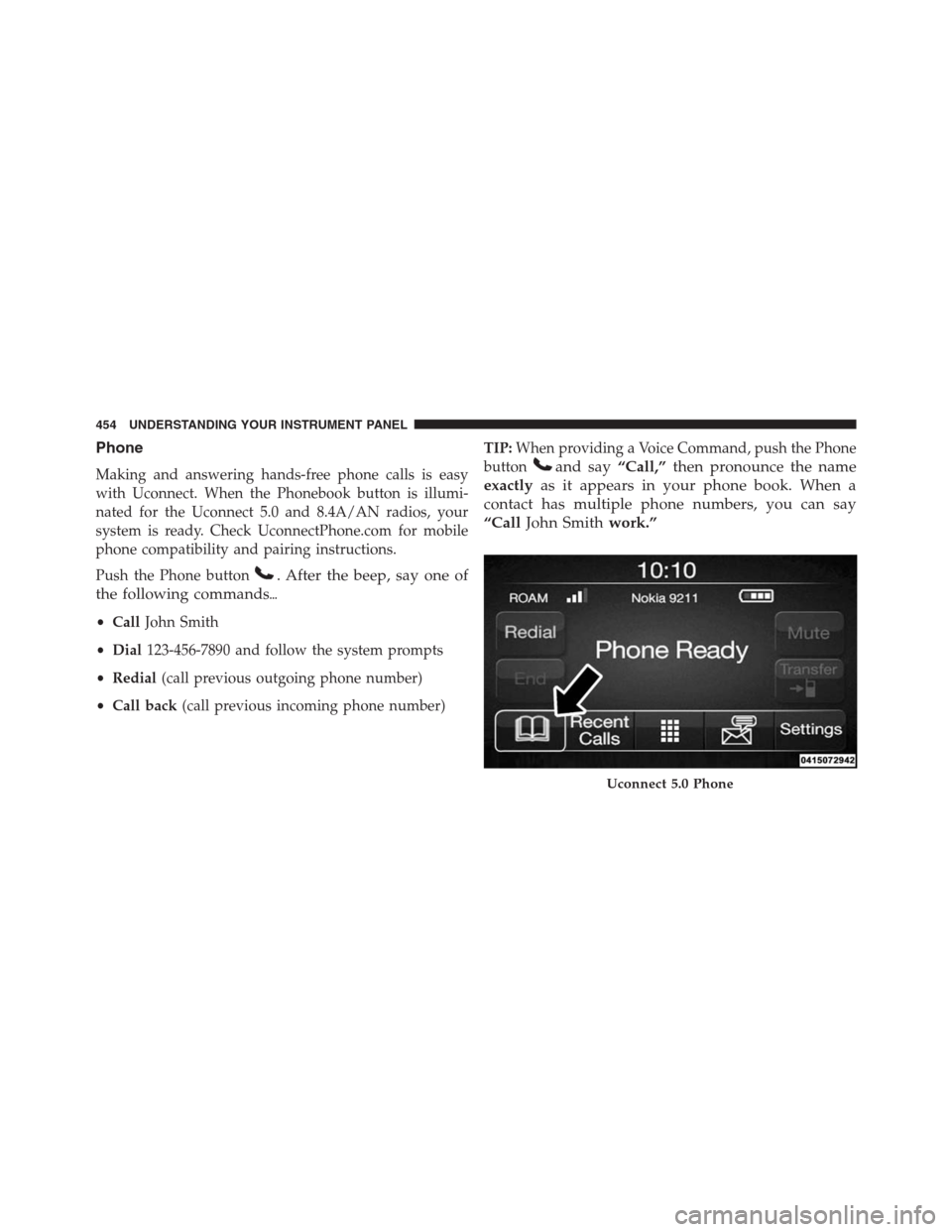
Making and answering hands-free phone calls is easy
with Uconnect. When the Phonebook button is illumi-
nated for the Uconnect 5.0 and 8.4A/AN radios, your
system is ready. Check UconnectPhone.com for mobile
phone compatibility and pairing instructions.
Push the Phone button
. After the beep, say one of
the following commands�
•CallJohn Smith
•Dial123-456-7890 and follow the system prompts
•Redial(call previous outgoing phone number)
•Call back(call previous incoming phone number)TIP:When providing a Voice Command, push the Phone
button
and say“Call,”then pronounce the name
exactlyas it appears in your phone book. When a
contact has multiple phone numbers, you can say
“CallJohn Smithwork.”
Uconnect 5.0 Phone
454 UNDERSTANDING YOUR INSTRUMENT PANEL
Page 457 of 916
Voice Text Reply
Uconnect will announceincomingtext messages. Push
the Phone button
and sayListen.(Must have com-
patible mobile phone paired to Uconnect system.)
1. Once an incoming text message is read to you, push
the Phone button
. After the beep, say:“Reply.”
2. Listen to the Uconnect prompts. After the beep, repeat
one of the pre-defined messages and follow the system
prompts.
PRE-DEFINED VOICE TEXT REPLY RESPONSES
Yes. Stuck in traffic. See you later.
No.Start without
me.I’ll be late.
Okay. Where are you? I will be
ber> minutes
late. Call me.Are you there
yet?
I’ll call you
later.I need
directions.See you in
of
minutes.
I’m on my way.
Can’t talk right
now.
I’m lost. Thanks.
Uconnect 8.4A/8.4AN Phone
4
UNDERSTANDING YOUR INSTRUMENT PANEL 455
Page 458 of 916
TIP:Your mobile phone must have the full implementa-
tion of theMessage Access Profile (MAP)to take advan-
tage of this feature. For details about MAP, visit
UconnectPhone.com.
Apple iPhone iOS 6 or later supports readingincoming
text messages only. To enable this feature on your Apple
iPhone, follow these 4 simple steps:
iPhone Notification Settings
1 — Select “Settings”
2 — Select “Bluetooth”
3 — Select the (i) for the paired vehicle
4 — Turn on “Show Notifications” 456 UNDERSTANDING YOUR INSTRUMENT PANEL
Page 463 of 916
Mobile App (8.4A/8.4AN)
You’re only a few steps away from using remote com-
mands and playing your favorite music in your vehicle.To link your internet radio accounts:
1. Download the Uconnect Access App to your mobile
device.
2. Press the Via Mobile icon on the navigation bar at the
bottom of the app.
3. Press the app you’d like to connect to your vehicle.
4. Enter your login information for the selected app and
press Link.
5. Next time you’re in your vehicle, enable Bluetooth,
pair your phone and select the Via Mobile app you
want to play from the Uconnect touchscreen to stream
your personalized music.
Mobile App
4
UNDERSTANDING YOUR INSTRUMENT PANEL 461
Page 465 of 916
Apple iPhone iOS6 or later supports readingincoming
text messages only. To enable this feature on your Apple
iPhone, follow these 4 simple steps:TIP:
•Voice Texting is not compatible with iPhone, but if
your vehicle is equipped with Siri Eyes Free, you can
use your voice to send a text message.
•Messages are limited to 140 characters.
•The Messaging button on the touchscreen must be
illuminated to use the feature.
iPhone Notification Settings1 — Select “Settings”
2 — Select “Bluetooth”
3 — Select the (i) for the paired vehicle
4 — Turn on “Show Notifications”
4
UNDERSTANDING YOUR INSTRUMENT PANEL 463
Page 472 of 916

▫Brake/Transmission Shift Interlock System . . .489
▫Eight-Speed Automatic Transmission — If
Equipped...........................490
▫Six-Speed Automatic Transmission — 1500 Models
Only (If Equipped)....................499
▫Six-Speed Automatic Transmission — 2500/3500
Models Only........................511
�FOUR-WHEEL DRIVE OPERATION — IF
EQUIPPED...........................522
▫Manually Shifted Transfer Case — If
Equipped...........................522
▫Electronically Shifted Transfer Case (Four-Position
Switch) — If Equipped.................526
▫Electronically Shifted Transfer Case (Five-Position
Switch) — If Equipped.................533▫Electronically Shifted Transfer Case (Five-Position
Switch) — If Equipped.................538
�AIR SUSPENSION SYSTEM (1500 MODELS) — IF
EQUIPPED...........................545
▫Description..........................545
▫Air Suspension Modes..................549
▫Electronic Vehicle Information Center
(EVIC)/Driver Information Display (DID) Display
Messages...........................551
▫Operation...........................551
�AIR SUSPENSION SYSTEM (2500/3500 MODELS)
— IF EQUIPPED.......................553
▫Description..........................553
▫Air Suspension Modes..................554
470 STARTING AND OPERATING
Page 473 of 916

▫Electronic Vehicle Information Center
(EVIC)/Driver Information Display (DID) Display
Messages...........................556
▫Operation...........................556
�AIR SUSPENSION SYSTEM (REBEL MODELS
ONLY) — IF EQUIPPED.................557
▫Description..........................557
▫Air Suspension Modes..................561
▫Electronic Vehicle Information Center
(EVIC)/Driver Infromation Display (DID) Display
Messages...........................562
▫Operation...........................563
�AXLE LOCKER SYSTEM — POWER WAGON
MODELS ONLY (IF EQUIPPED)............564�STABILIZER/SWAY BAR SYSTEM — POWER
WAGON ONLY........................567
�SAFE OFF-ROAD DRIVING — POWER WAGON
ONLY...............................569
▫Off-Road Driving Tips And Vehicle
Characteristics.......................569
▫Driving In Snow, Mud And Sand..........572
▫Crossing Obstacles (Rocks And Other High
Points).............................573
▫Hill Climbing........................576
▫Driving Through Water.................579
▫Airing Down For Off-Road Driving.........581
▫Vehicle Recovery......................582
▫After Driving Off-Road.................586
5
STARTING AND OPERATING 471