2016 Peugeot Partner Tepee sensor
[x] Cancel search: sensorPage 45 of 296

Instruments and controls
43
uNDeR-INFLAtI o N D ete C t I o N WI t H R e INI t IALISAt I o N
System which automatically checks the
pressures of the tyres while driving.
The system monitors the pressures
in the four tyres, once the vehicle is
moving.
It compares the information given by
the four wheel speed sensors with
reference values, which must be
reinitialised every time the tyre
pressures are adjusted or a wheel
changed.
The system triggers an alert as soon
as it detects a drop in the inflation
pressure of one or more tyres.The under-inflation detection
system does not replace the
need for vigilance on the part of
the
driver.
This system does not avoid the need to
check the tyre pressures (including the
spare wheel) every month as well as
before a long journey.
Driving with under-inflated tyres
impairs road holding, extends braking
distances and causes premature
tyre wear, particularly under arduous
condition (high loading, high speed,
long journey).
Driving with under-inflated tyres
increases fuel consumption. The inflation pressures defined for
your vehicle can be found on the
tyre pressure label.
For more information on the
identification markings, refer to the
corresponding section.
Tyre pressures should be checked
when the tyres are "cold" (vehicle
stopped for 1 hour or after a journey of
less than 6 miles (10 km) at moderate
speeds).
o
therwise (when hot), add 0.3 bar to
the pressures shown on the label.
ReADY to go
3
Page 61 of 296

59
LeD DAYtIMe RuNNINg LAMPS
Rear foglamps (amber,
2nd rotation of the ring
forwards).
Front foglamps (green,
1st
rotation of the ring
forwards). Rotate this ring forwards
to switch on and
rearwards to switch off.
Their state is confirmed by
the warning lamps in the
instrument panel. Do not forget to switch them off
when they are no longer needed.
o
peration of the automatic illumination
of headlamps switches off the rear
foglamps, but the front foglamps
remain on.
To switch off the front and
rear foglamps, turn the
ring rearwards twice in
succession.
Automatic illumination of headlamps
In foggy weather or in snow,
the sunshine sensor may detect
sufficient light. As a consequence,
the lighting will not come on
automatically.
If necessary, you must switch
on the dipped beam headlamps
manually.
Do not cover the sunshine sensor
located on the windscreen, behind
the mirror. It is used for the automatic
illumination of headlamps and for the
automatic rain sensitive wipers.
Activation
Turn the ring to the A
uto position. The
activation of this function is accompanied
by a message in the screen.
Deactivation
Turn the ring forwards or rearwards.
The deactivation of this function is
accompanied by a message in the screen.
The function is deactivated temporarily
when you use the manual lighting
control stalk. The sidelamps
and dipped beam
headlamps switch
on automatically if
the light is poor, or
during operation of the windscreen
wipers. They switch off as soon as the
light becomes bright enough or the
windscreen wipers stop.
This function is not compatible with the
daytime running lamps.
o
n starting the vehicle, in daylight the
L
e
D daytime running lamps come on
automatically.
If the sidelamps and headlamps are
switched on manually or automatically,
the daytime running lamps go off.
Programming
For countries where exterior lighting by
day is not a legal requirement, you can
activate or deactivate the function via
the configuration menu.
If the user does not operate any
equipment for 30 minutes, the
e
conomy mode engages to avoid
discharging the battery.
e
lectrical
functions are put on standby and the
battery warning lamp flashes.
Sidelamp operation is not affected by
e
conomy mode.
In clear weather or in rain, both day
and night, rear foglamps dazzle and
their use is prohibited.
Refer to chapter 8,
"Battery
section".
Front and rear foglamps
They operate with the sidelamps and
dipped beam headlamps.
Steering mounted controls
eASe oF uSe and CoMFoRT
4
Page 62 of 296

60
If the sunshine sensor
does not function correctly,
the lighting comes on
accompanied by the service
warning lamp, an audible
signal and a message in the screen.
Contact a P
eugeo T dealer or a
qualified workshop.
guide-me-home lighting
Keeping the dipped beam headlamps
on temporarily with the ignition off,
makes the driver's exit easier when the
light is poor.
HeADLAMP B e AM
The beam setting must be adjusted to
suit the load in the vehicle.
0 - No load.
1 - Partial load.
2 - Average load.
3 - Maximum authorised load.
Manual operation
-
With the ignition of
f, "flash" the
headlamps within one minute after
switching off the ignition.
The guide-me-home lighting switches
off automatically after a set time.
Automatic operation
Refer to chapter 10, "Screen
menu map" section. Initial setting is position 0.
Activate the function via the
vehicle configuration menu.
Programming
The system is activated or deactivated
in the vehicle configuration menu.
The system is activated by default. Switching off
The system does not operate:
-
below a certain angle of rotation of
the steering wheel,
-
above 25 mph (40 km/h),
-
when reverse gear is engaged.
Switching on
This function starts:
-
when the corresponding direction
indicator is switched on,
or
-
from a certain angle of rotation of
the steering wheel.
With dipped or main beam headlamps,
this function makes use of the beam
from a front foglamp to illu
minate the
inside of a bend, when the vehicle
speed is below 25 mph (approximately
40 km/h) (urban driving, winding road,
intersections, parking manoeuvres...).
Cornering lighting
travelling abroad
If using your vehicle in a country
that drives on the other side of the
road, the headlamps must be adjusted
to avoid dazzling on-coming drivers.
Contact a P
eugeo T dealer or a
qualified workshop.
Steering mounted controls
Page 63 of 296

61
2 Fast wipe (heavy rain).
1
Normal wipe (moderate rain).
l
Intermittent wipe.
0
o ff.
â
Single wipe
(press downwards).
In the
Intermittent position, the wiping
speed is in proportion to the vehicle
speed.
WIPeRS
Manual wipingWhenever the ignition has been
switched off for more than one minute,
with the windscreen wiper stalk in
position 2, 1 or I, the stalk must be
reactivated.
-
Move the stalk to any position.
-
Return it to the desired position. Do not cover the rain sensor
,
located in the centre of the
windscreen, behind the mirror. Activation
Press the control downwards.
Activation of the function is
accompanied by a message in
the
screen.
Deactivation
Place the windscreen wipers stalk in
position I, 1 or 2.
Deactivation of the function is
accompanied by a message in the
screen.
In the event of malfunction of the
automatic windscreen wipers, the
windscreen wipers will operate in
intermittent mode.
Contact a P eugeo T dealer or a
qualified workshop to have the system
checked. In the A uto position, the windscreen
wipers operate automatically and
adapt their speed to the intensity of the
rainfall.
When not in A uto mode, for the
other positions, refer to the manual
windscreen wipers section.
The automatic rain sensitive
windscreen wipers function must
be reactivated by pressing the stalk
downwards, if the ignition has been
switched off for more than one minute.
When using an automatic car
wash, switch off the ignition to
avoid triggering the automatic
wiping.
In winter, it is advisable to wait for the
windscreen to completely clear of ice
before operating the automatic wipers.
Automatic wipers
Steering mounted controls
eASe oF uSe and CoMFoRt
4
Page 74 of 296

72
good practice
For maximum cooling or heating of the
passenger compartment, it is possible
to exceed the value 15 by turning until
Lo is displayed or the value 27 by
turning until HI is displayed.
o
n entering the vehicle, the inside
temperature may be much colder (or
warmer) than is comfortable. There is
no advantage in changing the value
displayed in order to quickly reach the
level of comfort required. The system
will use its maximum performance to
reach the comfort value set.
DIgItAL AIR C o NDI t I o NIN g
Automatic operation
Auto comfort programme
This is the normal air conditioning
system operating mode. Driver or passenger side comfort
value
The value indicated in the screen
corresponds to a level of comfort and
not a temperature in degrees Celsius
or Fahrenheit.
T urn this control to the left
or to the right to decrease or
increase the value. A setting
around the value 21 provides
optimum comfort. However,
depending on your requirements, a
setting between 18 and 24 is usual.
Do not cover the sunshine sensor
located on the dashboard.
Press this button, the A
uto
symbol is displayed.
The system controls the
distribution, the flow and the
intake of air to guarantee
comfort and a sufficient circulation
of air in the passenger compartment
according to the comfort value set. No
further action on your part is required. Air flow will increase gradually when
the engine is cold, to prevent excessive
distribution of cold air.
For your comfort, the settings are
stored when the ignition is switched off
and are reinstated the next time the
vehicle is started.
The automatic function will no longer
be maintained if you change a setting
manually (A
u T
o
is cleared).
SePARAte
S ett IN g S F o R DRIV e R AND PASS e N ge R
Ventilation
Page 117 of 296

11 5
The audible (front and rear) and visual
(rear) parking sensor system consists
of proximity sensors, installed in the
rear bumper.
The sensors detect any obstacle which
enters its field of operation: person,
vehicle, tree, fence, behind the vehicle
during the manoeuvre.
Certain objects detected at the
beginning of the manoeuvre will no
longer be detected at the end of the
manoeuvre due to the blind spots
between and below the sensors.
e
xamples: stake, roadworks cone or
pavement post.
engage reverse gear
P
ARKIN
g
S
e
NS
o
RS
Display in the screen
An audible signal confirms the
activation of the system by engaging
reverse gear.
The proximity information is indicated
by an audible signal which becomes
more rapid as the vehicle approaches
the obstacle.
When the distance between the rear
of the vehicle and the obstacle is less
than approximately thirty centimetres,
the audible signal becomes
continuous.
SAFeTY
5
Parking sensors
5
Page 118 of 296

11 6
Activation / DeactivationMalfunction
In the event of a malfunction, the LeD
in the button comes on, accompanied
by an audible signal and a message in
the screen.
Contact a P
eugeo T dealer or
qualified workshop.
good practice
In bad weather or in winter, ensure that
the sensors are not covered with mud,
ice or snow.
The system will be deactivated
automatically if a trailer is being towed
or if a bicycle carrier is fitted (vehicle
fitted with a towbar or bicycle carrier
recommended by P
eugeo T).
You can activate or deactivate
the system by pressing this
button.
The activation or deactivation
of the system is stored when
the vehicle stops.
engage forward gear
In addition to the rear parking sensors,
the front parking sensors are triggered
when an obstacle is detected in front
of the vehicle and the speed of the
vehicle remains below 6 mph
(10 km/h).
The tone from the speaker (front
or rear) allows an obstacle to be
identified as either in front of or
behind the vehicle.
Stop the assistance
Change to neutral. The parking sensor system
cannot, in any circumstances,
take the place of the vigilance and
responsibility of the driver.
Parking sensors
Page 119 of 296
11 7
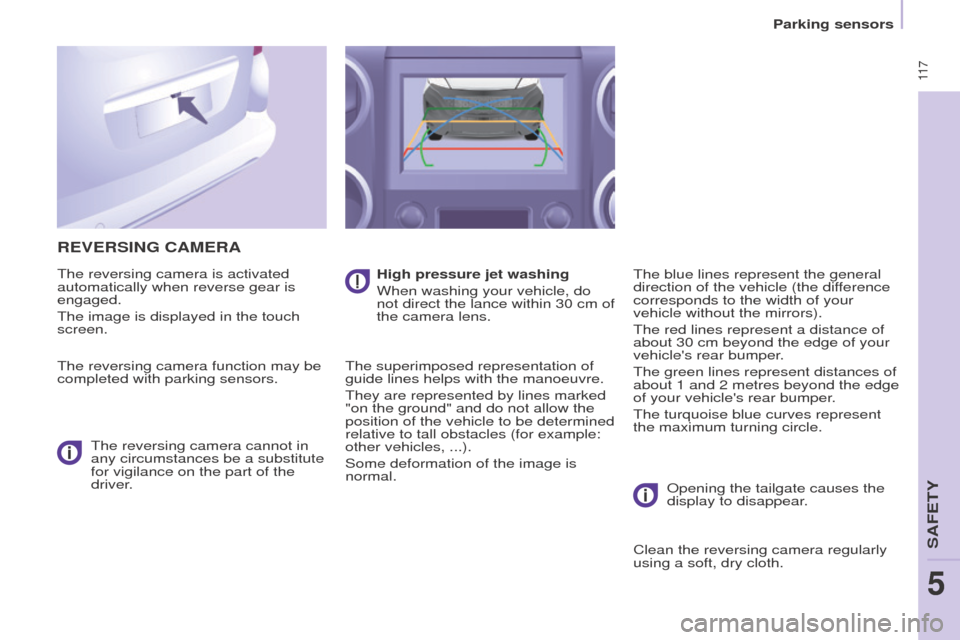
ReVeRSINg CAMeRA
The reversing camera is activated
automatically when reverse gear is
engaged.
The image is displayed in the touch
screen.
The reversing camera function may be
completed with parking sensors.The reversing camera cannot in
any circumstances be a substitute
for vigilance on the part of the
driver. High pressure jet washing
When washing your vehicle, do
not direct the lance within 30 cm of
the camera lens.
The superimposed representation of
guide lines helps with the manoeuvre.
They are represented by lines marked
"on the ground" and do not allow the
position of the vehicle to be determined
relative to tall obstacles (for example:
other vehicles,
...).
Some deformation of the image is
normal. The blue lines represent the general
direction of the vehicle (the difference
corresponds to the width of your
vehicle without the mirrors).
The red lines represent a distance of
about 30 cm beyond the edge of your
vehicle's rear bumper.
The green lines represent distances of
about 1 and 2 metres beyond the edge
of your vehicle's rear bumper.
The turquoise blue curves represent
the maximum turning circle.
o
pening the tailgate causes the
display to disappear.
Clean the reversing camera regularly
using a soft, dry cloth.
SAFeTY
5
Parking sensors
5