2016 Peugeot Expert VU radio controls
[x] Cancel search: radio controlsPage 434 of 520
432
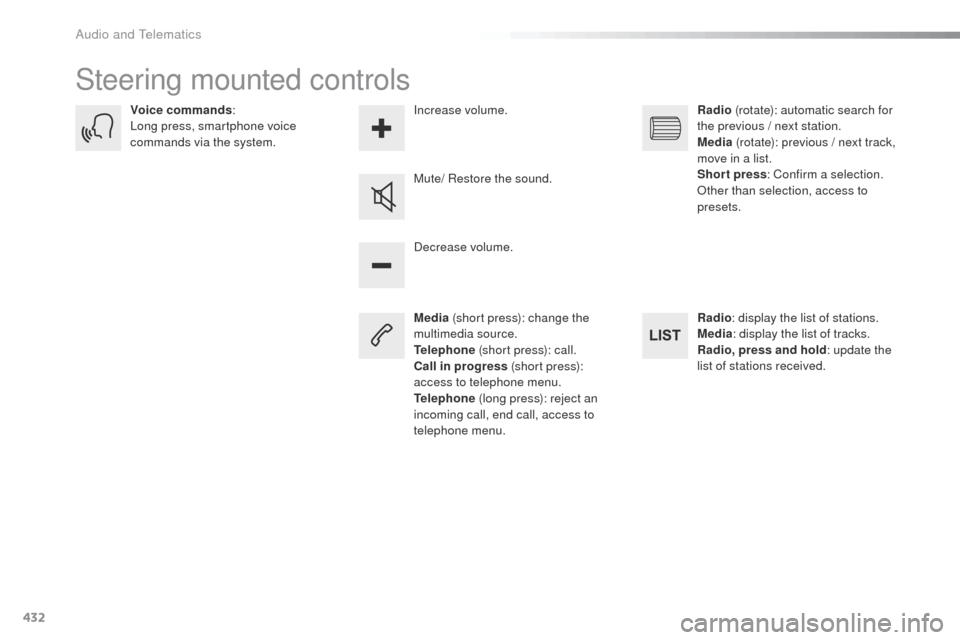
Steering mounted controls
Media (short press): change the
multimedia source.
Telephone (short press): call.
Call in progress (short press):
access to telephone menu.
Telephone (long press): reject an
incoming call, end call, access to
telephone menu. Decrease volume.
Voice commands
:
Long press, smartphone voice
commands via the system.
Mute/ Restore the sound.Radio
(rotate): automatic search for
the previous / next station.
Media (rotate): previous / next track,
move in a list.
Short press : Confirm a selection.
ot
her than selection, access to
presets.
Radio : display the list of stations.
Media : display the list of tracks.
Radio, press and hold : update the
list of stations received.
Increase volume.
Audio and telematics
Page 456 of 520
454
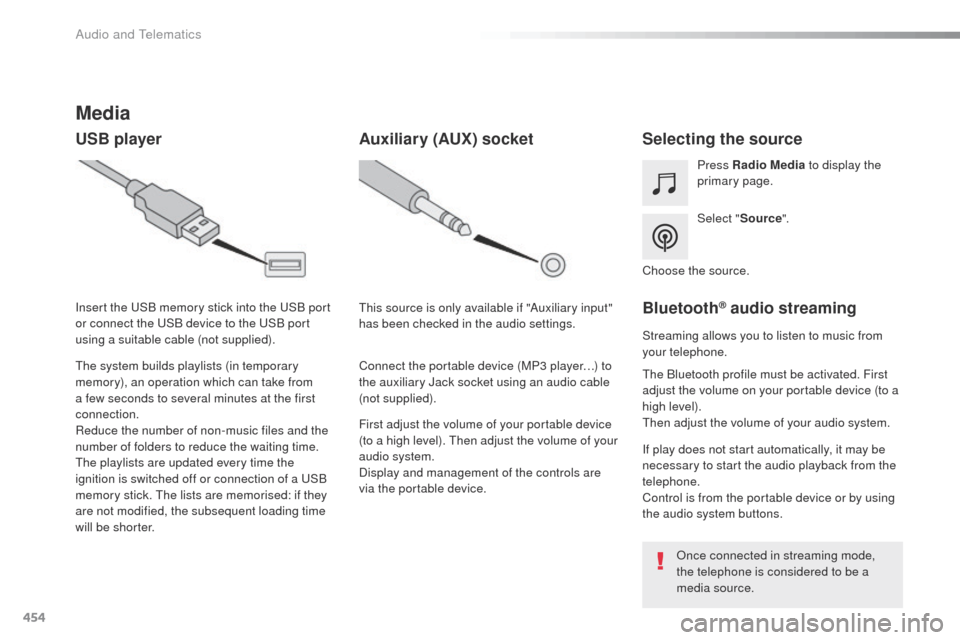
Media
USB playerSelecting the source
Select "Source".
Press Radio Media
to display the
primary page.
th
e system builds playlists (in temporary
memory), an operation which can take from
a few seconds to several minutes at the first
connection.
Reduce the number of non-music files and the
number of folders to reduce the waiting time.
th
e playlists are updated every time the
ignition is switched off or connection of a
u
S
B
memory stick.
t
h
e lists are memorised: if they
are not modified, the subsequent loading time
will be shorter. Insert the
u
S
B memory stick into the
u
S
B port
or connect the
u
S
B device to the
u
S
B port
using a suitable cable (not supplied).
Auxiliary (AUX) socket
First adjust the volume of your portable device
(to a high level). th en adjust the volume of your
audio system.
Display and management of the controls are
via the portable device.
th
is source is only available if "Auxiliary input"
has been checked in the audio settings.
Connect the portable device (MP3 player…) to
the auxiliary Jack socket using an audio cable
(not supplied). Choose the source.
Bluetooth® audio streaming
Streaming allows you to listen to music from
your telephone.
th
e Bluetooth profile must be activated. First
adjust the volume on your portable device (to a
high level).
th
en adjust the volume of your audio system.
If play does not start automatically, it may be
necessary to start the audio playback from the
telephone.
Control is from the portable device or by using
the audio system buttons.
on
ce connected in streaming mode,
the telephone is considered to be a
media source.
Audio and Telematics
Page 485 of 520
483
Bluetooth® audio system
Contents
First steps
4 84
Steering mounted controls -
t
y
pe 1
4
85
Steering mounted controls -
t
y
pe 2
4
86
Menus
4
87
Radio
488
DAB (Digital Audio Broadcasting) radio
4
90
Media
492
te
lephone
4
97
Frequently asked questions
5
02
Your audio system is coded in such a way that it will only operate
in your vehicle.
th
e different functions and adjustments described vary
according to the version and configuration of your vehicle. As a safety measure and because it requires the sustained
attention of the driver, the pairing of your Bluetooth telephone to
the Bluetooth hands-free audio system must only be carried out
with the vehicle stationary
and the ignition on.
to a
void discharging the battery, the audio system may switch
off after a few minutes if the engine is not running.
.
Audio and telematics
Page 487 of 520
485
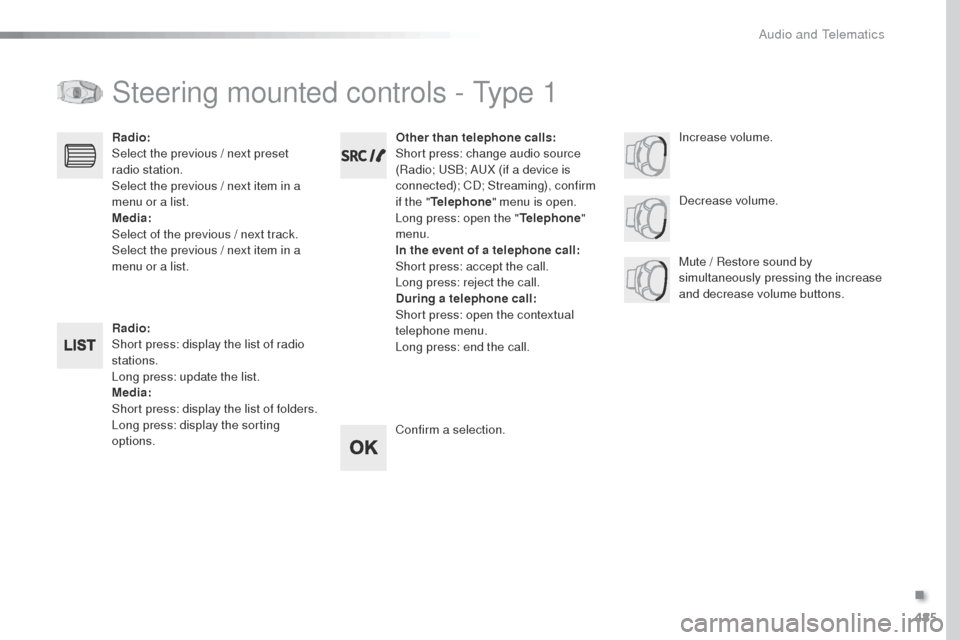
Steering mounted controls - type 1
Radio:
Short press: display the list of radio
stations.
Long press: update the list.
Media:
Short press: display the list of folders.
Long press: display the sorting
options. Decrease volume.
Radio:
Select the previous / next preset
radio station.
Select the previous / next item in a
menu or a list.
Media:
Select of the previous / next track.
Select the previous / next item in a
menu or a list.
Mute / Restore sound by
simultaneously pressing the increase
and decrease volume buttons.
Other than telephone calls:
Short press: change audio source
(Radio; u
S
B; A
uX (
if a device is
connected); CD; Streaming), confirm
if the " Telephone " menu is open.
Long press: open the " Telephone"
menu.
In the event of a telephone call:
Short press: accept the call.
Long press: reject the call.
During a telephone call :
Short press: open the contextual
telephone menu.
Long press: end the call.
Confirm a selection. Increase volume.
.
Audio and telematics
Page 488 of 520
486
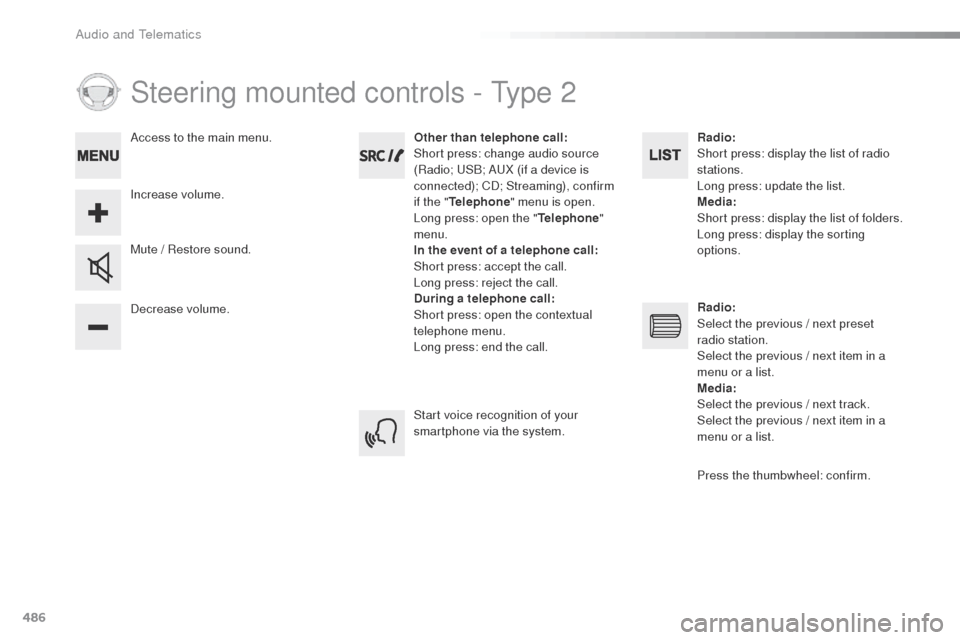
Steering mounted controls - type 2
Decrease volume. Mute / Restore sound. Other than telephone call:
Short press: change audio source
(Radio; u
S
B; A
uX (
if a device is
connected); CD; Streaming), confirm
if the " Telephone " menu is open.
Long press: open the " Telephone"
menu.
In the event of a telephone call:
Short press: accept the call.
Long press: reject the call.
During a telephone call :
Short press: open the contextual
telephone menu.
Long press: end the call.
Increase volume. Access to the main menu.
Start voice recognition of your
smartphone via the system.Radio:
Short press: display the list of radio
stations.
Long press: update the list.
Media
:
Short press: display the list of folders.
Long press: display the sorting
options.
Radio :
Select the previous / next preset
radio station.
Select the previous / next item in a
menu or a list.
Media :
Select the previous / next track.
Select the previous / next item in a
menu or a list.
Press the thumbwheel: confirm.
Audio and telematics
Page 513 of 520
511
tyr e s ................................................................ 12ty
re under-inflation
detection
...................... 22, 262, 264, 295, 302
un
der-inflation (detection)
............................ 2
62
unl
ocking
..................... 4
7- 49, 55 -57, 59, 60, 63
un
locking from the inside
.......7
2, 73, 79 - 81, 83
un
locking, selective
................47, 49, 55, 56, 60
un
locking the doors
............................80, 81, 83
unl
ocking, total
................................... 47, 55, 60
up
dating the date
............................46, 420, 476
upd
ating the time
............................46, 421, 477
u
SB
.............................................. 122, 398, 454
Ventilation
............... 1
2, 125, 126, 131, 135, 136
Voice commands
.................................. 3 4 6 - 3 51
U
V
tables of weights .........................333, 335, 336tab
le position ................................................ 101
ta
bles of fuses .............................. 316, 317, 320
ta
ble top, working
...............................
..........109
ta
ilgate
................
................64, 65, 94, 313, 314
t
a n k , f u e l
....................................................... 265
te
chnical data
.............................. 333, 335, 336
te
lephone
.................... 400, 402, 404, 406 - 411,
456, 458, 460, 462- 467, 497, 498, 500
te
lephone, Bluetooth with
voice recognition
........................................ 501
te
mperature, coolant
................................19, 31
th
ird brake lamp
................................... 311, 314
thr
ee flashes
(direction indicators)
...................................148
tim
e (setting)
..............................
....46, 421, 477
tM
C (
tr
affic info)
.......................................... 3
67
to
ol box
................................. 287, 289, 290, 296
to
o l s
..................................................... 290, 296
to
pping-up the
AdBlue
® additive ......................................... 285to
tal distance recorder ................................... 38
to
uch screen ................................39, 43, 44, 89,
150 -152, 154, 158, 220, 226, 236, 245, 247, 249, 250, 254, 256, 264, 341, 429
to
w b a r
.......................................... 198, 269, 272
to
wed loads
................................. 333, 335, 336
to
wing another vehicle
......................... 325
, 326
to
wing eye .................................................... 325
tra
ction control (ASR)
............................ 25, 161
tr
affic information (
tA
)
................................. 489
tr
affic information (
tM
C)
.............................. 3
67
t
r a i l e r
.................................................... 198, 269
tr
iangle, warning ........................................... 287
tr
ip computer
............................................ 40 - 42
tr
ip distance recorder
..................................... 38
ty
pe of bulbs
................................................. 3
03
T
Sliding side window ...................................... 124
Snow chains ......................................... 26
2, 268
Socket, 12 V accessory
................................12
1
Socket, auxiliary
........................... 398, 454, 494
Socket, JACK
....................... 122, 398, 454, 494
Sockets, audio
.............................................. 12 2
Speed limiter
................................. 224, 227, 229
Speed limit recognition
.................225, 226, 229, 232, 236
Speedometer
............................................. 14 -16
Stability control (
e
SC)............................. 25, 161
Starting the engine
..........199, 202, 204, 206, 209, 214
Station, radio
........................ 3
94, 395, 450, 451
Stay, bonnet
.................................................. 276
Steering mounted controls, audio
.................................. 344, 432, 485, 486
Steering wheel, adjustment
............................99
Stopping the engine
.....199, 202, 204, 209, 214
Stop & Start
........................ 22, 29, 42, 132, 135,
218, 220, 265, 276, 281, 321, 324
Stop (warning lamp)
........................................ 18
St
orage
.................................. 105, 109, 117, 120
Storage compartments
......................... 12
0, 121
Storage wells
......................................... 117, 1 2 0
Stowing rings
................................................ 12 2
Sun visor
....................................................... 11 9
Switching off the engine
............................... 19
9
Synchronising the remote control
..................................................... 5
4, 70
.
Alphabetical index