2016 Peugeot 508 battery location
[x] Cancel search: battery locationPage 56 of 371
54
508_en_Chap02_ouvertures_ed01-2016
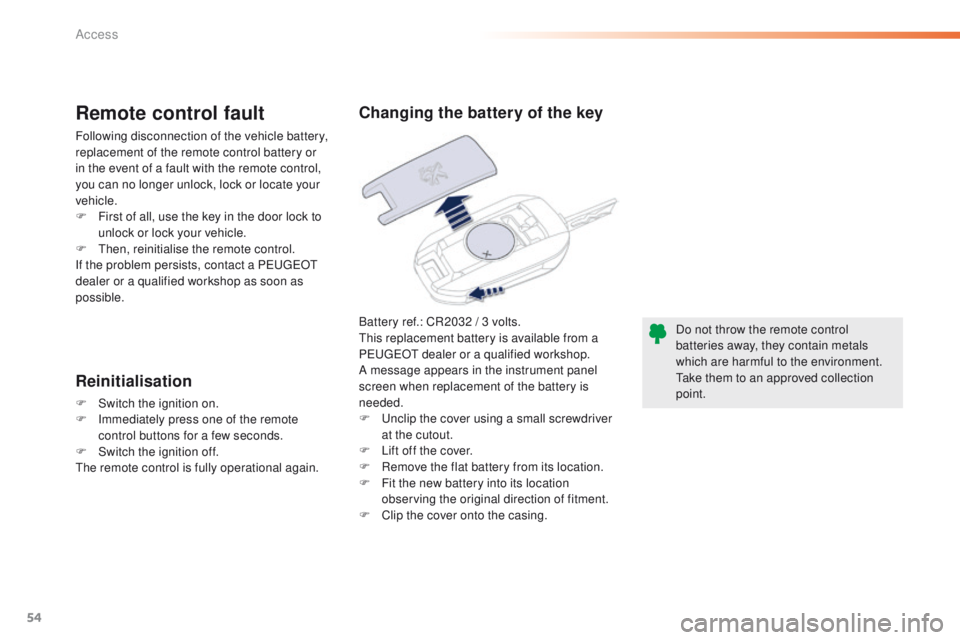
Battery ref.: CR2032 / 3 volts.this replacement battery is available from a
P
e
uge
Ot
dealer or a qualified workshop.
A message appears in the instrument panel
screen when replacement of the battery is
needed.
F
u
n
clip the cover using a small screwdriver
at the cutout.
F
L
ift off the cover.
F
R
emove the flat battery from its location.
F
F
it the new battery into its location
observing the original direction of fitment.
F
C
lip the cover onto the casing.
Remote control fault
Following disconnection of the vehicle battery,
replacement of the remote control battery or
in the event of a fault with the remote control,
you can no longer unlock, lock or locate your
vehicle.
F
F
irst of all, use the key in the door lock to
unlock or lock your vehicle.
F
t
hen
, reinitialise the remote control.
If the problem persists, contact a P
e
uge
Ot
dealer or a qualified workshop as soon as
possible.
Reinitialisation
F Switch the ignition on.
F I mmediately press one of the remote
control buttons for a few seconds.
F
S
witch the ignition off.
th
e remote control is fully operational again. Do not throw the remote control
batteries away, they contain metals
which are harmful to the environment.
ta
ke them to an approved collection
point.
Changing the battery of the key
Access
Page 65 of 371
63
508_en_Chap02_ouvertures_ed01-2016
Do not throw the remote control
batteries away, they contain metals
which are harmful to the environment.
ta
ke them to an approved collection
point.
Changing the battery of the
electronic key
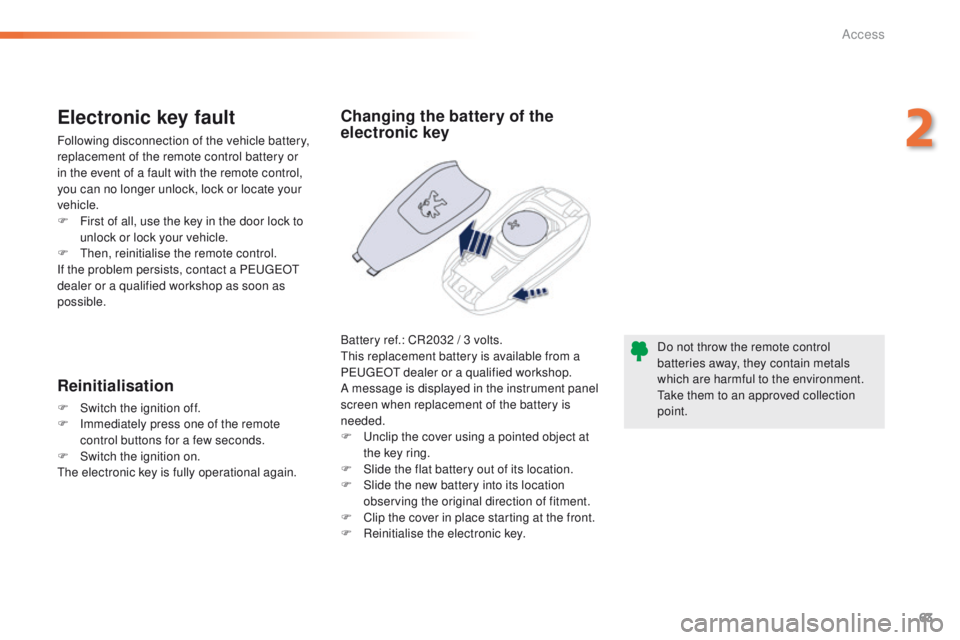
Battery ref.: CR2032 / 3 volts.th is replacement battery is available from a
P
e
uge
Ot
dealer or a qualified workshop.
A message is displayed in the instrument panel
screen when replacement of the battery is
needed.
F
u
n
clip the cover using a pointed object at
the key ring.
F
S
lide the flat battery out of its location.
F
S
lide the new battery into its location
observing the original direction of fitment.
F
C
lip the cover in place starting at the front.
F
R
einitialise the electronic key.
Electronic key fault
Following disconnection of the vehicle battery,
replacement of the remote control battery or
in the event of a fault with the remote control,
you can no longer unlock, lock or locate your
vehicle.
F
F
irst of all, use the key in the door lock to
unlock or lock your vehicle.
F
t
hen
, reinitialise the remote control.
If the problem persists, contact a P
e
uge
Ot
dealer or a qualified workshop as soon as
possible.
Reinitialisation
F Switch the ignition off.
F I mmediately press one of the remote
control buttons for a few seconds.
F
S
witch the ignition on.
th
e electronic key is fully operational again.
2
Access
Page 259 of 371
257
508_en_Chap08_en-cas-de-pannes_ed01-2016
Removing - refitting the battery*
* Valid only for Saloon, SW and non-hybrid
RHX.
th
is procedure allows you to safely remove the
battery when needed to change a failed bulb.
You can also call on a P
e
uge
Ot
dealer or a qualified workshop to carry
out this procedure.
Before removal
- Place the vehicle in a ventilated location, with free access and preferably on a level
sur face.
-
A
pply the parking brake.
-
P
ut the gear lever into neutral (position N
for an automatic gearbox).
-
I
f the vehicle has an alarm, leave the
bonnet open to avoid triggering the alarm.
-
L
eave at least one window open if in a
secure location, other wise lock all the
doors and the boot. -
I f the vehicle has a motorised tailgate,
it will not be possible to open it after
disconnecting the battery.
-
S
witch off the ignition and remove the key.
-
I
f the vehicle has Keyless e
n
try and
Starting, take the remote control at least
3
metres away from the vehicle.
-
W
ait about 4 minutes (or 12 minutes
with an automatic gearbox) before
disconnecting the battery.
8
In the event of a breakdown
Page 369 of 371
Audio and Telematics
6
508-additif_en_Chap10a_BTA-2_BTA-3R_ed01-2016
PEUGEOT Connect Assistance
The fault with the system does not prevent the vehicle being driven.
Press this button for more than 2 seconds to request assistance if the vehicle breaks down. A voice message confirms that the call has been made ** .
Pressing this button again immediately cancels the request. The cancellation is confirmed by a voice message.
Geo-location
You can deactivate geo-location by simultaneously pressing the "PEUGEOT Connect SOS" and "PEUGEOT Connect Assistance" buttons, followed by a press on "PEUGEOT Connect Assistance" to confirm.
To reactivate geo-location, simultaneously press the "PEUGEOT Connect SOS" and "PEUGEOT Connect Assistance" buttons again, followed by a press on "PEUGEOT Connect Assistance" to confirm.
If the orange indicator lamp is on fixed: the back-up battery should be replaced. In both cases, the emergency and assistance calls service may not work. Contact a qualified repairer as soon as possible.
Operation of the system
When the ignition is switched on, the green indicator lamp comes on for 3 seconds indicating that the system is operating correctly.
If the orange indicator lamp flashes then goes off: the system has a fault.
If you purchased your vehicle outside the Brand's dealer network, we suggest that you have a dealer check and, if desired, modify the configuration of these services. In a multi-lingual country, configuration is possible in the official national language of your choice.
For technical reasons, particularly to improve the quality of PEUGEOT CONNECT services to customers, the manufacturer reserves the right to carry out updates to the vehicle's on-board telematic system.
** Depending on the geographic cover for "PEUGEOT Connect SOS", "PEUGEOT Connect Assistance" and the official national language selected by the owner of the vehicle. The list of countries covered by PEUGEOT CONNECT services is available at dealers or
on the website in your country.
Page 371 of 371
Audio and Telematics
8
508-additif_en_Chap10a_BTA-2_BTA-3R_ed01-2016
PEUGEOT Connect Assistance If you purchased your vehicle outside the Brand's dealer network, we invite you to have a dealer check the configuration of these services and, if desired, modified to suit your wishes. In a multi-lingual country, configuration is possible in the official national language of your choice.
For technical reasons and in particular to improve the quality of "PEUGEOT CONNECT services" services to customers, the manufacturer reserves the right to carry out updates to the vehicle's on-board telematic system.
A fault with the system does not prevent the vehicle being driven.
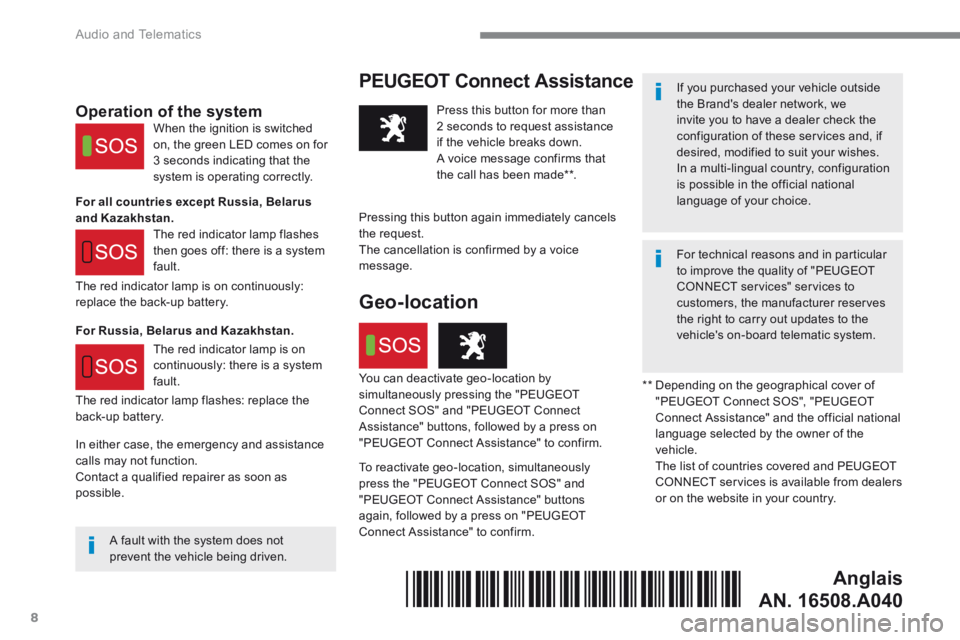
Press this button for more than 2 seconds to request assistance if the vehicle breaks down. A voice message confirms that the call has been made ** .
Pressing this button again immediately cancels
the request. The cancellation is confirmed by a voice message.
The red indicator lamp is on continuously: replace the back-up battery.
The red indicator lamp flashes: replace the back-up battery.
Operation of the system
For all countries except Russia, Belarus and Kazakhstan.
For Russia, Belarus and Kazakhstan.
When the ignition is switched on, the green LED comes on for 3 seconds indicating that the system is operating correctly.
The red indicator lamp flashes then goes off: there is a system fault.
The red indicator lamp is on continuously: there is a system fault. ** Depending on the geographical cover of "PEUGEOT Connect SOS", "PEUGEOT Connect Assistance" and the official national language selected by the owner of the vehicle. The list of countries covered and PEUGEOT CONNECT services is available from dealers or on the website in your country.
Geo-location
You can deactivate geo-location by simultaneously pressing the "PEUGEOT Connect SOS" and "PEUGEOT Connect Assistance" buttons, followed by a press on "PEUGEOT Connect Assistance" to confirm.
To reactivate geo-location, simultaneously press the "PEUGEOT Connect SOS" and "PEUGEOT Connect Assistance" buttons again, followed by a press on "PEUGEOT Connect Assistance" to confirm.
In either case, the emergency and assistance calls may not function. Contact a qualified repairer as soon as possible.
Anglais
AN. 16508.A040*16508.A040*