Page 266 of 364
264
5008_en_Chap11_caracteristiques_ed01-2015
The GTW and towed load values indicated are valid up to a maximum altitude of 1 000 metres; the towed load mentioned must be reduced by 10 % for
each additional 1 000 metres of altitude.
Never exceed 60 mph (100 km/h) when towing (comply with the legislation in force in your country).
High ambient temperatures may result in a reduction in the per formance of the vehicle to protect the engine; if the ambient temperature is above 37 °C,
limit the towed load.
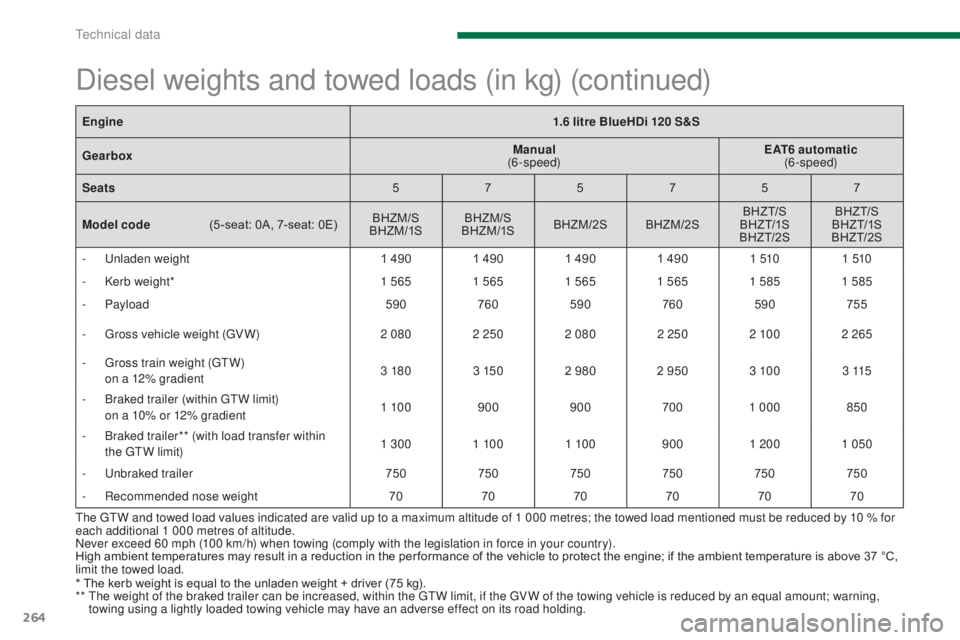
Diesel weights and towed loads (in kg) (continued)
Engine1.6 litre BlueHDi 120 S&S
Gearbox Manual
(6-speed) EAT6 automatic
(6-speed)
Seats 575757
Model code
(
5 -seat: 0A, 7-seat: 0E) BHZM/S
BHZM /1S BHZM/S
BHZM /1S BHZM/2S BHZM/2S BHZ T/S
BHZ T/1S
BHZ T/2S BHZ T/S
BHZ T/1S
BHZ T/2S
-
U
nladen weight 1 4901 4901 4901 490 1 5101 510
-
K
erb weight* 1 5651 5651 5651 5651 5851 585
-
Payload 590760590 760590 755
-
G
ross vehicle weight (GV W) 2 0802 2502 080 2 2502 10 02 265
-
G
ross train weight (GTW)
o
n a 12% gradient 3 180
3 1502 980 2 950 3 10 0 3 115
-
B
raked trailer (within GTW limit)
o
n a 10% or 12% gradient 1 10 0
900900 7001 000 850
-
B
raked trailer** (with load transfer within
the GTW limit) 1 300
1 10 01 10 0 9001 200 1 050
-
U
nbraked trailer 750750750750750750
-
R
ecommended nose weight 707070707070
* The kerb weight is equal to the unladen weight + driver (75 kg).
**
T
he weight of the braked trailer can be increased, within the GTW limit, if the GV W of the towing vehicle is reduced by an equal amount; warning,
towing using a lightly loaded towing vehicle may have an adverse effect on its road holding.
Technical data
Page 267 of 364
265
5008_en_Chap11_caracteristiques_ed01-2015
The GTW and towed load values indicated are valid up to a maximum altitude of 1 000 metres; the towed load mentioned must be reduced by 10 % for
each additional 1 000 metres of altitude.
Never exceed 60 mph (100 km/h) when towing (comply with the legislation in force in your country).
High ambient temperatures may result in a reduction in the per formance of the vehicle to protect the engine; if the ambient temperature is above 37 °C,
limit the towed load.
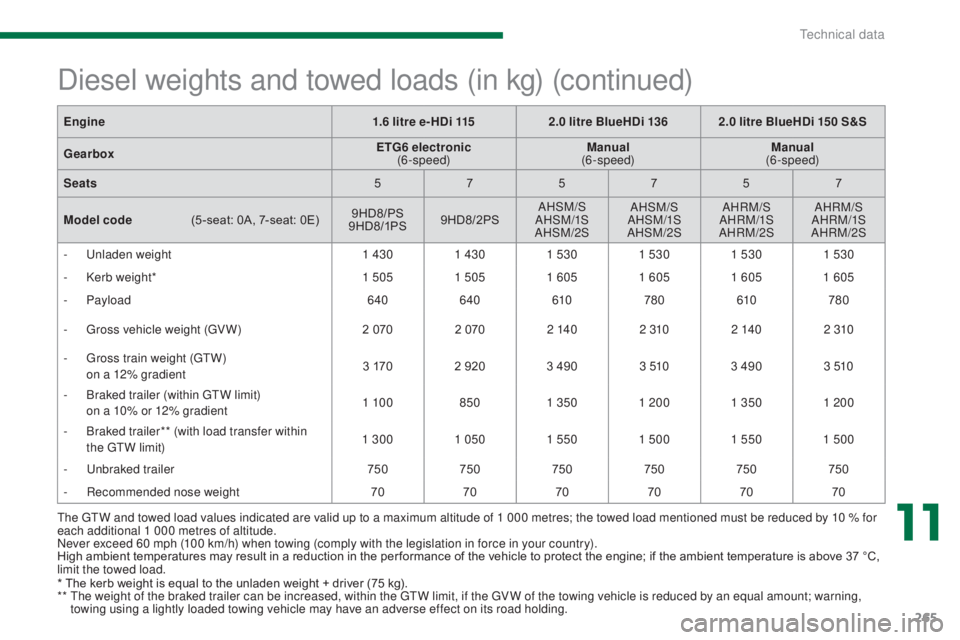
Diesel weights and towed loads (in kg) (continued)
Engine1.6 litre e- HDi 1152.0 litre BlueHDi 136 2.0 litre BlueHDi 150 S&S
Gearbox ETG6 electronic
(6-speed) Manual
(6-speed) Manual
(6-speed)
Seats 575757
Model code
(
5 -seat: 0A, 7-seat: 0E) 9HD8/PS
9 HD8/1PS 9HD8/2PS AHSM/S
AHSM/1S
AHSM/2S AHSM/S
AHSM/1S
AHSM/2S AHRM/S
AHRM/1S
AHRM/2S AHRM/S
AHRM/1S
AHRM/2S
-
U
nladen weight 1 4301 4301 530 1 5301 5301 530
-
K
erb weight* 1 5051 5051 605 1 6051 6051 605
-
Payload 640640 610780 610780
-
G
ross vehicle weight (GV W) 2 0702 070 2 140 2 3102 140 2 310
-
G
ross train weight (GTW)
o
n a 12% gradient 3 170
2 920 3 490 3 5103 490 3 510
-
B
raked trailer (within GTW limit)
o
n a 10% or 12% gradient 1 10 0
8501 350 1 200 1 3501 200
-
B
raked trailer** (with load transfer within
the GTW limit) 1 300
1 0501 5501 500 1 5501 500
-
U
nbraked trailer 750750750750750750
-
R
ecommended nose weight 707070707070
*
T
he kerb weight is equal to the unladen weight + driver (75 kg).
**
T
he weight of the braked trailer can be increased, within the GTW limit, if the GV W of the towing vehicle is reduced by an equal amount; warning,
towing using a lightly loaded towing vehicle may have an adverse effect on its road holding.
11
Technical data
Page 268 of 364
266
5008_en_Chap11_caracteristiques_ed01-2015
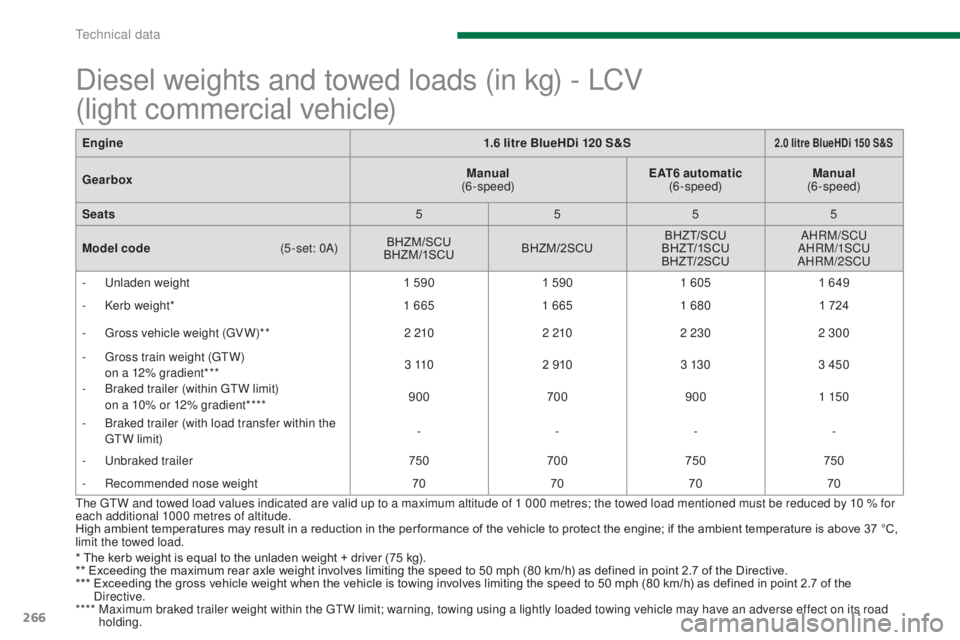
Engine1.6 litre BlueHDi 120 S&S2.0 litre BlueHDi 150 S&S
GearboxManual
(6-speed) EAT6 automatic
(6-speed) Manual
(6-speed)
Seats 5555
Model code
(
5 -set: 0A)BHZM/SCU
BHZM/1SCU BHZM/2SCU BHZT/SCU
BHZ T/1SCU
BHZT/2SCU AHRM/SCU
AHRM/1SCU
AHRM/2SCU
-
U
nladen weight 1 5901 5901 605 1 649
-
K
erb weight* 1 6651 6651 680 1 724
-
G
ross vehicle weight (GV W)** 2 2102 2102 230 2 300
-
G
ross train weight (GTW)
o
n a 12% gradient*** 3 11 0
2 910 3 13 03 450
-
B
raked trailer (within GTW limit)
o
n a 10% or 12% gradient**** 900
7009001 150
-
B
raked trailer (with load transfer within the
GTW limit) -
---
-
U
nbraked trailer 750700 750750
-
R
ecommended nose weight 70707070
The GTW and towed load values indicated are valid up to a maximum altitude of 1 000 metres; the towed load mentioned must be reduced by 10 % for
each additional 1000 metres of altitude.
High ambient temperatures may result in a reduction in the per formance of the vehicle to protect the engine; if the ambient temperature is above 37 °C,
limit the towed load.
* The kerb weight is equal to the unladen weight + driver (75 kg).
**
E
xceeding the maximum rear axle weight involves limiting the speed to 50 mph (80 km/h) as defined in point 2.7 of the Directive.
***
E
xceeding the gross vehicle weight when the vehicle is towing involves limiting the speed to 50 mph (80 km/h) as defined in point 2.7 of the
Directive.
****
M
aximum braked trailer weight within the GTW limit; warning, towing using a lightly loaded towing vehicle may have an adverse effect on its road
holding.
Diesel weights and towed loads (in kg) - LCV
(light commercial vehicle)
Technical data
Page 275 of 364
273
5008_en_Chap12b_RT6-2-8_ed01-2015
The system is protected in such a way that it will only
operate in your vehicle.
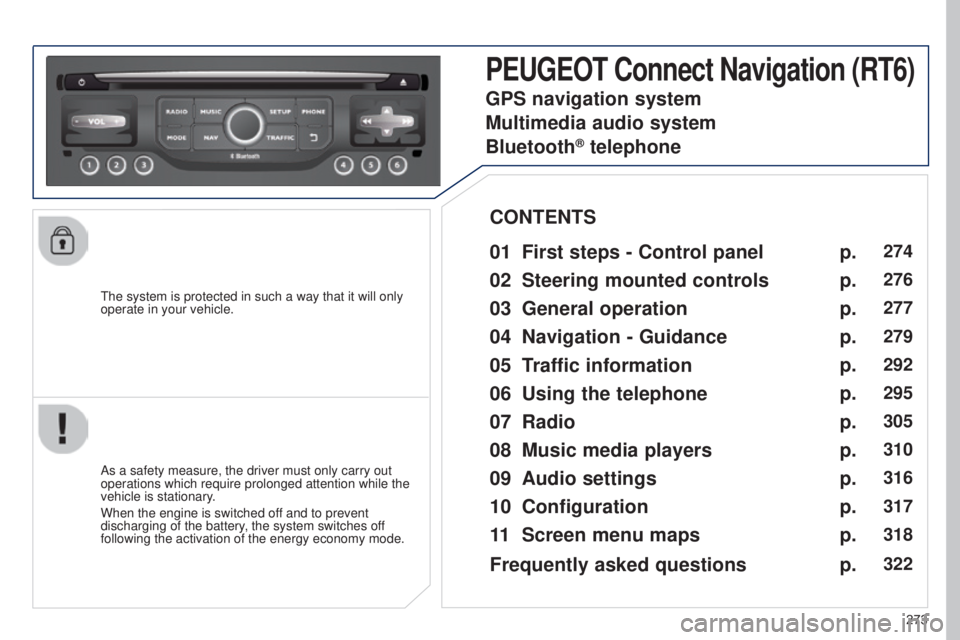
PEUGEOT Connect Navigation (RT6)
01 First steps - Control panel
As a safety measure, the driver must only carry out
operations which require prolonged attention while the
vehicle is stationary.
When the engine is switched off and to prevent
discharging of the battery, the system switches off
following the activation of the energy economy mode.
CONTENTS
02
Steering mounted
controls
03
General operation
04
Navigation
- Guidance
05
T
raffic information
06
Using
the telephone
07
Radio
08
Music media players
09
Audio
settings
10
Configuration
11
Screen menu
maps p.
p.
p.
p.
p.
p.
p.
p.
p.
p.
p.
274
276
277
279
292
295
305
310
316
317
318
GPS navigation system
Multimedia audio system
Bluetooth
® telephone
Frequently asked questions p.
322
Page 296 of 364
05
294
5008_en_Chap12b_RT6-2-8_ed01-2015
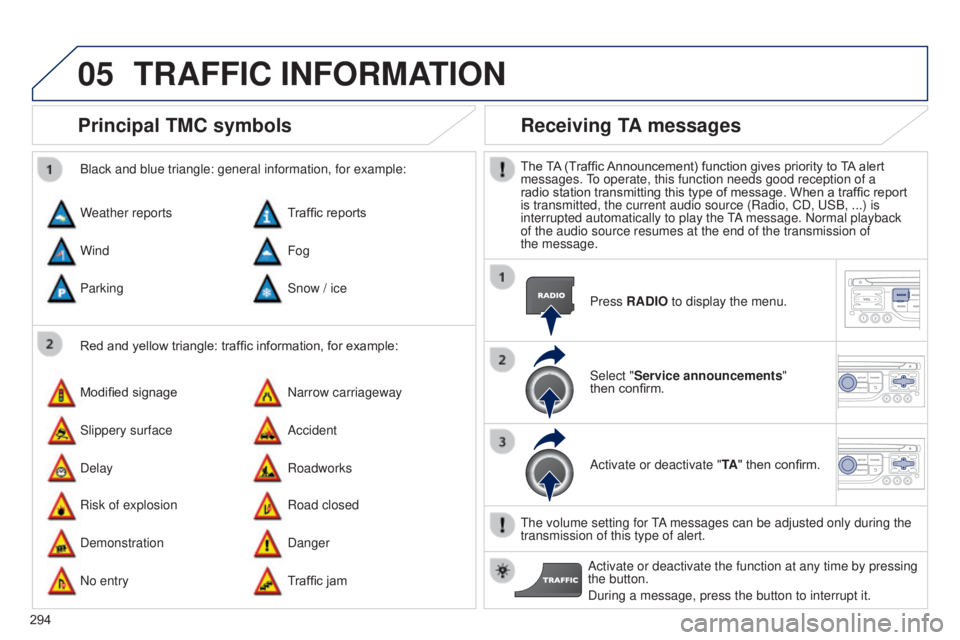
Principal TMC symbols
Red and yellow triangle: traffic information, for example:
Black and blue triangle: general information, for example:
Weather reports
Modified signage
Risk of explosion Traffic reports
Narrow carriageway
Road closed
Wind
Slippery surface
Demonstration Fog
Accident
Danger
Parking
Delay
No entry Snow / ice
Roadworks
Traffic jam
Receiving TA messages
The TA (Traffic Announcement) function gives priority to TA alert
messages. To operate, this function needs good reception of a
radio station transmitting this type of message. When a traffic report
is transmitted, the current audio source (Radio, CD, USB, ...) is
interrupted automatically to play the TA message. Normal playback
of the audio source resumes at the end of the transmission of
the
message. Press RADIO to display the menu.
Select "Service announcements"
then
confirm.
Activate or deactivate "TA " then confirm.
The volume setting for TA messages can be adjusted only during the
transmission of this type of alert. Activate or deactivate the function at any time by pressing
the button.
During a message, press the button to interrupt it.
TRAFFIC INFORMATION
Page 297 of 364
06
295
5008_en_Chap12b_RT6-2-8_ed01-2015
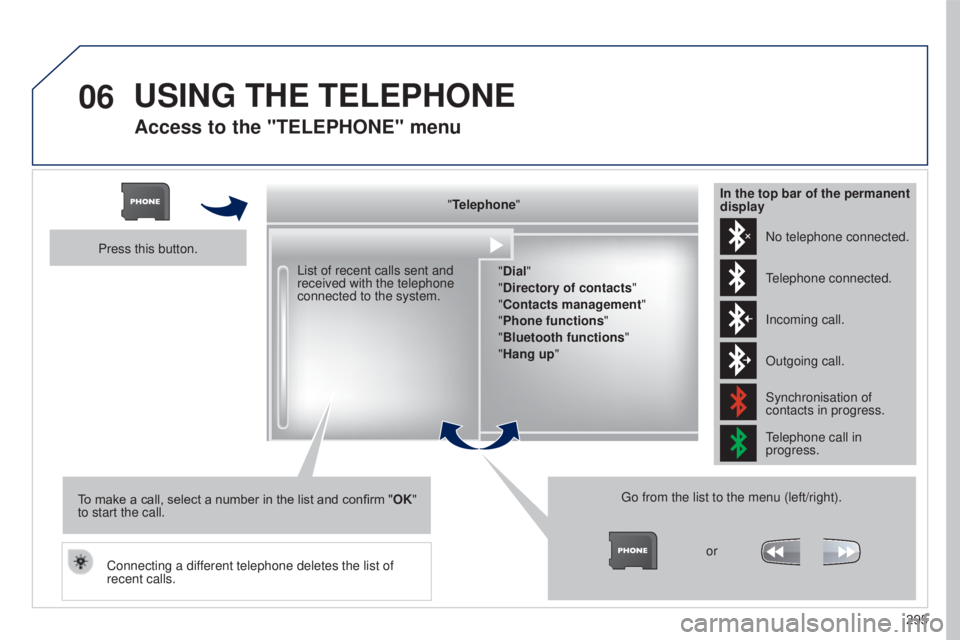
Access to the "TELEPHONE" menu
"Telephone""Dial"
"Directory of contacts"
"Contacts management "
"Phone functions "
"Bluetooth functions "
"Hang up "
Go from the list to the menu (left/right). or
List of recent calls sent and
received with the telephone
connected to the system.
Press this button.
To make a call, select a number in the list and confirm " OK"
to start the call.
Connecting a different telephone deletes the list of
recent calls. No telephone connected.
Telephone connected.
Incoming call.
Outgoing call.
Synchronisation of
contacts in progress.
Telephone call in
progress.
In the top bar of the permanent
display
USING THE TELEPHONE
Page 298 of 364
06
296
5008_en_Chap12b_RT6-2-8_ed01-2015
USING THE TELEPHONE
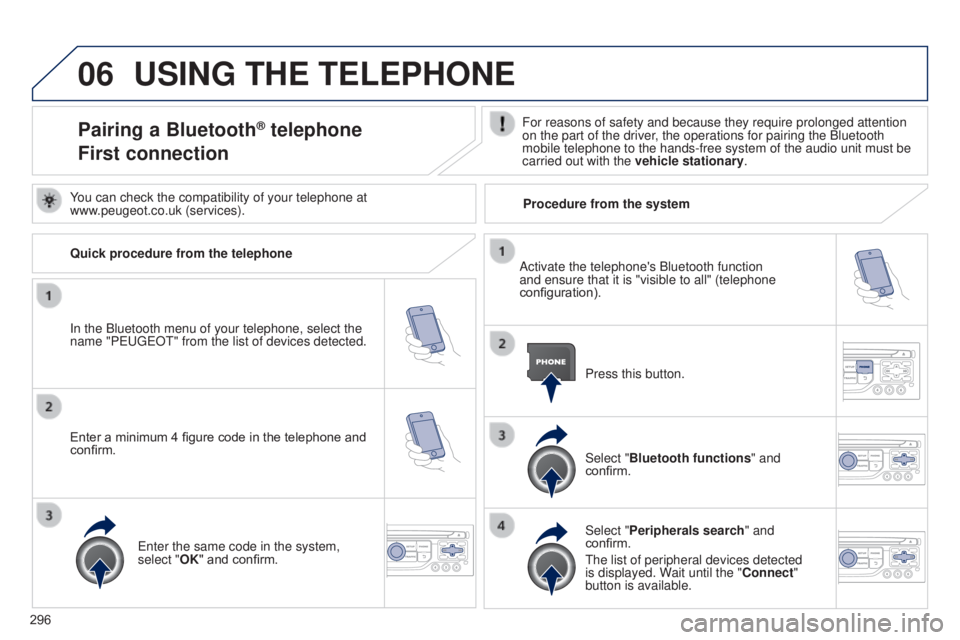
Pairing a Bluetooth® telephone
First connectionFor reasons of safety and because they require prolonged attention
on the part of the driver, the operations for pairing the Bluetooth
mobile telephone to the hands-free system of the audio unit must be
carried out with the vehicle stationary.
In the Bluetooth menu of your telephone, select the
name "PEUGEOT" from the list of devices detected. Press this button.
Select "Bluetooth functions" and
confirm.
Select "Peripherals search " and
confirm.
The list of peripheral devices detected
is displayed. Wait until the "Connect"
button is available.
You can check the compatibility of your telephone at
www.peugeot.co.uk (services).
Activate the telephone's Bluetooth function
and ensure that it is "visible to all" (telephone
configuration).
Quick procedure from the telephone
Enter a minimum 4 figure code in the telephone and
confirm.
Enter the same code in the system,
select "OK" and confirm. Procedure from the system
Page 299 of 364
06
297
5008_en_Chap12b_RT6-2-8_ed01-2015
USING THE TELEPHONE
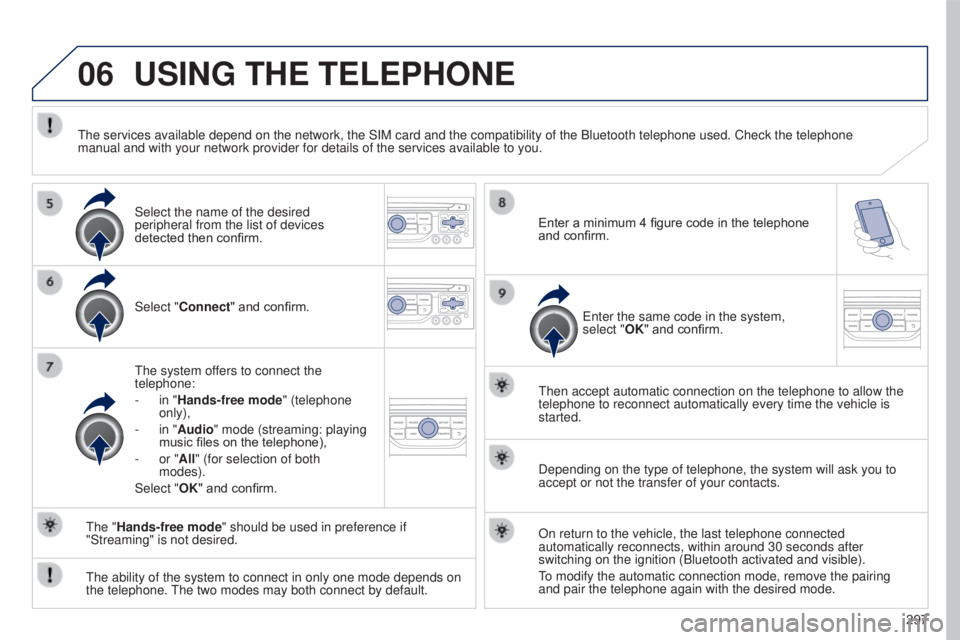
Select "Connect" and confirm.
The system offers to connect the
telephone:
-
in "
Hands-free mode" (telephone
only),
-
in "
Audio" mode (streaming: playing
music files on the telephone),
-
or "
All" (for selection of both
modes).
Select "OK" and confirm. Then accept automatic connection on the telephone to allow the
telephone to reconnect automatically every time the vehicle is
started.
The ability of the system to connect in only one mode depends on
the telephone. The two modes may both connect by default. The "Hands-free mode" should be used in preference if
"Streaming" is not desired.
The services available depend on the network, the SIM card and the compa\
tibility of the Bluetooth telephone used. Check the telephone
manual and with your network provider for details of the services availa\
ble to you.
Depending on the type of telephone, the system will ask you to
accept or not the transfer of your contacts.
On return to the vehicle, the last telephone connected
automatically reconnects, within around 30 seconds after
switching on the ignition (Bluetooth activated and visible).
To modify the automatic connection mode, remove the pairing
and pair the telephone again with the desired mode.
Enter a minimum 4 figure code in the telephone
and confirm.
Enter the same code in the system,
select "OK" and confirm.
Select the name of the desired
peripheral from the list of devices
detected then confirm.