Page 331 of 398
329
308_en_Chap10c_SMegplus_ed02-2015
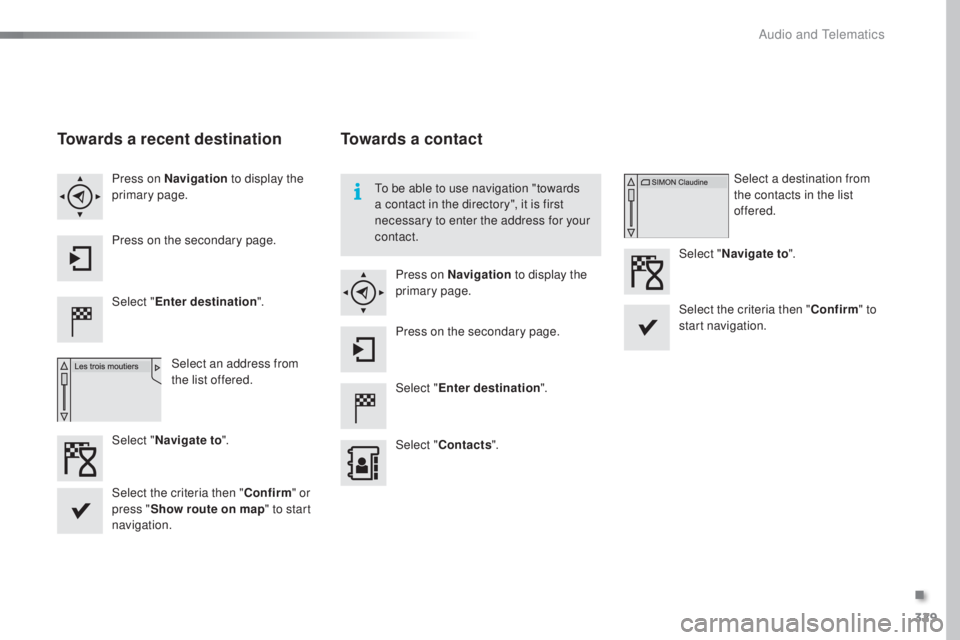
Towards a recent destination
Select "Enter destination ".
Select an address from
the list offered.
Press on Navigation
to display the
primary page.
Press on the secondary page.
Select " Navigate to ".
Towards a contact
Select "Enter destination ".
Select " Contacts ".
Press on Navigation
to display the
primary page.
Press on the secondary page. Select a destination from
the contacts in the list
offered.
Select " Navigate to ".
Select the criteria then " Confirm" to
start navigation.
to be a
ble to use navigation "towards
a contact in the directory", it is first
necessary to enter the address for your
contact.
Select the criteria then " Confirm" or
press " Show route on map " to start
navigation.
.
Audio and telematics
Page 332 of 398
330
308_en_Chap10c_SMegplus_ed02-2015
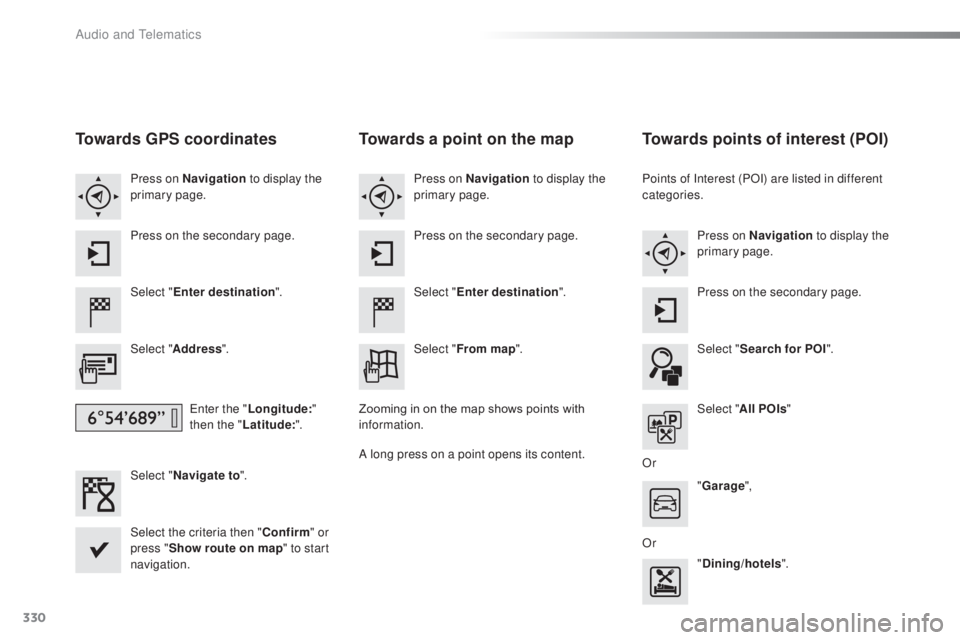
Towards GPS coordinates
Select "Enter destination ".
Select " Address ".
ent
er the "Longitude: "
then the " Latitude: ".
Select " Navigate to ".
Select the criteria then " Confirm" or
press " Show route on map " to start
navigation. Press on Navigation to display the
primary page.
Press on the secondary page.
Towards a point on the map
Select " Enter destination ".
Select " From map ".
Press on Navigation
to display the
primary page.
Press on the secondary page.
Zooming in on the map shows points with
information.
A long press on a point opens its content.
Towards points of interest (POI)
Points of Interest (POI) are listed in different
categories. Press on Navigation to display the
primary page.
Press on the secondary page.
Select " Search for POI ".
Select " All POIs "
Or "Garage ",
Or "Dining/hotels ".
Audio and telematics
Page 333 of 398
331
308_en_Chap10c_SMegplus_ed02-2015
An annual mapping update allows new
points of interest to be presented to you.
You can also update the Risk areas /
Danger areas every month.
the d
etailed procedure is available on:
http://peugeot.navigation.com.
.
Audio and telematics
Page 334 of 398
332
308_en_Chap10c_SMegplus_ed02-2015
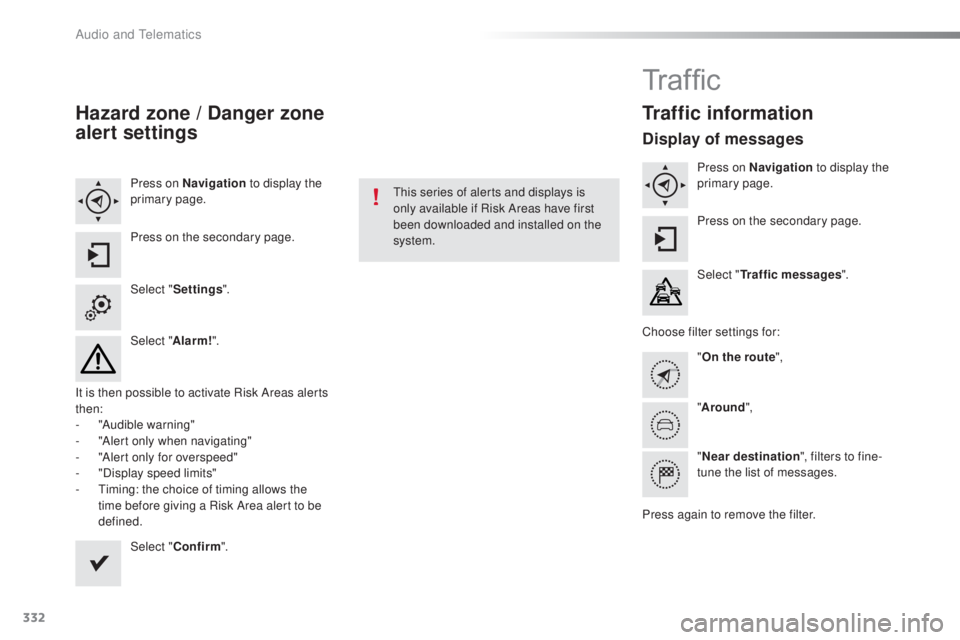
Hazard zone / Danger zone
alert settings
Press on Navigation to display the
primary page.
Press on the secondary page.
Select " Settings ".
Select " Alarm!".
It is then possible to activate Risk Areas alerts
then:
-
"A
udible warning"
-
"A
lert only when navigating"
-
"A
lert only for overspeed"
-
"D
isplay speed limits"
-
t
im
ing: the choice of timing allows the
time before giving a Risk Area alert to be
defined.
Select " Confirm ".thi
s series of alerts and displays is
only available if Risk Areas have first
been downloaded and installed on the
system.
Tr a f fi c
Traffic information
Display of messages
Press on Navigation to display the
primary page.
Press on the secondary page.
Select " Traffic messages ".
Choose filter settings for: "On the route ",
" Around ",
" Near destination ", filters to fine-
tune the list of messages.
Press again to remove the filter.
Audio and telematics
Page 335 of 398
333
308_en_Chap10c_SMegplus_ed02-2015
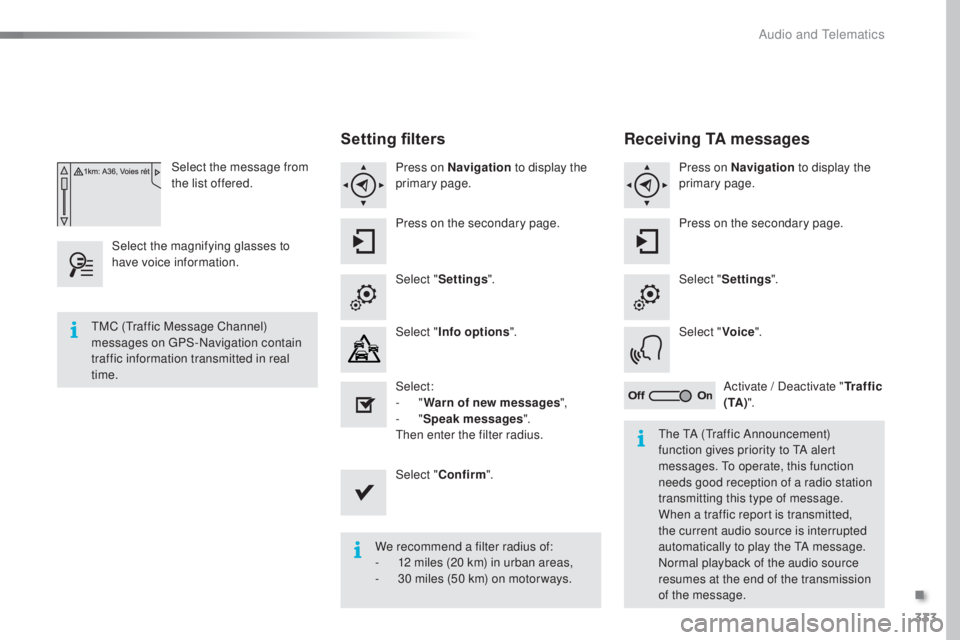
Select the message from
the list offered.
Select the magnifying glasses to
have voice information.
Setting filters
Press on Navigation to display the
primary page.
Press on the secondary page.
Select " Settings ".
Select " Info options ".
Select:
-
" W
arn of new messages ",
-
" S
peak messages ".
then en
ter the filter radius.
Select " Confirm ".
We recommend a filter radius of:
-
12 m
iles (20 km) in urban areas,
-
30 m
iles (50 km) on motor ways.
tMC (tra
ffic Message Channel)
messages on
gPS
-Navigation contain
traffic information transmitted in real
time.
the tA (tra
ffic Announcement)
function gives priority to
tA al
ert
messages.
to op
erate, this function
needs good reception of a radio station
transmitting this type of message.
When a traffic report is transmitted,
the current audio source is interrupted
automatically to play the
tA me
ssage.
Normal playback of the audio source
resumes at the end of the transmission
of the message.
Receiving TA messages
Press on Navigation to display the
primary page.
Press on the secondary page.
Select " Settings ".
Select " Voice".
Activate / Deactivate " Tr a f f i c
( TA ) ".
.
Audio and telematics
Page 337 of 398
335
308_en_Chap10c_SMegplus_ed02-2015
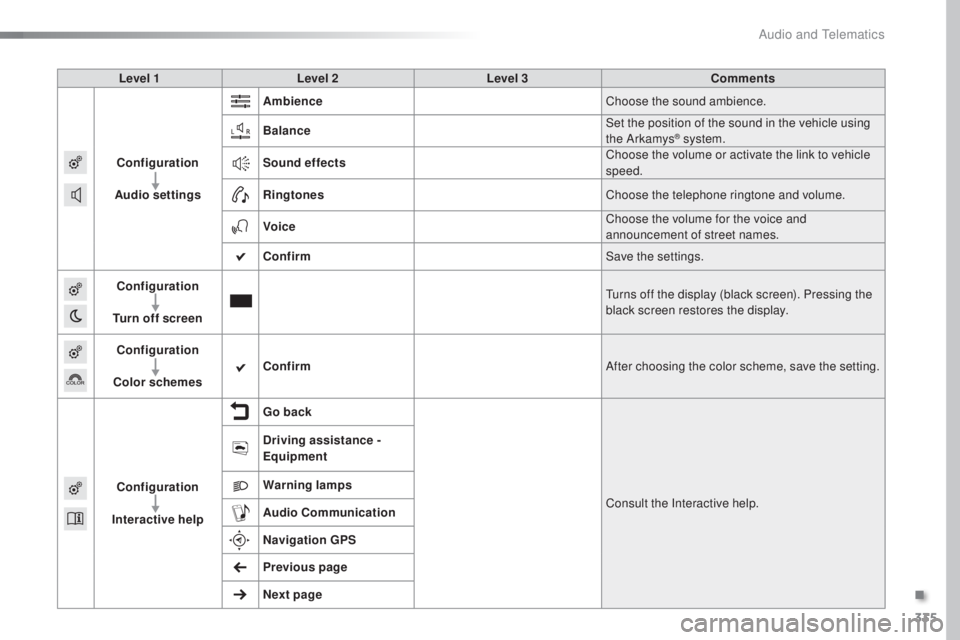
Level 1Level 2 Level 3 Comments
Configuration
Audio settings Ambience
Choose the sound ambience.
Balance Set the position of the sound in the vehicle using
the Arkamys
® system.
Sound effects Choose the volume or activate the link to vehicle
speed.
Ringtones Choose the telephone ringtone and volume.
Voice Choose the volume for the voice and
announcement of street names.
Confirm Save the settings.
Configuration
Turn off screen
tur
ns off the display (black screen). Pressing the
black screen restores the display.
Configuration
Color schemes Confirm
After choosing the color scheme, save the setting.
Configuration
Interactive help Go back
Consult the Interactive help.
Driving assistance -
Equipment
Warning lamps
Audio
Communication
Navigation GPS
Previous page
Next page
.
Audio and telematics
Page 346 of 398
344
308_en_Chap10c_SMegplus_ed02-2015
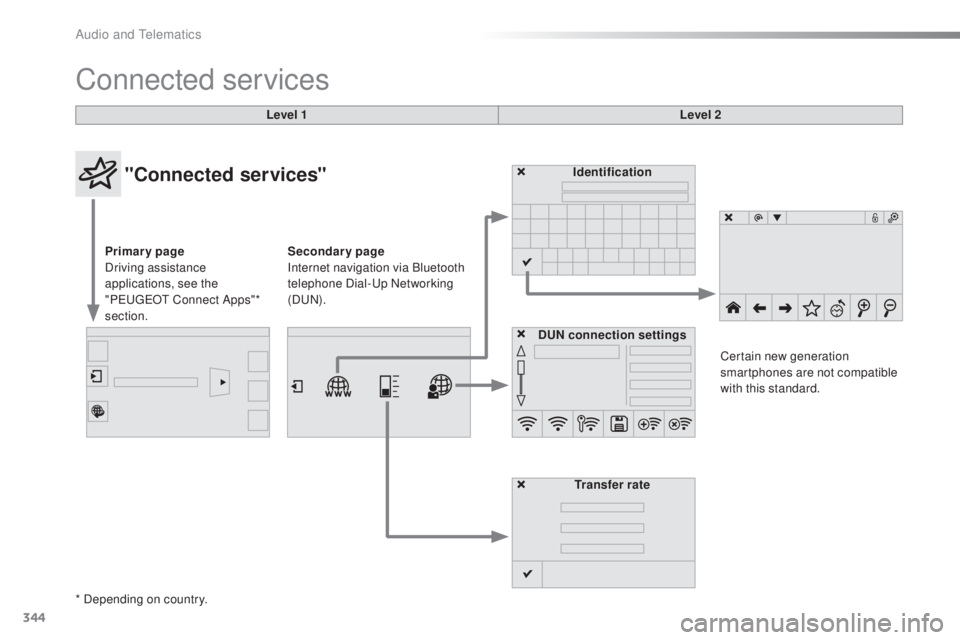
Connected services
Level 1Level 2
"Connected services"
Primary page
Driving assistance
applications, see the
"P
eu
ge
Ot C
onnect Apps"*
section. Identification
DUN connection settings Transfer rate Certain new generation
smartphones are not compatible
with this standard.
Secondary page
Internet navigation via Bluetooth
telephone Dial-
up
Networking
(D
uN).
*
Depending on country.
Audio and telematics
Page 356 of 398
354
308_en_Chap10c_SMegplus_ed02-2015
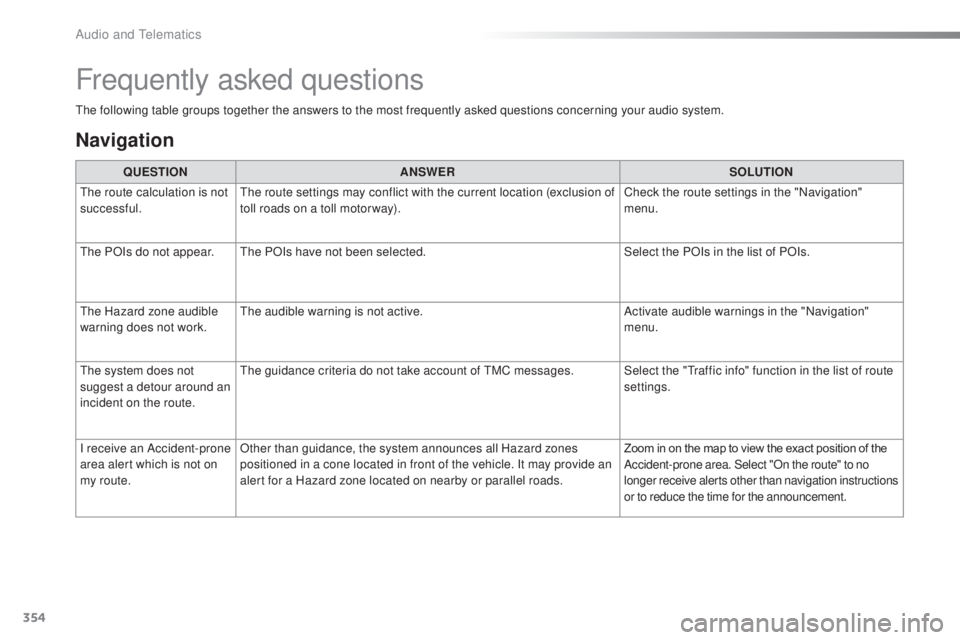
the following table groups together the answers to the most frequently asked questions concerning your audio system.
Frequently asked questions
Navigation
QUESTIONANSWER SOLUTION
the r
oute calculation is not
successful.
the r
oute settings may conflict with the current location (exclusion of
toll roads on a toll motor way). Check the route settings in the "Navigation"
menu.
the P
OIs do not appear.
the
POIs have not been selected. Select the POIs in the list of POIs.
the H
azard zone audible
warning does not work.
the a
udible warning is not active. Activate audible warnings in the "Navigation"
menu.
the s
ystem does not
suggest a detour around an
incident on the route.
the g
uidance criteria do not take account of
tMC m
essages. Select the "
tra
ffic info" function in the list of route
settings.
I receive an Accident-prone
area alert which is not on
my route. Other than guidance, the system announces all Hazard zones
positioned in a cone located in front of the vehicle. It may provide an
alert for a Hazard zone located on nearby or parallel roads.
Zoom in on the map to view the exact position of the
Accident-prone area. Select "On the route" to no
longer receive alerts other than navigation instructions
or to reduce the time for the announcement.
Audio and telematics
Page:
< prev 1-8 9-16 17-24