2016 Peugeot 308 reset
[x] Cancel search: resetPage 308 of 398
306
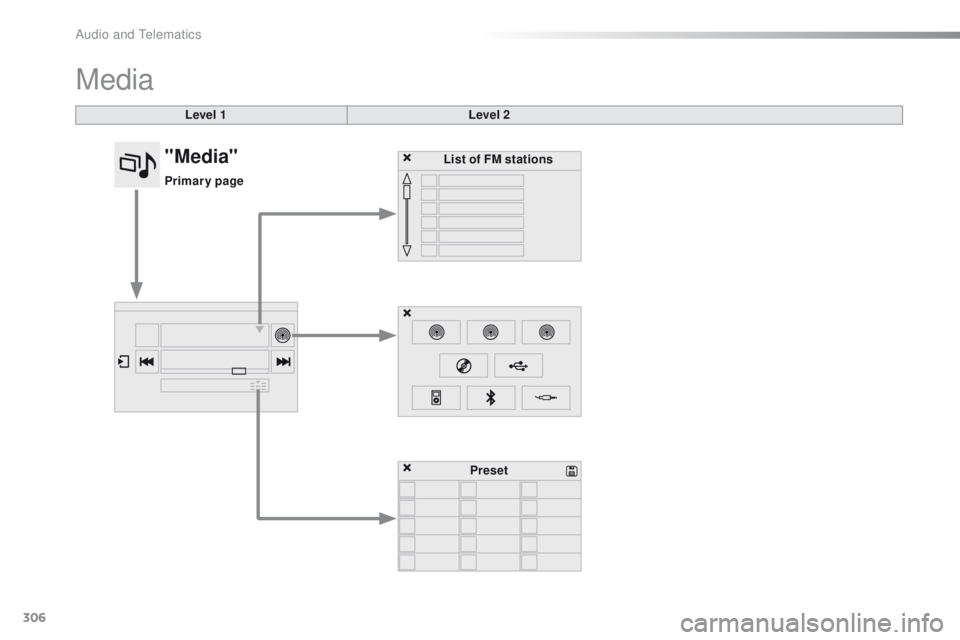
Media
Level 1Level 2
List of FM stations
Preset
"Media"
Primary page
Audio and telematics
Page 309 of 398
307
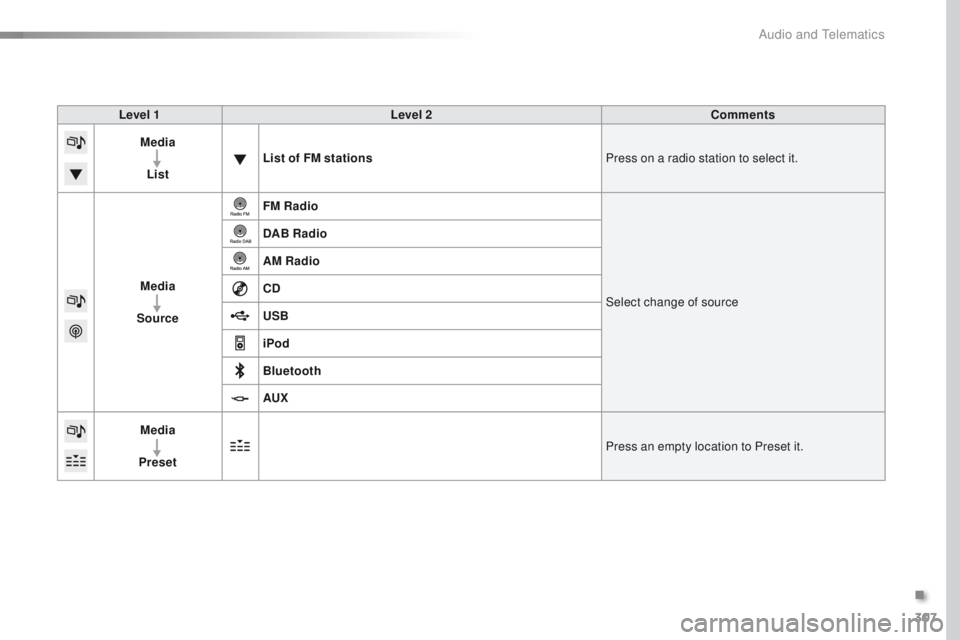
Level 1Level 2 Comments
Media
List List of FM stations
Press on a radio station to select it.
Media
Source FM Radio
Select change of source
DAB Radio
AM Radio
CD
USB
iPod
Bluetooth
AUX
Media
Preset Press an empty location to Preset it.
.
Audio and Telematics
Page 311 of 398
309
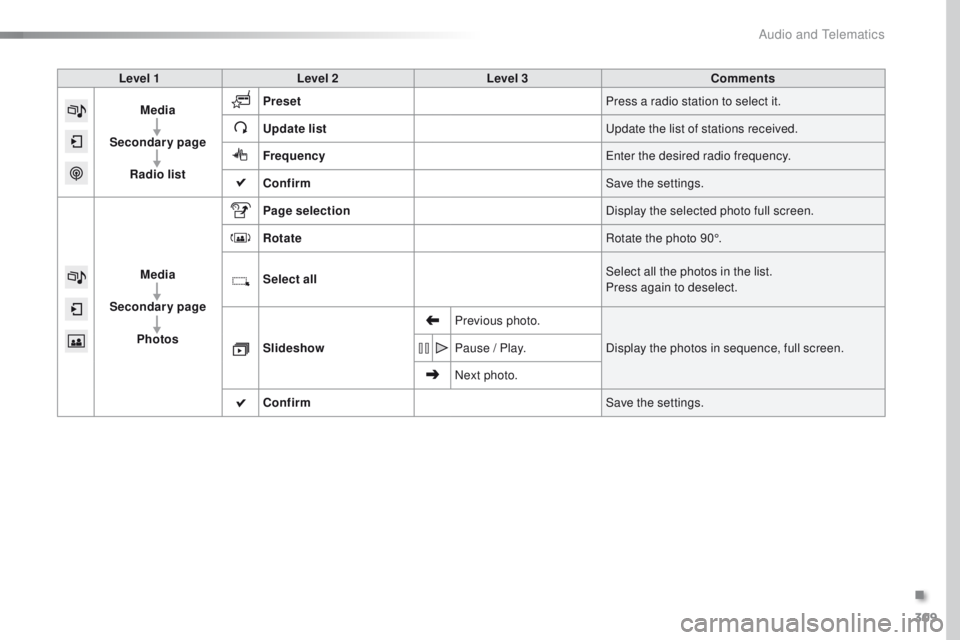
Level 1Level 2 Level 3 Comments
Media
Secondary page Radio list Preset
Press a radio station to select it.
Update list
up
date the list of stations received.
Frequency
en
ter the desired radio frequency.
Confirm Save the settings.
Media
Secondary page Photos Page selection
Display the selected photo full screen.
Rotate Rotate the photo 90°.
Select all Select all the photos in the list.
Press again to deselect.
Slideshow Previous photo.
Display the photos in sequence, full screen.
Pause / Play.
Next photo.
Confirm Save the settings.
.
Audio and Telematics
Page 314 of 398
312
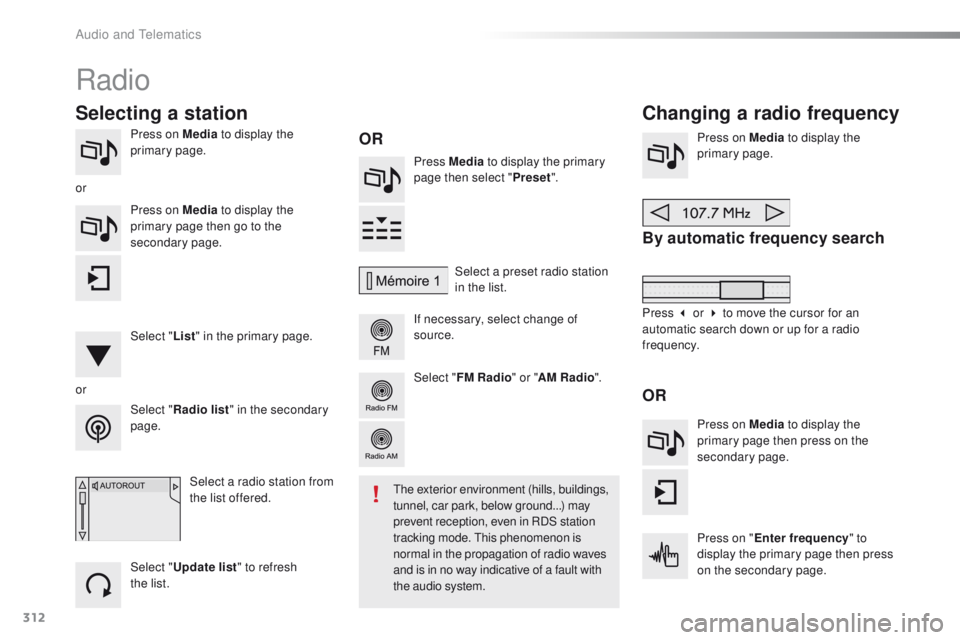
Press on Media to display the
primary page. Press Media to display the primary
page then select " Preset".
If necessary, select change of
source. Press on Media
to display the
primary page.
By automatic frequency search
Select " Radio list " in the secondary
page. Select a preset radio station
in the list.
Select " FM Radio " or "AM Radio ".
Select a radio station from
the list offered.
Select " Update list " to refresh
the
list.
Press on Media
to display the
primary page then go to the
secondary page.
Select " List" in the primary page.
Radio
Changing a radio frequency
Selecting a station
OR
orOR
the exterior environment (hills, buildings,
tunnel, car park, below ground...) may
prevent reception, even in RDS station
tracking mode.
t
h
is phenomenon is
normal in the propagation of radio waves
and is in no way indicative of a fault with
the audio system.
or
Press 3 or 4 to move the cursor for an
automatic search down or up for a radio
frequency.Press on Media to display the
primary page then press on the
secondary page.
Press on " Enter frequency " to
display the primary page then press
on the secondary page.
Audio and telematics
Page 315 of 398
313
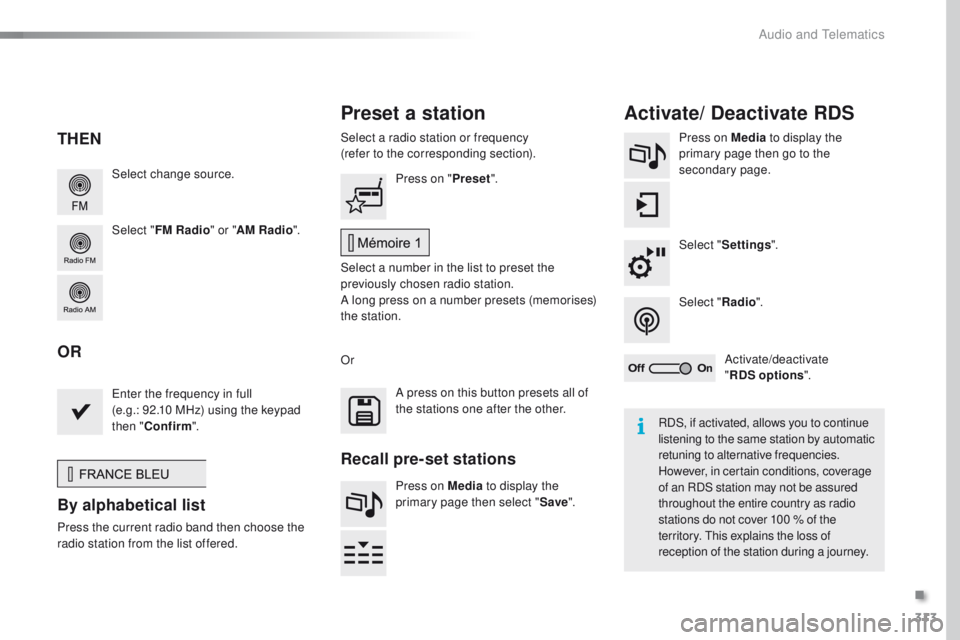
Select change source.
Select "FM Radio " or "AM Radio ".Select a radio station or frequency
(refer to the corresponding section).
Press on Media
to display the
primary page then go to the
secondary page.
Select " Settings ".
Select " Radio".
Activate/deactivate
" RDS options ".
Press on "
Preset".
Select a number in the list to preset the
previously chosen radio station.
A long press on a number presets (memorises)
the station.
en
ter the frequency in full
(e.g.: 92.10 MHz) using the keypad
then " Confirm ".
By alphabetical list
Press the current radio band then choose the
r adio station from the list offered. Or
Press on Media to display the
primary page then select " Save".
Preset a station Activate/ Deactivate RDS
THEN
OR
A press on this button presets all of
the stations one after the other.
Recall pre-set stations
RDS, if activated, allows you to continue
listening to the same station by automatic
retuning to alternative frequencies.
However, in certain conditions, coverage
of an RDS station may not be assured
throughout the entire country as radio
stations do not cover 100
% of the
territory.
t
h
is explains the loss of
reception of the station during a journey.
.
Audio and telematics
Page 316 of 398
314
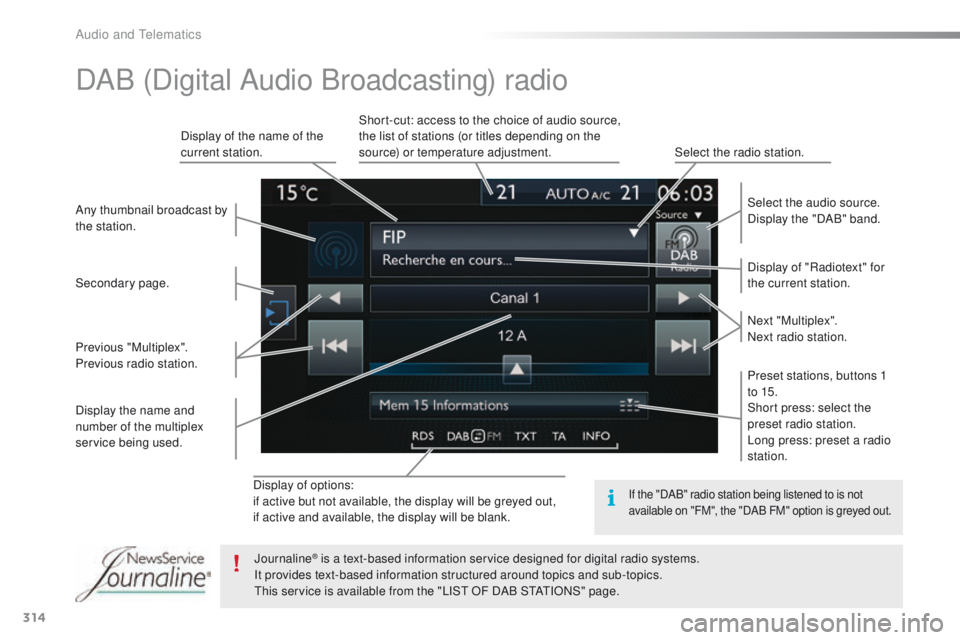
Display of options:
if active but not available, the display will be greyed out,
if active and available, the display will be blank.Display of "Radiotext" for
the current station. Select the audio source.
Display the "DAB" band.
Display of the name of the
current station.
Short-cut: access to the choice of audio source,
the list of stations (or titles depending on the
source) or temperature adjustment.
Select the radio station.
Any thumbnail broadcast by
the station.
Preset stations, buttons 1
to 15.
Short press: select the
preset radio station.
Long press: preset a radio
station. Next "Multiplex".
Next radio station.
Secondary page.
Display the name and
number of the multiplex
service being used. Previous "Multiplex".
Previous radio station.
DAB (Digital Audio Broadcasting) radio
If the "DAB" radio station being listened to is not
available on "FM", the "DAB FM" option is greyed out.
Journaline® is a text-based information service designed for digital radio systems.
I
t provides text-based information structured around topics and sub-topics.
th
is service is available from the "LIS
t
OF DAB S
tAtI
ONS" page.
Audio and telematics
Page 370 of 398
368
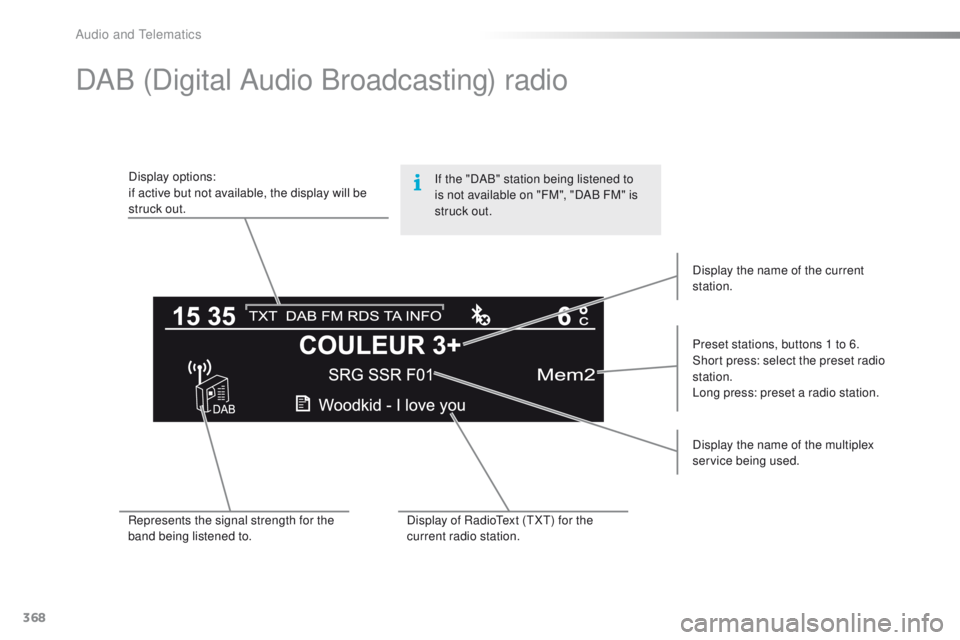
DAB (Digital Audio Broadcasting) radio
Display options:
if active but not available, the display will be
struck out.Preset stations, buttons 1 to 6.
Short press: select the preset radio
station.
Long press: preset a radio station.
Display the name of the multiplex
service being used.
Represents the signal strength for the
band being listened to. Display of Radio
te
xt (
tXt) f
or the
current radio station. Display the name of the current
station.
If the "DAB" station being listened to
is not available on "FM", "DAB
FM" is
struck out.
Audio and telematics
Page 389 of 398
387
Storage wells ............................................ 86, 87
Storing driving positions .................................74
Stowing rings
............................................ 86, 87
Switching off the engine
............................... 14
8
Synchronising the remote control
..................................................... 5
3, 62
T
table of weights .................................... 28 1, 288tab
les of engines .................278, 280, 284, 287
ta
bles of fuses .............................................. 266
ta
nk, AdBlue
® additive ......................... 2 35 -242t
a n k , f u e l
....................................................... 213
te
chnical data
....................................... 278-295
te
lephone
............................................. 3 5 0 , 374
te
mperature, coolant
...................................... 28
thr
ee flashes
(direction indicators)
................................... 111
tim
e (setting)
..............................
..............4 4 - 47
tM
C (
tr
affic info)
.......................................... 3
32
to
o l s
...................................................... 244, 250
to
pping-up the AdBlue
® additive ......... 2 39 -242to
p tether
...................................................... 13 9
to
tal distance recorder
................................... 32
to
uch screen ........................35, 37- 44, 173, 211
tou
ch screen (Menus)
................. 299, 304, 305
to
w b a r
................................................... 1 4 7, 2 1 8
to
wed loads
.......................................... 281, 288
to
wing another vehicle
................................. 2
75
to
wing eye
...................................................... 86
Reinitialisation of the under-inflation
detection system
.........................................
210
Reinitialising the remote control
............... 5
3, 62
Reminder, key in ignition
...............................
150
Reminder, lighting on
....................................
111
Remote control
.......................................... 48
-63
Removing a wheel
........................................
252
Removing the mat
...........................................
81
Replacing bulbs
....................................
256-265
Replacing fuses
..............................
......
2 6 6 -271
Replacing the air filter
...................................
233
Replacing the oil filter
................................... 23
3
Replacing the passenger compartment filter
.............................................................
233
Reservoir, headlamp wash
...........................
231
Reservoir, screenwash
................................. 2
31
Resetting the service indicator
.......................
30
Resetting the trip recorder
..............................
32
Reversing camera
.........................................
200
Reversing lamp
..................................... 26
1, 263
Risk areas (update)
.......................................
331
Roof bars
....................................................... 2
23
Running out of fuel (Diesel)
..........................
2
77 Screen menu
........................
306, 308, 310, 320,
322, 326, 334, 346, 348
Screen, multifunction (with audio system)
........................
45, 46, 366
Screen, multifunction (without audio system)
..................................
47
Screenwash
..................................................
11 6
Screenwash, rear
..........................................
11 6
SCR (Selective Catalytic Reduction)
............
235
Seat belts
....................................... 12
3 -125, 13 6
Seats, front
...............................
..................
7 2 -74
Seats, heated
..................................................
75
Seats, rear
.................................................
7 7, 7 8
Serial number, vehicle
.................................. 29
5
Service indicator
.............................................
28
Service (warning lamp)
................................... 19
S
ervicing
...............................
..........................
10
Settings, equipment
........................................
41
Settings (Menus)
...........................................
334
Settings, system
............................................
342
Sidelamps
.............
108, 256, 257, 259 -261, 263
Side repeater
..............................
..................
260
Ski flap
..............................
..............................
85
Snow chains
.......................................... 2
09, 216
Socket, 12 V accessory
......................
8
0, 83, 87
Socket, audio
............................
80, 83, 316, 371
Speed limiter
.........................................
173 , 174
Spotlamps, side
....................................
114 , 2 6 0
Stability control (
e
SC).............................
17, 1 2 0
Starting the engine
.......................................
148
Station, radio ......................................... 3
12, 3 6 6
Stay, bonnet
.................................................. 226
Steering mounted controls, audio
.................................................. 303, 365
Steering wheel, adjustment
............................ 71
Stop & Start
........................ 16, 24, 36, 101, 170,
171, 213, 226, 233, 272
Stop (warning lamp)
........................................ 18
St
orage
.......................................... 80, 82, 85 - 87S
Safety, children ......................12 5, 127, 13 0 -14 5
Screen, cold climate ..................................... 217
Screen, colour
...................................... 304, 305
Screen, instrument panel
..........................12, 3 4
.
Alphabetical index