Page 56 of 268
54
108_en_Chap03_ergonomie-confort_ed01-2016
Heating
the heating system only operates with the engine running.F t
u
rn the control from blue
(cold) to red (hot) to adjust the
temperature to your wishes.
temperature adjustment
Air flow adjustment
F turn the knob from position 1 to 4 to obtain the desired flow
o f a i r.
Avoid driving for too long without
ventilation (risk of misting and
deterioration of air quality).
Air distribution adjustment
Centre vent and side air vents.
Centre vent, side vents and footwells.
Footwells.
Windscreen and footwells.
Windscreen.
th
e air distribution can be varied by
placing the control in an intermediate
position.
ease of use and comfort
Page 57 of 268
55
108_en_Chap03_ergonomie-confort_ed01-2016
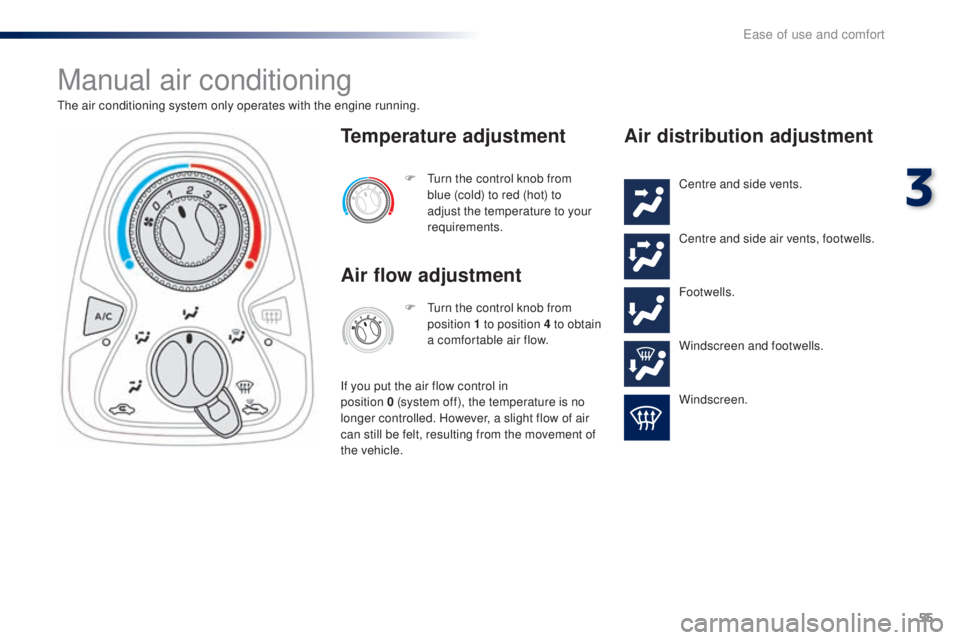
Manual air conditioning
the air conditioning system only operates with the engine running.F t
u
rn the control knob from
blue (cold) to red (hot) to
adjust the temperature to your
requirements.
temperature adjustment
Air flow adjustment
F turn the control knob from position 1 to position 4 to obtain
a comfortable air flow.
If you put the air flow control in
position
0
(system off), the temperature is no
longer controlled. However, a slight flow of air
can still be felt, resulting from the movement of
the vehicle.
Air distribution adjustment
Centre and side vents.
Centre and side air vents, footwells.
Footwells.
Windscreen and footwells.
Windscreen.
3
ease of use and comfort
Page 94 of 268

92
108_en_Chap04_conduite_ed01-2016
Reversing camera
the reversing camera is activated automatically when reverse gear is engaged.
th
e reversing camera cannot in any
circumstances replace the need for the
vigilance on the part of the driver.
th
e image is provided in the touch screen
only, with an indication of the limit of the rear
bumpers (red line) and the general direction of
the vehicle (blue lines).
Clean the reversing camera regularly
using a soft, dry cloth.
th
e field of vision covered by the camera is
limited: objects in the immediate proximity of
the bumper or located below it are not visible.
th
e camera's wide-angle lens deforms the
image presented in the screen: the distances
visible in the screen may be different from
the true distances.
t
h
is deformation varies
according to the loading of the vehicle and the
slope of the road.
High pressure jet washing
When washing your vehicle, do not
direct the lance within 30 cm of the
camera lens. Never reverse the vehicle looking only
at the screen.
It is normal to be able to see part of the number
plate at the bottom of the screen.
Driving
Page 187 of 268
185
108_en_Chap10a_Autoradio-toyota-tactile-1_ed01-2016
7-inch touch screen
Multimedia system - Bluetooth® telephone - Mirror Screen® - gPS navigation
First steps 1 86
Steering mounted controls
1
88
Menus
189
Audio source
1
90
Radio
19 4
DAB (Digital Audio Broadcasting) radio
1
96
Media
19
8
te
lephone
202
Configuration
20
8
Mirror Screen
® - Connexions iPhone® 212
Mirror Screen® - MirrorLinktM connections 2 16
Navigation
2
20
Frequently asked questions
23
1
As a safety measure, the driver must carry out operations which
require prolonged attention while the vehicle is stationary.
to p
revent discharging of the battery, the system cuts off
following activation of energy economy mode, 20 minutes after
switching off the engine on vehicles fitted with the Keyless
e
n
try
and Starting system. Contents
th
e temperature of a telephone may increase when connected
by MirrorLink
tM. In this case, the telephone battery discharges as
a safety measure.
.
Audio and telematics
Page 189 of 268
187
108_en_Chap10a_Autoradio-toyota-tactile-1_ed01-2016
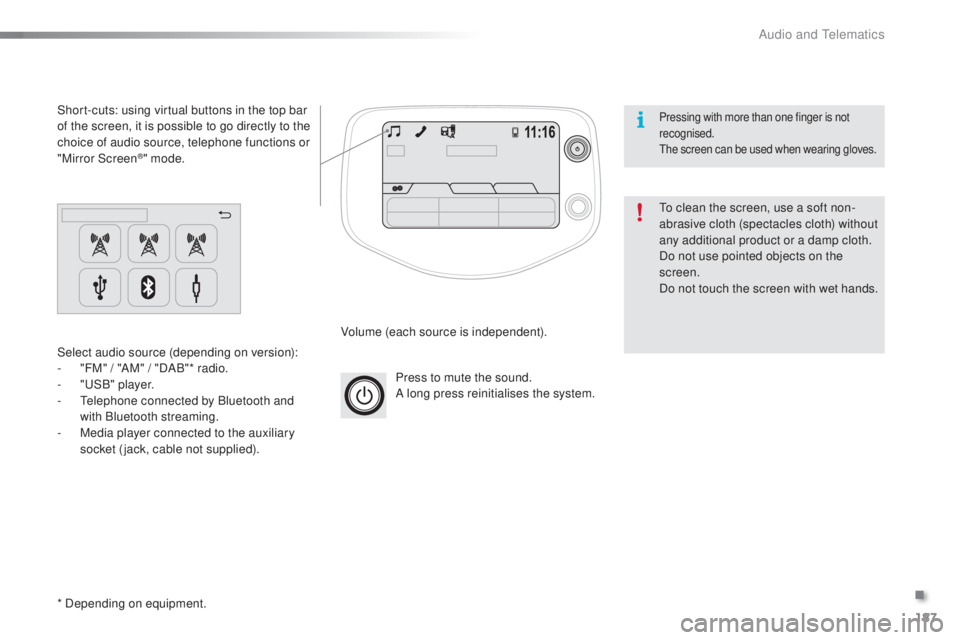
Press to mute the sound.
A long press reinitialises the system.
Volume (each source is independent).
Select audio source (depending on version):
-
"
FM" / "AM" / "DAB"* radio.
-
"uS
B" player.
-
t
e
lephone connected by Bluetooth and
with Bluetooth streaming.
-
M
edia player connected to the auxiliary
socket (jack, cable not supplied).
Short-cuts: using virtual buttons in the top bar
of the screen, it is possible to go directly to the
choice of audio source, telephone functions or
"Mirror Screen
®" mode.
* Depending on equipment.
to c
lean the screen, use a soft non-
abrasive cloth (spectacles cloth) without
any additional product or a damp cloth.
Do not use pointed objects on the
screen.
Do not touch the screen with wet hands.
Pressing with more than one finger is not
recognised.
th
e screen can be used when wearing gloves.
.
Audio and telematics
Page 191 of 268
189
108_en_Chap10a_Autoradio-toyota-tactile-1_ed01-2016
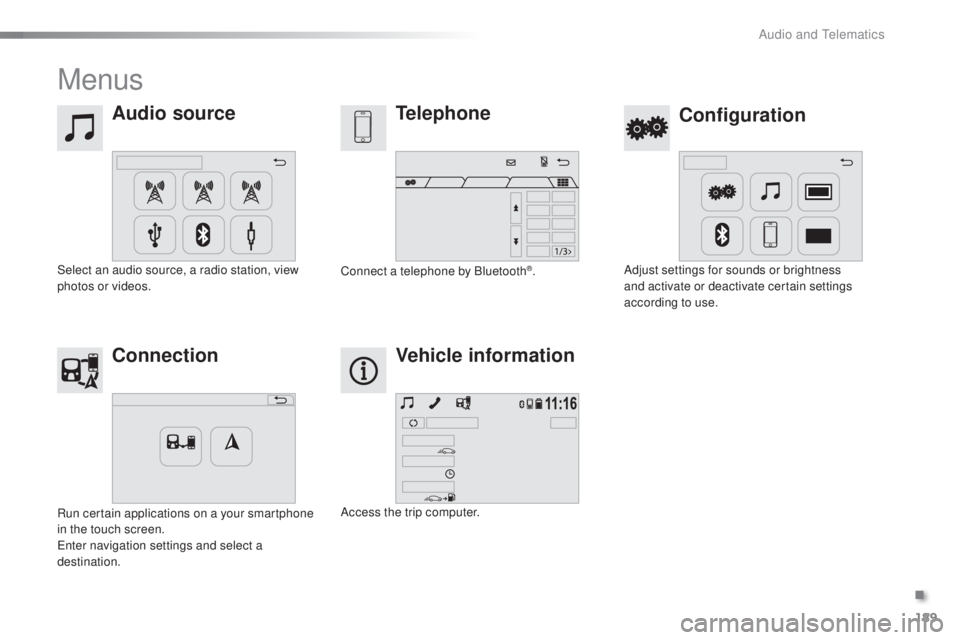
Menus
Audio source
Configurationtelephone
Connection Vehicle information
Select an audio source, a radio station, view
photos or videos. Adjust settings for sounds or brightness
and activate or deactivate certain settings
according to use.
Connect a telephone by Bluetooth®.
Run certain applications on a your smartphone
in the touch screen.
en
ter navigation settings and select a
destination. Access the trip computer.
.
Audio and telematics
Page 195 of 268
193
108_en_Chap10a_Autoradio-toyota-tactile-1_ed01-2016
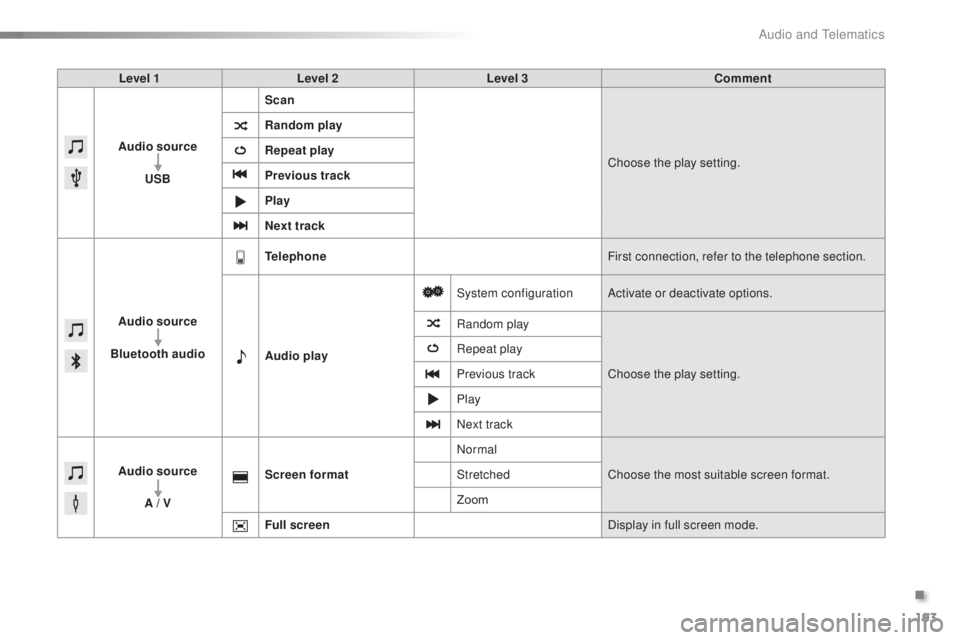
Level 1 Level 2 Level 3 Comment
Audio source
u
SB Scan
Choose the play setting.
Random play
Repeat play
Previous track
Play
Next track
Audio source
Bluetooth audio
tel
ephone First connection, refer to the telephone section.
Audio play System configuration
Activate or deactivate options.
Random play
Choose the play setting.
Repeat play
Previous track
Play
Next track
Audio source A / V Screen format
Normal
Choose the most suitable screen format.
Stretched
Zoom
Full screen Display in full screen mode.
.
Audio and telematics
Page 202 of 268
200
108_en_Chap10a_Autoradio-toyota-tactile-1_ed01-2016
Information and advice
the system accepts uS B mass storage
devices or Apple® players via the uS
B ports.
th
e adaptor cable is not
supplied.
Control of the peripheral device is with
the audio system controls.
Other peripherals, not recognised on
connection, must be connected to the
auxiliary socket using a Jack cable (not
supplied).
It is advisable to restrict file names to
20
characters, without using of special
characters (e.g.: " " ? ; ù) to avoid any playing
and displaying problems.
us
e only
u
S
B memory sticks formatted FA
t
32
(File Allocation
t
a
ble).
th
e audio system plays files with the extension:
".wma", type Ver7 and Ver8 with bit rate
between 48 and 192 Kbps and type Ver9 with
bit rate between 48 and 320 Kbps.
".aac", with bit rate between 16 and 320 Kbps.
".mp3 - MP
e
g
1
" with bit rate between 32 and
320 Kbps and ".mp3 - MP
e
g
2
" with bit rate
between 8 and 160 Kbps.
th
e sampling rates supported are 11, 22, 44
and 48 KHz.
th
e system can alternatively read files
via the Bluetooth
® system and the uS B
port.
It is recommended that the
u
S
B cable
for the portable device is used.
Audio and telematics