Page 211 of 268

209
108_en_Chap10a_Autoradio-toyota-tactile-1_ed01-2016
Level 1 Level 2 Level 3 Comment
Configuration
gen
eral Clock
OKSave settings.
Language Select the language.
Beep Activate or deactivate beep mode.
Personalise the star tup image
t
r a n s f e rStore images in a folder initially called
"Startupimage", before copying them to the
system.
Delete all
OK
Save the settings.
Animation Activate or deactivate animation mode.
Delete personal data Delete
Choose settings, activate or deactivate options.
Do not delete
u
pdate software
Software information
Configuration Audio Bluetooth audio sound configuration
Choose settings.
iPod
® sound inputu SB
Activate or deactivate iPod® sound inputs.
A
uX
V
ideo input mode N
t
SC Activate or deactivate the video input modes.
PA L
Sleeve configuration Activate or deactivate sleeve configuration.
Automatic sound adjustment Off
Activate or deactivate the automatic sound
adjustment modes.
Low
Medium
High
Configuration
Display
gen
eral Select the display configuration.
Video
.
Audio and telematics
Page 213 of 268
211
108_en_Chap10a_Autoradio-toyota-tactile-1_ed01-2016
Level 1 Level 2 Level 3 Comment
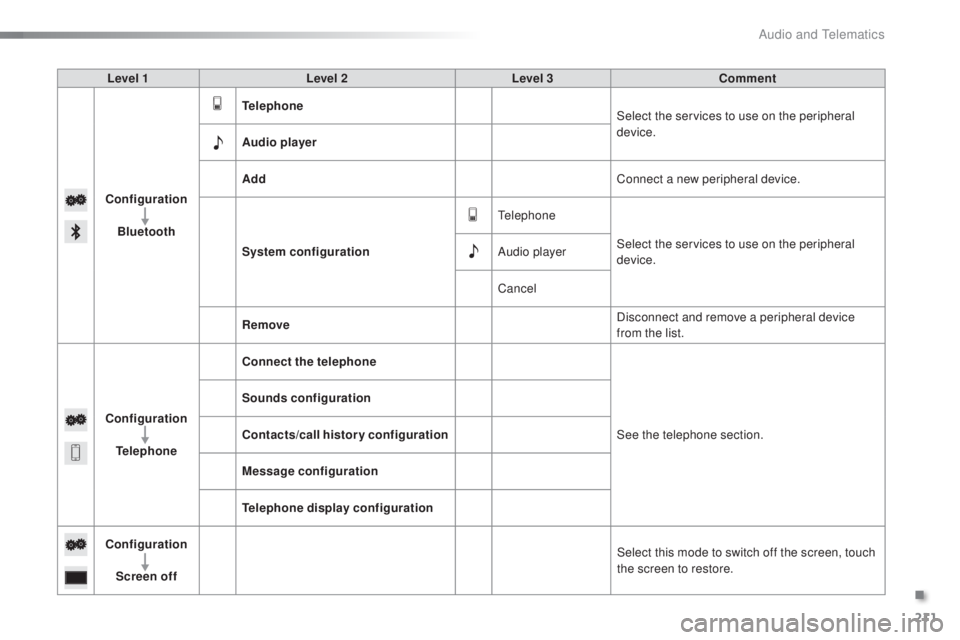
Configuration Bluetooth
tel
ephone Select the services to use on the peripheral
device.
Audio player
Add Connect a new peripheral device.
System configuration
te
lephoneSelect the services to use on the peripheral
device.
Audio player
Cancel
Remove Disconnect and remove a peripheral device
from the list.
Configuration
tel
ephone Connect the telephone
See the telephone section.
Sounds configuration
Contacts/call history configuration
Message configuration
te
lephone display configuration
Configuration Screen off Select this mode to switch off the screen, touch
the screen to restore.
.
Audio and telematics
Page 215 of 268

213
108_en_Chap10a_Autoradio-toyota-tactile-1_ed01-2016
Download the "AppinCar®"
smartphone application available
from the App Store
®.th
e download of the application
must be done with the vehicle
stationary .
Press on "Connection " in the
system.
During the procedure, a page
showing the terms and conditions for
use is displayed.
Accept to start and end the
connection. Press on " Smartphone ".
Once connected you can
use certain applications on
your smartphone as well
as the functions of your
system: " Audio source ",
"
tel
ephone" and configure
the " Display (video) ".
Connect the smartphone to the
uS
B port or JACK auxiliary socket
using a suitable cable, available as an
accessory from Pe ugeOt d ealers.
Start the " AppinCar
®" application
from your smartphone. It is recommended that both
connections be used:
u
S
B /
Apple
® and Bluetooth®.th
e smartphone charges
while connected.
As a safety measure and for ease of
use:
-
c
ertain applications on your
smartphone are not carried over to
the system screen.
-
c
ertain applications operate only
when the vehicle is stationary.
.
Audio and telematics
Page 217 of 268
215
108_en_Chap10a_Autoradio-toyota-tactile-1_ed01-2016
Level 1 Level 2Level 3Comments
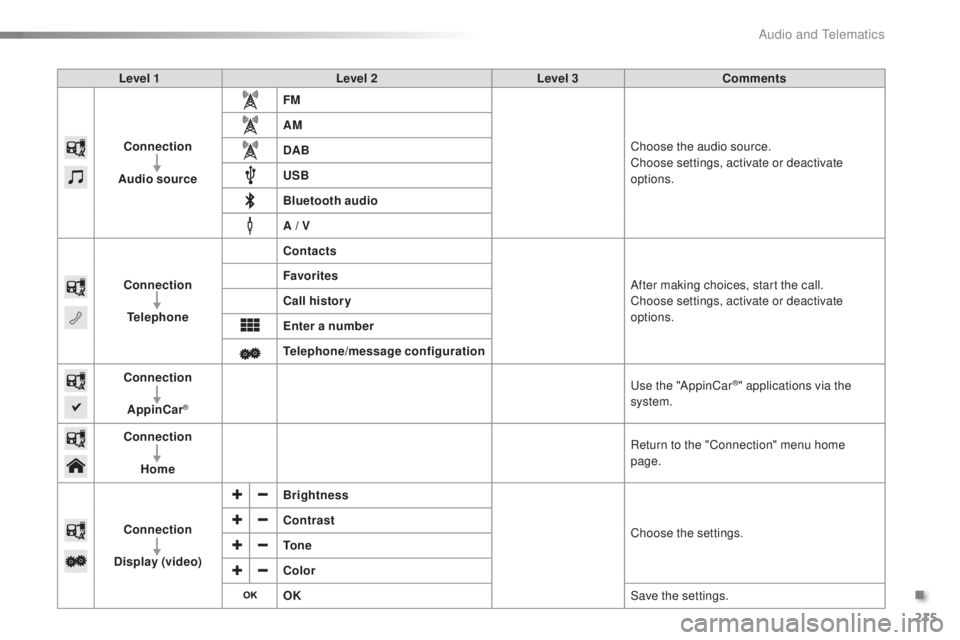
Connection
Audio source FM
Choose the audio source.
Choose settings, activate or deactivate
options.
AM
DAB
u
SB
Bluetooth audio
A / V
Connection
tel
ephone Contacts
After making choices, start the call.
Choose settings, activate or deactivate
options.
Favorites
Call history
en
ter a number
te
lephone/message configuration
Connection
AppinCar
®
use the "AppinCar®" applications via the
system.
Connection Home Return to the "Connection" menu home
page.
Connection
Display (video) Brightness
Choose the settings.
Contrast
to
n e
Color
oK S
ave the settings.
.
Audio and telematics
Page 219 of 268
217
108_en_Chap10a_Autoradio-toyota-tactile-1_ed01-2016
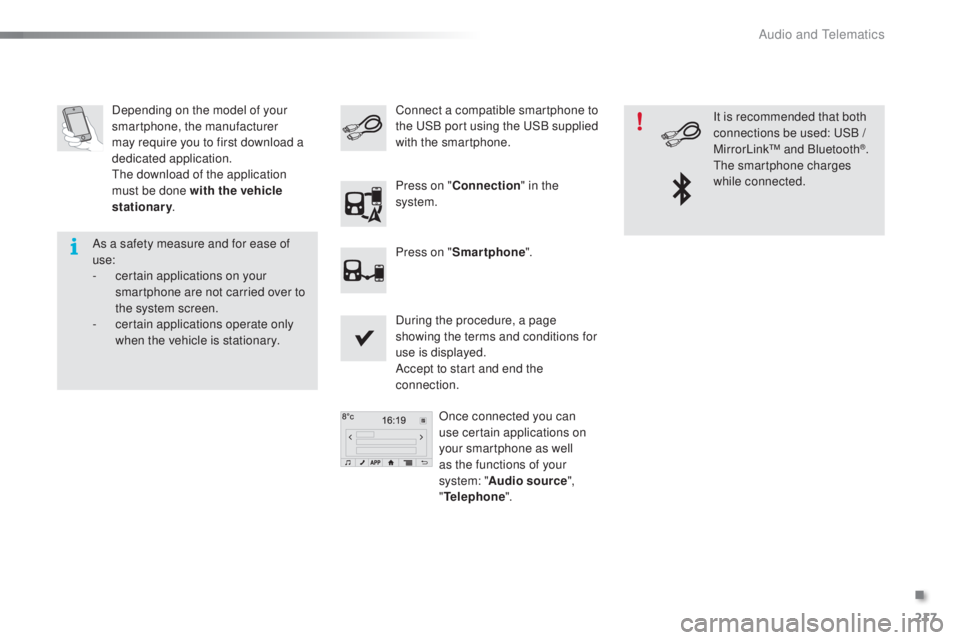
Depending on the model of your
smartphone, the manufacturer
may require you to first download a
dedicated application.
th
e download of the application
must be done with the vehicle
stationary .
During the procedure, a page
showing the terms and conditions for
use is displayed.
Accept to start and end the
connection.Once connected you can
use certain applications on
your smartphone as well
as the functions of your
system: " Audio source ",
"
tel
ephone".
Connect a compatible smartphone to
the
uS B port using the uS B supplied
with the smartphone.
Press on " Connection " in the
system.
Press on " Smartphone ". It is recommended that both
connections be used:
u
S
B /
MirrorLink™ and Bluetooth
®.th
e smartphone charges
while connected.
As a safety measure and for ease of
use:
-
c
ertain applications on your
smartphone are not carried over to
the system screen.
-
c
ertain applications operate only
when the vehicle is stationary.
.
Audio and telematics
Page 221 of 268
219
108_en_Chap10a_Autoradio-toyota-tactile-1_ed01-2016
Level 1 Level 2Level 3Comments
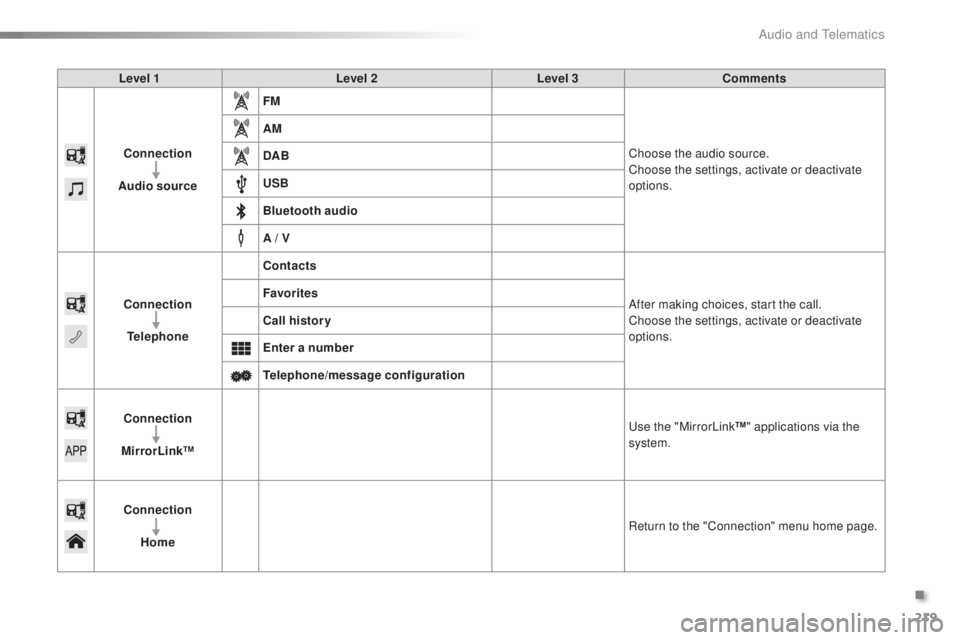
Connection
Audio source FM
Choose the audio source.
Choose the settings, activate or deactivate
options.
AM
DAB
u
SB
Bluetooth audio
A / V
Connection
tel
ephone Contacts
After making choices, start the call.
Choose the settings, activate or deactivate
options.
Favorites
Call history
en
ter a number
te
lephone/message configuration
Connection
MirrorLink™
u
se the "MirrorLink™" applications via the
system.
Connection Home Return to the "Connection" menu home page.
.
Audio and telematics
Page 233 of 268
231
108_en_Chap10a_Autoradio-toyota-tactile-1_ed01-2016
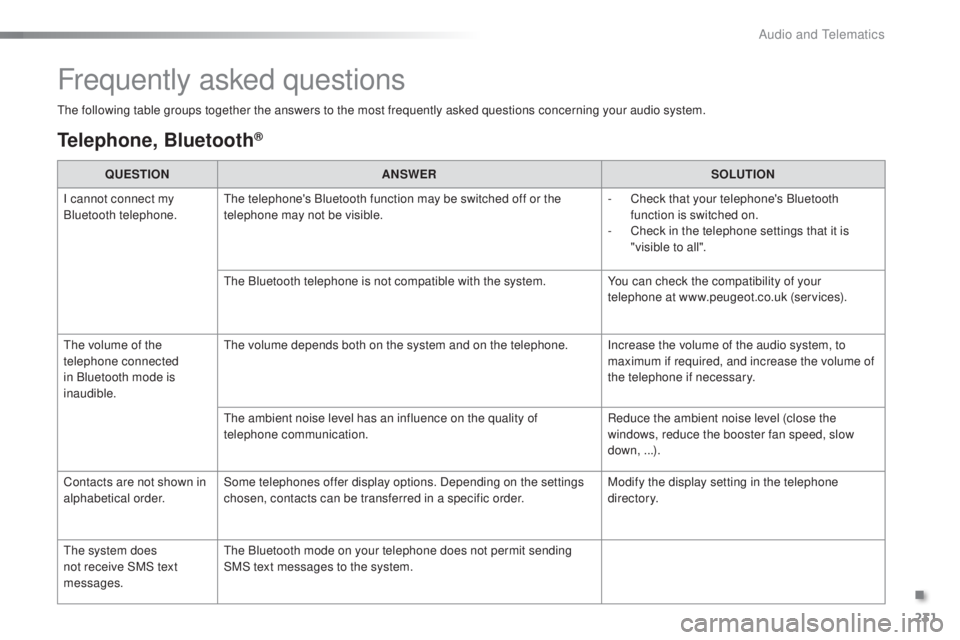
Frequently asked questions
the following table groups together the answers to the most frequently asked questions concerning your audio system.
telephone, Bluetooth®
QueStIoN A NSWeRS oLutIoN
I c
annot connect my
Bluetooth telephone.
th
e telephone's Bluetooth function may be switched off or the
telephone may not be visible. -
C
heck that your telephone's Bluetooth
function is switched on.
-
C
heck in the telephone settings that it is
"visible to all".
th
e Bluetooth telephone is not compatible with the system. You can check the compatibility of your
telephone at www.peugeot.co.uk (services).
th
e volume of the
telephone connected
in Bluetooth mode is
inaudible.
th
e volume depends both on the system and on the telephone. Increase the volume of the audio system, to maximum if required, and increase the volume of
the telephone if necessary.
th
e ambient noise level has an influence on the quality of
telephone communication. Reduce the ambient noise level (close the
windows, reduce the booster fan speed, slow
down, ...).
Contacts are not shown in
alphabetical order. Some telephones offer display options. Depending on the settings
chosen, contacts can be transferred in a specific order. Modify the display setting in the telephone
di r e c to r y.
th
e system does
not receive SMS text
messages.
th
e Bluetooth mode on your telephone does not permit sending
SMS text messages to the system.
.
Audio and telematics
Page 234 of 268
232
108_en_Chap10a_Autoradio-toyota-tactile-1_ed01-2016
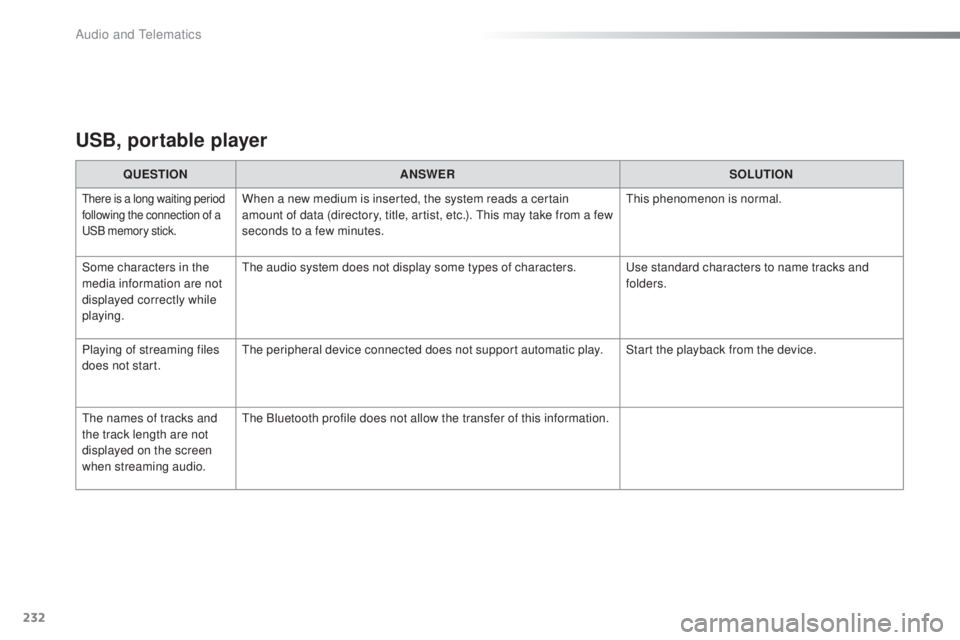
uSB, portable player
QueStIoN A NSWeRS oLutIoN
there is a long waiting period
following the connection of a
uS
B memory stick.When a new medium is inserted, the system reads a certain
amount of data (directory, title, artist, etc.). th is may take from a few
seconds to a few minutes.th is phenomenon is normal.
Some characters in the
media information are not
displayed correctly while
playing.
th
e audio system does not display some types of characters.
u
se standard characters to name tracks and
folders.
Playing of streaming files
does not start.
th
e peripheral device connected does not support automatic play. Start the playback from the device.
th
e names of tracks and
the track length are not
displayed on the screen
when streaming audio.
th
e Bluetooth profile does not allow the transfer of this information.
Audio and telematics