2016 NISSAN TITAN radio
[x] Cancel search: radioPage 276 of 636
![NISSAN TITAN 2016 2.G Owners Manual SXM settings
To view the SXM settings:1. Press the [
] button.
2. Touch the “Settings” key.
3. Touch the “SXM” key.
The signal strength, activation status and other
information are displayed o](/manual-img/5/503/w960_503-275.png "NISSAN TITAN 2016 2.G Owners Manual SXM settings
To view the SXM settings:1. Press the [
] button.
2. Touch the “Settings” key.
3. Touch the “SXM” key.
The signal strength, activation status and other
information are displayed o")
SXM settings
To view the SXM settings:1. Press the [
] button.
2. Touch the “Settings” key.
3. Touch the “SXM” key.
The signal strength, activation status and other
information are displayed on the screen.
FM/AM/SAT radio operation
FM·AM button
Press the FM·AM button to change the band as
follows:
AM →FM1 →FM2 →AM
If another audio source is playing when the
FM·AM button is pressed, the audio source play-
ing will automatically be turned off and the last
radio station played will begin playing.
SXM band select
Pressing the SXM button will change the band as
follows:
SXM1* →SXM2*→ SXM3*→SXM1* (satellite,
if so equipped)
When the SXM button is pressed while the igni-
tion switch is in the ACC or ON position, the
radio will come on at the last station played. The last station played will also come on when
the VOL (volume) control knob is pressed to turn
the radio on.
*When the SXM button is pressed, the satellite
radio mode will be skipped unless an optional
satellite receiver and antenna are installed and a
SiriusXM® Satellite Radio service subscription is
active. Satellite radio is not available in Alaska,
Hawaii and Guam.
If a compact disc is playing when the SXM button
is pressed, the compact disc will automatically be
turned off and the last radio station played will
come on.
While the radio is in SXM mode, the operation
can be controlled through the touch-screen.
Touch the “Channels” key to display a list of
channels. Touch a channel displayed on the list to
change to that channel. Touch the “Categories”
key to display a list of categories. Touch a cat-
egory displayed on the list to display options
within that category.
Tuning with the touch-screen
When in AM or FM mode, the radio can be tuned
using the touch-screen. To bring up the visual
tuner, touch the “Tune” key on the lower right
corner of the screen. A screen appears with a bar
running from low frequencies on the left to high
frequencies on the right. Touch the screen at thelocation of the frequency you wish to tune and the
station will change to that frequency. To return to
the regular radio display screen, touch the “OK”
key.
Tuning with the TUNE knob
The radio can also be manually tuned using the
TUNE knob. When in FM or AM mode, turn the
TUNE knob to the left for lower frequencies or to
the right for higher frequencies. When in SXM
mode, turn the TUNE knob to change the chan-
nel.SEEK/TRACK tuning
When in FM or AM mode, press the
SEEK
button or
TRACK button to tune from low
to high or high to low frequencies and to stop at
the next broadcasting station.
When in SXM mode, press the
SEEK but-
ton or
TRACK button to change the cat-
egory.
Monitor, climate, audio, phone and voice recognition systems4-65
Page 277 of 636
1 to 6 Station memory operations
Twelve stations can be set for the FM band (6 for
FM1, 6 for FM2) and six stations can be set for
the AM band. Eighteen stations can be set for the
SXM band (6 for SXM1, 6 for SXM2 and 6 for
SXM3) .1. Choose the radio band AM, FM1 or FM2 using the FM·AM select button or choose
the radio band SXM1, SXM2 and SXM3
using the SXM button.
2. Tune to the desired station using manual or seek tuning. Press and hold any of the de-
sired station memory buttons (1 – 6) until a
beep sound is heard. 3. The channel indicator will then come on and
the sound will resume. Programming is now
complete.
4. Other buttons can be set in the same man- ner.
If the battery cable is disconnected or if the fuse
opens, the radio memory will be canceled. In that
case, reset the desired stations.
Presets can also be selected by touching the
desired preset number on the screen.Smart Favorites Preset Setup (if so
equipped):
The Smart Favorites feature allows the user to
designate presets, within the SXM1, SXM2 and
SXM3 bands, as their Smart Favorites. When any
of the Smart Favorite presets are selected, the
current track on that station will play from the
beginning of the song.
To program a Smart Favorite preset:
1. Press the SXM button.
2. Touch the “Setup” key.
LHA2899LHA3085
4-66Monitor, climate, audio, phone and voice recognition systems
Page 279 of 636
REWIND/
FAST
FORWARDTo rewind/ fast forward a
track, hold the
or
seek/track button.
Compact disc (CD) player operation
If the radio is already operating, it automatically
turns off and the compact disc begins to play.
CD button
When the CD button is pressed with the system
off and the compact disc loaded, the system will
turn on and the compact disc will start to play. When the CD button is pressed with a compact
disc loaded and the radio playing, the radio will
automatically be turned off and the compact disc
will start to play.
CD/MP3 display mode
Menu item
CD/MP3 display mode While listening to a CD or an MP3/WMA CD, certain text may be displayed (when a CD encoded with text is
being used) . Depending on how the CD or MP3/WMA CD is encoded, the text is displayed listing the artist,
album and song title. There are other keys displayed on the screen when a CD is playing:
Random Touch the “Random” key to apply a random play pattern to the CD. If an MP3 CD is playing, touching “Ran-
dom” or alternates between Random Folder, and Random All. This text will appear on the display. To cancel
Random mode, touch the “Random” key until the key is no longer highlighted.
Repeat Touch the “Repeat” key to apply a repeat play pattern to the CD. If an MP3 CD is playing, touching “Repeat”
alternates between repeating the current song and repeating the current folder. This text will appear on the
display. To cancel Repeat mode, touch the “Repeat” key until the key is no longer highlighted
Browse Touch the “Browse” key to display the titles on the CD in list format. Touch the title of a song in the list to begin
playing that song. If an MP3 CD is playing, touching the “Browse” key will also list the folders on the disc. Fol-
low the procedure for selecting a song with the touch-screen to choose a folder.
4-68Monitor, climate, audio, phone and voice recognition systems
Page 292 of 636
●A new disc may be rough on the inner and
outer edges. Remove the rough edges by
rubbing the inner and outer edges with the
side of a pen or pencil as illustrated.
STEERING WHEEL SWITCH FOR
AUDIO CONTROL
The audio system can be operated using the
controls on the steering wheel.
1. SOURCE switch
2. Menu control switch/ENTER button
3.
switches
4. Volume control switch
SOURCE switch
With the ignition switch in the ACC or ON posi-
tion, push the SOURCE switch to turn the audio
system on.
Push the SOURCE switch to change the mode in
the following sequence:
AM →FM1 →FM2 →SXM1 (satellite radio, if so
equipped) →SXM2 (satellite radio, if so equip-
ped)→SXM3 (satellite radio, if so equipped) →
CD* →USB/iPod®*→ Bluetooth® Audio* →Au-
dio App*→ AUX*→AM.
* These modes are only available when compat-
ible media storage is inserted into the device or
connected to the system.
Volume control switch
Push the volume control switch to increase or
decrease the volume.
Menu control switch/ENTER button
While the display is showing a map or audio
screen, tilt the Menu Control switch upward or
downward to select a station, track, CD or folder.
For most audio sources, tilting the switch
up/down for more than 1.5 seconds provides a
different function than a tilting up/down for less
than 1.5 seconds.
LHA3812
Monitor, climate, audio, phone and voice recognition systems4-81
Page 308 of 636
DVD–A button
Press this button to transmit the remote control
codes and functions to operate monitor A.
GENERAL OPERATING
INSTRUCTIONS
Turning the monitor ON or OFF
1. Press the POWER button on the front panelor the remote control to turn the monitor on
or off. When powered on, the front panel
controls will illuminate.
2. After the monitor has been turned on and is displaying a picture, adjust the viewing angle
by pivoting the screen to optimize the picture
quality.
3. Remember to turn the monitor off and return the LCD monitor to the fully closed (upright)
position when not in use.
Listening through vehicle speakers
Press the AUX button on the factory radio and
toggle through AUX screens to select VTRF —
Jack to listen to the audio from monitor A.
Sharing sources between Monitor A
and Monitor B
The source button on your monitor unit or remote
control allows viewing monitor A video on moni-
tor B and vice versa. Press the source button to
cycle through available video sources.
Disc/DVD Basic Operation
To get the most use out of each disc, make sure
you read this section completely.
For additional information, refer to “CD care and
cleaning” in this section.
Regional coding
Both the DVD player and discs are coded by
region. These regional codes must match in order
for the disc to play. The system is preset to the
region code designated for your area by the DVD
Copy Control Association. Other regions may not
be played in this system.
Supported Disc Types
● DVD-Video: DVD contains video
● DVD +/- R: DVD contains video
● CD-DA: CD contains audio
● CD-Video: CD contains video
● CD-R/+RW: CD contains audio Unsupported Disc Types
Before you load a disc, make sure that it is
compatible with the player. Note that the follow-
ing disc CANNOT be used with this system:
Optical disc- CD-1, CD-ROM, and DVD-ROM
Mini disc- CDG (audio only, not graphics) , and
Blu-ray (list is not all inclusive) .
Loading and Playing Discs
Press the POWER button to turn the monitor on.
Insert the disc about halfway into the disc com-
partment slot, with the disc’s label facing the rear
of the vehicle. Do NOT insert the disc at an angle.
The Disc must be inserted straight into the player.
The disc will load automatically and begin to play.
Some discs may start at the root menu, where
playback must be selected to start a movie. De-
pending on the disc and playback location on the
disc, a “
” icon may be displayed in the upper-
left hand corner of the screen indicating that
playback is not possible during certain times.
Monitor, climate, audio, phone and voice recognition systems4-97
Page 322 of 636
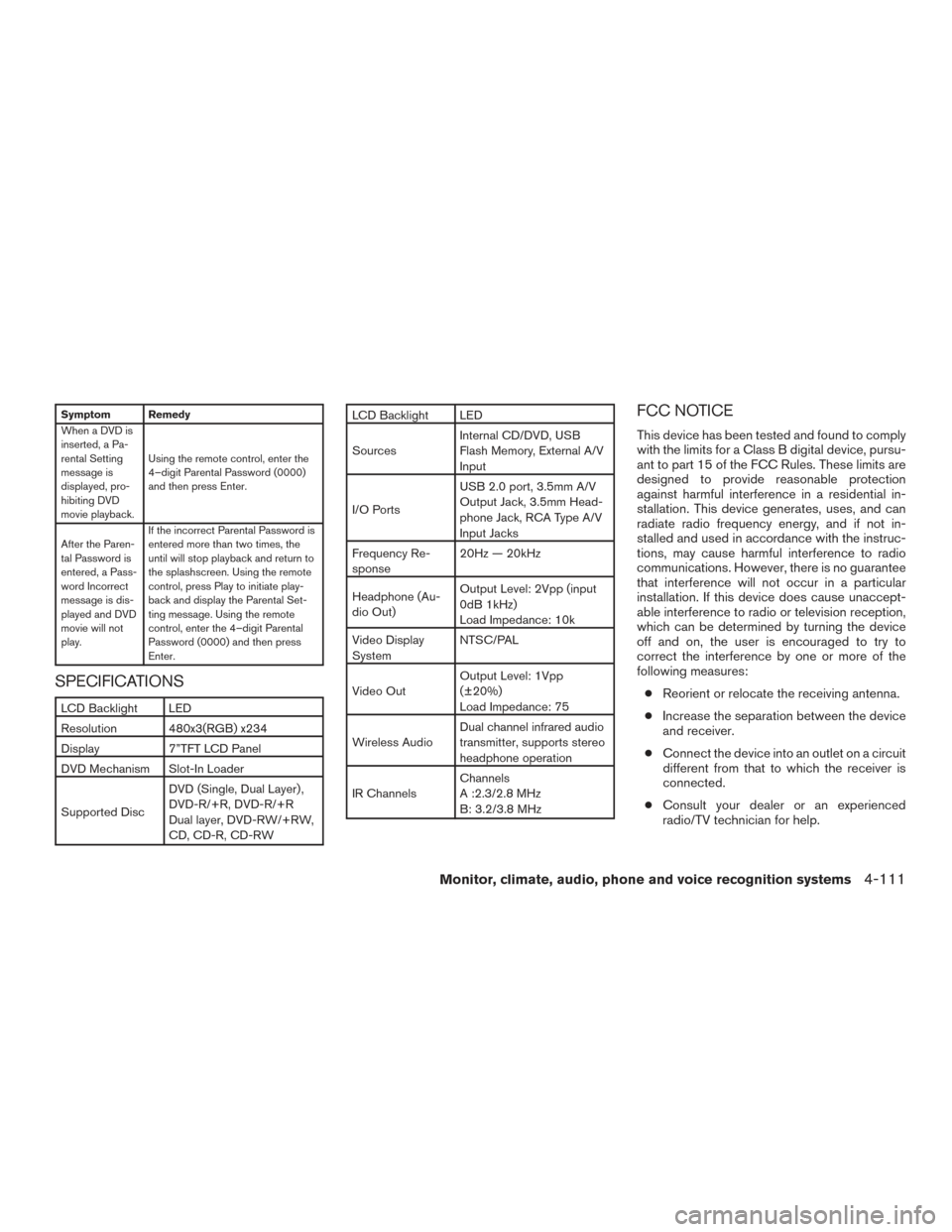
Symptom Remedy
When a DVD is
inserted, a Pa-
rental Setting
message is
displayed, pro-
hibiting DVD
movie playback.Using the remote control, enter the
4–digit Parental Password (0000)
and then press Enter.
After the Paren-
tal Password is
entered, a Pass-
word Incorrect
message is dis-
played and DVD
movie will not
play. If the incorrect Parental Password is
entered more than two times, the
until will stop playback and return to
the splashscreen. Using the remote
control, press Play to initiate play-
back and display the Parental Set-
ting message. Using the remote
control, enter the 4–digit Parental
Password (0000) and then press
Enter.
SPECIFICATIONS
LCD Backlight LED
Resolution 480x3(RGB) x234
Display 7”TFT LCD Panel
DVD Mechanism Slot-In Loader
Supported Disc
DVD (Single, Dual Layer) ,
DVD-R/+R, DVD-R/+R
Dual layer, DVD-RW/+RW,
CD, CD-R, CD-RW
LCD Backlight LED
Sources
Internal CD/DVD, USB
Flash Memory, External A/V
Input
I/O Ports USB 2.0 port, 3.5mm A/V
Output Jack, 3.5mm Head-
phone Jack, RCA Type A/V
Input Jacks
Frequency Re-
sponse 20Hz — 20kHz
Headphone (Au-
dio Out) Output Level: 2Vpp (input
0dB 1kHz)
Load Impedance: 10k
Video Display
System NTSC/PAL
Video Out Output Level: 1Vpp
(±20%)
Load Impedance: 75
Wireless Audio Dual channel infrared audio
transmitter, supports stereo
headphone operation
IR Channels Channels
A :2.3/2.8 MHz
B: 3.2/3.8 MHzFCC NOTICE
This device has been tested and found to comply
with the limits for a Class B digital device, pursu-
ant to part 15 of the FCC Rules. These limits are
designed to provide reasonable protection
against harmful interference in a residential in-
stallation. This device generates, uses, and can
radiate radio frequency energy, and if not in-
stalled and used in accordance with the instruc-
tions, may cause harmful interference to radio
communications. However, there is no guarantee
that interference will not occur in a particular
installation. If this device does cause unaccept-
able interference to radio or television reception,
which can be determined by turning the device
off and on, the user is encouraged to try to
correct the interference by one or more of the
following measures:
● Reorient or relocate the receiving antenna.
● Increase the separation between the device
and receiver.
● Connect the device into an outlet on a circuit
different from that to which the receiver is
connected.
● Consult your dealer or an experienced
radio/TV technician for help.
Monitor, climate, audio, phone and voice recognition systems4-111
Page 323 of 636
FCC WARNING
WARNING
●To assure continued FCC compliance,
the user must use the provided
grounded power supply cord and the
shielded video interface cable with
bonded ferrite cores.
● Any unauthorized change or modifica-
tions to this device would void the us-
er’s authority to operate this device.
ITE NOTICE
This Class B digital apparatus complies with
Canadian ICES-003.
This device complies with Industry Canada
licence-exempt RSS standard(s) . Operation is
subject to the following two conditions: (1) this
device may not cause interference, and (2) this
device must accept any interference, including
interference that may cause undesired operation
of the device.
This device and its antenna(s) must not be co-
located or operation in conjunction with any other
antenna or transmitter. Under Industry Canada regulations, this radio
transmitter may only operate using an antenna or
a type and maximum (or lesser) gain approved for
the transmitter by Industry Canada. To reduce
potential radio interference to other users, the
antenna type and its gain should be so chosen
that the equivalent isotropically radiated power
(e.i.r.p) is not more than that necessary for suc-
cessful communication.
WEEE NOTICE
Disposal of Old Electrical & Electronic Equip-
ment (Applicable in the European Union and
other European countries with separate collec-
tion systems) .
This symbol on the product or on its packaging
indicates that the device shall not be treated as
household waste. Instead, it shall be handed over
to the applicable collection point for the recycling
of electrical and electronic equipment By ensur-
ing this device is disposed of correctly, you will
help prevent potential negative consequences
for the environment and human health, which
could otherwise be caused by inappropriate
LHA3869
4-112Monitor, climate, audio, phone and voice recognition systems
Page 324 of 636
waste handling of this device. The recycling of
material will help to conserve natural resources.
For additional information about recycling of this
device, please contact your local city office, your
household waste disposal service or the shop
where you purchased the device. Applicable ac-
cessory: remote control.
MACROVISION NOTICE
This product incorporates copyright protection
technology that is protected by method claims of
certain U.S. patents and other intellectual prop-
erty rights owned by Macrovision Corporation
and other rights owners. Use of this copyright
protection technology must be authorized by
Macrovision Corporation, and is intended for
home and other limited viewing used only unless
otherwise authorized by Macrovision
Corporation. Reverse engineering or disassem-
bly is prohibited.
DOLBY DIGITAL
Manufactured under license from Dolby Labora-
tories.
Dolby and the double-D symbol are registered
trademarks of Dolby Laboratories.When installing a CB, ham radio or car phone in
your vehicle, be sure to observe the following
precautions; otherwise, the new equipment may
adversely affect the engine control system and
other electronic parts.
WARNING
●
A cellular phone should not be used for
any purpose while driving so full atten-
tion may be given to vehicle operation.
Some jurisdictions prohibit the use of
cellular phones while driving.
● If you must make a call while your ve-
hicle is in motion, the hands free cellu-
lar phone operational mode (if so
equipped) is highly recommended. Ex-
ercise extreme caution at all times so
full attention may be given to vehicle
operation.
● If you are unable to devote full attention
to vehicle operation while talking on
the phone, pull off the road to a safe
location and stop your vehicle.
LHA3870
CAR PHONE OR CB RADIO
Monitor, climate, audio, phone and voice recognition systems4-113