2016 NISSAN SENTRA emergency key
[x] Cancel search: emergency keyPage 98 of 478
●If the light illuminates while driving,
avoid sudden steering maneuvers or
abrupt braking, reduce vehicle speed,
pull off the road to a safe location and
stop the vehicle as soon as possible.
Driving with under-inflated tires may
permanently damage the tires and in-
crease the likelihood of tire failure. Se-
rious vehicle damage could occur and
may lead to an accident and could result
in serious personal injury or death.
Check the tire pressure for all four tires.
Adjust the tire pressure to the recom-
mended COLD tire pressure shown on
the Tire and Loading Information label
located in the driver’s door opening to
turn the low tire pressure warning light
OFF. If the light still comes on while
driving after adjusting the tire pressure,
a tire may be flat. If you have a flat tire,
replace it with a spare tire as soon as
possible.
● When a spare tire is mounted or a wheel
is replaced the TPMS will not function
and the low tire pressure warning light
will flash for approximately 1 minute.
The light will remain on after 1 minute.
Contact a NISSAN dealer as soon as
possible for tire replacement and/or
system resetting. ●
Replacing tires with those not originally
specified by NISSAN could affect the
proper operation of the TPMS.
CAUTION
● The TPMS is not a substitute for the
regular tire pressure check. Be sure to
check the tire pressure regularly.
● If the vehicle is being driven at speeds
of less than 16 mph (25 km/h), the
TPMS may not operate correctly.
● Be sure to install the specified size of
tires to the four wheels correctly.
Low windshield-washer fluid
warning light (if so equipped)
This light comes on when the windshield-washer
fluid is at a low level. Add windshield-washer fluid
as necessary. For additional information, refer to
“Windshield-washer fluid” in the “Maintenance
and do-it-yourself” section of this manual.
Master warning light
When the ignition switch is in the ON position,
the master warning light illuminates if any of the
following are displayed on the vehicle information
display:
● No key warning
● Low washer fluid warning
● Parking brake release warning
● Door open warning
● Loose fuel cap warning
● Check tire pressure warning
● Emergency brake warning
● Lock warning
● I-Key system warning
● Headlight system warning
● ITS warning
● Shipping mode warning
● Low oil pressure warning
For additional information, refer to “Vehicle infor-
mation display” in this section.
Instruments and controls2-19
Page 287 of 478
5 Starting and driving
Precautions when starting and driving................5-2
Exhaust gas (carbon monoxide) ..................5-2
Three-way catalyst ..............................5-2
Tire Pressure Monitoring System (TPMS) ..........5-3
Avoiding collision and rollover . . ..................5-6
Off-road recovery ...............................5-7
Rapid air pressure loss ..........................5-7
Drinking alcohol/drugs and driving ................5-8
Ignition switch (if so equipped) ......................5-8
Continuously Variable Transmission (CVT)
(if so equipped) ................................5-8
Manual transmission (if so equipped) .............5-9
Ignition switch positions .........................5-9
NISSAN Vehicle Immobilizer System .............5-10
Push-Button Ignition Switch (if so equipped) ........5-10
Operating range ............................... 5-11
Push-button ignition switch positions . . . .........5-11
Emergency engine shut off .....................5-12
NISSAN Intelligent Key® battery discharge .......5-12
NISSAN Vehicle Immobilizer System .............5-13
Before starting the engine ......................... 5-13
Starting the engine (models without NISSAN
Intelligent Key® system) ........................... 5-14Starting the engine (models with NISSAN
Intelligent Key® system)
........................... 5-15
Driving the vehicle ................................ 5-16
Continuously Variable Transmission (CVT)
(if so equipped) ............................... 5-16
Manual transmission (if so equipped) ............5-19
Parking brake .................................... 5-21
SPORT mode switch ............................. 5-22
ECO mode switch ................................ 5-22
Shift lever indicator (Manual transmission
only) ......................................... 5-23
Blind Spot Warning (BSW) (if so equipped) .........5-23
BSW system operation ........................ 5-25
How to enable/disable the BSW system .........5-27
BSW system limitations ........................ 5-28
BSW driving situations ......................... 5-29
System temporarily unavailable ..................5-32
System maintenance ........................... 5-33
Rear Cross Traffic Alert (RCTA) (if so equipped) .....5-34
RCT
A system operation ........................ 5-35
How to enable/disable the RCTA system .........5-38
RCTA system limitations ........................ 5-39
System temporarily unavailable ..................5-42
System maintenance ........................... 5-42
Page 297 of 478
NISSAN VEHICLE IMMOBILIZER
SYSTEM
The NISSAN Vehicle Immobilizer System will not
allow the engine to start without the use of the
registered key.
If the engine fails to start using a registered key
(for example, when interference is caused by
another registered key, an automated toll road
device or automatic payment device on the key
ring) , restart the engine using the following pro-
cedure:1. Leave the ignition switch in the ON position for approximately 5 seconds.
2. Place the ignition switch in the OFF or LOCK position, and wait approximately
10 seconds.
3. Repeat steps 1 and 2.
4. Restart the engine while holding the device (which may have caused the interference)
separate from the registered key.
If the no start condition re-occurs, NISSAN rec-
ommends placing the registered key on a sepa-
rate key ring to avoid interference from other
devices.
WARNING
Do not operate the push-button ignition
switch while driving the vehicle except in
an emergency. (The engine will stop when
the ignition switch is pushed 3 consecu-
tive times in quick succession or the igni-
tion switch is pushed and held for more
than 2 seconds.) If the engine stops while
the vehicle is being driven, this could lead
to a crash and serious injury. When the ignition switch is pushed without de-
pressing the brake pedal or the clutch pedal
(MT) , the ignition switch position will illuminate as
follows:
Push center
● once to change to ACC.
● two times to change to ON.
● three times to return to OFF.
The ignition switch will automatically return to the
LOCK position when any door is either opened or
closed with the switch in the OFF position.
The ignition lock is designed so that the ignition
switch position cannot be switched to OFF until
the shift lever is moved to the P (Park) position or
N (Neutral) position (MT) .
When the ignition switch cannot be pushed to-
ward the OFF position, proceed as follows: 1. Move the shift lever into the P (Park) position or N (Neutral) position (MT) .
2. Push the ignition switch. The ignition switch position will change to the ON position.
3. Push the ignition switch again to the OFF position.
LSD2014
PUSH-BUTTON IGNITION SWITCH (if
so equipped)
5-10Starting and driving
Page 299 of 478
ACC (Accessories)
This position activates electrical accessories,
such as the radio, when the engine is not running.
ACC has a battery saver feature that will turn the
ignition switch to the OFF position after a period
of time under the following conditions:● all doors are closed.
● shift lever is in P (Park) .
ON (Normal operating position)
This position turns on the ignition system and
electrical accessories.
ON has a battery saver feature that will turn the
ignition switch to the OFF position, if the vehicle
is not running, after some time under the follow-
ing conditions:
The battery saver feature will be cancelled if any
of the following occur: ● any door is opened.
● shift lever is moved out of the P (Park) posi-
tion.
● ignition switch changes position.CAUTION
Do not leave the vehicle with the ignition
switch in ACC or ON positions when the
engine is not running for an extended pe-
riod. This can discharge the battery.
OFF
The ignition switch is in the OFF position when
the engine is turned off using the ignition switch.
No lights will illuminate on the ignition switch.
EMERGENCY ENGINE SHUT OFF
To shut off the engine in an emergency situation
while driving, perform the following procedure:
– Rapidly push the push-button ignition switch three consecutive times in less than 1.5 sec-
onds, or
– Push and hold the push-button ignition switch for more than 2 seconds.
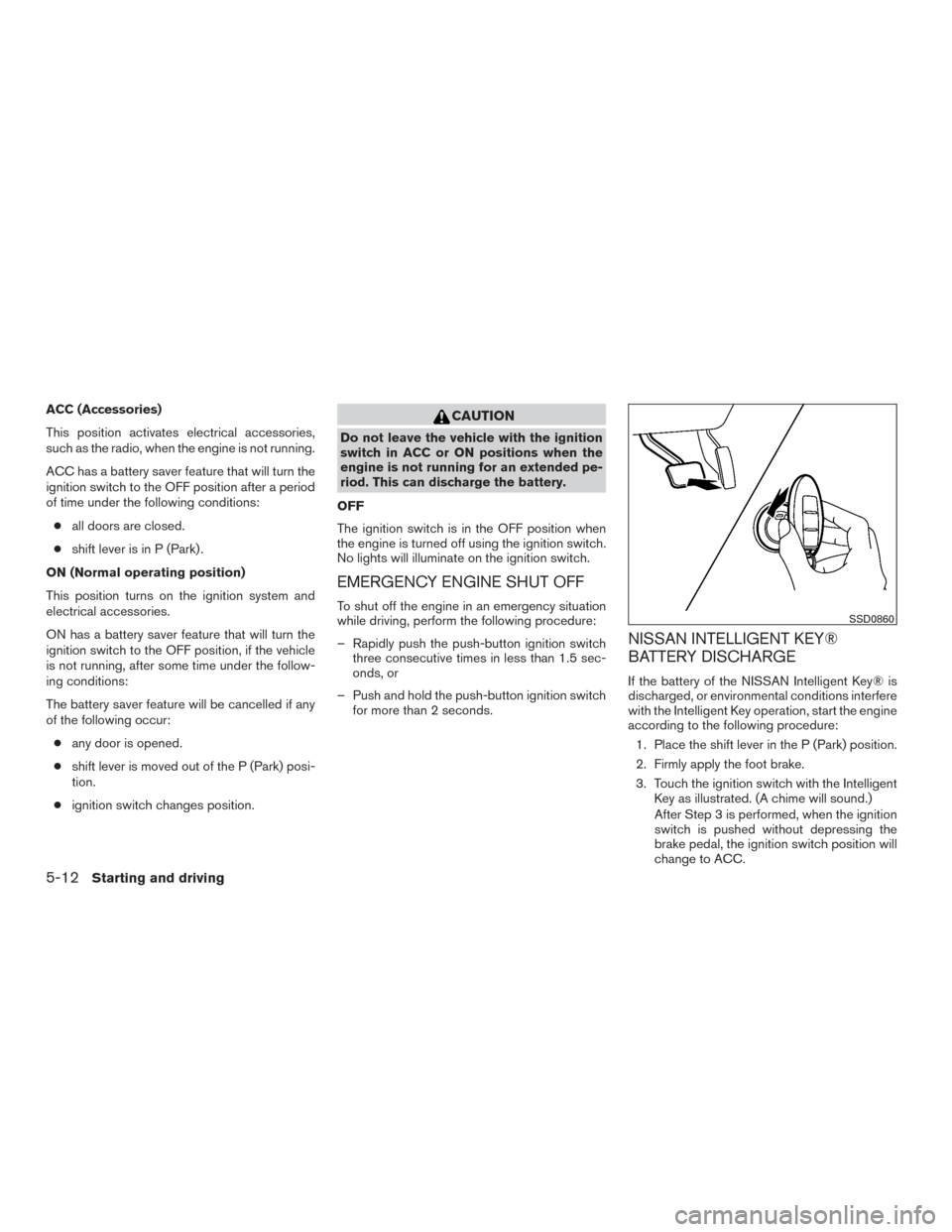
NISSAN INTELLIGENT KEY®
BATTERY DISCHARGE
If the battery of the NISSAN Intelligent Key® is
discharged, or environmental conditions interfere
with the Intelligent Key operation, start the engine
according to the following procedure:
1. Place the shift lever in the P (Park) position.
2. Firmly apply the foot brake.
3. Touch the ignition switch with the Intelligent Key as illustrated. (A chime will sound.)
After Step 3 is performed, when the ignition
switch is pushed without depressing the
brake pedal, the ignition switch position will
change to ACC.
SSD0860
5-12Starting and driving
Page 303 of 478
CONTINUOUSLY VARIABLE
TRANSMISSION (CVT) (if so
equipped)
WARNING
●Do not depress the accelerator pedal
while shifting from P (Park) or N (Neu-
tral) to R (Reverse) , D (Drive) or L (Low) .
Always depress the brake pedal until
shifting is completed. Failure to do so
could cause you to lose control and
have an accident.
● Cold engine idle speed is high, so use
caution when shifting into a forward or
reverse gear before the engine has
warmed up.
● Do not downshift abruptly on slippery
roads. This may cause a loss of control.
● Never shift to either the P (Park) or R
(Reverse) position while the vehicle is
moving forward and P (Park) or D
(Drive) position while the vehicle is re-
versing. This could cause an accident or
damage the transmission.
CAUTION
● Except in an emergency, do not shift to
the N (Neutral) position while driving.
Coasting with the transmission in the N
(Neutral) position may cause serious
damage to the transmission.
● To avoid possible damage to your ve-
hicle, when stopping the vehicle on an
uphill grade, do not hold the vehicle by
depressing the accelerator pedal.
The CVT in your vehicle is electronically con-
trolled to produce maximum power and smooth
operation.
The recommended operating procedures for this
transmission are shown on the following pages.
Follow these procedures for maximum vehicle
performance and driving enjoyment.
NOTE:
Engine power may be automatically re-
duced to protect the CVT if the engine
speed increases quickly when driving on
slippery roads or while being tested on
some dynamometers.
Starting the vehicle
1. After starting the engine, fully depress the foot brake pedal before moving the shift
lever out of the P (Park) position.
2. Keep the foot brake pedal depressed and move the shift lever into a driving gear.
3. Release the foot brake, then gradually start the vehicle in motion.
4. Stop the vehicle completely before shifting the shift lever to the P (Park) position.
The CVT is designed so the foot brake
pedal MUST be depressed before shifting
from P (Park) to any drive position while
the ignition switch is in the ON position.
The shift lever cannot be moved out of P
(Park) and into any of the other gear posi-
tions if the ignition switch is turned to the
LOCK or OFF position or if the key is re-
moved.
DRIVING THE VEHICLE
5-16Starting and driving