2016 NISSAN SENTRA brake
[x] Cancel search: brakePage 340 of 478
![NISSAN SENTRA 2016 B17 / 7.G Owners Manual Distance Approximate distance at60 mph (100 km/h) [ft (m)]
1. Long 200 (60)
2. Middle 150 (45)
3. Short 90 (30)
● The distance to the vehicle ahead will
change according to the vehicle speed. The
hi](/manual-img/5/501/w960_501-339.png "NISSAN SENTRA 2016 B17 / 7.G Owners Manual Distance Approximate distance at60 mph (100 km/h) [ft (m)]
1. Long 200 (60)
2. Middle 150 (45)
3. Short 90 (30)
● The distance to the vehicle ahead will
change according to the vehicle speed. The
hi")
Distance Approximate distance at60 mph (100 km/h) [ft (m)]
1. Long 200 (60)
2. Middle 150 (45)
3. Short 90 (30)
● The distance to the vehicle ahead will
change according to the vehicle speed. The
higher the vehicle speed, the longer the dis-
tance.
● If the engine is stopped, the set distance
becomes “long”. (Each time the engine is
started, the initial setting becomes “long”) .
Approach warning
If your vehicle comes closer to the vehicle ahead
due to rapid deceleration of that vehicle or if
another vehicle cuts in, the system warns the
driver with the chime and ICC system display.
Decelerate by depressing the brake pedal to
maintain a safe vehicle distance if:
● The chime sounds.
● The vehicle ahead detection indicator blinks.
The warning chime may not sound in some cases
when there is a short distance between vehicles.
Some examples are: ● When the vehicles are traveling at the same
speed and the distance between vehicles is
not changing.
● When the vehicle ahead is traveling faster
and the distance between vehicles is in-
creasing.
● When a vehicle cuts in near your vehicle.
The warning chime will not sound when: ● The vehicle approaches other vehicles that
are parked or moving slowly.
● The accelerator pedal is depressed, overrid-
ing the system. NOTE:
The approach warning chime may sound
and the system display may blink when the
ICC sensor detects objects on the side of
the vehicle or on the side of the road. This
may cause the ICC system to decelerate or
accelerate the vehicle. The ICC sensor may
detect these objects when the vehicle is
driven on winding roads, narrow roads, hilly
roads, or when entering or exiting a curve.
In these cases you will have to manually
control the proper distance ahead of your
vehicle.
Also, the sensor sensitivity can be affected by
vehicle operation (steering maneuver or driving
position in the lane) or traffic or vehicle condition
(for example, if a vehicle is being driven with some
damage) .
LSD2636
Starting and driving5-53
Page 341 of 478
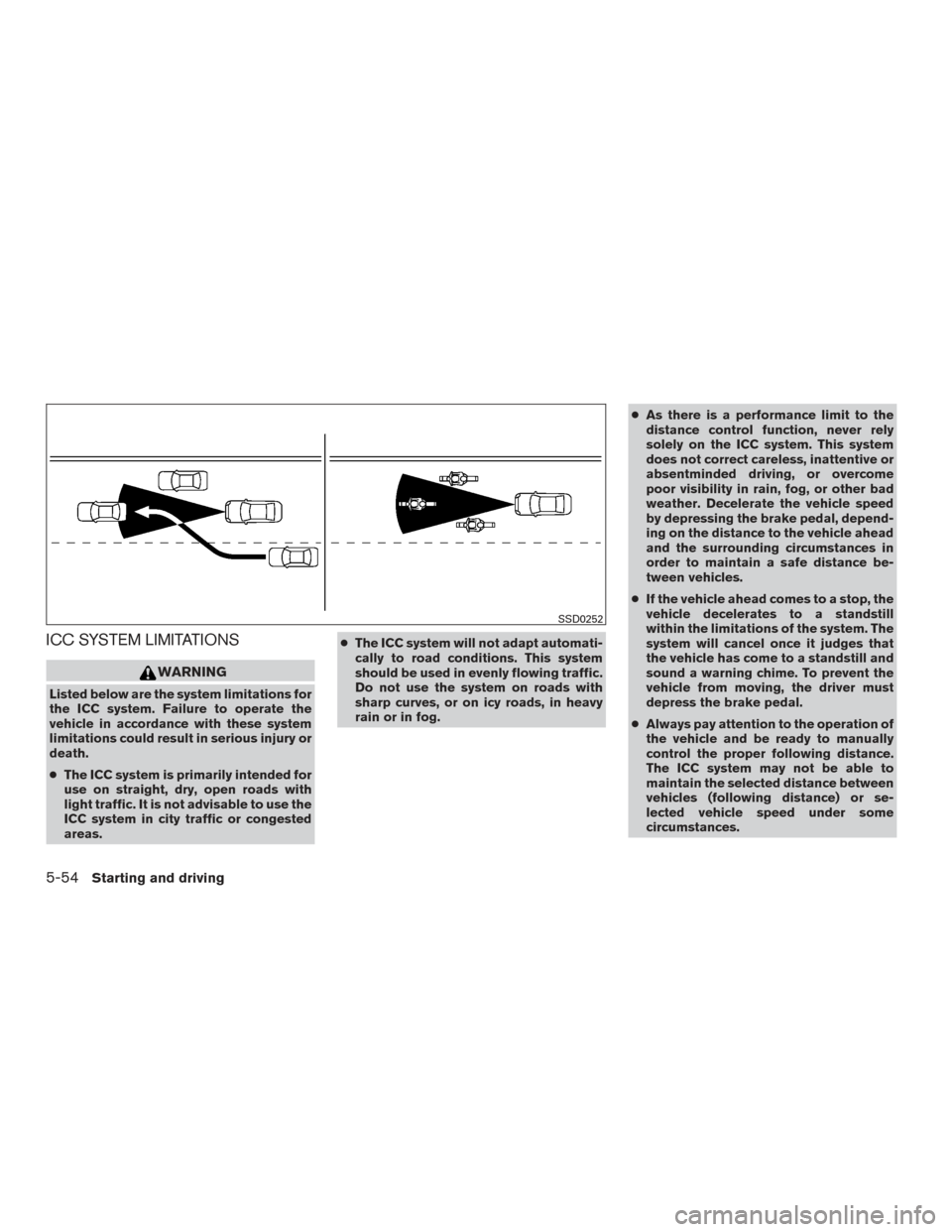
ICC SYSTEM LIMITATIONS
WARNING
Listed below are the system limitations for
the ICC system. Failure to operate the
vehicle in accordance with these system
limitations could result in serious injury or
death.
●The ICC system is primarily intended for
use on straight, dry, open roads with
light traffic. It is not advisable to use the
ICC system in city traffic or congested
areas. ●
The ICC system will not adapt automati-
cally to road conditions. This system
should be used in evenly flowing traffic.
Do not use the system on roads with
sharp curves, or on icy roads, in heavy
rain or in fog. ●
As there is a performance limit to the
distance control function, never rely
solely on the ICC system. This system
does not correct careless, inattentive or
absentminded driving, or overcome
poor visibility in rain, fog, or other bad
weather. Decelerate the vehicle speed
by depressing the brake pedal, depend-
ing on the distance to the vehicle ahead
and the surrounding circumstances in
order to maintain a safe distance be-
tween vehicles.
● If the vehicle ahead comes to a stop, the
vehicle decelerates to a standstill
within the limitations of the system. The
system will cancel once it judges that
the vehicle has come to a standstill and
sound a warning chime. To prevent the
vehicle from moving, the driver must
depress the brake pedal.
● Always pay attention to the operation of
the vehicle and be ready to manually
control the proper following distance.
The ICC system may not be able to
maintain the selected distance between
vehicles (following distance) or se-
lected vehicle speed under some
circumstances.
SSD0252
5-54Starting and driving
Page 342 of 478
●The system may not detect the vehicle
in front of you in certain road or weather
conditions. To avoid accidents, never
use the ICC system under the following
conditions:
– On roads where the traffic is heavy or there are sharp curves
– On slippery road surfaces such as on ice or snow, etc.
– During bad weather (rain, fog, snow, etc.)
– When rain, snow or dirt adhere to the bumper around the distance sensor
– On steep downhill roads (the vehicle may go beyond the set vehicle speed
and frequent braking may result in
overheating the brakes)
– On repeated uphill and downhill roads
– When traffic conditions make it diffi- cult to keep a proper distance be-
tween vehicles because of frequent
acceleration or deceleration
– Interference by other radar sources. ●
Do not use the ICC system if you are
towing a trailer. The system may not
detect a vehicle ahead.
● In some road or traffic conditions, a
vehicle or object can unexpectedly
come into the sensor detection zone
and cause automatic braking. Always
stay alert and avoid using the ICC sys-
tem where not recommended in this
warning section.
The radar sensor will not detect the following
objects: ● Stationary and slow moving vehicles
● Pedestrians or objects in the roadway
● Oncoming vehicles in the same lane
● Motorcycles traveling offset in the travel lane
The following are some conditions in which the
sensor cannot properly detect a vehicle ahead
and the system may not operate properly: ● When snow or road spray from traveling
vehicles reduces the sensor’s detection.
● When excessively heavy baggage is loaded
in the rear seat or the trunk of your vehicle. The ICC system is designed to automatically
check the sensor’s operation within the limita-
tions of the system.
The detection zone of the ICC sensor is limited. A
vehicle ahead must be in the detection zone for
the vehicle-to-vehicle distance detection mode
to maintain the selected distance from the vehicle
ahead.
A vehicle ahead may move outside of the detec-
tion zone due to its position within the same lane
of travel. Motorcycles may not be detected in the
same lane ahead if they are traveling offset from
the centerline of the lane. A vehicle that is enter-
ing the lane ahead may not be detected until the
vehicle has completely moved into the lane.
If this occurs, the ICC system may warn you
by blinking the system indicator and
sounding the chime. The driver may have to
manually control the proper distance away
from vehicle traveling ahead.
Starting and driving5-55
Page 344 of 478

SYSTEM TEMPORARILY
UNAVAILABLE
The following are conditions in which the ICC
system may be temporarily unavailable. In these
instances, the ICC system may not cancel and
may not be able to maintain the selected follow-
ing distance from the vehicle ahead.
Condition A
Under the following conditions, the ICC system is
automatically canceled. A chime will sound and
the system will not be able to be set:● When the VDC system is turned off
● When the VDC or ABS operates
● When a vehicle ahead is not detected and
your vehicle is traveling below the speed of
15 mph (24 km/h)
● When the system judges the vehicle is at a
standstill
● When the shift lever is not in the D (Drive) or
L (Low) mode
● When the parking brake is applied
● When a wheel slips
LSD2574
Starting and driving5-57
Page 348 of 478
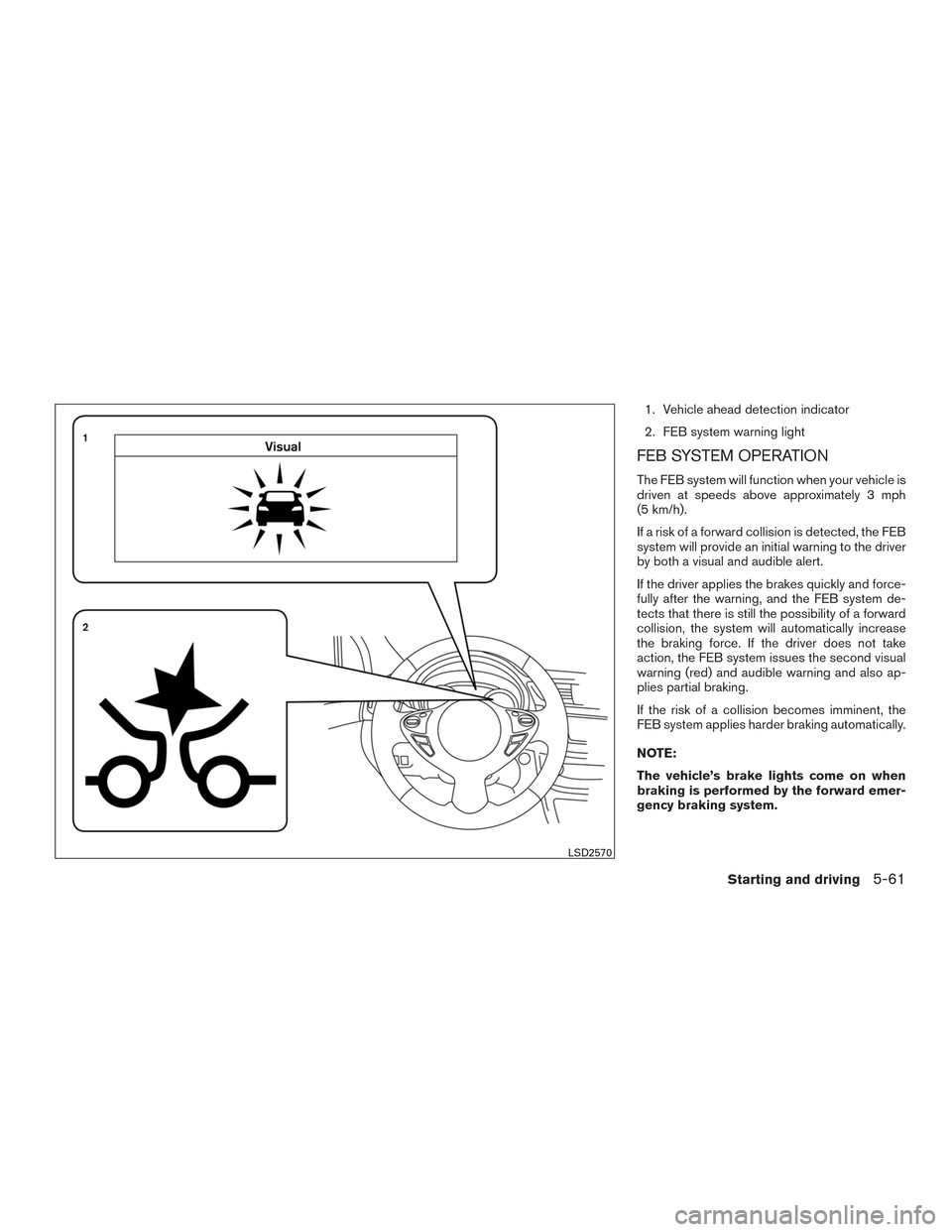
1. Vehicle ahead detection indicator
2. FEB system warning light
FEB SYSTEM OPERATION
The FEB system will function when your vehicle is
driven at speeds above approximately 3 mph
(5 km/h).
If a risk of a forward collision is detected, the FEB
system will provide an initial warning to the driver
by both a visual and audible alert.
If the driver applies the brakes quickly and force-
fully after the warning, and the FEB system de-
tects that there is still the possibility of a forward
collision, the system will automatically increase
the braking force. If the driver does not take
action, the FEB system issues the second visual
warning (red) and audible warning and also ap-
plies partial braking.
If the risk of a collision becomes imminent, the
FEB system applies harder braking automatically.
NOTE:
The vehicle’s brake lights come on when
braking is performed by the forward emer-
gency braking system.
LSD2570
Starting and driving5-61
Page 349 of 478
Depending on vehicle speed and distance to the
vehicle ahead, as well as driving and roadway
conditions, the system may help the driver avoid a
forward collision or may help mitigate the conse-
quences of a collision, should one be unavoid-
able. If the driver is handling the steering wheel,
accelerating or braking, the FEB system will func-
tion later or will not function.
The automatic braking will cease under the fol-
lowing conditions:● When the steering wheel is turned as far as
necessary to avoid a collision.
● When the accelerator pedal is depressed.
● When there is no longer a vehicle detected
ahead.
If the FEB system has stopped the vehicle, the
vehicle will remain at a standstill for approximately
2 seconds before the brakes are released.
LSD2573
5-62Starting and driving
Page 350 of 478
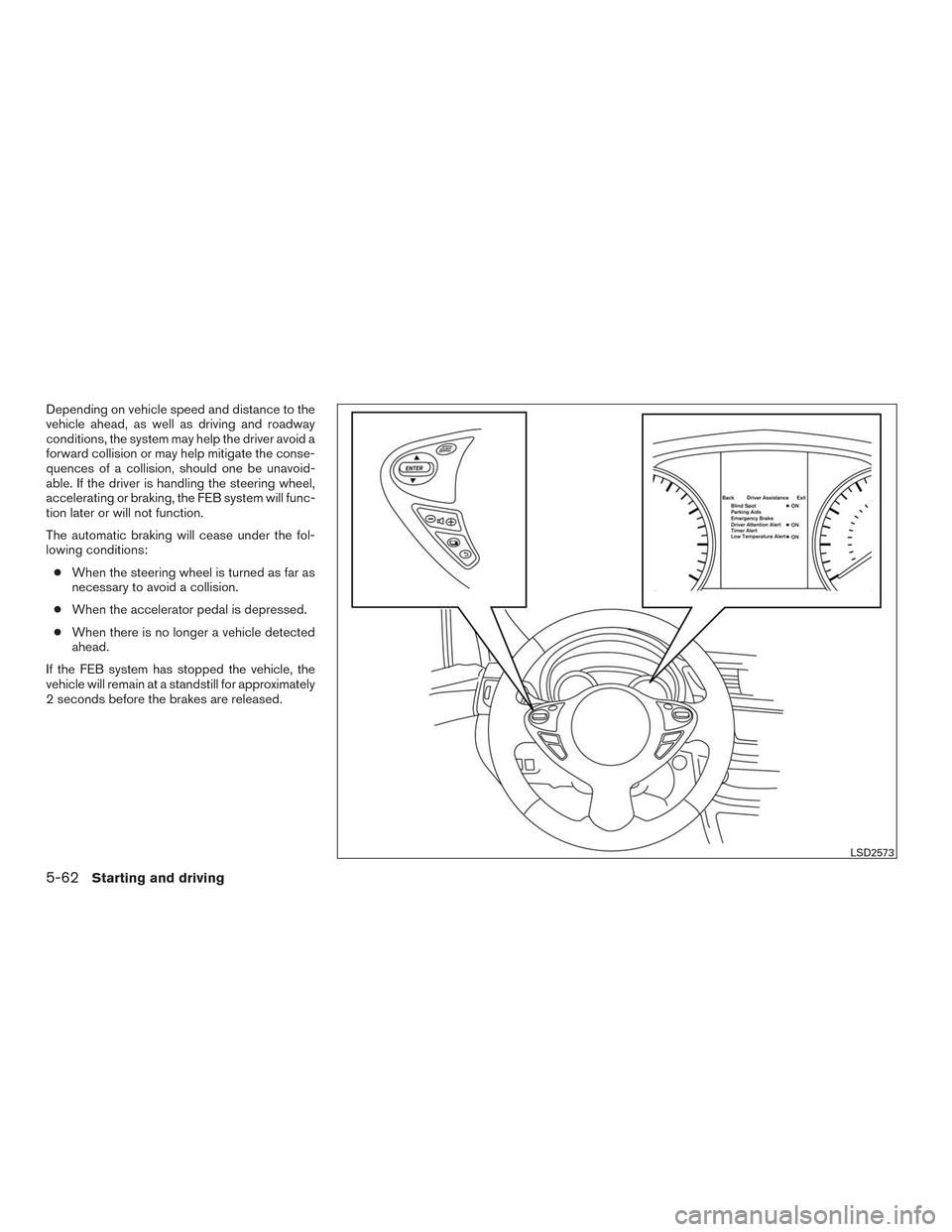
TURNING THE FEB SYSTEM
ON/OFF
Perform the following steps to turn the FEB sys-
tems ON or OFF.1. Press the
button until “Settings” dis-
plays in the vehicle information display. Use
the
button to select “Driver Assis-
tance”. Then press the ENTER button.
2. Select “Driving Aids” and press the ENTER button.
3. Select “Emergency Brake” and press the ENTER button.
When the FEB system is turned off, the FEB
system warning light illuminates.
NOTE:
● The FEB system will be automatically turned
on when the engine is restarted.
FEB SYSTEM LIMITATIONS
WARNING
Listed below are the system limitations for
the FEB system. Failure to operate the
vehicle in accordance with these system
limitations could result in serious injury or
death. ●
The FEB system cannot detect all ve-
hicles under all conditions.
● The radar sensor does not detect the
following objects:
– Pedestrians, animals or obstacles in the roadway.
– Oncoming vehicles.
– Crossing vehicles.
● The radar sensor has some perfor-
mance limitations. If a stationary ve-
hicle is in the vehicles’ path, the FEB
system will not function when the ve-
hicle is driven at speeds over approxi-
mately 50 mph (80 km/h).
● The radar sensor may not detect a ve-
hicle ahead in the following conditions:
– Dirt, ice, snow or other material cov- ering the radar sensor.
– Interference by other radar sources.
– Snow or road spray from traveling vehicles.
– If the vehicle ahead is narrow (e.g. motorcycle) .
– When driving on a steep downhill slope or roads with sharp curves. ●
In some road or traffic conditions, the
FEB system may unexpectedly apply
partial braking. When acceleration is
necessary, continue to depress the ac-
celerator pedal to override the system.
● Braking distances increase on slippery
surfaces.
● The system is designed to automatically
check the sensor’s functionality, within
certain limitations. The system may not
detect some forms of obstructions of
the sensor area such as ice, snow, stick-
ers, etc. In these cases, the system may
not be able to worn the driver properly.
Be sure that you check, clean and clear
the sensor area regularly.
● Excessive noise will interfere with the
warning chime sound, and the chime
may not be heard.
Starting and driving5-63
Page 354 of 478
Follow these easy-to-use Fuel Efficient Driving
Tips to help you achieve the most fuel economy
from your vehicle.1. Use Smooth Accelerator and Brake
Pedal Application
● Avoid rapid starts and stops
● Use smooth, gentle accelerator and
brake application whenever possible
● Maintain constant speed while commut-
ing and coast whenever possible
2. Maintain Constant Speed
● Look ahead to try and anticipate and mini-
mize stops
● Synchronizing your speed with traffic
lights allows you to reduce your number
of stops
● Maintaining a steady speed can minimize
red light stops and improve fuel efficiency
3. Use Air Conditioning (A/C) at Higher
Vehicle Speeds
● Below 40 mph (64 km/h), it is more effi-
cient to open windows to cool the vehicle
due to reduced engine load ●
Above 40 mph (64 km/h), it is more effi-
cient to use A/C to cool the vehicle due to
increased aerodynamic drag
● Recirculating the cool air in the cabin
when the A/C is on reduces cooling load
4. Drive at Economical Speeds and Dis-
tances
● Observing the speed limit and not ex-
ceeding 60 mph (97 km/h) (where legally
allowed) can improve fuel efficiency due
to reduced aerodynamic drag
● Maintaining a safe following distance be-
hind other vehicles reduces unnecessary
braking
● Safely monitoring traffic to anticipate
changes in speed permits reduced brak-
ing and smooth acceleration changes
● Select a gear range suitable to road con-
ditions
5. Use Cruise Control
● Using cruise control during highway driv-
ing helps maintain a steady speed
● Cruise control is particularly effective in
providing fuel savings when driving on flat
terrains 6.
Plan for the Shortest Route
● Utilize a map or navigation system to de-
termine the best route to save time
7. Avoid Idling
● Shutting off your engine when safe for
stops exceeding 30–60 seconds saves
fuel and reduces emissions
8. Buy an Automated Pass for Toll Roads
● Automated passes permit drivers to use
special lanes to maintain cruising speed
through the toll and avoid stopping and
starting
9. Winter Warm Up
● Limit idling time to minimize impact to fuel
economy
● Vehicles typically need no more than
30 seconds of idling at start-up to effec-
tively circulate the engine oil before driv-
ing
● Your vehicle will reach its ideal operating
temperature more quickly while driving
versus idling
FUEL EFFICIENT DRIVING TIPS
Starting and driving5-67