Page 124 of 478
NOTE:
The top and bottom few rows of wires on
the rear window are not part of the rear
window defroster system. These wires
make up the antenna for the audio system.
HEADLIGHT CONTROL SWITCH
Lighting
�1Rotate the switch to theposition, and
the front parking, tail, license plate, and in-
strument panel lights will come on.
�2Rotate the switch to theposition, and
the headlights will come on and all the other
lights remain on.
CAUTION
Use the headlights with the engine run-
ning to avoid discharging the vehicle
battery.
Type A (if so equipped)
LIC2634
Type B (if so equipped)
LIC2635
HEADLIGHT AND TURN SIGNAL
SWITCH
Instruments and controls2-37
Page 125 of 478

Autolight system (if so equipped)
The autolight system allows the headlights to turn
on and off automatically. The autolight system
can:● Turn on the headlights, front parking, tail,
license plate and instrument panel lights au-
tomatically when it is dark.
● Turn off all the lights when it is light.
● Keep all the lights on for a period of time after
you place the ignition switch in the OFF
position and all doors are closed. NOTE:
Autolight activation sensitivity and the time
delay for autolight shutoff can be adjusted.
For additional information, refer to “Ve-
hicle information display” in this section.
To turn on the autolight system:
1. Turn the headlight switch to the AUTO posi- tion
�1.
2. Turn the ignition switch to ON.
3. The autolight system automatically turns the headlights on and off.
Initially, if the ignition switch is turned OFF and a
door is opened and left open, the headlights
remain ON for a period of time. If another door is
opened while the headlights are on, then the
timer is reset.
To turn the autolight system off, turn the switch to
the OFF,
,orposition. Be sure you do not put anything on top of
the autolight sensor located in the top side
�1of the instrument panel. The autolight
sensor controls the autolight; if it is cov-
ered, the autolight sensor reacts as if it is
dark out and the headlights will illuminate.
If this occurs while parked with the engine
off and the ignition switch placed in the ON
position, your vehicle’s battery could be-
come discharged.
LIC2636LIC3051
2-38Instruments and controls
Page 127 of 478

Select the switch position by referring to the
following sample.
Vehicle LoadSwitch
Position
Driver only or Driver/front pas- senger 0
Driver/front seat passenger/rear seat passengers 1
Driver/front seat passenger/rear
seat passengers/cargo or driver/ cargo/no trailer 2
Fully loaded/no trailer 3
DAYTIME RUNNING LIGHT SYSTEM
The daytime running lights automatically illumi-
nate when the engine is started with the parking
brake released. The daytime running lights oper-
ate with the headlight switch in the OFF position
or in the
position. Turn the headlight switch
to the
position for full illumination when
driving at night.
If the parking brake is applied before the engine is
started, the daytime running lights do not illumi-
nate. The daytime running lights illuminate when
the parking brake is released. The daytime run-
ning lights will remain on until the ignition switch
is placed in the OFF position.
WARNING
When the daytime running light system is
active, tail lights on your vehicle are not
on. It is necessary at dusk to turn on your
headlights. Failure to do so could cause
an accident injuring yourself and others.
INSTRUMENT BRIGHTNESS
CONTROL
Press the “-” button�Ato decrease the bright-
ness of instrument panel lights.
Press the “+” button
�Bto increase the bright-
ness of instrument panel lights.
LIC2624
2-40Instruments and controls
Page 131 of 478

The all-wheel drive (AWD) lock switch is located
on the instrument panel. The AWD LOCK indica-
tor light will illuminate when the switch is turned
on. For additional information, refer to “Warning
lights, indicator lights and audible reminders” in
this section.
Each time you push the switch, the AWD mode
will switch: AUTO→LOCK→AUTO. Adjusts the engine and transmission points to
enhance performance. Press the SPORT button
on the instrument panel to activate. “SPORT”
appears in the speedometer for two seconds.
NOTE:
In the SPORT mode, fuel economy may be
reduced.WARNING
●
Never rely solely on the hill descent
control system to control vehicle speed
when driving on steep downhill grades.
Always drive carefully when using the
hill descent control system and deceler-
ate the vehicle speed by depressing the
brake pedal if necessary. Be especially
careful when driving on frozen, muddy
or extremely steep downhill roads. Fail-
ure to control vehicle speed may result
in a loss of control of the vehicle and
possible serious injury or death.
LIC2645LIC2417LIC2664
ALL-WHEEL DRIVE (AWD) LOCK
SWITCH (if so equipped) SPORT MODE SWITCH (if so
equipped)HILL DESCENT CONTROL SWITCH (if
so equipped)
2-44Instruments and controls
Page 133 of 478
formation, refer to “Blind Spot Warning (BSW)”
in the “Starting and driving” section of this
manual.The E-call (SOS) system switch is used in com-
bination with a NissanConnect
SMServices sub-
scription to call for assistance in case of an
emergency.
Pushing the switch will (with a paid subscription)
reach a Response Specialist that will provide
assistance based on the situation described by
the vehicle’s occupant. For additional informa-
tion, or to enroll your vehicle, refer to
www.NissanUSA.com/connect or call
855–426–6628.12V OUTLETS
The power outlets are for powering electrical
accessories such as cellular telephones. They
are rated at 12 volt, 120W (10A) maximum.
The front and center console power outlets are
powered only when the ignition switch is in the
ON position, or while the accessory power is
active.
LIC3357
Instrument Panel
LIC2615
E-CALL (SOS) SWITCH (if so
equipped) POWER OUTLETS
2-46Instruments and controls
Page 135 of 478
●Push the plug in as far as it will go. If
good contact is not made, the plug may
overheat or the internal temperature
fuse may open.
● When not in use, be sure to close the
cap. Do not allow water or any other
liquid to contact the outlet.
The extended storage switch is used when ship-
ping the vehicle. It is located in the fuse panel on
the driver’s side of the instrument panel. If any
electrical equipment does not operate, ensure
the extended storage switch is pushed fully in
place, as shown.
To inspect the extended storage switch, ensure
the ignition switch and headlight switch are OFF,
remove the fuse box cover
�Ausing a suitable
tool in combination with a cloth to avoid damag-
ing the trim.
LIC3359
OFF position
LIC3266
EXTENDED STORAGE SWITCH
2-48Instruments and controls
Page 145 of 478
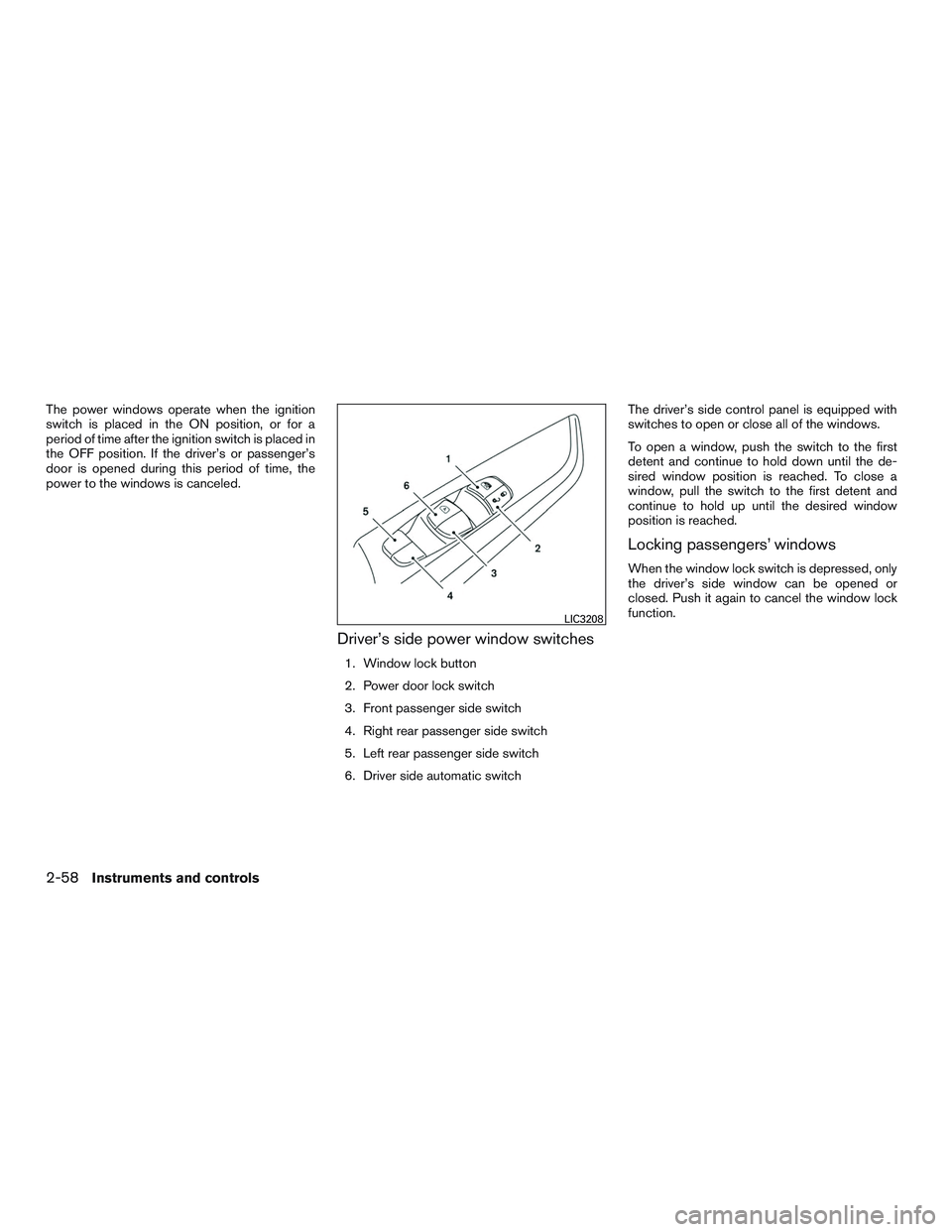
The power windows operate when the ignition
switch is placed in the ON position, or for a
period of time after the ignition switch is placed in
the OFF position. If the driver’s or passenger’s
door is opened during this period of time, the
power to the windows is canceled.
Driver’s side power window switches
1. Window lock button
2. Power door lock switch
3. Front passenger side switch
4. Right rear passenger side switch
5. Left rear passenger side switch
6. Driver side automatic switchThe driver’s side control panel is equipped with
switches to open or close all of the windows.
To open a window, push the switch to the first
detent and continue to hold down until the de-
sired window position is reached. To close a
window, pull the switch to the first detent and
continue to hold up until the desired window
position is reached.
Locking passengers’ windows
When the window lock switch is depressed, only
the driver’s side window can be opened or
closed. Push it again to cancel the window lock
function.
LIC3208
2-58Instruments and controls
Page 167 of 478

●Doors do not lock by pushing the door
handle request switch while any door is
open. However, doors lock with the
mechanical key even if any door is
open.
● Doors do not lock with the door handle
request switch with the Intelligent Key
inside the vehicle and a beep sounds to
warn you. However, when an Intelligent
Key is inside the vehicle, doors can be
locked with another Intelligent Key.
CAUTION
● After locking the doors using the re-
quest switch, make sure that the doors
have been securely locked by operating
the door handles or the rear liftgate
opener switch.
● When locking the doors using the re-
quest switch, make sure to have the
Intelligent Key in your possession be-
fore operating the request switch to
prevent the Intelligent Key from being
left in the vehicle.
● The request switch is operational only
when the Intelligent Key has been de-
tected by the Intelligent Key system. Lockout protection
To prevent the Intelligent Key from being acci-
dentally locked in the vehicle, lockout protection
is equipped with the Intelligent Key system.
When the driver’s side door is open, the doors
are locked, and then the Intelligent Key is put
inside the vehicle and all the doors are closed;
the lock will automatically unlock and the door
buzzer sounds.
NOTE:
The doors may not lock when the Intelli-
gent Key is in the same hand that is oper-
ating the request switch to lock the door.
Put the Intelligent Key in a purse, pocket or
your other hand.
CAUTION
The lockout protection may not function
under the following conditions:
●
When the Intelligent Key is placed on
top of the instrument panel.
● When the Intelligent Key is placed in-
side the glove box or a storage bin.
● When the Intelligent Key is placed in-
side the door pockets.
● When the Intelligent Key is placed in-
side or near metallic materials.
3-16Pre-driving checks and adjustments


