2016 NISSAN PATHFINDER steering
[x] Cancel search: steeringPage 89 of 540
2 Instruments and controls
Instrument panel...................................2-2
Meters and gauges ................................2-3
Speedometer and odometer .....................2-4
Tachometer ....................................2-5
Engine coolant temperature gauge ...............2-5
Fuel gauge ....................................2-6
Compass (if so equipped) ..........................2-6
Compass display ...............................2-7
Warning lights, indicator lights and audible
reminders ........................................ 2-10
Checking lights ............................... 2-10
Warning lights ................................ 2-11
Indicator lights ................................ 2-15
Audible reminders ............................. 2-17
Vehicle Information Display ........................2-18
How to use the vehicle information display .......2-18
Startup display ................................ 2-18
Resetting the trip computer .....................2-19
Settings ...................................... 2-19
Vehicle information display warnings and
indicators ..................................... 2-27
Security systems ................................. 2-31
Vehicle security system ......................... 2-31NISSAN vehicle immobilizer system
.............2-32
Wiper and washer switch ......................... 2-33
Switch operation .............................. 2-33
Rear switch operation .......................... 2-34
Rear window and outside mirror (if so equipped)
defroster switch .................................. 2-35
Headlight and turn signal switch ....................2-36
Headlight control switch ........................ 2-36
Daytime running light system
(if so equipped) ............................... 2-38
Instrument brightness control ...................2-39
Turn signal switch ............................. 2-39
Fog light switch (if so equipped) ................2-40
Horn ............................................ 2-40
Heated seats (if so equipped) ......................2-40
Heated 2nd row seats (if so equipped) ..............2-41
Climate controlled seat switch (if so equipped) ......2-43
Heated
steering wheel (if so equipped) .............2-44
Vehicle Dynamic Control (VDC) off switch ...........2-44
Hill descent control (HDC) switch (if so equipped) . . . 2-45
Warning systems switch (if so equipped) ............2-46
Tow mode switch ................................. 2-46
Power outlets .................................... 2-47
Page 92 of 540
16. Push-button ignition switch (P. 5-10)
17. Cruise control main/set switches(P. 5-37)
18. Tilt steering wheel control (P. 3-31)
19. Control panel and vehicle information
display switches (P. 2-18)
Bluetooth® Hands-Free Phone System
(if so equipped) (P. 4-121)
20. Hood release (P. 3-21)
21. Tow mode switch (P. 2-46) Liftgate release switch (P. 3-22)
Power liftgate main switch (P. 3-22)
Vehicle Dynamic Control (VDC) OFF
switch (P. 2-44)
Warning systems switch
(if so equipped) (P. 5-20)
Power inverter switch (if so equipped)
(P. 2-47)
*: Refer to the separate Navigation System Own-
er’s Manual (if so equipped) .
Refer to the page number indicated in pa-
rentheses for operating details.
1. Tachometer
2. Warning and indicator lights
3. Vehicle information displayOdometer
Twin trip odometer
4. Speedometer 5. Fuel gauge
6. Engine coolant temperature gauge
LIC3459
METERS AND GAUGES
Instruments and controls2-3
Page 99 of 540
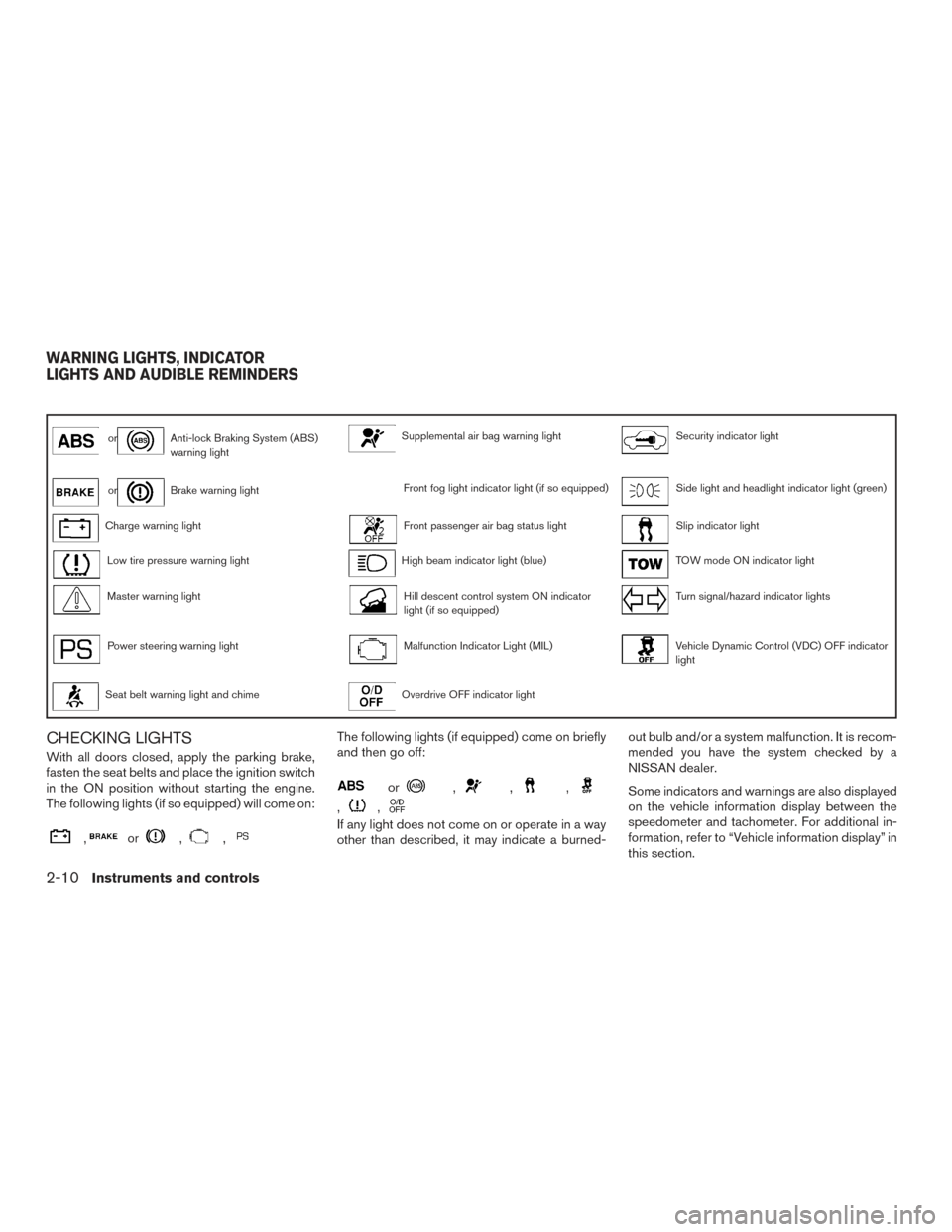
orAnti-lock Braking System (ABS)
warning lightSupplemental air bag warning lightSecurity indicator light
orBrake warning lightFront fog light indicator light (if so equipped)Side light and headlight indicator light (green)
Charge warning lightFront passenger air bag status lightSlip indicator light
Low tire pressure warning lightHigh beam indicator light (blue)TOW mode ON indicator light
Master warning lightHill descent control system ON indicator
light (if so equipped)Turn signal/hazard indicator lights
Power steering warning lightMalfunction Indicator Light (MIL)Vehicle Dynamic Control (VDC) OFF indicator
light
Seat belt warning light and chimeOverdrive OFF indicator light
CHECKING LIGHTS
With all doors closed, apply the parking brake,
fasten the seat belts and place the ignition switch
in the ON position without starting the engine.
The following lights (if so equipped) will come on:
,or,,
The following lights (if equipped) come on briefly
and then go off:
or,,,
,,
If any light does not come on or operate in a way
other than described, it may indicate a burned-out bulb and/or a system malfunction. It is recom-
mended you have the system checked by a
NISSAN dealer.
Some indicators and warnings are also displayed
on the vehicle information display between the
speedometer and tachometer. For additional in-
formation, refer to “Vehicle information display” in
this section.
WARNING LIGHTS, INDICATOR
LIGHTS AND AUDIBLE REMINDERS
2-10Instruments and controls
Page 102 of 540
●If the light illuminates while driving,
avoid sudden steering maneuvers or
abrupt braking, reduce vehicle speed,
pull off the road to a safe location and
stop the vehicle as soon as possible.
Driving with under-inflated tires may
permanently damage the tires and in-
crease the likelihood of tire failure. Se-
rious vehicle damage could occur and
may lead to an accident and could result
in serious personal injury or death.
Check the tire pressure for all four tires.
Adjust the tire pressure to the recom-
mended COLD tire pressure show on
the Tire and Loading Information label
located in the driver’s door opening to
turn the low tire pressure warning light
OFF. If the light still illuminates while
driving after adjusting the tire pressure,
a tire may be flat or the TPMS may be
malfunctioning. If you have a flat tire,
replace it with a spare tire as soon as
possible. If no tire is flat and all tires are
properly inflated, have the vehicle
checked. It is recommended you visit a
NISSAN dealer for this service. ●
Since the spare tire is not equipped with
TPMS, when a spare tire is mounted or a
wheel is replaced the TPMS will not
function and the low tire pressure warn-
ing light will flash for approximately
1 minute. The light will remain on after
1 minute. Have your tires replaced
and/or TPMS system reset as soon as
possible. It is recommended you visit a
NISSAN dealer for these services.
● Replacing tires with those not originally
specified by NISSAN could affect the
proper operation of the TPMS.
CAUTION
● The TPMS is not a substitute for the
regular tire pressure check. Be sure to
check the tire pressure regularly.
● If the vehicle is being driven at speeds
of less than 16 mph 25 (km/h) , the
TPMS may not operate correctly.
● Be sure to install the specified size of
tires to the four wheels correctly.
Master warning light
When the ignition switch is in the ON position,
the master warning light illuminates if any of the
following are displayed on the vehicle information
display:
● No key warning
● Low fuel warning
● Low washer fluid warning
● Parking brake release warning
● Door open warning
● Loose fuel cap warning (if so equipped)
● Check tire pressure warning
For additional information, refer to “Vehicle infor-
mation display” in this section.
Power steering warning light
WARNING
● If the engine is not running or is turned
off while driving, the power assist for
the steering will not work. Steering will
be harder to operate.
Instruments and controls2-13
Page 103 of 540
●When the power steering warning light
illuminates with the engine running,
there will be no power assist for the
steering. You will still have control of
the vehicle, but the steering will be
harder to operate. Have the power
steering system checked. It is recom-
mended you visit a NISSAN dealer for
this service.
When the ignition switch is placed in the ON
position, the power steering warning light illumi-
nates. After starting the engine, the power steer-
ing warning light turns off. This indicates the
power steering is operational.
If the power steering warning light illuminates
while the engine is running, it may indicate the
power steering is not functioning properly and
may need servicing. Have the power steering
checked. It is recommended you visit a NISSAN
dealer for this service.
When the power steering warning light illumi-
nates with the engine running, there will be no
power assist for the steering, but you will still
have control of the vehicle. At this time, greater
steering effort is required to operate the steering
wheel, especially in sharp turns and at low
speeds. For additional information, refer to “Power steer-
ing” in the “Starting and driving” section of this
manual.
Seat belt warning light and
chime
The light and chime remind you to fasten your
seat belts. The light illuminates whenever the
ignition switch is placed in the ON or START
position and remains illuminated until the driver’s
seat belt is fastened. At the same time, the chime
sounds for about 6 seconds unless the driver’s
seat belt is securely fastened.
The seat belt warning light may also illuminate if
the front passenger’s seat belt is not fastened
when the front passenger’s seat is occupied . For
7 seconds after the ignition switch is placed in
the ON position, the system does not activate the
warning light for the front passenger.
For additional information, refer to “Seat belts” in
the “Safety—Seats, seat belts and supplemental
restraint system” section of this manual.
Supplemental air bag warninglight
When the ignition switch is placed in the ON or
START position, the supplemental air bag warn-
ing light illuminates for about 7 seconds and then
turns off. This means the system is operational. If any of the following conditions occur, the front
air bag, side air bag, curtain air bag, and preten-
sioner seat belt systems need servicing:
● The supplemental air bag warning light re-
mains on after approximately 7 seconds.
● The supplemental air bag warning light
flashes intermittently.
● The supplemental air bag warning light does
not come on at all.
It is recommended you visit a NISSAN dealer for
these services.
Unless checked and repaired, the supplemental
restraint system (air bag system) and/or the pre-
tensioners may not function properly. For addi-
tional information, refer to “Supplemental Re-
straint System (SRS)” in the “Safety—Seats, seat
belts and supplemental restraint system” section
of this manual.
2-14Instruments and controls
Page 107 of 540
The vehicle information display is located to the
left of the speedometer. It displays such items as:● Vehicle settings
● Trip computer information
● Drive system warnings and settings (if so
equipped)
● Cruise control system information
● NISSAN Intelligent Key® operation informa-
tion
● Indicators and warnings
● Tire Pressure informationHOW TO USE THE VEHICLE
INFORMATION DISPLAY
The vehicle information display can be navigated
using the ENTER ,
, andbuttons
located on the steering wheel.
1.
— press to enter the vehicle informa-
tion menu items
2. ENTER — move UP/DOWN
to navi-
gate through the items in vehicle information
then press to change or select an item in the
vehicle information display
3.
— to go back to the previous menu The ENTER button also controls audio functions.
For additional information, refer to “Steering
wheel switch for audio control” in the “Monitor,
climate, audio, phone and voice recognition sys-
tems” section of this manual.
STARTUP DISPLAY
When the vehicle in placed in the ON or ACC
position the screens that display in the vehicle
information include:
● Active system status (if so equipped)
● Trip computer
● Tire pressure information
● 4WD (if so equipped)
● Fuel economy
● Distance to empty
● Warnings
Warnings will only display if there are any pres-
ent. For additional information on warnings and
indicators refer to “Vehicle information display
warnings and indicators” in this section.
To control what items display in the vehicle infor-
mation display, refer to “Main menu selection” in
this section.
LIC2205LIC2245
VEHICLE INFORMATION DISPLAY
2-18Instruments and controls
Page 111 of 540
Menu itemResult
Exit Seat Slide (if so equipped) When the exit seat slide is ON the driver’s seat will move backward for easy exit when the ignition switch is placed in the
OFF position and the driver’s door is opened.
After getting into the vehicle and placing the ignition switch in the ACC position, the driver’s seat will move to the previous
set position. For additional information, refer to “Automatic drive positioner” in the “Pre-driving checks and adjustments”
section of this manual.
Exit Steering Up (if so equipped) When the exit steering up feature is turned ON, the steering wheel moves upward for easy exit when the ignition switch i s
in the OFF position and the driver’s door is opened.
After getting into the vehicle and placing the ignition switch in the ACC position, the steering wheel moves to the previous
position. For additional information, refer to “Tilt and telescopic operation” in the “Pre-driving checks and adjustments” sec-
tion of this manual.
Main Menu Selection
The main menu selection menu allows the user to
customize the information that appears in the
vehicle information display when the ignition is
placed in the ON position.
Menu item Result
Driver Assistance (if so equipped) Allows user to turn the Driver Assistance display ON/OFF
Trip Computer Allows user to turn the Trip Computer display ON/OFF
Tire Pressures Allows user to turn the Tire Pressures display ON/OFF
4WD (if so equipped) Allows the user to turn the 4WD display ON/OFF
Fuel Economy Allows user to turn the Fuel Economy display ON/OFF
2-22Instruments and controls
Page 129 of 540
FOG LIGHT SWITCH (if so equipped)
To turn the fog lights on, rotate the headlight
switch to the
position, then rotate the fog
light switch to the
position.
To turn the fog lights on with the headlight switch
in the AUTO position, the headlights must be on,
then rotate the fog light switch to the
po-
sition.
To turn the fog lights off, rotate the fog light
switch to the OFF position.
The headlights must be on and the low beams
selected for the fog lights to operate. The fog
lights automatically turn off when the high beam
headlights are selected. To sound the horn, push the center pad area of
the steering wheel.
The front seats are warmed by built-in heaters.
1. Start the engine.
2. Push the LO or HI position of the switch, as desired. The indicator light in the switch will
illuminate.
The heater is controlled by a thermostat,
automatically turning the heater on and off.
The indicator light will remain on as long as
the switch is on.
3. When the seat is warmed or before you leave the vehicle, be sure to push the switch
to turn it off.
LIC3256LIC2227LIC3037
HORN HEATED SEATS (if so equipped)
2-40Instruments and controls