2016 NISSAN MURANO door lock
[x] Cancel search: door lockPage 12 of 465
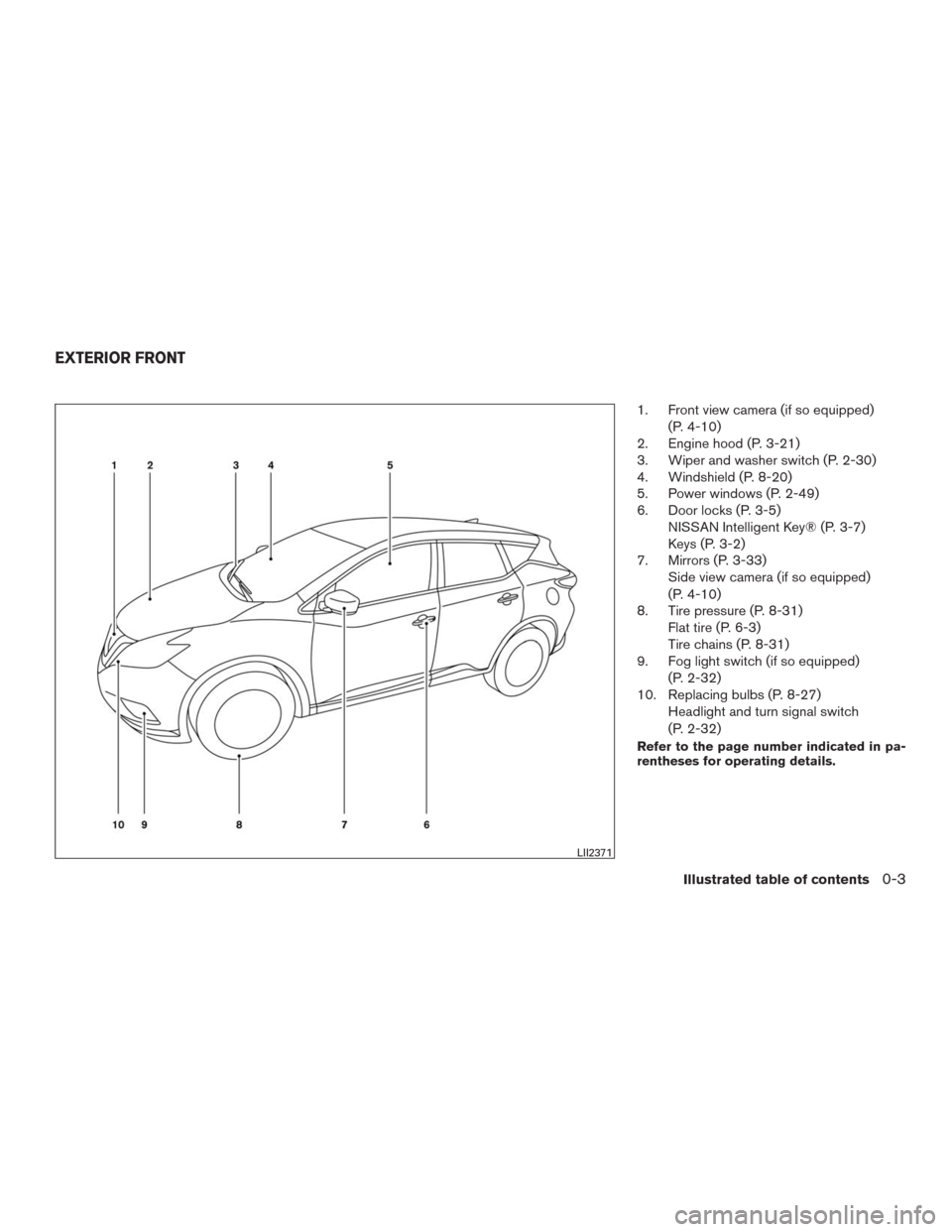
1. Front view camera (if so equipped)
(P. 4-10)
2. Engine hood (P. 3-21)
3. Wiper and washer switch (P. 2-30)
4. Windshield (P. 8-20)
5. Power windows (P. 2-49)
6. Door locks (P. 3-5)
NISSAN Intelligent Key® (P. 3-7)
Keys (P. 3-2)
7. Mirrors (P. 3-33)
Side view camera (if so equipped)
(P. 4-10)
8. Tire pressure (P. 8-31)
Flat tire (P. 6-3)
Tire chains (P. 8-31)
9. Fog light switch (if so equipped)
(P. 2-32)
10. Replacing bulbs (P. 8-27)
Headlight and turn signal switch
(P. 2-32)
Refer to the page number indicated in pa-
rentheses for operating details.
LII2371
EXTERIOR FRONT
Illustrated table of contents0-3
Page 13 of 465
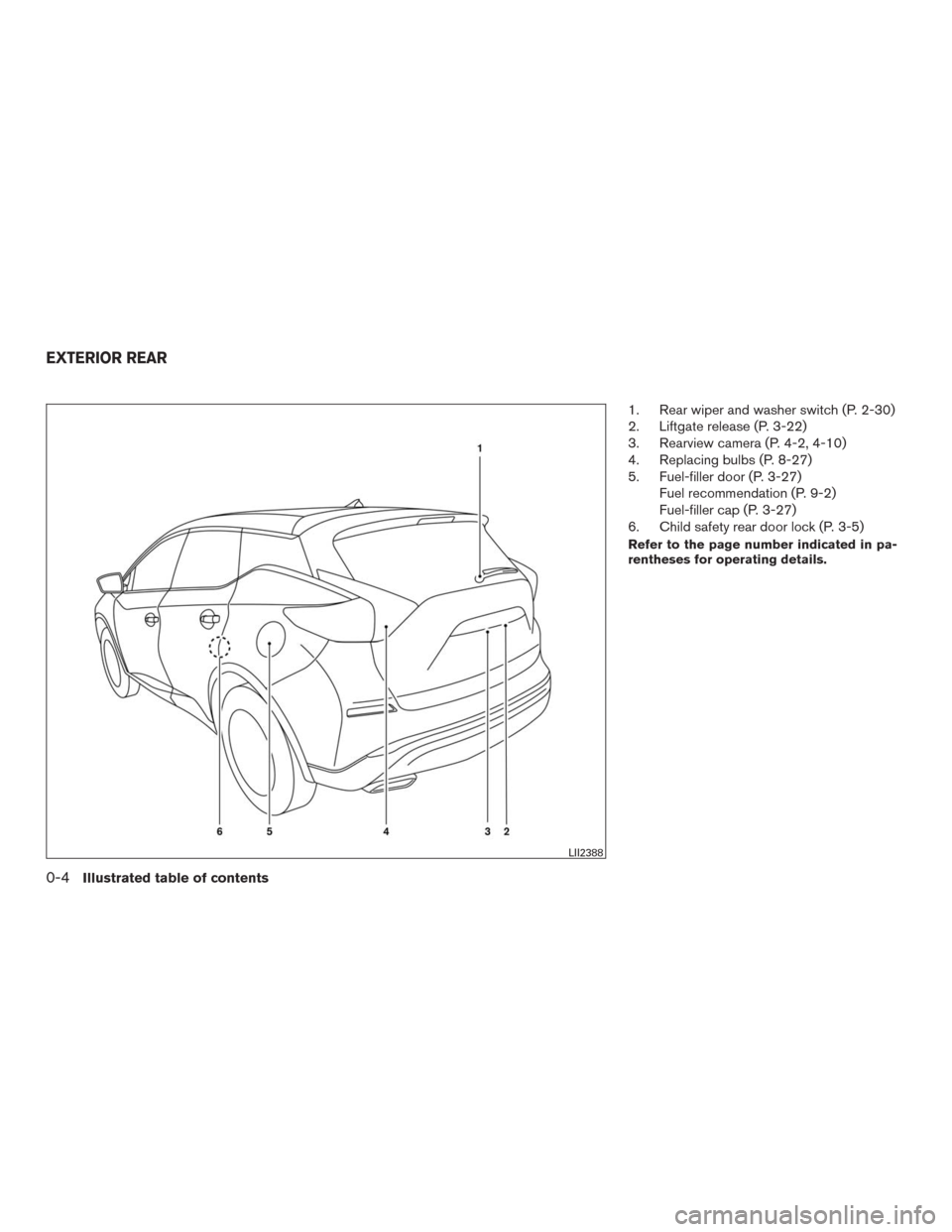
1. Rear wiper and washer switch (P. 2-30)
2. Liftgate release (P. 3-22)
3. Rearview camera (P. 4-2, 4-10)
4. Replacing bulbs (P. 8-27)
5. Fuel-filler door (P. 3-27)
Fuel recommendation (P. 9-2)
Fuel-filler cap (P. 3-27)
6. Child safety rear door lock (P. 3-5)
Refer to the page number indicated in pa-
rentheses for operating details.
LII2388
EXTERIOR REAR
0-4Illustrated table of contents
Page 78 of 465
If a malfunction occurs in the front passenger air
bag system, the supplemental air bag warning
light
, located in the meter and gauges area
of the instrument panel, will blink. Have the sys-
tem checked. It is recommended that you visit a
NISSAN dealer for this service.
Normal operation
In order for the occupant classification sensor
system to classify the front passenger based on
weight, please follow the precautions and steps
outlined below:
Precautions
● Make sure that there are no objects weigh-
ing over 2.2 lbs (1 kg) hanging on the seat or
placed in the seatback pocket.
● Make sure that a child restraint or other
object is not pressing against the rear of the
seatback.
● Make sure that a rear passenger is not push-
ing or pulling on the back of the front pas-
senger seat.
● Make sure that the front passenger seat or
seatback is not forced back against an ob-
ject on the seat or floor behind it.
● Make sure that there is no object placed
under the front passenger seat. Steps
1. Adjust the seat as outlined in the “Seats” section of this manual. Sit upright, leaning
against the seatback, and centered on the
seat cushion with your feet comfortably ex-
tended to the floor.
2. Make sure there are no objects on your lap.
3. Fasten the seat belt as outlined in the “Seat belts” section of this manual.
4. Remain in this position for 30 seconds al- lowing the system to classify the front pas-
senger before the vehicle is put into motion.
5. Ensure proper classification by checking the front passenger air bag status light.
NOTE:
This vehicle’s occupant classification sen-
sor system locks the classification during
driving so it is important that you confirm
that the front passenger is properly classi-
fied prior to driving. Also, the occupant
classification sensor system may recalcu-
late the weight of the occupant when the
vehicle comes to a stop (i.e. stop light, stop
sign, etc.) , so front passenger seat occu-
pants should continue to remain seated as
outlined above. Troubleshooting
If you think the front passenger air bag status light
is incorrect:
1. If the light is ON with no front passenger and no objects on the front passenger seat:
This may be due to the following conditions that
may be interfering with the weight sensors: ● An object weighing over 2.2 lbs (1 kg) hang-
ing on the seat or placed in the seatback
pocket.
● A child restraint or other object pressing
against the rear of the seatback.
● A rear passenger pushing or pulling on the
back of the front passenger seat.
● Forcing the front seat or seatback against an
object on the seat or floor behind it.
● An object placed under the front passenger
seat.
● An object placed between the seat cushion
and center console or between the seat
cushion and the door.
If the vehicle is moving, please come to a stop
when it is safe to do so. Check and correct any of
the above conditions. Restart the vehicle and
wait 1 minute.
Safety—Seats, seat belts and supplemental restraint system1-59
** Click HERE to see "Owner's Manual Supplement" **
Page 97 of 465
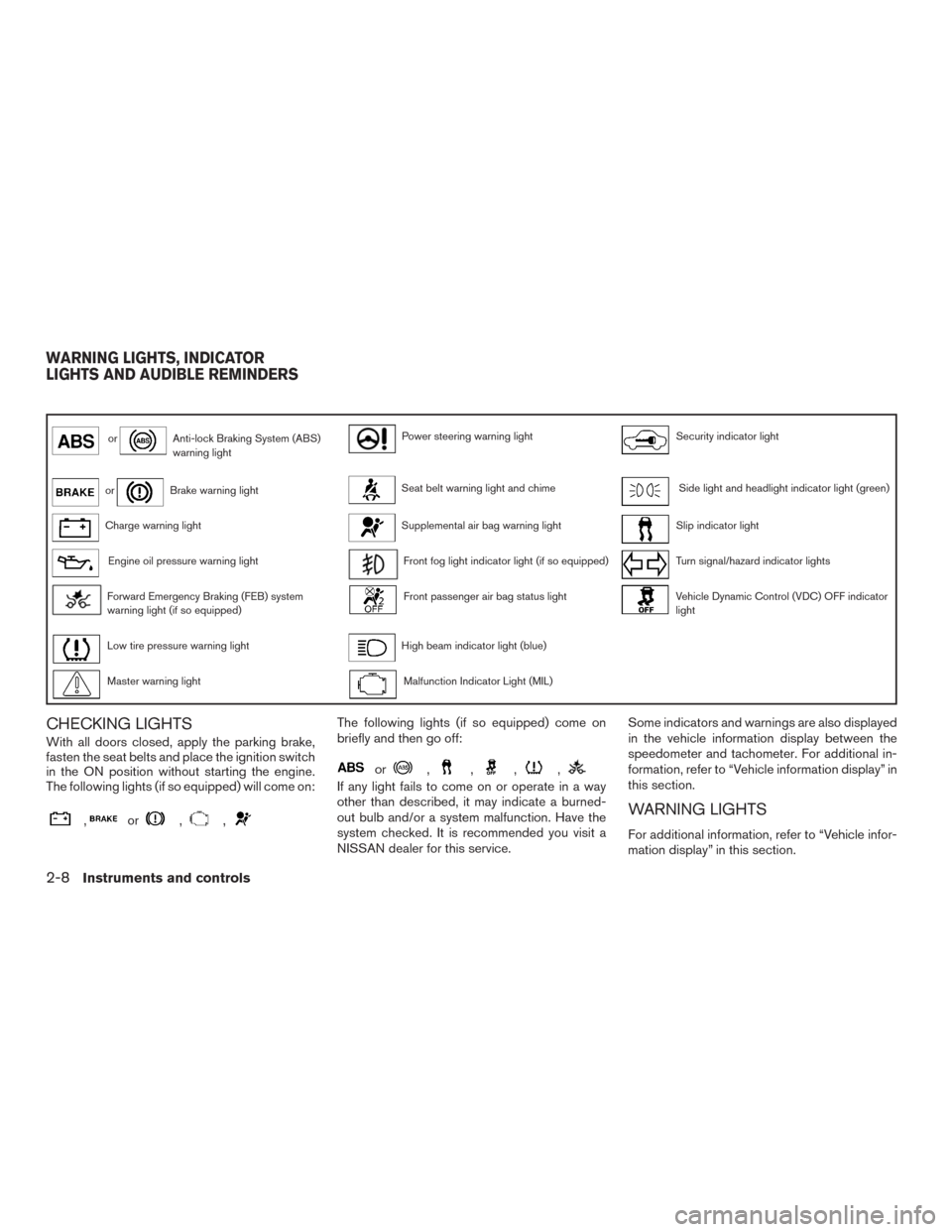
orAnti-lock Braking System (ABS)
warning lightPower steering warning lightSecurity indicator light
orBrake warning lightSeat belt warning light and chimeSide light and headlight indicator light (green)
Charge warning lightSupplemental air bag warning lightSlip indicator light
Engine oil pressure warning lightFront fog light indicator light (if so equipped)Turn signal/hazard indicator lights
Forward Emergency Braking (FEB) system
warning light (if so equipped)Front passenger air bag status lightVehicle Dynamic Control (VDC) OFF indicator
light
Low tire pressure warning lightHigh beam indicator light (blue)
Master warning lightMalfunction Indicator Light (MIL)
CHECKING LIGHTS
With all doors closed, apply the parking brake,
fasten the seat belts and place the ignition switch
in the ON position without starting the engine.
The following lights (if so equipped) will come on:
,or,,
The following lights (if so equipped) come on
briefly and then go off:
or,,,,
If any light fails to come on or operate in a way
other than described, it may indicate a burned-
out bulb and/or a system malfunction. Have the
system checked. It is recommended you visit a
NISSAN dealer for this service.Some indicators and warnings are also displayed
in the vehicle information display between the
speedometer and tachometer. For additional in-
formation, refer to “Vehicle information display” in
this section.
WARNING LIGHTS
For additional information, refer to “Vehicle infor-
mation display” in this section.
WARNING LIGHTS, INDICATOR
LIGHTS AND AUDIBLE REMINDERS
2-8Instruments and controls
Page 104 of 465
Turn signal/hazard indicator
lights
The appropriate light flashes when the turn signal
switch is activated.
Both lights flash when the hazard switch is turned
on.
Vehicle Dynamic Control
(VDC) OFF indicator light
This indicator light comes on when the VDC off
switch is pushed to OFF. This indicates the VDC
system is not operating.
Push the VDC off switch again or restart the
engine and the system will operate normally. For
additional information, refer to “Vehicle Dynamic
Control (VDC) system” in the “Starting and driv-
ing” section of this manual.
The VDC light also comes on when you place the
ignition switch in the ON position. The light will
turn off after about 2 seconds if the system is
operational. If the light stays on or comes on
along with the
indicator light while you are
driving, have the VDC system checked. It is rec-
ommended that you visit a NISSAN dealer for this
service.While the VDC system is operating, you might
feel a slight vibration or hear the system working
when starting the vehicle or accelerating, but this
is normal.
AUDIBLE REMINDERS
Brake pad wear warning
The disc brake pads have audible wear warnings.
When a disc brake pad requires replacement, it
makes a high pitched scraping sound when the
vehicle is in motion, whether or not the brake
pedal is depressed. Have the brakes checked as
soon as possible if the warning sound is heard.
Key left reminder chime
A chime sounds if the driver’s door is opened
while the ignition switch is placed in the ACC or
OFF position with the Intelligent Key left in the
vehicle. Make sure the ignition switch is placed in
the LOCK position, and take the Intelligent Key
with you when leaving the vehicle.
Light reminder chime
With the ignition switch placed in the OFF posi-
tion, a chime sounds when the driver’s door is
opened if the headlights or parking lights are on.
Turn the headlight control switch off before leav-
ing the vehicle.
NISSAN Intelligent Key® Lock-in
Prevention
The Intelligent Key buzzer sounds if the Intelligent
Key is left inside the vehicle when the doors are
closed and locked. When the buzzer sounds, be
sure to take the Intelligent Key with you when
leaving the vehicle. For additional information,
refer to “NISSAN Intelligent Key®” in the “Pre-
driving checks and adjustments” section of this
manual.
Instruments and controls2-15
Page 108 of 465
Vehicle Settings
The vehicle settings allow the user to change the
settings for lights, wipers, locking, keys, and
other vehicle settings.
Menu itemResult
Lighting Displays the various Lighting settings
Accent Lighting (if so equipped) Allows the user to adjust the brightness of the accent lights
Light Sensitivity Allows the user to change when the lights illuminate based on the brightness outside the vehicle
Light Off Delay Allows the user to change the duration of time, from 0 to 180 seconds, that the automatic headlights stay on after the ve-
hicle is shut off
Turn Indicator Displays available Turn Indicator settings
3 Flash Pass Allows the user to turn the 3 Flash Pass ON/OFF
Locking Displays the various Locking settings
Ext. Door Switch Allows user to turn the Ext. Door Switch ON/OFF. When turned on, the request switch on the door is activated.
Selective Unlock Allows user to turn Selective Unlock ON/OFF. When turned on, only the driver’s door is unlocked after the door unlock
operation. When the door handle request switch on the driver’s or front passenger’s side door is pushed to be unlocked,
only the corresponding door is unlocked first. All the doors can be unlocked if the door unlock operation is performed again
within 1 minute. When this item is turned to OFF, all the doors will be unlocked after the door unlock operation is performed
once.
Answer Back Horn (if so equipped) Allows user to turn Answer Back Horn ON/OFF. When turned on, the horn will chirp and the hazard indicators will flash
once when locking the vehicle with the Intelligent Key.
Wipers Displays the various Wipers settings
Speed Dependent Allows the user to turn the Speed Dependent feature ON/OFF
Driving Position (if so equipped) Displays the various Driving Position settings
Exit Seat Slide Allows the user to turn the Exit Seat Slide ON/OFF
Exit Steering Up Allows the user to turn the Exit Steering Up ON/OFF
Remote Engine Start (if so equipped) Allows user to turn the Remote Engine Start ON/OFF. When turned on, the engine can be restarted remotely. For addi-
tional information, refer to “Remote engine start in the “Pre-driving checks and adjustments” section of this manual.
Instruments and controls2-19
Page 116 of 465
Blind Spot Warning (BSW) and Rear Cross
Traffic Alert (RCTA) indicator (if so
equipped)
This indicator shows when the BSW and RCTA
systems are engaged.
For additional information, refer to “Blind Spot
Warning (BSW)” and “Rear Cross Traffic Alert
(RCTA)” in the “Starting and driving” section of
this manual.
Malfunction: See Owner’s Manual (if so
equipped)
This warning appears when one or more of the
following systems (if so equipped) is not func-
tioning properly:
●Forward Emergency Braking (FEB)
●Blind Spot Warning (BSW)
●Predictive Forward Collision Warning
(PFCW)
If one or more of these warning appears, have the
system checked. It is recommended you visit a
NISSAN dealer for this service.Headlight System Error: See Owner’s
Manual (if so equipped)
This warning appears when the LED headlights
are not functioning properly.
If this warning appears, have your system
checked. It is recommended that you visit a
NISSAN dealer for this service.
Unavailable: Front Radar Obstruction (if
so equipped)
This warning appears when the there is radar
blockage detected. For additional information,
refer to “Forward Emergency Braking (FEB)” in
the “Starting and driving” section of this manual.
Your vehicle has two types of security systems:
●Vehicle security system
●NISSAN Vehicle Immobilizer System
VEHICLE SECURITY SYSTEM
The vehicle security system provides visual and
audible alarm signals if someone opens the
doors, liftgate or the hood when the system is
armed. It is not, however, a motion detection type
system that activates when a vehicle is moved or
when a vibration occurs.
The system helps deter vehicle theft but cannot
prevent it, nor can it prevent the theft of interior or
exterior vehicle components in all situations. Al-
LIC2930
SECURITY SYSTEMS
Instruments and controls2-27
Page 117 of 465
ways secure your vehicle even if parking for a
brief period. Never leave your Intelligent Key in
the vehicle, and always lock the vehicle when
unattended. Be aware of your surroundings, and
park in secure, well-lit areas whenever possible.
Many devices offering additional protection, such
as component locks, identification markers, and
tracking systems, are available at auto supply
stores and specialty shops. A NISSAN dealer
may also offer such equipment. Check with your
insurance company to see if you may be eligible
for discounts for various theft protection features.
How to arm the vehicle security
system
1. Close all windows.(The system can be
armed even if the windows are open.)
2. Remove the Intelligent Key from the vehicle.
3. Close all doors, hood and trunk/liftgate.
Lock all doors. The doors can be locked with
the Intelligent Key, door handle request
switch (if so equipped) , or mechanical key.
4. Confirm that the
security indicator
light stays on for about 30 seconds. The
vehicle security system is now pre-armed.
The vehicle security system will automati-
cally shift into the armed phase. The
security light begins to flash once everythree seconds. If during the pre-armed
phase one of the following occurs, the sys-
tem will not arm:
●Any door is unlocked with the mechanical
key, the Intelligent Key or door request
switch (if so equipped) .
●Ignition switch is placed in ACC or ON
position.
●Even when the driver and/or passen-
gers are in the vehicle, the system will
activate with all the doors, hood and
trunk lid locked with the ignition switch
placed in the LOCK position. When
placing the ignition switch in the ACC
or ON position, the system will be re-
leased.
Vehicle security system activation
The vehicle security system will give the following
alarm:
●The headlights blink and the horn sounds
intermittently but synchronously.
●The alarm automatically turns off after a pe-
riod of time. However, the alarm reactivates if
the vehicle is tampered with again.The alarm is activated by:
●
opening any door or hood without using the
key or Intelligent Key (even if the door is un-
locked by releasing the door inside lock knob) .
How to stop an activated alarm
The alarm stops only by unlocking a door or the
trunk/liftgate with the mechanical key, pressing
the
button on the Intelligent Key, or press-
ing the request switch on the driver’s or passen-
ger’s door with the Intelligent Key in range of the
door handle.
NISSAN VEHICLE IMMOBILIZER
SYSTEM
The NISSAN Vehicle Immobilizer System will not
allow the engine to start without the use of a
registered key.
Never leave these keys in the vehicle.
FCC Notice:
For USA:
This device complies with Part 15 of the
FCC Rules. Operation is subject to the fol-
lowing two conditions: (1) This device may
not cause harmful interference, and (2) this
device must accept any interference re-
ceived, including interference that may
cause undesired operation.
2-28Instruments and controls