Page 222 of 443
1. Temperature control dial (driver’s side)/AUTO button
2. ON-OFF button
3. Display screen
4. MODE (manual air flow control) button 5. Temperature control dial (passenger’s
side)/DUAL button
6.
Fresh air intake button
7.
Air recirculation button
8. A/C (air conditioner) button 9.
fan speed control buttons
10.
REAR window and outside mirror
defroster switch
11.
FRONT (defroster) button
WARNING
● The air conditioner cooling function op-
erates only when the engine is running.
● Do not leave children or adults who
would normally require the assistance
of others alone in your vehicle. Pets
should also not be left alone. They
could accidentally injure themselves or
others through inadvertent operation of
the vehicle. Also, on hot, sunny days,
temperatures in a closed vehicle could
quickly become high enough to cause
severe or possibly fatal injuries to
people or animals.
● Do not use the recirculation mode for
long periods as it may cause the interior
air to become stale and the windows to
fog up.
LHA3200
HEATER AND AIR CONDITIONER
(automatic)
Monitor, climate, audio, phone and voice recognition systems4-19
Page 224 of 443
Remote engine start logic (if so
equipped)
Vehicles equipped with automatic climate con-
trols and remote start function may go into auto-
matic heating or cooling mode when remote start
is activated depending on outside and cabin tem-
peratures. Automatic temperature depends on
outside and cabin temperatures. During this pe-
riod, the climate control display and buttons will
be inoperable until the ignition switch is turned
on.
MANUAL OPERATION
Fan speed control
Press thefan speed control buttons to
manually control the fan speed.
Press the AUTO button to return to automatic
control of the fan speed.
Air recirculation
Press theair recirculation button to recir-
culate interior air inside the vehicle. The
indicator light on the button will come on.
The air recirculation cannot be activated when
the air conditioner is in the
front defrosting
mode.
Fresh air intake
Press thefresh air intake button to draw
outside air into the passenger compartment.
Air flow control
Pressing the MODE button manually controls air
flow and selects the air outlet:
— Air flows mainly from center and
side vents.
— Air flows mainly from center andside vents and foot outlets.
— Air flows mainly from foot outletsand partly from defroster.
— Air flows mainly from defrosterand foot outlets.
To turn system off
Press the ON-OFF button.
Rear window and outside mirror
defroster switch
For additional information, refer to “Rear window
and outside mirror defroster switch” in the “In-
struments and controls” section of this manual.
OPERATING TIPS
●When the engine coolant temperature and
outside air temperature are low, the air flow
from the foot outlets may not operate for a
maximum of 150 seconds. However, this is
not a malfunction. After the coolant tempera-
ture warms up, air flow from the foot outlets
will operate normally.
● Keep the moonroof (if so equipped) closed
while the air conditioner is in operation.
● If you feel that the air flow mode you have
selected and the outlets the air is coming out
do not match, select the
mode.
● When you change the air flow mode, you
may feel air flow from the feet vents for just a
moment. This is not a malfunction.
Monitor, climate, audio, phone and voice recognition systems4-21
Page 243 of 443
3. Touch the ignition switch with the IntelligentKey as illustrated. (A chime will sound.)
After Step 3 is performed, when the ignition
switch is pushed without depressing the
brake pedal, the ignition switch position will
change to ACC.
4. Push the ignition switch while depressing the brake pedal within ten seconds after the
chime sounds. The hybrid system will start.
NOTE: ● When the ignition switch is pushed to the
ACC or ON position or the hybrid system is
started by the above procedure, the Intelli-
gent Key battery discharge indicator ap-
pears in the vehicle information display even
when the Intelligent Key is inside the vehicle.
This is not a malfunction. To turn off the
Intelligent Key battery discharge indicator,
touch the ignition switch with the Intelligent
Key again.
● If the Intelligent Key battery discharge indi-
cator appears, replace the battery as soon
as possible. For additional information, refer
to “Battery Replacement” in the “Mainte-
nance and do-it-yourself” section of this
manual.NISSAN VEHICLE IMMOBILIZER
SYSTEM
The NISSAN Vehicle Immobilizer System will not
allow the hybrid system to start without the use of
the registered key.
If the hybrid system fails to start using a regis-
tered key (for example, when interference is
caused by another registered key, an automated
toll road device or automatic payment device on
the key ring) , restart the hybrid system using the
following procedure:
1. Leave the ignition switch in the ON position for approximately 5 seconds.
2. Place the ignition switch in the OFF or LOCK position, and wait approximately
10 seconds.
3. Repeat Steps 1 and 2.
4. Restart the hybrid system while holding the device (which may have caused the interfer-
ence) separate from the registered key.
If the no start condition re-occurs, NISSAN rec-
ommends placing the registered key on a sepa-
rate key ring to avoid interference from other
devices. ●
Make sure the area around the vehicle is
clear.
● Check fluid levels such as engine oil, cool-
ant, brake fluid, and windshield-washer fluid
as frequently as possible, or at least when-
ever you refuel.
● Check that all windows and lights are clean.
● Visually inspect tires for their appearance
and condition. Also check tires for proper
inflation.
● Check that all doors are closed.
● Position seat and adjust head restraints.
● Adjust inside and outside mirrors.
● Fasten seat belts and ask all passengers to
do likewise.
● Check the operation of warning lights when
the ignition switch is placed in the ON posi-
tion. For additional information, refer to
“Warning lights, indicator lights and audible
reminders” in the “Instruments and controls”
section of this manual.
BEFORE STARTING THE NISSAN
PURE DRIVE HYBRID SYSTEM
5-14Starting and driving
Page 251 of 443
To engage:
Firmly depress the parking brake.
To release:1. Firmly apply the foot brake.
2. Move the shift lever to the P (Park) position.
3. Firmly depress the parking brake pedal and it will release.
4. Before driving, be sure the brake warning light goes out.
WARNING
Failure to follow the warnings and instruc-
tions for proper use of the BSW system
could result in serious injury or death.
●The BSW system is not a replacement
for proper driving procedures and is not
designed to prevent contact with ve-
hicles or objects. When changing lanes,
always use the side and rear mirrors
and turn and look in the direction your
vehicle will move to ensure it is safe to
change lanes. Never rely solely on the
BSW system.
The BSW system helps alert the driver of other
vehicles in adjacent lanes when changing lanes. The BSW system uses radar sensors
�1in-
stalled near the rear bumper to detect other ve-
hicles in an adjacent lane.
LSD0158LSD2223
BLIND SPOT WARNING (BSW)
5-22Starting and driving
Page 252 of 443
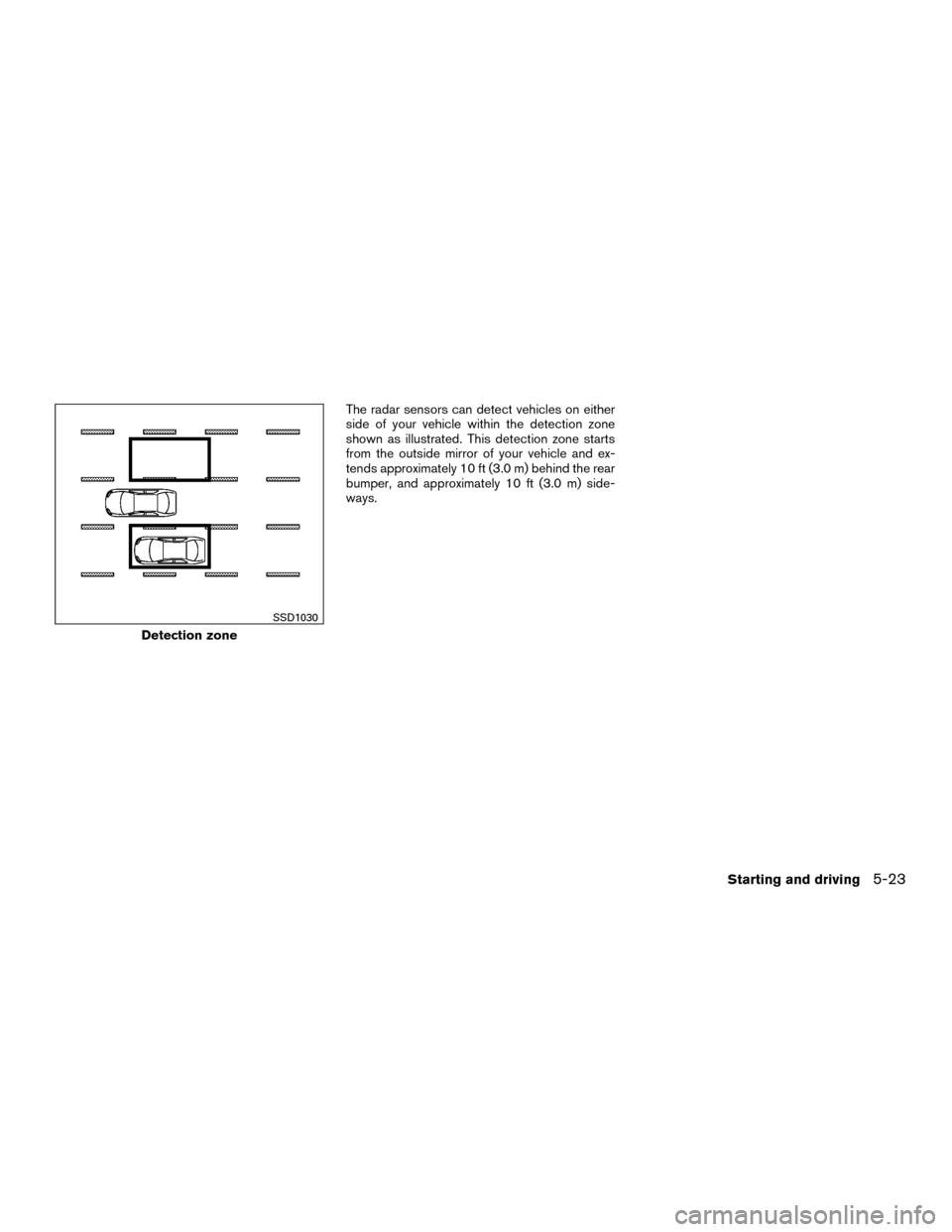
The radar sensors can detect vehicles on either
side of your vehicle within the detection zone
shown as illustrated. This detection zone starts
from the outside mirror of your vehicle and ex-
tends approximately 10 ft (3.0 m) behind the rear
bumper, and approximately 10 ft (3.0 m) side-
ways.
Detection zone
SSD1030
Starting and driving5-23
Page 261 of 443
For Canada
Applicable law: Canada 310
This device complies with Industry Canada
licence-exempt RSS standard(s) . Opera-
tion is subject to the following two condi-
tions: (1) this device may not cause inter-
ference, and (2) this device must accept any
interference, including interference that
may cause undesired operation of the de-
vice.
Frequency bands: 24.05GHz – 24.25GHz
Output power: less than 20 milliwattsWARNING
Failure to follow the warnings and instruc-
tions for proper use of the RCTA system
could result in serious injury or death.
●The RCTA system is not a replacement
for proper driving procedures and is not
designed to prevent contact with ve-
hicles or objects. When backing out of a
parking space, always use the side and
rear mirrors and turn and look in the
direction your vehicle will move. Never
rely solely on the RCTA system.
The RCTA system will assist you when backing
out from a parking space. When the vehicle is in
reverse, the system is designed to detect other
vehicles approaching from the right or left of the
vehicle. If the system detects cross traffic, it will
alert you.
REAR CROSS TRAFFIC ALERT (RCTA)
(if so equipped)
5-32Starting and driving
Page 375 of 443
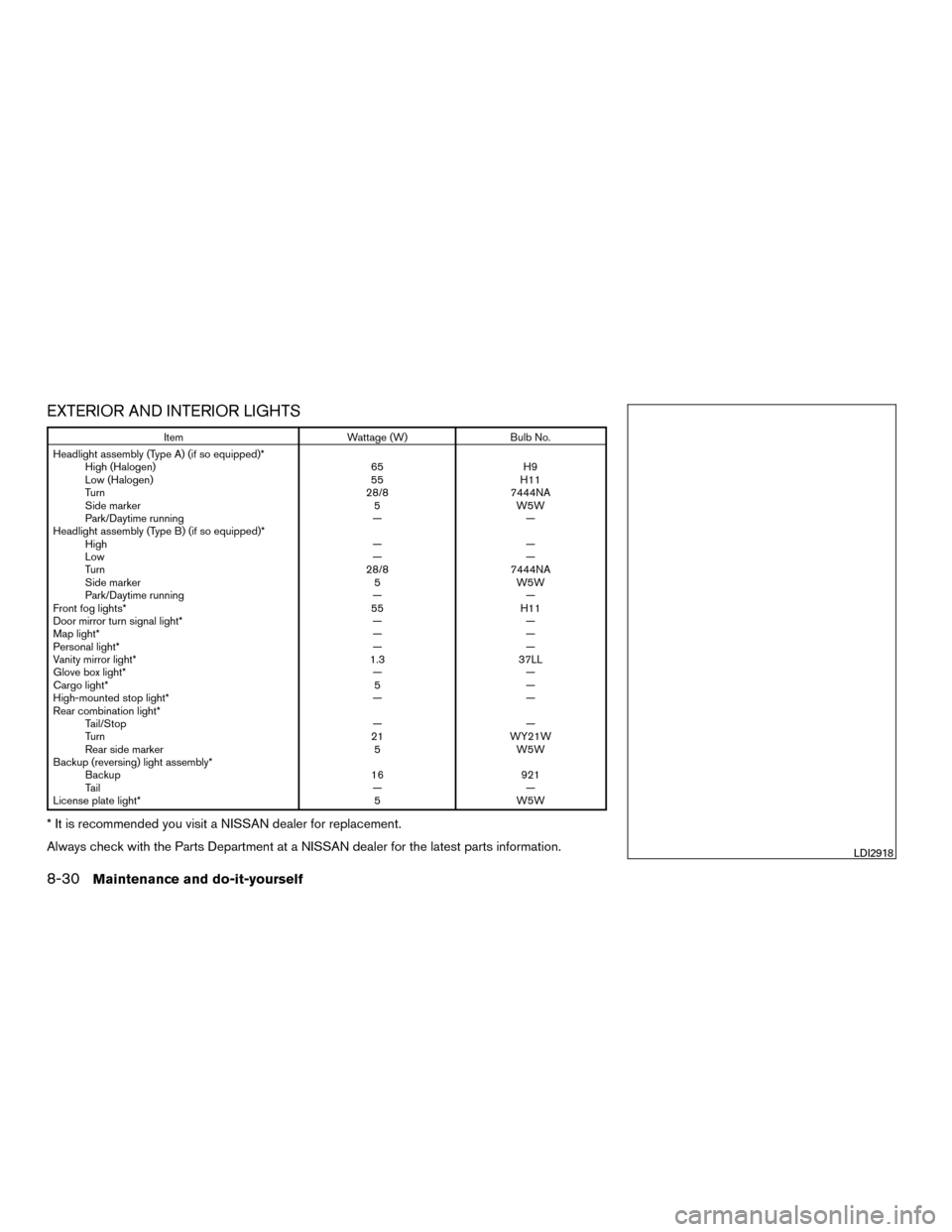
EXTERIOR AND INTERIOR LIGHTS
ItemWattage (W)Bulb No.
Headlight assembly (Type A) (if so equipped)* High (Halogen) 65H9
Low (Halogen) 55H11
Turn 28/87444NA
Side marker 5W5W
Park/Daytime running ——
Headlight assembly (Type B) (if so equipped)* High ——
Low ——
Turn 28/87444NA
Side marker 5W5W
Park/Daytime running ——
Front fog lights* 55H11
Door mirror turn signal light* ——
Map light* ——
Personal light* ——
Vanity mirror light* 1.337LL
Glove box light* ——
Cargo light* 5—
High-mounted stop light* ——
Rear combination light* Tail/Stop ——
Turn 21WY21W
Rear side marker 5W5W
Backup (reversing) light assembly* Backup 16921
Tail ——
License plate light* 5W5W
* It is recommended you visit a NISSAN dealer for replacement.
Always check with the Parts Department at a NISSAN dealer for the latest parts information.
LDI2918
8-30Maintenance and do-it-yourself
Page 376 of 443
1. Map light
2 Headlight assembly
3 Personal light
4. Door mirror turn signal light
5. Fog light
6. High-mounted stoplight
7. License plate light
8. Rear combination light
9. Backup (reversing) light assembly
10. Cargo light
11. Daytime running light
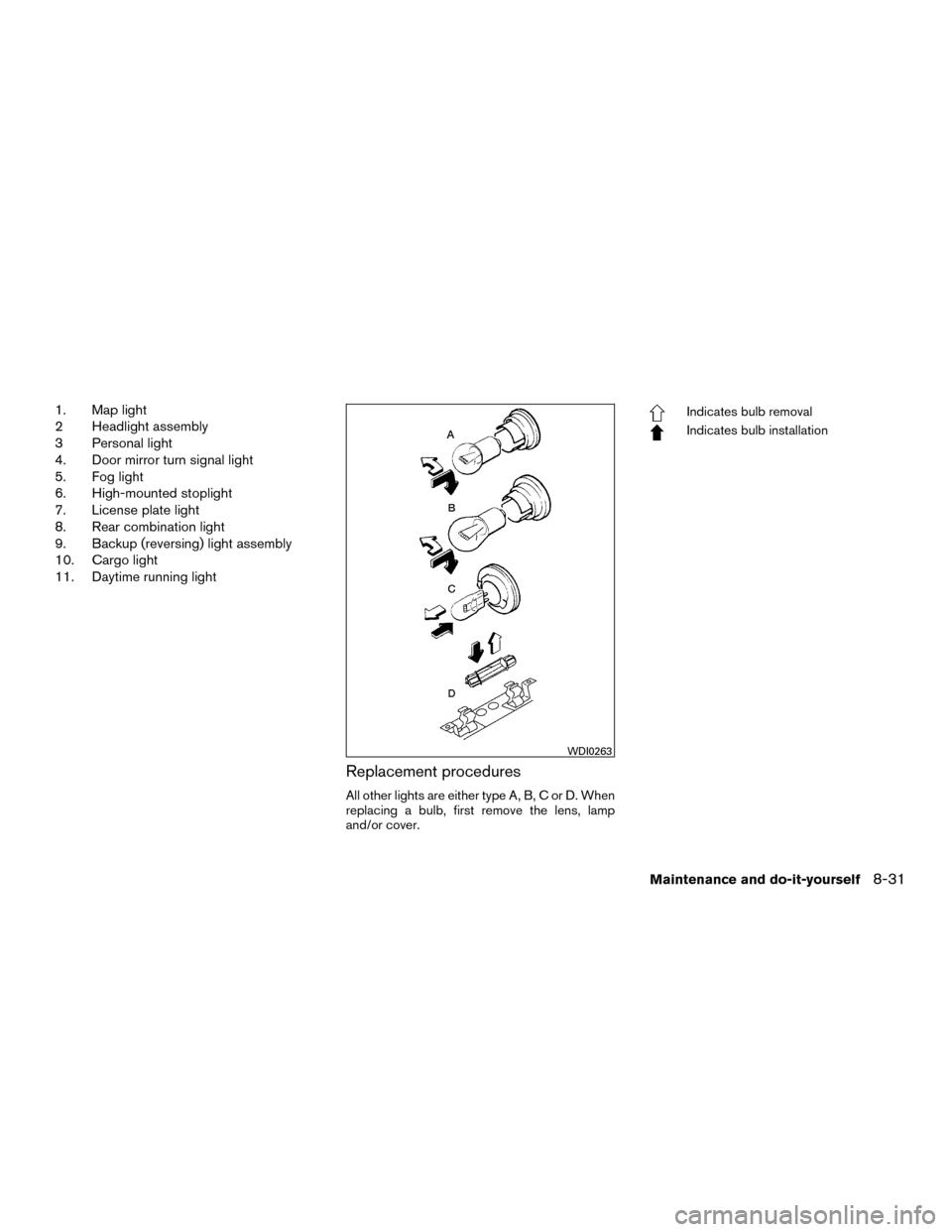
Replacement procedures
All other lights are either type A, B, C or D. When
replacing a bulb, first remove the lens, lamp
and/or cover.
Indicates bulb removal
Indicates bulb installation
WDI0263
Maintenance and do-it-yourself8-31