Page 5 of 299

NISSAN CARES...
Both NISSAN and your NISSAN dealer are dedicated to serving all your automotive needs. Your satisfaction with your vehicle and your NISSAN dealer are
our primary concerns. Your NISSAN dealer is always available to assist you with all your automobile sales and service needs.
However, if there is something that your NISSAN
dealer cannot assist you with or you would like to
provide NISSAN directly with comments or
questions, please contact the NISSAN Con-
sumer Affairs Department using our toll-free
number:
1-800-387-0122The Consumer Affairs Department will ask for the
following information:
– Your name, address and telephone number
– Vehicle identification number (attached to the
top of the instrument panel on the driver’s
side)
– Date of purchase
– Current odometer reading
– Your NISSAN dealer’s name
– Your comments or questions
OR You can write to NISSAN with the information at:
Nissan Canada Inc.
5290 Orbitor Drive
Mississauga, Ontario L4W 4Z5
or via e-mail at:
[email protected]
If you prefer, visit us at:
www.nissan.ca
We appreciate your interest in NISSAN and thank you for buying a quality NISSAN vehicle.
NISSAN CUSTOMER CARE
PROGRAM
Page 6 of 299
Table of
ContentsIllustrated table of contents
Safety—Seats, seat belts and supplemental restraint system
Instruments and controls
Pre-driving checks and adjustments
Display screen, heater, air conditioner, audio and phone systems
Starting and driving
In case of emergency
Appearance and care
Maintenance and do-it-yourself
Technical and consumer information
Index
0
1
2
3
4
5
6
7
8
9
10
Page 14 of 299
21. Audio control switches (if so equipped)(P.4-46)
Bluetooth® hands-free phone system
controls (if so equipped) (P. 4-48)
22. Fuel-filler door release lever (P. 3-10)
23. Vehicle Dynamic Control (VDC) OFF
switch (P. 2-21)
24. Electronic outside rearview mirror con-
trol switch (if so equipped) (P. 3-15)
Refer to the page number indicated in
parentheses for operating details.
Illustrated table of contents0-7
Page 78 of 299
21. Audio control switches (if so equipped)(P.4-46)
Bluetooth® hands-free phone system
controls (if so equipped) (P. 4-48)
22. Fuel-filler door release lever (P. 3-10)
23. Vehicle Dynamic Control (VDC) OFF
switch (P. 2-21)
24. Electronic outside rearview mirror con-
trol switch (if so equipped) (P. 3-15)
Refer to the page number indicated in pa-
rentheses for operating details.
1. Tachometer
2. Speedometer
3. OdometerTrip computer
4. Instrument brightness control knob
5. Change/reset button
LIC3356
METERS AND GAUGES
Instruments and controls2-3
Page 96 of 299

To sound the horn, push near the horn icon on the
steering wheel.
WARNING
Do not disassemble the horn. Doing so
could affect proper operation of the
supplemental front air bag system. Tam-
pering with the supplemental front air bag
system may result in serious personal
injury.The vehicle should be driven with the VDC sys-
tem on for most driving conditions.
If the vehicle is stuck in mud or snow, the VDC
system reduces the engine output to reduce
wheel spin. The engine speed will be reduced
even if the accelerator is depressed to the floor. If
maximum engine power is needed to free a stuck
vehicle, turn the VDC system off.
To turn off the VDC system, push the VDC OFF
switch. The
indicator will come on.
Push the VDC OFF switch again or restart the
engine to turn on the system. For additional infor-
mation, refer to “Vehicle Dynamic Control (VDC)
system” in the “Starting and driving” section of
this manual. The power outlet is for powering electrical acces-
sories such as cellular telephones. The outlet is
rated at 12 volt, 120W (10A) maximum.
CAUTION
●
The outlet and plug may be hot during
or immediately after use.
● Only certain power outlets are designed
for use with a cigarette lighter unit. Do
not use any other power outlet for an
accessory lighter. For additional infor-
mation, see a NISSAN dealer.
LIC2163LIC1548LIC2715
HORN VEHICLE DYNAMIC CONTROL (VDC)
OFF SWITCHPOWER OUTLET
Instruments and controls2-21
Page 122 of 299
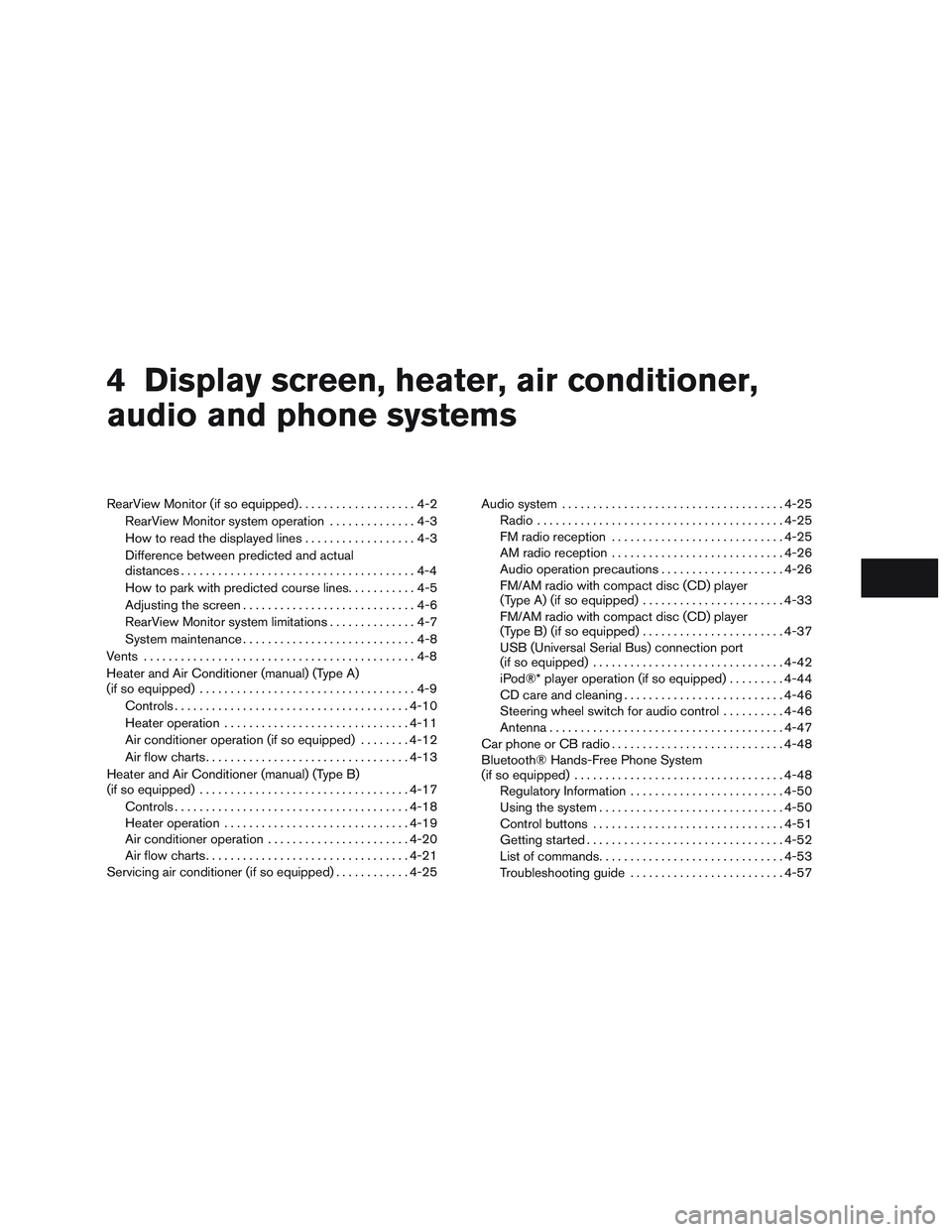
4 Display screen, heater, air conditioner,
audio and phone systems
RearView Monitor (if so equipped)...................4-2
RearView Monitor system operation ..............4-3
How to read the displayed lines ..................4-3
Difference between predicted and actual
distances ......................................4-4
How to park with predicted course lines ...........4-5
Adjusting the screen ............................4-6
RearView Monitor system limitations ..............4-7
System maintenance ............................4-8
Vents ............................................4-8
Heater and Air Conditioner (manual) (Type A)
(if so equipped) ...................................4-9
Controls ...................................... 4-10
Heater operation .............................. 4-11
Air conditioner operation (if so equipped) ........4-12
Air flow charts ................................. 4-13
Heater and Air Conditioner (manual) (Type B)
(if so equipped) .................................. 4-17
Controls ...................................... 4-18
Heater operation .............................. 4-19
Air conditioner operation .......................4-20
Air flow charts ................................. 4-21
Servicing air conditioner (if so equipped) ............4-25Audio system
.................................... 4-25
Radio ........................................ 4-25
FM radio reception ............................ 4-25
AM radio reception ............................ 4-26
Audio operation precautions ....................4-26
FM/AM radio with compact disc (CD) player
(Type A) (if so equipped) .......................4-33
FM/AM radio with compact disc (CD) player
(Type B) (if so equipped) .......................4-37
USB (Universal Serial Bus) connection port
(if so equipped) ............................... 4-42
iPod®* player operation (if so equipped) .........4-44
CD care and cleaning .......................... 4-46
Steering wheel switch for audio control ..........4-46
Antenna ...................................... 4-47
Car phone or CB radio ............................ 4-48
Bluetooth® Hands-Free Phone System
(if so equipped) .................................. 4-48
Regulatory Information ......................... 4-50
Using
the system .............................. 4-50
Control buttons ............................... 4-51
Getting started ................................ 4-52
List of commands .............................. 4-53
Troubleshooting guide ......................... 4-57
Page 123 of 299
WARNING
●Failure to follow the warnings and in-
structions for proper use of the Rear-
View Monitor system could result in se-
rious injury or death. ●
RearView Monitor is a convenience fea-
ture and is not a substitute for proper
backing. Always turn and look out the
windows and check mirrors to be sure
that it is safe to move before operating
the vehicle. Always back up slowly. ●
The system is designed as an aid to the
driver in showing large stationary ob-
jects directly behind the vehicle, to help
avoid damaging the vehicle.
LHA3823
REARVIEW MONITOR (if so
equipped)
4-2Display screen, heater, air conditioner, audio and phone systems
Page 124 of 299

●The distance guide line and the vehicle
width line should be used as a reference
only when the vehicle is on a level
paved surface. The distance viewed on
the monitor is for reference only and
may be different than the actual dis-
tance between the vehicle and dis-
played objects.
CAUTION
Do not scratch the camera lens when
cleaning dirt or snow from the front of the
camera.
The RearView Monitor system automatically
shows a rear view of the vehicle when the shift
lever is shifted into the R (Reverse) position. The
radio can still be heard while the RearView Moni-
tor is active. To display the rear view, the RearView Monitor
system uses a camera located just above the
vehicle’s license plate
�1.
REARVIEW MONITOR SYSTEM
OPERATION
With the ignition switch in the ON position, move
the shift lever to the R (Reverse) position or press
the CAMERA button to operate the RearView
Monitor.
HOW TO READ THE DISPLAYED
LINES
Guiding lines which indicate the vehicle width
and distances to objects with reference to the
vehicle body line
�Aare displayed on the monitor.
Distance guide lines
Indicate distances from the vehicle body. ● Red line
�1: approx. 1.5 ft (0.5 m)
● Yellow line
�2: approx. 3 ft (1 m)
● Green line
�3: approx. 7 ft (2 m)
● Green line
�4: approx. 10 ft (3 m)
LHA3733LHA1196
Display screen, heater, air conditioner, audio and phone systems4-3


