Page 166 of 299

If another audio source is playing and the iPod®
is connected, press the iPod MENU button to
switch to the iPod® mode.
If the system is turned off while the iPod® is
playing, the iPod® will start when the PWR but-
ton is pressed.
Top menu item selecting
Press the iPod MENU button while the iPod® is
connected to show the interface for iPod® op-
eration on the audio display. The items can be
chosen from the menu list screen by pressing the
SEEK button
orwhile the iPod® is
operational. The display pattern can be changed
as follows:
Playlists →Artists →Albums →Songs →Pod-
casts →Genres →Composers →Audiobooks
For additional information, refer to the iPod®
owner’s manual.
ENTER and BACK buttons
Press the ENTER button while the top menu is
displayed to show program details on the audio
display. Use the SEEK buttons
orto
scroll through the choices and press the ENTER
button to make a selection. Press the BACK
button to return to the previous display. TUNE/FOLDER knob
If there are multiple folders with audio files on the
iPod® device, turn the TUNE/FOLDER knob to
change folders. Turn the knob to the left to skip
back a folder. Turn the knob to the right to skip
ahead a folder. If there is only one folder of audio
files on the iPod® device, turning the
TUNE/FOLDER knob in either direction will re-
turn to the first track on the iPod® device.
SEEK/TRACK buttons
When the
SEEK button orTRACK
button is pressed for less than 1.5 seconds while
the iPod® is playing, the next track or the begin-
ning of the current track on the iPod® will be
played.
When the
SEEK button orTRACK
button is pressed for more than 1.5 seconds
while the iPod® is playing, the iPod® will play
while fast forwarding or rewinding. When the
button is released, the iPod® will return to the
normal play speed. RDM/RPT button
Press the RDM/RPT button while a track is play-
ing to change the play pattern as follows:
Excluding Podcast and Audiobook:
1 TRACK REPEAT→
ALL REPEAT→OFF
TRACK SHUFFLE→ ALBUM SHUFFLE→OFF
For additional information, refer to the iPod®
owner’s manual.
Display screen, heater, air conditioner, audio and phone systems4-45
Page 172 of 299

The command given is picked up by the micro-
phone, and voice feedback is given when the
command is accepted.● If you need to hear the available commands
for the current menu again, say “Help” and
the system will repeat them.
● If a command is not recognized, the system
announces, “Command not recognized.
Please try again.” Make sure the command is
said exactly as prompted by the system and
repeat the command in a clear voice.
● If you want to go back to the previous com-
mand, you can say “Go back” or “Correc-
tion” any time the system is waiting for a
response.
● You can cancel a command when the sys-
tem is waiting for a response by saying,
“Cancel” or “Quit.” The system announces
“Cancel” and ends the Voice Recognition
session. You can also press and hold
the
button on the steering wheel for
5 seconds at any time to end the Voice
Recognition session. Whenever the Voice
Recognition session is cancelled, a double
beep is played to indicate you have exited
the system. ●
If you want to adjust the volume of the voice
feedback, press the volume control switches
(+ or -) on the steering wheel while being
provided with feedback. You can also use
the radio volume control knob.
Voice Prompt Interrupt
In most cases you can interrupt the voice feed-
back to speak the next command by pressing
the
button on the steering wheel. After
interrupting the system, wait for a beep before
speaking your command.
One Shot Call
To use the system faster, you may speak the
second level commands with the main menu
command on the main menu. For example, press
the
button and after the tone say, “Call
Redial”.
Operating tips
To get the best performance out of the system,
observe the following:
● Keep the interior of the vehicle as quiet as
possible. Close the windows to eliminate
surrounding noises (traffic noises, vibration
sounds, etc.) , which may prevent the system
from recognizing voice commands correctly.
CONTROL BUTTONS
The control buttons for the Bluetooth® Hands-
Free Phone System are located on the steering
wheel.
PHONE/SEND
Press the
button to answer
an incoming call.
LHA2087
Display screen, heater, air conditioner, audio and phone systems4-51
Page 252 of 299
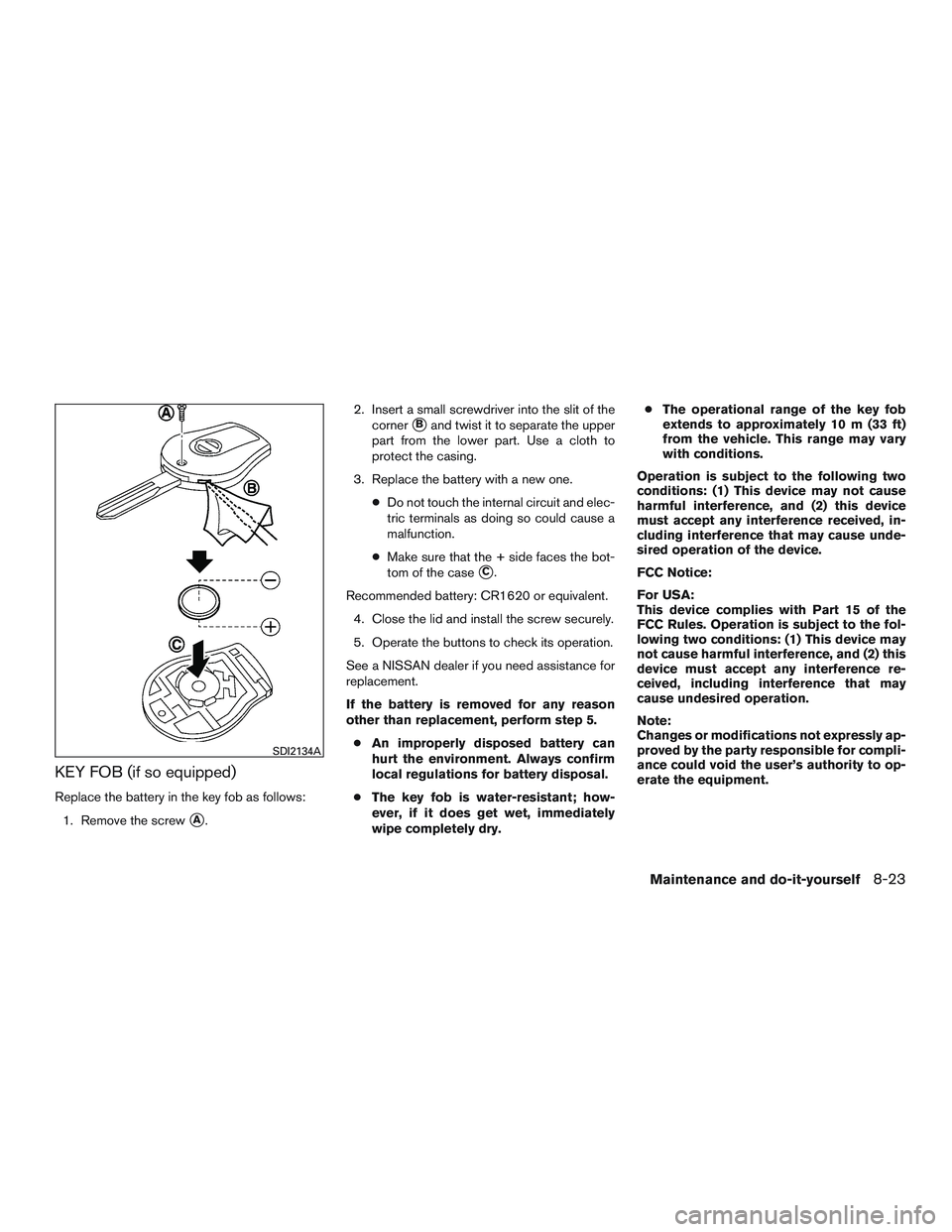
KEY FOB (if so equipped)
Replace the battery in the key fob as follows:1. Remove the screw
�A. 2. Insert a small screwdriver into the slit of the
corner
�Band twist it to separate the upper
part from the lower part. Use a cloth to
protect the casing.
3. Replace the battery with a new one. ●Do not touch the internal circuit and elec-
tric terminals as doing so could cause a
malfunction.
● Make sure that the + side faces the bot-
tom of the case
�C.
Recommended battery: CR1620 or equivalent. 4. Close the lid and install the screw securely.
5. Operate the buttons to check its operation.
See a NISSAN dealer if you need assistance for
replacement.
If the battery is removed for any reason
other than replacement, perform step 5. ● An improperly disposed battery can
hurt the environment. Always confirm
local regulations for battery disposal.
● The key fob is water-resistant; how-
ever, if it does get wet, immediately
wipe completely dry. ●
The operational range of the key fob
extends to approximately 10 m (33 ft)
from the vehicle. This range may vary
with conditions.
Operation is subject to the following two
conditions: (1) This device may not cause
harmful interference, and (2) this device
must accept any interference received, in-
cluding interference that may cause unde-
sired operation of the device.
FCC Notice:
For USA:
This device complies with Part 15 of the
FCC Rules. Operation is subject to the fol-
lowing two conditions: (1) This device may
not cause harmful interference, and (2) this
device must accept any interference re-
ceived, including interference that may
cause undesired operation.
Note:
Changes or modifications not expressly ap-
proved by the party responsible for compli-
ance could void the user’s authority to op-
erate the equipment.
SDI2134A
Maintenance and do-it-yourself8-23