Page 225 of 401
Two driving modes can be selected by using the
drive mode selector switches, NORMAL and
SPORT.
NOTE:● When the drive mode select switch selects a
mode, the mode may not switch quickly. This
is not a malfunction.
● Select the NORMAL mode for normal driv-
ing.
NORMAL MODE
NORMAL mode is recommended for normal driv-
ing. Push the NORMAL mode button to select
this mode.
SPORT MODE
The SPORT mode adjusts the engine, transmis-
sion, and steering to enhance performance. Push
the SPORT mode button to select this driving
mode.
NOTE:
In the SPORT mode, fuel economy may be
reduced.
WARNING
Failure to follow the warnings and instruc-
tions for proper use of the BSW system
could result in serious injury or death.
● The BSW system is not a replacement
for proper driving procedures and is not
designed to prevent contact with ve-
hicles or objects. When changing lanes,
always use the side and rear mirrors
and turn and look in the direction your
vehicle will move to ensure it is safe to
change lanes. Never rely solely on the
BSW system.
The BSW system helps alert the driver of other
vehicles in adjacent lanes when changing lanes.
Drive mode selector switches
LSD2361
DRIVE MODE SELECTOR BLIND SPOT WARNING (BSW) (if so
equipped)
5-22Starting and driving
Page 248 of 401
THE ICC SWITCH
The system is operated by the
CRUISE
switch and four control switches,
all mounted on the steering wheel.
1. DISTANCE switch:
Changes the vehicle’s following distance:
● Long
● Middle
● Short 2.
RES+ switch:
Resumes set speed or increases speed in-
crementally.
3. CANCEL switch:
Deactivates the system without erasing the
set speed.
4. SET– switch:
Sets desired cruise speed or reduces speed
incrementally.
5. CRUISE
switch:
Master switch to activate the system.
The ICC system display and indicators
The display is located between the speedometer
and tachometer.
1. CRUISE
switch indicator:
● ICC system ON indicator (white): In-
dicates that the CRUISE
switch is
ON.
● ICC system SET indicator (green):
Indicates that the cruising speed is set.
● ICC system warning (orange): Indi-
cates that if there is a malfunction in the
ICC system.
LSD2433LSD2285
Starting and driving5-45
Page 253 of 401
NOTE:
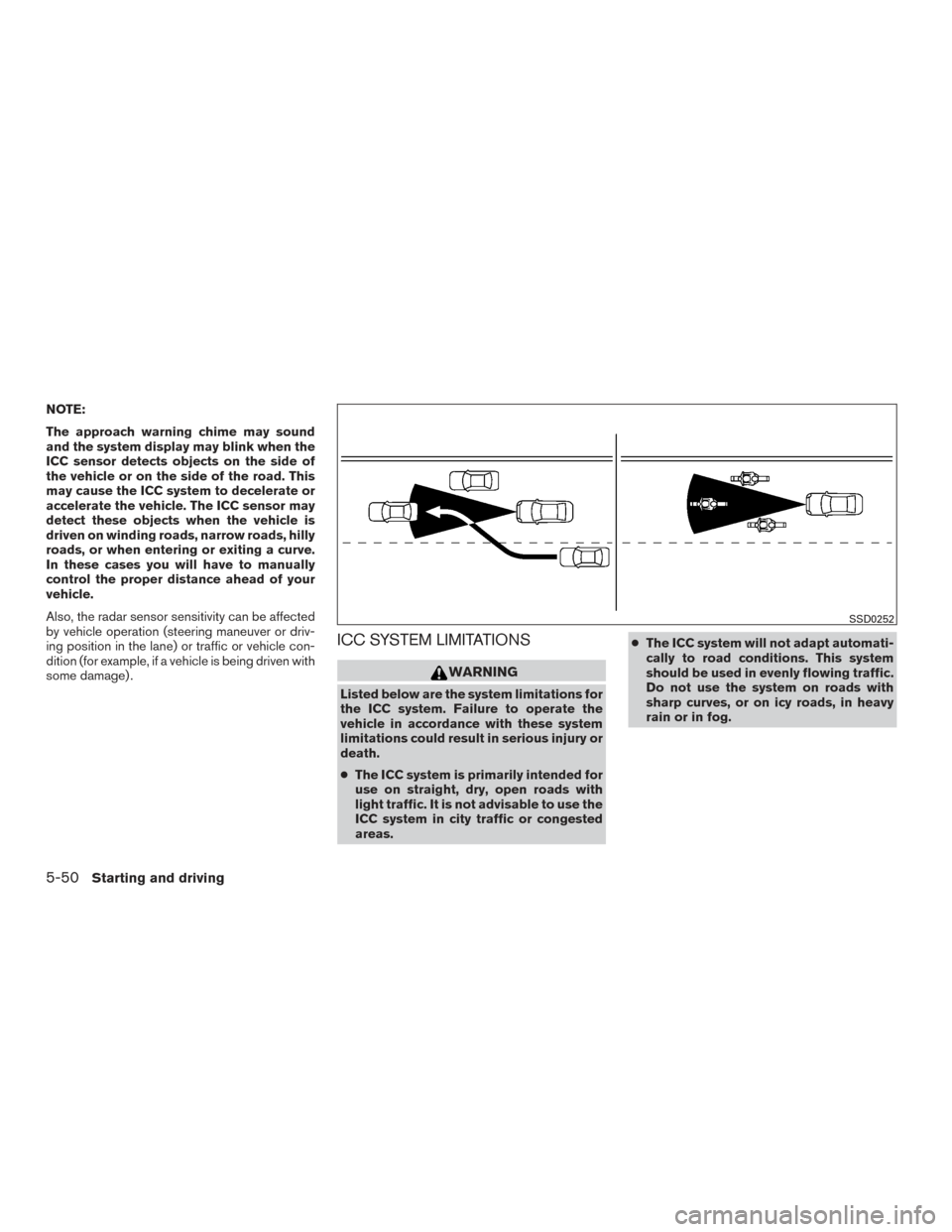
The approach warning chime may sound
and the system display may blink when the
ICC sensor detects objects on the side of
the vehicle or on the side of the road. This
may cause the ICC system to decelerate or
accelerate the vehicle. The ICC sensor may
detect these objects when the vehicle is
driven on winding roads, narrow roads, hilly
roads, or when entering or exiting a curve.
In these cases you will have to manually
control the proper distance ahead of your
vehicle.
Also, the radar sensor sensitivity can be affected
by vehicle operation (steering maneuver or driv-
ing position in the lane) or traffic or vehicle con-
dition (for example, if a vehicle is being driven with
some damage) .
ICC SYSTEM LIMITATIONS
WARNING
Listed below are the system limitations for
the ICC system. Failure to operate the
vehicle in accordance with these system
limitations could result in serious injury or
death.
●The ICC system is primarily intended for
use on straight, dry, open roads with
light traffic. It is not advisable to use the
ICC system in city traffic or congested
areas. ●
The ICC system will not adapt automati-
cally to road conditions. This system
should be used in evenly flowing traffic.
Do not use the system on roads with
sharp curves, or on icy roads, in heavy
rain or in fog.
SSD0252
5-50Starting and driving
Page 255 of 401
The ICC system is designed to automatically
check the sensor’s operation within the limita-
tions of the system.
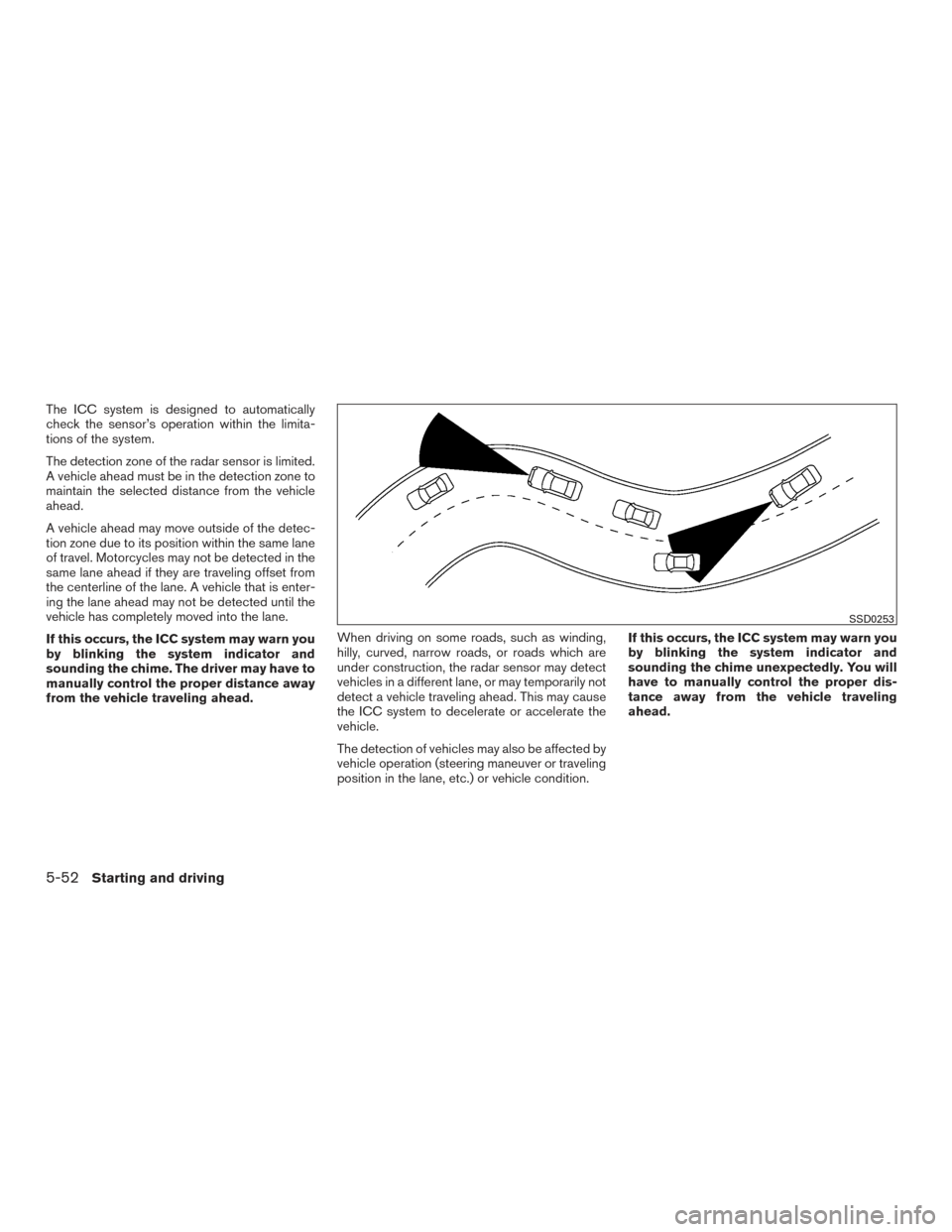
The detection zone of the radar sensor is limited.
A vehicle ahead must be in the detection zone to
maintain the selected distance from the vehicle
ahead.
A vehicle ahead may move outside of the detec-
tion zone due to its position within the same lane
of travel. Motorcycles may not be detected in the
same lane ahead if they are traveling offset from
the centerline of the lane. A vehicle that is enter-
ing the lane ahead may not be detected until the
vehicle has completely moved into the lane.
If this occurs, the ICC system may warn you
by blinking the system indicator and
sounding the chime. The driver may have to
manually control the proper distance away
from the vehicle traveling ahead.When driving on some roads, such as winding,
hilly, curved, narrow roads, or roads which are
under construction, the radar sensor may detect
vehicles in a different lane, or may temporarily not
detect a vehicle traveling ahead. This may cause
the ICC system to decelerate or accelerate the
vehicle.
The detection of vehicles may also be affected by
vehicle operation (steering maneuver or traveling
position in the lane, etc.) or vehicle condition.If this occurs, the ICC system may warn you
by blinking the system indicator and
sounding the chime unexpectedly. You will
have to manually control the proper dis-
tance away from the vehicle traveling
ahead.
SSD0253
5-52Starting and driving
Page 261 of 401
Depending on vehicle speed and distance to the
vehicle ahead, as well as driving and roadway
conditions, the system may help the driver avoid a
forward collision or may help mitigate the conse-
quences of a collision, should one be unavoid-
able. If the driver is handling the steering wheel,
accelerating or braking, the FEB system will func-
tion later or will not function.
The automatic braking will cease under the fol-
lowing conditions:● When the steering wheel is turned as far as
necessary to avoid a collision.
● When the accelerator pedal is depressed.
● When there is no longer a vehicle detected
ahead.
If the FEB system has stopped the vehicle, the
vehicle will remain at a standstill for approximately
2 seconds before the brakes are released.
LSD2412
5-58Starting and driving
Page 275 of 401
For Canada
This device complies with Industry Canada
licence-exempt RSS standard(s) . Opera-
tion is subject to the following two condi-
tions:1. This device may not cause interference,
2. This device must accept any interfer-
ence, including interference that may
cause undesired operation of the de-
vice.WARNING
Failure to follow the warnings and instruc-
tions for proper use of the Driver Attention
Alert system could result in serious injury
or death.
● The Driver Attention Alert system is only
a warning to inform the driver of a po-
tential lack of driver attention or
drowsiness. It will not steer the vehicle
or prevent loss of control.
● The Driver Attention Alert system does
not detect and provide an alert of the
driver’s lack of attention or fatigue in
every situation.
● It is the driver’s responsibility to:
● stay alert,
● drive safely,
● keep the vehicle in the traveling lane,
● be in control of the vehicle at all
times,
● avoid driving when tired,
● avoid distractions (texting, etc) . The Driver Attention Alert system helps alert the
driver if the system detects a lack of attention or
driving fatigue.
The system monitors driving style and steering
behavior over a period of time, and it detects
changes from the normal pattern. If the system
detects that driver attention is decreasing over a
period of time, the system uses audible and visual
warnings to suggest that the driver take a break.
DRIVER ATTENTION ALERT (if so
equipped)
5-72Starting and driving
Page 276 of 401
DRIVER ATTENTION ALERT SYSTEM
OPERATION
If the system detects driver fatigue or that driver
attention is decreasing, the message “Take a
break?” appears in the vehicle information display
and a chime sounds when the vehicle is driven at
speeds above 37 mph (60 km/h).
The system continuously monitors driver atten-
tion and can provide multiple warnings per trip.
The system resets and starts reassessing driving
style and steering behavior when the ignition
switch is cycled from on to off and back on.
LSD2379
LSD2412
Starting and driving5-73
Page 281 of 401
WARNING
●If the engine is not running or is turned
off while driving, the power assist for
the steering will not work. Steering will
be harder to operate.
● When the power steering warning light
illuminates with the engine running,
there will be no power assist for the
steering. You will still have control of
the vehicle but the steering will be
harder to operate. Have the power
steering system checked by a NISSAN
dealer.
The power steering system is designed to pro-
vide power assist while driving to operate the
steering wheel with light force.
When the steering wheel is operated repeatedly
or continuously while parking or driving at a very
low speed, the power assist for the steering
wheel will be reduced. This is to prevent over-
heating of the power steering system and protect
it from getting damaged. While the power assist
is reduced, steering wheel operation will become
heavy. If the steering wheel operation is still per-
formed, the power steering may stop and the
power steering warning light will illuminate. In a
safe location, stop the engine and push the igni-
tion switch to the OFF position. The temperature of the power steering system will go down after a
period of time and the power assist level will
return to normal after starting the engine. The
power steering warning light will go off. Avoid
repeating such steering wheel operations that
could cause the power steering system to over-
heat.
You may hear a noise from the front of the vehicle
when the steering wheel is operated. This is a
normal operational noise and is not a malfunction.
If the electric power steering warning light illumi-
nates while the engine is running, it may indicate
the power steering system is not functioning
properly and may need servicing. Have the power
steering system checked by a NISSAN dealer.
When the electric power steering warning light
illuminates with the engine running, there will be
no power assist for the steering but you will still
have control of the vehicle. At this time, greater
steering effort is required to operate the steering
wheel, especially in sharp turns and at low
speeds.
The brake system has two separate hydraulic
circuits. If one circuit malfunctions, you will still
have braking at two wheels.
BRAKE PRECAUTIONS
Vacuum assisted brakes
The brake booster aids braking by using engine
vacuum. If the engine stops, you can stop the
vehicle by depressing the brake pedal. However,
greater foot pressure on the brake pedal will be
required to stop the vehicle and stopping dis-
tance will be longer.
Using the brakes
Avoid resting your foot on the brake pedal while
driving. This will overheat the brakes, wear out the
brake pads faster, and reduce gas mileage.
To help reduce brake wear and to prevent the
brakes from overheating, reduce speed and
downshift to a lower gear before going down a
slope or long grade. Overheated brakes may
reduce braking performance and could result in
loss of vehicle control.
POWER STEERING
BRAKE SYSTEM
5-78Starting and driving