Page 247 of 437
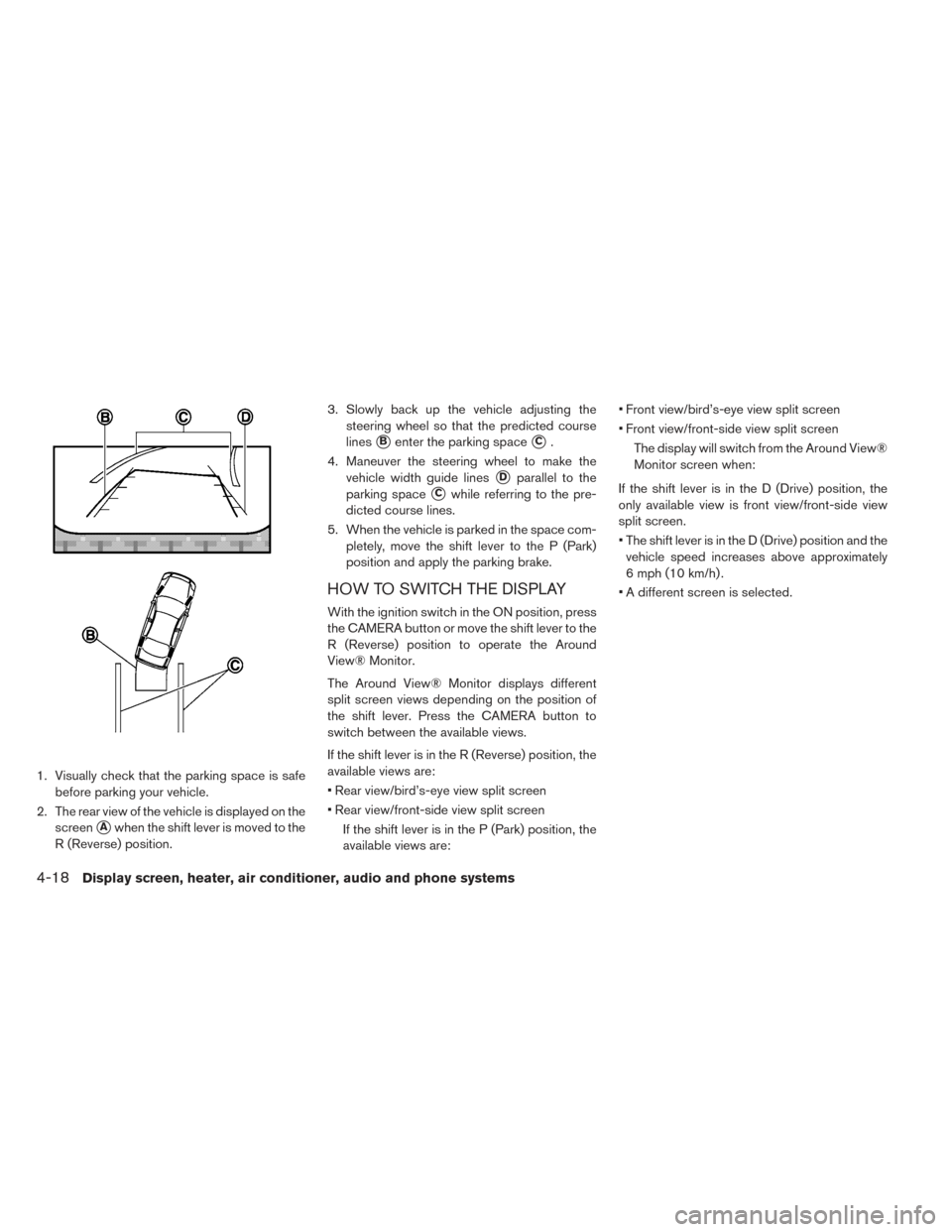
1. Visually check that the parking space is safebefore parking your vehicle.
2. The rear view of the vehicle is displayed on the screen
�Awhen the shift lever is moved to the
R (Reverse) position. 3. Slowly back up the vehicle adjusting the
steering wheel so that the predicted course
lines
�Benter the parking space�C.
4. Maneuver the steering wheel to make the vehicle width guide lines
�Dparallel to the
parking space
�Cwhile referring to the pre-
dicted course lines.
5. When the vehicle is parked in the space com- pletely, move the shift lever to the P (Park)
position and apply the parking brake.
HOW TO SWITCH THE DISPLAY
With the ignition switch in the ON position, press
the CAMERA button or move the shift lever to the
R (Reverse) position to operate the Around
View® Monitor.
The Around View® Monitor displays different
split screen views depending on the position of
the shift lever. Press the CAMERA button to
switch between the available views.
If the shift lever is in the R (Reverse) position, the
available views are:
• Rear view/bird’s-eye view split screen
• Rear view/front-side view split screen
If the shift lever is in the P (Park) position, the
available views are: • Front view/bird’s-eye view split screen
• Front view/front-side view split screen
The display will switch from the Around View®
Monitor screen when:
If the shift lever is in the D (Drive) position, the
only available view is front view/front-side view
split screen.
• The shift lever is in the D (Drive) position and the vehicle speed increases above approximately
6 mph (10 km/h) .
• A different screen is selected.
4-18Display screen, heater, air conditioner, audio and phone systems
Page 273 of 437
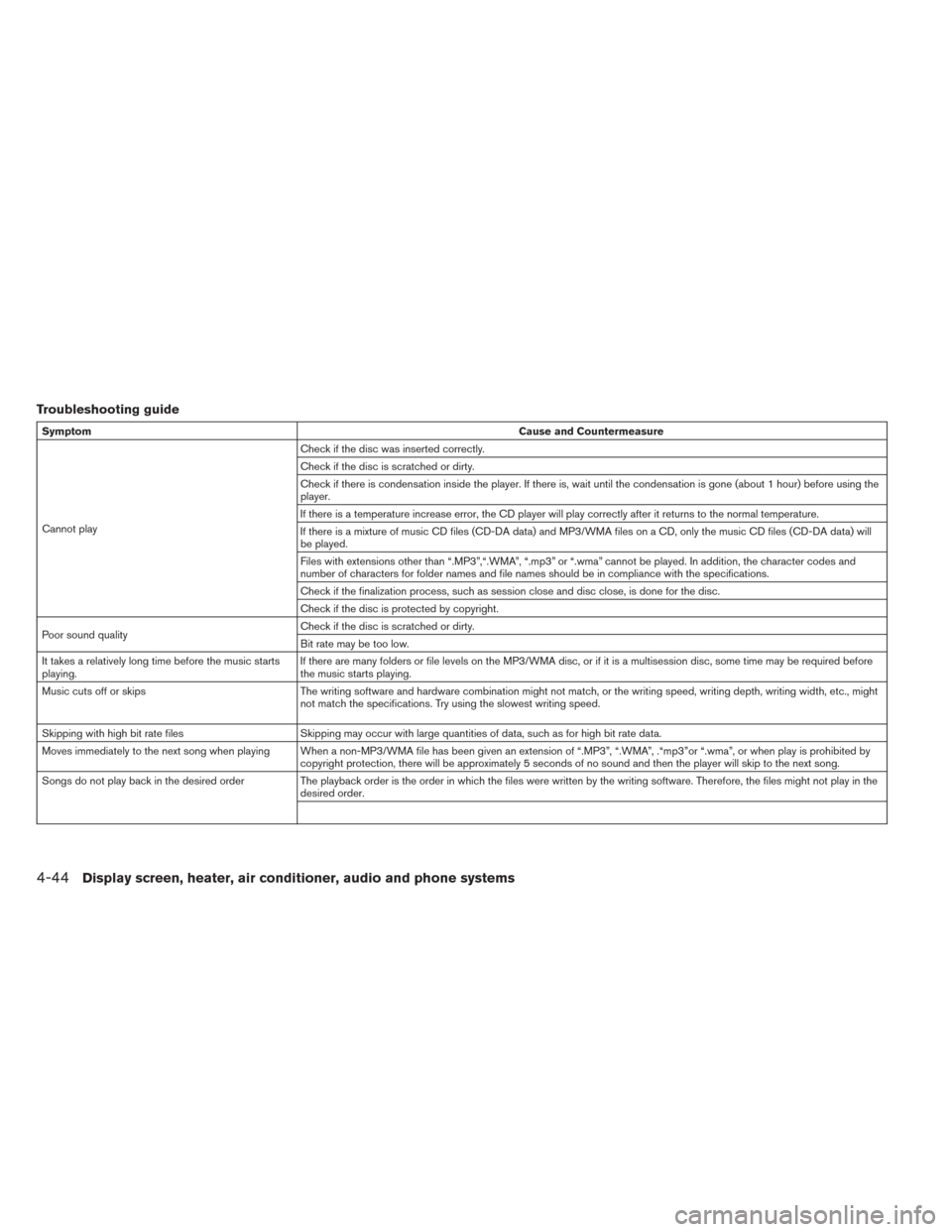
Troubleshooting guide
SymptomCause and Countermeasure
Cannot play Check if the disc was inserted correctly.
Check if the disc is scratched or dirty.
Check if there is condensation inside the player. If there is, wait until the condensation is gone (about 1 hour) before using the
player.
If there is a temperature increase error, the CD player will play correctly after it returns to the normal temperature.
If there is a mixture of music CD files (CD-DA data) and MP3/WMA files on a CD, only the music CD files (CD-DA data) will
be played.
Files with extensions other than “.MP3”,“.WMA”, “.mp3” or “.wma” cannot be played. In addition, the character codes and
number of characters for folder names and file names should be in compliance with the specifications.
Check if the finalization process, such as session close and disc close, is done for the disc.
Check if the disc is protected by copyright.
Poor sound quality Check if the disc is scratched or dirty.
Bit rate may be too low.
It takes a relatively long time before the music starts
playing. If there are many folders or file levels on the MP3/WMA disc, or if it is a multisession disc, some time may be required before
the music starts playing.
Music cuts off or skips The writing software and hardware combination might not match, or the writing speed, writing depth, writing width, etc., might
not match the specifications. Try using the slowest writing speed.
Skipping with high bit rate files Skipping may occur with large quantities of data, such as for high bit rate data.
Moves immediately to the next song when playing When a non-MP3/WMA file has been given an extension of “.MP3”, “.WMA”, .“mp3”or “.wma”, or when play is prohibited by copyright protection, there will be approximately 5 seconds of no sound and then the player will skip to the next song.
Songs do not play back in the desired order The playback order is the order in which the files were written by the writing software. Therefore, the files might not play in the
desired order.
4-44Display screen, heater, air conditioner, audio and phone systems
Page 384 of 437
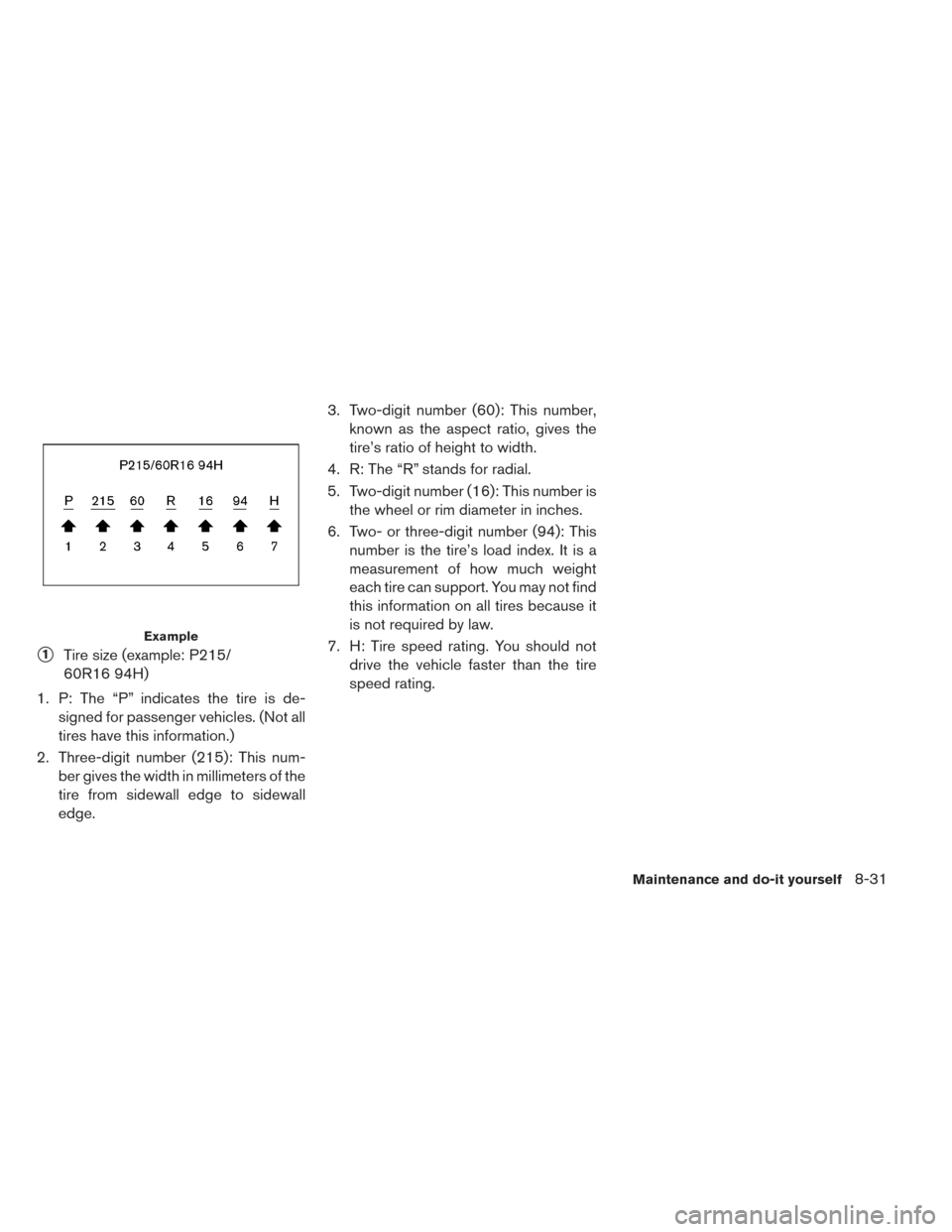
�1Tire size (example: P215/
60R16 94H)
1. P: The “P” indicates the tire is de- signed for passenger vehicles. (Not all
tires have this information.)
2. Three-digit number (215): This num- ber gives the width in millimeters of the
tire from sidewall edge to sidewall
edge. 3. Two-digit number (60): This number,
known as the aspect ratio, gives the
tire’s ratio of height to width.
4. R: The “R” stands for radial.
5. Two-digit number (16): This number is the wheel or rim diameter in inches.
6. Two- or three-digit number (94): This number is the tire’s load index. It is a
measurement of how much weight
each tire can support. You may not find
this information on all tires because it
is not required by law.
7. H: Tire speed rating. You should not drive the vehicle faster than the tire
speed rating.
Example
Maintenance and do-it yourself8-31
Page 397 of 437
MOTOR
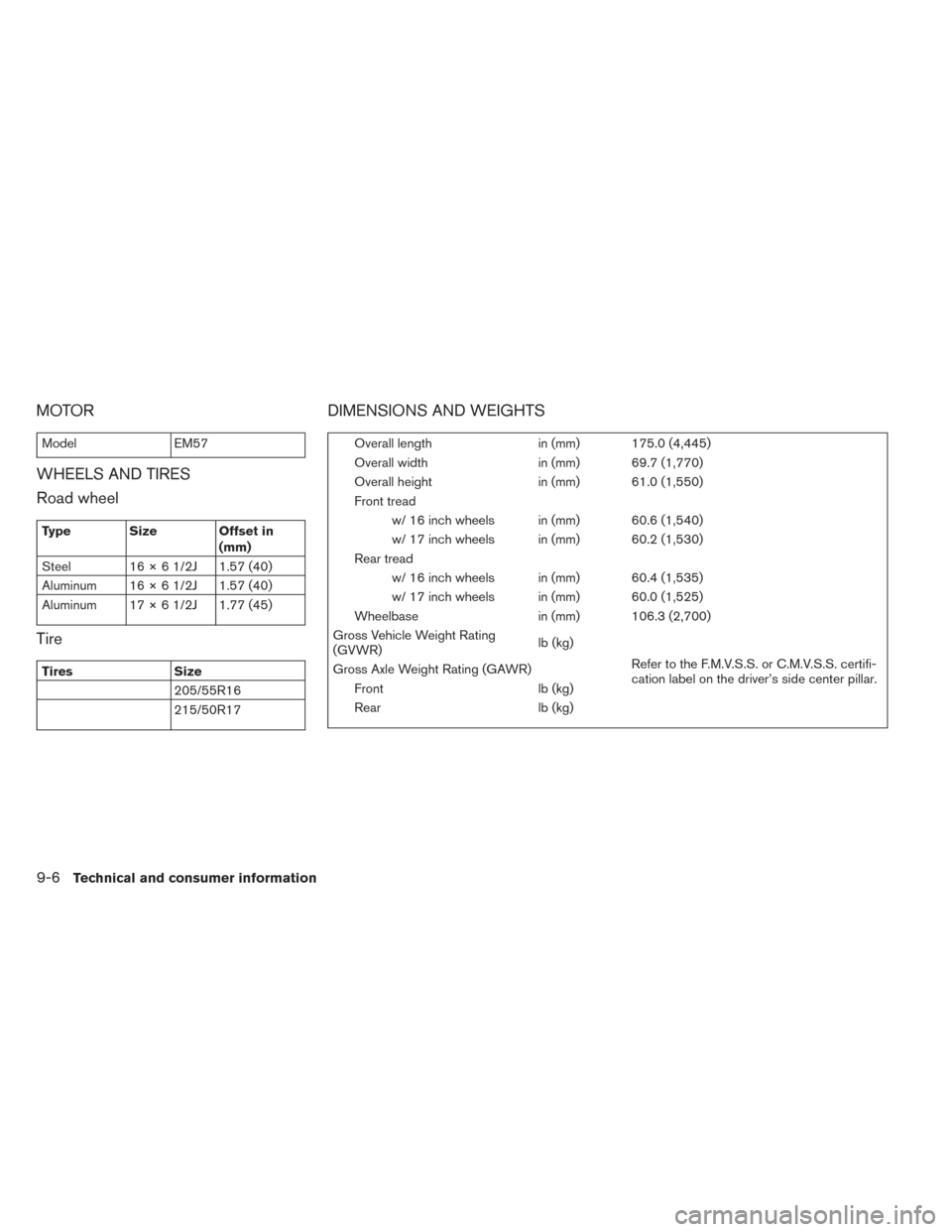
ModelEM57
WHEELS AND TIRES
Road wheel
Type Size Offset in
(mm)
Steel 16 × 6 1/2J 1.57 (40)
Aluminum 16 × 6 1/2J 1.57 (40)
Aluminum 17 × 6 1/2J 1.77 (45)
Tire
Tires Size
205/55R16
215/50R17
DIMENSIONS AND WEIGHTS
Overall length in (mm) 175.0 (4,445)
Overall width in (mm) 69.7 (1,770)
Overall height in (mm) 61.0 (1,550)
Front tread w/ 16 inch wheels in (mm) 60.6 (1,540)
w/ 17 inch wheels in (mm) 60.2 (1,530)
Rear tread w/ 16 inch wheels in (mm) 60.4 (1,535)
w/ 17 inch wheels in (mm) 60.0 (1,525)
Wheelbase in (mm) 106.3 (2,700)
Gross Vehicle Weight Rating
(GVWR) lb (kg)
Refer to the F.M.V.S.S. or C.M.V.S.S. certifi-
cation label on the driver’s side center pillar.
Gross Axle Weight Rating (GAWR)
Front lb (kg)
Rear lb (kg)
9-6Technical and consumer information
Page 405 of 437
Do not tow a trailer with your vehicle.Towing your vehicle with all four wheels on the
ground is sometimes called flat towing. This
method is typically used when towing a vehicle
behind a recreational vehicle, such as a motor
home.
CAUTION
• Failure to follow these guidelines can result in severe transmission damage.
• Whenever flat towing your vehicle, al- ways tow forward, never backward.
• Never tow your front wheel drive ve- hicle with the front tires on the ground.
Doing so may cause serious and ex-
pensive damage to the powertrain.
• DO NOT tow your front wheel drive continuously variable transmission ve-
hicle with all four wheels on the
ground (flat towing) . Doing so WILL
DAMAGE internal transmission parts
due to lack of transmission lubrication.
• For emergency towing procedures re- fer to “Towing recommended by
NISSAN” in the “In case of emergency”
section of this manual. DOT (Department Of Transportation) Quality
Grades: All passenger car tires must conform to
federal safety requirements in addition to these
grades.
Quality grades can be found where applicable on
the tire sidewall between tread shoulder and
maximum section width. For example:
Treadwear 200 Traction AA Temperature A
TREADWEAR
The treadwear grade is a comparative rating
based on the wear rate of the tire when tested
under controlled conditions on a specified gov-
ernment test course. For example, a tire graded
150 would wear one and one-half (1 1/2) times
as well on the government course as a tire graded
100. The relative performance of tires depends
upon actual conditions of their use however, and
may depart significantly from the norm due to
variations in driving habits, service practices and
differences in road characteristics and climate.
TOWING A TRAILER
FLAT TOWINGUNIFORM TIRE QUALITY GRADING
9-14Technical and consumer information