Page 277 of 437
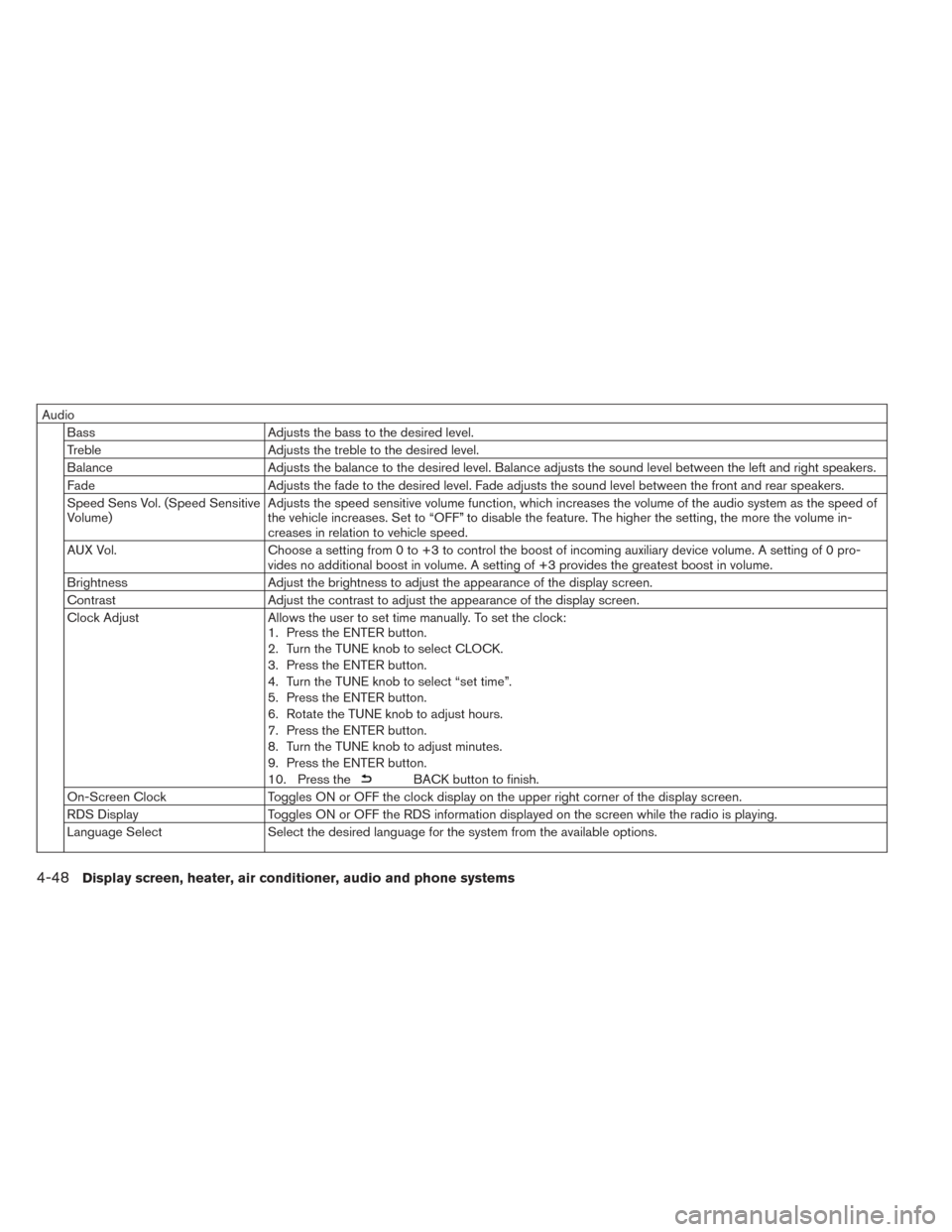
AudioBass Adjusts the bass to the desired level.
Treble Adjusts the treble to the desired level.
Balance Adjusts the balance to the desired level. Balance adjusts the sound level between the left and right speakers.
Fade Adjusts the fade to the desired level. Fade adjusts the sound level between the front and rear speakers.
Speed Sens Vol. (Speed Sensitive
Volume) Adjusts the speed sensitive volume function, which increases the volume of the audio system as the speed of
the vehicle increases. Set to “OFF” to disable the feature. The higher the setting, the more the volume in-
creases in relation to vehicle speed.
AUX Vol. Choose a setting from 0 to +3 to control the boost of incoming auxiliary device volume. A setting of 0 pro-
vides no additional boost in volume. A setting of +3 provides the greatest boost in volume.
Brightness Adjust the brightness to adjust the appearance of the display screen.
Contrast Adjust the contrast to adjust the appearance of the display screen.
Clock Adjust Allows the user to set time manually. To set the clock:
1. Press the ENTER button.
2. Turn the TUNE knob to select CLOCK.
3. Press the ENTER button.
4. Turn the TUNE knob to select “set time”.
5. Press the ENTER button.
6. Rotate the TUNE knob to adjust hours.
7. Press the ENTER button.
8. Turn the TUNE knob to adjust minutes.
9. Press the ENTER button.
10. Press the
BACK button to finish.
On-Screen Clock Toggles ON or OFF the clock display on the upper right corner of the display screen.
RDS Display Toggles ON or OFF the RDS information displayed on the screen while the radio is playing.
Language Select Select the desired language for the system from the available options.
4-48Display screen, heater, air conditioner, audio and phone systems
Page 286 of 437
iPod®:
• Tilt up/down for less than 1.5 seconds to in-crease or decrease the track number.
CD:
• Tilt up/down for less than 1.5 seconds to in- crease or decrease the track number.
• Tilt up/down for more than 1.5 seconds to in- crease or decrease the folder number (if playing
compressed audio files) .
USB:
• Tilt up/down for less than 1.5 seconds to in- crease or decrease the track number.
• Tilt up/down for more than 1.5 seconds to in- crease or decrease the folder number.
ANTENNA
Removing antenna
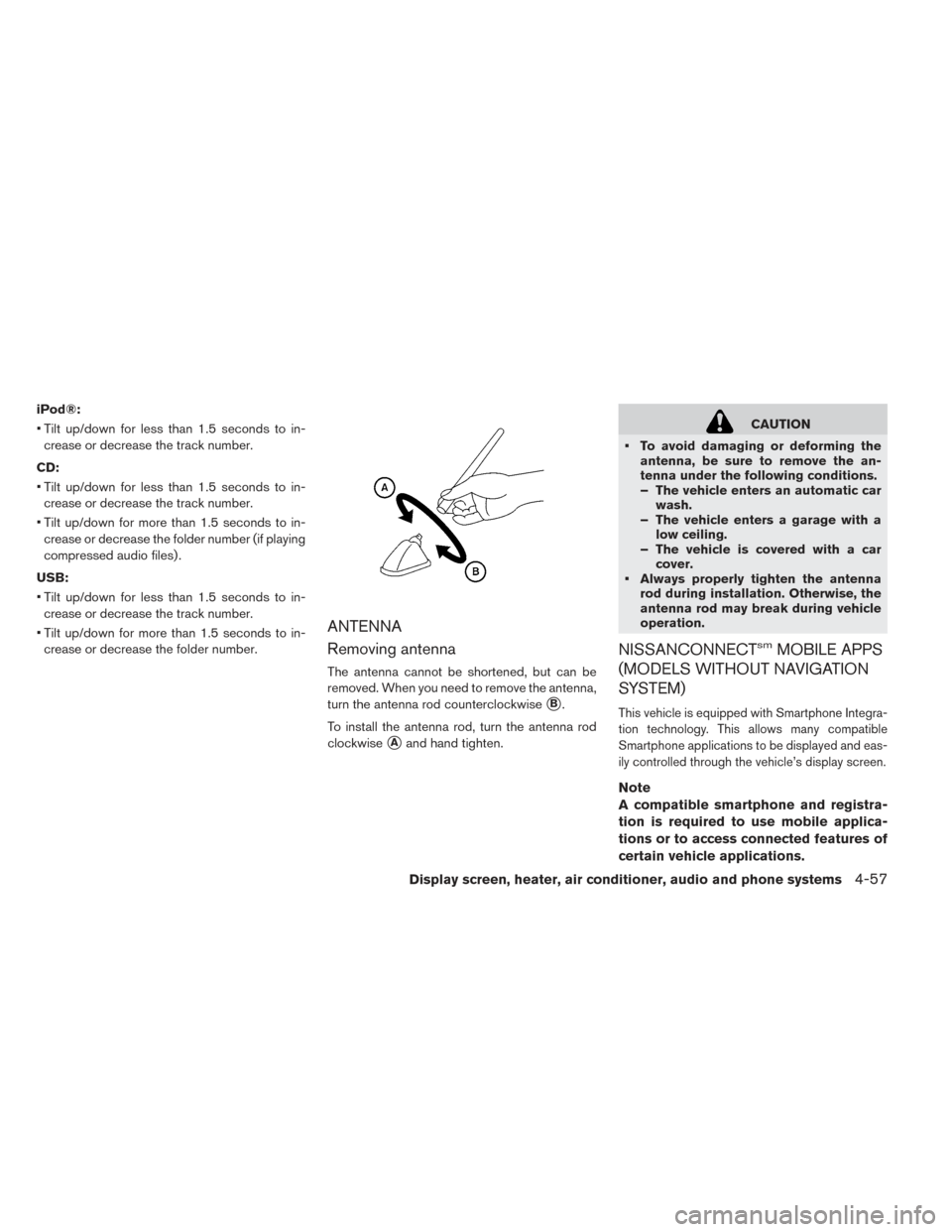
The antenna cannot be shortened, but can be
removed. When you need to remove the antenna,
turn the antenna rod counterclockwise
�B.
To install the antenna rod, turn the antenna rod
clockwise
�Aand hand tighten.
CAUTION
• To avoid damaging or deforming the antenna, be sure to remove the an-
tenna under the following conditions.
– The vehicle enters an automatic carwash.
– The vehicle enters a garage with a low ceiling.
– The vehicle is covered with a car cover.
• Always properly tighten the antenna rod during installation. Otherwise, the
antenna rod may break during vehicle
operation.
NISSANCONNECTsmMOBILE APPS
(MODELS WITHOUT NAVIGATION
SYSTEM)
This vehicle is equipped with Smartphone Integra-
tion technology. This allows many compatible
Smartphone applications to be displayed and eas-
ily controlled through the vehicle’s display screen.
Note
A compatible smartphone and registra-
tion is required to use mobile applica-
tions or to access connected features of
certain vehicle applications.
Display screen, heater, air conditioner, audio and phone systems4-57
Page 336 of 437
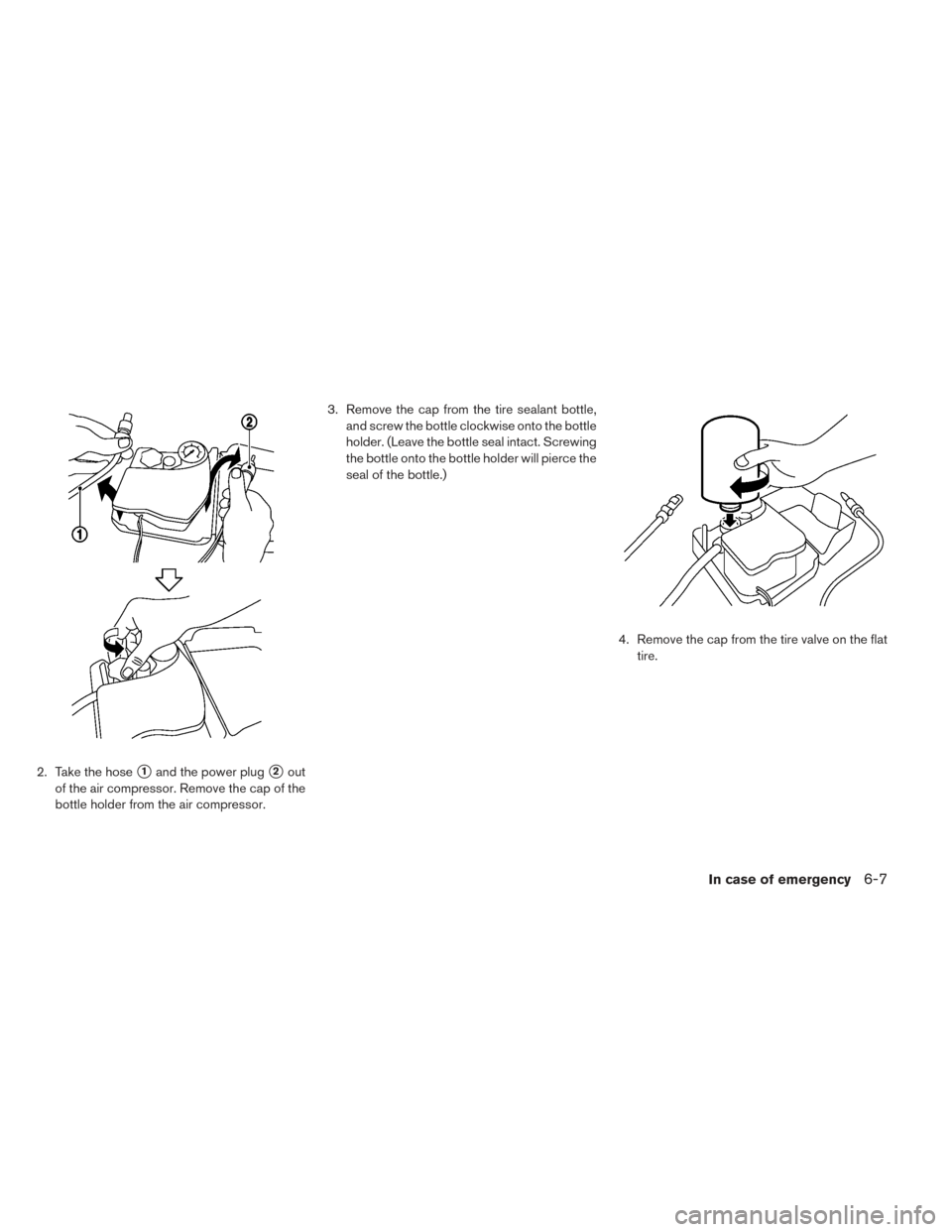
2. Take the hose�1and the power plug�2out
of the air compressor. Remove the cap of the
bottle holder from the air compressor. 3. Remove the cap from the tire sealant bottle,
and screw the bottle clockwise onto the bottle
holder. (Leave the bottle seal intact. Screwing
the bottle onto the bottle holder will pierce the
seal of the bottle.)
4. Remove the cap from the tire valve on the flattire.
In case of emergency6-7
Page 415 of 437
Top tether strap................1-22
Childsafety....................1-16
Child safety rear door lock ............3-6
Circuit breaker, Fusible link ...........8-18
Cleaning exterior and interior ........7-2,7-4
Climatecontrol..................4-38 Climate control service ............4-38
Climate control system refrigerant and
lubricant recommendations .........4-38
Climate control system .............4-22
Climate control operation ..........4-22
Climate Ctrl. Timer ................4-29
Clock.......................2-11
Clock setting (models without Navigation
System) ......................4-47
Cold weather driving ...............5-25
Consolebox...................2-53
Coolant.......................8-9 Changingcoolant ...............8-9
Checkingcoolantlevel.............8-9
Recommended fluids/lubricants and
capacities ....................9-2
Cooling system ..................8-8
Corrosionprotection ...............7-6
Cruisecontrol..................5-16
Cupholders...................2-51D
Defroster switch, Rear window and outside mirror
defroster switch .................2-41
Dimensionsandweights.............9-6
Display, vehicle information ...........2-22
Doors ........................3-4
Driving ......................5-25
Cold weather driving .............5-25
Driving vehicle ................5-12
Precautions when starting and driving ....5-2
Driving range ....................2-8
Driving vehicle ..................5-12
E
ECO .......................2-47
ECO switch ..................2-47
ECOindicator..................2-10
Efficient use of your vehicle ..........EV-23
Emergency charge ..............CH-11
Emergency EV (Electric Vehicle) shut off . .5-10, 6-3
Emergency shutoff system ...........EV-9
Emission control information label ........9-9
EV Characteristics ...............EV-9
Event Data Recorder (EDR) ...........9-18
EVSE (Electric Vehicle Supply Equipment) . .CH-11
EV system....................EV-2
EV unique information .............EV-25
F
Flashers (Refer to hazard warning flasher
switch).......................6-2
Flat tire .......................6-3
Flattowing....................9-14
Floormatcleaning.................7-5
Fluid ........................8-10
Brake fluid ...................8-10
coolant.....................8-8
Recommended fluids/lubricants and
capacities ....................9-2
Reduction gear fluid .............8-10
Windshield-washer fluid ...........8-11
F.M.V.S.S./C.M.V.S.S. certification label .....9-9
Foglightswitch .................2-45
Frontmanualseatadjustment ..........1-3
Front passenger air bag and status light ....1-45
Front seat, Front seat adjustment ........1-3
Fuses.......................8-17
Fusiblelinks ...................8-18
G
Garage door open, HomeLink® Universal . . .2-59 Transceiver ..................2-59
Gauge.......................2-8 Driving range ..................2-8
ECO indicator ................2-10
Li-ion battery available charge gauge .....2-9
10-2Index