Page 237 of 399
�������
> (GLW� ����� �� � 0RGHO� )���' @
Choosing a languageGUID-4E29ECA5-1464-463F-A9B3-6425EEB5F83BYou can interact with the Bluetooth
Page 238 of 399
�������
> (GLW� ����� �� � 0RGHO� )���' @
4-84Heater, air conditioner, audio and phone systems
.If you want to adjust the volume of the voice
feedback, push the (
-or+) button
on the steering wheel while being provided
with feedback. You can also use the radio
volume control knob.
Voice Prompt Interrupt:
GUID-F83C168B-173D-4313-B631-F712588C0463In most cases you can interrupt the voice
feedback to speak the next command by
pushing the
button on the steering wheel.
After interrupting the system, wait for a beep
before speaking your command.
One Shot Call:
GUID-F83C168B-173D-4313-B631-F712588C0463To use the system faster, you may speak the
second level commands with the main menu
command on the main menu. For example, push
the
button and after the tone say, ªCall
Redialº.
Operating tips:
GUID-F83C168B-173D-4313-B631-F712588C0463To get the best performance out of the voice
recognition system, observe the following:
. Keep the interior of the vehicle as quiet as
possible. Close the windows to eliminate
surrounding noises (traffic noises, vibration
sounds, etc.) , which may prevent the system
from recognizing voice commands correctly.
. Wait until the tone sounds before speaking a
command. Otherwise, the command will not
be received properly. .
Start speaking a command within 5 seconds
after the tone sounds.
. Speak in a natural voice without pausing
between words.
Voice commandsGUID-BE9F4E7E-EDF9-4F46-880E-05C5B1377DF1Voice commands can be used to operate the
Bluetooth
Page 239 of 399
�������
> (GLW� ����� �� � 0RGHO� )���' @
Recent Calls:GUID-F83C168B-173D-4313-B631-F712588C0463The following commands are available under
ªRecent Callsº:
.Incoming (Calls)
Speak this command to list the last five
incoming calls to the vehicle. If the call is
from an entry in the phonebook, the name
will be displayed. Otherwise, the phone
number of the incoming call will be dis-
played.
Say ªDialº to call the number or ªSend Textº
to send a text message to that number. Say
ªNext Entryº or ªPrevious Entryº to move
through the list of incoming calls.
. Missed (Calls)
Speak this command to list the last five
missed calls to the vehicle. If the call is from
an entry in the phonebook, the name will be
displayed. Otherwise, the phone number of
the missed call will be displayed.
Say ªDialº to call the number or ªSend Textº
to send a text message to that number. Say
ªNext Entryº or ªPrevious Entryº to move
through the list of missed calls.
. Outgoing (Calls)
Speak this command to list the last five
outgoing calls from the vehicle. If the call
was to an entry in the phonebook, the name
will be displayed. Otherwise, the phone number of the outgoing call will be dis-
played.
Say ªDialº to call the number or ªSend Textº
to send a text message to that number. Say
ªNext Entryº or ªPrevious Entryº to move
through the list of outgoing calls.
. Redial
Speak this command to call the last number
dialed.
. Call Back
Speak this command to call the number of
the last incoming call to the vehicle.
Show Applications:
GUID-F83C168B-173D-4313-B631-F712588C0463Select this command to display list of smart-
phone apps available.
Messaging:
GUID-F83C168B-173D-4313-B631-F712588C0463Speak this command to access text messaging
functions. For more information on these com-
mands, see ªText messagingº (P.4-86) .
Select Phone:
GUID-F83C168B-173D-4313-B631-F712588C0463Speak this command to select a phone to use
from a list of those phones connected to the
vehicle.
Making a callGUID-651357F4-F0D0-4000-AA64-92FF8DEF606ETo make a call from a phone connected to the
vehicle's Bluetooth
Page 240 of 399
�������
> (GLW� ����� �� � 0RGHO� )���' @
4-86Heater, air conditioner, audio and phone systems
berº, then speak the digits. Up to 24
digits can be entered. Available special
characters are ªstarº, ªpoundº, ªplusº and
ªpauseº. When finished, say ªDialº to
initiate the call. Say ªCorrectionº at any
time in the process to correct a mis-
spoken or misinterpreted number or
character.
.RedialSpeak this command to dial the number
of the last outgoing call. The system will
display ªRedialing (name/number)º. The
name of the phonebook entry will be
displayed if it available, otherwise the
number being redialed will be displayed.
.Call Back
Speak this command to dial the number
of the last incoming call. The system will
display ªCalling back (name/number)º .
The name of the phonebook entry will be
displayed if it available, otherwise the
number being called back will be dis-
played.
Receiving a callGUID-BD6E5D29-B491-4EC8-A565-1BF7F699C353When a call is received by the phone connected
to the vehicle's Bluetooth
Page 242 of 399
�������
> (GLW� ����� �� � 0RGHO� )���' @
4-88Heater, air conditioner, audio and phone systems
options for replying to the text message:
.Call Back
Speak this command to call the sender of
the text message using the Bluetooth
Page 243 of 399
�������
> (GLW� ����� �� � 0RGHO� )���' @
.Show Incoming TextSelect ªDriver Onlyº to have incoming
text messages displayed only in the
vehicle information display. Select ªBothº
to have incoming text messages dis-
played in both the vehicle information
display and the center display screen.
Select ªNoneº to have no display of
incoming text messages.
.Edit Custom MessagesSelect to set a custom message that will
be available with the standard options
when sending a text message. To set a
custom message, send a text message to
your own phone number while the phone
is connected to the system. Three
custom messages can be set. Custom
messages can only be set while the
vehicle is stationary.
.Auto ReplySelect to turn on or off the Auto Reply
function. When enabled, the vehicle will
automatically send a predefined text
message to the sender when a text
message is received while driving.
.Auto Reply Message
Select to choose the message that is
sent when the Auto Reply function is
enabled. Choose from ªI'm Drivingº or
one of the three custom messages
stored in the system.
.Vehicle Signature On/OffSelect to choose whether or not the vehicle signature is added to outgoing
text messages from the vehicle. This
message cannot be changed or custo-
mized.
GUID-0ACDF711-D3E0-41BE-99CF-7D06C18A8E09
WARNING
.
Use a phone after stopping your
vehicle in a safe location. If you
have to use a phone while driving,
exercise extreme caution at all
times so full attention may be given
to vehicle operation.
. If you are unable to devote full
attention to vehicle operation while
talking on the phone, pull off the
road to a safe location and stop
your vehicle.
CAUTION
To avoid discharging the vehicle bat-
tery, use a phone after starting the
engine.
Heater, air conditioner, audio and phone systems4-89
Bluetooth
Page 246 of 399
�������
> (GLW� ����� �� � 0RGHO� )���' @
4-92Heater, air conditioner, audio and phone systems
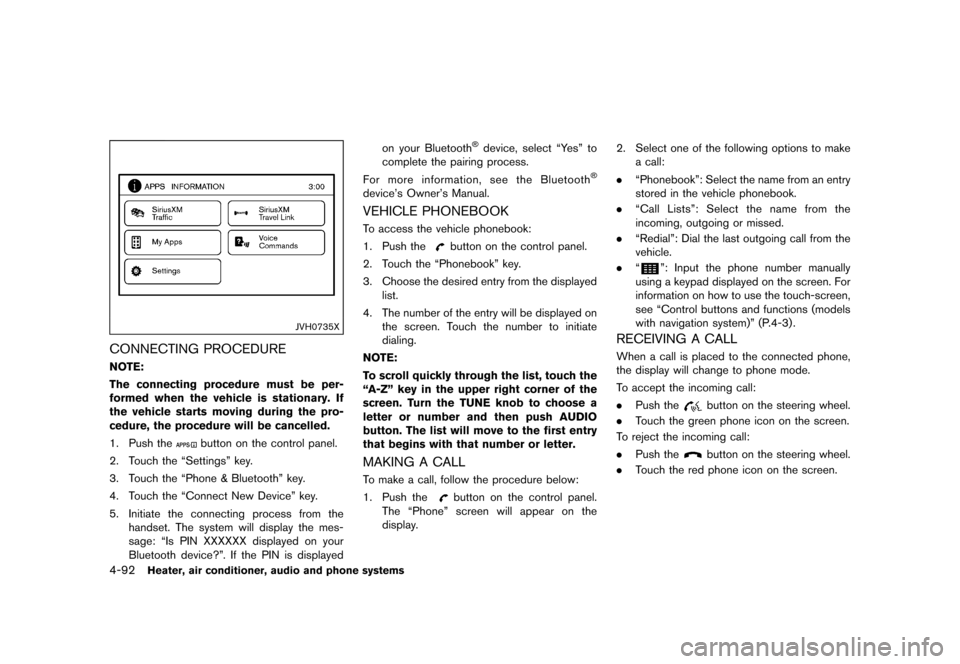
JVH0735X
CONNECTING PROCEDUREGUID-3CBEE362-984A-458D-B2F1-3A1853EC8CAENOTE:
The connecting procedure must be per-
formed when the vehicle is stationary. If
the vehicle starts moving during the pro-
cedure, the procedure will be cancelled.
1. Push the
button on the control panel.
2. Touch the ªSettingsº key.
3. Touch the ªPhone & Bluetoothº key.
4. Touch the ªConnect New Deviceº key.
5. Initiate the connecting process from the handset. The system will display the mes-
sage: ªIs PIN XXXXXX displayed on your
Bluetooth device?º. If the PIN is displayed on your Bluetooth
Page 247 of 399
�������
> (GLW� ����� �� � 0RGHO� )���' @
DURING A CALLGUID-AC05C9D1-677F-4D22-9B84-49D6CED59897While a call is active, the following options are
available on the screen:
.ªHandsetº
Select this option to switch control of the
phone call over to the handset.
. ªMute Mic.º
Select this option to mute the microphone.
Select again to unmute the microphone.
. Red phone (
) icon
Select to end the phone call.
ENDING A CALLGUID-2454323B-F971-404D-A6C1-21C3813A1EBATo end a phone call, select the red phone ()
icon on the screen or push the
button on
the steering wheel.
TEXT MESSAGINGGUID-A63DB37D-CB9B-4AA3-8C8F-8DE04CE0A80D
WARNING
. Laws in some jurisdictions may
restrict the use of some of the
applications and features, such as
social networking and texting.
. Laws in some jurisdictions may
restrict the use of ªText-to-Speechº.
Check local regulations before
using this feature. .
Use the text messaging feature after
stopping your vehicle in a safe
location. If you have to use the
feature while driving, exercise ex-
treme caution at all times so full
attention may be given to vehicle
operation.
. If you are unable to devote full
attention to vehicle operation while
using the text messaging feature,
pull off the road to a safe location
and stop your vehicle.
NOTE:
Many phones may require special permis-
sion to enable text messaging. Check the
phone's screen during Bluetooth