2016 NISSAN ALTIMA maintenance
[x] Cancel search: maintenancePage 97 of 491
HOW TO USE THE VEHICLE
INFORMATION DISPLAY
The vehicle information display can be changed
using the buttons
and ENTER located on
the steering wheel.
1.
— navigate through the items in ve-
hicle information
ENTER — change or select an item in the
vehicle information display
2.
— go back to the previous menu
3.
— select/enter the Vehicle information
menu items or to change from one display screen
to the next (i.e. trip, TPMS, Fuel economy)
The ENTER andbuttons also control audio
and control panel functions. For additional infor-
mation, refer to “Steering wheel switch for audio
control” in the “Monitor, climate, audio, phone
and voice recognition systems” section of this
manual.
STARTUP DISPLAY
When the vehicle in placed in the ON or ACC
position the screens that display in the vehicle
information include:
● Active system status
● Tire pressures
● Trip computer
● Audio
● Navigation (if so equipped)
● Driver Assistance (if so equipped)
● Fuel economy
● Warnings
Warnings will only display if there are any pres-
ent. For additional information, refer to “Vehicle
information display warnings and indicators” in
this section.
To control what items display in the vehicle infor-
mation display, refer to “How to use the vehicle
information display” in this section.
RESETTING THE TRIP COMPUTER
1. Press thebutton until you reach the
trip computer mode.
2. Press the
button again for more than
1.5 seconds to reset average fuel consump-
tion, average speed, distance to empty, and
journey time.
SETTINGS
The setting mode allows you to change the infor-
mation displayed in the vehicle information dis-
play:
● Driver Assistance (if so equipped)
● Vehicle Settings
● Main Menu Selection
● Body Color
● Maintenance
● Alarms
● Language
● Unit
● Welcome Effects
● Factory Reset
LIC2322
2-18Instruments and controls
Page 101 of 491
Maintenance
The maintenance menu allows the user to set
reminders for various vehicle maintenance items.
WARNING
The tire replacement indicator is not a
substitute for regular tire checks, includ-
ing tire pressure checks. For additional
information, refer to “Changing wheels
and tires” in the “Maintenance and do-it-
yourself” section of this manual. Many fac-
tors including tire inflation, alignment,
driving habits and road conditions affect
tire wear and when tires should be re-
placed. Setting the tire replacement indi-
cator for a certain driving distance does
not mean your tires will last that long. Use
the tire replacement indicator as a guideonly and always perform regular tire
checks. Failure to perform regular tire
checks, including tire pressure checks
could result in tire failure. Serious vehicle
damage could occur and may lead to a
collision, which could result in serious
personal injury or death.
Menu item
Result
Maintenance Displays various Maintenance settings
Service This indicator appears when the customer set distance is reached for checking or replacing maintenance items other than
the engine oil, oil filter and tires. Other maintenance items can include such things as air filter or tire rotation. You can set or
reset the distance for checking or replacing the items. You can set or reset the distance for service type items. For sched-
uled maintenance items and intervals, refer to your “NISSAN Service and Maintenance Guide.”
Tire This indicator appears when the customer set distance is reached for replacing tires. You can set or reset the distance for
replacing tires.
Other This indicator appears when the customer set distance is reached for checking or replacing maintenance items other than
the engine oil, oil filter and tires. Other maintenance items can include such things as air filter or tire rotation. The distance
for checking or replacing the items can be set or reset.
2-22Instruments and controls
Page 105 of 491
12. Timer Alert – Time for a driver break?
13. Low Outside Temperature
14. Power will turn off to save the battery
15. CVT Error: See Owner’s Manual
16. Reminder: Turn OFF headlights
17. Low Oil Pressure: See Owner’s Manual
18. Key Registration Complete
19. Tire Pressure Low - Add Air
20. TPMS Error: See Owner’s Manual
21. Parking Sensor Error: See Owner’s Manual(if so equipped)
22. Push brake and start button to drive
23. Loose Fuel Cap
24. I-Key System Error: See Owner’s Manual
25. Intelligent Cruise Control (ICC) indicators (if so equipped)
26. Blind Spot Warning (BSW) and Rear Cross Traffic Alert (RCTA) indicator (if so
equipped)
27. Malfunction: See Owner’s Manual (if so equipped)
28. Transmission Shift Position Indicator No Key Detected
This warning appears when the Intelligent Key is
left outside the vehicle with the ignition switch in
the ON or ACC position. Make sure the Intelli-
gent Key is inside the vehicle.
Key ID Incorrect
This warning appears when the ignition switch is
placed from the OFF position and the Intelligent
Key is not recognized by the system. You cannot
start the engine with an unregistered key.
For additional information, refer to “NISSAN In-
telligent Key®” in the “Pre-driving checks and
adjustments” section of this manual.
Shift to Park
This warning illuminates when the ignition switch
is in the ACC or OFF position and the shift lever
is in any position other than P (Park) position.
Also, a chime sounds when the ignition switch is
in the OFF position.
If this warning illuminates, move the shift lever to
the P (Park) position or start the engine.
For additional information about Intelligent Key,
refer to “NISSAN Intelligent Key®” in the “Pre-
driving checks and adjustments” section of this
manual.
Push ignition to OFF
After the Push ignition to OFF warning illumi-
nates, the warning will illuminate if the ignition
switch is placed in the ACC position when the
shift lever is moved to the P (Park) position.
To turn off the Push warning, place the ignition
switch in the ON position and then in the LOCK
position.
Key Battery Low
This indicator illuminates when the Intelligent Key
battery is running out of power.
If this indicator illuminates, replace the battery
with a new one. For additional information, refer
to “Battery replacement” in the “Maintenance and
do-it-yourself” section of this manual.
Engine start operation for Intelligent
Key® system
This indicator appears when the battery of the
Intelligent Key is low and when the Intelligent Key
system and the vehicle are not communicating
normally.
If this appears, touch the ignition switch with the
Intelligent Key while depressing the brake pedal.
For additional information, refer to “NISSAN In-
telligent Key® battery discharge” in the “Starting
and driving” section of this manual.
2-26Instruments and controls
Page 106 of 491
Release Parking brake
This warning illuminates in the message area of
the vehicle information display when the parking
brake is set and the vehicle is driven.
Low Fuel
This warning illuminates when the fuel level in the
fuel tank is getting low. Refuel as soon as it is
convenient, preferably before the fuel gauge
reaches 0 (Empty) .There will be a small re-
serve of fuel in the tank when the fuel
gauge needle reaches 0 (Empty) .
Low Washer Fluid (if so equipped)
This warning illuminates when the windshield-
washer fluid is at a low level. Add windshield-
washer fluid as necessary. For additional informa-
tion, refer to “Windshield-washer fluid” in the
“Maintenance and do-it-yourself” section of this
manual.
Door Open
This warning illuminates when a door has been
opened when the engine is running.
Trunk Open
This warning illuminates when the trunk has been
opened when the engine is running. Timer Alert – Time for a driver break?
This indicator appears when the set time is
reached. The time can be set up to six hours. For
additional information on setting the timer, refer
to “Alarms” in this section.
Low Outside Temperature
This warning appears if the outside temperature
is below 37°F (3°C) . The temperature can be
changed to display in Celsius or Fahrenheit. For
additional information, refer to “Unit” in this sec-
tion.
Power will turn off to save the battery
This warning appears in the message area of the
vehicle information display after a period of time if
the shift lever has not moved from the P (Park)
position.
CVT Error: See Owner’s Manual
This warning illuminates when the there is a prob-
lem with the CVT system. If this warning comes
on, have the system checked. It is recommended
you visit a NISSAN dealer for this service.
Reminder: Turn OFF headlights
This warning appears when the headlights are
left in the ON position when exiting the vehicle.
Place the headlight switch in the OFF or AUTOposition. For additional information, refer to
“Headlight and turn signal switch” in this section.
Low Oil Pressure: See Owner’s Manual
This warning appears in the message area of the
vehicle information display if low oil pressure is
detected. This gauge is not designed to indicate
low oil level.
The low oil pressure warning is
not designed to indicate a low oil level. Use
the dipstick to check the oil level. For additional
information, refer to “Engine oil” in the “Mainte-
nance and do-it-yourself” section of this manual.
Key Registration Complete
This appears when a new Intelligent Key is regis-
tered to the vehicle.
Tire Pressure Low - Add Air
This warning appears when the low tire pressure
warning light in the meter illuminates and low tire
pressure is detected. The warning appears each
time the ignition switch is placed in the ON
position as long as the low tire pressure warning
light remains illuminated. If this warning appears,
stop the vehicle and adjust the tire pressures of
all four tires to the recommended COLD tire
pressure shown on the Tire and Loading Informa-
tion label. For additional information, refer to
“Low tire pressure warning light” in this section
Instruments and controls2-27
Page 131 of 491
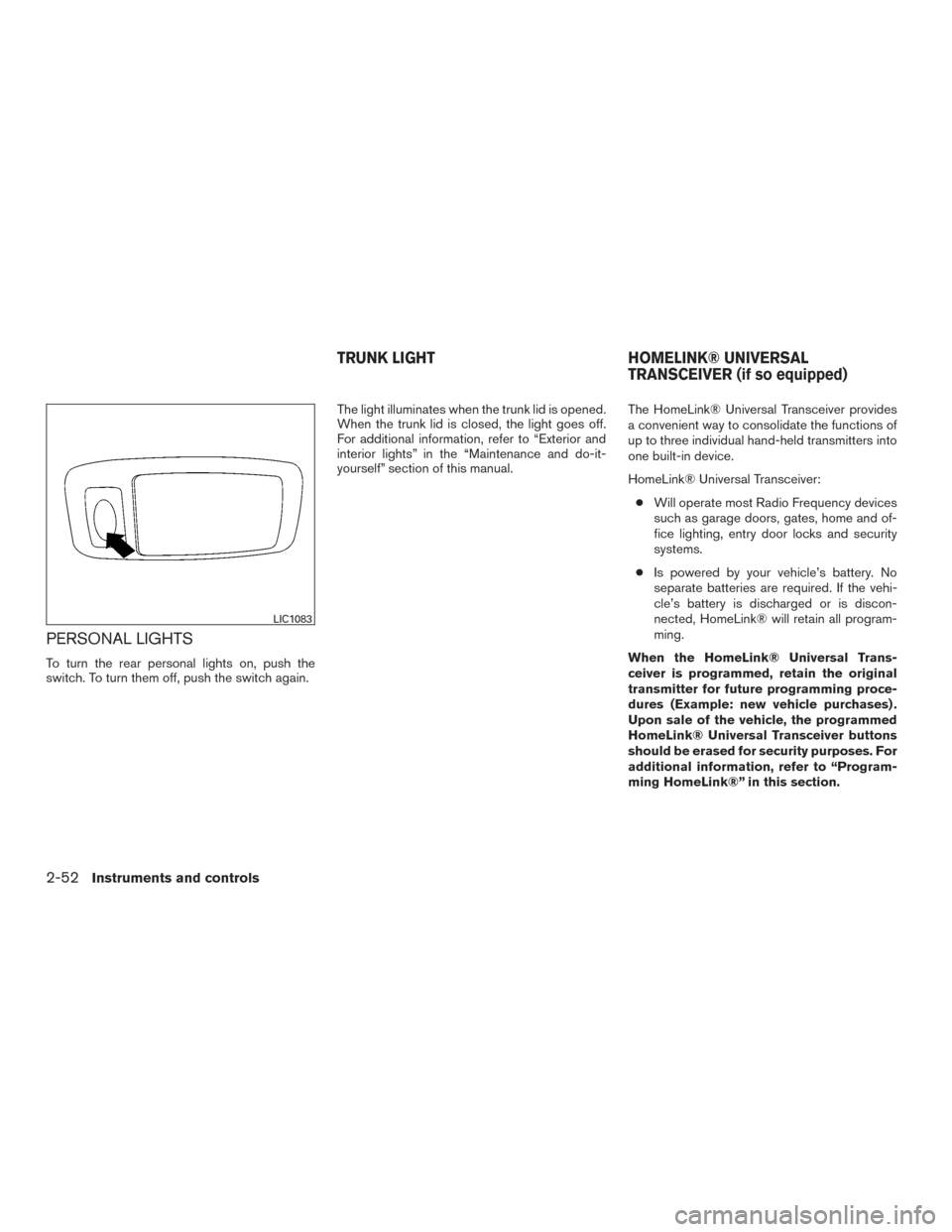
PERSONAL LIGHTS
To turn the rear personal lights on, push the
switch. To turn them off, push the switch again.The light illuminates when the trunk lid is opened.
When the trunk lid is closed, the light goes off.
For additional information, refer to “Exterior and
interior lights” in the “Maintenance and do-it-
yourself” section of this manual.
The HomeLink® Universal Transceiver provides
a convenient way to consolidate the functions of
up to three individual hand-held transmitters into
one built-in device.
HomeLink® Universal Transceiver:
● Will operate most Radio Frequency devices
such as garage doors, gates, home and of-
fice lighting, entry door locks and security
systems.
● Is powered by your vehicle’s battery. No
separate batteries are required. If the vehi-
cle’s battery is discharged or is discon-
nected, HomeLink® will retain all program-
ming.
When the HomeLink® Universal Trans-
ceiver is programmed, retain the original
transmitter for future programming proce-
dures (Example: new vehicle purchases) .
Upon sale of the vehicle, the programmed
HomeLink® Universal Transceiver buttons
should be erased for security purposes. For
additional information, refer to “Program-
ming HomeLink®” in this section.
LIC1083
TRUNK LIGHT HOMELINK® UNIVERSAL
TRANSCEIVER (if so equipped)
2-52Instruments and controls
Page 145 of 491
Although the life of the battery varies depending
on the operating conditions, the battery’s life is
approximately two years. If the battery is dis-
charged, replace it with a new one.
When the Intelligent Key battery is low, an indi-
cator illuminates in the vehicle information dis-
play. For additional information, refer to “Vehicle
information display” in the “Instruments and con-
trols” section of this manual.
Since the Intelligent Key is continuously receiving
radio waves, if the key is left near equipment
which transmits strong radio waves, such as sig-
nals from a TV and personal computer, the bat-
tery life may become shorter.
For additional information, refer to “Battery re-
placement” in the “Maintenance and do-it-
yourself” section of this manual.
As many as four Intelligent Keys can be regis-
tered and used with one vehicle. For information
about the purchase and use of additional Intelli-
gent Keys, it is recommended you visit a NISSAN
dealer.CAUTION
Listed below are conditions or occur-
rences which will damage the Intelligent
Key:
●Do not allow the Intelligent Key, which
contains electrical components, to
come into contact with water or salt
water. This could affect the system
function.
● Do not drop the Intelligent Key.
● Do not strike the Intelligent Key sharply
against another object.
● Do not change or modify the Intelligent
Key.
● Wetting may damage the Intelligent
Key. If the Intelligent Key gets wet, im-
mediately wipe until it is completely dry.
● Do not place the Intelligent Key for an
extended period in an area where tem-
peratures exceed 140°F (60°C) .
● Do not attach the Intelligent Key with a
key holder that contains a magnet.
● Do not place the Intelligent Key near
equipment that produces a magnetic
field, such as a TV, audio equipment and
personal computers. If an Intelligent Key is lost or stolen, NISSAN
recommends erasing the ID code of that Intelli-
gent Key from the vehicle. This may prevent the
unauthorized use of the Intelligent Key to operate
the vehicle. For information regarding the erasing
procedure, it is recommended you visit a
NISSAN dealer.
3-8Pre-driving checks and adjustments
Page 156 of 491
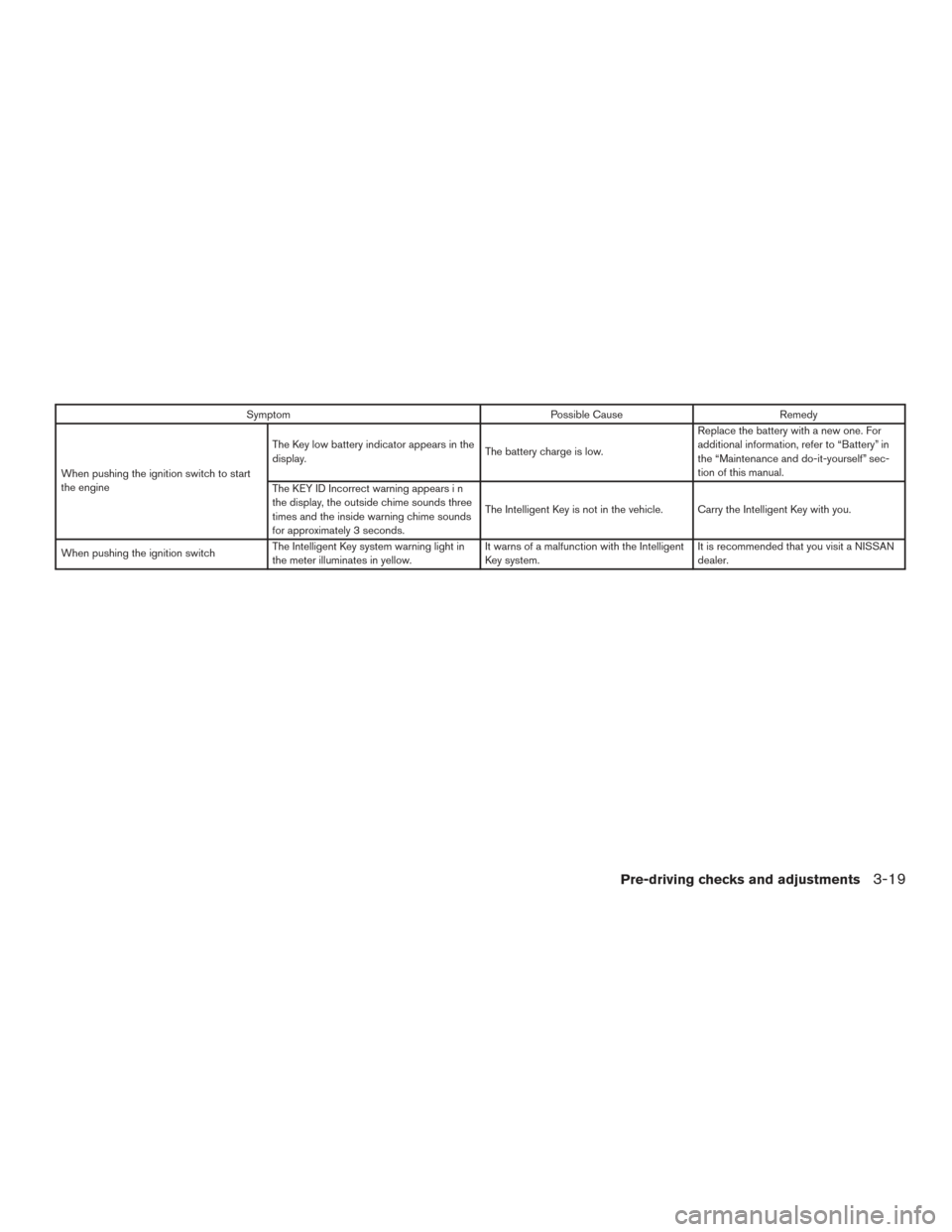
SymptomPossible CauseRemedy
When pushing the ignition switch to start
the engine The Key low battery indicator appears in the
display.
The battery charge is low.Replace the battery with a new one. For
additional information, refer to “Battery” in
the “Maintenance and do-it-yourself” sec-
tion of this manual.
The KEY ID Incorrect warning appears i n
the display, the outside chime sounds three
times and the inside warning chime sounds
for approximately 3 seconds. The Intelligent Key is not in the vehicle. Carry the Intelligent Key with you.
When pushing the ignition switch The Intelligent Key system warning light in
the meter illuminates in yellow. It warns of a malfunction with the Intelligent
Key system.It is recommended that you visit a NISSAN
dealer.
Pre-driving checks and adjustments3-19
Page 157 of 491
WARNING
●Radio waves could adversely affect elec-
tric medical equipment. Those who use a
pacemaker should contact the electric
medical equipment manufacturer for the
possible influences before use.
●The Intelligent Key transmits radio waves
when the buttons are pressed. The FAA
advises the radio waves may affect air-
craft navigation and communication sys-
tems. Do not operate the Intelligent Key
while on an airplane. Make sure the but-
tons are not operated unintentionally
when the unit is stored for a flight.
The Intelligent Key can operate all the door locks
using the remote control function. The operating
environment and/or conditions may affect the
Intelligent Key operation.
Be sure to read the following before using the
Intelligent Key.
CAUTION
● Be sure to carry the Intelligent Key with
you when operating the vehicle.
● Never leave the Intelligent Key in the
vehicle when you leave the vehicle. The Intelligent Key is always communicating with
the vehicle as it receives radio waves. The Intel-
ligent Key transmits weak radio waves. Environ-
mental conditions may interfere with the opera-
tion of the Intelligent Key under the following
operating conditions:
● When operating near a location where
strong radio waves are transmitted, such as
a TV tower, power station and broadcasting
station.
● When in possession of wireless equipment,
such as a cellular telephone, transceiver or a
CB radio.
● When the Intelligent Key is in contact with or
covered by metallic materials.
● When any type of radio wave remote control
is used nearby.
● When the Intelligent Key is placed near an
electric appliance such as a personal com-
puter.
● When the vehicle is parked near a parking
meter.
In such cases, correct the operating conditions
before using the Intelligent Key function or use
the mechanical key. Although the life of the battery varies depending
on the operating conditions, the battery’s life is
approximately two years. If the battery is dis-
charged, replace it with a new one.
When the Intelligent Key battery is low, an indi-
cator illuminates in the vehicle information dis-
play. For additional information, refer to “Vehicle
information display” in the “Instruments and con-
trols” section of this manual.
Since the Intelligent Key is continuously receiving
radio waves, if the key is left near equipment
which transmits strong radio waves, such as sig-
nals from a TV and personal computer, the bat-
tery life may become shorter.
For additional information, refer to “Battery re-
placement” in the “Maintenance and do-it-
yourself” section of this manual.
As many as four Intelligent Keys can be regis-
tered and used with one vehicle. For information
about the purchase and use of additional Intelli-
gent Keys, it is recommended you visit a NISSAN
dealer.
NISSAN INTELLIGENT KEY®
WITHOUT DOOR AND TRUNK
REQUEST SWITCHES
3-20Pre-driving checks and adjustments