2016 NISSAN 370Z COUPE ignition
[x] Cancel search: ignitionPage 115 of 428
2-48Instruments and controls
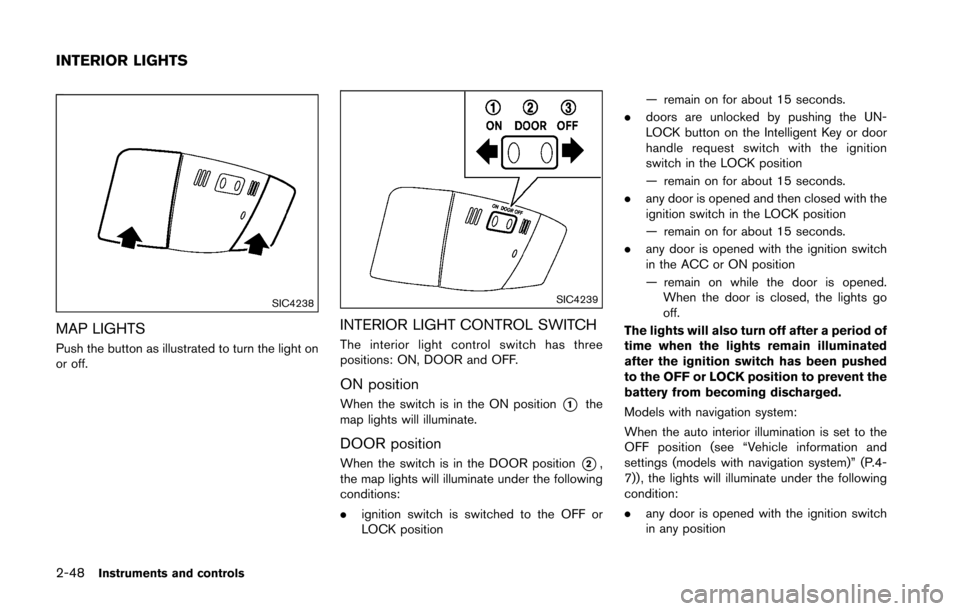
SIC4238
MAP LIGHTS
Push the button as illustrated to turn the light on
or off.
SIC4239
INTERIOR LIGHT CONTROL SWITCH
The interior light control switch has three
positions: ON, DOOR and OFF.
ON position
When the switch is in the ON position*1the
map lights will illuminate.
DOOR position
When the switch is in the DOOR position*2,
the map lights will illuminate under the following
conditions:
. ignition switch is switched to the OFF or
LOCK position — remain on for about 15 seconds.
. doors are unlocked by pushing the UN-
LOCK button on the Intelligent Key or door
handle request switch with the ignition
switch in the LOCK position
— remain on for about 15 seconds.
. any door is opened and then closed with the
ignition switch in the LOCK position
— remain on for about 15 seconds.
. any door is opened with the ignition switch
in the ACC or ON position
— remain on while the door is opened.
When the door is closed, the lights go
off.
The lights will also turn off after a period of
time when the lights remain illuminated
after the ignition switch has been pushed
to the OFF or LOCK position to prevent the
battery from becoming discharged.
Models with navigation system:
When the auto interior illumination is set to the
OFF position (see “Vehicle information and
settings (models with navigation system)” (P.4-
7)) , the lights will illuminate under the following
condition:
. any door is opened with the ignition switch
in any position
INTERIOR LIGHTS
Page 117 of 428
2-50Instruments and controls
The light illuminates when the rear hatch is
opened. When the rear hatch is closed, the light
will turn off.
The light will also turn off after a period of
time when the light remains illuminated
after the ignition switch has been pushed
to the OFF or LOCK position to prevent the
battery from becoming discharged.The light illuminates when the trunk lid is
opened. When the trunk lid is closed, the light
turns off.
The HomeLinkŠUniversal Transceiver provides a
convenient way to consolidate the functions of
up to three individual hand-held transmitters into
one built-in device.
HomeLink
ŠUniversal Transceiver:
. Will operate most Radio Frequency (RF)
devices such as garage doors, gates, home
and office lighting, entry door locks and
security systems.
. Is powered by your vehicle’s battery. No
separate batteries are required. If the
vehicle’s battery is discharged or is dis-
connected, HomeLink
Šwill retain all pro-
gramming.
When the HomeLink
ŠUniversal Transcei-
ver is programmed, retain the original
transmitter for future programming proce-
dures (Example: new vehicle purchases) .
Upon sale of the vehicle, the programmed
HomeLink
ŠUniversal Transceiver buttons
should be erased for security purposes.
For additional information, refer to “Pro-
gramming HomeLink
Š” (P.2-51) .
WARNING
. Do not use the HomeLinkŠUniversal
Transceiver with any garage door
opener that lacks safety stop and
CARGO LIGHT (Coupe models) TRUNK LIGHT (Roadster models) HomeLinkŠUNIVERSAL
TRANSCEIVER (if so equipped)
Page 126 of 428
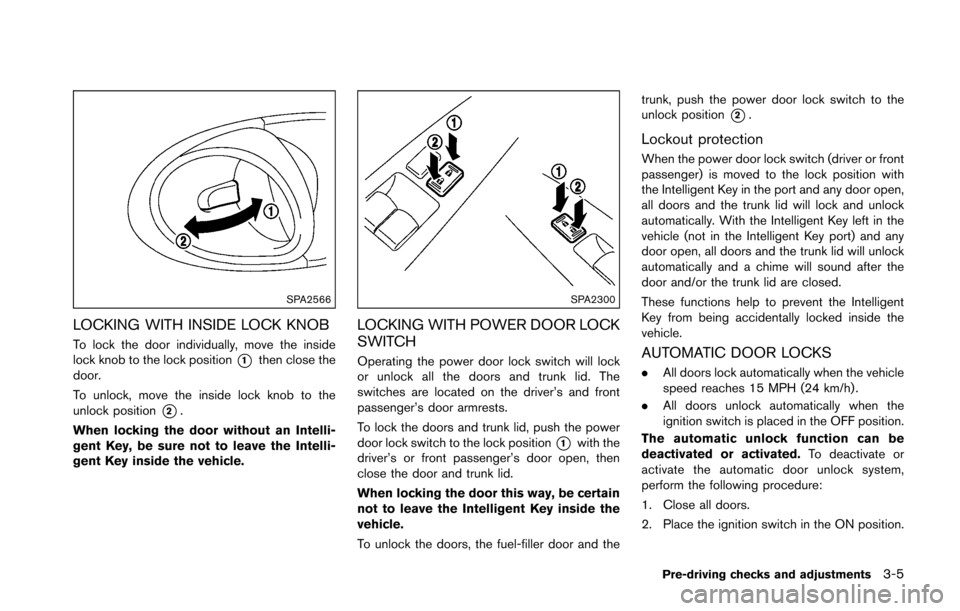
SPA2566
LOCKING WITH INSIDE LOCK KNOB
To lock the door individually, move the inside
lock knob to the lock position
*1then close the
door.
To unlock, move the inside lock knob to the
unlock position
*2.
When locking the door without an Intelli-
gent Key, be sure not to leave the Intelli-
gent Key inside the vehicle.
SPA2300
LOCKING WITH POWER DOOR LOCK
SWITCH
Operating the power door lock switch will lock
or unlock all the doors and trunk lid. The
switches are located on the driver’s and front
passenger’s door armrests.
To lock the doors and trunk lid, push the power
door lock switch to the lock position
*1with the
driver’s or front passenger’s door open, then
close the door and trunk lid.
When locking the door this way, be certain
not to leave the Intelligent Key inside the
vehicle.
To unlock the doors, the fuel-filler door and the trunk, push the power door lock switch to the
unlock position
*2.
Lockout protection
When the power door lock switch (driver or front
passenger) is moved to the lock position with
the Intelligent Key in the port and any door open,
all doors and the trunk lid will lock and unlock
automatically. With the Intelligent Key left in the
vehicle (not in the Intelligent Key port) and any
door open, all doors and the trunk lid will unlock
automatically and a chime will sound after the
door and/or the trunk lid are closed.
These functions help to prevent the Intelligent
Key from being accidentally locked inside the
vehicle.
AUTOMATIC DOOR LOCKS
.
All doors lock automatically when the vehicle
speed reaches 15 MPH (24 km/h) .
. All doors unlock automatically when the
ignition switch is placed in the OFF position.
The automatic unlock function can be
deactivated or activated. To deactivate or
activate the automatic door unlock system,
perform the following procedure:
1. Close all doors.
2. Place the ignition switch in the ON position.
Pre-driving checks and adjustments3-5
Page 127 of 428
3-6Pre-driving checks and adjustments
3. Within 20 seconds of performing Step 2,push and hold the power door lock switch to
the
position (UNLOCK) for more than 5
seconds.
4. When activated, the hazard indicator will flash twice. When deactivated, the hazard
indicator will flash once.
5. The ignition switch must be placed in the OFF and ON position again between each
setting change.
When the automatic door unlock system is
deactivated, the doors do not unlock when the
ignition switch is placed in the OFF position. To
unlock the door manually, use the inside lock
knob or the power door lock switch (driver’s or
front passenger’s side) .WARNING
. Radio waves could adversely affect
electric medical equipment. Those
who use a pacemaker should con-
tact the electric medical equipment
manufacturer for the possible influ-
ences before use.
. The Intelligent Key transmits radio
waves when the buttons are
pushed. The FAA advises that the
radio waves may affect aircraft na-
vigation and communication sys-
tems. Do not operate the
Intelligent Key while on an airplane.
Make sure the buttons are not
operated unintentionally when the
unit is stored during a flight.
The Intelligent Key system can operate all the
door and rear hatch/trunk lid locks using the
remote controller function or pushing the re-
quest switch on the vehicle without taking the
key out from a pocket or purse. The operating
environment and/or conditions may affect the
Intelligent Key system operation.
Be sure to read the following before using the
Intelligent Key system.
CAUTION
. Be sure to carry the Intelligent Key
with you when operating the vehi-
cle.
. Never leave the Intelligent Key in
the vehicle when you leave the
vehicle.
The Intelligent Key is always communicating with
the vehicle as it receives radio waves. The
Intelligent Key system transmits weak radio
waves. Environmental conditions may interfere
with the operation of the Intelligent Key system
under the following operating conditions.
. When operating near a location where
strong radio waves are transmitted, such
as a TV tower, power station and broad-
casting station.
. When in possession of wireless equipment,
such as a cellular telephone, transceiver,
and CB radio.
. When the Intelligent Key is in contact with or
covered by metallic materials.
. When any type of radio wave remote control
is used nearby.
. When the Intelligent Key is placed near an
electric appliance such as a personal
INTELLIGENT KEY SYSTEM
Page 128 of 428
computer.
. When the vehicle is parked near a parking
meter.
In such cases, correct the operating conditions
before using the Intelligent Key function or use
the mechanical key.
Although the life of the battery varies depending
on the operating conditions, the battery’s life is
approximately 2 years. If the battery is dis-
charged, replace it with a new one.
When the Intelligent Key battery is almost
discharged, insert the Intelligent Key into the
Intelligent Key port to start the engine. Replace
the discharged battery with a new one as soon
as possible. For more details, see “Push-button
ignition switch” (P.5-7) .
Since the Intelligent Key is continuously receiv-
ing radio waves, if the key is left near equipment
which transmits strong radio waves, such as
signals from a TV and personal computer, the
battery life may become shorter.
For information regarding replacement of a
battery, see “Intelligent Key battery replacement”
(P.8-24) .
As many as 4 Intelligent Keys can be registered
and used with one vehicle. For information about
the purchase and use of additional Intelligent
Keys, contact a NISSAN dealer.
CAUTION
. Do not allow the Intelligent Key,
which contains electrical compo-
nents, to come into contact with
water or salt water. This could affect
the system function.
. Do not drop the Intelligent Key.
. Do not strike the Intelligent Key
sharply against another object.
. Do not change or modify the Intel-
ligent Key.
. Wetting may damage the Intelligent
Key. If the Intelligent Key gets wet,
immediately wipe until it is comple-
tely dry.
. If the outside temperature is below
148F( í108 C) , the battery of the
Intelligent Key may not function
properly.
. Do not place the Intelligent Key for
an extended period in an area where
temperatures exceed 1408F (608C) .
. Do not attach the Intelligent Key
with a key holder that contains a
magnet. .
Do not place the Intelligent Key near
equipment that produces a mag-
netic field, such as a TV, audio
equipment, personal computer or
cellular phone.
If an Intelligent Key is lost or stolen, NISSAN
recommends erasing the ID code of that
Intelligent Key from the vehicle. This may prevent
the unauthorized use of the Intelligent Key to
operate the vehicle. For information regarding
the erasing procedure, contact a NISSAN deal-
er.
The Intelligent Key function can be disabled. For
information about disabling the Intelligent Key
function, contact a NISSAN dealer.
Pre-driving checks and adjustments3-7
Page 131 of 428
3-10Pre-driving checks and adjustments
SPA2680Roadster models
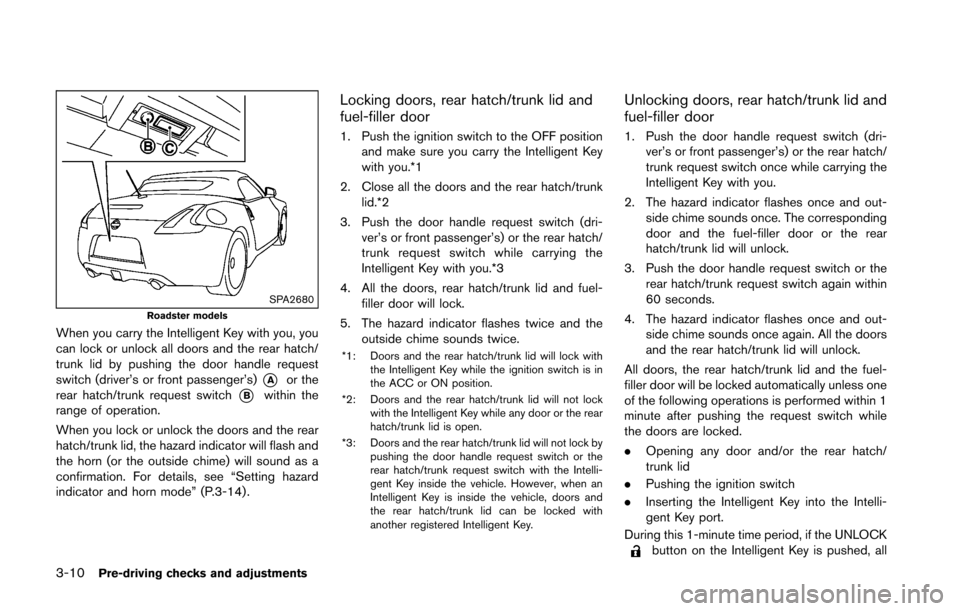
When you carry the Intelligent Key with you, you
can lock or unlock all doors and the rear hatch/
trunk lid by pushing the door handle request
switch (driver’s or front passenger’s)
*Aor the
rear hatch/trunk request switch
*Bwithin the
range of operation.
When you lock or unlock the doors and the rear
hatch/trunk lid, the hazard indicator will flash and
the horn (or the outside chime) will sound as a
confirmation. For details, see “Setting hazard
indicator and horn mode” (P.3-14) .
Locking doors, rear hatch/trunk lid and
fuel-filler door
1. Push the ignition switch to the OFF position and make sure you carry the Intelligent Key
with you.*1
2. Close all the doors and the rear hatch/trunk lid.*2
3. Push the door handle request switch (dri- ver’s or front passenger’s) or the rear hatch/
trunk request switch while carrying the
Intelligent Key with you.*3
4. All the doors, rear hatch/trunk lid and fuel- filler door will lock.
5. The hazard indicator flashes twice and the outside chime sounds twice.
*1: Doors and the rear hatch/trunk lid will lock with
the Intelligent Key while the ignition switch is in
the ACC or ON position.
*2: Doors and the rear hatch/trunk lid will not lock with the Intelligent Key while any door or the rear
hatch/trunk lid is open.
*3: Doors and the rear hatch/trunk lid will not lock by pushing the door handle request switch or the
rear hatch/trunk request switch with the Intelli-
gent Key inside the vehicle. However, when an
Intelligent Key is inside the vehicle, doors and
the rear hatch/trunk lid can be locked with
another registered Intelligent Key.
Unlocking doors, rear hatch/trunk lid and
fuel-filler door
1. Push the door handle request switch (dri-ver’s or front passenger’s) or the rear hatch/
trunk request switch once while carrying the
Intelligent Key with you.
2. The hazard indicator flashes once and out- side chime sounds once. The corresponding
door and the fuel-filler door or the rear
hatch/trunk lid will unlock.
3. Push the door handle request switch or the rear hatch/trunk request switch again within
60 seconds.
4. The hazard indicator flashes once and out- side chime sounds once again. All the doors
and the rear hatch/trunk lid will unlock.
All doors, the rear hatch/trunk lid and the fuel-
filler door will be locked automatically unless one
of the following operations is performed within 1
minute after pushing the request switch while
the doors are locked.
. Opening any door and/or the rear hatch/
trunk lid
. Pushing the ignition switch
. Inserting the Intelligent Key into the Intelli-
gent Key port.
During this 1-minute time period, if the UNLOCK
button on the Intelligent Key is pushed, all
Page 132 of 428
doors will be locked automatically after another
1 minute.
Opening rear hatch/trunk lid
To open only the rear hatch/trunk lid, perform the
following procedure.
1. Carry the Intelligent Key.
2. Push the rear hatch/trunk lid opener switch
*C.
3. The rear hatch/trunk lid will open.
Lockout protection:
To prevent the Intelligent Key from being
accidentally locked in the trunk, lockout protec-
tion is equipped with the Intelligent Key system.
When the trunk lid is closed with the Intelligent
Key inside the trunk, the outside buzzer will
sound and all doors and the trunk lid will unlock.
BATTERY SAVER SYSTEM
When all the following conditions are met for a
period of time, the battery saver system will cut
off the power supply to prevent battery dis-
charge.
. The ignition switch is in the ACC position,
and
. All doors are closed, and
. The shift lever is in the P (Park) position
(Automatic Transmission models) .
WARNING SIGNALS
To help prevent the vehicle from moving
unexpectedly by erroneous operation of the
Intelligent Key listed on the following chart or
to help prevent the vehicle from being stolen,
chime or beep sounds inside and outside the
vehicle and a warning displays in the vehicle
information display.
When a chime or beep sounds or the warning
displays, be sure to check the vehicle and
Intelligent Key.
See “Troubleshooting guide” (P.3-12) and
“Vehicle information display” (P.2-18) .
Pre-driving checks and adjustments3-11
Page 133 of 428
3-12Pre-driving checks and adjustments
TROUBLESHOOTING GUIDE
SymptomPossible causeAction to take
When pushing the ignition switch
to stop the engine The SHIFT P warning appears on the display
and the inside warning chime sounds con-
tinuously (Automatic Transmission models) .
The shift lever is not in the P (Park)
position.
Shift the shift lever to the P (Park) position.
When opening the driver’s door
to get out of the vehicle The inside warning chime sounds continuously. The ignition switch is in the ACC
position.
Push the ignition switch to the OFF posi-
tion.
The Intelligent Key is in the Intelligent
Key port. Remove the Intelligent Key from the Intelli-
gent Key port.
When closing the door after get-
ting out of the vehicle The NO KEY warning appears on the display,
the outside chime sounds 3 times and the
inside warning chime sounds for approximately
a few seconds.
The ignition switch is in the ACC or ON
position.
Push the ignition switch to the OFF posi-
tion.
The SHIFT P warning appears on the display
and the outside chime sounds continuously
(Automatic Transmission models) . The ignition switch is in the ACC or OFF
position and the shift lever is not in the P
(Park) position.Move the shift lever to the P (Park) position
and push the ignition switch to the OFF
position.
When closing the door with the
inside lock knob turned to LOCK The outside chime sounds for a few seconds
and all the doors unlock. The Intelligent Key is inside the vehicle
and cargo/trunk room area.
Carry the Intelligent Key with you.
When pushing the door handle
request switch to lock the door The outside chime sounds for a few seconds. The Intelligent Key is inside the vehicle
and cargo/trunk room area.
Carry the Intelligent Key with you.
A door is not closed securely. Close the door securely.
When closing the trunk lid
(Roadster models) The outside chime sounds for a few seconds
and all doors unlock. The Intelligent Key is inside the trunk. Carry the Intelligent Key with you.
When shifting the shift lever to the
P (Park) position (Automatic
Transmission models) The inside warning chime sounds continuously. The ignition switch is in the ON position.
The ignition switch is in the OFF position.