2016 MITSUBISHI OUTLANDER ECU
[x] Cancel search: ECUPage 315 of 464
Floor mat
Driving safety 6-3
6
N00628600033
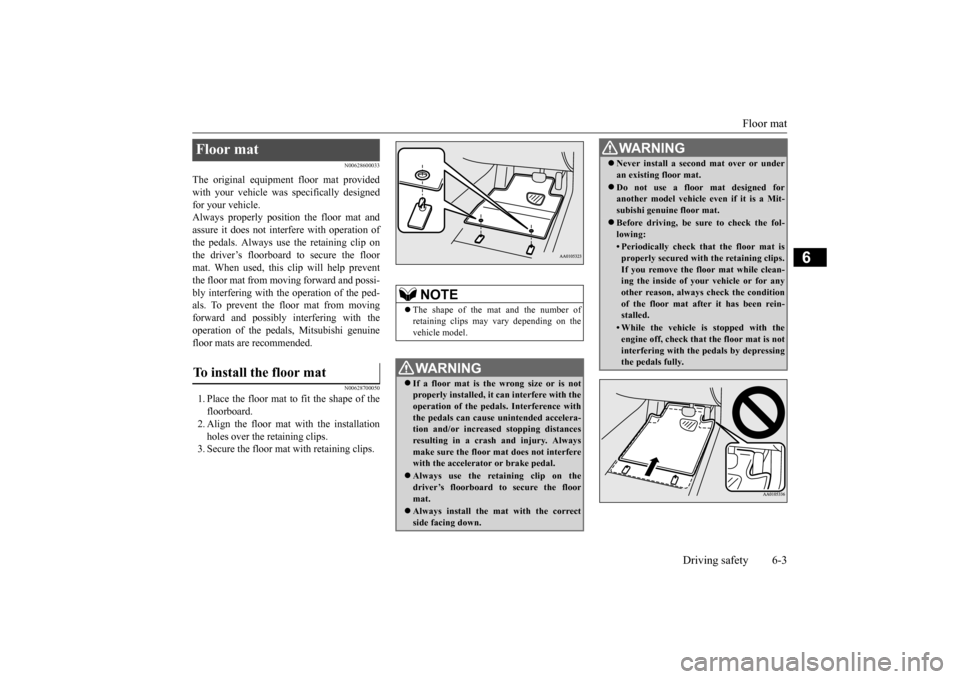
The original equipment floor mat provided with your vehicle was
specifically designed
for your vehicle.Always properly positio
n the floor mat and
assure it does not inte
rfere with operation of
the pedals. Always use the retaining clip onthe driver’s floorboard to secure the floor mat. When used, this clip will help prevent the floor mat from moving forward and possi- bly interfering with the operation of the ped- als. To prevent the floor mat from movingforward and possibly interfering with the operation of the pedals, Mitsubishi genuine floor mats are recommended.
N00628700050
1. Place the floor mat to fit the shape of thefloorboard.2. Align the floor mat with the installation holes over the retaining clips. 3. Secure the floor mat with retaining clips.Floor mat To install the floor mat
NOTE
The shape of the mat and the number of retaining clips may vary depending on the vehicle model.WA R N I N G If a floor mat is the
wrong size or is not
properly installed, it can interfere with theoperation of the pedals. Interference with the pedals can cause unintended accelera- tion and/or increased stopping distancesresulting in a cras
h and injury. Always
make sure the floor mat does not interfere with the accelerator or brake pedal. Always use the reta
ining clip on the
driver’s floorboard to secure the floormat. Always install the mat with the correct side facing down.
Never install a second mat over or under an existing floor mat. Do not use a floor mat designed for another model vehicle ev
en if it is a Mit-
subishi genuine floor mat. Before driving, be sure to check the fol- lowing:• Periodically check that the floor mat isproperly secured with the retaining clips.If you remove the fl
oor mat while clean-
ing the inside of you
r vehicle or for any
other reason, always
check the condition
of the floor mat afte
r it has been rein-
stalled.• While the vehicle is stopped with theengine off, check that
the floor mat is not
interfering with the pedals by depressingthe pedals fully.WA R N I N G
BK0223400US.book 3 ページ 2015年2月13日 金曜日 午後12時15分
Page 323 of 464
Trailer towing
Driving safety 6-11
6
N00630601112
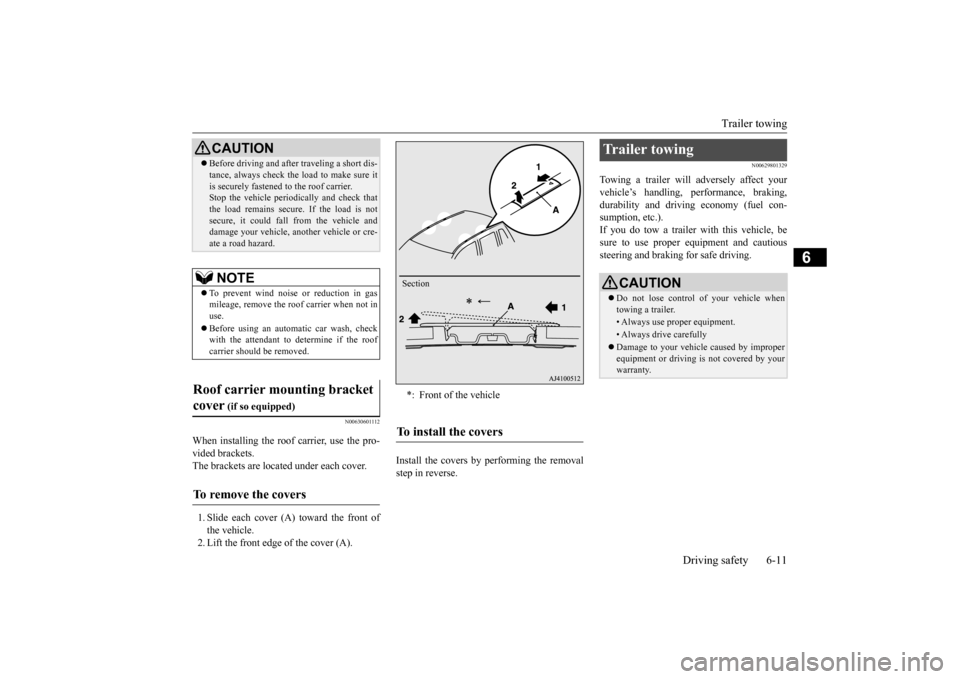
When installing the roof carrier, use the pro- vided brackets. The brackets are located under each cover. 1. Slide each cover (A) toward the front of the vehicle. 2. Lift the front edge of the cover (A).
Install the covers by performing the removal step in reverse.
N00629801329
Towing a trailer will adversely affect yourvehicle’s handling, performance, braking, durability and driving economy (fuel con-sumption, etc.). If you do tow a trailer
with this vehicle, be
sure to use proper e
quipment and cautious
steering and braking for safe driving.
Before driving and after traveling a short dis- tance, always check the load to make sure itis securely fastened to the roof carrier.Stop the vehicle periodi
cally and check that
the load remains secure. If the load is not secure, it could fall from the vehicle anddamage your vehicle,
another vehicle or cre-
ate a road hazard.NOTE
To prevent wind noise or reduction in gas mileage, remove the roof carrier when not in use. Before using an automatic car wash, check with the attendant to determine if the roofcarrier should be removed.
Roof carrier mounting bracket cover
(if so equipped)
To remove the covers
CAUTION
*: Front of the vehicleTo install the covers
Section
Trailer towing
CAUTION Do not lose control of your vehicle when towing a trailer.• Always use proper equipment.• Always drive carefully Damage to your vehicle caused by improper equipment or driving is not covered by your warranty.
BK0223400US.book 11 ページ 2015年2月13日 金曜日 午後12時15分
Page 325 of 464
Trailer towing
Driving safety 6-13
6
Tongue loads can be adjusted by proper dis- tribution of the load in the trailer. This can bechecked by separately
weighing the loaded
trailer and then the tongue. The GAWRs are printed on the certification label which is riveted on the door sill on the driver’s side. Refer to “Vehicle labeling” on page 11-2. Choose a proper hitch and ball, and make sure it is installed at a height that is compati- ble with the trailer.Use a good equalizing hitch which uniformly distributes the trailer tongue load throughout the frame.
A safety chain must al
ways be used between
the towing vehicle and the trailer. Leave suf-ficient slack in the chain for turns. The chain should cross under the trailer tongue to pre- vent the tongue from dropping to the groundin case it becomes damaged or separated. For correct safety chai
n procedures, consult
your authorized Mitsub
ishi Motors dealer.
Your vehicle will need service more often when you’re towing a trailer. Refer to “WAR-RANTY AND MAINTENANCE MAN- UAL”. Especially important in trailer operation are manual transaxle oil, automatictransaxle fluid, engine oi
l, rear axle oil, belt,
cooling system and brake system. Each of these is covered in this manual. For details, please refer to the “Vehicle care and maintenance” section.Check periodically to see that all hitch nuts and bolts are tight. Mitsubishi Motors recommends that any trailer having a total we
ight of 1,250 lbs (567
kg) or more (2400 models), 1,400 lbs (635kg) or more (3000 mode
ls) be equipped with
its own electric or surge-type brakes. If you choose electric br
akes, be sure they are
electrically actuated. Do not attempt to tapinto your vehicle’s hydraulic system. No mat- ter how successful it
may seem, any attempt
to attach trailer brakes to your vehicle’shydraulic system will lower braking effec- tiveness and create a potential hazard.
Gross axle weight rating (GAWR) Trailer hitches
WA R N I N G If you make any holes in the body of your vehicle for installing
a trailer hitch, be
sure to seal the holes later when youremove the hitch. If
you don’t seal them,
deadly carbon monoxide (CO) from your exhaust can enter your vehicle. Refer to“Exhaust system” on page 9-24.
NOTE
Mitsubishi Motors recommends that sway control be used whenever you are towing, toimprove towing stability.For further informati
on, please contact your
authorized Mitsubishi Motors dealer.
Safety chains
CAUTION Never tow a trailer wi
thout using a safety
chain securely attached to both the trailer and the vehicle. If the
coupling unit or hitch
ball experiences a probl
em, the trailer may
separate from
your vehicle.
Maintenance when trailer tow- ing Trailer brakes
BK0223400US.book 13 ページ 2015年2月13日 金曜日 午後12時15分
Page 348 of 464
Audio Files (MP3/WMA/AAC) 7-20 Comfort controls
7
Discs that have not
been finalized cannot
be played back. Even if recorded using the correct format on a recorder or computer, application software settings and environments; discpeculiarities, damage,
or marking; or dirt
or condensation on the lens inside the product may render the disc unplayable. Depending on the disc
, some functions
may not be used, or the disc may not play back. Do not use discs with cracks or warps. If the disc has sticke
rs affixed, remains
from removed stickers, or affixed adhe- sive, then do not use the disc. Discs that have decora
tive labels or stick-
ers may not be used.
This product will play
back audio CDs, how-
ever please be aware of the following points regarding CD standards. Ensure that you use discs with on the label surface. Playback of other than standard CDs is not guaranteed. Even
if the audio can be
played back, the audio quality cannot beguaranteed. When playing back other than standard CDs, the following may occur.
• There may be noise during playback. • There may be jumping in the audio.• The disc may not be recognized. • The first track may not be played back. • It may take longer than usual until startof playback of tracks. • Playback may start from within the track.• Some parts may not be played back. • Tracks may freeze during playback. • Tracks may be displayed erroneously.
N00715600027
This product can play back MP3/WMA/AACformat audio files recorded on CD-ROM, CD-R/RW, and USB devices. There are limitations on the files and media that can be used, therefore read the followingprior to recording MP3/WMA/AAC format audio files on discs or USB devices. Additionally, ensure y
ou read the user manu-
als for your CD-R/RW drive and the writing software, and ensure these are used correctly. If the MP3/WMA/AAC
format audio files
includes title informati
on or other data, then
this can be displayed.
Nonstandard CDs
Audio Files (MP3/WMA/AAC)
CAUTION CD-ROM and CD-R/RW media can only play back MP3 fo
rmat audio files.
Actions such as copying audio CDs or files and either distributing these to others for free or for charge, or uploading files via the Inter-net or other means to servers is an infringe- ment of the law. Do not append the file
extensions “.mp3”,
“.wma”, or “.m4a”, to other than MP3/WMA/AAC format
files. Playing back
discs with these types of files recorded upon them may cause the files to be incorrectly identified for playback, which may lead toloud noise, resulting in speaker damage or accident.NOTE
Depending on the condition of the disc recorder or recording software used, correctplayback may not be po
ssible. In these cases,
refer to the user manual for your product or software. Depending on your computer’s operating system, version, softwa
re, or settings, files
may not have a file
extension appended. In
these cases, append
the file extensions
“.mp3”, “.wma”, or “.m4a” when copying the files. Files larger than 2GB in size cannot be played back.
BK0223400US.book 20 ページ 2015年2月13日 金曜日 午後12時15分
Page 379 of 464
Antenna
Comfort controls 7-51
7
N00734201494
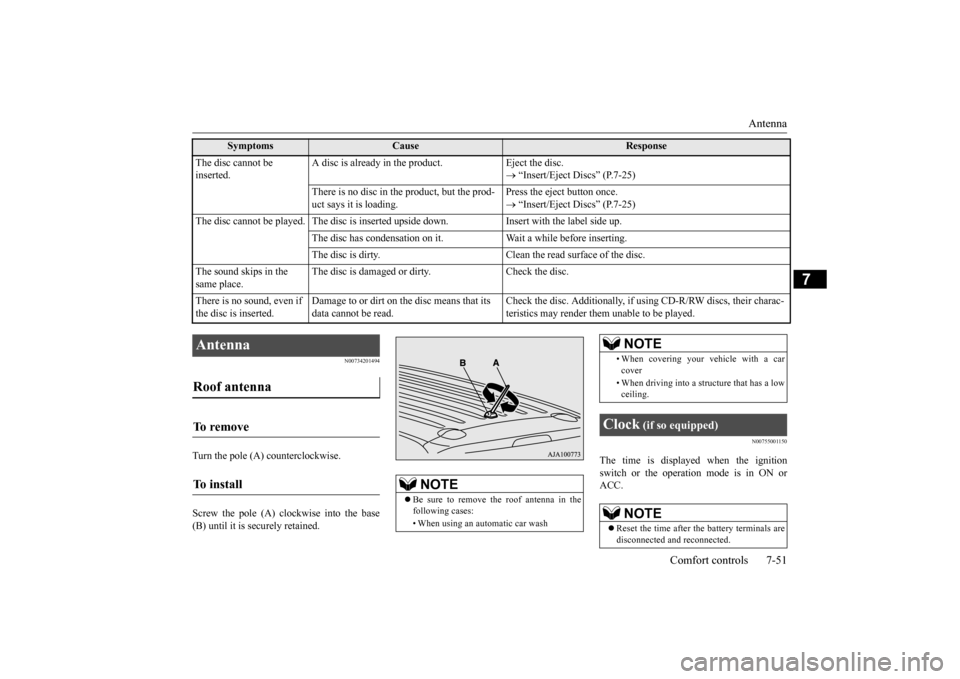
Turn the pole (A) counterclockwise. Screw the pole (A) clockwise into the base (B) until it is securely retained.
N00755001150
The time is displayed when the ignition switch or the operation mode is in ON orACC.
The disc cannot be inserted.
A disc is already in the product. Eject the disc.
“Insert/Eject Discs” (P.7-25)
There is no disc in
the product, but the prod-
uct says it is loading.
Press the eject button once. “Insert/Eject Discs” (P.7-25)
The disc cannot be played. The
disc is inserted up
side down. Insert with
the label side up.
The disc has condensation on it
. Wait a while before inserting.
The disc is dirty. Clean the
read surface of the disc.
The sound skips in the same place.
The disc is damaged or dirty. Check the disc.
There is no sound, even if the disc is inserted.
Damage to or dirt on the disc means that its data cannot be read.
Check the disc. Additionally, if using CD-R/RW discs, their charac- teristics may render them
unable to be played.
Symptoms
Cause
Response
Antenna Roof antenna To remove To install
NOTE
Be sure to remove the roof antenna in the following cases: • When using an automatic car wash
• When covering your ve
hicle with a car
cover • When driving into a structure that has a low ceiling.
Clock
(if so equipped)
NOTE
Reset the time after the battery terminals are disconnected an
d reconnected.
NOTE
BK0223400US.book 51 ページ 2015年2月13日 金曜日 午後12時15分
Page 394 of 464
How to change a tire 8-12 For emergencies
8
N00832300020
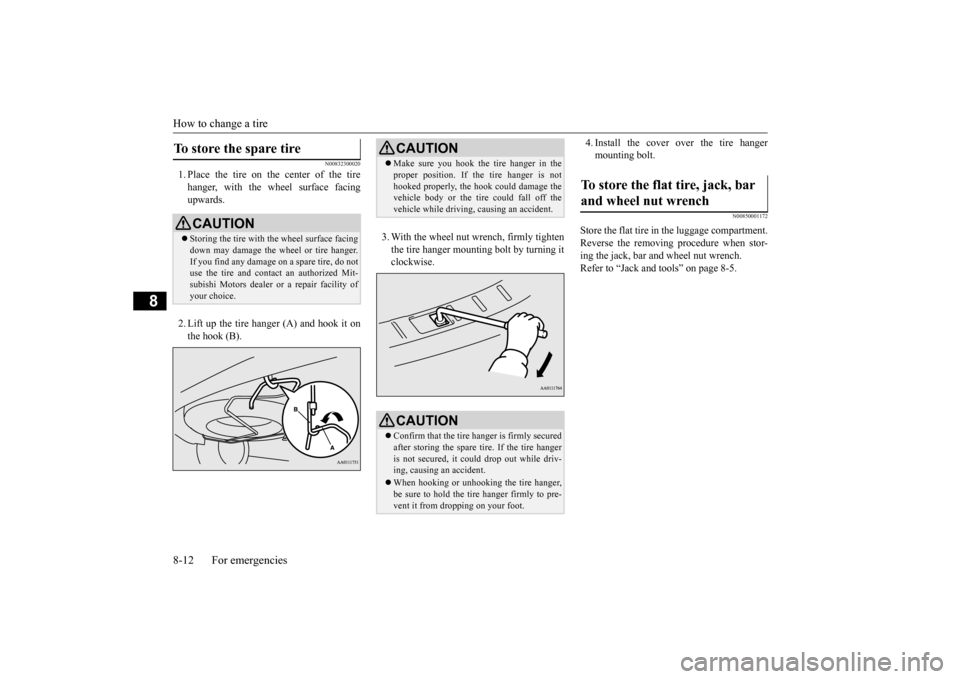
1. Place the tire on the center of the tire hanger, with the wheel surface facing upwards. 2. Lift up the tire hanger (A) and hook it on the hook (B).
3. With the wheel nut wrench, firmly tighten the tire hanger mounti
ng bolt by turning it
clockwise.
4. Install the cover over the tire hanger mounting bolt.
N00850001172
Store the flat tire in the luggage compartment.Reverse the removing procedure when stor- ing the jack, bar and wheel nut wrench. Refer to “Jack and t
ools” on page 8-5.
To store the spare tire
CAUTIONStoring the tire with the wheel surface facing down may damage the wheel or tire hanger. If you find any damage
on a spare tire, do not
use the tire and contact an authorized Mit- subishi Motors dealer or a repair facility of your choice.
CAUTION Make sure you hook the tire hanger in the proper position. If the tire hanger is nothooked properly, the hook
could damage the
vehicle body or the tire
could fall off the
vehicle while driving,
causing an accident.
CAUTIONConfirm that the tire hanger is firmly secured after storing the spare
tire. If the tire hanger
is not secured, it c
ould drop out while driv-
ing, causing
an accident.
When hooking or unhooking the tire hanger, be sure to hold the tire hanger firmly to pre-vent it from dropping on your foot.
To store the flat tire, jack, bar and wheel nut wrench
BK0223400US.book 12 ページ 2015年2月13日 金曜日 午後12時15分
Page 402 of 464
Engine hood 9-4 Vehicle care and maintenance
9
Release the lever and
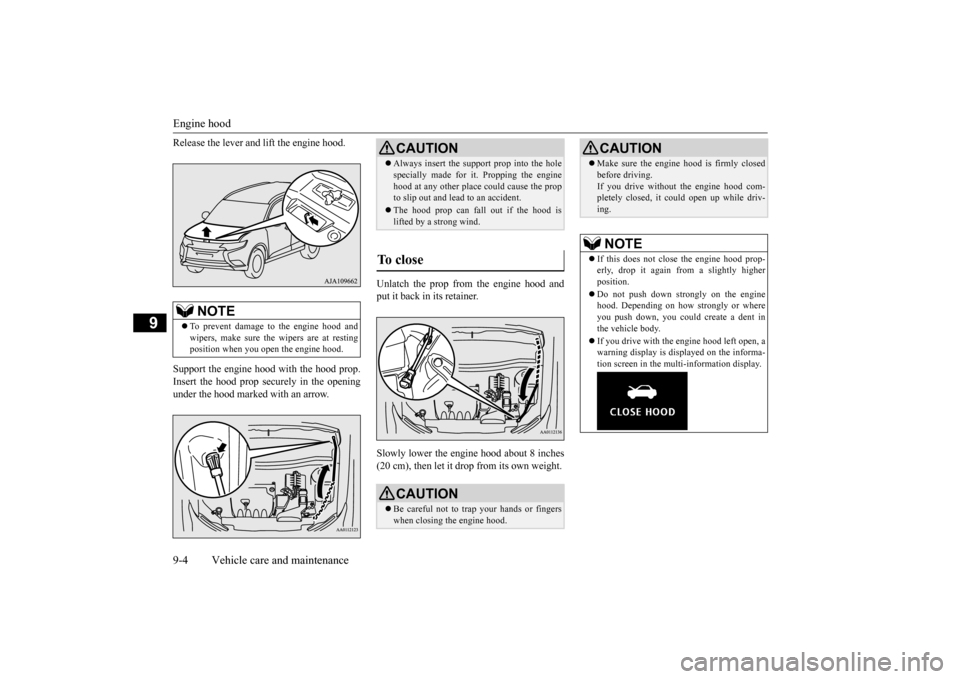
lift the engine hood.
Support the engine hood with the hood prop. Insert the hood prop securely in the opening under the hood marked with an arrow.
Unlatch the prop from the engine hood and put it back in its retainer. Slowly lower the engine hood about 8 inches (20 cm), then let it drop from its own weight.
NOTE
To prevent damage to the engine hood and wipers, make sure the
wipers are at resting
position when you open the engine hood.
CAUTION Always insert the support prop into the hole specially made for it. Propping the enginehood at any other place
could cause the prop
to slip out and lead
to an accident.
The hood prop can fall out if the hood is lifted by a strong wind.
To close
CAUTION Be careful not to trap your hands or fingers when closing the engine hood.
Make sure the engine hood is firmly closed before driving.If you drive without the engine hood com-pletely closed, it c
ould open up while driv-
ing.NOTE
If this does not clos
e the engine hood prop-
erly, drop it again from a slightly higher position. Do not push down strongly on the engine hood. Depending on how strongly or whereyou push down, you could create a dent in the vehicle body. If you drive with the e
ngine hood left open, a
warning display is displayed on the informa- tion screen in the multi-information display.CAUTION
BK0223400US.book 4 ページ 2015年2月13日 金曜日 午後12時15分
Page 412 of 464
Battery 9-14 Vehicle care and maintenance
9
facility of your choice before the start of cold weather. If necessary, have it charged. Thiswill provide more relia
ble starting, and longer
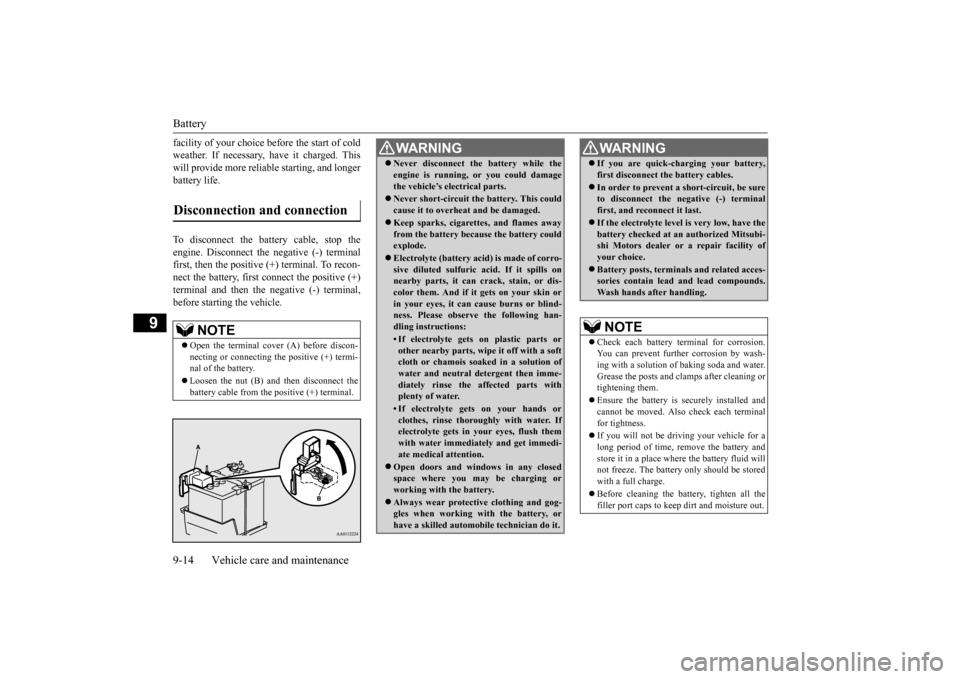
battery life. To disconnect the battery cable, stop the engine. Disconnect the
negative (-) terminal
first, then the positive (+) terminal. To recon- nect the battery, first
connect the positive (+)
terminal and then the negative (-) terminal,before starting the vehicle.Disconnection and connection
NOTE
Open the terminal cover (A) before discon- necting or connecting
the positive (+) termi-
nal of the battery. Loosen the nut (B) a
nd then disconnect the
battery cable from the positive (+) terminal.
WA R N I N G Never disconnect the battery while the engine is running, or you could damagethe vehicle’s electrical parts. Never short-circuit the battery. This could cause it to overheat and be damaged. Keep sparks, cigarettes, and flames away from the battery because the battery couldexplode. Electrolyte (battery acid) is made of corro- sive diluted sulfuric acid. If it spills on nearby parts, it can crack, stain, or dis- color them. And if it gets on your skin orin your eyes, it can cause burns or blind- ness. Please observe the following han- dling instructions:• If electrolyte gets on plastic parts orother nearby parts, wipe it off with a softcloth or chamois soak
ed in a solution of
water and neutral detergent then imme- diately rinse the affected parts withplenty of water.• If electrolyte gets on your hands orclothes, rinse thoroughly with water. If electrolyte gets in your eyes, flush them with water immediately and get immedi-ate medical attention.
Open doors and wind
ows in any closed
space where you may be charging or working with the battery. Always wear protecti
ve clothing and gog-
gles when working with the battery, or have a skilled automobi
le technician do it.
If you are quick-ch
arging your battery,
first disconnect the battery cables. In order to prevent a
short-circuit, be sure
to disconnect the negative (-) terminal first, and reconnect it last. If the electrolyte level
is very low, have the
battery checked at an
authorized Mitsubi-
shi Motors dealer or
a repair facility of
your choice. Battery posts, terminals and related acces- sories contain lead
and lead compounds.
Wash hands after handling.NOTE
Check each battery terminal for corrosion. You can prevent further corrosion by wash-ing with a solution of baking soda and water. Grease the posts and cl
amps after cleaning or
tightening them. Ensure the battery is securely installed and cannot be moved. Also
check each terminal
for tightness. If you will not be driving your vehicle for a long period of time, remove the battery andstore it in a place where the battery fluid will not freeze. The battery only should be stored with a full charge. Before cleaning the battery, tighten all the filler port caps to keep
dirt and moisture out.
WA R N I N G
BK0223400US.book 14 ページ 2015年2月13日 金曜日 午後12時15分