2016 MINI Hardtop 4 Door battery
[x] Cancel search: batteryPage 213 of 246
Starting aid terminals
In the vehicle, only charge the battery via the
starting aid terminals, refer to page 215, in the
engine compartment with the engine off.
Power failure
After a temporary power loss, some equipment
needs to be newly initialized or individual set‐
tings updated, e. g.:▷Time: update.▷Date: update.▷Navigation system: wait for the operability
of the navigation.▷Seat and mirror memory: store the posi‐
tions again.▷Glass sunroof: initialize the system, refer to
page 48.
Disposing of old batteries
Have old batteries disposed of by a
dealer’s service center or another quali‐
fied service center or repair shop or
take them to a collection point.
Maintain the battery in an upright position for
transport and storage. Secure the battery so
that it does not tip over during transport.
Fuses Information WARNING
Incorrect and repaired fuses can overload
electrical lines and components. There is risk of
fire. Never attempt to repair a blown fuse and
do not replace a nonworking fuse with a substi‐
tute of another color or amperage rating. ◀
Replacing fuse
The fuses are located in the passenger footwell
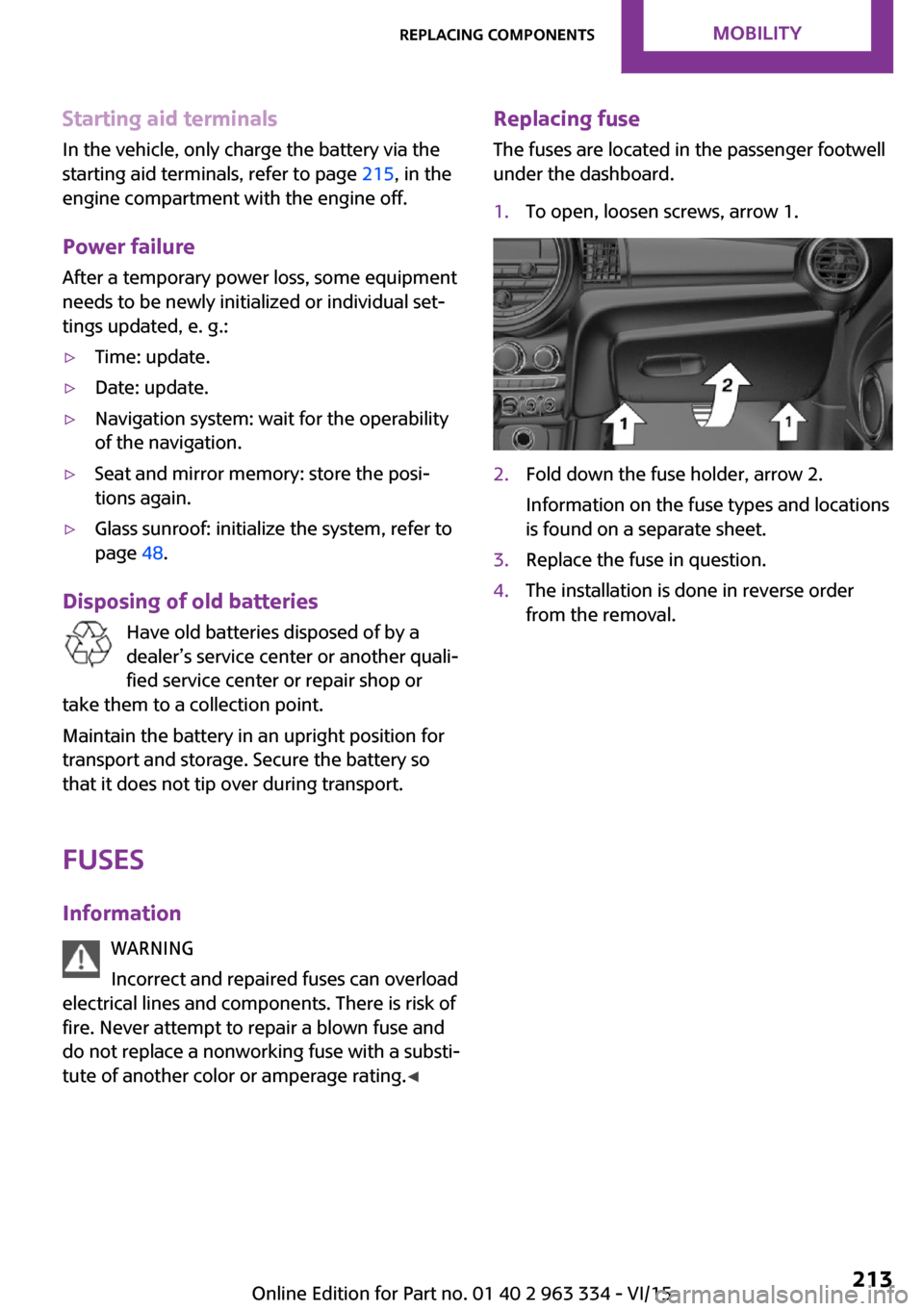
under the dashboard.1.To open, loosen screws, arrow 1.2.Fold down the fuse holder, arrow 2.
Information on the fuse types and locations
is found on a separate sheet.3.Replace the fuse in question.4.The installation is done in reverse order
from the removal.Seite 213Replacing componentsMOBILITY213
Online Edition for Part no. 01 40 2 963 334 - VI/15
Page 214 of 246

Breakdown assistanceVehicle features and op‐
tions
This chapter describes all standard, country-
specific and optional features offered with the
series. It also describes features that are not
necessarily available in your car, e. g., due to
the selected options or country versions. This
also applies to safety-related functions and sys‐
tems. The respectively applicable country provi‐
sions must be observed when using the respec‐
tive features and systems.
Hazard warning flash‐
ers
The button is located above the Control Dis‐
play.
Warning triangle
The warning triangle is located in the tailgate.
To remove, loosen the brackets.
First-aid kit
The first-aid kit is located in the trunk.
Some of the articles have a limited service life.
Check the expiration dates of the contents reg‐
ularly and replace any expired items promptly.
Jump-starting General information If the battery is discharged, the engine can be
started using the battery of another vehicle and
two jumper cables. Only use jumper cables with
fully insulated clamp handles.
Information DANGER
Contact with live components can lead to
an electric shock. There is risk of injuries or
danger to life. Do not touch any components
that are under voltage. ◀
To prevent personal injury or damage to both
vehicles, adhere strictly to the following proce‐
dure.
Seite 214MOBILITYBreakdown assistance214
Online Edition for Part no. 01 40 2 963 334 - VI/15
Page 215 of 246

PreparationCAUTION
In the case of body contact between the
two vehicles, a short circuit can occur during
jump-starting. There is risk of property damage.
Make sure that no body contact occurs. ◀1.Check whether the battery of the other ve‐
hicle has a voltage of 12 volts. This informa‐
tion can be found on the battery.2.Switch off the engine of the assisting vehi‐
cle.3.Switch off any electronic systems/power
consumers in both vehicles.
Starting aid terminals
WARNING
If the jumper cables are connected in the
incorrect order, sparks formation can occur.
There is risk of injuries. Pay attention to the cor‐
rect order during connection. ◀
The so-called starting aid terminal in the engine
compartment acts as the battery's positive ter‐
minal.
Open the lid of the starting aid terminal.
The body ground acts as the negative terminal
of the battery.
Connecting the cables
1.Pull off the lid of the starting aid terminal.2.Attach one terminal clamp of the positive
jumper cable to the positive terminal of the
battery, or to the corresponding starting aid
terminal of the vehicle providing assistance.3.Attach the terminal clamp on the other end
of the cable to the positive terminal of the
battery, or to the corresponding starting aid
terminal of the vehicle to be started.4.Attach one terminal clamp of the negative
jumper cable to the negative terminal of
the battery, or to the corresponding engine
or body ground of assisting vehicle.5.Attach the second terminal clamp to the
negative terminal of the battery, or to the
corresponding engine or body ground of
the vehicle to be started.
Starting the engine
Never use spray fluids to start the engine.
1.Start the engine of the assisting vehicle and
let it run for several minutes at an increased
idle speed.2.Start the engine of the vehicle that is to be
started in the usual way.
If the first starting attempt is not successful,
wait a few minutes before making another
attempt in order to allow the discharged
battery to recharge.Seite 215Breakdown assistanceMOBILITY215
Online Edition for Part no. 01 40 2 963 334 - VI/15
Page 216 of 246

3.Let both engines run for several minutes.4.Disconnect the jumper cables in the reverse
order.
Check the battery and recharge if needed.
Tow-starting and towing
Information WARNING
Due to system limits, individual functions
can malfunction during tow-starting/towing
with the Intelligent Safety systems activated,
e.g. approach control warning with light brak‐
ing function. There is risk of an accident. Switch
all Intelligent Safety systems off prior to tow-
starting/towing. ◀
Switching off Intelligent Safety systems, refer to
page 108.
Steptronic transmission: transporting
your vehicle
Information Your vehicle must not be towed if the front
wheels are touching the ground.
CAUTION
The vehicle can be damaged when tow‐
ing the vehicle with a lifted rear axle. There is
risk of property damage. Have vehicle trans‐
ported only with lifted front axle or on a load‐
ing platform. ◀
Tow truck
Have your vehicle transported with a tow truck
with a so-called lift bar or on a flat bed.
CAUTION
When lifting the vehicle by the tow fitting
or body and chassis parts; damage can occur
on vehicle parts. There is risk of property dam‐
age. Lift vehicle using suitable means. ◀
Use tow fitting located in the front only for po‐
sitioning the vehicle.
Manual transmission
Observe before towing your vehicle
Gearshift lever in neutral position.
Towing CAUTION
If manual unlocking of the parking brake
is not possible, the vehicle cannot be moved or
towed. There is risk of property damage. The
vehicle should only be transported on a loading
platform. ◀
Information the following instructions:
▷Make sure that the ignition is switched on;
otherwise, the low beams, tail lights, turn
signals, and wipers may be unavailable.▷Do not tow the vehicle with the rear axle
tilted, as the front wheels could turn.▷When the engine is stopped, there is no
power assist. Consequently, more forceSeite 216MOBILITYBreakdown assistance216
Online Edition for Part no. 01 40 2 963 334 - VI/15
Page 236 of 246

Everything from A to ZIndexA
ABS, Antilock Brake Sys‐ tem 115
Acceleration Assistant, refer to Launch Control 74
ACC, see camera-based cruise control 119
Activated-charcoal filter 141
Active Cruise Control, see camera-based cruise con‐
trol 119
Additives, oil 197
Adjustments, seats/head re‐ straints 49
Adjustments, steering wheel 57
After washing vehicle 221
Airbags 99
Airbags, indicator/warning light 100
Air circulation, refer to Recir‐ culated-air mode 140
Air circulation, see Recircu‐ lated-air mode 137
Air conditioner 136
Air, dehumidifying, see Cool‐ ing function 137, 139
Air distribution, manual 137, 140
Air flow, air conditioner 137
Air flow, automatic climate control 140
Air pressure, tires 178
Air vents, refer to Ventila‐ tion 141
Alarm system 43
Alarm triggering 43
Alarm, unintentional 44
All around the center con‐ sole 16 All around the roofliner 17
All around the steering wheel 14
All-season tires, see Winter tires 187
Alternating-code hand-held transmitter 144
Alternative oil types 197
Antifreeze, washer fluid 70
Antilock Brake System, ABS 115
Anti-slip control, see DSC 115
Approved axle load 227
Arrival time 85
Ash tray 147
Assistance when driving off 118
Assist system, see Intelligent Safety 108
AUTO intensity 139
Automatic car wash 220
Automatic climate con‐ trol 138
Automatic Curb Monitor 55
Automatic deactivation, Front- seat passenger airbags 101
Automatic headlight con‐ trol 95
Automatic locking 43
Automatic recirculated-air control 140
Automatic transmission with Steptronic 71
AUTO program, automatic cli‐ mate control 139
AUTO program, intensity 139
Auto Start/Stop function 64
Average fuel consumption 85
Average speed 85
Axle loads, weights 227 B
Backrest curvature, refer to Lumbar support 50
Band-aids, see First-aid kit 214
Bar for tow-starting/ towing 217
Battery replacement, vehicle battery 212
Battery, vehicle 212
Belts, safety belts 51
Beverage holder, cu‐ pholder 152
Bonus range, GREEN mode 167
Bottle holder, see Cu‐ pholder 152
Brake assistant 115
Brake discs, break-in 158
Brake pads, break-in 158
Braking, hints 159
Breakdown assistance 214
Break-in 158
Brightness of Control Dis‐ play 88
Bug light 204
Bulb replacement 203
Bulb replacement, front 204
Bulb replacement, rear 206
Bulb replacement, side 209
Bulbs and lights 203
Button, Start/Stop 62
Bypassing, see Jump-start‐ ing 214
C
California Proposition 65 Warning 8 Seite 236REFERENCEEverything from A to Z236
Online Edition for Part no. 01 40 2 963 334 - VI/15
Page 237 of 246

Camera-based cruise con‐trol 119
Camera lenses, care 223
Camera, rearview cam‐ era 130
Can holder, see Cu‐ pholder 152
Car battery 212
Car care products 221
Care, displays 223
Care, vehicle 221
Cargo area 148
Cargo area, adapting size 153
Cargo area, enlarging 149
Cargo area lid 40
Cargo area, storage compart‐ ments 153
Cargo cover 148
Cargo, securing 162
Cargo straps, securing cargo 162
Car key, see Remote con‐ trol 34
Carpet, care 223
Car wash 220
Catalytic converter, see Hot exhaust system 159
CBS Condition Based Serv‐ ice 200
Center armrest 152
Center console 16
Central instrument cluster, LED ring 88
Central locking system 40
Central screen, refer to Control Display 18
Changes, technical, refer to Own Safety 7
Changing parts 202
Changing wheels 210
Changing wheels/tires 186
Chassis number, see vehicle identification number 10
Check Control 76
Checking the oil level elec‐ tronically 195 Children, seating position 58
Children, transporting safely 58
Child restraint fixing sys‐ tem 58
Child restraint fixing system LATCH 60
Child restraint fixing systems, mounting 59
Child safety locks 61
Child seat, mounting 59
Child seats 58
Chrome parts, care 222
Chrono package, cockpit 92
Cigarette lighter 147
Cleaning, displays 223
Climate control 136, 138
Clock 80
Closing/opening via door lock 39
Closing/opening with remote control 37
Clothes hooks 153
Coasting 168
Coasting with engine decou‐ pled, coasting 168
Coasting with idling en‐ gine 168
Combination switch, see Turn signals 67
Combi switch, see wiper sys‐ tem 68
Comfort Access 41
Compartments in the doors 152
Compass 145
Compressor 188
Condensation on win‐ dows 140
Condensation under the vehi‐ cle 160
Condition Based Service CBS 200
Configuring driving pro‐ gram 118
Confirmation signal 43 Control Display 18
Control Display, settings 87
Controller 19
Control systems, driving stabil‐ ity 115
Convenient opening 38
Coolant 198
Cooling function 137, 139
Cooling, maximum 139
Cooling system 198
Cornering lamp 96
Corrosion on brake discs 160
Cosmetic mirror 147
Courtesy lamps during unlock‐ ing 37
Courtesy lamps with the vehi‐ cle locked 38
Cruise control 124
Cruise control, active 119
Cruising range 81
Cupholder 152
Current fuel consumption 81
D
Damage, tires 186
Damping control, dy‐ namic 117
Data, technical 226
Date 80
Daytime running lights 96
Defrosting, refer to defrosting the windows 137
Defrosting, see Windows, de‐ frosting 140
Defrosting the windows 137
Dehumidifying, air 137, 139
Deleting personal data 24
Deletion of personal data 24
Destination distance 85
Digital clock 80
Digital compass 145
Dimensions 226
Dimmable exterior mirrors 56
Dimmable interior rearview mirror 56 Seite 237Everything from A to ZREFERENCE237
Online Edition for Part no. 01 40 2 963 334 - VI/15
Page 238 of 246

Direction indicator, see Turnsignals 67
Display, electronic, instrument cluster 76
Display, engine tempera‐ ture 85
Display lighting, see Instru‐ ment lighting 97
Displays 75
Displays, cleaning 223
Disposal, coolant 199
Disposal, vehicle battery 213
Distance control, see PDC 126
Distance to destination 85
Divided screen view, split screen 23
Door lock, see Remote con‐ trol 34
Drive mode, GREEN mode 165
Drive-off assistant 118
Drive-off assistant, see DSC 115
Driving Dynamics Control 117
Driving Excitement, SPORT 86
Driving instruction, GREEN mode 167
Driving instructions, break- in 158
Driving mode 117
Driving notes, general 158
Driving stability control sys‐ tems 115
Driving style analysis 169
Driving tips 158
DSC Dynamic Stability Con‐ trol 115
DTC Dynamic Traction Con‐ trol 116
Dynamic Damping Con‐ trol 117
Dynamic Stability Control DSC 115
Dynamic Traction Control DTC 116 E
Electronic displays, instrument cluster 76
Electronic oil measure‐ ment 195
Electronic Stability Program ESP, see DSC 115
Emergency detection, remote control 35
Emergency release, fuel filler flap 174
Emergency start function, en‐ gine start 35
Emergency wheel, compact wheel, refer to Emergency
wheel 210
Energy Control 81
Engine, automatic Start/Stop function 64
Engine, automatic switch- off 64
Engine compartment 193
Engine compartment, working in 194
Engine coolant 198
Engine idling when driving, coasting 168
Engine oil 195
Engine oil, adding 196
Engine oil additives 197
Engine oil change 197
Engine oil filler neck 196
Engine oil types, alterna‐ tive 197
Engine oil types, suitable 197
Engine start during malfunc‐ tion 35
Engine start, jump-start‐ ing 214
Engine start, refer to Starting the engine 63
Engine stop 63
Engine temperature, dis‐ play 85
Entering a car wash 220 Equipment, interior 143
Error displays, see Check Con‐ trol 76
ESP Electronic Stability Pro‐ gram, see DSC 115
Exchanging wheels/tires 186
Exhaust system 159
Exterior mirror, automatic dimming feature 56
Exterior mirrors 55
External start 214
External temperature dis‐ play 80
External temperature warn‐ ing 80
Eyes for securing cargo 162
F
Failure message, see Check Control 76
False alarm, refer to Uninten‐ tional alarm 44
Fan, refer to Air flow 137
Fan, see Air flow 140
Favorites buttons, onboard monitor 24
Filler neck for engine oil 196
Fine wood, care 222
First-aid kit 214
Fitting for towing, see tow fit‐ ting 218
Flat tire, changing wheels 210
Flat Tire Monitor FTM 106
Flat tire, repairing 188
Flat tire, Tire Pressure Monitor TPM 102
Flat tire, warning lamp 103, 106
Flooding 159
Floor carpet, care 223
Floor mats, care 223
Fogged up windows 137
Folding back rear seat back‐ rests 149 Seite 238REFERENCEEverything from A to Z238
Online Edition for Part no. 01 40 2 963 334 - VI/15
Page 242 of 246

Rear window de‐froster 138, 140
Recirculated-air filter 141
Recirculated-air mode 137, 140
Recommended fuel grade 176
Recommended tire brands 186
Refueling 174
Remaining range 81
Remote control/key 34
Remote control, blocking 35
Remote control, malfunc‐ tion 38
Remote control, replacing the battery 34
Remote control, univer‐ sal 143
Replacement fuse 213
Replacing parts 202
Replacing the battery, remote control 34
Replacing wheels/tires 186
Reporting safety malfunc‐ tions 10
RES CNCL button, see camera- based cruise control 119
RES CNCL button, see Cruise control 124
Reserve warning, see Range 81
Reset, Tire Pressure Monitor TPM 103
Retaining straps, securing cargo 162
Retreaded tires 187
Roadside parking lights 95
RON recommended fuel grade 176
Roofliner 17
Roof load capacity 227
Roof-mounted luggage rack 162
Rope for tow-starting/ towing 217 RSC Run Flat System Compo‐
nent, see Run-flat tires 187
Rubber components, care 222
Run-flat tires 187
S
Safe braking 159
Safety belt reminder for driv‐ er's seat and front passenger
seat 52
Safety belts 51
Safety belts, care 222
Safety switch, windows 46
Safety systems, airbags 99
Saving fuel 164
Screen, refer to Control Dis‐ play 18
Screwdriver 202
Screw thread for tow fit‐ ting 218
Sealant 188
Seat belts, see Safety belts 51
Seat heating, front 51
Seating position for chil‐ dren 58
Seats 49
Selection list in instrument cluster 84
Selector lever, Steptronic transmission 71
Sensors, care 223
Service and warranty 8
Service requirements, Condi‐ tion Based Service CBS 200
Service requirements, dis‐ play 81
SET button, see camera-based cruise control 119
SET button, see Cruise con‐ trol 124
Settings, locking/unlocking 42
Settings, mirrors 55
Settings on Control Display 87 Shift paddles on the steering
wheel 73
Shift point indicator, Head-Up Display 91
Side airbag 99
Signaling, horn 14
Signals when unlocking 43
Sitting safely 49
Size 226
Slide/tilt glass roof 46
Snow chains 191
Socket 147
Socket, OBD Onboard Diag‐ nostics 201
Spare fuse 213
Spare tire, refer to Emergency wheel 210
Speed, average 85
Speed limit detection, on- board computer 85
Speed limiter, display 82
Speed Limit Information 82
Speed warning 87
Split screen 23
Sport displays 86
Sport displays, Head-up Dis‐ play 91
Sport instruments, cockpit 92
SPORT program, Dynamic Driving Control 117
Sport program, transmis‐ sion 72
Stability control systems 115
Standard view, Head-up Dis‐ play 90
Start/stop, automatic func‐ tion 64
Start/Stop button 62
Start function during malfunc‐ tion 35
Starting the engine 63
Status control display, tires 103
Status information, onboard monitor 23
Status of Owner's Manual 7 Seite 242REFERENCEEverything from A to Z242
Online Edition for Part no. 01 40 2 963 334 - VI/15