2016 MINI COOPER CONVERTIBLE height
[x] Cancel search: heightPage 45 of 252

Interior motion sensor and tilt alarm sensor
are not active, as doors, hood, or tailgate
are not correctly closed. Correctly closed
access points are secured.
When the still open access points are
closed, interior motion sensor and tilt alarm
sensor will be switched on.▷The indicator lamp goes out after unlock‐
ing:
The vehicle has not been tampered with.▷The indicator lamp flashes after unlocking
until the engine ignition is switched on, but
no longer than approx. 5 minutes:
An alarm has been triggered.
Tilt alarm sensor The tilt of the vehicle is monitored.
The alarm system responds in situations such as
attempts to steal a wheel or when the car is
towed.
Interior motion sensor The interior is monitored to the height of the
seats. The alarm system is switched on together
with the interior motion sensor even when the
convertible top is open. Falling objects such as
leaves can trigger the alarm unintentionally.
Avoiding unintentional alarms
The tilt alarm sensor and interior motion sensor
can be switched off together, such as in the fol‐
lowing situations:
▷In automatic car washes.▷In duplex garages.▷During transport on trains carrying vehicles,
at sea or on a trailer.▷With animals in the vehicle.Switching off the tilt alarm sensor and
interior motion sensor
Press the remote control button again
within 10 seconds as soon as the vehi‐
cle is locked.
The indicator lamp lights up for approx. 2 sec‐
onds and then continues to flash.
The tilt alarm sensor and interior motion sensor
are turned off until the vehicle is locked again.
Switching off the alarm▷Unlock vehicle with the remote control or
switch on the ignition, if needed through
emergency detection of remote control, re‐
fer to page 35.▷For Comfort Access:If you have the remote
control with you, unlock vehicle using the
button on the driver's side or passenger
side door.
Power windows
Information WARNING
Unattended children or animals can
cause the vehicle to move and endanger them‐
selves and traffic, e.g., due to the following ac‐
tions:
▷Pressing the Start/Stop button.▷Releasing the parking brake.▷Opening and closing the doors or windows.▷Engaging selector lever position N.▷Using vehicle equipment.
There is risk of accidents or injuries. Do not
leave children or animals unattended in the ve‐
hicle. Take the remote control with you when
exiting and lock the vehicle. ◀
If an accident of a certain severity occurs, the
windows are automatically closed except a
gap.
Seite 45Opening and closingCONTROLS45
Online Edition for Part no. 01 40 2 969 276 - II/16
Page 54 of 252

AdjustingVehicle features and op‐
tions
This chapter describes all standard, country-
specific and optional features offered with the
series. It also describes features that are not
necessarily available in your car, e. g., due to
the selected options or country versions. This
also applies to safety-related functions and sys‐
tems. The respectively applicable country provi‐
sions must be observed when using the respec‐
tive features and systems.
Sitting safely The ideal seating position meeting the needs of
the occupants can make a vital contribution to
relaxed, fatigue-free driving.
The seating position plays an important role in
an accident in combination with:▷Safety belts, refer to page 56.▷Head restraints, refer to page 58.▷Airbags, refer to page 105.
Seats
Information WARNING
Seat adjustments while driving can lead
to unexpected movements of the seat. Vehicle
control could be lost. There is risk of an acci‐
dent. Only adjust the seat on the driver's side
when the vehicle is stationary. ◀
WARNING
With a backrest inclined too far to the
rear, the protective effect of the safety belt
cannot be ensured anymore. There is a danger
of sliding under the safety belt in an accident.
There is a risk of injury or danger to life. Adjust
the seat prior to starting the trip. Adjust the
backrest so that it is in the most upright posi‐
tion as possible and do not adjust again while
driving. ◀
WARNING
There is risk of jamming when moving the
seats. There is a risk of injury or risk of property
damage. Make sure that the area of movement
of the seat is clear prior to any adjustment. ◀
Adjusting seats
Overview1Forward/backward2Thigh support3Height4Backrest tiltSeite 54CONTROLSAdjusting54
Online Edition for Part no. 01 40 2 969 276 - II/16
Page 55 of 252

Forward/backward
Pull the lever and slide the seat in the desired
direction.
After releasing the lever, move the seat forward
or back slightly making sure it engages prop‐
erly.
Height
Pull the lever up or press it down as often as
needed to reach the desired height.
Backrest tilt
Pull the lever and apply your weight to the
backrest or lift it off, as necessary.
Lumbar support
The curvature of the seat backrest can be ad‐
justed in a way that it supports the lumbar re‐
gion of the spine. The lower back and the spine
are supported for upright posture.
Turn the wheel in order to increase or decrease
the curvature.
Thigh support
Pull the lever at the front of the seat and adjust
the thigh support.
Entering the rear
Information WARNING
There is risk of jamming when moving the
seats. There is a risk of injury or risk of property
damage. Make sure that the area of movement
of the seat is clear prior to any adjustment. ◀
WARNING
Unexpected movements of the backrest
while driving may occur due to an unlocked
backrest. Vehicle control could be lost. There is
Seite 55AdjustingCONTROLS55
Online Edition for Part no. 01 40 2 969 276 - II/16
Page 58 of 252
Safety belts can be imperceptibly damaged in
the event of an accident. There is a risk of injury
or danger to life. Do not modify safety belts,
safety belt buckles, belt tensioners, belt retrac‐
tors or belt anchors and keep them clean. Have
the safety belts checked after an accident at
the dealer’s service center or another qualified
service center or repair shop. ◀
Front head restraints
Information WARNING
A missing protective effect due to re‐
moved or not correctly adjusted head restraints
can cause injuries in the head and neck area.
There is a a risk of injury. Install head restraints
on occupied seats prior to driving and make
sure that the center of the head restraint sup‐
ports the back of the head at eye level. ◀
WARNING
Objects on the head restraint reduce the
protective effect in the head and neck area.
There is a a risk of injury.▷Do not use seat or head restraint covers.▷Do not hang objects, e.g., clothes hangers,
directly on the head restraint.▷Only use accessories that have been deter‐
mined to be safe for attachment to a head
restraint.▷Do not use any accessories, e.g., pillows,
while driving. ◀
Correctly adjusted head restraint
General information
A correctly adjusted head restraint reduces the
risk of injury to cervical vertebrae in the event
of an accident.
Adjust the headrest via the backrest tilt as
needed.
Height
Adjust the head restraint so that its center is
approximately at eye level.
Distance Adjust the distance so that the head restraint is
as close as possible to the back of the head.
If necessary, adjust the distance by adjusting
the tilt of the backrest.
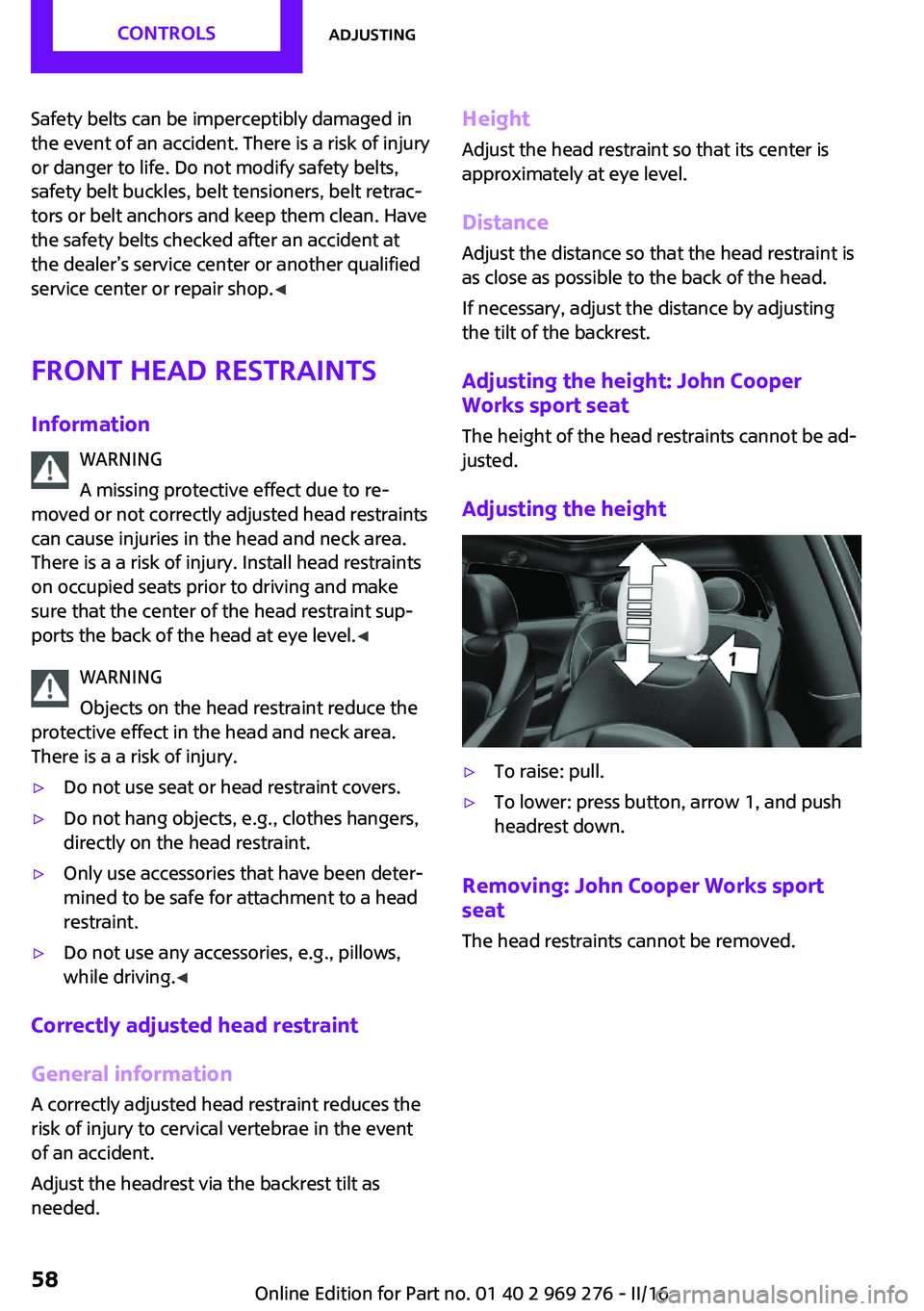
Adjusting the height: John Cooper
Works sport seat
The height of the head restraints cannot be ad‐
justed.
Adjusting the height▷To raise: pull.▷To lower: press button, arrow 1, and push
headrest down.
Removing: John Cooper Works sport
seat
The head restraints cannot be removed.
Seite 58CONTROLSAdjusting58
Online Edition for Part no. 01 40 2 969 276 - II/16
Page 59 of 252

Removing1.Pull head restraint up as far as possible.2.Press button, arrow 1, and pull the head re‐
straint out completely.
To remove the head restraint, fold the backrest
rearward if it is in the upright position.
Only remove the head restraint if no one will be
sitting in the seat in question.
Rear head restraints
Information WARNING
A missing protective effect due to re‐
moved or not correctly adjusted head restraints
can cause injuries in the head and neck area.
There is a a risk of injury. Install head restraints
on occupied seats prior to driving and make
sure that the center of the head restraint sup‐
ports the back of the head at eye level. ◀
WARNING
Objects on the head restraint reduce the
protective effect in the head and neck area.
There is a a risk of injury.
▷Do not use seat or head restraint covers.▷Do not hang objects, e.g., clothes hangers,
directly on the head restraint.▷Only use accessories that have been deter‐
mined to be safe for attachment to a head
restraint.▷Do not use any accessories, e.g., pillows,
while driving. ◀
Correctly adjusted head restraint
General information
A correctly adjusted head restraint reduces the
risk of injury to cervical vertebrae in the event
of an accident.
Height
Adjust the head restraint so that its center is approximately at eye level.
Adjusting the height
▷To raise: push.▷To lower: press button, arrow 1, and push
head restraint down.
Removing
Fold the rear backrest down, refer to
page 159, before removing the head restraint,
otherwise the head restraint cannot be re‐
moved.
Seite 59AdjustingCONTROLS59
Online Edition for Part no. 01 40 2 969 276 - II/16
Page 62 of 252

▷In the mirror glass.▷On the back of the mirror.
Functional requirements
▷Keep the photocells clean.▷Do not cover the area between the inside
rearview mirror and the windshield.
Steering wheel
Information WARNING
Steering wheel adjustments while driving
can lead to unexpected steering wheel move‐
ments. Vehicle control could be lost. There is
risk of an accident. Adjust the steering wheel
while the vehicle is stationary only. ◀
Adjusting
1.Switch on the ignition.2.Fold the lever down.3.Move the steering wheel to the preferred
height and angle to suit your seating posi‐
tion.4.Fold the lever back.5.Switch off the ignition again if needed.Seite 62CONTROLSAdjusting62
Online Edition for Part no. 01 40 2 969 276 - II/16
Page 64 of 252

WARNING
The stability of the child restraint system
is limited or compromised with incorrect seat
adjustment or improper installation of the child
seat. There is a risk of injury or danger to life.
Make sure that the child restraint system fits
securely against the backrest. If possible, adjust
the backrest tilt for all affected backrests and
correctly adjust the seats. Make sure that seats
and backrests are securely engaged. If possible,
adjust the height of the head restraints or re‐
move them. ◀
Installing child re‐ straint systems
InformationPay attention to the specifications of the child
restraint system manufacturer when selecting,
installing, and using child restraint systems.
WARNING
The stability of the child restraint system
is limited or compromised with incorrect seat
adjustment or improper installation of the child
seat. There is a risk of injury or danger to life.
Make sure that the child restraint system fits
securely against the backrest. If possible, adjust
the backrest tilt for all affected backrests and
correctly adjust the seats. Make sure that seats
and backrests are securely engaged. If possible,
adjust the height of the head restraints or re‐
move them. ◀
In order to faciliate the installation of a back-
facing child restraint system in the rear:
Move the front passenger's seat as far up as
possible before folding down the backrest.On the front passenger seat
Deactivating airbags WARNING
Active front-seat passenger airbags can
injure a child in a child restraint system when
the airbags are activated. There is a risk of in‐
jury. Make sure that the front-seat passenger
airbags are deactivated and that the PASSEN‐
GER AIRBAG OFF indicator lamp lights up. ◀
After installing a child restraint system in the
front passenger seat, make sure that the front,
knee and side airbags on the front passenger
side are deactivated.
Deactivate the front-seat passenger airbags au‐
tomatically, refer to page 107.
Seat position and height
Before installing a child restraint system, move
the front passenger seat as far back as possible
and adjust its height to the highest and thus
best possible position for the belt and to offer
optimal protection in the event of an accident.
If the upper anchorage of the safety belt is lo‐
cated in front of the belt guide of the child seat,
move the passenger seat carefully forward until
the best possible belt guide position is reached.
Child seat security
The rear safety belts and the front passenger
safety belt can be permanently locked to fasten
child restraint systems.
Seite 64CONTROLSTransporting children safely64
Online Edition for Part no. 01 40 2 969 276 - II/16
Page 96 of 252

On the Control Display:1. "Settings"2."Head-Up Display"3."Brightness"4.Turn the Controller until the desired bright‐
ness is set.5.Press the Controller.
When the low beams are activated, the bright‐
ness of the Head-up Display can be additionally
influenced using the instrument lighting, refer
to page 103.
Settings are stored for the profile currently
used.
Adjusting the height On the Control Display:
1. "Settings"2."Head-Up Display"3."Height"4.Turn the Controller until the desired height
is reached.5.Press the Controller.
Settings are stored for the profile currently
used.
Setting the rotation The screen of the Head-up Display can be ro‐
tated around its own axis.
On the Control Display:
1. "Settings"2."Head-Up Display"3."Rotation"4.Turn the Controller until the desired setting
is selected.5.Press the Controller.
Settings are stored for the profile currently
used.
John Cooper Works: Sport displays in the Head-up Display
General information
The sport displays in the Head-up Display assist
with a sporty driving style.
Switching on1. "Settings"2."Head-Up Display"3."Displayed information"4."Sport displays"
With navigation system: if the sport displays are
switched on, no navigation content will be dis‐
played on the Head-up Display.
Display
1Speed2Shift point indicator3Gear display4Current engine speed5Warning field, speed
Shift point indicator
The concept
Shift point indicator in the Head-up Display in‐
dicates the optimum shifting point. Thus, with a
sporty driving style, the best possible vehicle
acceleration is achieved.
Seite 96CONTROLSDisplays96
Online Edition for Part no. 01 40 2 969 276 - II/16