2016 MINI COOPER CONVERTIBLE ECU
[x] Cancel search: ECUPage 106 of 252

Protective action
Airbags are not triggered in every impact situa‐
tion, e.g., in less severe accidents or rear-end
collisions.
Information for optimum effect of the
airbags
WARNING
If the seat position is incorrect or the de‐
ployment area of the airbags is impaired, the
airbag system cannot protect as intended or
cause additional injuries due to triggering.
There is a risk of injury or danger to life. Follow
the information on optimum protective effect
of the airbag system. ◀▷Keep at a distance from the airbags.▷Make sure that occupants keep their heads
away from the side airbag.▷Always grasp the steering wheel on the
steering wheel rim. Hold your hands at the
3 o'clock and 9 o'clock positions, to keep
the risk of injury to your hands or arms as
low as possible when the airbag is trig‐
gered.▷Make sure that the front passenger is sitting
correctly, i.e., keeps his or her feet and legs
in the floor area and does not support them
on the dashboard.▷There should be no persons, animals or ob‐
jects between an airbag and a person.▷Do not apply adhesive materials to the air‐
bag cover panels, do not cover them or
modify them in any way.▷Dashboard and windshield on the front
passenger side must stay clear - do not at‐
tach adhesive labels or coverings and do
not attach brackets or cables, e. g., for GPS
devices or' mobile phones.▷Do not use the cover of the front airbag on
the front passenger side as a storage area.▷Do not place slip covers, seat cushions or
other objects on the front passenger seatthat are not specifically suited for seats with
integrated side airbags.▷Do not hang pieces of clothing, such as
jackets, over the backrests.▷Never modify either the individual compo‐
nents or the wiring in the airbag system.
This also applies to steering wheel covers,
the dashboard, and the seats.▷Do not remove the airbag system.
Even when you follow all instructions very
closely, injury from contact with the airbags
cannot be fully ruled out in certain situations.
The ignition and inflation noise may lead to
short-term and, in most cases, temporary hear‐
ing impairment in sensitive individuals.
Warnings and information on the airbags are
also found on the sun visors.
Functional readiness of the airbag
system
Information WARNING
Individual components can be hot after
triggering of the airbag system. There is a a risk
of injury. Do not touch individual compo‐
nents. ◀
WARNING
Improperly executed work can lead to
failure, malfunction or unintentional triggering
of the airbag system. In the case of a malfunc‐
tion, the airbag system could not trigger as in‐
tended in the event of an accident despite re‐
spective accident severity. There is a risk of
injury or danger to life. Have the airbag system
checked, repaired, dismantled and scrapped by
a dealer’s service center or another qualified
service center or repair shop. ◀
Seite 106CONTROLSSafety106
Online Edition for Part no. 01 40 2 969 276 - II/16
Page 109 of 252
WARNING
Improperly executed work can lead to
failure, malfunction or unintentional triggering
of the system. In the case of a malfunction, the
system could not trigger as intended in the
event of an accident despite respective acci‐
dent severity. There is a risk of injury or danger
to life. Have the system checked, repaired, dis‐
mantled and scrapped by a dealer’s service
center or another qualified service center or re‐
pair shop. ◀
Triggered rollover protection system WARNING
After triggering or damage, system func‐
tionality is limited or not available anymore.
There is a risk of injury or danger to life.
Have the system checked and replaced by a
dealer’s service center or another qualified
service center or repair shop in the event of
triggering of or damage to the system. ◀
WARNING
With an extended rollover protection sys‐
tem, the area of movement of the convertible
top is limited. There is a risk of injuries or a risk
of property damage. When the rollover protec‐
tion system is extended, do not move the con‐
vertible top. ◀
Malfunction A Check Control message is displayed
when there is a malfunction.
Tire Pressure Monitor
TPM
The concept
The system monitors tire inflation pressure in
the four mounted tires. The system warns you if
there is a significant loss of pressure in one ormore tires. For this purpose, sensors in the tire
valves measure the tire inflation pressure.
Information With use of the system observe further infor‐
mation found under Tire inflation pressure, re‐
fer to page 186.
Functional requirements The system must have been reset with the cor‐
rect tire inflation pressure; otherwise, reliable
signaling of tire pressure loss is not assured.
Reset the system after each adjustment of the
tire inflation pressure and after every tire or
wheel change.
Always use wheels with TPM electronics to en‐
sure that the system will operate properly.
Status display The current status of the Tire Pressure Monitor
TPM can be displayed on the Control Display,
e.g., whether or not the TPM is active.
On the Control Display:1. "Vehicle info"2."Vehicle status"3. "Tire Pressure Monitor (TPM)"
The status is displayed.
Status control display Tire and system status are indicated by the
color of the tires and a text message on the
Control Display.
All wheels green System is active and will issue a warning rela‐
tive to the tire inflation pressures stored during
the last reset.
One wheel is yellowA flat tire or major drop in inflation pressure in
the indicated tire.
Seite 109SafetyCONTROLS109
Online Edition for Part no. 01 40 2 969 276 - II/16
Page 118 of 252

PrewarningThis warning is issued, for example, when there
is the impending danger of a collision or the
distance to the vehicle ahead is too small.
The driver must intervene actively when there is a prewarning.
Acute warning with braking function
Acute warning in displayed in case of the immi‐
nent danger of a collision when the vehicle ap‐
proaches another object at a high differential
speed.
The driver must intervene actively when there
is an acute warning. If necessary, the driver is
assisted by a minor automatic braking inter‐
vention in a possible risk of collision.
Acute warnings can also be triggered without
previous forewarning.
Braking intervention The warning prompts the driver himself/herself
to react. During a warning, the maximum brak‐
ing force is used. Premise for the brake booster
is sufficiently quick and sufficiently hard step‐
ping on the brake pedal. The system can assist
with some braking intervention if there is a risk
of a collision. At low speeds vehicles may thus
come to a complete stop.
Manual transmission: During a braking inter‐
vention up to a complete stop, the engine may
be shut down.
The braking intervention is executed only if ve‐
hicle stability has not been restricted, e.g. by
deactivating the DSC Dynamic Stability Control.
The braking intervention can be interrupted by
stepping on the accelerator pedal or by actively
moving the steering wheel.
Object detection can be restricted. Limitations
of the detection range and functional restric‐
tions are to be considered.System limits
Information WARNING
The system can react incorrectly or not at
all due to the system limits. There is risk of acci‐
dents or risk of property damage. Observe the
information regarding the system limits and ac‐
tively intervene, if needed. ◀
Detection range The system's detection potential is limited.
Thus a system reaction might not come or
might come late.
E. g. the following situations may not be de‐ tected:▷Slow moving vehicles when you approach
them at high speed.▷Vehicles that suddenly swerve in front of
you, or sharply decelerating vehicles.▷Vehicles with an unusual rear appearance.▷Two-wheeled vehicles ahead of you.
Functional limitations
The system may not be fully functional in the
following situations:
▷In heavy fog, rain, sprayed water or snow‐
fall.▷In tight curves.▷If the field of view of the camera or the
windshield are dirty or covered.▷If the driving stability control systems are
deactivated, for example DSC OFF.▷Up to 10 seconds after the start of the en‐
gine, via the Start/Stop button.▷During calibration of the camera immedi‐
ately after vehicle delivery.▷If there are constant blinding effects be‐
cause of oncoming light, e. g., from the sun
low in the sky.Seite 118CONTROLSSafety118
Online Edition for Part no. 01 40 2 969 276 - II/16
Page 120 of 252

Intelligent Safety button
Camera
The camera is installed near the interior rear‐
view mirror.
Keep the windshield in the area behind the in‐
terior rearview mirror clean and clear.
Switching on/off
Switching on automatically
The system is automatically active after every
driving-off.
Switching on/off manually Press button briefly:
▷The menu for the intelligent safety
system is displayed. The systems
are individually switched off ac‐
cording to their respective settings.▷LED lights up orange or goes out respective
to their individual settings.
Adjust as needed. Individual settings are stored
for the profile currently used.
Press button again:
▷All Intelligent Safety systems are
activated.▷The LED lights up green.
Hold down button:
▷All Intelligent Safety systems are turned off.▷The LED goes out.
Warning with braking function
Display
If a collision with a person detected in this way
is imminent, a warning symbol appears on the
instrument cluster and in the Head-up Display.
The red symbol is displayed and a signal
sounds.
Intervene immediately by braking or
make an evasive maneuver.
Braking intervention
The warning prompts the driver himself/herself
to react. During a warning, the maximum brak‐ ing force is used. Premise for the brake booster
is sufficiently quick and sufficiently hard step‐
ping on the brake pedal. The system can assist
with some braking intervention if there is a risk
of a collision. At low speeds vehicles may thus
come to a complete stop.
Manual transmission: During a braking inter‐
vention up to a complete stop, the engine may
be shut down.
The braking intervention is executed only if ve‐
hicle stability has not been restricted, e.g. by
deactivating the DSC Dynamic Stability Control.
The braking intervention can be interrupted by
stepping on the accelerator pedal or by actively
moving the steering wheel.
Object detection can be restricted. Limitations
of the detection range and functional restric‐
tions are to be considered.
Seite 120CONTROLSSafety120
Online Edition for Part no. 01 40 2 969 276 - II/16
Page 121 of 252

System limits
Information WARNING
The system can react incorrectly or not at
all due to the system limits. There is risk of acci‐
dents or risk of property damage. Observe the
information regarding the system limits and ac‐
tively intervene, if needed. ◀
Detection range The detection potential of the camera is lim‐
ited.
Thus a warning might not be issued or be is‐
sued late.
E. g. the following situations may not be de‐
tected:▷Partially covered pedestrians.▷Pedestrians that are not detected as such
because of the viewing angle or contour.▷Pedestrians outside of the detection range.▷Pedestrians having a body size less than
32 inches/80 cm.
Functional limitations
The system may not be fully functional or may
not be available in the following situations:
▷In heavy fog, rain, sprayed water or snow‐
fall.▷In tight curves.▷If the field of view of the camera or the
windshield are dirty or covered.▷If the driving stability control systems are
deactivated, for example DSC OFF.▷Up to 10 seconds after the start of the en‐
gine, via the Start/Stop button.▷During calibration of the camera immedi‐
ately after vehicle delivery.▷If there are constant blinding effects be‐
cause of oncoming light, e. g., from the sun
low in the sky.▷When it is dark outside.
Brake force display
The concept
▷During normal brake application, the brake
lights light up.▷During heavy brake application, the flash‐
ers light up in addition.
Post Crash — iBrake
In the event of an accident, the system canbring the car to a halt automatically without in‐
tervention by the driver in certain situations.
This can reduce the risk of a further collision
and the consequences thereof.
Depressing the brake pedal can cause the vehi‐
cle to brake harder. This interrupts automatic
braking. Destepping on the gas pedal also in‐
terrupts automatic braking.
After coming to a halt, the brake is released au‐
tomatically. Secure the vehicle against rolling.
Seite 121SafetyCONTROLS121
Online Edition for Part no. 01 40 2 969 276 - II/16
Page 151 of 252

Interior equipmentVehicle features and op‐
tions
This chapter describes all standard, country-
specific and optional features offered with the
series. It also describes features that are not
necessarily available in your car, e. g., due to
the selected options or country versions. This
also applies to safety-related functions and sys‐
tems. The respectively applicable country provi‐
sions must be observed when using the respec‐
tive features and systems.
Universal Integrated Re‐
mote Control
The concept
The Universal Integrated Remote Control can
operate up to 3 functions of remote-controlled
systems such as garage door drives or lighting
systems. The Universal Integrated Remote Con‐
trol replaces up to 3 different hand-held trans‐
mitters. To operate the remote control, the but‐
tons on the interior rearview mirror must be
programmed with the desired functions. The
hand-held transmitter for the particular system
is required in order to program the remote con‐
trol.
Before selling the vehicle, delete the stored
functions for the sake of security.
Information WARNING
Body parts can be jammed when operat‐
ing remote-controlled systems, e.g., the garage
door, using the integrated universal remote
control. There is a risk of injury or risk of prop‐
erty damage. Make sure that the area of move‐
ment of the respective system is clear duringprogramming and operation. Also follow the
safety instructions of the hand-held transmit‐
ter. ◀
Compatibility If this symbol is printed on the packag‐
ing or in the instructions of the system
to be controlled, the system is generally
compatible with the Universal Integrated Re‐
mote Control.
If you have any questions, please contact:▷A dealer’s service center or another quali‐
fied service center or repair shop.▷www.homelink.com on the Internet.
HomeLink is a registered trademark of Gentex
Corporation.
Overview
1LED2Programmable keys3Hand-held transmitters of the system
Programming
General information
1.Switch on the ignition.2.Initial setup:
Press and hold the left and right button on
the interior rearview mirror simultaneouslySeite 151Interior equipmentCONTROLS151
Online Edition for Part no. 01 40 2 969 276 - II/16
Page 158 of 252

stowed, which do not fit through the loading
opening in the normal position.1.Unlock the convertible top using the han‐
dles, arrows 1.2.Lift convertible top, arrow 2.3.Fold back the handles and place on the
brackets, arrows 3.
Lower the convertible top again and lock it be‐
fore continuing on your trip.
1.Remove handles from the brackets.2.Push convertible top down and hold.3.Push the handles outward to lock the con‐
vertible top.4.Check that the convertible top is locked.
Expanding the cargo area volume
With the convertible top closed, the cargo area
volume can be expanded.
1.Fold the convertible top upward as descri‐
bed under Loading aid, refer to page 157.2.Swivel the cargo cover upward and remove
backward from the lower supports, see ar‐
rows 1.3.Insert the cargo cover into the upper sup‐
ports, arrows 2, until it engages and place
down horizontally.
The loading aid cannot be locked, if the
cargo cover is not fully inserted into the up‐
per supports.4.Fold the convertible top downward as de‐
scribed under Loading aid, refer to
page 157, and lock it.
Return the cargo cover into the lower position
so that the convertible top can be used.
Cargo area
Enlarging the cargo area
The concept
The cargo area can be enlarged by folding
down the rear seat backrest.
The rear seat backrest is divided into two parts
at a ratio of 50 to 50.
The sides can be folded down separately or to‐
gether.
Information WARNING
Danger of jamming with folding down the
backrests. There is a risk of injuries or a risk of
property damage. Make sure that the area of
movement of the rear backrest and the of the head restraint is clear prior to folding down. ◀
WARNING
The stability of the child restraint system
is limited or compromised with incorrect seat
adjustment or improper installation of the child seat. There is a risk of injury or danger to life.
Make sure that the child restraint system fits
securely against the backrest. If possible, adjust
the backrest tilt for all affected backrests and
correctly adjust the seats. Make sure that seats
and backrests are securely engaged. If possible,
Seite 158CONTROLSInterior equipment158
Online Edition for Part no. 01 40 2 969 276 - II/16
Page 159 of 252
adjust the height of the head restraints or re‐
move them. ◀
WARNING
With an unlocked backrest, an unsecured
load can be thrown into the vehicle's interior,
e.g., in case of an accident, braking or evasive
maneuver. There is a a risk of injury. Make sure
that the backrest engages into the locking after
folding it back. ◀
WARNING
Body parts can be jammed when moving
the head restraint. There is a a risk of injury.
Make sure that the area of movement is clear
when moving the head restraint. ◀
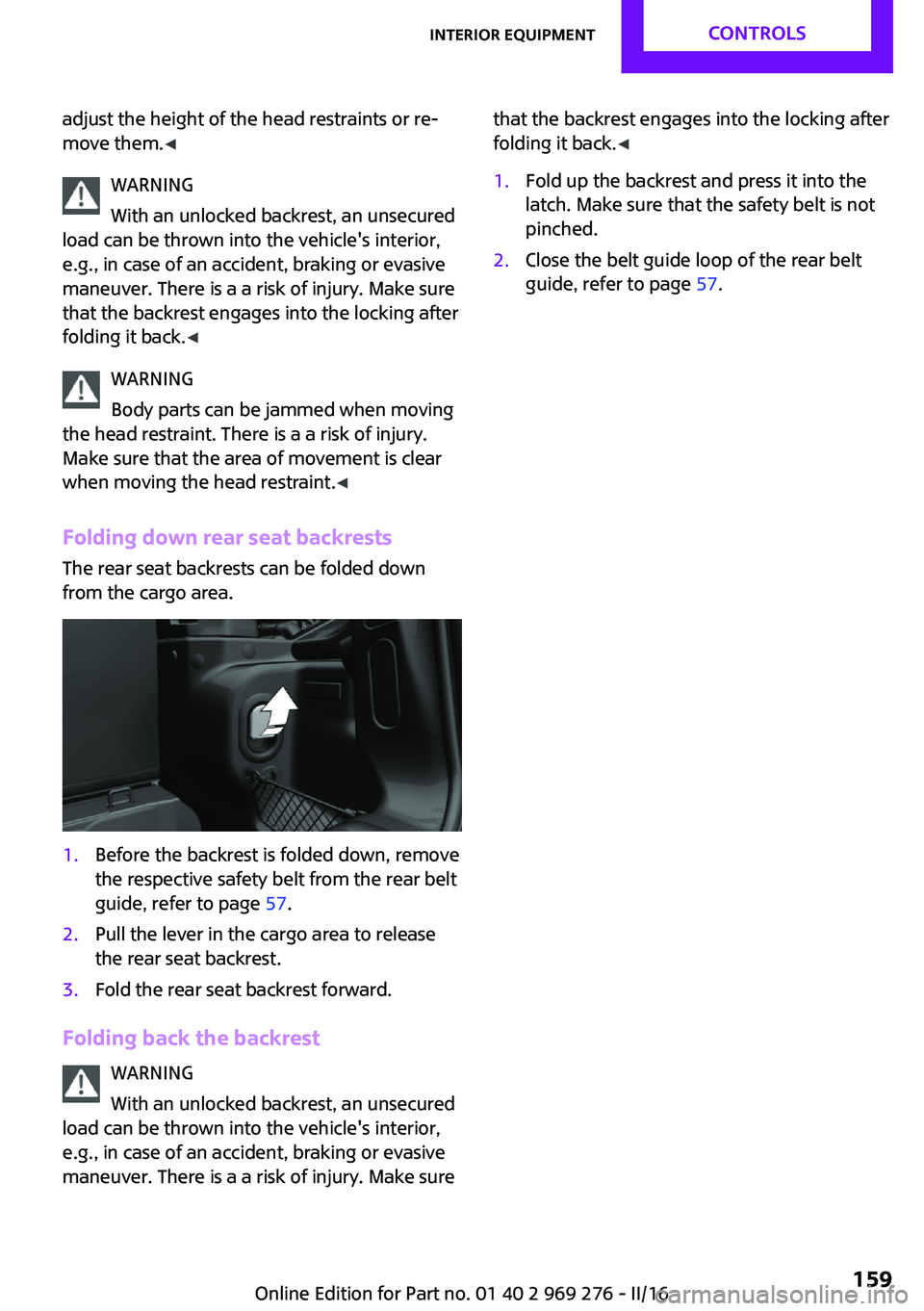
Folding down rear seat backrests
The rear seat backrests can be folded down
from the cargo area.1.Before the backrest is folded down, remove
the respective safety belt from the rear belt
guide, refer to page 57.2.Pull the lever in the cargo area to release
the rear seat backrest.3.Fold the rear seat backrest forward.
Folding back the backrest
WARNING
With an unlocked backrest, an unsecured
load can be thrown into the vehicle's interior,
e.g., in case of an accident, braking or evasive
maneuver. There is a a risk of injury. Make sure
that the backrest engages into the locking after
folding it back. ◀1.Fold up the backrest and press it into the
latch. Make sure that the safety belt is not
pinched.2.Close the belt guide loop of the rear belt
guide, refer to page 57.Seite 159Interior equipmentCONTROLS159
Online Edition for Part no. 01 40 2 969 276 - II/16