2016 MERCEDES-BENZ SPRINTER heating
[x] Cancel search: heatingPage 23 of 290

WheelsChanging a wheel .......................... 266
Checking ........................................ 248
Cleaning ......................................... 235
Important safety notes .................. 247
Installing the adapter (spare
wheel) ............................................ 269
Interchanging/changing ................ 266
Mounting a new wheel ...................2 70
Mounting a wheel .......................... 267
Removing a wheel .......................... 269
Removing and mounting the spare
wheel ............................................. 273
Snow chains .................................. 249
Storing ...........................................2 67
Tightening torque ........................... 271
Wheel size/tire size ....................... 272
Window curtain air bag ....................... 45
Windows
see Side windows
Windshield
Cleaning ......................................... 235
Defrosting ...................................... 103
Windshield heating
Problem (malfunction) ................... 104
Switching on/off ........................... 104
Windshield washer fluid
Adding ...........................................2 24
Indicator lamp ................................ 202
Windshield wipers
Problem (malfunction) ..................... 96
Rain and light sensor ....................... 93
Rear window wiper .......................... 94
Replacing the wiper blades .............. 94
Setting the sensitivity (vehicles
with steering wheel buttons and
rain/light sensor) ........................... 173
Switching on/off .............................. 93
Wiping with windshield washer
fluid ................................................. 93
Winter diesel ..................................... 278
Winter driving
Slippery road surfaces ................... 137
Snow chains .................................. 249
Winter operation
General notes ................................ 249
Radiator cover ................................. 28 Winter tires
M+S tires ................................... .... 249
Setti
ng a limit speed ......................1 34
Wiper blades
Cleaning ......................................... 235
Replacing ......................................... 94
Workshop
see Qualified specialist workshop
Index21
Page 33 of 290

Cockpit
FunctionPage
:Door control panel37
;Light switch79
=Combination switch
• turn signals81
• high-beam headlamps81
• windshield wipers93
• rear window wiper94
?Cruise control lever140
ASteering wheel without or
with buttons35
BInstrument cluster32
CStowage compartment
• 3.5 mm audio jack211
• USB port211
DTimer for the auxiliary warm-
air heater (auxiliary heating)114
E• Stowage compartment
with interior light84
• Overhead control panel36
FRear-view mirror78
FunctionPage
GPARKTRONIC warning dis-
play151
HOpens/closes the right-hand
side window71
IStowage compartment (jack
and vehicle tool kit)240
JGlove box204
KCenter console35
LSelector lever (automatic
transmission)124
MIgnition lock119
NFurther control panels37
OSteering wheel buttons35
PEngages/releases the park-
ing brake136
QHorn
ROpens the hood218
SSteering wheel buttons35
Cockpit31
At a glance
Page 37 of 290

Steering wheel buttons
FunctionPage
:Display164
On-board computer opera-
tion
;Selects a submenu or adjusts
the volume164
WUp/increases the vol-
ume
X Down/reduces the vol-
ume
Using the telephone175
6 Accepts a call/starts
dialing
~ Ends a call/rejects an
incoming call
=Scrolls from one menu to
another164
V Forwards
UBack
Scrolls within a menu164
9Forwards
:Back
Center console
FunctionPage
:Stowage compartment205
;Audio 10 or Audio 15 (see the
separate operating instruc-
tions)
=Air-conditioning control
panel97
Paper holder1207
?Center console control
panel
cSwitches the left/right-hand
seat heating on/off76
zSwitches the windshield
heating on/off104
|Switches the rear window
defroster on/off104
fActivates/deactivates
PARKTRONIC153
£Switches the hazard warning
lamps on/off82
1Only on vehicles without rear-compartment climate control.
Center console35
At a glance
Page 78 of 290

Head restraints
GWARNING
If head restraints are not installed and adjus-
ted correctly, they cannot provide protection
as intended. There is an increased risk of
injury in the head and neck area, e.g. in the
event of an accident or when braking.
Always drive with the head restraints instal-
led. Before driving off, make sure for every
vehicle occupant that the center of the head
restraint supports the back of the head at
about eye level.
Do not change over the head restraints for the
front and rear seats. Otherwise, it will not be
possible to correctly adjust the height and angle
of the head restraints.
Adjust the head restraint so that it is as close as
possible to your head.
Head restraint (example: luxury head restraint on
the front-passenger seat)
:
Release button
;Head restraint height
=Head restraint angle (luxury head restraints
only)
XTo raise: pull the head restraint up to the
desired position.
XTo lower: press release button :and slide
the head restraint down to the desired posi-
tion.
XTo adjust the angle: hold the front part of the
luxury head restraint by the lower edge and
tilt it to the desired position.
XTo remove : pull the head restraint up to the
stop.
XPress release button :and pull out the head
restraint.
XTo insert: insert the head restraint so that the
rod with the detents is on the left when viewed in the direction of travel.
XPress and hold release button :.
XPush the head restraint down until it engages.
Armrests
XTo set the armrest angle:fold the armrest
upwards by more than 45° ;.
The armrest is released.
XFold armrest =forwards to the stop.
XSlowly fold the armrest upwards to the
desired position.
XTo fold the armrest up: if necessary, fold the
armrest upwards :by more than 90°.
Seat heating
GWARNING
Repeatedly switching on the seat heating can
cause the seat cushion and backrest pads to
become very hot. The health of persons with
limited temperature sensitivity or a limited
ability to react to excessively high tempera-
tures may be affected or they may even suffer
burn-like injuries. There is a risk of injury.
Therefore, do not switch the seat heating on
repeatedly.
!When you leave your seat, do not place any-
thing on the seat and switch off the seat heat-
ing. Do not switch the seat heating on when
the seat is not occupied, e.g. when driving
without a front passenger. The seat heating
may otherwise overheat, causing damage to
the seat.
76Seats
Seats, steering wheel and mirrors
Page 79 of 290

The three red indicator lamps in thecbutton
show the activated heating level 1to 3.
The system automatically switches down from
level 3to level 2after approximately
five minutes.
The system automatically switches down from
level 2to level 1after approximately
ten minutes.
At level 1, the seat heating remains in continu-
ous operation.
XMake sure that the key is in position 1or 2in
the ignition lock.
XTo switch on: press thecbutton repeat-
edly until the desired heating level has been
set.
XTo switch off: press thecbutton repeat-
edly until all indicator lamps go out.
If the indicator lamps of the current heating level
in the cbutton flash, the seat heating has
switched off automatically. In this case, too
many electrical consumers are switched on or
the battery charge is not sufficient. The seat
heating will automatically switch back to the
current heating level when enough on-board
voltage is available again.
Steering wheel
GWARNING
You could lose control of your vehicle if you do the following while driving:
Radjust the driver's seat, head restraint,
steering wheel or mirrors
Rfasten the seat belt
There is a risk of an accident.
Adjust the driver's seat, head restraint, steer- ing wheel and mirror and fasten your seat belt
before starting the engine.
GWARNING
If the steering wheel is unlocked while the
vehicle is in motion, it could change position
unexpectedly. This could cause you to lose
control of the vehicle. There is a risk of an
accident.
Before starting off, make sure the steering
wheel is locked. Never unlock the steering
wheel while the vehicle is in motion.
GWARNING
Children could injure themselves if they
adjust the steering wheel. There is a risk of
injury.
When leaving the vehicle, always take the
SmartKey with you and lock the vehicle. Never
leave children unsupervised in the vehicle.
The steering wheel can still be adjusted if the
key has been removed.
:Steering column fore-and-aft adjustment
;Steering column height
=Lever
Steering wheel77
Seats, steering wheel and mirrors
Z
Page 100 of 290

Heating control panel
:Sets the temperature (Ypage 102)
z Defrosts the windshield (
Ypage 103)
;KSets the airflow (Ypage 102)
z Defrosts the windshield (
Ypage 103)
=eActivates and deactivates air-recirculation mode (Ypage 104)
?Sets the air distribution (Ypage 102)
sz Defrosts the windshield (
Ypage 103)
Information on heating
Below, you can find a number of notes and rec-
ommendations to help you use the heating opti-
mally.
RSet the temperature control to the middle
level. Only change the temperature in small
increments.
If you wish to heat up the vehicle interior as
quickly as possible, set the temperature con-
trol to thezmaximum setting. When the
desired interior temperature has been
reached, turn the temperature control back
down in small steps.
ROnly use the settings for defrosting the wind-
shield briefly, until the windshield is clear
again.
ROnly use air-recirculation mode briefly, e.g. if
there are unpleasant outside odors or when in
a tunnel. The windows could otherwise fog up
as no fresh air is drawn into the vehicle in air-
recirculation mode. The indicator lamp in the
h button comes on when the function is
switched on.
98Overview of climate control systems
Climate control
Page 102 of 290
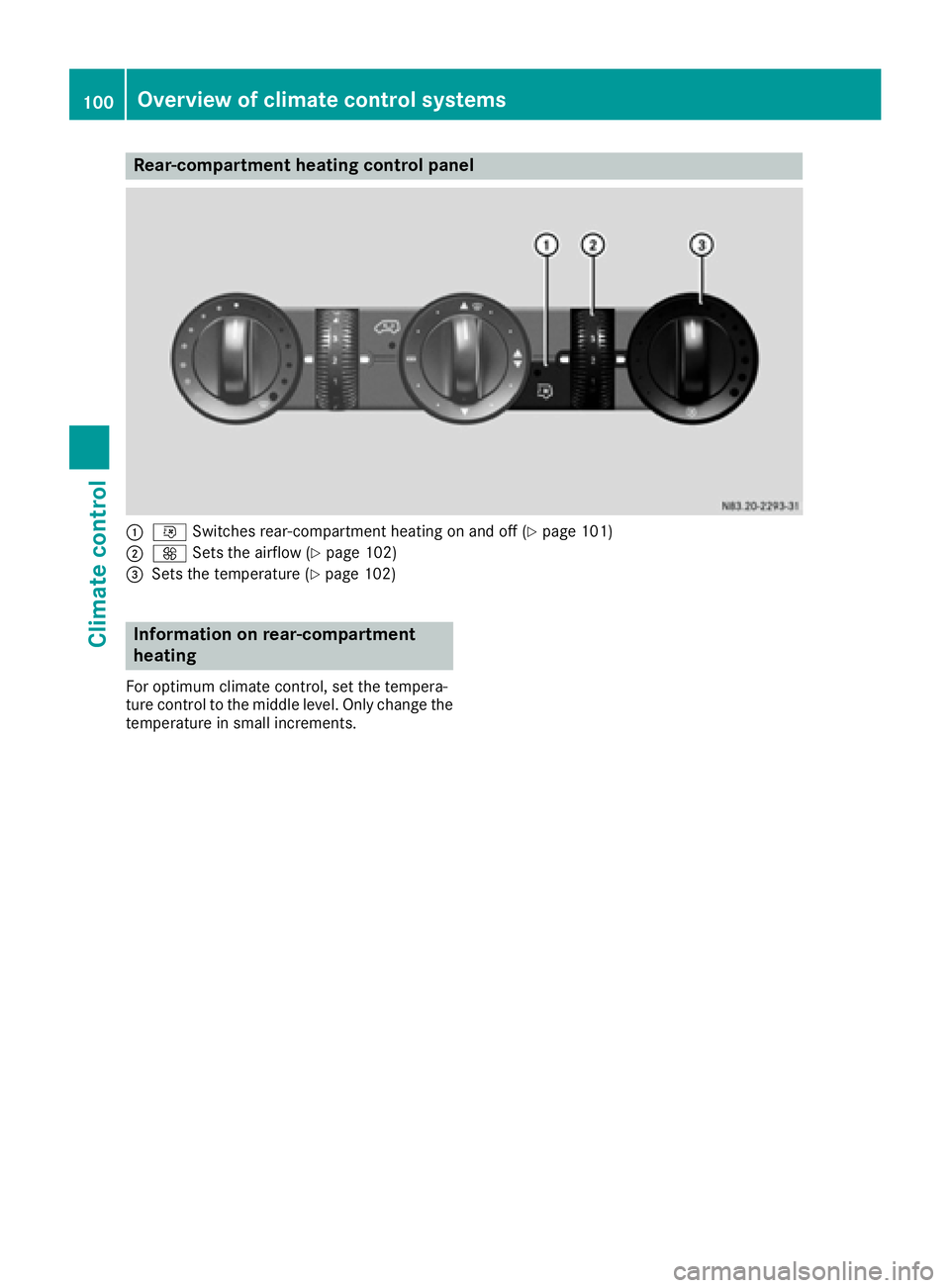
Rear-compartment heating control panel
:iSwitches rear-compartment heating on and off (Ypage 101)
;KSets the airflow (Ypage 102)
=Sets the temperature (Ypage 102)
Information on rear-compartment
heating
For optimum climate control, set the tempera-
ture control to the middle level. Only change the
temperature in small increments.
100Overview of climate control systems
Climate control
Page 103 of 290

Control panel for rear-compartment air-conditioning system
:Sets the airflow (Ypage 102)
K Increases the airflow
I Reduces the airflow
;Sets the temperature (Ypage 102)
=Blower setting bar display
?iSwitches rear-compartment air-conditioning on and off (Ypage 101)
Information on rear-compartment air
conditioning
For optimum climate control, set the tempera-
ture control to the middle level. Only change the
temperature in small increments.
Operating the climate control system
Switching the climate control on/off
Important information
When the climate control is switched off, air
intake and air circulation also stop. Only use this
setting for a brief period. Otherwise, the win-
dows could fog up.
Activating/deactivating climate con-
trol via the control panel
XTurn the key to position 2in the ignition lock. Vehicle with heating
XTo switch on:
set airflow control ;down to
at least level 1(Ypage 99).
XTo switch off: set airflow control ;up to the
0 position (Ypage 99).
Vehicle with air conditioning
XTo switch on: press theKbutton.
The blower speeds are shown in bars next to
the button.
XTo switch off: press theIbutton and,
after reaching the lowest blower speed, press
it again.
Activating/deactivating rear-compart-
ment climate control via the control
panel
XTurn the key to position 2in the ignition lock.
Operating the climate control system101
Climate control