2016 MERCEDES-BENZ SPRINTER climate control
[x] Cancel search: climate controlPage 19 of 290

Removing/mounting ...................... 273
Specia lsea tbelt retractor .................. 48
Specialist worksho p............................ 26
Speed ,controlling
see Cruis econtrol
Speedomete r
Digital (vehicles wit hsteerin g
whee lbuttons ).............................. .170
Digital (vehicles without steering
wheel buttons) ............................... 163
Selecting display unit (vehicles
with steering- wheel buttons) ........1 70
see Instrument cluster
Standing lamps
Replacing bulbs ............................... 87
Replacing bulbs (rear) ......................8 9
Standing lamps (Chassis Cab)
Replacing bulbs (rear) ......................9 0
Start-off assist
Display message ............................1 82
Starting (engine) ................................ 120
Station
see Radio
Steering wheel
Adjusting ......................................... 77
Button overview ............................... 35
Cleaning ......................................... 238
Step
see Electrical step
Stickers
General safety notes ........................ 24
Stowage spaces
see Stowage spaces and stowage
compartments
Stowage spaces and stowage com-
partments
Eyeglasses compartment ...............2 05
Glove box ....................................... 204
Important safety notes .................. 204
Paper holder .................................. 207
Stowage compartment above the
windshield ..................................... 206
Stowage compartment in the cen-
ter console ..................................... 206
Stowage compartment in the
dashboard ...................................... 205
Stowage space above the head-
liner ............................................... 206 Stowage space u
nder the rear
bench seat ..................................... 207
Stowage space under the twin co-
driver's seat ................................... 206
Summer tires ..................................... 249
Switch unit
see Control panel
Switching off the alarm (ATA) ............ 56
Switching the heater booster func-
tion on/off ......................................... 111
Switching the surround lighting
on/off (on-board computer) ............. 172
Swivel seat ........................................... 73
T
Tachometer ........................................ 162
Tail lamps
Changing ......................................... 90
Replacing bulbs ............................... 89
see Lights
Tail lamps (Chassis Cab)
Replacing bulbs ............................... 90
Tank content
Fuel gauge ..................................... 162
Range (vehicles with steering
wheel buttons) ............................... 174
Reserve fuel warning lamp ............. 200
Technical data
Capacities ...................................... 277
Cargo tie-down points .................... 285
Cargo tie-down rings ...................... 285
Loading rails .................................. 285
Roof carrier .................................... 286
Tires/wheels ......................... 257, 272
Trailer tow hitch ............................. 286
Vehicle data ................................... 285
Telephone .................................. 210, 211
Telephone (on-board computer)
Accepting an incoming call ............ 175
Display messages .......................... 193
Numbers from the phone book ...... 175
Operating ....................................... 175
Redialing ........................................ 176
Rejecting or ending a call .............. 175
Temperature
Outside temperature ...................... 162
Setting (climate control) ................ 102
Index17
Page 37 of 290

Steering wheel buttons
FunctionPage
:Display164
On-board computer opera-
tion
;Selects a submenu or adjusts
the volume164
WUp/increases the vol-
ume
X Down/reduces the vol-
ume
Using the telephone175
6 Accepts a call/starts
dialing
~ Ends a call/rejects an
incoming call
=Scrolls from one menu to
another164
V Forwards
UBack
Scrolls within a menu164
9Forwards
:Back
Center console
FunctionPage
:Stowage compartment205
;Audio 10 or Audio 15 (see the
separate operating instruc-
tions)
=Air-conditioning control
panel97
Paper holder1207
?Center console control
panel
cSwitches the left/right-hand
seat heating on/off76
zSwitches the windshield
heating on/off104
|Switches the rear window
defroster on/off104
fActivates/deactivates
PARKTRONIC153
£Switches the hazard warning
lamps on/off82
1Only on vehicles without rear-compartment climate control.
Center console35
At a glance
Page 99 of 290

Useful information
This Operator's Manual describes all models as
well as standard and optional equipment of your
vehicle that were available at the time of going
to print. Country-specific variations are possi-
ble. Note that your vehicle may not be equipped
with all of the described functions. This also
applies to systems and functions relevant to
safety.
Read the information on qualified specialist
workshops (
Ypage 26).
Overview of climate control systems
Important safety notes
Observe the recommended settings on the fol-
lowing pages. Otherwise, the windows could fog
up.
Climate control regulates the temperature and
the humidity in the vehicle interior and filters
undesirable substances from the air.
Climate control is only operational when the
engine is running. The system only functions
optimally when the side windows are closed.
iVentilate the vehicle for a brief period during
warm weather. In order to cool the vehicle
more rapidly, switch climate control to air-
recirculation mode briefly. This will speed up
the cooling process and the desired interior
temperature will be reached more quickly.
iThe integrated filter can filter out most par-
ticles of dust and completely filters out pollen.
A clogged filter reduces the airflow into the
vehicle interior. For this reason, you should
always observe the interval for replacing the
filter, which is specified in the Maintenance
Booklet. As it depends on environmental con-
ditions, e.g. heavy air pollution, the interval
may be shorter than that stated in the Main-
tenance Booklet.
Overview of climate control systems97
Climate control
Page 100 of 290

Heating control panel
:Sets the temperature (Ypage 102)
z Defrosts the windshield (
Ypage 103)
;KSets the airflow (Ypage 102)
z Defrosts the windshield (
Ypage 103)
=eActivates and deactivates air-recirculation mode (Ypage 104)
?Sets the air distribution (Ypage 102)
sz Defrosts the windshield (
Ypage 103)
Information on heating
Below, you can find a number of notes and rec-
ommendations to help you use the heating opti-
mally.
RSet the temperature control to the middle
level. Only change the temperature in small
increments.
If you wish to heat up the vehicle interior as
quickly as possible, set the temperature con-
trol to thezmaximum setting. When the
desired interior temperature has been
reached, turn the temperature control back
down in small steps.
ROnly use the settings for defrosting the wind-
shield briefly, until the windshield is clear
again.
ROnly use air-recirculation mode briefly, e.g. if
there are unpleasant outside odors or when in
a tunnel. The windows could otherwise fog up
as no fresh air is drawn into the vehicle in air-
recirculation mode. The indicator lamp in the
h button comes on when the function is
switched on.
98Overview of climate control systems
Climate control
Page 101 of 290

Control panel for the air-conditioning system
:Sets the temperature (Ypage 102)
z Defrosts the windshield (
Ypage 103)
;Sets the airflow (Ypage 102)
K Increases the airflow
I Reduces the airflow
=eActivates and deactivates air-recirculation mode (Ypage 104)
?xSwitches the reheat function (window air dehumidification) on and off (Ypage 103)
ASets the air distribution (Ypage 102)
sz Defrosts the windshield (
Ypage 103)
B¿Switches cooling with air dehumidification on/off (Ypage 102)
CBlower setting bar display
zDefrosts the windshield (
Ypage 103)
Information on the air-conditioning
system
Below, you can find a number of notes and rec-
ommendations to help you use the air-condi-
tioning system optimally.
RSwitch on the cooling with air dehumidifica-
tion function. The indicator lamp above the
rocker switch lights up.
RSet the temperature to 72 ‡ (22 †). Only
change the temperature in small increments.
ROnly use the "Windshield defrosting" function
briefly until the windshield is clear again.
ROnly use air-recirculation mode briefly, e.g. if
there are unpleasant outside odors or when in
a tunnel. The windows could otherwise fog up as no fresh air is drawn into the vehicle in air-
recirculation mode.
ROnly use reheat mode until the windows are
clear again.
Overview of climate control systems99
Climate control
Page 102 of 290
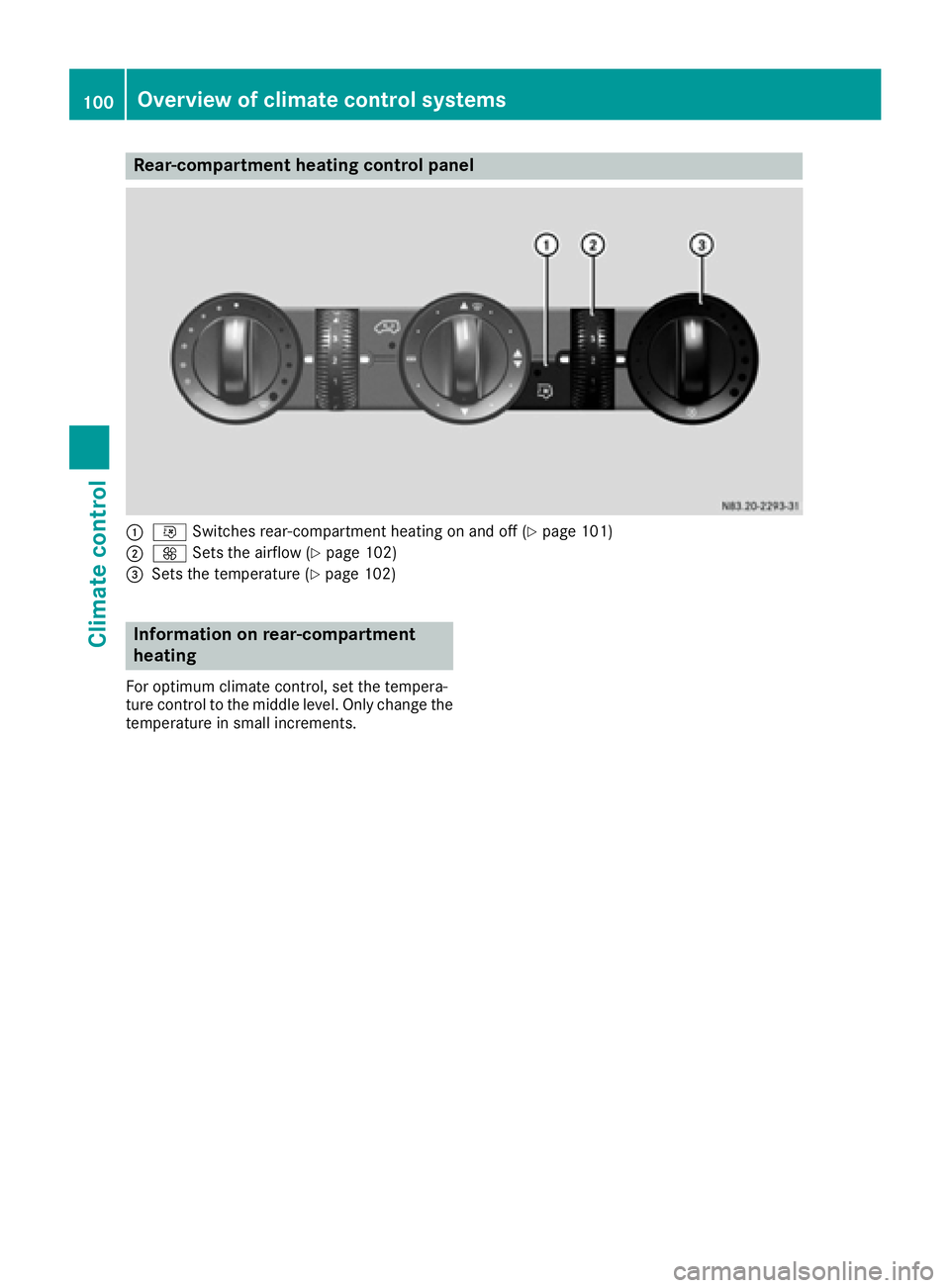
Rear-compartment heating control panel
:iSwitches rear-compartment heating on and off (Ypage 101)
;KSets the airflow (Ypage 102)
=Sets the temperature (Ypage 102)
Information on rear-compartment
heating
For optimum climate control, set the tempera-
ture control to the middle level. Only change the
temperature in small increments.
100Overview of climate control systems
Climate control
Page 103 of 290

Control panel for rear-compartment air-conditioning system
:Sets the airflow (Ypage 102)
K Increases the airflow
I Reduces the airflow
;Sets the temperature (Ypage 102)
=Blower setting bar display
?iSwitches rear-compartment air-conditioning on and off (Ypage 101)
Information on rear-compartment air
conditioning
For optimum climate control, set the tempera-
ture control to the middle level. Only change the
temperature in small increments.
Operating the climate control system
Switching the climate control on/off
Important information
When the climate control is switched off, air
intake and air circulation also stop. Only use this
setting for a brief period. Otherwise, the win-
dows could fog up.
Activating/deactivating climate con-
trol via the control panel
XTurn the key to position 2in the ignition lock. Vehicle with heating
XTo switch on:
set airflow control ;down to
at least level 1(Ypage 99).
XTo switch off: set airflow control ;up to the
0 position (Ypage 99).
Vehicle with air conditioning
XTo switch on: press theKbutton.
The blower speeds are shown in bars next to
the button.
XTo switch off: press theIbutton and,
after reaching the lowest blower speed, press
it again.
Activating/deactivating rear-compart-
ment climate control via the control
panel
XTurn the key to position 2in the ignition lock.
Operating the climate control system101
Climate control
Page 104 of 290

Vehicle with rear-compartment heating/
rear-compartment air conditioning
XTo switch on/off:press theiswitch.
If the indicator lamp in the button lights up,
the rear-compartment heating/rear-com-
partment air conditioning is switched on.
Switching the cooling with air dehu-
midification function on/off
Important information
If you switch off the "Cooling with air dehumid-
ification" function, the air inside the vehicle will
not be cooled (in warm weather) or dehumidi-
fied. The windows could fog up more quickly.
The cooling with air dehumidification function is
only available when the engine is running. The
air inside the vehicle is cooled and dehumidified
according to the temperature selected.
Condensation may appear on the underside of
the vehicle when in cooling mode. This is normal
and not a sign that there is a malfunction.
Switching on and off
Vehicle with air conditioning
XPress the ¿button.
If the indicator lamp in the button lights up,
cooling with air dehumidification is switched
on.
Setting the temperature
Increasing and reducing temperature in
the front compartment via the control
panel
Only change the temperature in small incre-
ments. Start at the center position, or at 72 ‡
(22 †).
XSwitch on climate control (Ypage 101).
XTurn temperature control :clockwise to
increase or counterclockwise to reduce the
temperature (
Ypage 99).
Increasing and reducing temperature in
the rear compartment via the control
panel
Only change the temperature in small incre-
ments.
XSwitch on climate control (Ypage 101).
XTurn rear-compartment temperature control
= (Ypage 100) or rear-compartment air-
conditioning system ;(Ypage 101) clock-
wise to increase or counterclockwise to
reduce the temperature.
iVehicles with additional air conditioning and
heating in the rear compartment: if you set
the temperature control to the center posi-
tion, only one of the two climate control sys-
tems works in the rear compartment and in
air-recirculation mode (
Ypage 104).
Setting the air distribution
Air distribution settings
The air distribution symbols have the following
meanings:
m Directs air through the center and side
air vents
s
z Directs air to the windshield and the air
vents
q Directs air to the windshield, the air
vents and into the footwell
r Directs air to the air vents and into the
footwell
Adjusting
XSwitch on climate control (Ypage 101).
XSet air-distribution control ?for the heating
(Ypage 98) or air-conditioning system A
(Ypage 99) to the corresponding symbol.
Setting the airflow
XSwitch on climate control (Ypage 101).
XVehicle with heating/rear-compartment
heating: set airflow control ;of the heating
(
Ypage 98) or of the rear-compartment heat-
ing (Ypage 100) to the desired level.
XVehicle with air conditioning/rear-com-
partment air conditioning: press theI
102Operating the climate control system
Climate control