2016 MERCEDES-BENZ SPRINTER change time
[x] Cancel search: change timePage 88 of 290
Changing bulbs
Important safety notes
GDANGER
Xenon bulbs carry a high voltage. You can get an electric shock if you remove the cover of
the Xenon bulb and touch the electrical con-
tacts. There is a risk of fatal injury.
Never touch the parts or the electrical con-
tacts of the Xenon bulb. Always have work on
the Xenon bulbs carried out at a qualified spe-
cialist workshop.
GWARNING
Bulbs, lamps and connectors can get very hot
when operating. If you change a bulb, you
could burn yourself on these components.
There is a risk of injury.
Allow these components to cool down before
changing a bulb.
!Make sure the bulbs are always securely
installed.
If your vehicle is equipped with Bi-Xenon bulbs,
you can recognize this by the following: the cone
of light from the Xenon bulbs moves from the
top to the bottom and back again when you start
the engine. For this to be observed, the low-
beam headlamps must be switched on before
starting the engine.
The bulbs and lamps are an essential compo-
nent of vehicle safety. You must therefore make
sure that these function correctly at all times.
Have the headlamp setting checked regularly.
RAlways switch off the vehicle's lighting sys-
tem before changing a bulb.
This will prevent a short circuit.
RDo not touch the glass tube of new bulbs with your bare hands. Always use a clean, lint-free
cloth or only touch the base of the bulb when
installing.
Even minor contamination can burn into the
glass surface and reduce the service life of the
bulbs.
RDo not use a bulb that has been dropped or
that has scratches on its glass tube.
The bulb could explode.
ROnly use bulbs in closed lamps which have
been designed for this purpose.
ROnly use spare bulbs of the same type and
with the prescribed voltage
RProtect the bulbs from moisture when in use.
If the new bulb still does not light up, consult a
qualified specialist workshop.
RHave the LEDs and bulbs of the following
lamps changed at a qualified specialist work-
shop:
-the additional turn signals in the exterior
mirrors
-the high-mounted brake lamp
-LED daytime running lamps (Bi-Xenon
headlamps)
-Bi-Xenon lamps (Bi-Xenon headlamps)
-front fog lamps
If you require assistance changing bulbs, con-
sult a qualified specialist workshop.
Front bulbs
Overview of bulb replacement – bulb
types
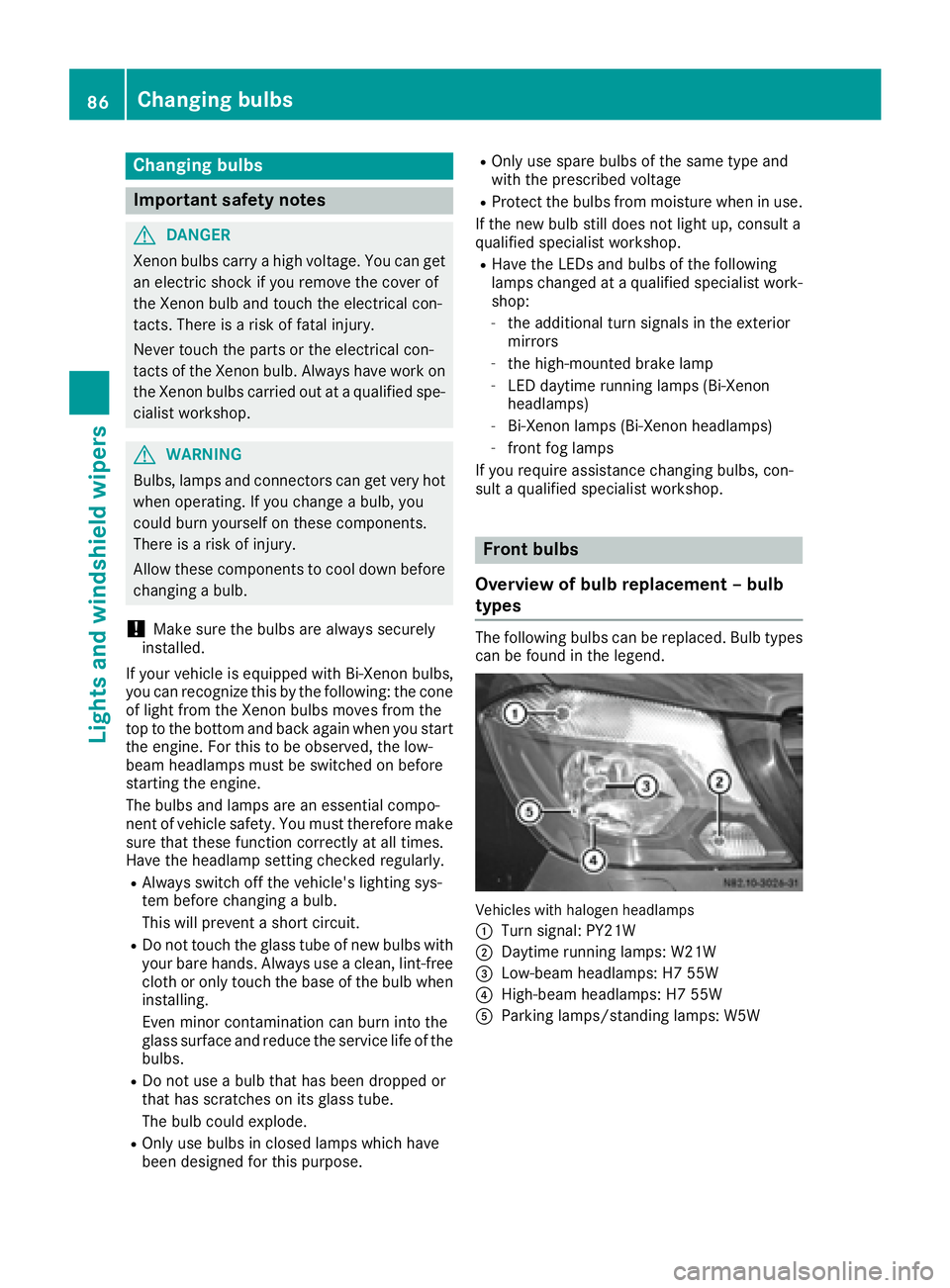
The following bulbs can be replaced. Bulb types can be found in the legend.
Vehicle swit hhalogen headlamps
:
Turn signal: PY21W
;Daytime running lamps: W21W
=Low-beam headlamps: H7 55W
?High-beam headlamps: H7 55W
AParking lamps/standing lamps: W5W
86Changing bulbs
Lights and windshield wipers
Page 112 of 290

SignalingMeaning
Flashes redAuxiliary heating switched
off
Lights up
greenAuxiliary heating switched
on
Flashes greenChange operating duration
active
Flashes alter-
nately red and
greenRemote control in synchro-
nizing mode
iWhen the remote control battery is weak,
indicator lamp :flashes red rapidly. Replace
the remote control battery (
Ypage 111).
You can find information on further lamp sta-
tuses in the "Problems with the hot-water aux-
iliary heater" section (
Ypage 113).
Switching the remote control on/off
The remote control switches to standby mode
after 10 seconds. Indicator lamp :goes out.
XTo switch on: press and hold the Übutton
until indicator lamp :lights up red.
If a connection between the remote control
and the receiver in the vehicle has been estab-
lished and indicator lamp ::
Rflashes red, the auxiliary heating is switched
off.
Rlights up green, the auxiliary heating is
switched on.
XTo switch off:press and hold the Übut-
ton until indicator lamp :goes out.
Switching the auxiliary heating on/off
XSwitch on the remote control.
XTo switch on: when indicator lamp :flashes
red, press the bbutton.
During data transmission, indicator lamp :
lights up red.
When indicator lamp :lights up green, the
auxiliary heating is switched on.
XTo switch off: when indicator lamp :lights
up green, press the bbutton.
During data transmission, indicator lamp :
lights up red.
When indicator lamp :flashes red, the aux-
iliary heating is switched off.
Changing the operating duration
XSwitch on the remote control.
XWhen indicator lamp :flashes red, press
Ü andb simultaneously.
Indicator lamp :flashes green.
XPress the Übutton repeatedly until the
desired operating duration is shown.
R20 minutes
Indicator lamp :flashes green twice.
R30 minutes
Indicator lamp :flashes green three
times.
R40 minutes
Indicator lamp :flashes green four times.
XPress the bbutton.
During data transmission, indicator lamp :
lights up red.
If indicator lamp :emits two long, green
flashes, the selected operating duration is
stored.
iIf no adjustment is made, indicator lamp :
flashes six times and the remote control goes
into standby mode.
Synchronizing the remote control
XPress the yauxiliary heating button in the
control panel (Ypage 108) for longer than
10 seconds.
When you press and hold the ybutton, the
red indicator lamp lights up in the butt
on.
When the red indicator lamp in the ybut-
ton flashes, the receiver in the vehicle is ready
for synchronizing.
XPress and hold the Üremote control but-
ton until indicator lamp :lights up red.
If there is an active connection between the
remote control and the receiver, indicator
lamp :flashes alternately red and green.
The remote control is in synchronizing mode.
iIf you press the Übutton again on the
remote control after starting synchronization,
you will only synchronize this remote control
unit with the receiver. Any other remote con-
trol units that were synchronized will be
cleared. Indicator lamp :flashes alternately
red and green (very slowly).
XPress the bbutton on the remote control.
During data transmission, indicator lamp :
lights up red.
When remote control indicator lamp :emits
two long green flashes, the selected operat-
110Operating the auxiliary heating system
Climate control
Page 115 of 290

Problems with the hot-water auxiliary heating
ProblemPossible causes/consequences andMSolutions
The indicator lamp on
the remote control
flashes red rapidly.The remote control battery is discharged. Data transmission is not
possible.
XReplace the remote control battery (Ypage 111).
The indicator lamp on
the remote control
flashes red and green in
rapid succession.There is no connection between the remote control and the receiver in
the vehicle.
XChange your position in relation to the vehicle, e.g. hold the remote
control higher or to the side.
XMove closer.
If you cannot establish a connection and the auxiliary heating is
switched on, it can then only be deactivated using the ybutton
(
Ypage 108).
or
Several remote controls are being used at the same time.
XSwitch on the remote control again after a short while
(Ypage 110).
or
The remote control is not synchronized.
XSynchronize the remote control (Ypage 110).
The indicator lamp on
the remote control
slowly flashes red and
green alternately.The remote control is being synchronized.
XWait until the remote control synchronization process is complete
(Ypage 110).
The remote control for
the auxiliary heating can-
not be switched on.The remote control battery is discharged.
XReplace the remote control battery (Ypage 111).
The auxiliary heating
does not switch on.The outside temperature is above 39 ‡ (4 †). The auxiliary heating
switches off automatically.
The auxiliary heating
switches off automati-
cally and/or cannot be
switched on.The fuel tank is less than Õfull. The auxiliary heating switches off
automatically.
XRefuel at the nearest gas station.
XThen, start the auxiliary heating several times until the fuel lines are
full.
or
The low-voltage protection system integrated in the control unit
switches off the auxiliary heating because the on-board voltage is less
than 10 V.
XHave the alternator and battery checked.
or
Operating the auxiliary heating system113
Climate control
Z
Page 120 of 290

Useful information
This Operator's Manual describes all models as
well as standard and optional equipment of your
vehicle that were available at the time of going
to print. Country-specific variations are possi-
ble. Note that your vehicle may not be equipped
with all of the described functions. This also
applies to systems and functions relevant to
safety.
Read the information on qualified specialist
workshops (
Ypage 26).
Breaking-in notes
The first 1000 miles (1500 km)
New or replaced brake pads and brake disks
only reach their optimum braking effect after a
few 100 miles (a few 100 kilometers). Until then,
compensate for this by applying greater force to
the brake pedal.
For the service life and economy of your vehicle
it is crucial that you break in the engine with due
care.
RTherefore, protect the engine for the first
1000 miles (1500 km) by driving at varying
vehicle and engine speeds.
RAvoid overstraining the vehicle and high
engine speeds during this period, e.g. driving
at full throttle. Do not exceed Øof the max-
imum speed for each gear.
RDo not change down a gear manually in order to brake.
RTry to avoid depressing the accelerator pedal
beyond the point of resistance (kickdown).
RThe shift ranges 3,2or 1should only be
engaged when driving slowly, e.g. when driv-
ing in mountainous terrain.
After 1000 miles (1500 km), you can increase
the engine speed gradually and accelerate the
vehicle to full speed.
iYou should also observe these notes on
breaking-in if the engine or parts of the drive
train on your vehicle have been replaced.
Driving
Important safety notes
GWARNING
If you switch off the ignition while driving,
safety-relevant functions are only available
with limitations, or not at all. This could affect, for example, the power steering and the brake
boosting effect. You will require considerably
more effort to steer and brake. There is a risk
of an accident.
Do not switch off the ignition while driving.
GWARNING
If the parking brake has not been fully
released when driving, the parking brake can:
Roverheat and cause a fire
Rlose its hold function.
There is a risk of fire and an accident. Release
the parking brake fully before driving off.
If you park the vehicle for more than
three weeks:
Rconnect the batteries to a trickle charger or
Rdisconnect the vehicle's starter battery or
Rswitch off the electrical system using the bat-
tery main switch (Ypage 118) and
Rdisconnect the vehicle's auxiliary battery
Otherwise, you need to check the battery's con-
dition of charge every three weeks, since
standby power consumption can drain the bat-
tery. If the battery voltage is lower than 12.2 V,
the battery must be charged. Otherwise, the
battery may be damaged by exhaustive dis-
charging.
Be sure to observe the notes on disconnecting
and charging the batteries under "Battery"
(
Ypage 227). You can obtain information about
trickle chargers from a qualified specialist work-
shop.
Battery isolating switch
Important safety notes
!Make sure that the key is in position 0in the
ignition lock and wait at least 20 seconds
before disconnecting or connecting the bat-
118Driving
Dr iving an d parking
Page 137 of 290

Low-beam headlamps
If you are traveling in countries where vehicles
are driven on the opposite side of the road to
that in which the vehicle is registered, you will
need to:
Rhave the halogen headlamps partially masked
Rhave the Bi-Xenon headlamps set to symmet-
rical low beam
This prevents glare to oncoming traffic and no
longer illuminates the edge of the road to the
same height and distance.
Have the headlamps masked or adjusted at a
qualified specialist workshop before you cross
the border, but as close to it as possible.
When you return from your journey, and as close
to the border as possible, you will need to:
Rremove the adhesive surfaces from your hal-
ogen headlamps and clean the glass of the
headlamps if necessary
Rhave the Bi-Xenon headlamps reset to asym-
metrical low beam at a qualified specialist
workshop
Transport by rail
Transporting your vehicle by rail may be subject
to certain restrictions or require special meas-
ures to be taken in some countries due to vary- ing tunnel heights and loading standards.
You can obtain further information from any
authorized Sprinter dealer.
Brakes
Important safety notes
GWARNING
If you shift down on a slippery road surface in an attempt to increase the engine's braking
effect, the drive wheels could lose their grip.
There is an increased danger of skidding and
accidents.
Do not shift down for additional engine brak-
ing on a slippery road surface.
GWARNING
If you rest your foot on the brake pedal while
driving, the braking system can overheat. This
increases the stopping distance and can even
cause the braking system to fail. There is a
risk of an accident.
Never use the brake pedal as a footrest. Never
depress the brake pedal and the accelerator
pedal at the same time.
!Depressing the brake pedal constantly
results in excessive and premature wear to
the brake pads.
Downhill gradients
!Depressing the brake pedal constantly
results in excessive and premature wear to
the brake pads.
On long and steep downhill gradients, you
should change down to shift range 2or1 in
good time. This should be observed in particular
when driving with a laden vehicle and when tow-
ing a trailer.
iYou must also change the shift range in
good time when cruise control is switched on.
You thereby make use of the braking effect of
the engine and do not have to brake as often to
maintain the speed. This relieves the load on the
service brake and prevents the brakes from
overheating and wearing too quickly.
Heavy and light loads
GWARNING
If you rest your foot on the brake pedal while
driving, the braking system can overheat. This increases the stopping distance and can even
cause the braking system to fail. There is a
risk of an accident.
Never use the brake pedal as a footrest. Never
depress the brake pedal and the accelerator
pedal at the same time.
!Depressing the brake pedal constantly
results in excessive and premature wear to
the brake pads.
If the brakes have been subjected to a heavy
load, do not stop the vehicle immediately. Drive
on for a short while. The brakes are cooled down
more quickly in the airflow.
Driving tips135
Driving and parking
Z
Page 142 of 290

Drivingsystems
Cruis econtro l
General notes
Cruise contro lmaintain sth espeed of th evehi-
cl e fo ryou.
Use cruise contro lif road and traffic condition s
mak eit appropriat eto maintain asteady speed
fo r a prolonged period. You can set any speed
from 20 mph upwards in increment sof 1mph .
iIf you hav eset km/h as th euni tfo rth edig-
ital speedometer (Ypage 170), you can set
any speed from 30 km/h upwards in incre-
ments of 1km/h.
Cruise contro lshould no tbe activated when
drivin goff-road or on construction sites.
Cruise contro lmay no tbe able to maintain th e
stored speed on uphill or downhill gradients. If
th egradient evens out and th evehicle' sspeed
doe sno tfall belo w20 mph (30 km/ h), the
stored speed is resumed.
iThe speed shown in the speedometer may
differ slightly from the speed stored by cruise
control.
Important safety notes
If you fail to adapt your driving style or if you are inattentive, cruise control can neither reduce
the risk of an accident nor override the laws of
physics. Cruise control cannot take road,
weather and traffic conditions into account.
Cruise control is only an aid. You are responsible
for the distance to the vehicle in front, for vehi-
cle speed, for braking in good time and for stay-
ing in lane.
Do not use cruise control:
Rin traffic conditions that are unsuitable for
driving at a constant speed, e.g. in heavy traf-
fic, on winding roads or off-road.
Ron slippery roads. Braking or accelerating
may cause the drive wheels to lose traction
and the vehicle could then skid.
Rwhen there is poor visibility, e.g. due to fog,
heavy rain or snow.
If there is a change of drivers, make sure that
you inform the new driver about the set cruise
speed.
Cruise control lever
Operating cruise control
:To activate and store the current speed or a
higher speed
;To activate at the last stored speed
=To activate and store the current speed or a
lower speed
?To deactivate cruise control
The cruise control lever is the upper lever on the
left of the steering column.
Displaying the cruise control speed
Vehicles with steering wheel buttons: when
you activate cruise control, the text field in the
display briefly shows the speed
limitmessage
and the stored speed. The status area of the
display then shows the Vsymbol and the
stored speed.
Vehicles without steering wheel buttons:
when you activate cruise control, the display
briefly shows the Vsymbol and the stored
speed.
Activation conditions
To activate cruise control, all of the following
activation conditions must be fulfilled:
Rthe parking brake must be released. The c
indicator lamp in the instrument cluster is off
Ryou are driving faster than 20 mph (30 km/h)
Rneither the brake or clutch pedal is depressed
iOther drive and brake systems not descri-
bed in this Operator's Manual, such as a
retarder, may affect cruise control. You can
find information on this in the separate oper-
ating instructions provided by the body man-
ufacturer.
140Driving systems
Driving and parking
Page 144 of 290

Problems with cruise control
ProblemPossible causes/consequences andMSolutions
On vehicles with steering
wheel buttons, the
speed cannot be set
when cruise control is
activated.The display shows a high-priority message. Thus a change in speed is
not possible.
XProceed as instructed by the message in the display.
XDeactivate cruise control
COLLISION PREVENTION ASSIST
General notes
COLLISION PREVENTION ASSIST comprises the
distance warning function and adaptive Brake
Assist.
Distance warning function
Important safety notes
iNote the section on 'Important safety notes'
(Ypage 52).
GWARNING
The distance warning function does not react:
Rto people or animals
Rto oncoming vehicles
Rto crossing traffic
Rwhen cornering
Thus, the distance warning function cannot
provide a warning in all critical situations.
There is a risk of an accident.
Always pay careful attention to the traffic sit-
uation and be ready to brake.
GWARNING
The distance warning function cannot always
clearly identify objects and complex traffic
situations.
In such cases, the distance warning function
may:
Rgive an unnecessary warning
Rnot give a warning
There is a risk of an accident.
Always pay careful attention to the traffic sit- uation and do not rely solely on the distance
warning function.
Operation
The distance warning function can help you to
minimize the risk of a front-end collision with a
vehicle ahead or reduce the effects of such a
collision. If the distance warning function
detects that there is a risk of a collision, you will
be warned visually and acoustically. Without
your intervention, the distance warning function
cannot prevent a collision.
The distance warning function will issue a warn-
ing at speeds of around 20 mph (30 km/h) or
more if:
Ryou approach a vehicle ahead of you very
quickly. You will then hear an intermittent
warning tone and the red ·warning lamp
in the instrument cluster flashes.
XBrake immediately in order to increase the
distance from the vehicle in front.
or
XTake evasive action provided it is safe to do
so.
If you want the distance warning function to
assist you, the function must be activated and
operational.
Due to the nature of the system, particularly
complicated driving conditions may cause the
system to display an unnecessary warning.
With the help of the radar sensor system, the
distance warning function can detect obstacles
that are in the path of your vehicle for an exten-
ded period of time.
Up to a speed of around 45 mph (70 km/h), the
distance warning function can also react to sta-
tionary obstacles, such as stopped or parked
vehicles.
142Driving systems
Driving and parking
Page 149 of 290

Lane Keeping Assist does not keep your vehicle
in its lane.
The system may be impaired or may not function
if:
Rif the vehicle is incorrectly loaded
(Ypage 212)
Rthere is poor visibility, e.g. due to insufficient
illumination of the road, or due to snow, rain,
fog or spray
Rthere is glare, e.g. from oncoming traffic, the
sun or reflection from other vehicles (e.g. if
the road surface is wet)
Rthe windshield is dirty, fogged up, damaged or
covered, for instance by a sticker, in the vicin-
ity of the camera
Rno, or several, unclear lane markings are pres-
ent for one lane, e.g. in a construction area
Rthe lane markings are worn away, dark or cov-
ered up, e.g. by dirt or snow
Rthe distance to the vehicle in front is too small
and the lane markings thus cannot be detec-
ted
Rthe lane markings change quickly, e.g. lanes
branch off, cross one another or merge
Rthe road is narrow and winding
Rthere are highly variable shade conditions on
the road
A warning may be given if a front wheel passes
over a lane marking. In addition, a warning tone
sounds and the Ãindicator lamp in the
instrument cluster flashes red.
Activating/deactivating Lane Keeping
Assist
Lane Keeping Assist is automatically activated
when you start the engine.
XTo deactivate: press thejbutton in the
center console (Ypage 35).
On vehicles without steering wheel but-
tons:
OFF
flashes briefly in the display and the Ã
indicator lamp in the instrument cluster
flashes yellow and then lights up continu-
ously.
On vehicles with steering wheel buttons:
The Lane
Keep.AssistDeactivatedmes-
sage appears in the display and the Ã
indicator lamp in the instrument cluster
flashes yellow and then lights up continu-
ously. Lane Keeping Assist is deactivated.
XTo activate:
press thejbutton in the
center console again (Ypage 35).
On vehicles without steering wheel but-
tons:
on
flashes briefly in the display and the Ã
indicator lamp in the instrument cluster goes
out. If a lane marking is detected, the Ã
indicator lamp lights up green.
On vehicles with steering wheel buttons:
The Lane Keep. Assist Activated
mes-
sage appears in the display and the Ã
indicator lamp in the instrument cluster goes
out. If a lane marking is detected, the Ã
indicator lamp lights up green.
Lane Keeping Assist is activated.
A Lane Keeping Assist warning is suppressed if:
Ra driving safety system intervenes, such as
ABS, BAS or ESP®.
Ryou have set the turn signal and a lane change is detected. In this case, the warnings are
suppressed for a certain period of time.
Ryou accelerate hard, e.g. kickdown on vehi-
cles with an automatic transmission.
Ryou brake hard.
Ryou steer actively, e.g. swerve to avoid an
obstacle or change lane quickly.
Ryou cut the corner on a sharp bend.
In order that you are warned only when neces-
sary and in good time if you cross the lane mark-
ing, the system recognizes certain conditions
and warns you accordingly.
Lane Keeping Assist warns you earlier if:
Ryou approach the outer lane marking on a
bend.
Rthe road has very wide lanes, e.g. a freeway.
Rthe system recognizes solid lane markings.
Warnings are given later if:
Rthe road has narrow lanes.
Ryou cut the corner on a bend.
All-wheel drive
Important safety notes
!Never tow the vehicle with one axle raised.
This may damage the transfer case. Damage
of this sort is not covered by the Mercedes-
Benz Limited Warranty. All wheels must
Driving systems147
Driving and parking
Z