2016 MERCEDES-BENZ SL-Class trunk
[x] Cancel search: trunkPage 95 of 614

Rpress the closing or locking button on the
trunk lid.
Rpull the trunk lid handle
!The trunk lid swings upwards when
opened. Therefore, make sure that there is
sufficient clearance above the trunk lid.
iOpening dimensions of the trunk lid
(
Ypage 608).
Opening
You can open the trunk lid automatically
using the handle in the trunk lid.
XIf the trunk lid is unlocked, pull the trunk lid
handle and let it go again immediately.
Vehicles with the trunk lid remote closing fea-
ture: the trunk lid can be also be opened
automatically using the SmartKey.
XPress and hold the Fbutton on the key
until the trunk lid opens.
Closing
:Closing button
;Locking button
XTo close: press closing button :in the
trunk lid. Vehicles with trunk lid remote closing feature
and KEYLESS-GO: you can simultaneously
close the trunk lid and lock the vehicle.
XPress locking button ;in the trunk lid.
If a KEYLESS-GO key is detected outside
the vehicle, the trunk lid closes and the
vehicle locks.
If a SmartKey with KEYLESS-GO is detected in
the trunk, the trunk lid opens again after it is
closed. It does not lock.
HANDS-FREE ACCESS
Important safety notes
GWARNING
The vehicle's exhaust system may be very hot. You could burn yourself by touching the
exhaust system if you use HANDS-FREE
ACCESS. There is a risk of injury. Always
ensure that you only make the kicking move-
ment within the detection range of sensors.
!If the SmartKey is within the rear detec-
tion range of KEYLESS-GO, the following
situations, for example, could lead to the
unintentional opening of the trunk:
Rusing a car wash
Rusing a power washer
Make sure that the SmartKey is at least
10 ft (3 m) away from the vehicle.
General notes
With KEYLESS-GO and HANDS-FREE
ACCESS, you can open or close the trunk lid
or stop the procedure without using your
hands. This is useful if you have your hands
full. To do this, make a kicking movement
under the bumper with your foot.
Observe the following points:
RCarry your KEYLESS-GO key about your
person. The KEYLESS-GO key must be in
the rear detection range of the vehicle.
RWhen making the kicking movement, make
sure that you are standing firmly on the
Trunk93
Opening and closing
Z
Page 96 of 614

ground and that there is sufficient clear-
ance to the rear of the vehicle. You could
otherwise lose your balance e.g. on ice.
RAlways ensure that you only make the kick-ing movement within the detection range of
sensors :.
RStand at least 12 in (30 cm) away from the
rear area while doing so.
RDo not come into contact with the bumper
while making the kicking movement. Oth-
erwise, the sensors may not function cor-
rectly.
RHANDS-FREE ACCESS does not function
when the engine is started.
RIf a KEYLESS-GO key is within the rear
detection range of KEYLESS-GO, HANDS-
FREE ACCESS could be triggered. The trunk
lid could thus be opened or closed unin-
tentionally, for example, if you:
-sit on the edge of the trunk.
-set something down or lift something up
behind the vehicle.
-polish the rear of the vehicle.
Do not carry the KEYLESS-GO key about
your person in these situations or in situa-
tions similar to these. This will prevent the
unintentional opening/closing of the trunk.
RDirt caused by road salt around sensors :
may restrict functionality.
RUsing the HANDS-FREE ACCESS with a
prosthetic leg may restrict functionality.
Operation
XTo open/close: move your foot in sensor
detection range :using your leg.
You will hear a warning tone while the trunk
lid is opening or closing.
XIf the trunk lid does not open after sev-
eral attempts: wait at least ten seconds
then move your leg under the bumper once
again.
iIf you hold your foot under the bumper for
too long, the trunk lid does not open or
close. Repeat the leg movement more
quickly if this occurs.
To stop the opening or closing procedure:
Rmove your foot in sensor detection
range :under the bumper, or
Rpull the handle on the outside of the trunk
lid or
Rpress the closing button on the trunk lid, or
Rpull or press the remote operating switch
on the driver's door or
Rpress the Fbutton on the key
If the trunk lid closing procedure has been
stopped:
Rmove your foot under the bumper again and
the trunk lid will open
If the trunk lid opening procedure has been
stopped:
Rmove your foot under the bumper again and
the trunk lid will close
94Trunk
Opening and closing
Page 97 of 614

Opening/closing automatically from
inside
Important safety notes
GWARNING
Parts of the body could become trapped dur-
ing automatic closing of the trunk lid. More-
over, people, e.g. children, may be standing in the closing area or may enter the closing area
during the closing process. There is a risk of
injury.
Make sure that nobody is in the vicinity of the
closing area during the closing process.
Use one of the following options to stop the
closing process:
Rpress the Fbutton on the SmartKey.
Rpull or press the remote operating switch
on the driver's door.
Rpress the closing or locking button on the
trunk lid.
Rpull the trunk lid handle
GWARNING
The trunk lid can be automatically opened or
closed even if the SmartKey is not in the vehi- cle. If children are left unsupervised in the
vehicle, they could activate the functions.
There is a risk of injury.
When leaving the vehicle, always take the
SmartKey with you and lock the vehicle. Never
leave children unsupervised in the vehicle.
!The trunk lid swings upwards when
opened. Therefore, make sure that there is
sufficient clearance above the trunk lid.
iOpening dimensions of the trunk lid
(
Ypage 608).
Opening and closing
XTo open: pull remote operating switch for
trunk lid :until the trunk lid opens.
XTo close: press remote operating
switch :for the trunk lid, until the trunk lid
is closed.
You can open and close the trunk lid from the
driver's seat when the vehicle is stationary
and unlocked.
Locking the trunk separately
You can lock the trunk separately. If you then
unlock the vehicle centrally, the trunk
remains locked and cannot be opened.
XClose the trunk lid.
XTake the mechanical key out of the Smart-
Key (
Ypage 84).
1Basic position
2To lock
Trunk95
Opening and closing
Z
Page 98 of 614

XInsert the mechanical key into the trunk lid
lock as far as it will go.
XTurn the mechanical key clockwise from
position1to position 2.
XRemove the mechanical key.
XInsert mechanical key into the SmartKey
(
Ypage 84).
Unlocking the trunk (mechanical key)
!
The trunk lid swings upwards when
opened. Therefore, make sure that there is
sufficient clearance above the trunk lid.
If the trunk cannot be unlocked with the
SmartKey or KEYLESS-GO, use the mechani-
cal key.
If you use the mechanical key to unlock and
open the trunk lid, the anti-theft alarm system will be triggered (
Ypage 80).
XTake the mechanical key out of the Smart-
Key (
Ypage 84).
XInsert the mechanical key into the trunk lid
lock as far as it will go.
1Basic position
2To unlock
XTurn the mechanical key from position 1
counter-clockwise as far as it will go to
position 2.
XPull the trunk lid handle.
The trunk is unlocked.
XTurn the mechanical key back to position
1and remove it.
XInsert mechanical key into the SmartKey
(
Ypage 84).
Trunk emergency release
You can unlock the trunk lid from the inside
with the emergency release button.
XPress emergency release button :briefly.
The trunk lid unlocks and opens slightly.
XPush the trunk lid upwards to open it com-
pletely.
The trunk lid can be unlocked with the trunk
lid emergency release when the vehicle is
stationary or while driving.
The trunk lid emergency release does not
unlock the trunk lid if the battery is discon-
nected or discharged.
Trunk lid emergency release light:
Remergency release button :flashes for
30 minutes after the trunk lid is opened
Remergency release button :flashes for
60 minutes after the trunk lid is closed
Side windows
Important safety notes
GWARNING
While opening the side windows, body parts
could become trapped between the side win-
96Side windows
Opening and closing
Page 101 of 614

You can use the SmartKey to open or close all
side windows simultaneously.
XClose the roof (Ypage 101).
XOpen the trunk partition (Ypage 102).
XVehicles without KEYLESS-GO:point the
tip of the SmartKey at the door handle on
the driver's door.
XVehicles with KEYLESS-GO: the Smart-
Key must be within 6 ft (2 m) of the vehicle.
XTo open all side windows: press the%
button on the key until the side windows
are fully opened.
XTo interrupt the opening procedure:
release the %button.
XTo close all side windows: press the&
button on the key until the side windows
are fully closed.
XTo interrupt the closing procedure:
release the &button.
Convenience closing with KEYLESS-GO
GWARNING
When using the convenience closing feature,
parts of the body could be trapped in the clos-
ing area when a side window is being closed.
There is a risk of injury.
Observe the complete closing procedure
when the convenience closing feature is oper-
ating. Make sure that no body parts are in
close proximity during the closing procedure.
If someone is trapped:
XRelease the recessed sensor surface on the
door handle immediately.
XPull the door handle immediately and hold
it until the side windows open again.
With KEYLESS-GO you can close all side win-
dows simultaneously. The KEYLESS-GO key
must be outside the vehicle. All the doors
must be closed.
XTouch recessed sensor surface :on the
door handle until the side windows are fully
closed.
iMake sure you only touch recessed sen-
sor surface :.
XMake sure that all the side windows are
closed.
XTo interrupt convenience closing:
release recessed sensor surface :on the
door handle.
Resetting the side windows
If a side window can no longer be closed fully,
you must reset it.
XClose all the doors.
XTurn the SmartKey to position 1or 2in the
ignition lock.
XPull the corresponding switch on the door
control panel until the side window is com- pletely closed (
Ypage 97).
XHold the switch for an additional second.
If the side window opens again slightly:
XImmediately pull the corresponding switch
on the door control panel until the side win-
dow is completely closed (
Ypage 97).
XHold the switch for an additional second.
XIf the respective side window remains
closed after the button is released, then it
has been set correctly. If this is not the
case, repeat the steps above again.
Side windows99
Opening and closing
Z
Page 103 of 614

Rthere is sufficient clearance, as the roof
swings upwards.
Rthere is sufficient clearance behind the
vehicle, as the trunk lid swings back-
wards beyond the bumper.
Rthe trunk is only loaded to below the
trunk partition.
Rthe trunk partition is not pushed up by
the load.
Rthe trunk partition is closed.
Rthe trunk lid is closed.
Rthe outside temperature is above 5 ‡
(Ò15 †).
You could otherwise damage the roof,
trunk and other parts of the vehicle.
iVehicle dimensions when opening/clos-
ing the roof (
Ypage 608).
iMake sure that the roof and rear window
are clean and dry before opening the roof.
Otherwise, water or dirt could enter the
vehicle interior or trunk.
Opening and closing using the roof
switch
Important safety notes
GWARNING
When opening or closing the roof, body parts
could be trapped by, for example, the roof
mechanism, trunk lid or side windows. There
is a risk of injury.
When raising or lowering the roof, make sure
that no body parts are in the vicinity of moving
components. If someone becomes trapped,
release the button.
Opening and closing
XSecure the vehicle against rolling away
(
Ypage 171).
XClose the trunk partition (Ypage 103).
XClose the trunk lid.
XTurn the SmartKey to position 2in the igni-
tion lock.
XOpen the cover in the lower center console.
Roof switch :is located under the cover.
XTo open : pull roof switch :until the entire
roof is stowed away in the trunk.
You see the Vario-Roof in Operation
message in the multifunction display. Once
the opening procedure is complete, the
message disappears and a tone will sound.
All of the side windows open.
XTo close: press and hold soft-top switch :
until the soft top is fully closed.
You see the Vario-Roof in Operation
message in the multifunction display. Once
the opening procedure is complete, the
message disappears and a tone will sound.
All of the side windows open.
XTo close all side windows, pull the switch
under the cover of the center console
(
Ypage 98).
Roof101
Opening and closing
Z
Page 104 of 614

Opening and closing using the Smart-
Key
Important safety notes
GWARNING
When opening or closing the roof, body parts
could be trapped by, for example, the roof
mechanism, trunk lid or side windows. There
is a risk of injury.
When raising or lowering the roof, make sure
that no body parts are in the vicinity of moving
components. If someone becomes trapped,
release the button.
Opening and closing
XClose the trunk partition (Ypage 102).
XClose the trunk lid (Ypage 91).
XVehicles without KEYLESS-GO: point the
tip of the SmartKey at the door handle on
the driver's door.
XVehicles with KEYLESS-GO: the Smart-
Key must be within 6 ft (2 m) of the vehicle.
XTo open: press and hold the %button
on the key until the roof is fully opened.
The roof and the rear side windows open.
The front side windows close.
XTo interrupt the opening procedure:
release the %button.
XTo open the front side windows: press
the % button on the key again.
XTo close: press and hold the &button
on the key until the roof is fully closed.
The roof and the side windows close.
XTo interrupt the closing procedure:
release the &button.
When the roof is closed and the trunk parti-
tion is open, the roof cannot be opened using the SmartKey functions. Instead, all of the
side windows open or close simultaneously
(
Ypage 98).
Locking the roof again
Important safety notes
GWARNING
If you do not fully open/close the soft top, the
soft-top hydraulics depressurize after a short
time. This causes the soft top to lower unex-
pectedly and may cause you or others to be
trapped. There is a risk of injury.
Always open or close the soft top completely.
The roof is not locked if:
Rthe K symbol and the Vario-Roofin
Operationmessage appear in the multi-
function display
Rthe K symbol and the Open/Close
Vario-Roof Completelymessage
appear and you hear a warning tone.
Ryou hear a warning tone for up to 10 sec-
onds when pulling away or while driving.
Locking
You can lock the roof again if it is not locked
fully.
XPull over and stop the vehicle safely as soon
as possible, paying attention to road and
traffic conditions.
XMake sure that the SmartKey is in position
2 in the ignition lock.
XPress the roof switch (Ypage 101).
Trunk partition
General notes
!To avoid damaging the roof or luggage
when folding back the roof, you should:
Ronly load the trunk to below the trunk
partition
Rnot place any objects on or in front of the
trunk partition
102Roof
Opening and closing
Page 105 of 614
Rnot place any objects on the cover
behind the roll bars
Rnot allow the cargo to push the trunk
partition upwards
!Make sure the trunk separator is com-
pletely closed. Otherwise, the roof can be
blocked when it is opened or closed.
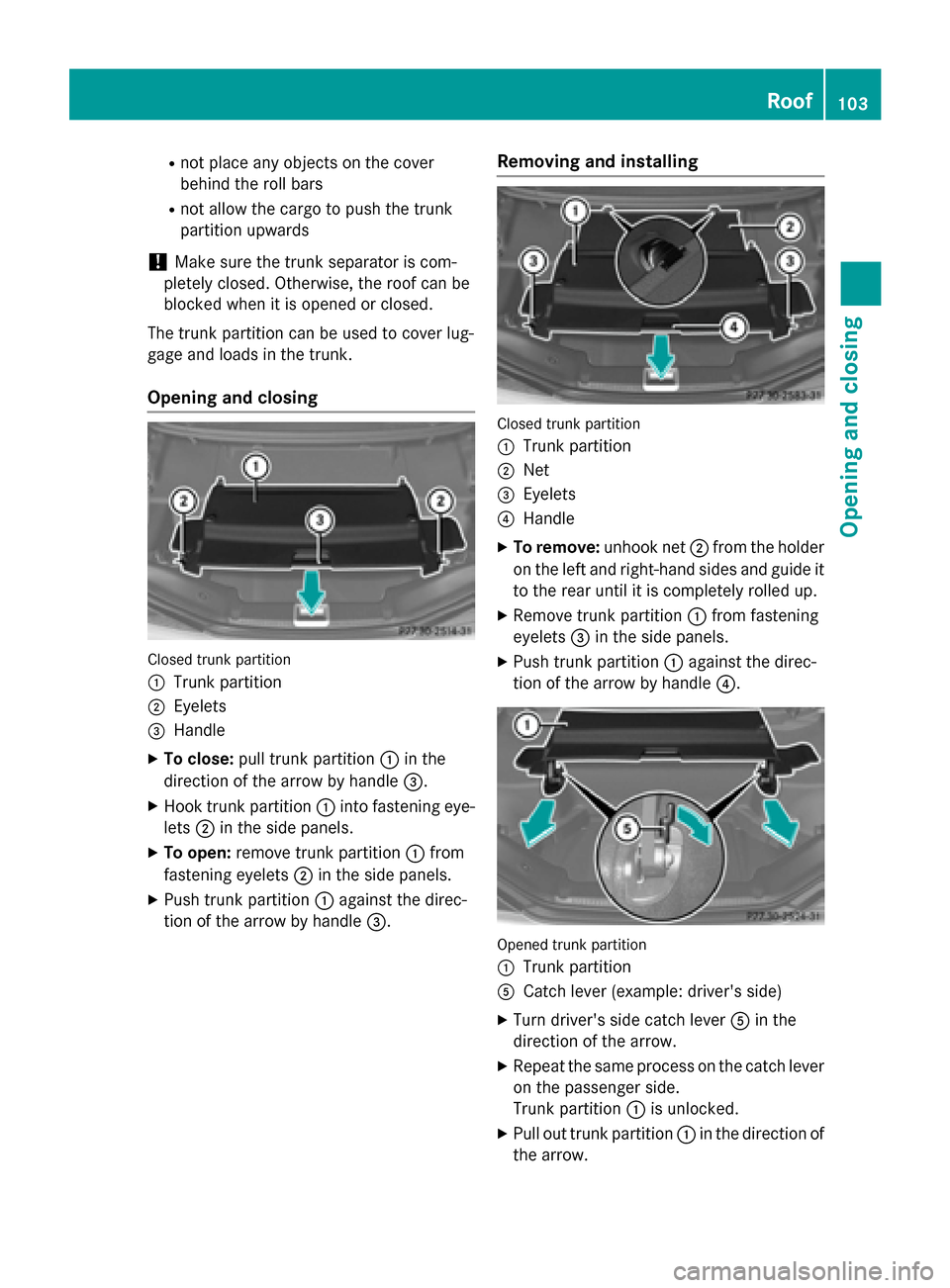
The trunk partition can be used to cover lug-
gage and loads in the trunk.
Opening and closing
Closed trunk partition
:
Trunk partition
;Eyelets
=Handle
XTo close: pull trunk partition :in the
direction of the arrow by handle =.
XHook trunk partition:into fastening eye-
lets ;in the side panels.
XTo open: remove trunk partition :from
fastening eyelets ;in the side panels.
XPush trunk partition :against the direc-
tion of the arrow by handle =.
Removing and installing
Closed trunk partition
:
Trunk partition
;Net
=Eyelets
?Handle
XTo remove:unhook net;from the holder
on the left and right-hand sides and guide it
to the rear until it is completely rolled up.
XRemove trunk partition :from fastening
eyelets =in the side panels.
XPush trunk partition :against the direc-
tion of the arrow by handle ?.
Opened trunk partition
:
Trunk partition
ACatch lever (example: driver's side)
XTurn driver's side catch lever Ain the
direction of the arrow.
XRepeat the same process on the catch lever
on the passenger side.
Trunk partition :is unlocked.
XPull out trunk partition :in the direction of
the arrow.
Roof103
Opening and closing
Z