2016 MERCEDES-BENZ S-Class SEDAN warning
[x] Cancel search: warningPage 82 of 298

Your COMANDequipment
i
These operatin ginstruction sdescribe all
th estandar dan doptional equipmen tof
your COMAN Dsystem, as available at th e
time of going to print .Country-specifi cdif -
ference sare possible. Bear in min dthat
your vehicle may no tfeature all function s
described here. Thi salso applies to safety-
relevant systems an dfunctions.
iRead th einformation on qualified special-
ist workshop sin th evehicle Operator's
Manual.
Introduction
Important safet ynotes
GWARNING
If you operat einformation systems an dcom-
munication equipment integrated in th evehi-
cl e whil edriving, you will be distracted from
traffic conditions. You could also los econtro l
of th evehicle. There is aris kof an accident.
Only operat eth eequipment when th etraffic
situation permits. If you are no tsur ethat this
is possible, par kth evehicle payin gattention
to traffic condition san doperat eth eequip-
men twhen th evehicle is stationary.
You mus tobserv eth elega lrequirements fo r
th ecountry in whic hyou are currentl ydrivin g
when operatin gCOMAND.
COMAN Dcalculates th erout eto th edestina -
tion without taking accoun tof th efollowing,
fo rexample:
Rtraffic lights
Rstop an dyield signs
Rmergin glanes
Rparking or stoppin gin ano parking/n o
stoppin gzone
Rother road an dtraffic rule san dregulation s
Rnarrow bridge s
COMAN Dcan giv eincorrec tnavigation com-
mands if th eactual street/traffic situation doe
sno tcorrespon dwit hth edigita lmap's
data. Digital map sdo no tcover all areas no r
all routes in an area. Fo rexamp
le,arou
t emay
hav ebee ndiverted or th edirection of aone-
way stree tmay hav echanged .
Fo rthis reason ,you mus talways observ e
road an dtraffic rule san dregulation sdurin g
your journey. Road an dtraffic rule san dreg -
ulation salways hav epriorit yover th esys -
tem' sdrivin grecommendations.
Navigation announcement sare intended to
direc tyou whil edrivin gwithout divertin gyour
attention from th eroad an ddriving.
Please always use this feature instead of con-
sultin gth emap display fo rdirections. Look -
in g at th eicon sor map display can distract
you from traffic condition san ddriving, an d
increase th eris kof an accident.
General notes
Operationa lreadines sof th enavigation
syste m
The navigation syste mmus tdetermin eth e
position of th evehicle befor efirst use or
wheneve roperational status is restored .
Therefore, you may hav eto drive fo r awhil e
befor eprecise rout eguidance is possible.
GP Sreception
Amon gother things, correc tfunctionin gof
th enavigation syste mdepend son GPS recep-
tion .In certain situations, GPS reception may
be impaired, there may be interferenc eor
there may be no reception at all, e.g. in tun-
nels or parking garages .
Using roof carriers may impair th ecorrec t
functionin gof aroof antenn a(phone, satellite
radio, GPS).
Entry restriction
In certain countries, dat aentr yis restricte dif
th evehicle is travelin gat more than approx -
imately 3mph (5 km/h). The restriction is
80Introduction
Navigation
Page 89 of 298
Destination entry
Important safetynotes
GWARNING
If you operat einformation systems and communication equipmen tintegrated in th evehicle whil e
driving, you will be distracted from traffic conditions. You could also los econtro lof th evehicle.
There is aris kof an accident.
Only operat eth eequipmen twhen th etraffic situation permits. If you are no tsur ethat this is
possible, par kth evehicle payin gattention to traffic condition sand operat eth eequipmen twhen
th evehicle is stationary.
You mus tobserv eth elega lrequirements fo rth ecountry in whic hyou are currentl ydrivin g
when operatin gCOMAND.
Destination entr ymay be blocke dwhil edriving, dependin gon th ecountry specifications.
General notes
The various characte rentr yoption sare described fo rth econtroller .Alternatively you can use
th etouchpad to ente rcharacters and selec tmenus (
Ypage 32) .
Usingan address
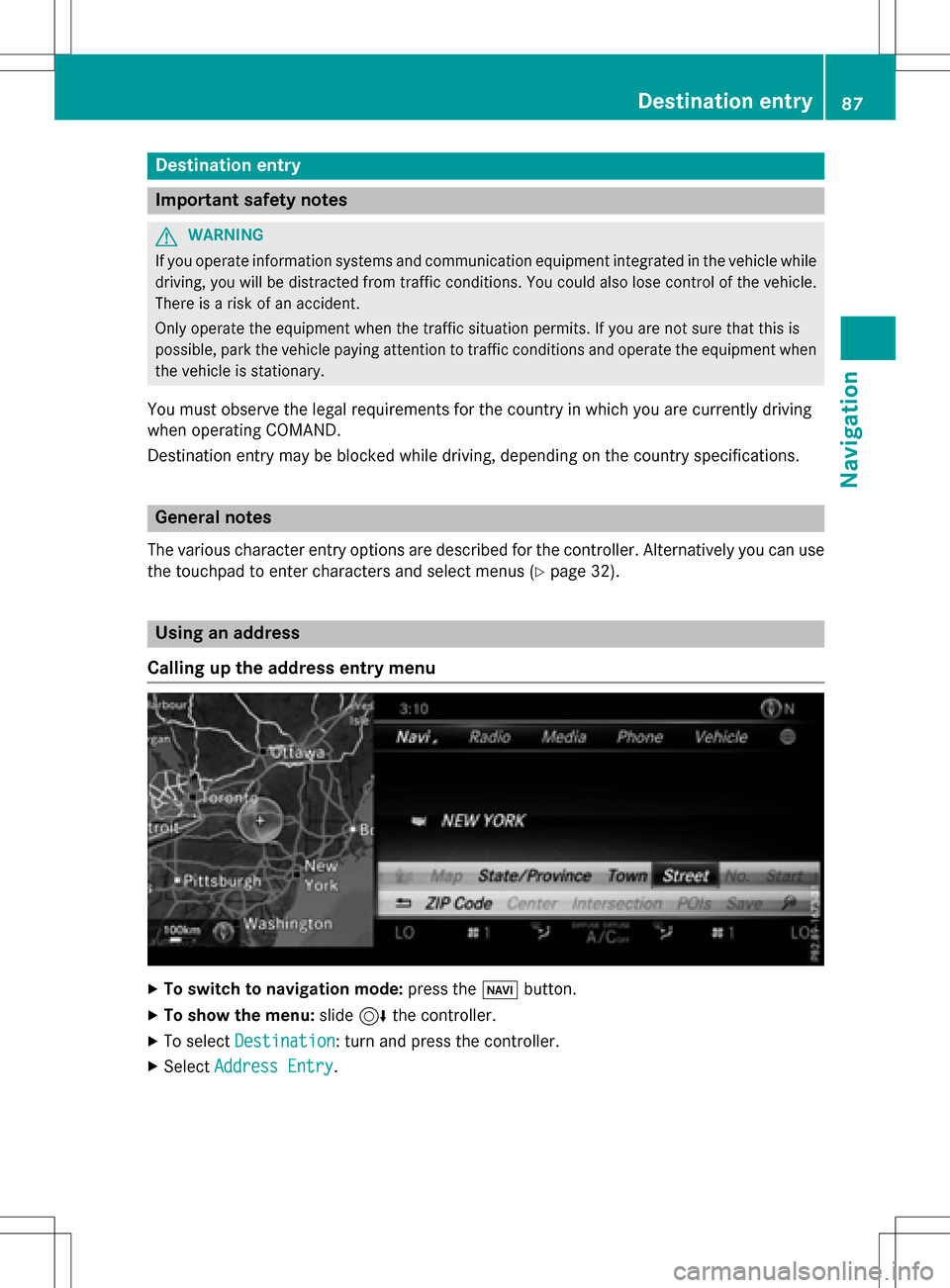
Calling up th eaddress entry menu
XTo switch to navigation mode: press theØ button.
XTo show th emenu :slid e6 thecontroller .
XTo selectDestination:turn and press th econtroller .
XSelectAddres sEntry.
Destination entry87
Navigation
Z
Page 119 of 298

Real-time traffic reports on the map
:Icon indicating an incident on the route (traffic jam icon)
;Display for traffic reports
=Map scale
?Icon delimiting the section of the route affected (color lines)
When ;is displayed, traffic reports can be received or traffic reports are available. If it is not
displayed, no reception is possible.
COMAND can show certain traffic incidents on the map. Traffic reports are shown on the map
at scales of 1/32 mi to 20 mi.
XTo hide the menu: slide5and press the controller.
The map can be seen in the full-screen display.
XTo set the map scale: turn the controller until the desired map scale is selected.
:Traffic jam on the route
;Slow-moving traffic on the route
=Road blocked
?Traffic disruption
ATraffic warning
BDashed red and white line delimiting the traffic warning
CRoad block (crosses along the affected road)
Real-time traffic reports117
Navigation
Z
Page 140 of 298

Your COMANDequipment
i
These operatin ginstruction sdescribe all
th estandar dan doptional equipmen tof
your COMAN Dsystem, as available at th e
time of going to print .Country-specifi cdif -
ference sare possible. Bear in min dthat
your vehicle may no tfeature all function s
described here. Thi salso applies to safety-
relevant systems an dfunctions.
iRead th einformation on qualified special-
ist workshop sin th evehicle Operator's
Manual.
Important safet ynotes
GWARNING
If you operat emobile communication equip-
men twhil edriving, you will be distracted from
traffic conditions. You could also los econtro l
of th evehicle. There is aris kof an accident.
Only operat ethis equipment when th evehicle
is stationary.
If you mak e acallon your mobile phone whil e
driving, always use hands-free mode. Only
use th emobile phone when road, weather
an dtraffic condition spermit .Some jurisdic -
tion sprohibi tth edriver from usin g amobile
phone whil edrivin g avehicle.
Bear in min dthat at aspeed of 30 mph
(approximately 50 km/h), th evehicle cover s
a distanc eof 44 feet (approximately 14 m)
per second.
Excessive levels of electromagnetic radiation
may cause damage to your health an dth e
health of others.
There is scientific discussio nsurroundin gth e
possible health risks posed by electromag-
neti cfields .You can reduce this ris kby usin g
an exterio rantenna.
Therefore, connec tyour mobile communica-
tion sequipmen tto th evehicle' sexterio r
antenn awhereve rpossible.
General notes
Bluetoot h®interface
ABluetoot h®interface is available fo rteleph -
ony.
If your mobile phone supports th eBluetoot h
®
profilePBAP (Phone Book Access Profile) ,th e
contact sare automatically displaye din
COMAND. If your mobile phone doe sno tsup-
por tth eBluetoot h
®profilePBAP ,COMAN D
will attempt to display th econtact susin g
alternative methods.
You can use th emessag efunction if your
mobile phone supports th eMA PBluetoot h
®
profile (Messag eAccess Profile).
Wit h a suitable mobile phone ,you can use th e
hands-free syste man dreceiv evCards via th e
Bluetoot h
®interface .
You can obtain more information about suit -
able mobile phone son th eInternet at
www.mercedes-benz-mobile.com .
You can also obtain more information by call-
ing.
In th eUSA, you can get in touch wit hth e
Mercedes-Ben zCustomer Assistanc eCente r
on 1-800-FOR-MERCede s(1-800-367-6372).
In Canada, you can get in touch with the Cus- tomer Relations Center on 1-800-387-0100.
HD Voice®
COMAND supports telephone calls in HD
Voice®. The voice quality can be improved
with this procedure.
Requirements for HD Voice
®:
RYour mobile phone and mobile phone net-
work provider support HD Voice®.
RThe mobile phone and mobile phone net-
work provider of the person you are calling
support HD Voice
®.
Depending on the quality of the connection,
the voice quality may fluctuate.
138General notes
Telephone
Page 178 of 298

Your COMANDequipment
i
These operatin ginstruction sdescribe all
th estandar dan doptional equipmen tof
your COMAN Dsystem, as available at th e
time of going to print .Country-specifi cdif -
ference sare possible. Bear in min dthat
your vehicle may no tfeature all function s
described here. Thi salso applies to safety-
relevant systems an dfunctions.
iRead th einformation on qualified special-
ist workshop sin th evehicle Operator's
Manual.
Important safet ynotes
GWARNING
If you operat einformation systems an dcom-
munication equipment integrated in th evehi-
cl e whil edriving, you will be distracted from
traffic conditions. You could also los econtro l
of th evehicle. There is aris kof an accident.
Only operat eth eequipment when th etraffic
situation permits. If you are no tsur ethat this
is possible, par kth evehicle payin gattention
to traffic condition san doperat eth eequip-
men twhen th evehicle is stationary.
You mus tobserv eth elega lrequirements fo r
th ecountry in whic hyou are drivin gwhen
operatin gth esystem.
General notes
Connection difficulties whil eth evehi-
cle is in motion
The connection may be los tif:
Rth emobile phone networ kcoverage is
insufficien t
Rthevehicle has moved into amobile phone
cell wit hno free channels
Rth eSI M car dused is no tcompatible wit h
th enetwor kavailable
Function restrictions
You will no tbe able to use th eMercedes-Ben z
Apps an dInternet connection ,or will no lon -
ger be able to use them, or may hav eto wait
befor eusin gthem, in th efollowin gsituations:
Rwhen th emobile phone is switched of f
Rif your mobile phone has notbee nenabled
fo rInternet access .
Rif theBluetoot h®function is switched of fon
COMAN Dan dth edesire dphone is sup-
posed to be connecte dvia Bluetoot h
®.
Rif theBluetoot h®function is switched of fon
th emobile phone an dth ephone is sup-
posed to be connecte dvia Bluetoot h
®.
Rif themobile phone is no tconnecte dvia
US Ban dth ephone is suppose dto be con-
nected via USB.
Rif neither th emobile phone networ kno rth e
mobile phone allow simultaneous use of a
phone an dan Internet connection .
Rif themobile phone has no tbee nenabled
fo rInternet access via Bluetoot h®and/or
USB.
The driver is no tpermitte dto cal lup websites
whil edrivin gan duse of th eMercedes-Ben z
Apps is restricted.
iIt is possible that you may no tbe able to
receiv ecalls when an Internet connecti on
i
s active .Thi sdepend son th emobile phone
an dth emobile phone networ kused .
Conditions for access
USA: to use Mercedes-Ben zApps an dInter-
ne taccess ,mbrace mus tbe activated an d
operational. Furthermore, mbrace mus tbe
activated fo rMercedes-Ben zApps an dInter-
ne taccess .Tak enote of th econnection pri -
orities .An emergency cal lhas th ehighes tpri -
ority. Whe n aservic ecall, e.g. abreakdown
servic ecal lor th eMB Info Call, is active ,an
emergency cal lcan still be initiated. Aservic e
call, on th eother hand, has priorit yover a
176Conditions for access
Online and Internet functions
Page 214 of 298

Starting an application at a different
seat
XIn media mode, slide6the controller.
The media menu bar appears.
XTo select Options: turn and press the con-
troller.
XSelect Start Application at Other
Seat.
An additional menu appears with the option
of switching the media source to Split‐
View,Rear Rightor Rear Left.
Use Additional
Options…to operate the
parental control screen for selected seats:
(
Ypage 76).
XTo switch the media source to, e.g. Split‐
View: turn and press the controller
(
Ypage 30).
Audio/video mode
Important safety notes
GWARNING
The CD/DVD drive is a class 1 laser product.
If you open the housing of the CD/DVD drive,
there is a risk of exposure to invisible laser
radiation. This laser radiation could damage
your retina. There is a risk of injury.
Never open the housing. Always have main-
tenance and repair work carried out at a quali- fied specialist workshop.
GWARNING
Handling discs while driving may distract you from traffic conditions. You could also lose
control of the vehicle. There is a risk of an
accident.
Handle discs only when the vehicle is station-
ary.
Notes on audio/video mode
Permissible data carriers
RCD-R, CD-A and CD-RW
RDVD-R, DVD-V and DVD-RW
RSD memory card
RUSB storage device
Permissible file systems
RISO 9660/Joliet standard for CDs
RUDF for video DVDs
RFAT16, FAT32, exFAT and NTFS for SD
memory card and USB storage media
Multisession CDs
For multisession CDs, the content of the first
session determines how COMAND will proc-
ess the CD. COMAND plays only one session and gives priority to the audio CD session.
File structure of a data carrier
When you create a disc with compressed
music files, the tracks can be organized in
folders. A folder may also contain subfolders.
The disc may contain no more than eight
directory levels. Files beyond the eighth level
will not be recognized by the system.
iCOMAND supports up to 50,000 files
from one data medium. For data media with more than 64 GB, only files in the following
folders are supported: Music, Pictures,
Video.
Track and file names
When you create a disc with compressed
music files, you can assign names to the
tracks and folders.
212Audio/video mode
Media
Page 242 of 298

The#dot indicates the current setting.
Mono/stereo:
XTo select Mono/Stereo: turn and press the
controller.
XSelect MonoorStereo.
The #dot indicates the current setting.
Volume:
XSelect Volume.
XSelectStandardorBoost.
Standard
: the volume of the external audio
source is adjusted to a standard value.
Boost
: the volume of the external audio
source is raised by approximately 10 dB.
The #dot indicates the current setting.
Video DVD mode
Important safety notes
GWARNING
The CD/DVD drive is a class 1 laser product.
If you open the housing of the CD/DVD drive,
there is a risk of exposure to invisible laser
radiation. This laser radiation could damage
your retina. There is a risk of injury.
Never open the housing. Always have main-
tenance and repair work carried out at a quali- fied specialist workshop.
GWARNING
Handling discs while driving may distract you from traffic conditions. You could also lose
control of the vehicle. There is a risk of an
accident.
Handle discs only when the vehicle is station-
ary.
Bear in mind that at a speed of only 30 mph
(approximately 50 km/h) your vehiclecover s
a distanc eof 44 fee t(approximately 14 m)
every second.
General notes
Note son discs
!Do no taffix stickers or label sto th ediscs.
The ycould peel of fand damage COMAND .
Stickers can caus eth edisc to bend, whic h
can result in rea derror sand disc recogni-
tion problems.
!COMAND is designed to play disc sthat
compl ywit hth eEN 6090 8standard. There-
fore, you can only use disc swit h a maxi-
mum thickness of 1. 3mm.
If you inser tthicker discs, e.g. those that
contain dat aon bot hside s(DVD on on e
side and audio dat aon th eother), they can -
no tbe ejecte dand can damage th edevice .
Only use round disc swit h a diameter of
12 cm .Do no tuse disc swit h a diameter of
8 cm, eve nwit han adapter.
The variet yof dat amedia, writers and writin g
software means that COMAND may no tbe
able to play disc sthat you hav ecopied your -
self .
DVD playbac kconditions
If video DVDs do no tconfor mto th eNTS Cor
PA LTV standards ,they may creat epicture,
soun dor other problem sduring playback.
COMAND is capable of playin gbac kvideo
DVDs produced accordin gto th efollowing
standards :
RRegioncode 1or region code 0(n oregion
code)
RPA Lor NTS Cstandard
You will generally fin dth erelevant details
either on th eDV Ditself or on th eDV Dcase.
iIf you inser t avideo DV Dwit h a differen t
region code, amessage to this effec t
appears .
iCOMAND is set to region code 1at th e
factory. This setting can be changed at an
authorized Mercedes-Ben zCenter. It is also
possibl eto play video DVDs wit h adifferen t
region code, provided that they are pro -
240Video DVD mode
Media
Page 260 of 298

Your COMANDequipment
These operatin ginstruction sdescribe all th e
standar dan doptional equipmen tfo ryour
COMAN Dsystem, as available at th etime of
going to print .Country-specifi cdifference s
are possible. Please note that your COMAN D
syste mmay no tbe equipped wit hall th efea-
tures described .
SIRIUS Weather
Introduction
Thisfunction is currentl yno tavailable fo r
Canada.
Fo rth ereception of weather forecast svia
satellite radio, you will need aSIRIU SXM Sat -
ellite Weather subscription .
If th emessage: Call
SIRIUStoactivate
system at: 888-539-747 4ESN:
SIRIUSIDappears alon gwit hth eID number
of th eSIRIU Sdevice, you will need to hav eth e
weather servic eactivated first .
XTo selectCal lorCancel:turn an dpress
th econtroller .
If amobile phone is connecte dto COMAN D
(
Ypage 140), th ecal lwill connec tto aSIR-
IU Sservic eemploye eafter selecting Call
.
The ID number of th eSIRIU Sdevic ewill be
transferred to th etelephon edisplay.
XThi swill be followed by instruction sfrom
th eservic eemployee.
COMAN Dcan receiv eweather forecast svia
satellite radio fo rth eentire US A(includin g
Alask aan dHawaii). The received weather
dat acan be displaye das an information chart
(dail yforecast ,five-day forecast ,detailed
information )or on th eweather map .
The weather dat areceived from aweather
station is stored in COMAN Dforon ehour .It
can therefore be displaye dagain immediately
after restartin gth eengin e(fo rexample after
refueling). Dependin
gon whic hscale has bee nselected,
th eweather map can display th efollowin g
weather dat awit hsymbols :
Rrain radar
Rstormcharacteristics
Rareas of high-pressure/low-pressure,
weather fronts
Rcours eof tropical cyclones (hurricanes,
typhoons )
Rgale warnings
Rwinddirection an dspeeds
iThe rain radar canno tbe displaye dfo r
Alaska, Hawaii an dPuerto Rico.
iHurricane: term used to describe th etrop-
ical cyclones that primarily develop in th e
Atlantic, North Pacifi can dSout hPacifi c
oceans. The win dspeeds are abov e74 mp
h
(11 8km/h). Five categorie sare used to
classify th estrengt hof ahurricane.
Typhoon :term used to describe atropical
cyclon ethat develop sin th enorthwestern
Pacific. The win dspeeds are in th ecategory
of ahurricane.
Switching th eSIRIUS Weather display
on/of f
Switching on
258SIRIUS Weather
SIRIUS Weather