2016 MERCEDES-BENZ GLE-CLASS COUPE oil reset
[x] Cancel search: oil resetPage 6 of 382

AMGAdaptive sport suspension sys-
tem ................................................ 185
AMG menu (on-board computer) .....2 31
Approach/departure angle .............. 167
Ashtray ............................................... 288
Assistance display (on-board com-
puter) ..................................................2 27
Assistance menu (on-board com-
puter) ..................................................2 27
ASSYST PLUS
Displaying a service message ........3 06
Hiding a service message .............. 306
Resetting the service interval dis-
play ................................................ 306
Service message ............................ 306
Special service requirements ......... 307
ATA (Anti-Theft Alarm system)
Activating/deactivating ................... 70
Function ...........................................7 0
Switching off the alarm .................... 70
ATTENTION ASSIST
Activating/deactivating ................. 228
Display message ............................ 253
Function/notes ............................. 200
Audio menu (on-board computer) .... 225
Audio system
see separate operating instructions
Authorized Mercedes-Benz Center
see Qualified specialist workshop
AUTO lights
Display message ............................ 248
see Lights
Automatic car wash (care) ............... 307
Automatic engine start (ECO start/
stop function) .................................... 139
Automatic engine switch-off (ECO
start/stop function) .......................... 139
Automatic headlamp mode .............. 108
Automatic transmission
Accelerator pedal position ............. 145
Changing gear ............................... 145
DIRECT SELECT lever ..................... 142
Display message ............................ 261
Drive program ................................ 147
Drive program display .................... 143
Driving tips .................................... 145 DYNAMIC SELECT control
ler ......... 142
Eme
rgency running mode .............. 150
Engaging drive position .................. 144
Engaging neutral ............................ 143
Engaging park position automati-
cally ............................................... 143
Engaging reverse gear ................... 143
Engaging the park position ............ 143
Gliding mode ................................. 146
Kickdown ....................................... 146
Manual shifting .............................. 147
Oil temperature (on-board com-
puter, Mercedes-AMG vehicles) ..... 231
Overview ........................................ 142
Problem (malfunction) ................... 150
Pulling away ................................... 137
Starting the engine ........................ 136
Steering wheel paddle shifters ...... 147
Trailer towing ................................. 147
Transmission position display ........ 143
Transmission positions .................. 145
Automatic transmission emer-
gency mode ....................................... 150
Axle load, permissible (trailer tow-
ing) ...................................................... 376
B
Bag hook ............................................ 283
Ball coupling
Installing ........................................ 213
Removing ....................................... 217
BAS (Brake Assist System) ................. 61
BAS PLUS with Cross-Traffic Assist
(Brake Assist PLUS with Cross-
Traffic Assist)
Function/notes ................................ 61
Important safety notes .................... 61
Battery (SmartKey)
Checking .......................................... 75
Important safety notes .................... 75
Replacing ......................................... 75
Battery (vehicle)
Charging ........................................ 322
Display message ............................ 250
Important safety notes .................. 320
Jump starting ................................. 323
Overview ........................................ 320
4Index
Page 18 of 382

Switching seat heating on/off ......... 98
Switching seat ventilation on/off .. 100
Section
Sliding sunroof ................................. 89
Selector lever
Cleaning ......................................... 313
Sensors (cleaning instructions) ....... 311
Service menu (on-board com-
puter) .................................................. 229
Service message
see ASSYST PLUS
Service products
Brake fluid ..................................... 371
Coolant (engine) ............................ 372
DEF special additives ..................... 370
Engine oil ....................................... 370
Fuel ................................................ 368
Important safety notes .................. 367
Refrigerant (air-conditioning sys-
tem) ............................................... 373
Washer fluid ................................... 372
Setting the air distribution ............... 127
Setting the airflow ............................ 127
Settings
Factory (on-board computer) ......... 231
On-board computer ....................... 229
SETUP (on-board computer) ............. 232
Side impact air bag ............................. 45
Side marker lamp (display mes-
sage) ................................................... 247
Side windows
Cleaning ......................................... 310
Convenience closing feature ............ 87
Convenience opening feature .......... 86
Important safety information ........... 85
Opening/closing .............................. 86
Overview .......................................... 85
Problem (malfunction) ..................... 89
Resetting ......................................... 88
Reversing feature ............................. 85
Sliding sunroof
see Panorama roof with power
tilt/sliding panel
SmartKey
Changing the battery ....................... 75
Changing the programming ............. 74
Checking the battery ....................... 75 Convenience closing feature ............ 87
Convenience opening feature .......... 86
Display message ............................ 264
Door central locking/unlocking ....... 72
Important safety notes .................... 72
KEYLESS-GO start function .............. 74
Loss ................................................. 77
Mechanical key ................................ 74
Overview ..........................................
72
P
ositions (ignition lock) ................. 134
Problem (malfunction) ..................... 77
Starting the engine ........................ 136
Smartphone
Starting the engine ........................ 136
Snow chains
Information .................................... 333
Sockets
Center console .............................. 289
General notes ................................ 289
Luggage compartment ................... 289
Rear compartment ......................... 289
Special seat belt retractor .................. 54
Specialist workshop ............................ 26
Speed, controlling
see Cruise control
Speedometer
Digital ............................................ 223
In the Instrument cluster ................. 31
Segments ...................................... 219
Selecting the display unit ............... 229
Standing lamps
Display message ............................ 247
Switching on/off ........................... 109
Start/Stop button
Removing ....................................... 135
Start/stop function
see ECO start/stop function
Starting (engine) ................................ 136
STEER CONTROL .................................. 70
Steering
Display message ............................ 263
Steering Assist and Stop&Go Pilot
(DISTRONIC PLUS)
Activating/deactivating ................. 227
Display message ............................ 258
Steering assistant STEER CON-
TROL
see STEER CONTROL
16Index
Page 233 of 382

For further information on belt adjustment, see
(Ypage 42).
Switching the fold-in mirrors when lock-
ing feature on/off
This function is only available when the vehicle is
equipped with the electrical fold-in function.
When you activate theAuto.
MirrorFoldingfunction, the exterior mirrors are folded in when
the vehicle is locked. The exterior mirrors fold
out automatically again as soon as you unlock
the vehicle.
XPress the =or; button on the steering
wheel to select the Sett.menu.
XPress the:or9 button to select the
Conveniencesubmenu.
XPress ato confirm.
XPress the :or9 button to select the
Auto. Mirror Foldingfunction.
If the Auto. Mirror Foldingfunction is
switched on, the multifunction display shows
the exterior mirror in orange.
XPress the abutton to save the setting.
If you have switched the Auto. Mirror Fold‐ingon and you fold the exterior mirrors in using
button :, they will not fold out automatically
(
Ypage 105).
You can then only fold out the exterior mirrors
using button :.
Restoring the factory settings
XPress the=or; button on the steering
wheel to select the Sett.menu.
XPress the:or9 button to select the
Factory Settingsubmenu.
XPress ato confirm.
The Reset All Settings?message
appears.
XPress the :or9 button to select Noor
Yes.
XPress ato confirm the selection.
If you select Yes, the multifunction display
shows a confirmation message.
If you want to reset the Daytime Running
Lightsfunction in theLightsubmenu, you
must turn the SmartKey to position 1in the igni-
tion lock.
AMG menu (Mercedes-AMG vehicles)
WARMUP
:Digital speedometer
;Gear indicator
=Upshift indicator
?Engine oil temperature
ACoolant temperature
BTransmission fluid temperature
XPress the =or; button on the steering
wheel to select the AMGmenu.
Upshift indicator: upshift indicatorUp=
indicates that the engine has reached the
overrevving range when in the manual drive
program.
Engine/transmission oil temperature:
when the engine and transmission are at nor-
mal operating temperature, oil tempera-
ture ?and Bare displayed in white in the
multifunction display.
If the multifunction display shows oil temper-
ature ?orB in blue, the engine or the
transmission are not yet at normal operating
temperature. Avoid driving at full engine out-
put during this time.
Menus and submenus231
On-board computer and displays
Z
Page 308 of 382
Make sure that no windshield washer con-
centrate is spilled next to the filler neck.
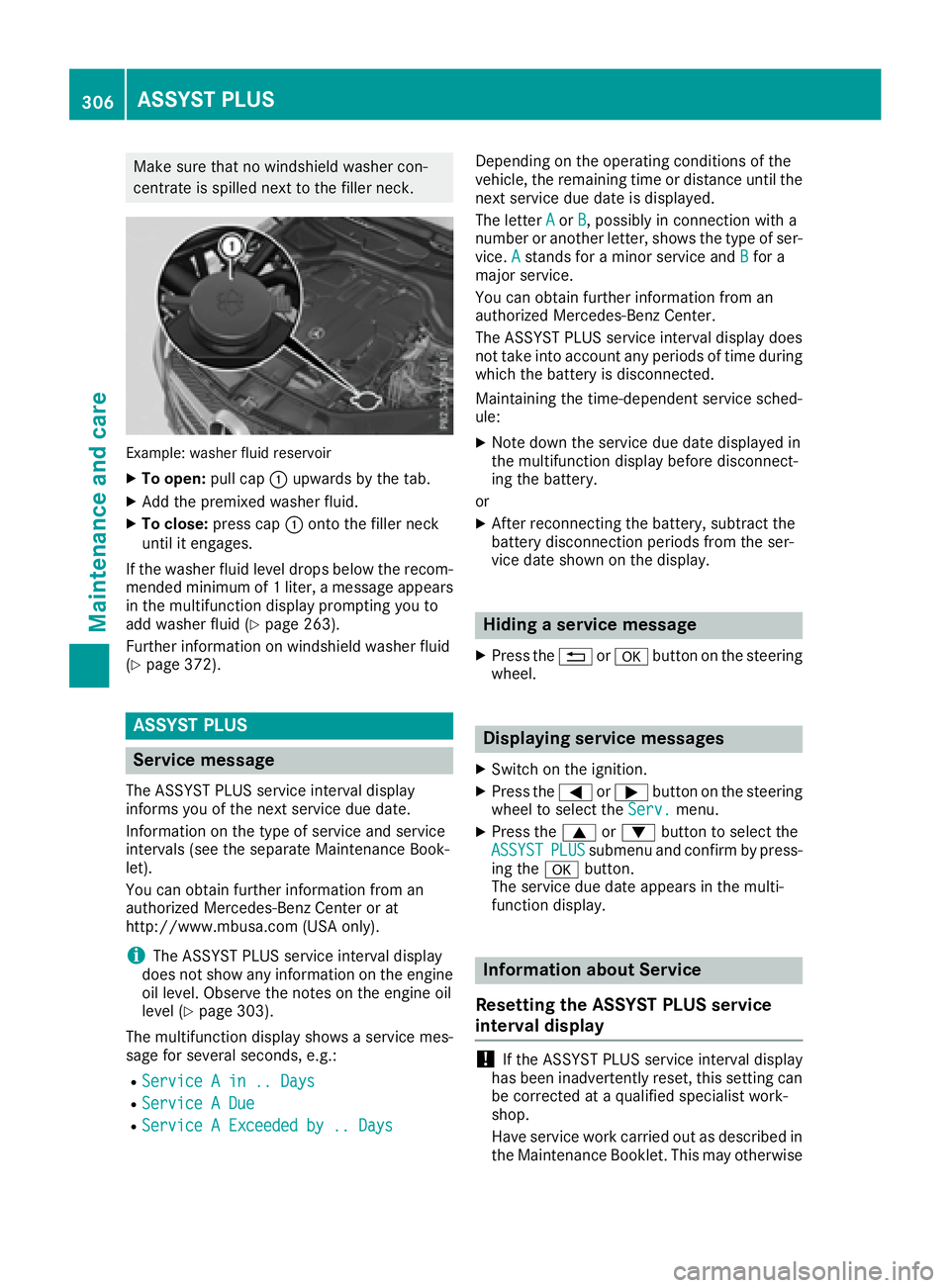
Example: washer fluid reservoir
XTo open:pull cap:upwards by the tab.
XAdd the premixed washer fluid.
XTo close: press cap :onto the filler neck
until it engages.
If the washer fluid level drops below the recom-
mended minimum of 1 liter, a message appears
in the multifunction display prompting you to
add washer fluid (
Ypage 263).
Further information on windshield washer fluid
(
Ypage 372).
ASSYST PLUS
Service message
The ASSYST PLUS service interval display
informs you of the next service due date.
Information on the type of service and service
intervals (see the separate Maintenance Book-
let).
You can obtain further information from an
authorized Mercedes-Benz Center or at
http://www.mbusa.com (USA only).
iThe ASSYST PLUS service interval display
does not show any information on the engine
oil level. Observe the notes on the engine oil
level (
Ypage 303).
The multifunction display shows a service mes-
sage for several seconds, e.g.:
RService A in .. Days
RService A Due
RService A Exceeded by .. Days
Depending on the operating conditions of the
vehicle, the remaining time or distance until the
next service due date is displayed.
The letter A
orB, possibly in connection with a
number or another letter, shows the type of ser-
vice. A
stands for a minor service and Bfor a
major service.
You can obtain further information from an
authorized Mercedes-Benz Center.
The ASSYST PLUS service interval display does
not take into account any periods of time during
which the battery is disconnected.
Maintaining the time-dependent service sched-
ule:
XNote down the service due date displayed in
the multifunction display before disconnect-
ing the battery.
or
XAfter reconnecting the battery, subtract the
battery disconnection periods from the ser-
vice date shown on the display.
Hiding a service message
XPress the %ora button on the steering
wheel.
Displaying service messages
XSwitch on the ignition.
XPress the =or; button on the steering
wheel to select the Serv.menu.
XPress the9or: button to select the
ASSYSTPLUSsubmenu and confirm by press-
ing the abutton.
The service due date appears in the multi-
function display.
Information about Service
Resetting the ASSYST PLUS service
interval display
!If the ASSYST PLUS service interval display
has been inadvertently reset, this setting can
be corrected at a qualified specialist work-
shop.
Have service work carried out as described in
the Maintenance Booklet. This may otherwise
306ASSYST PLUS
Maintenance and care
Page 309 of 382
lead to increased wear and damage to the
major assemblies or the vehicle.
A qualified specialist workshop, e.g. an author-
ized Mercedes-Benz Center, will reset the
ASSYST PLUS service interval display after the
service work has been carried out. You can also
obtain further information on maintenance
work, for example.
Special service requirements
The specified maintenance interval takes only
the normal operation of the vehicle into
account. Under arduous operating conditions or
increased load on the vehicle, maintenance
work must be carried out more frequently, for
example:
Rregular city driving with frequent intermediate
stops
Rif the vehicle is primarily used to travel short
distances
Ruse in mountainous terrain or on poor road
surfaces
Rif the engine is often left idling for long periods
Under these or similar conditions, have, for
example, the air filter, engine oil and oil filter
replaced or changed more frequently. Under
arduous operating conditions, the tires must be
checked more often. Further information can be
obtained at a qualified specialist workshop, e.g.
an authorized Mercedes-Benz Center.
Driving abroad
An extensive Mercedes-Benz Service network is also available in other countries. You can obtain
further information from any authorized
Mercedes-Benz Center.
Care
General notes
HEnvironmental note
Dispose of empty packaging and cleaning
cloths in an environmentally responsible man-
ner.
!For cleaning your vehicle, do not use any of
the following:
Rdry, rough or hard cloths
Rabrasive cleaning agents
Rsolvents
Rcleaning agents containing solvents
Do not scrub.
Do not touch the surfaces or protective films
with hard objects, e.g. a ring or ice scraper.
You could otherwise scratch or damage the
surfaces and protective film.
!Do not park the vehicle for an extended
period straight after cleaning it, particularly
after having cleaned the wheels with wheel
cleaner. Wheel cleaners could cause
increased corrosion of the brake discs and
brake pads/linings. For this reason, you
should drive for a few minutes after cleaning.
Braking heats the brake discs and the brake
pads/linings, thus drying them. The vehicle
can then be parked.
Regular care of your vehicle is a condition for
retaining the quality in the long term.
Use care products and cleaning agents recom-
mended and approved by Mercedes-Benz.
Washing the vehicle and cleaning the
paintwork
Automatic car wash
GWARNING
Braking efficiency is reduced after washing
the vehicle. There is a risk of an accident.
After the vehicle has been washed, brake
carefully while paying attention to the traffic
conditions until full braking power is restored.
!Before driving into an automatic car wash,
make sure that it is suitable for the dimen-
sions of the vehicle. In particular, make sure
that:
Rthere is enough ground clearance between
the vehicle underbody and the guide rails of
the automatic car wash.
Rthe clearance width of the automatic car
wash, in particular the width of the guide
rails, is adequate (for further information on
Care307
Maintenance and care
Z