2016 MERCEDES-BENZ GLC-Class reset sun roof
[x] Cancel search: reset sun roofPage 19 of 418

Fuel ................................................ 409
Important safety notes .................. 409
Refrigerant (air-conditioning sys-
tem) ............................................... 414
Washer fluid ................................... 413
Settings
Factory (on-board computer) ......... 256
On-board computer ....................... 252
Side impact air bag ............................. 50
Side marker lamp (display mes-
sage) ................................................... 274
Side windows
Cleaning ......................................... 347
Convenience closing feature ............ 99
Convenience opening feature .......... 99
Important safety information ........... 98
Opening/closing .............................. 98
Problem (malfunction) ................... 101
Resetting ....................................... 100
Reversing feature ............................. 98
Ski and snowboard bag .................... 309
Sliding sunroof
see Panorama roof with power
tilt/sliding panel
SmartKey
Changing the battery ....................... 86
Changing the programming ............. 84
Checking the battery ....................... 86
Convenience closing feature .......... 100
Convenience opening feature .......... 99
Display message ............................ 290
Door central locking/unlocking ....... 83
Important safety notes .................... 82
KEYLESS-GO start function .............. 84
Loss ................................................. 87
Mechanical key ................................ 85
Overview .......................................... 82
Positions (ignition lock) ................. 153
Problem (malfunction) ..................... 87
Starting the engine ........................ 155
Smartphone
Starting the engine ........................ 156
Snow chains ...................................... 377
Socket (12 V)
Cargo compartment ....................... 322
Center console .............................. 321
General notes ................................ 321
Rear compartment ......................... 321 Special seat belt retractor
.................. 61
Specialist workshop ............................ 27
Speed, controlling
see Cruise control
Speedometer
Activating/deactivating the addi-
tional speedometer ........................ 255
Digital ............................................ 245
In the Instrume
nt cluster ................. 33
Segments ...................................... 238
Selecting the display unit ............... 255
see Instrument cluster
Standing lamps
Display message ............................ 274
Switching on/off ........................... 126
Start/Stop button
Starting the engine ........................ 156
Start/stop function
see ECO start/stop function
Starting (engine) ................................ 155
STEER CONTROL .................................. 78
Steering
Display message ............................ 289
Warning lamps ............................... 303
Steering Assist and Stop&Go Pilot
(DISTRONIC PLUS)
Display message ............................ 284
Steering assistant STEER CON-
TROL
see STEER CONTROL
Steering wheel
Adjusting (electrically) ................... 116
Adjusting (manually) ...................... 115
Button overview ............................... 35
Buttons (on-board computer) ......... 239
Cleaning ......................................... 350
EASY ENTRY/EXIT feature ............. 117
Important safety notes .................. 115
Steering wheel heating .................. 116
Storing settings (memory func-
tion) ............................................... 122
Steering wheel heating
Problem (malfunction) ................... 117
Switching on/off ........................... 116
Steering wheel paddle shifters ........ 167
Stowage areas ................................... 306
Index17
Page 22 of 418

Towing eye......................................... 355
Traffic Sign Assist
Display message ............................ 282
Function/notes ............................. 216
Important safety notes .................. 216
Instrument cluster display ............. 217
Trailer coupling
see Towing a trailer
Trailer loads and drawbar nose-
weights ............................................... 234
Trailer towing
Permissible trailer loads and
drawbar noseweights ..................... 234
Transfer case ..................................... 169
Transmission
see Automatic transmission
Transmission position display ......... 163
Transmission position display
(DIRECT SELECT lever) ...................... 163
Transporting the vehicle .................. 369
Trim pieces (cleaning instruc-
tions) .................................................. 350
Trip computer (on-board com-
puter) .................................................. 245
Trip odometer
Calling up ....................................... 244
Resetting (on-board computer) ...... 245
Trunk load (maximum) ...................... 415
Turn signals
Changing bulbs (front) ................... 132
Display message ............................ 273
Switching on/off ........................... 126
Two-way radio
Frequencies ................................... 406
Installation ..................................... 406
Transmission output (maximum) .... 406
Type identification plate
see Vehicle identification plate
U
UnlockingEmergency unlocking ....................... 90
From inside the vehicle (central
unlocking button) ............................. 89
V
Vanity mirror (in the sun visor) ........ 319
Vehicle
Correct use ...................................... 27
Data acquisition ............................... 28
Display message ............................ 287
Equipment ....................................... 23
Individual settings .......................... 252
Limited Warranty ............................. 28
Loading .......................................... 384
Locking (in an emergency) ............... 91
Locking (SmartKey) .......................... 83
Lowering ........................................ 399
Maintenance .................................... 24
Operating safety .............................. 25
Parking .......................................... 172
Parking for a long period ................ 176
Pulling away ................................... 157
Raising ........................................... 396
Reporting problems ......................... 27
Securing from rolling away ............ 396
Towing away .................................. 367
Transporting .................................. 369
Unlocking (in an emergency) ........... 90
Unlocking (SmartKey) ...................... 83
Vehicle data ................................... 415
Vehicle data
Roof load (maximum) ..................... 415
Trunk load (maximum) ................... 415
Vehicle dimensions ........................... 415
Vehicle emergency locking ................ 91
Vehicle identification number
see VIN
Vehicle identification plate .............. 408
Vehicle level
AIR BODY CONTROL ...................... 196
Display message ............................ 279
Vehicle tool kit .................................. 355
Video
Operating the DVD ......................... 249
VIN
Seat ............................................... 408
Type plate ...................................... 408
20Index
Page 102 of 418
Using the SmartKey
XPress and hold the&button until the
side windows and the sliding sunroof or the
panorama roof with power tilt/sliding
panel are fully closed.
XMake sure that all the side windows and the
sliding sunroof or panorama roof with
power tilt/sliding panel are closed.
XVehicles with panorama roof with
power tilt/sliding panel: press and hold
the & button once more until the roller
sunblinds of the panorama roof with power
tilt/sliding panel close.
XTo interrupt convenience closing:
release the &button.
Using KEYLESS-GO
The driver's door and the door at which the
handle is used, must both be closed. The
SmartKey must be outside the vehicle. The
gap between the SmartKey and the corre-
sponding door handle should not be greater
than 3 ft (1 m).
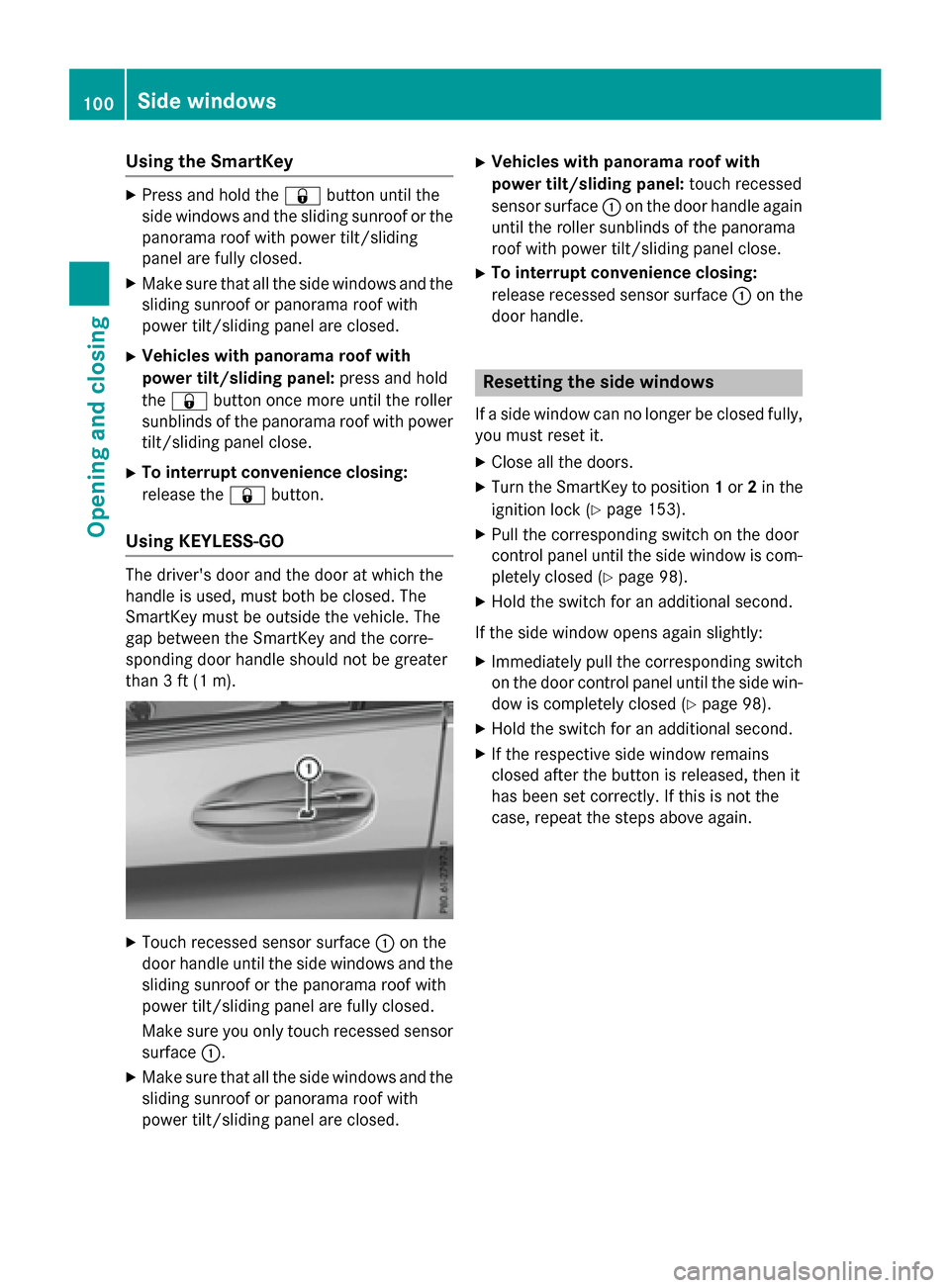
XTouch recessed sensor surface :on the
door handle until the side windows and the
sliding sunroof or the panorama roof with
power tilt/sliding panel are fully closed.
Make sure you only touch recessed sensor surface :.
XMake sure that all the side windows and the
sliding sunroof or panorama roof with
power tilt/sliding panel are closed.
XVehicles with panorama roof with
power tilt/sliding panel: touch recessed
sensor surface :on the door handle again
until the roller sunblinds of the panorama
roof with power tilt/sliding panel close.
XTo interrupt convenience closing:
release recessed sensor surface :on the
door handle.
Resetting the side windows
If a side window can no longer be closed fully,
you must reset it.
XClose all the doors.
XTurn the SmartKey to position 1or 2in the
ignition lock (
Ypage 153).
XPull the corresponding switch on the door
control panel until the side window is com-
pletely closed (
Ypage 98).
XHold the switch for an additional second.
If the side window opens again slightly:
XImmediately pull the corresponding switch on the door control panel until the side win-
dow is completely closed (
Ypage 98).
XHold the switch for an additional second.
XIf the respective side window remains
closed after the button is released, then it
has been set correctly. If this is not the
case, repeat the steps above again.
100Side windows
Opening and closing
Page 103 of 418

Problems with the side windows
GWARNING
If you close a side window again immediately after it has been blocked or reset, the side window
closes with increased or maximum force. The reversing feature is then not active. Parts of the
body could be trapped in the closing area in the process. This poses an increased risk of injury or
even fatal injury.
Make sure that no parts of the body are in the closing area. To stop the closing process, release
the switch or push the switch again to reopen the side window.
ProblemPossible causes/consequences and MSolutions
A side window cannot
be closed because it is
blocked by objects, e.g.
leaves in the window
guide.XRemove the objects.
XClose the side window.
A side window cannot
be closed and you can-
not see the cause.If a side window is obstructed during closing and reopens again
slightly:
XImmediately after the window blocks, pull the corresponding
switch again until the side window has closed.
The side window is closed with increased force.
If a side window is obstructed again during closing and reopens
again slightly:
XImmediately after the window blocks, pull the corresponding
switch again until the side window has closed.
The side window is closed without the anti-entrapment feature.
Panorama roof with power tilt/sliding
panel
Important safety notes
In the following section, the term "sliding sun-
roof" refers to the panorama roof with power
tilt/sliding panel.
GWARNING
While opening and closing the sliding sunroof, body parts in close proximity could become
trapped. There is a risk of injury.
Make sure that no body parts are in close
proximity during the opening and closing pro-
cedures.
If somebody becomes trapped:
Rrelease the switch immediately, or
Rduring automatic operation, push the
switch briefly in any direction
The opening or closing procedure will be stop-
ped.
GWARNING
If children operate the sliding sunroof they
could become trapped, particularly if they are left unsupervised. There is a risk of injury.
When leaving the vehicle, always take the
SmartKey with you and lock the vehicle. Never
leave children unsupervised in the vehicle.
Panorama roof with power tilt/sliding panel101
Opening and closing
Z
Page 104 of 418
GWARNING
At high speeds the raised sliding sunroof auto-
matically lowers slightly at the rear. This could
trap you or other persons. There is a risk of
injury. Make sure that nobody reaches into
the sweep of the sliding sunroof whilst the
vehicle is in motion.
If somebody becomes trapped, immediately
pull back the sliding sunroof switch. The slid-
ing sunroof lifts during opening.
!Only open the sliding sunroof if it is free of
snow and ice. Otherwise, malfunctions may
occur.
Do not allow anything to protrude from the
sliding sunroof. Otherwise, the seals could
be damaged.
!The weather can change abruptly. It could
start to rain or snow. Make sure that the
sliding sunroof is closed when you leave the
vehicle. The vehicle electronics can be
damaged if water enters the vehicle inte-
rior.
Resonance noises can occur in addition to the usual airflow noises when the sliding sunroof
is open. They are caused by minor pressure
fluctuations in the vehicle interior. Change
the position of the sliding sunroof or open a
side window slightly to reduce or eliminate
these noises.
Sliding sunroof reversing feature
In the following section, the term "sliding sun-
roof" refers to the panorama roof with power
tilt/sliding panel.
The sliding sunroof is equipped with an auto-
matic reversing feature. If a solid object
blocks or restricts the sliding sunroof during
the closing process, the sliding sunroof opens
again automatically. The automatic reversing
feature is only an aid and is no substitute for
your attention when closing the sliding roof.
GWARNING
The reversing feature does not react:
Rto soft, light and thin objects, e.g. small fin-
gers
Rover the last 1/6 in (4 mm) of the closing
movement
Rduring resetting
Rwhen closing the sliding sunroof again man- ually immediately after automatic reversing
This means that the reversing feature cannot
prevent someone being trapped in these sit-
uations. There is a risk of injury.
Make sure that no body parts are in close
proximity during the closing procedure.
If somebody becomes trapped:
Rrelease the switch immediately, or
Rpress the switch in any direction during the
automatic closing process
The closing process is stopped.
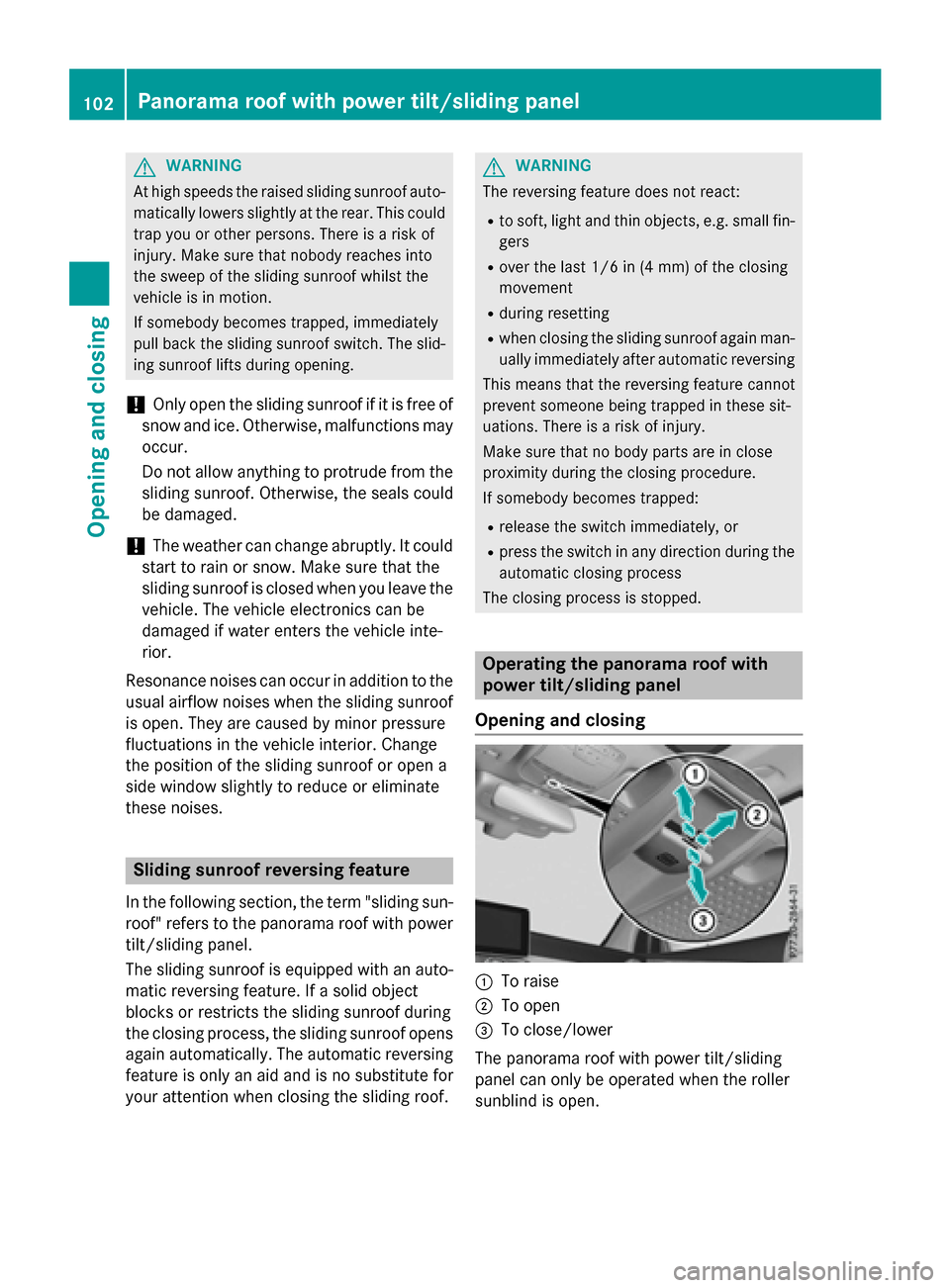
Operating the panorama roof with
power tilt/sliding panel
Opening and closing
:To raise
;To open
=To close/lower
The panorama roof with power tilt/sliding
panel can only be operated when the roller
sunblind is open.
102Panorama roof with power tilt/sliding panel
Opening and closing
Page 106 of 418

GWARNING
The reversing feature does not react in par-
ticular to soft, light and thin objects, e.g. small
fingers. This means that the reversing feature
cannot prevent someone being trapped in
these situations. There is a risk of injury.
When closing the roller sunblind, make sure
that no body parts are in the sweep area.
If somebody becomes trapped:
Rrelease the switch immediately, or
Rpress the switch in any direction during the
automatic closing process
The closing process is stopped.
Opening and closing the roller sun-
blinds
:To open
;To open
=To close
You can only close the roller sunblinds when
the panorama roof with power tilt/sliding
panel is closed.
XTurn the SmartKey to position 1or 2in the
ignition lock (
Ypage 153).
XPress the 3switch in direction :.
Both roller sunblinds open, then the pano-
rama roof with power tilt/sliding panel is
raised.
XPull the 3switch in direction ;.
The sunblinds open.
XPull the 3switch in direction =.The roller sunblinds close when the pano-
rama roof with power tilt/sliding panel is
closed.
If you press or pull the 3switch beyond
the point of resistance, automatic operation
is started in the corresponding direction. You
can stop automatic operation by pressing or
pulling again.
Resetting the panorama roof with
power tilt/sliding panel or the front
roller sunblind
Reset the panorama roof with power tilt/slid-
ing panel or the roller sunblinds if the pano-
rama roof with power tilt/sliding panel or the
front roller sunblind does not move smoothly.
XTurn the SmartKey to position 1or 2in the
ignition lock (
Ypage 153).
XPull the 3switch repeatedly to the point
of resistance in the direction of arrow :
until the panorama roof with power tilt/
sliding panel is fully closed.
XKeep the 3switch pulled for an addi-
tional second.
XPull the 3switch several times in the
direction of arrow :until the roller sun-
blinds are closed.
XKeep the 3switch pulled for an addi-
tional second.
XMake sure that the panorama roof with
power tilt/sliding panel (
Ypage 102) and
104Panorama roof with power tilt/sliding panel
Opening and closing
Page 108 of 418
Problems with the panorama roof with power tilt/sliding panel
GWARNING
If you close the sliding sunroof again immediately after it has been blocked or reset, the sliding
sunroof closes with increased or maximum force. The reversing feature is then not active. Parts
of the body could be trapped in the closing area in the process. This poses an increased risk of
injury or even fatal injury.
Make sure that no parts of the body are in the closing area.
If somebody becomes trapped:
Rrelease the switch immediately, or
Rpress the switch in any direction during the automatic closing process
The closing process is stopped.
!If the sliding sunroof still cannot be opened or closed as a result of a malfunction, contact
a qualified specialist workshop.
ProblemPossible causes/consequences and MSolutions
The panorama roof with
power tilt/sliding panel
cannot be closed and
you cannot see the
cause.If the panorama roof with power tilt/sliding panel is obstructed
during closing and reopens again slightly:
XImmediately after it blocks, pull the3switch down again to
the point of resistance until the panorama roof with power tilt/
sliding panel is closed.
The panorama roof with power tilt/sliding panel is closed with
more force.
If the panorama roof with power tilt/sliding panel is obstructed
again during closing and reopens again slightly:
XImmediately after it blocks, pull the 3switch down again to
the point of resistance until the panorama roof with power tilt/
sliding panel is closed.
The panorama roof with power tilt/sliding panel is closed with-
out the automatic reversing function.
106Panorama roof with power tilt/sliding panel
Opening and closing