2016 MERCEDES-BENZ GLA Phone set up
[x] Cancel search: Phone set upPage 16 of 390
Operation ......................................... 51
System self-test .............................. .5 3
Occupant safety
Automatic measures after an acci-
dent ................................................ .5 8
Childr en in the vehicle .................... .5 8
Important safety notes .................... 43
Introduction to the restraint sys-
tem .................................................. 42
Occupant Classification System
(OCS) ............................................... 51
PASSENGER AIR BAG indicator
lamps ............................................... 43
Pets in the vehicle ........................... 64
Restraint system warning lamp ........ 43
Seat belt .......................................... 44
OCS
Conditions ....................................... 51
Faults ............................................... 55
Operation ........................................ .5 1
System self-test ............................... 53
Odometer ........................................... 221
Off-road driving
Approach/departure angle ............ 384
Checklist after driving off-road ...... 182
Checklist before driving off-road .... 182
General information ....................... 181
Important safety notes .................. 180
Maximum gradient climbing abil-
ity .................................................. 384
Traveling uphill ............................... 183
Off-road program ............................... 199
Driving dynamics display ............... 200
Off-road system
DSR ............................................... 197
Off road drive program .................. 199
Off-road 4ETS .................................. 69
Off-road ABS .................................... 66
Off-road ESP ®
.................................. 72
On-board computer
AMG menu ..................................... 231
Assistance graphic menu ............... 227
Assistance menu ........................... 227
Audio menu ................................... 225
Convenience submenu .................. 231
Display messages .......................... 235
Displayi ng a se rvice message ........ 313
DISTRONIC
PLUS ........................... 191 Factory settings ............................. 231
Important safety notes .................. 218
Instrument cluster submenu .......... 229
Lighting submenu .......................... 230
Menu overview .............................. 221
Message memory .......................... 235
Navigation menu ............................ 223
Operation ....................................... 219
RACETIMER ................................... 232
Service menu ................................. 229
Settings menu ............................... 229
Standard display ............................ 221
Telephone menu ............................ 226
Trip menu ...................................... 221
Vehicle submenu ........................... 230
Video DVD operation ..................... 225
On-board diagnostic interface
see Diagnostics connection
Opening and closing the side trim
panels ................................................. 124
Operating safety
Declaration of conformity ................ 25
Operating system
see On-board computer
Operator's Manual
Vehicle equipment ........................... 24
Outside temperature display ........... 219
Overhead control panel ...................... 39
Override feature
Rear side windows ........................... 64
P
Paint code number ............................ 376
Paintwork (cleaning instructions) ... 315
Panic alarm .......................................... 42
Panorama roof with power tilt/
sliding panel
Important safety notes .................... 94
Operating ......................................... 95
Operating the roller sunblinds for
the sliding sunroof ........................... 96
Problem (malfunction) ..................... 99
Reversing feature ............................. 95
Parcel shelf ........................................ 286
Parking
Important safety notes .................. 171
Parking brake ................................ 17314
Index
Page 20 of 390
Stowage compartments
Armrest (front) ............................... 282
Armrest (under) ............................. 282
Center console .............................. 281
Center console (rear) ..................... 282
Cup holders ................................... 288
Eyeglasses compartment ............... 281
Glove box ....................................... 281
Important safety information ......... 281
Map pockets .................................. 283
Stowage net ................................... 283
Under driver's seat/front-
passenger seat .............................. 282
Stowage net ....................................... 283
Summer tires ..................................... 342
Sun visor ............................................ 290
Suspension
Adaptive Damping System ............. 199
Suspension setting
AMG adaptive sport suspension
system ........................................... 196
Switching air-recirculation mode
on/off ................................................. 143
T
Tachometer ........................................ 219
Tail lamps
see Lights
Tailgate
Display message ............................ 263
Emergency unlocking ....................... 89
Important safety notes .................... 85
Limiting the opening angle ............... 89
Obstruction detection ...................... 86
Opening dimensions ...................... 383
Opening/closing (from outside) ....... 87
Opening/closing automatically
from inside ....................................... 88
Opening/closing automatically
from outside .................................... 87
Tank
see Fuel tank
Tank content
Fuel gauge ....................................... 31
Technical data
Capacities ...................................... 377
Information .................................... 374 Tires/wheels ................................. 367
Vehicle data ................................... 383
TELEAID
Call priority .................................... 296
Downloading destinations
(COMAND) ..................................... 296
Downloading routes ....................... 299
Emergency call .............................. 293
General notes ................................ 292
Geo fencing ................................... 300
Locating a stolen vehicle ............... 298
MB info call button ........................ 295
Remote vehicle locking .................. 298
Roadside Assistance button .......... 294
Search & Send ............................... 297
Self-test ......................................... 293
Speed alert .................................... 300
System .......................................... 292
Triggering the vehicle alarm ........... 300
Vehicle Health Check .................... 298
Vehicle remote unlocking .............. 297
Telephone
Accepting a call (multifunction
steering wheel) .............................. 226
Display message ............................ 264
Introduction ................................... 226
Menu (on-board computer) ............ 226
Number from the phone book ........ 226
Redialing ........................................ 227
Rejecting/ending a call ................. 226
Temperature
Coolant .......................................... 219
Coolant (on-board computer,
Mercedes-AMG vehicles) ............... 231
Engine oil (on-board computer,
Mercedes-AMG vehicles) ............... 231
Outside temperature ...................... 219
Setting ( climate control) ................ 139
T
ransmission oil (on-board com-
puter, Mercedes-AMG vehicles) ..... 231
Through-loading feature ................... 283
Timing (RACETIMER) ......................... 232
Tire pressure
Calling up (on-board computer) ..... 348
Checking manually ........................ 347
Display message ............................ 258
Maximum ....................................... 346
Not reached (TIREFIT) .................... 32618
Index
Page 78 of 390
Useful information
i This Operator's Manual describes all
models and all standard and optional equip-
ment of your vehicle available at the time of
publication of the Operator's Manual.
Country-specific differences are possible.
Please note that your vehicle may not be
equipped with all features described. This
also applies to safety-related systems and
functions.
i Read the information on qualified special-
ist workshops ( Y
page 25).
SmartKey
Important safety notes
G WARNING
If children are left unsupervised in the vehicle,
they could: R
open the doors, thus endangering other
people or road users. R
get out and disrupt traffic. R
operate the vehicle's equipment.
Additionally, children could set the vehicle in
motion if, for example, they: R
release the parking brake. R
shifting the automatic transmission out of
park position PR
Start the engine.
There is a risk of an accident and injury.
When leaving the vehicle, always take the
SmartKey with you and lock the vehicle. Never
leave children or animals unattended in the
vehicle. Always keep the SmartKey out of
reach of children.
G WARNING
If you attach heavy or large objects to the
SmartKey, the SmartKey could be uninten-
tionally turned in the ignition lock. This could
cause the engine to be switched off. There is a
risk of an accident. Do not attach any heavy or large objects to the
SmartKey. Remove any bulky key rings before
inserting the SmartKey into the ignition lock.
! Keep the SmartKey away from strong
magnetic fields. Otherwise, the remote
control function could be affected.
Strong magnetic fields can occur in the
vicinity of powerful electrical installations.
Do not keep the SmartKey: R
with electronic devices, e.g. a mobile
phone or another SmartKey. R
with metallic objects, e.g. coins or metal
foil. R
inside metallic objects, e.g. a metal case.
Vehicles with KEYLESS-GO start function:
do not keep the SmartKey in the cargo com-
partment. Otherwise, the SmartKey may not
be detected, e.g. when starting the engine
using the Start/Stop button.
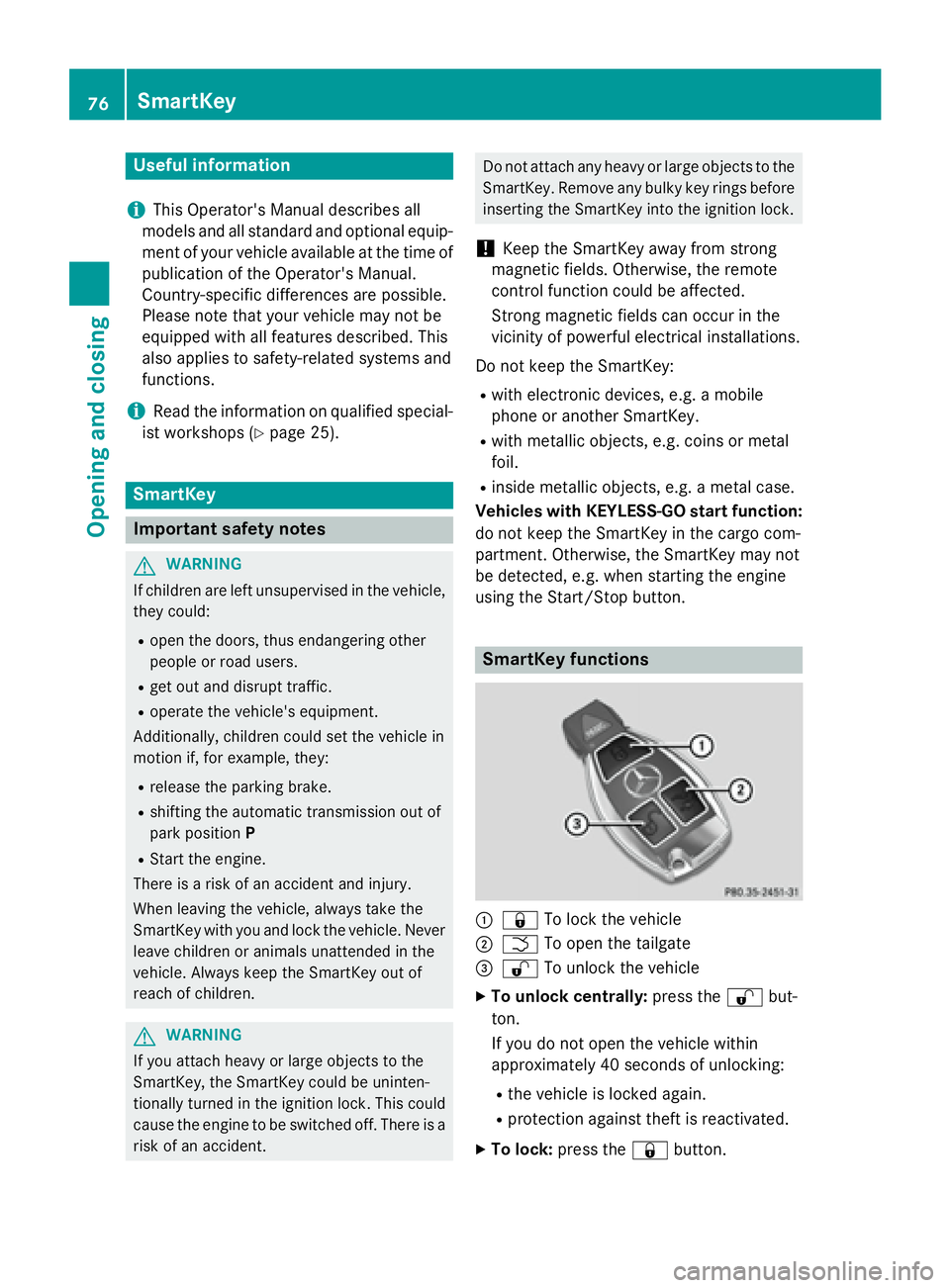
SmartKey functions
C
7 To lock the vehicleD
T To open the tailgate
Page 134 of 390
Useful information
i This Operator's Manual describes all
models and all standard and optional equip-
ment of your vehicle available at the time of
publication of the Operator's Manual.
Country-specific differences are possible.
Please note that your vehicle may not be
equipped with all features described. This
also applies to safety-related systems and
functions.
i Read the information on qualified special-
ist workshops ( Y
page 25).
Overview of climate control systems
General notesObserve the settings recommended on the
following pages. The windows could other-
wise fog up.
To prevent the windows from fogging up: R
switch off climate control only briefly R
switch on air-recirculation mode only
briefly R
switch on the cooling with air dehumidifi-
cation function R
switch on the defrost windshield function
briefly, if required
The air-conditioning system/dual-zone auto-
matic climate control regulates the tempera-
ture and the humidity of the vehicle interior
and filters out undesirable substances from
the air.
The air-conditioning system/dual-zone auto-
matic climate control can only be operated
when the engine is running. Optimum opera-
tion is only achieved with the side windows
and panorama roof with power tilt/sliding
panel closed.
If you start the engine using your smartphone,
the last selected climate control setting is
reactivated ( Y
page 171). The residual heat function can only be acti-
vated or deactivated with the ignition
switched off ( Y
page 143).
Always keep the ventilation flaps behind the
side trim panel in the cargo compartment
clear ( Y
page 124). Otherwise the vehicle will
not be ventilated correctly.
i Ventilate the vehicle for a brief period
during warm weather, e.g. using the con-
venience opening feature ( Y
page 91). This
will speed up the cooling process and the
desired interior temperature will be
reached more quickly.
i The integrated filter filters out most par-
ticles of dust and soot and completely fil-
ters out pollen. It also reduces gaseous pol-
lutants and odors. A clogged filter reduces
the amount of air supplied to the vehicle
interior. For this reason, you should always
observe the interval for replacing the filter,
which is specified in the Maintenance
Booklet. As it depends on environmental
conditions, e.g. heavy air pollution, the
interval may be shorter than stated in t he
Main tenance Booklet.
i It is possible that under certain circum-
stances the residual heat function may be
activated automatically an hour after the
SmartKey has been removed in order to dry
the automatic climate control. The vehicle
is then ventilated for 30 minutes.132
Overview of climate control systems
Climate control
Page 154 of 390
Starting procedure with the Start/Stop
button The Start/Stop button can be used to start
the vehicle manually without inserting the
SmartKey into the ignition lock. The Start/
Stop button must be inserted in the ignition
lock and the SmartKey must be in the vehicle.
This mode for starting the engine operates
independently of the ECO start/stop auto-
matic engine start function.
You can start the engine if a valid SmartKey is
in the vehicle. Switch off the engine and
always take the SmartKey with you when
leaving the vehicle, even if you only leave it for
a short time. Pay attention to the important
safety notes. X
Depress the brake pedal and keep it
depressed. X
Press the Start/Stop button once
( Y
page 149).
The engine starts.
Starting procedure via smartphone
Observe the important safety notes on start-
ing the engine ( Y
page 151).
You can also start your engine via your smart-
phone from outside the vehicle. In this case,
the previously selected climate control set-
ting is activated. In this way you can cool or
heat the interior of the vehicle before starting
the journey.
Only start the engine via your smartphone if it
is safe to start and run the engine where your
vehicle is parked.
Observe the legal stipulations in the area
where your vehicle is parked. Engine start via
smartphone may be limited to certain coun-
tries or regions.
You can execute a maximum of two consec-
utive starting attempts via your smartphone.
If you insert the key into the ignition lock, you
can carry out two more starting attempts.
Once you have started the engine, you can
switch the engine off via your smartphone at
any time. You can only start the engine via your smart-
phone if: R
the key is in the ignition lock R
park position P is selected R
the accelerator pedal is not depressed R
the anti-theft alarm system is not activated R
the panic alarm is not activated R
the hazard warning lamps are switched off R
the hood is closed. R
the doors are closed and locked R
the windows and sliding sunroof are closed
Also make sure that: R
the fuel tank is sufficiently filled R
the starter battery is sufficiently charged
G WARNING
Limbs could be crushed or trapped if the
engine is started unintentionally during ser-
vice or maintenance work. There is a risk of
injury.
Always secure the engine against uninten-
tional starting before carrying out mainte-
nance or repair work.
Make sure that the engine cannot be started
via your smartphone before carrying out
maintenance or repairs. You can prevent an
engine start via your smartphone, for exam-
ple, if you: R
switch on the hazard warning lamps R
do not lock the doors R
open the hood.
Pulling away
General notes
G WARNING
If the engine speed is above the idling speed
and you engage transmission position D or R ,
the vehicle could pull away suddenly. There is
a risk of an accident.152
Driving
Driving and parking
Page 177 of 390
with limitations, or not at all. This could affect,
for example, the power steering and the brake
boosting effect. You will require considerably
more effort to steer and brake. There is a risk
of an accident.
Do not switch off the ignition while driving.
G WARNING
If you operate mobile communication equip-
ment while driving, you will be distracted from
traffic conditions. You could also lose control
of the vehicle. There is a risk of an accident.
Only operate this equipment when the vehicle
is stationary.
Observe the legal requirements for the coun-
try in which you are driving. Some jurisdic-
tions prohibit the driver from using a mobile
phone while driving a vehicle.
If you make a call while driving, always use
hands-free mode. Only operate the telephone
when the traffic situation permits. If you are
unsure, pull over to a safe location and stop
before operating the telephone.
Bear in mind that at a speed of only 30 mph
(approximately 50 km/h), the vehicle covers
a distance of 44 ft (approximately 14 m) per
second.
Drive sensibly – save fuel
Observe the following tips to save fuel: R
The tires should always be inflated to the
recommended tire pressure. R
Remove unnecessary loads. R
Remove roof racks when they are not nee-
ded. R
Warm up the engine at low engine speeds. R
Avoid frequent acceleration or braking. R
Have all maintenance work carried out as
indicated by the service intervals in the
Maintenance Booklet or by the service
interval display.
Fuel consumption also increases when driv-
ing in cold weather, in stop-start traffic and in
hilly terrain. Drinking and driving
G WARNING
Drinking and driving and/or taking drugs and
driving are very dangerous combinations.
Even a small amount of alcohol or drugs can
affect your reflexes, perceptions and judg-
ment.
The possibility of a serious or even fatal acci-
dent is greatly increased when you drink or
take drugs and drive.
Do not drink or take drugs and drive or allow
anyone to drive who has been drinking or tak-
ing drugs.
Emission control
G WARNING
Combustion engines emit poisonous exhaust
gases such as carbon monoxide. Inhaling
these exhaust gases leads to poisoning. There
is a risk of fatal injury. Therefore never leave
the engine running in enclosed spaces with-
out sufficient ventilation.
Certain engine systems are designed to keep
the level of poisonous components in exhaust
fumes within legal limits.
These systems only work at peak efficiency if
they are serviced exactly in accordance with
the manufacturer's specifications. Always
have work on the engine carried out at a
qualified specialist workshop. Mercedes-
Benz recommends that you use an authorized
Mercedes-Benz Center for this purpose. In
particular, work relevant to safety or on
safety-related systems must be carried out at
a qualified specialist workshop.
The engine settings must not be changed
under any circumstances. Furthermore, all
specific service work must be carried out at
regular intervals and in accordance with the
Mercedes-Benz service requirements. Details
can be found in the Maintenance Booklet. Driving tips 175
Driving and parking Z
Page 222 of 390
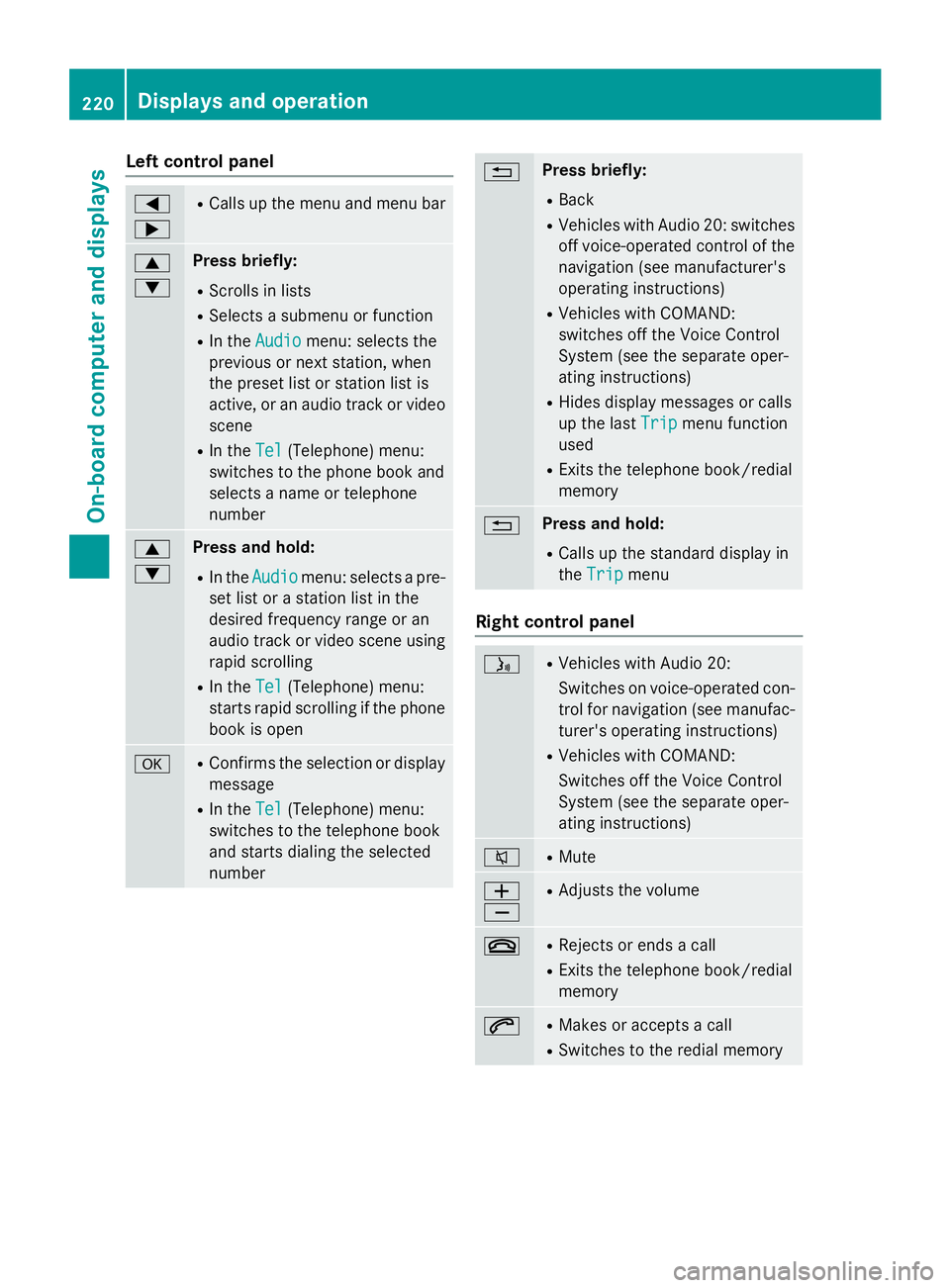
Left control panel Y
e R
Calls up the menu and menu bar
c
d Press briefly: R
Scrolls in lists R
Selects a submenu or function R
In the Audio menu: selects the
previous or next station, when
the preset list or station list is
active, or an audio track or video
scene R
In the Tel (Telephone) menu:
switches to the phone book and
selects a name or telephone
number
c
d Press and hold: R
In the Audio menu: selects a pre-
set list or a station list in the
desired frequency range or an
audio track or video scene using
rapid scrolling R
In the Tel (Telephone) menu:
starts rapid scrolling if the phone
book is open
v R
Confirms the selection or display
message R
In the Tel (Telephone) menu:
switches to the telephone book
and starts dialing the selected
number 8 Press briefly: R
Back R
Vehicles with Audio 20: switches
off voice-operated control of the
navigation (see manufacturer's
operating instructions) R
Vehicles with COMAND:
switches off the Voice Control
System (see the separate oper-
ating instructions) R
Hides display messages or calls
up the last Trip
menu function
used R
Exits the telephone book/redial
memory
8 Press and hold: R
Calls up the standard display in
the Trip
menu
Right control panel
Page 302 of 390
Speed alert You can define the upper speed limit, which
must not be exceeded by the vehicle.
If this selected speed is exceeded by the vehi-
cle, a message will be sent to the Customer
Assistance Center. The Customer Assistance
Center then forwards this information to you.
You can select the way in which you receive
this information beforehand. Possible options
include text message, e-mail or an automated
call.
The data you receive contains the following
information: R
the location where the speed limit was
exceeded R
the time at which the speed limit was
exceeded R
the selected speed limit which was excee-
ded
Geo fencing
Geo fencing allows you to select areas which
the vehicle should not enter or leave. You will
be informed if the vehicle crosses the boun-
daries of the selected areas. You can select
the way in which you receive this information
beforehand. Possible options include text
message, e-mail or an automated call.
The area can be determined as either a circle
or a polygon with a maximum of ten corners.
You can specify up to ten areas simultane-
ously. Different settings are possible for each
area.
USA only: these settings can be called up
under "Owners Online" at http://
www.mbusa.com.
Alternatively, you can trigger an MB Info call
and inform the customer service representa-
tive that you wish to activate geo fencing.
Currently inactive areas can be activated by
text message. Triggering the vehicle alarm With this function, you can trigger the vehi-
cle's panic alarm via text message. An alarm
sounds and the exterior lighting flashes.
Depending on the setting, the panic alarm
lasts five or ten seconds. Afterwards, the
alarm switches off.
Garage door opener
General notes The HomeLink ®
garage door opener integra-
ted in the rear-view mirror allows you to oper-
ate up to three different door and gate sys-
tems.
Use the integrated garage door opener only
on garage doors that: R
have safety stop and reverse features and R
meet current U.S. federal safety standards
Once programed, the integrated garage door
opener in the rear-view mirror will assume the
function of the garage door system's remote
control. Please also read the operating
instructions for the garage door system.
When programming a garage door opener,
park the vehicle outside the garage. Do not
run the engine while programming.
Certain garage door drives are incompatible
with the integrated garage door opener. If you
have difficulty programing the integrated
garage door opener, contact an authorized
Mercedes-Benz Center.
Alternatively, you can call the following tele-
phone assistance services: R
USA: Mercedes-Benz Customer Assistance
Center at 1-800-FOR-MERCedes R
Canada: Customer Service at
1-800-387-0100 R
HomeLink ®
hotline 1-800-355-3515 (free
of charge)
More information on HomeLink ®
and/or
compatible products is also available online
at http://www.homelink.com.300
Features
Stowage and features