2016 MERCEDES-BENZ GLA-Class distronic
[x] Cancel search: distronicPage 195 of 390

detected vehicle turns a corner and reveals
an obstacle or stationary vehicle, DISTRONIC
PLUS will not brake for these.
Crossing vehicles
DISTRONIC PLUS may detect vehicles that
are crossing your lane by mistake. Activating
DISTRONIC PLUS at traffic lights with cross-
ing traffic, for example, could cause your vehi-
cle to pull away unintentionally.
HOLD function
General notes
The HOLD function can assist the driver in the
following situations:
Rwhen pulling away, especially on steep
slopes
Rwhen maneuvering on steep slopes
Rwhen waiting in traffic
The vehicle is kept stationary without the
driver having to depress the brake pedal.
The braking effect is canceled and the HOLD
function deactivated when you depress the
accelerator pedal to pull away.
Important safety notes
GWARNING
When leaving the vehicle, it can still roll away despite being braked by the HOLD function if:
Rthere is a malfunction in the system or in
the voltage supply.
Rthe HOLD function has been deactivated by
pressing the accelerator pedal or the brake
pedal, e.g. by a vehicle occupant.
Rthe electrical system in the engine com-
partment, the battery or the fuses have
been tampered with.
Rthe battery is disconnected
There is a risk of an accident.
If you wish to exit the vehicle, always turn off the HOLD function and secure the vehicle
against rolling away.
!If DISTRONIC PLUS or the HOLD function
is activated, the vehicle brakes automati-
cally in certain situations.
To prevent damage to the vehicle, deacti-
vate DISTRONIC PLUS and the HOLD func-
tion in the following or other similar situa-
tions:
Rwhen towing the vehicle
Rin the car wash
Deactivating the HOLD function
(
Ypage 194).
Activation conditions
You can activate the HOLD function if:
Rthe vehicle is stationary
Rthe engine is running or if it has been auto-
matically switched off by the ECO start/
stop function
Rthe driver's door is closed or your seat belt
is fastened
Rthe electric parking brake is released
RDISTRONIC PLUS is deactivated
Rthe transmission is in position D,Ror Non
vehicles with automatic transmission
Driving systems193
Driving and parking
Z
Page 220 of 390

Useful information
i
This Operator's Manual describes all
models and all standard and optional equip-
ment of your vehicle available at the time of
publication of the Operator's Manual.
Country-specific differences are possible.
Please note that your vehicle may not be
equipped with all features described. This
also applies to safety-related systems and
functions.
iRead the information on qualified special-
ist workshops (
Ypage 25).
Important safety notes
GWARNING
If you operate information systems and com-
munication equipment integrated in the vehi-
cle while driving, you will be distracted from
traffic conditions. You could also lose control
of the vehicle. There is a risk of an accident.
Only operate the equipment when the traffic
situation permits. If you are not sure that this
is possible, park the vehicle paying attention
to traffic conditions and operate the equip-
ment when the vehicle is stationary.
You must observe the legal requirements for
the country in which you are currently driving
when operating the on-board computer.
GWARNING
If the instrument cluster has failed or mal-
functioned, you may not recognize function
restrictions in systems relevant to safety. The
operating safety of your vehicle may be
impaired. There is a risk of an accident.
Drive on carefully. Have the vehicle checked
at a qualified specialist workshop immedi-
ately.
The on-board computer only shows messages
or warnings from certain systems in the mul-
tifunction display. You should therefore make sure your vehicle is operating safely at all
times.
If the operating safety of your vehicle is
impaired, pull over as soon as it is safe to do
so. Contact a qualified specialist workshop.
For an overview, see the instrument panel
illustration (
Ypage 31).
Displays and operation
Instrument cluster lighting
The light sensor in the instrument cluster
automatically controls the brightness of the
multifunction display. In daylight, the displays
in the instrument cluster are not illuminated.
The lighting in the instrument cluster, in the
displays and the controls in the vehicle inte-
rior can be adjusted using the brightness con-
trol knob.
The brightness control knob is located on the
bottom left of the instrument cluster
(
Ypage 31).
XTurn the brightness control knob clockwise
or counter-clockwise.
If the light switch is set to the
Ã,Tor
L position, the brightness is dependent
upon the brightness of the ambient light.
Speedometer with segments
The speedometer is divided into segments
only on vehicles with DISTRONIC PLUS.
The segments in the speedometer indicate
which speed range is available.
RDISTRONIC PLUS activated (Ypage 186):
One or two segments in the set speed
range light up.
RDISTRONIC PLUS detects a vehicle in front
that is driving at a slower speed than the
stored speed:
The segments between the speed of the
vehicle in front and the stored speed light
up.
218Displays and operation
On-board computer and displays
Page 229 of 390
Redialing
The on-board computer saves the last namesor numbers dialed in the redial memory.
XPress the =or; button on the steer-
ing wheel to select the Tel
menu.
XPress the6button to switch to the
redial memory.
XPress the 9or: button to select the
desired name or number.
XPress the 6ora button to start dial-
ing.
or
XIf you do not want to make a call: press
the ~ or% button.
Assistance menu
Introduction
Depending on the equipment installed in the
vehicle, you have the following options in the
DriveAssist
menu:
RDisplaying the assistance graphic
(
Ypage 227)
RActivating/deactivating ESP®(except
Mercedes-AMG vehicles) (
Ypage 227)
RActivating/deactivating COLLISION PRE-
VENTION ASSIST PLUS (
Ypage 228)
RActivating/deactivating ATTENTION
ASSIST (
Ypage 228)
RActivating/deactivating Blind Spot Assist
(
Ypage 228)
RActivating/deactivating Lane Keeping
Assist (
Ypage 228)
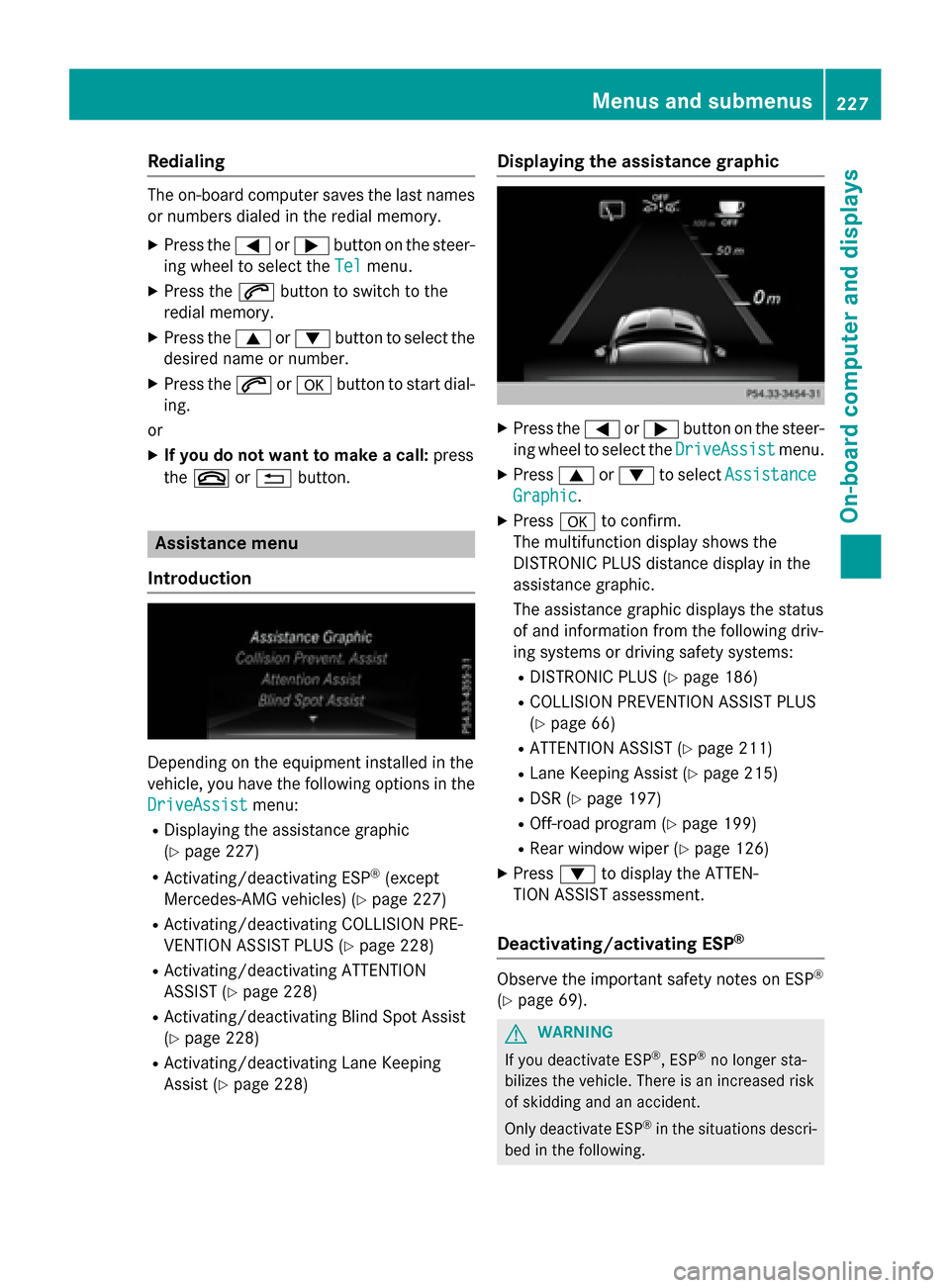
Displaying the assistance graphic
XPress the =or; button on the steer-
ing wheel to select the DriveAssist
menu.
XPress9or: to select Assistance
Graphic.
XPressato confirm.
The multifunction display shows the
DISTRONIC PLUS distance display in the
assistance graphic.
The assistance graphic displays the status
of and information from the following driv-
ing systems or driving safety systems:
RDISTRONIC PLUS (Ypage 186)
RCOLLISION PREVENTION ASSIST PLUS
(
Ypage 66)
RATTENTION ASSIST (Ypage 211)
RLane Keeping Assist (Ypage 215)
RDSR (Ypage 197)
ROff-road program (Ypage 199)
RRear window wiper (Ypage 126)
XPress :to display the ATTEN-
TION ASSIST assessment.
Deactivating/activating ESP®
Observe the important safety notes on ESP®
(Ypage 69).
GWARNING
If you deactivate ESP
®, ESP®no longer sta-
bilizes the vehicle. There is an increased risk
of skidding and an accident.
Only deactivate ESP
®in the situations descri-
bed in the following.
Menus and submenus227
On-board computer and displays
Z
Page 231 of 390

XPressaagain to confirm.
XPress the :or9 button to set Off,
Standard
or Adaptive.
XPress the abutton to save the setting.
When Lane Keeping Assist is activated, the
multifunction display shows the lane mark-
ings as bright lines in the assistance
graphic.
For further information about Lane Keeping
Assist, see (
Ypage 215).
Service menu
Depending on the equipment installed in the
vehicle, you have the following options in the
Serv.
menu:
RCalling up display messages in message
memory (
Ypage 235)
RRestarting the tire pressure loss warning
system (Canada only) (
Ypage 347)
RChecking the tire pressure electronically
(USA only) (
Ypage 348)
RCalling up the service due date
(
Ypage 313)
Settings menu
Introduction
Depending on the equipment installed in the
vehicle, in the Sett.
menu you have the fol-
lowing options:
RChanging the instrument cluster settings
RChanging the light settings
RChanging the vehicle settings
RChanging the convenience settings
RRestoring the factory settings
Instrument cluster
Selecting the distance unit
The Display Unit Speed-/Odometer:
function allows you to choose whether cer-
tain displays appear in kilometers or miles in
the multifunction display.
XPress the =or; button on the steer-
ing wheel to select the Sett.
menu.
XPress the:or9 button to select the
Instrument Cluster
submenu.
XPress ato confirm.
XPress the :or9 button to select the
Display Unit Speed-/Odometer
func-
tion.
You will see the selected setting: km
or
miles
.
XPress the abutton to save the setting.
The selected unit of measurement for dis-
tance applies to:
Rdigital speedometer in the Tripmenu
ROdometer and the trip odometer
RTrip computer
Rcurrent fuel consumption and approximate
range
RNavigation instructions in the Navimenu
RCruise Control
RDISTRONIC PLUS
RASSYST PLUS service interval display
Switching the additional speedometer
on/off
If the additional speedometer is switched on, the speed is shown in the status area of the
Menus and submenus229
On-board computer and displays
Z
Page 245 of 390

Display messagesPossible causes/consequences andMSolutions
Collision Preven‐
tionAssist Plu s
Inoperative
COLLISION PREVENTION ASSIST PLU Sis temporarily inoperative
due to amalfunction .Adaptive Brake Assis tmay also hav efailed.
XVisit aqualified specialist workshop immediately.
Radar Sensor s
Dirty See Opera‐
tor's Manual
At leaston eof th efollowing drivin gsystems or drivin gsafet ysys-
tems is temporarily restricted or inoperative:
RCOLLISION PREVENTION ASSIST PLU S
RDISTRONIC PLUS
Possibl ecauses are:
Rth esensor sin th eradiato rtrim and/o rin th ebumpers are dirty
Rth efunction of th edrivin gsystem and/o rdrivin gsafet ysystem
is impaire ddue to heav yrain or snow.
A warnin gtone also sounds.
Whe nth ecauses state dabov eno longer apply, th edisplay mes -
sage disappears. Al ldrivin gsystems and drivin gsafet ysystems
are operative again .
If th edisplay message does no tdisappear :
XPull overand stop th evehicl esafely as soo nas possible, payin g
attention to roa dand traffic conditions.
XSecur eth evehicl eagainst rollin gaway (Ypage 171).
XSwitchof fth eengine.
XClean th esensor sin th efollowing location s (Ypage 317):
Rin theradiato rtrim
Rin th efron tbumper
Rin th erear bumper, particularl yin th emiddle of th erear
bumper
XRestart th eengine.
The display message disappears.
6
SRS Malfunction
Servic eRequired
The restrain tsystem is faulty. The 6warnin glamp also lights
up in th einstrumen tcluster.
GWARNIN G
The air bags or Emergency Tensioning Devices may either be trig-
gered unintentionally or, in th eevent of an accident, may no tbe
triggered .
There is an increase dris kof injury.
XVisit aqualified specialist workshop immediately.
Fo rfurther information about th erestrain tsystem, see
(
Ypage 42) .
Display messages243
On-board computer and displays
Z
Page 257 of 390

Display messagesPossible causes/consequences andMSolutions
ParkAssist Can ‐
celed
The driver's doo ris open and th edriver's seat belt has no tbeen
fastened.
XRepea tth eparkin gprocess wit hth eseat belt fastene dand th e
driver's doo rclosed .
You hav einadvertentl ytouched th emultifunction steerin gwhee l
while steerin gintervention was active .
XWhilesteerin gintervention is active ,mak esur ethat th emulti-
function steerin gwhee lis no ttouched unintentionally.
The vehicl ehas started to skid and ES P®has intervened.
XUse Active Parking Assistagain later (Ypage 203).
ParkAssistInoper ‐
ative
You hav ejus tcarrie dout alarg enumber of turning or parkin g
maneuvers .
Active Parking Assis twill become available again after approx -
imately te nminute s (
Ypage 203).
XPull ove rand stop th evehicl esafely as soo nas possible, payin g
attention to roa dand traffic conditions.
XSwitc hof fand restar tth eengine.
If th emultifunction display still shows th edisplay message :
XVisitaqualified specialist workshop .
PARKTRONICis defective.
XVisit aqualified specialist workshop .
ParkAssist Fin ‐
ished
The vehicleis parked. Awarnin gtone also sounds.
The display message disappear sautomatically.
DISTRONIC PLU SOffDISTRONIC PLU Shas been deactivated (Ypage 186).
If it was no tdeactivated by th edriver , awarnin gtone also sounds.
DISTRONICPLU SNow
Available
DISTRONIC PLU Sis operational again after havin gbeen tempo -
rarily unavailable .You can no wreactivat eDISTRONIC PLU S
(
Ypage 186).
Display messages25 5
On-board computer and displays
Z
Page 258 of 390
Display messagesPossible causes/consequences andMSolutions
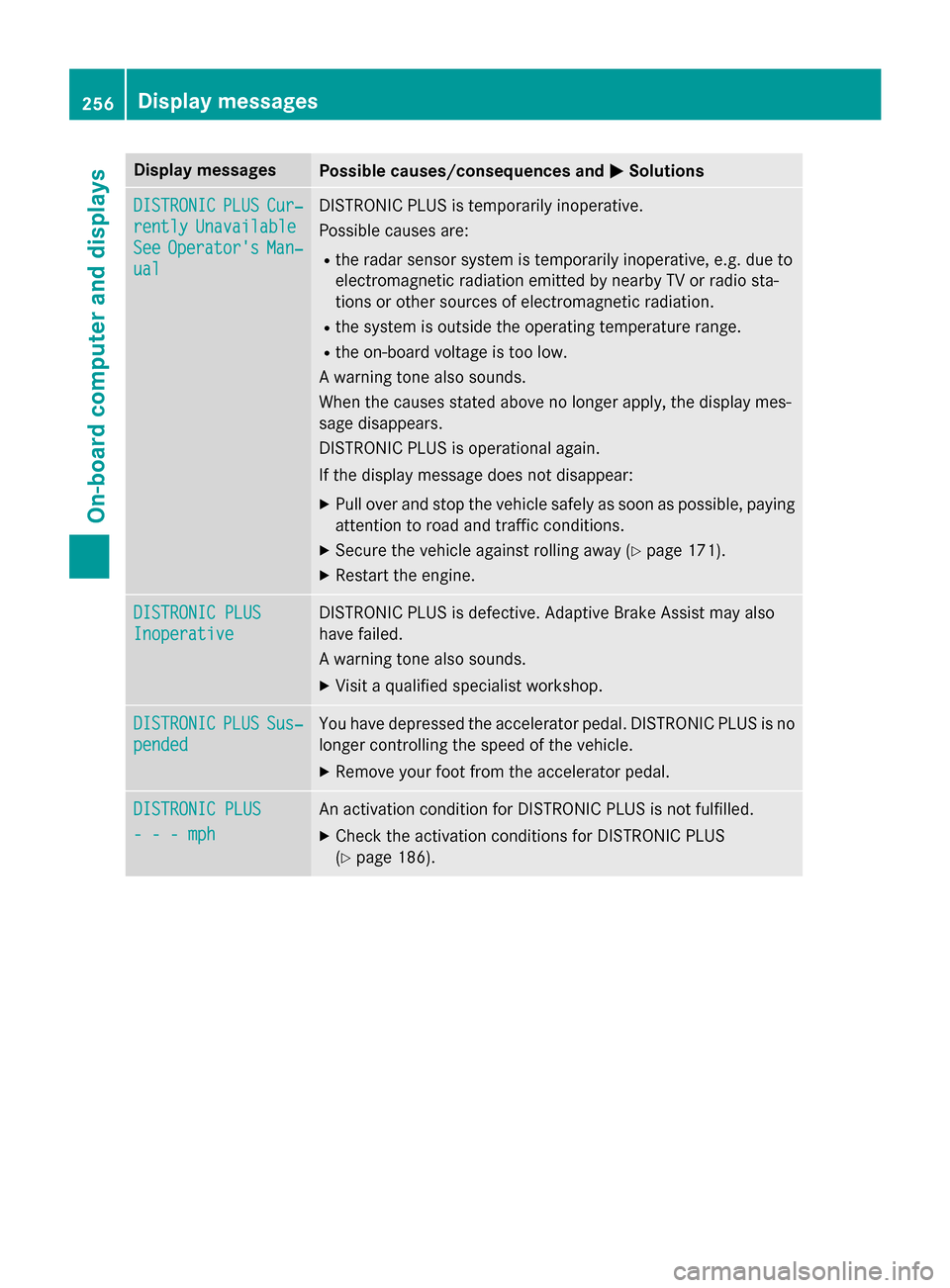
DISTRONICPLUSCur‐
rentlyUnavailable
SeeOperator' sMan‐
ual
DISTRONIC PLU Sis temporarily inoperative.
Possibl ecauses are:
Rth erada rsensor system is temporarily inoperative, e.g. due to
electromagnetic radiation emitted by nearby TV or radi osta-
tion sor other source sof electromagnetic radiation .
Rthesystem is outside th eoperating temperature range.
Rth eon-boar dvoltag eis to olow.
A warnin gtone also sounds.
Whe nth ecauses state dabov eno longer apply, th edisplay mes -
sage disappears.
DISTRONIC PLU Sis operational again .
If th edisplay message does no tdisappear :
XPull overand stop th evehicl esafely as soo nas possible, payin g
attention to roa dand traffic conditions.
XSecur eth evehicl eagainst rollin gaway (Ypage 171).
XRestart th eengine.
DISTRONIC PLU S
Inoperative
DISTRONIC PLUSis defective. Adaptive Brake Assis tmay also
hav efailed.
A warnin gtone also sounds.
XVisit aqualified specialist workshop .
DISTRONICPLUSSus‐
pended
You hav edepressed th eaccelerato rpedal .DISTRONIC PLU Sis no
longer controllin gth espeed of th evehicle.
XRemove your foot from th eaccelerato rpedal .
DISTRONIC PLU S
- - -mph
An activation condition fo rDISTRONIC PLU Sis no tfulfilled .
XCheckth eactivation condition sfo rDISTRONIC PLU S
(
Ypage 186).
256Display messages
On-board computer and displays
Page 274 of 390
ProblemPossible causes/consequences andMSolutions
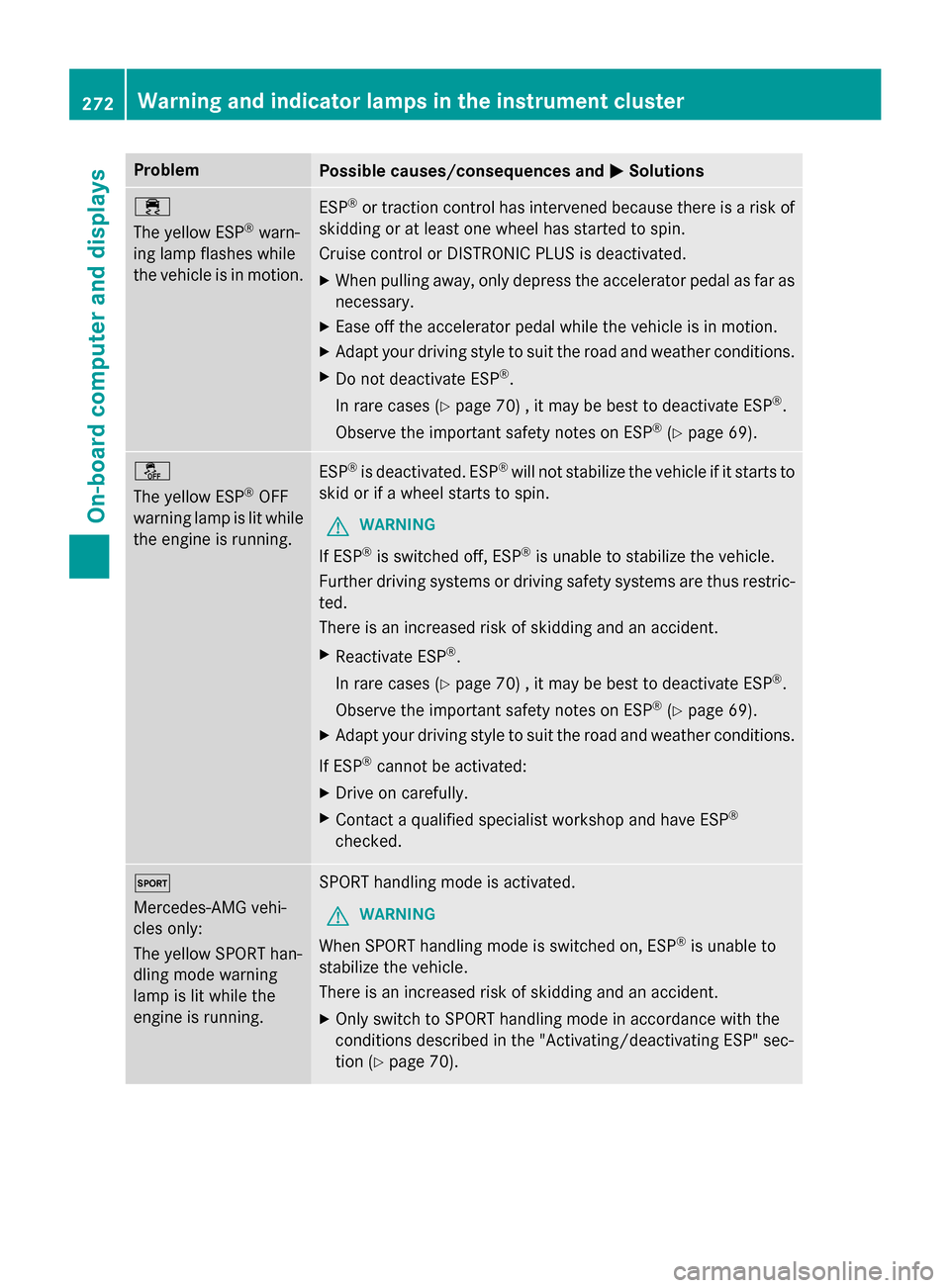
÷
The yellow ESP
®warn-
ing lamp flashes while
the vehicle is in motion.
ESP®or traction control has intervened because there is a risk of
skidding or at least one wheel has started to spin.
Cruise control or DISTRONIC PLUS is deactivated.
XWhen pulling away, only depress the accelerator pedal as far as
necessary.
XEase off the accelerator pedal while the vehicle is in motion.
XAdapt your driving style to suit the road and weather conditions.
XDo not deactivate ESP®.
In rare cases (
Ypage 70) , it may be best to deactivate ESP®.
Observe the important safety notes on ESP
®(Ypage 69).
å
The yellow ESP
®OFF
warning lamp is lit while
the engine is running.
ESP®is deactivated. ESP®will not stabilize the vehicle if it starts to
skid or if a wheel starts to spin.
GWARNING
If ESP®is switched off, ESP®is unable to stabilize the vehicle.
Further driving systems or driving safety systems are thus restric-
ted.
There is an increased risk of skidding and an accident.
XReactivate ESP®.
In rare cases (
Ypage 70) , it may be best to deactivate ESP®.
Observe the important safety notes on ESP
®(Ypage 69).
XAdapt your driving style to suit the road and weather conditions.
If ESP
®cannot be activated:
XDrive on carefully.
XContact a qualified specialist workshop and have ESP®
checked.
M
Mercedes-AMG vehi-
cles only:
The yellow SPORT han-
dling mode warning
lamp is lit while the
engine is running.SPORT handling mode is activated.
GWARNING
When SPORT handling mode is switched on, ESP®is unable to
stabilize the vehicle.
There is an increased risk of skidding and an accident.
XOnly switch to SPORT handling mode in accordance with the
conditions described in the "Activating/deactivating ESP" sec-
tion (
Ypage 70).
272Warning and indicator lamps in the instrument cluster
On-board computer and displays