2016 MERCEDES-BENZ GL tailgate
[x] Cancel search: tailgatePage 269 of 462
so will result in a loss of function of the
brake systems of both the vehicle and the
trailer. X
Shift the transmission to position P .X
Apply the vehicle's electric parking brake. X
Start the engine. X
Vehicles with the AIRMATIC package:
select highway level. X
Vehicles with ADS: set ADS to AUTO or
COMF .X
Switch off the engine. X
Close the doors and tailgate. X
Couple up the trailer. X
Establish the electrical connection
between the vehicle and the trailer. X
Check that the trailer lighting system is
working.
i Vehicles with the AIRMATIC package:
with a trailer attached, the vehicle will
always remain at highway level. When cou-
pling up a trailer, please observe the fol-
lowing: R
Unless highway level has been set man-
ually, the vehicle is automatically low-
ered to highway level. This is the case if a
speed of 5 mph (8 km/h) is reached. R
High-speed level is not available.
These restrictions apply to all accessories
powered through a connection to the trailer
power socket of your vehicle, e.g. a bicycle
carrier.
Observe the maximum permissible trailer
dimensions (width and length).
Most U.S. states and all Canadian provinces
require by law: R
Safety chains between the towing vehicle
and the trailer. The chains should be cross-
wound under the trailer drawbar. They must
be fastened to the vehicle's trailer cou-
pling, not to the bumper or the axle. Leave enough play in the chains to make
tight cornering possible. R
A separate brake system for certain types
of trailer. R
Safety switch for braked trailers. Check the
specific legal requirements applicable to
your state.
If the trailer becomes detached from the
towing vehicle, the safety switch applies
the trailer brakes.
Towing a trailer There are numerous legal requirements con-
cerning the towing of a trailer, e.g. speed
restrictions. Make sure that your car/trailer
combination complies with the local regula-
tions: R
in your place of residence R
in the location to which you are driving
The police and local authorities can provide
reliable information.
Observe the following when towing a trailer: R
To gain driving experience and to become
accustomed to the new handling charac-
teristics, you should practice the following
in a traffic-free location: -
cornering -
stopping -
backing up R
Before driving, check: -
trailer tow hitch -
safety switch for braked trailers -
safety chains -
electrical connections -
lights -
wheels R
Adjust the exterior mirrors to provide an
unobstructed view of the rear section of the
trailer. R
If the trailer has electronically controlled
brakes, pull away carefully. Brake manually Towing a trailer 267
Driving and parking Z
Page 270 of 462
using the brake controller and check
whether the brakes function correctly. R
Se cure any objects on the trailer to prevent
the cargo from slipping when the vehicle is
in motion. R
When you couple up a trailer, check at reg-
ular intervals that the load is firmly secured.
If the trailer is equipped with trailer lights
and brakes, check the trailer to ensure that
these are working. R
Bear in mind that the han dlin g will be less
st able when towing a trailer than when driv-
ing wit hout one. Avoid sudden steering
movements. R
The vehicle/trailer combination is heavier,
accelerates more slowly, has a decreased
gradient cli mbin g capability and a longer
braking dist ance.
It is more susceptible to side winds and
requires more careful steering. R
If poss ible, do not brake suddenly, but
instead depr ess the brake pedal moder-
ate ly at first so that the trailer can activate
it s brakes. Then increase the pressure on
the brake pedal. R
If the automat ic transmission repeat edly
shifts between gears on uphill or down hill
gradients, shift to a lower gear using the
left-hand steering wheel paddle shifter.
A lower gear and lower speed reduce the
risk of engine failure. R
When driv ing down hill, shift to a lower gear
to uti liz e the engine's braking effect.
Avoid continuous brake application as this
m ay
overheat the vehicle brakes and, if
instal led, the trailer brakes.R
If the coolant temperature increases dra-
matical ly while the air-cond it ioning system
is swit ched on, switch off the air-condition-
ing system.
Coolant heat can also be dissipated by
opening the win dows and switching the ventilation blowe r and the interior temper-
ature to the highest leve l.R
When overtaking, pay particular attention
to the extended length of your vehicle/
trailer combination.
Due to the length of the vehicle/trailer
combination, you require additional road
space in relation to the vehicle you are
overtaking before you can change back to
the original lane.
Decoupling a trailer
G WARNIN G
If you uncouple a trailer wit h th e overrun
brak e engaged , you could trap your han d
between th e vehicl e and th e trailer drawbar.
Ther e is a ris k of injury.
Do no t uncouple a trailer if th e overrun brak e
is engaged .
G WARNIN G
Vehicles wit h leve l control :
The vehicl e is lowered as soo n as you discon -
nect th e trailer cable. This could result in your
limb s or those of other people that are
between th e vehicl e body and tires or under-
neath th e vehicl e bein g trapped . Ther e is a
ris k of injury.
Mak e sure that nobody is in th e immediat e
vicinity of th e whee l housing s or under th e
vehicl e when you disconnect th e trailer cable.
! Do not disc onnect a trailer wit h an
engaged overrun brake. Otherwise, your
vehicle could be damaged by the reboun d-
ing of the overrun brake. X
Sh ift the transmission to position P .X
Ap ply the vehicle's electr ic parking brake.X
St art the engine. X
Close the doors and tailgate. X
Apply the trailer's parking brake.268
Towing a trailer
Driving and parking
Page 287 of 462
R
surround lighting: the exterior lighting
remains lit for 40 seconds after unlocking
with the SmartKey. If you start the engine,
the surround lighting is switched off and
automatic headlamp mode is activated
( Y
page 130). R
exterior lighting delayed switch-off: the
exterior lighting remains lit for 60 seconds
after the engine is switched off. If you close
all the doors and the tailgate, the exterior
lighting goes off after 15 seconds.
i Depending on your vehicle's equipment,
when the surround lighting and delayed
switch-off exterior lighting are on, the fol-
lowing light up: R
Parking lamps R
Daytime running lamps R
Side marker lamps R
Surround lighting in the exterior mirrors
Activating/deactivating the interior light-
ing delayed switch-off
If you activate the Light. Delay
function,
the interior lighting remains on for
20 seconds after you remove the SmartKey
from the ignition lock. X
Press the Y or e button on the steer-
ing wheel to select the Settings
menu.X
Press the d or c button to select the
Lights
submenu.X
Press v to confirm.X
Press the d or c button to select the
Lighting delayed sw.-off
function.
If the Interior
Lighting Delay function
has been switched on, the vehicle interior is
displayed in orange in the multifunction
display. X
Press the v button to save the setting. Vehicle submenu Activating/deactivating the automatic
door locking mechanism
If you activate the Automatic Door Lock
function, the vehicle is centrally locked above
a speed of approximately 9 mph (15 km/h). X
Press the Y or e button on the steer-
ing wheel to select the Sett
menu.X
Press the d or c button to select the
Vehicle
submenu. X
Press v to confirm. X
Press the d or c button to select the
Automatic Door Lock
function.
When the Automatic
Door Lock function
is activated, the vehicle doors are displayed
in orange in the multifunction display. X
Press the v button to save the setting.
For further information on the automatic lock-
ing feature, see ( Y
page 91).
Activating/deactivating the acoustic
locking verification signal
If you switch on the Acoustic
Lock function,
an acoustic signal sounds when you lock the
vehicle. X
Press the Y or e button on the steer-
ing wheel to select the Sett.
menu.X
Press d or c to select the Vehicle
submenu. X
Press v to confirm. X
Press the d or c button to select the
Acoustic Lock
function.
If the Acoustic
Lock function is activated,
the 7 symbol in the multifunction dis-
play lights up orange. X
Press the v button to save the setting.
Convenience submenu
Activating/deactivating the EASY-
ENTRY/EXIT feature
G WARNING
When the EASY-ENTRY/EXIT feature adjusts
the steering wheel, you and other vehicleMenus and submenus 285
On-board computer and displays Z
Page 323 of 462
Display messages
Possible causes/consequences and P Solutions
Ris k of vehicl e
rollin g Transmis‐
sio n not in P The driver's doo r is open/not completely closed and th e trans -
missio n is in position R , N or D .
A warnin g tone also sounds.
G WARNIN G
The vehicl e may rol l away.
There is a ris k of an accident. X
Shift th e transmissio n to position P .X
Secur e th e vehicl e against rollin g away ( Y
page 189).X
Clos e th e driver's doo r completely.
Onl y select Par k
(P) whe n vehicl e
is stationar y The vehicl e is moving. X
Stop th e vehicl e safely as soo n as possible, payin g attention to
roa d and traffic conditions. X
Shift th e transmissio n to position P .
Withou t changing
gear, consul t work‐
sho p You canno t chang e th e transmissio n position due to a malfunction .
A warnin g tone also sounds.
If transmissio n position D is selected:X
Drive to a qualified specialist workshop without shiftin g th e
transmissio n from position D .
If transmissio n position R , N or P is selected:X
Secur e th e vehicl e against rollin g away ( Y
page 189).X
Notify a qualified specialist workshop or breakdown service.
Auxiliary batter y
malfunction The auxiliar y battery fo r th e automati c transmissio n is no longer
bein g charged. X
Visit a qualified specialist workshop at th e next opportunity.X
Unti l then , set th e automati c transmissio n to position P before
you switch of f th e engine.X
Before leavin g th e vehicle, apply th e electric parkin g brake.X
Secur e th e vehicl e against rollin g away ( Y
page 189).
e The tailgat e is open .
G WARNIN G
Whe n th e engin e is running , exhaus t gase s can ente r th e vehicl e
interio r if th e tailgat e is open .
There is a ris k of poisoning. X
Clos e th e tailgate. Display messages 32 1
On-board computer and displays Z
Page 342 of 462
Useful information
i This Operator's Manual describes all
models and all standard and optional equip-
ment of your vehicle available at the time of
publication of the Operator's Manual.
Country-specific differences are possible.
Please note that your vehicle may not be
equipped with all features described. This
also applies to safety-related systems and
functions.
i Read the information on qualified special-
ist workshops ( Y
page 29).
Stowage areas
Loading guidelines
G WARNING
If objects, luggage or loads are not secured or
not secured sufficiently, they could slip, tip
over or be flung around and thereby hit vehicle
occupants. There is a risk of injury, particu-
larly in the event of sudden braking or a sud-
den change in direction.
Always store objects so that they cannot be
flung around. Secure objects, luggage or
loads against slipping or tipping before the
journey.
G WARNING
Combustion engines emit poisonous exhaust
gases such as carbon monoxide. If the tailgate
is open when the engine is running, particu-
larly if the vehicle is moving, exhaust fumes
could enter the passenger compartment.
There is a risk of poisoning.
Turn off the engine before opening the tail-
gate. Never drive with the tailgate open.
G WARNING
The exhaust tail pipe and tail pipe trim can
become very hot. If you come into contact
with these parts of the vehicle, you could burn
yourself. There is a risk of injury. Always be particularly careful around the
exhaust tail pipe and the tail pipe trim. Allow
these components to cool down before touch-
ing them.
The gross vehicle weight (GVW) is the vehicle
weight including fuel, vehicle tool kit, spare
wheel, installed accessories, vehicle occu-
pants and luggage/cargo.
Do not exceed the load limit or permitted
gross vehicle weight rating (GVWR) for your
vehicle. The gross load limit and the GVWR
are specified on the vehicle identification
plate on the B-pillar of the driver's door
( Y
page 416).
The load must also be distributed so that the
weight on each axle never exceeds the gross
axle weight rating (GAWR) for the front and
rear axles. The specifications for GVWR and
GAWR are on the vehicle identification plate
on the B-pillar of the driver's door
( Y
page 416).
Observe the notes on loading the vehicle
( Y
page 416).
The handling characteristics of a laden vehi-
cle are dependent on the distribution of the
load within the vehicle. For this reason, you
should observe the following notes when
transporting a load: R
Never exceed the maximum permissible
gross vehicle mass or the gross axle weight
rating for the vehicle (including occupants). R
The cargo compartment is the preferred
place to carry objects. R
Position heavy loads as far forwards as pos-
sible and as low down in the cargo com-
partment as possible. R
The load must not protrude above the
upper edge of the seat backrests. R
Always place the load against the rear or
front seat backrests. Make sure that the
seat backrests are securely locked into
place. R
Always place the load behind unoccupied
seats if possible.340
Stowage areas
Stowage and features
Page 349 of 462
X
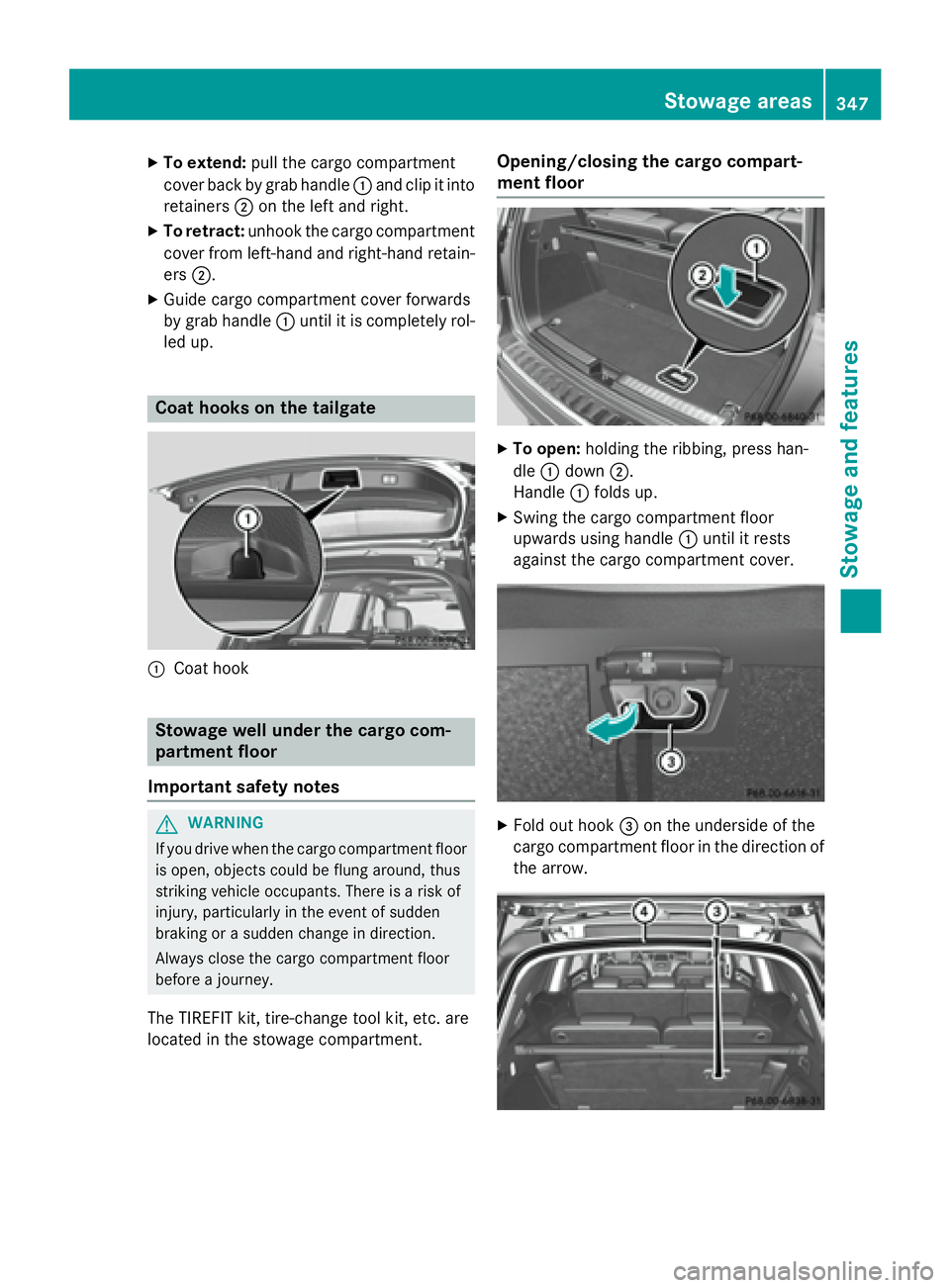
To extend: pull the cargo compartment
cover back by grab handle C and clip it into
retainers D on the left and right.X
To retract: unhook the cargo compartment
cover from left-hand and right-hand retain-
ers D .X
Guide cargo compartment cover forwards
by grab handle C until it is completely rol-
led up.
Coat hooks on the tailgate
C
Coat hook
Stowage well under the cargo com-
partment floor
Important safety notes
G WARNING
If you drive when the cargo compartment floor
is open, objects could be flung around, thus
striking vehicle occupants. There is a risk of
injury, particularly in the event of sudden
braking or a sudden change in direction.
Always close the cargo compartment floor
before a journey.
The TIREFIT kit, tire-change tool kit, etc. are
located in the stowage compartment. Opening/closing the cargo compart-
ment floor X
To open: holding the ribbing, press han-
dle C down D .
Handle C folds up. X
Swing the cargo compartment floor
upwards using handle C until it rests
against the cargo compartment cover.
X
Fold out hook
Page 431 of 462
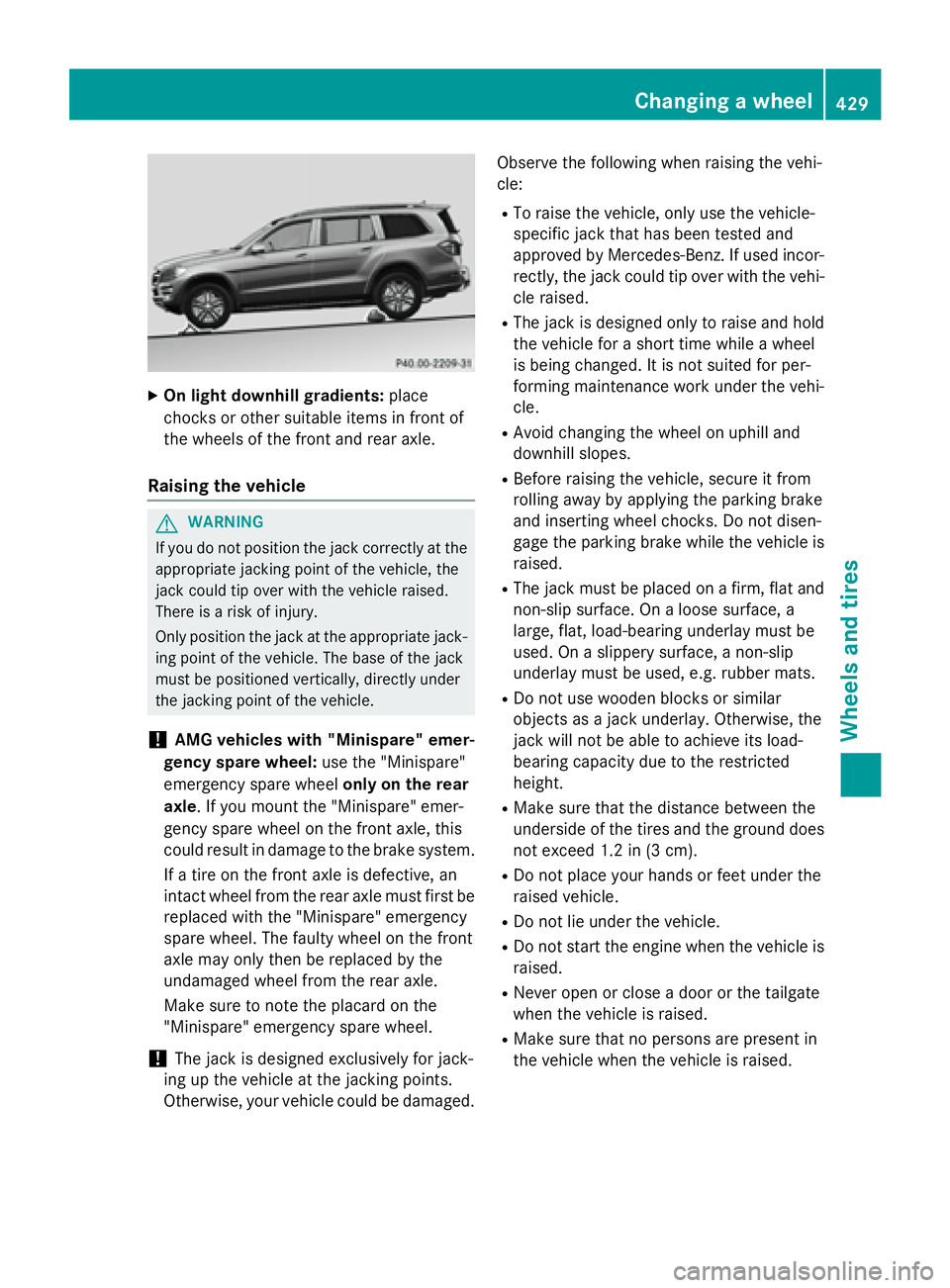
X
On light downhill gradients: place
chocks or other suitable items in front of
the wheels of the front and rear axle.
Raising the vehicle
G WARNING
If you do not position the jack correctly at the
appropriate jacking point of the vehicle, the
jack could tip over with the vehicle raised.
There is a risk of injury.
Only position the jack at the appropriate jack-
ing point of the vehicle. The base of the jack
must be positioned vertically, directly under
the jacking point of the vehicle.
! AMG vehicles with "Minispare" emer-
gency spare wheel: use the "Minispare"
emergency spare wheel only on the rear
axle . If you mount the "Minispare" emer-
gency spare wheel on the front axle, this
could result in damage to the brake system.
If a tire on the front axle is defective, an
intact wheel from the rear axle must first be
replaced with the "Minispare" emergency
spare wheel. The faulty wheel on the front
axle may only then be replaced by the
undamaged wheel from the rear axle.
Make sure to note the placard on the
"Minispare" emergency spare wheel.
! The jack is designed exclusively for jack-
ing up the vehicle at the jacking points.
Otherwise, your vehicle could be damaged. Observe the following when raising the vehi-
cle: R
To raise the vehicle, only use the vehicle-
specific jack that has been tested and
approved by Mercedes-Benz. If used incor-
rectly, the jack could tip over with the vehi-
cle raised. R
The jack is designed only to raise and hold
the vehicle for a short time while a wheel
is being changed. It is not suited for per-
forming maintenance work under the vehi-
cle. R
Avoid changing the wheel on uphill and
downhill slopes. R
Before raising the vehicle, secure it from
rolling away by applying the parking brake
and inserting wheel chocks. Do not disen-
gage the parking brake while the vehicle is
raised. R
The jack must be placed on a firm, flat and
non-slip surface. On a loose surface, a
large, flat, load-bearing underlay must be
used. On a slippery surface, a non-slip
underlay must be used, e.g. rubber mats. R
Do not use wooden blocks or similar
objects as a jack underlay. Otherwise, the
jack will not be able to achieve its load-
bearing capacit y due to the restricted
height. R
Make sure that the distance between the
underside of the tires and the ground does
not exceed 1.2 in (3 cm). R
Do not place your hands or feet under the
raised vehicle. R
Do not lie under the vehicle. R
Do not start the engine when the vehicle is
raised. R
Never open or close a door or the tailgate
when the vehicle is raised. R
Make sure that no persons are present in
the vehicle when the vehicle is raised.Changing a wheel 429
Wheels and tires Z