2016 MERCEDES-BENZ GL-Class turn signal
[x] Cancel search: turn signalPage 252 of 462

Indicator and warning display
:Yellow indicator lamp/red warning lamp
Active Blind Spot Assist is not active at
speeds below approximately 20 mph
(30 km/h). Vehicles in the monitoring range
are then not indicated.
When Active Blind Spot Assist is activated,
indicator lamp :in the exterior mirrors lights
up yellow at speeds of up to 20 mph
(30 km/h). At speeds above 20 mph
(30 km/h), the indicator lamp goes out and
Active Blind Spot Assist is operational.
If a vehicle is detected within the monitoring
range at speeds above approximately 20 mph
(30 km/h), warning lamp :on the corre-
sponding side lights up red. This warning lamp
always lights up when a vehicle enters the
blind spot monitoring range from behind or
from the side. When you overtake a vehicle
with a difference in speed of less than 7 mph
(12 km/h), a delayed warning occurs.
The yellow indicator lamp goes out if reverse
gear is engaged. Active Blind Spot Assist is
not operational.
The brightness of the indicator/warning
lamps is adjusted automatically according to
the brightness of the surroundings.
Visual and acoustic collision warning
If you switch on the turn signals to change
lanes and a vehicle is detected in the side
monitoring range, you receive a visual and
acoustic collision warning. You then hear a
double warning tone and red warning lamp
:
f
lashes. If the turn signal remains on, detec-
ted vehicles are indicated by the flashing of red warning lamp
:. There are no further
warning tones.
Course-correcting brake application
If Active Blind Spot Assist detects a risk of a
lateral collision in the monitoring range, a
course-correcting brake application is carried
out. This is meant to assist you in avoiding a
collision.
GWARNING
A course-correcting brake application cannot always prevent a collision. There is a risk of an
accident.
Always steer, brake or accelerate yourself,
especially if Active Blind Spot Assist warns
you or makes a course-correcting brake appli-
cation. Always maintain a safe distance at the
sides.
If a course-correcting brake application
occurs, red warning lamp :flashes in the
exterior mirror and a dual warning tone
sounds. In addition, display ;underlining
the danger of a side collision appears in the
multifunction display.
In very rare cases, the system may make an
inappropriate brake application. A course-
correcting brake application may be interrup-
ted at any time if you steer slightly in the
opposite direction or accelerate.
The course-correcting brake application is
available in the speed range between 20 mph (30 km/h) and 120 mph (200 km/h).
250Driving systems
Driving and parking
Page 255 of 462

If you leave your lane, under certain circum-
stances the vehicle will brake briefly on one
side. This is meant to assist you in bringing
the vehicle back to the original lane.
If a lane-correcting brake application occurs,
display:appears in the multifunction dis-
play.
A lane-correcting brake application can only
be made after driving over a solid, recogniz-
able lane marking. Before this, a warning
must be given by means of intermittent vibra-
tion in the steering wheel. In addition, a lane
with lane markings on both sides must be
recognized. The brake application also
slightly reduces vehicle speed.
iA further lane-correcting brake applica-
tion can only occur after your vehicle has
returned to the original lane.
No lane-correcting brake application occurs
if:
Ryou clearly and actively steer, brake or
accelerate.
Ryou cut the corner on a sharp bend.
Ryou have switched on the turn signal.
Ra driving safety system intervenes, e.g.
ESP®, PRE-SAFE®Brake or Active Blind
Spot Assist.
Ryou have adopted a sporty driving style with high cornering speeds or high rates of
acceleration.
RESP®is switched off.
Rthe transmission is not in position D.
Ron vehicles with a trailer tow hitch, the
electrical connection to the trailer has been
correctly established.
Rthe off-road program is activated (vehicles
without the ON&OFFROAD package).
Roff-road program 1 or 2 is activated (vehi-
cles with the ON&OFFROAD package).
Rthe LOW RANGE off-road gear is activated
(vehicles with the ON&OFFROAD package).
Rwhen a loss of tire pressure or a defective
tire has been detected and displayed.
There is a possibility that the Active Lane
Keeping Assist could misjudge the given traf-
fic situation. An inappropriate brake applica-
tion may be interrupted at any time if you:
Rsteer slightly in the opposite direction
Rswitch on the turn signal
Rclearly brake or accelerate
A lane-correcting brake application is inter-
rupted automatically if:
Ra driving safety system intervenes, e.g.
ESP®, PRE-SAFE®Brake or Active Blind
Spot Assist.
Rlane markings can no longer be recognized.
Switching on Active Lane Keeping Assist
XSwitch on Active Lane Keeping Assist using
the on-board computer; to do so, select
Standard
or Adaptive(Ypage 282).
If you drive at speeds above 40 mph
(60 km/h) and lane markings are detected,
the lines in the assistance graphics display
(
Ypage 281) are shown in green. Active
Lane Keeping Assist is ready for use.
If Standard
is selected, no warning vibra-
tion occurs if:
Ryou switch on the turn signals. In this
event, the warnings are suppressed for a
certain period of time.
Ra driving safety system intervenes, such
as ABS, BAS or ESP®.
When Adaptive
is selected, no warning
vibration occurs if:
Driving systems253
Driving and parking
Z
Page 306 of 462

Display messagesPossible causes/consequences andMSolutions
b
Rearlef tindica ‐
tororRea rright
indicator
The rear left-han dor rear right-hand tur nsignal is defective.
XVisit aqualified specialist workshop .
b
Front leftindica ‐
tororFront right
indicator
The fron tleft-han dor fron tright-hand tur nsignal is defective.
XVisit aqualified specialist workshop .
b
Leftmirrorindica ‐
tororRight mir ‐
ror indicator
The turnsignal in th eleft-han dor right-hand exterio rmirror is
defective.
XVisit aqualified specialist workshop .
b
Third brake lamp
The high-mountedbrak elamp is faulty.
XVisit aqualified specialist workshop .
b
Leftbrake lam por
Right brake lam p
The leftor right-hand brak elamp is defective.
XChec kwhether you are permitte dto replac eth ebulb yourself
(
Ypage 137).
or
XVisit aqualified specialist workshop .
b
Left-hand tail
lamp/brakelam por
Right-han dtai l
lamp/brak elam p
The lef tor right-hand tai llamp/brak elamp is defective.
XVisit aqualified specialist workshop .
b
Lefthig hbea mor
Right hig hbea m
The lef tor right-hand high beam is defective.
XChec kwhether you are permitte dto replac eth ebulb yourself
(
Ypage 137).
or
XVisit aqualified specialist workshop .
b
LicensePlate Lam p
The leftor right-hand license plat elamp is faulty.
XVisit aqualified specialist workshop .
b
Rearfog lam p
The rear fo glamp is faulty.
XVisit aqualified specialist workshop .
304Display messages
On-board computer and displays
Page 368 of 462

to synchronize the rolling code
(
Ypage 366).
XRelease buttonBon remote control Afor
the garage door drive system.
If indicator lamp :lights up red: repeat the
programing procedure for the correspond-
ing button on the rear-view mirror. When
doing so, vary the distance between remote
control Aand the rear-view mirror.
The required distance between remote
control Aand the integrated garage door
opener depends on the garage door drive
system. Several attempts might be neces-
sary. You should test every position for at
least 25 seconds before trying another
position.
Synchronizing the rolling code
Pay attention to the "Important safety notes"
(
Ypage 365).
If the garage door system uses a rolling code,
you will also have to synchronize the garage
door system with the integrated garage door
opener in the rear-view mirror. To do this you
will need to use the programming button on
the door drive control panel. The program-
ming button may be positioned in different
places depending on the manufacturer. It is
usually located on the door drive unit on the
garage ceiling.
Familiarize yourself with the garage door
drive operating instructions, e.g. under "Pro-
gramming of additional remote controls",
before carrying out the following steps.
Your vehicle must be within reach of the
garage door or gate opener drive. Make sure
that neither your vehicle nor any persons/
objects are present within the swe ep of the
door or ga
te.
XTurn the SmartKey to position 2in the igni-
tion lock (
Ypage 165).
XGet out of the vehicle.
XPress the programming button on the door
drive unit.
Usually, you now have 30 seconds to ini-
tiate the next step.
XGet into the vehicle.
XPress previously programmed button ;,
= or? on the integrated garage door
opener multiple times until the door closes.
The rolling code synchronization is then
complete.
Notes on programming the remote con-
trol
Canadian radio frequency laws require a
"break" (or interruption) of the transmission
signals after broadcasting for a few seconds. Therefore, these signals may not last long
enough for the integrated garage door
opener. The signal is not recognized during
programming. Comparable with Canadian
law, some U.S. garage door openers also fea-
ture a "break".
Proceed as follows:
Rif you live in Canada
Rif you have difficulties programming the
garage door opener (regardless of where
you live) when using the programming
steps
XPress and hold one of buttons ;to? on
the integrated garage door opener.
After a short time, indicator lamp :lights
up yellow.
XRelease the button.
Indicator lamp :flashes yellow.
XPress button Bof garage door remote
control Afor two seconds, then release it
for two seconds.
XPress button Bagain for two seconds.
XRepeat this sequence on button Bof
remote control Auntil indicator lamp :
lights up green.
When indicator lamp :lights up green:
programming is finished.
366Features
Stowage and features
Page 369 of 462

When indicator lamp:flashes green: pro-
gramming was successful. The next step is
to synchronize the rolling code.
XRelease button Bof remote control Aof
the garage door drive.
If indicator lamp :lights up red: repeat the
programming process for the correspond-
ing button on the rear-view mirror. When
doing so, vary the distance between remote
control Aand the rear-view mirror.
The required distance between remote
control Aand the integrated garage door
opener depends on the garage door drive
system. Several attempts might be neces-
sary. You should test every position for at
least 25 seconds before trying another
position.
Problems when programming
If you are experiencing problems programing the integrated garage door opener on the
rear-view mirror, take note of the following
instructions:
RCheck the transmitter frequency used by
garage door drive remote control Aand
whether it is supported. The transmitter
frequency can usually be found on the back
of the garage door drive remote control.
The integrated garage door opener is com- patible with devices that have units which
operate in the frequency range of 280 to
433 MHz.
RReplace the batteries in garage door
remote control A. This increases the like-
lihood that garage door remote control A
will transmit a strong and precise signal to
the integrated garage door opener.
RWhen programming, hold remote control
A at varying distances and angles from the
button which you are programming. Try var-
ious angles at a distance between 2and
12 inches (5to 30 cm) or at the same angle
but at varying distances.
RIf another remote control is available for the
same garage door drive, repeat the same
programming steps with this remote con- trol. Before performing these steps, make
sure that new batteries have been installed
in garage door drive remote control
A.
RNote that some remote controls only trans-
mit for a limited amoun
t of time (the indi-
cator lamp on the remote control goes out).
Press button Bon remote control Aagain
before transmission ends.
RAlign the antenna cable of the garage door
opener unit. This can improve signal recep-
tion/transmission.
Opening/closing the garage door
After it has been programmed, the integrated
garage door opener performs the function of
the garage door system remote control.
Please also read the operating instructions
for the garage door system.
XTurn the SmartKey to position 2in the igni-
tion lock (
Ypage 165).
XPress button ;,=or? which you have
programmed to operate the garage door.
Garage door system with a fixed code: indi-
cator lamp :lights up green.
Garage door system with a rolling code:
indicator lamp :flashes green.
The transmitter will transmit a signal as
long as the button is pressed. The trans-
mission is halted after a maximum of ten
seconds and indicator lamp :lights up
yellow.
XPress button ;,=or? again if neces-
sary.
Clearing the memory
Make sure that you clear the memory of the
integrated garage door opener before selling
the vehicle.
Features367
Stowage and features
Z
Page 382 of 462
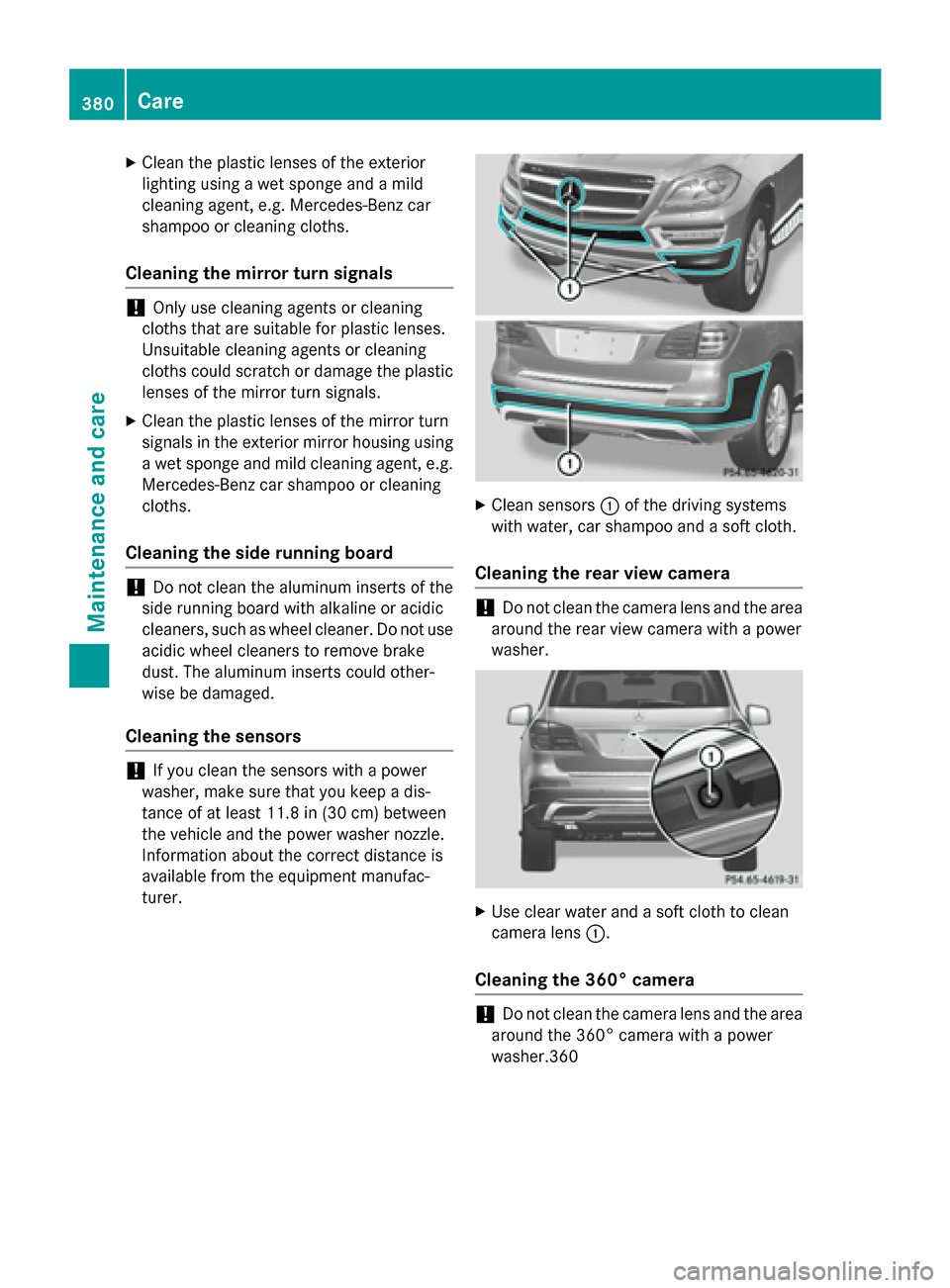
XClean the plasticlenses of the exterior
lighting using a wet sponge and a mild
cleaning agent, e.g. Mercedes-Benz car
shampoo or cleaning cloths.
Cleaning the mirror turn signals
!Only use cleaning agents or cleaning
cloths that are suitable for plastic lenses.
Unsuitable cleaning agents or cleaning
cloths could scratch or damage the plastic lenses of the mirror turn signals.
XClean the plastic lenses of the mirror turn
signals inthe exterior mirror housing using
a wet sponge and mild cleaning agent, e.g.
Mercedes-Benz car shampoo or cleaning
cloths.
Cleaning the side running board
!Do not clean the aluminum inserts of the
side running board with alkaline or acidic
cleaners, such as wheel cleaner. Do not use
acid icwheel cleaners to remove brake
dust. The aluminum inserts could other-
wise be damaged.
Cleaning the sensors
!Ifyou clean the sensors with a power
washer, make sure that you keep a dis-
tance of at least 11.8 in(30 cm) between
the veh icleand the power washer nozzle.
In formation about the correct distance is
availab lefrom the equipment manufac-
turer.
XClean sensors :of the driving systems
wit h water, car shampoo and a soft cloth.
Cleaning the rear view camera
!Do not clean the camera lens and the area
around the rear viewcamera with a power
washer.
XUse clear water and a soft cloth to clean
camera lens :.
Cleaning the 360° camera
!Do not clean the camera lens and the area
around the 360° camera with a power
washer.360
380Care
Maintenance and care
Page 401 of 462

The brackets for the screw-in towing eyes are
located in the bumpers. They are at the front
and at the rear, behind the covers.
XRemove the towing eye from the vehicle
tool kit (
Ypage 386).
XTo open the cover at the front:press the
mark on cover :inwards in the direction
of the arrow.
XTo open the cover at the rear: insert a
flat, blunt object into the cutout and lever
cover ;out of the bumper.
XTake cover :or; off the opening.
XScrew in the towing eye clockwise as far as
it will go and tighten it.
Removing the towing eye
XUnscrew and remove the towing eye.
XAttach cover :or; to the bumper and
press until it engages.
XPlace the towing eye in the vehicle tool kit.
Towing a vehicle with both axles on
the ground
It is important that you observe the safety
instructions when towing away your vehicle
(
Ypage 397).
The automatic transmission automatically
shifts to position Pwhen you open the driver's
or front-passenger door or when you remove
the SmartKey from the ignition lock.
In order to ensure that the automatic trans-
mission stays in position Nwhen towing the
vehicle, you must observe the following
points:
XMake sure that the vehicle is stationary and
the SmartKey in the ignition lock is in posi-
tion 0.
XTurn the SmartKey to position 2in the igni-
tion lock.
On vehicles with KEYLESS-GO, use the
SmartKey instead of the Start/Stop button
(
Ypage 165).
XDepress and hold the brake pedal.
XShift the automatic transmission to posi-
tion N.
XRelease the brake pedal.
XRelease the electric parking brake.
XLeave the SmartKey in position 2in the
ignition lock.
XSwitch on the hazard warning lamps
(
Ypage 133).
iIn order to signal a change of direction
when towing the vehicle with the hazard
warning lamps switched on, use the com-
bination switch as usual. In this case, only
the indicator lamps for the direction of
travel flash. After resetting the combina-
tion switch, the hazard warning lamp starts
flashing again.
Transporting the vehicle
!
You may only secure the vehicle by the
wheels, not by parts of the vehicle such as
axle or steering components. Otherwise,
the vehicle could be damaged.
The towing eye can be used to pull the vehicle
onto a trailer or transporter for transporting
purposes.
XTurn the SmartKey to position 2in the igni-
tion lock.
XShift the automatic transmission to posi-
tion N.
As soon as the vehicle has been loaded:
XPrevent the vehicle from rolling away by
applying the electric parking brake.
XShift the automatic transmission to posi-
tion P.
XTurn the SmartKey to position 0in the igni-
tion lock and remove it.
XSecure the vehicle.
Towing and tow-starting399
Breakdown assistance
Z