2016 MERCEDES-BENZ G-Class light
[x] Cancel search: lightPage 109 of 302
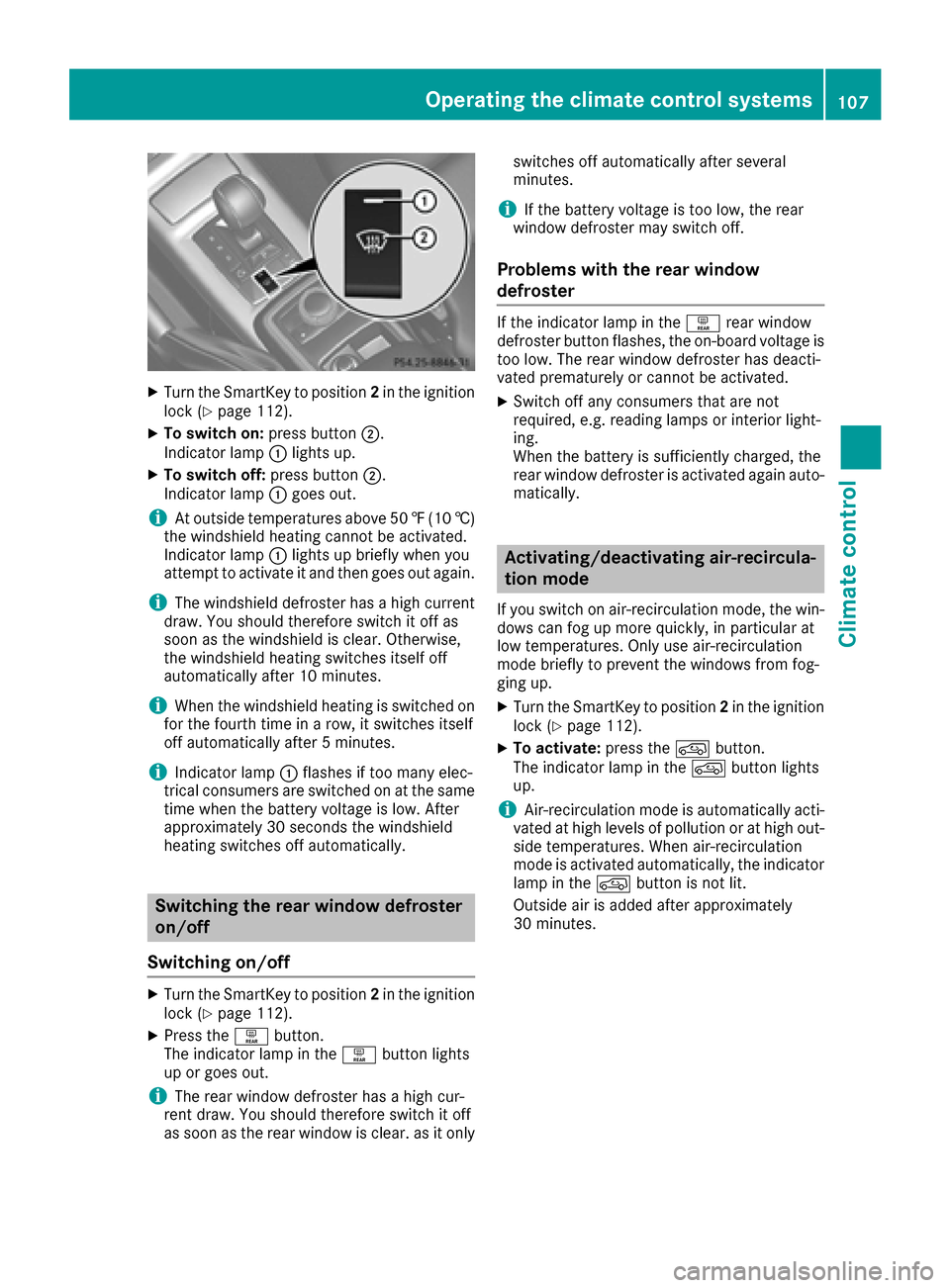
XTurn the SmartKey to position2in the ignition
lock (Ypage 112).
XTo switch on: press button;.
Indicator lamp :lights up.
XTo switch off: press button;.
Indicator lamp :goes out.
iAt outside temperatures above 50 ‡(10 †)
the windshield heating cannot be activated.
Indicator lamp :lights up briefly when you
attempt to activate it and then goes out again.
iThe windshield defroster has a high current
draw. You should therefore switch it off as
soon as the windshield is clear. Otherwise,
the windshield heating switches itself off
automatically after 10 minutes.
iWhen the windshield heating is switched on
for the fourth time in a row, it switches itself
off automatically after 5 minutes.
iIndicator lamp :flashes if too many elec-
trical consumers are switched on at the same
time when the battery voltage is low. After
approximately 30 seconds the windshield
heating switches off automatically.
Switching the rear window defroster
on/off
Switching on/off
XTurn the SmartKey to position 2in the ignition
lock (Ypage 112).
XPress the ªbutton.
The indicator lamp in the ªbutton lights
up or goes out.
iThe rear window defroster has a high cur-
rent draw. You should therefore switch it off
as soon as the rear window is clear. as it only switches off automatically after several
minutes.
iIf the battery voltage is too low, the rear
window defroster may switch off.
Problems with the rear window
defroster
If the indicator lamp in the ªrear window
defroster button flashes, the on-board voltage is
too low. The rear window defroster has deacti-
vated prematurely or cannot be activated.
XSwitch off any consumers that are not
required, e.g. reading lamps or interior light-
ing.
When the battery is sufficiently charged, the
rear window defroster is activated again auto- matically.
Activating/deactivating air-recircula-
tion mode
If you switch on air-recirculation mode, the win-
dows can fog up more quickly, in particular at
low temperatures. Only use air-recirculation
mode briefly to prevent the windows from fog-
ging up.
XTurn the SmartKey to position 2in the ignition
lock (Ypage 112).
XTo activate: press thedbutton.
The indicator lamp in the dbutton lights
up.
iAir-recirculation mode is automatically acti-
vated at high levels of pollution or at high out-
side temperatures. When air-recirculation
mode is activated automatically, the indicator
lamp in the dbutton is not lit.
Outside air is added after approximately
30 minutes.
Operating the climate control systems107
Climate control
Z
Page 110 of 302

XTo deactivate:press thedbutton.
The indicator lamp in the dbutton goes
out.
iAir-recirculation mode switches off auto-
matically:
Rafter approximately five minutes at outside
temperatures below approximately 41 ‡
Rafter approximately five minutes if cooling
with air dehumidification is deactivated
Rafter approximately 30 minutes at outside
temperatures above approximately 41 ‡
(5 †)
Convenience opening or closing using
the air-recirculation button
GWARNING
When the convenience closing feature is oper- ating, parts of the body could become trapped
in the closing area of the side window and the
sliding sunroof. There is a risk of injury.
Observe the complete closing procedure
when the convenience closing feature is oper-
ating. Make sure that no body parts are in
close proximity during the closing procedure.
GWARNING
During convenience opening parts of the body could be drawn in or become trapped
between the side window and window frame.
There is a risk of injury.
Make sure that nobody touches the side win-
dow during the opening procedure. If some-
one becomes trapped, immediately press
the W switch in the door to stop the move-
ment of the side windows. To continue closing
the side window, pull on the Wswitch.
XConvenience closing feature: press and
hold the grocker switch up or down until
the side windows and the sliding sunroof start
to close automatically.
The indicator lamp above the grocker
switch lights up. Air-recirculation mode is
activated.
If you manually open the side windows or the
sliding sunroof after closing with the conve- nience closing feature, they will remain in this
position when opened.
If parts of the body are in the closing area during
convenience closing, proceed as follows:
XPress the Wbutton to stop the side win-
dows.
The side window stops.
XTo then open the side windows, press the
W button again.
XPress the 3switch to stop the sliding sun-
roof.
The sliding sunroof stops.
XTo then open the sliding sunroof, pull back on
the 3 switch.
XConvenience opening feature: press and
hold the grocker switch up or down until
the side windows and the sliding sunroof start
to open automatically.
The indicator lamp above the grocker
switch goes out. Air-recirculation mode is
deactivated.
Activating/deactivating the residual
heat function
The "residual heat" function is only available in
Canada.
It is possible to make use of the residual heat of
the engine to continue heating the stationary
vehicle for up to 30 minutes after the engine has
been switched off. The heating time depends on the coolant temperature and on the interior tem-
perature that has been set.
iThe blower will run at a low speed regardless
of the airflow setting.
iIf you activate the residual heat function at
high temperatures, only the ventilation will be
activated.
XTurn the SmartKey to position 0(Ypage 112)
in the ignition lock or remove it.
XTo activate: press theÁbutton.
The indicator lamp in the Ábutton lights
up.
108Operating the climate control systems
Climate control
Page 114 of 302

Wear suitable footwear to ensure correct
usage of the pedals.
GWARNING
If you switch off the ignition while driving,
safety-relevant functions are only available
with limitations, or not at all. This could affect, for example, the power steering and the brake
boosting effect. You will require considerably
more effort to steer and brake. There is a risk
of an accident.
Do not switch off the ignition while driving.
GWARNING
If the parking brake has not been fully
released when driving, the parking brake can:
Roverheat and cause a fire
Rlose its hold function.
There is a risk of fire and an accident. Release
the parking brake fully before driving off.
!Warm up the engine quickly. Do not use the
engine's full performance until it has reached
operating temperature.
Only shift the automatic transmission to the
desired drive position when the vehicle is sta-
tionary.
Where possible, avoid spinning the drive
wheels when pulling away on slippery roads.
You could otherwise damage the drive train.
!Avoid high engine speeds when the engine
is cold. The engine's service life could other-
wise be significantly shortened. Do not use
the engine's full performance until it has
reached operating temperature.
!AMG vehicles: at low engine oil tempera-
tures below 68 ‡ (+20 †), the maximum
engine speed is restricted in order to protect the engine. To protect the engine and main-
tain smooth engine operation, avoid driving at
full throttle when the engine is cold.
SmartKey positions
gTo remove the SmartKey
1Power supply for some consumers, such as
the windshield wipers
2Ignition (power supply for all consumers)
and drive position
3To start the engine
As soon as the ignition is switched on, all the
indicator lamps in the instrument cluster light
up. If an indicator lamp does not go out after
starting the engine or lights up while driving, see
(
Ypage 205).
If the SmartKey is in position 0in the ignition
lock for an extended period of time, it can no
longer be turned in the ignition lock. The steer-
ing is then locked. To unlock, remove the Smart-
Key and reinsert it into the ignition lock.
The steering is locked when you remove the
SmartKey from the ignition lock.
XRemove the SmartKey when the engine is
switched off.
The starter battery could otherwise be dis-
charged.
If you cannot turn the SmartKey in the ignition
lock, the starter battery may not be charged
sufficiently.
XCheck the starter battery and charge it if nec-
essary (Ypage 252).
or
XJump-start the vehicle (Ypage 254).
iYou can only remove the SmartKey if:
Rthe SmartKey is in position 0in the ignition
lock.
Rthe automatic transmission selector lever
is in P.
112Driving
Driving and parking
Page 117 of 302
XTo deactivate:in drive program C/E press
button :.
or
XSwitch to drive program Sor M(Ypage 122).
Indicator lamp ;on button :and the è
ECO symbol in the multifunction display go
out.
The Stop/Start active
orStop/Startinactivemessage in the AMG menu in the
multifunction display goes out.
XTo activate: press button :.
Indicator lamp ;lights up. If drive program S
or Mis active, the automatic transmission
switches to drive program C/E .
If all conditions for automatic engine switch-
off (
Ypage 115) are fulfilled, the èECO
symbol is shown in green in the multifunction
display. In addition, the Stop/Start active
message is shown in the AMG menu in the
multifunction display.
If not all conditions for automatic engine
switch-off (
Ypage 115)are fulfilled, the è
ECO symbol is not shown. If this is the case,
the ECO start/stop function is not available.
In addition, the Stop/Start inactive
dis-
play message is shown in the AMG menu in
the multifunction display.
iIf indicator lamp ;is off, the ECO start/
stop function has been deactivated manually
or as the result of a malfunction. The engine
will then not be switched off automatically
when the vehicle stops.
Automatic engine switch-off
If the vehicle is braked to a standstill in Dor N,
the ECO start/stop function switches off the
engine automatically.
The ECO start/stop function is operational and
the è ECO symbol is shown in green in the
multifunction display, if:
Rthe indicator lamp in the èECO button is
lit green.
Rno off-road program has been selected.
Rthe vehicle is stationary.
Rthe outside temperature is within the comfort
range.
Rthe engine is at normal operating tempera-
ture.
Rthe set temperature for the vehicle interior
has been reached.
Rthe battery is sufficiently charged.
Rthe system detects that the windshield is not
fogged up when the air-conditioning system is switched on.
Rthe hood is closed.
Rthe driver's door is closed and the driver's
seat belt is fastened.
If the conditions for automatic engine switch-off
are not all fulfilled, the èECO symbol is
shown in yellow.
In addition, the Stop/Start inactive
mes-
sage is shown in the AMG menu in the multi-
function display.
iIf you shift the transmission from Rto D, the
ECO start/stop function is available again
once the èECO symbol reappears in
green in the multifunction display.
iThe engine can be automatically switched
off an unlimited number of times.
iYou can still activate the HOLD function
when the vehicle is stationary, even if the
engine has been switched off automatically. It
is then not necessary to continue applying the
brakes during the automatic stop phase.
When you depress the accelerator pedal, the
engine starts automatically and the braking
effect of the HOLD function is deactivated.
Depress the accelerator pedal carefully, as
the engine must be started first.
iDuring automatic engine switch-off, the cli-
mate control system only operates at a
reduced capacity. If you require full climate
control capacity, the ECO start/stop function
can be deactivated by pressing the ECO but-
ton (
Ypage 114).
Driving115
Driving and parking
Z
Page 119 of 302
Problems with the engine
ProblemPossible causes/consequences andMSolutions
The engine does not
start. The starter motor
can be heard.RThere is a malfunction in the engine electronics.
RThere is a malfunction in the fuel supply.
XTurn the SmartKey back to position0in the ignition lock before
attempting to start the engine again.
XTry to start the engine again (Ypage 113). Avoid excessively long
and frequent attempts to start the engine, as this (Ypage 112) will
drain the battery.
If the engine does not start after several attempts:
XConsult a qualified specialist workshop.
The engine does not
start. The starter motor
can be heard. The yellow
reserve fuel warning
lamp is lit and the needle
of the fuel gage display
shows 0.The fuel tank is empty.
XRefuel the vehicle.
The engine does not
start. You cannot hear
the starter motor.The on-board voltage is too low because the battery is too weak or
discharged.
XJump-start the vehicle (Ypage 254).
If the engine does not start despite attempts to jump-start it:
XConsult a qualified specialist workshop.
The starter motor was exposed to a thermal load that was too high.
XAllow the starter motor to cool down for approximately two minutes.
XTry to start the engine again.
If the engine still does not start:
XConsult a qualified specialist workshop.
The engine is not running
smoothly and is misfir-
ing.There is a malfunction in the engine electronics or in a mechanical
component of the engine management system.
XOnly depress the accelerator pedal slightly.
Otherwise, non-combusted fuel may get into the catalytic converter
and damage it.
XHave the cause rectified immediately at a qualified specialist work-
shop.
Driving117
Driving and parking
Z
Page 120 of 302

ProblemPossible causes/consequences andMSolutions
The coolant temperature
gage shows a value
above 248 ‡ (120 †). A
display message may
also appear in the multi-
function display and a
warning tone may sound.The coolant level is too low. The coolant is too hot and the engine is no
longer being cooled sufficiently.
XStop as soon as possible and allow the engine and the coolant to
cool down.
XCheck the coolant level (Ypage 238). Observe the warning notes
as you do so and add coolant if necessary.
If the coolant level is correct, the radiator fan may be faulty. The cool-
ant is too hot and the engine is no longer being cooled sufficiently.
XAt coolant temperatures below 248 ‡(120 †), drive to the nearest
qualified specialist workshop.
XAvoid heavy loads on the engine as you do so, e.g. driving in moun-
tainous terrain and stop-and-go traffic.
Adjustable damping
General notes
With the adjustable damping you can choose
between two different suspension settings.
Suspension settings
COMFComfortable suspension setting
SportSports suspension setting
Selecting the suspension setting
Program selector button in the center console
iIf you select the sports suspension setting,
the vehicle will dampen more roughly.
XPress SPORT on program selector button :.
The indicator lamp lights up. SPORTis shown
in the multifunction display. The sports sus-
pension setting is selected.
iIf you select the comfortable suspension
setting, the vehicle will dampen more
smoothly.
XPress COMF on program selector button :.
The indicator lamp lights up. COMFis shown
in the multifunction display. The comfortable
suspension setting is selected.
Automatic transmission
Important safety notes
GWARNING
If the engine speed is above the idling speed
and you engage transmission position Dor R,
the vehicle could pull away suddenly. There is
a risk of an accident.
When engaging transmission position Dor R,
always firmly depress the brake pedal and do not simultaneously accelerate.
GWARNING
The automatic transmission switches to neu-
tral position Nwhen you switch off the engine.
The vehicle may roll away. There is a risk of an
accident.
After switching off the engine, always switch
to parking position P. Prevent the parked vehi-
cle from rolling away by applying the parking
brake.
118Automatic transmission
Driving and parking
Page 121 of 302

iBear in mind that the power transmission
between the engine and the transmission is
interrupted when the engine is switched off.
For this reason, shift the automatic transmis-
sion to Pwhen the engine is switched off and
the vehicle is at a standstill. Apply the parking
brake to prevent the vehicle from rolling
away.
Selector lever
Overview of transmission positions
!If the engine speed is too high or if the vehi-
cle is rolling, do not shift the transmission
directly from Dto R, from Rto Dor directly to
P.
Do not open the driver's door while the vehi-
cle is in motion. At low speeds in transmission
position Dor R, park position Pis otherwise
engaged automatically.
The transmission could be damaged.
Selector lever
j
Park position
kReverse gear
iNeutral
hDrive
When you select a transmission position, the
selector lever subsequently returns to its origi-
nal position.
The current transmission position P,R, Nor D
appears in the transmission position display in
the multifunction display.
Transmission position and drive pro-
gram display
!If the transmission position display in the
multifunction display is not working, you should pull away carefully to check whether
the desired transmission position is engaged.
Select transmission position D. Do not
restrict the shift range.
:Transmission position
;Drive program
Current transmission position :and current
drive program ;appear in the multifunction
display.
The current position of the selector lever is
shown by the indicators next to the selector
lever.
The indicators light up when the SmartKey is
inserted into the ignition lock. The indicators go
out when the SmartKey is removed from the
ignition lock.
When the selector lever is in position D, you can
influence the gearshifts made by the automatic
transmission by:
Rrestricting the shift range
Rchanging gear yourself
Engaging park position P
XWhen the vehicle is stationary, depress the
brake pedal and keep it depressed.
XPress the Pbutton in the center console.
iIf you depress the brake pedal and push the
selector lever forwards or back to the first
point of resistance, park position Pis disen-
gaged. The transmission shifts to neutral N.
Automatic transmission119
Driving and parking
Z
Page 130 of 302

!Overfilling the fuel tank could damage the
fuel system.
!Take care not to spill any fuel on painted
surfaces. You could otherwise damage the
paintwork.
!Use a filter when refueling from a fuel can.
Otherwise, the fuel lines and/or injection sys-
tem could be blocked by particles from the
fuel can.
If you overfill the fuel tank, pressure may build
up in the fuel tank. This could cause fuel to spray
out when the fuel pump nozzle is removed.
There is a risk of injury. The fuel tank is full when
the fuel pump nozzle first switches off. End the
refueling process.
For further information on fuel and fuel quality
(
Ypage 289).
Refueling
Vehicles with a fuel filler flap
Example: G 550 fuel filler cap
:
To open the fuel filler flap
;Tire pressure table
=Fuel type
?To insert the fuel filler cap
When you open or close the vehicle with the
SmartKey, the fuel filler flap is automatically
unlocked or locked.
The position of the fuel filler cap is displayed
8 in the instrument cluster. The arrow next
to the filling pump indicates the side of the vehi-
cle. The fuel filler flap is located to the rear on
the right.
Opening the fuel filler cap
:To open the fuel filler flap
;Tire pressure table
=Fuel type
?To insert the fuel filler cap
XSwitch the engine off.
iWhen the engine is running and the fuel filler
flap is open, the yellow reserve fuel warning
lamp and the =(USA only) or ;(Can-
ada only) Check Engine warning lamp may
light up.
Further information about warning and indi-
cator lamps in the instrument cluster can be
found in the Digital Operator's Manual.
XRemove the SmartKey from the ignition lock.
XTurn the fuel filler cap counterclockwise and
remove it.
XInsert the fuel filler cap into the holder
bracket on the inside of filler flap ?.
Refueling
XCompletely insert the filler neck of the fuel
pump nozzle into the tank and refuel.
iDo not add any more fuel after the pump
stops filling for the first time. Otherwise, fuel
may leak out.
Closing
XReplace the fuel filler cap and turn it clock-
wise. The fuel filler cap audibly engages.
XClose the fuel filler flap.
iClose the fuel filler flap before locking the
vehicle. A locking pin otherwise prevents the
fuel filler flap from closing after the vehicle
has been locked.
128Refueling
Driving and parking