2016 MAZDA MODEL CX-5 SCBS
[x] Cancel search: SCBSPage 262 of 626

Black plate (262,1)
CAUTION
ØWhen driving off-road in areas where there is grass or forage, it is recommended
that the Smart City Brake Support (SCBS) system be turned off.
ØAlways use tires for all wheels that are of the specified size, and the same
manufacturer, brand, and tread pattern. In addition, do not use tires with
significantly different wear patterns on the same vehicle as the Smart City Brake
Support (SCBS) system may not operate normally.
ØThe laser sensor includes a function for detecting a soiled windshield and
informing the driver, however, depending on the conditions, it may not detect
plastic shopping bags, ice or snow on the windshield. In such cases, the system
cannot accurately determine a vehicle ahead and may not be able to operate
normally. Always drive carefully and pay attention to the road ahead.
4-128
When Driving
i-ACTIVSENSE
CX-5_8DV2-EA-14K_Edition3 Page262
Thursday, February 26 2015 5:33 PM
Form No.8DV2-EA-14K
Page 263 of 626

Black plate (263,1)
NOTElThe Smart City Brake Support (SCBS) system will not operate if the driver is deliberately
performing driving operations (accelerator pedal and steering wheel).
lThe Smart City Brake Support (SCBS) system will operate under the following conditions.lThe engine is running.l“SCBS Forward malfunction”is not displayed in the multi-information display.lThe vehicle speed is between about 4 to 30 km/h (2 to 18 mph).lThe Smart City Brake Support (SCBS) system is not turned off.lThe DSC is not malfunctioning.lThe Smart City Brake Support (SCBS) detects a vehicle ahead by emitting a near-infrared laser
beam and receiving the beam reflected off the reflector of the vehicle ahead, and then using it for
the measurement. Consequently, the Smart City Brake Support (SCBS) may not operate under the
following conditions:
lReflection of the laser is poor due to the shape of the vehicle ahead.lThe vehicle ahead is significantly dirty.lUnder bad weather condition, such as rain, fog and snow.lThe window washer is being used or the windshield wipers are not used when it's raining.lThe windshield is dirty.lThe steering wheel is turned completely left or right, or the vehicle is accelerated rapidly and
comes close to the vehicle ahead.
lTrucks with low loading platforms and vehicles with an extremely low or high profile.lVehicles with certain shapes such as a vehicle carrier.lUnder the following conditions, the Smart City Brake Support (SCBS) system may not operate
normally.
lHeavy luggage is loaded in the luggage compartment or on the rear seat.lIf there is the possibility of partial contact with a vehicle ahead.lWhen driving on continuously curving roads, and entering and exiting exits.lElongated luggage or cargo is loaded onto installed roof rails and covers the laser sensor.lExhaust gas from the vehicle in front, sand, snow, and water vapor rising from manholes and
grating, and water splashed into the air.
lWhen towing a malfunctioning vehicle.lWhen driving with tires having significantly different wear.lIn the following cases, the laser sensor may inadvertently determine that there is a vehicle ahead
and the Smart City Brake Support (SCBS) system may operate.
lObjects on the road at the entrance to a curve.lVehicles passing in the opposite lane while making a curve.lMetal objects, bumps, or protruding objects on the road.lWhen passing through a toll gate equipped with a bar.lWhen passing under a vinyl curtain or flag.lPlastic objects such as pylons.lTwo-wheeled vehicles, pedestrians, animals or standing trees.lWhen the system operates, the user is notified by the flashing Smart City Brake Support (SCBS)
warning indication and the multi-information display.
When Driving
i-ACTIVSENSE
4-129
CX-5_8DV2-EA-14K_Edition3 Page263
Thursday, February 26 2015 5:33 PM
Form No.8DV2-EA-14K
Page 264 of 626

Black plate (264,1)
qAutomatic Brake Operation Display
“Smart City Brake Support activated”is
displayed in the multi-information display
while the SCBS brakes or the brake assist
(SCBS brake assist) is operating.
NOTElThe collision warning beep sounds
intermittently while the SCBS brake or
brake assist (SCBS brake assist) is
operating.
lIf the vehicle is stopped by the SCBS
operation and the brake pedal is not
depressed, the warning beep sounds one
time after about 2 seconds and the SCBS
brake is automatically released.
qStopping the Smart City Brake
Support (SCBS) System Operation
The Smart City Brake Support (SCBS)
system can be temporarily deactivated.
Refer to Personalization Features on page
9-10.
When the Smart City Brake Support
(SCBS) system is turned off, the Smart
City Brake Support (SCBS) OFF indicator
light turns on.
When the engine is restarted, the system
becomes operational.
4-130
When Driving
i-ACTIVSENSE
CX-5_8DV2-EA-14K_Edition3 Page264
Thursday, February 26 2015 5:33 PM
Form No.8DV2-EA-14K
Page 267 of 626

Black plate (267,1)
qCollision Warning
If there is the possibility of a collision
with a vehicle ahead, the beep sounds
continuously and a warning is indicated in
the multi-information display.
qStopping The Smart Brake
Support (SBS) System Operation
The Smart Brake Support (SBS) system
can be temporarily deactivated.
Refer to Personalization Features on page
9-10.
When the Smart Brake Support (SBS)
system is turned off, the Smart Brake
Support (SBS) OFF indicator light turns
on.
When the engine is restarted, the system
becomes operational.NOTE
If the Smart Brake Support (SBS) system
operation is turned off, the Smart City Brake
Support (SCBS) system operation is turned off
simultaneously.
When Driving
i-ACTIVSENSE
4-133
CX-5_8DV2-EA-14K_Edition3 Page267
Thursday, February 26 2015 5:33 PM
Form No.8DV2-EA-14K
Page 274 of 626

Black plate (274,1)
Laser Sensor (Front)í
Your vehicle is equipped with a laser sensor (front). The laser sensor (front) is positioned
near the rearview mirror and used by the following systems.
lSmart Brake Support (SBS)lSmart City Brake Support (SCBS)
CAUTION
Heed the following precautions to assure correct operation of the system.
ØKeep the windshield clean at all times.
ØDo not apply stickers to the surface of the windshield (including transparent
stickers).
ØIf cracks or damage caused by flying gravel or debris is visible near the laser
sensor (front), stop using the system immediately and have your vehicle inspected
by an Authorized Mazda Dealer.
See the next page on how to turn off the system. Refer to Personalization Features
on page 9-10.
ØDo not apply a coating agent to the windshield.
ØWhen replacing the windshield wipers or windshield, consult an Authorized
Mazda Dealer.
ØNever remove the sensor.
ØA removed sensor will not meet the conditions for a class 1M laser under the IEC
60825-1 specification and therefore eye safety cannot be assured.
ØDo not peer into the sensor using optical instruments with a magnification
function such as magnifying glasses, and microscopic and objective lenses within
a distance of 100 mm (3.94 in) from the sensor.
4-140
When Driving
íSome models.
i-ACTIVSENSE
CX-5_8DV2-EA-14K_Edition3 Page274
Thursday, February 26 2015 5:33 PM
Form No.8DV2-EA-14K
Page 345 of 626

Black plate (345,1)
qSettings
NOTE
Depending on the grade and specification, the screen display may differ.
Select theicon on the home screen and display the Settings screen.
Switch the tab and select the setting item you want to change.
You can customize settings in the setup display as follows:
Tab Item Function
Display Refer to Volume/Display/Sound Controls on page 5-36.
SafetyDistance Recognition Support System
SBS/SCBS
OtherRefer to Personalization Features on page 9-10.
Sound Refer to Volume/Display/Sound Controls on page 5-36.
ClockAdjust TimeDisplays the currently set time is displayed.
Press
to advance the hour/minute, and selectto move the hour/minute back.
AM/PM can only be selected with the 12-hour
clock display.
GPS SyncWhen ON is selected,“Adjust Time”is
disabled.
Time FormatChanges the display between 12 and 24-hour
clock time.
Time Zone Select Selects the time zone.
Daylight Savings TimeTurns the daylight saving time setting on/off.
When ON, the time advances 1 hour. When
OFF, it returns to normal time.
VehicleRain Sensing Wiper
Door Locks
OtherRefer to Personalization Features on page 9-10.
Devices Bluetooth
®Refer to Bluetooth® Preparation (Type B) on
page 5-86.
Interior Features
Audio System
5-49
CX-5_8DV2-EA-14K_Edition3 Page345
Thursday, February 26 2015 5:33 PM
Form No.8DV2-EA-14K
Page 609 of 626
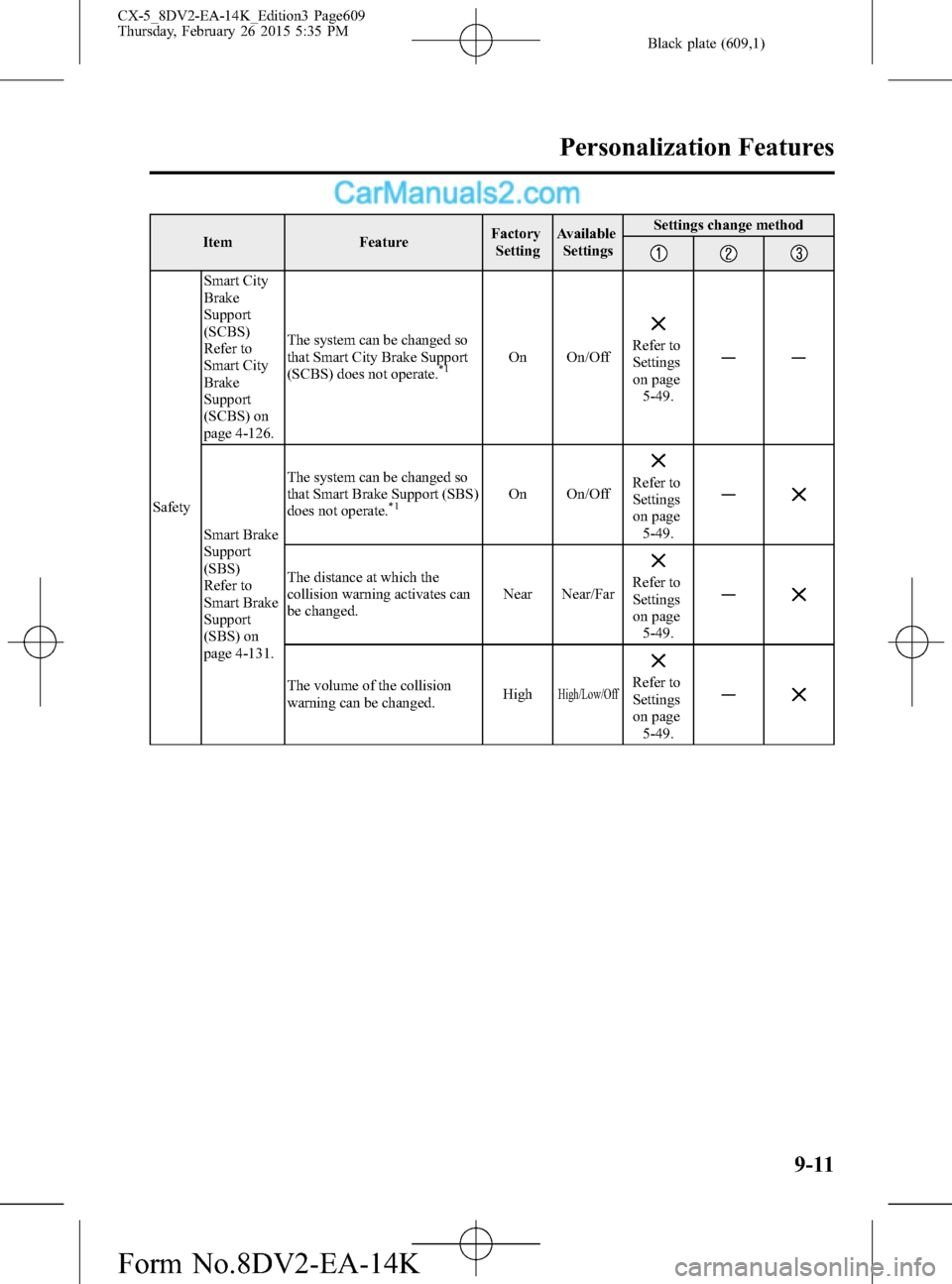
Black plate (609,1)
Item FeatureFactory
SettingAvailable
SettingsSettings change method
SafetySmart City
Brake
Support
(SCBS)
Refer to
Smart City
Brake
Support
(SCBS) on
page 4-126.The system can be changed so
that Smart City Brake Support
(SCBS) does not operate.
*1On On/OffRefer to
Settings
on page
5-49.――
Smart Brake
Support
(SBS)
Refer to
Smart Brake
Support
(SBS) on
page 4-131.The system can be changed so
that Smart Brake Support (SBS)
does not operate.
*1On On/OffRefer to
Settings
on page
5-49.―
The distance at which the
collision warning activates can
be changed.Near Near/FarRefer to
Settings
on page
5-49.―
The volume of the collision
warning can be changed.HighHigh/Low/OffRefer to
Settings
on page
5-49.―
Personalization Features
9-11
CX-5_8DV2-EA-14K_Edition3 Page609
Thursday, February 26 2015 5:35 PM
Form No.8DV2-EA-14K
Page 621 of 626

Black plate (621,1)
I
i-ACTIVSENSE ............................... 4-90
Active safety technology ............ 4-90
Adaptive Front Lighting System
(AFS) ......................................... 4-92
Blind Spot Monitoring
(BSM) system .......................... 4-102
Camera and snsors ..................... 4-91
Distance Recognition Support System
(DRSS) ..................................... 4-108
Forward Sensing Camera
(FSC) ........................................ 4-134
High Beam Control System
(HBC) ........................................ 4-93
Lane Departure Warning System
(LDWS) ..................................... 4-96
Laser sensor (front) .................. 4-140
Mazda Radar Cruise Control
(MRCC) ................................... 4-116
Pre-crash safety technology ........ 4-90
Radar sensor (front) ................. 4-137
Radar sensors (rear) ................. 4-142
Rear Cross Traffic Alert
(RCTA) ..................................... 4-111
Smart Brake Support (SBS) ..... 4-131
Smart City Brake Support
(SCBS) ..................................... 4-126
Ignition
Switch .......................................... 4-2
Illuminated Entry System ............... 5-129
Immobilizer System .......................... 3-37
I
Indicator Lights
Blind Spot Monitoring
(BSM) OFF ................................ 4-45
Brake pedal operation demand ... 4-29
Cruise ......................................... 4-44
Hazard warning .......................... 4-43
HBC ........................................... 4-41
Headlight high-beam .................. 4-43
KEY ............................................ 4-39
LDWS ........................................ 4-31
LDWS OFF ................................ 4-32
Lights-on .................................... 4-45
Low engine coolant
temperature ................................ 4-42
Mazda Radar Cruise Control
(MRCC) ..................................... 4-44
Power steering malfunction ........ 4-33
Security ...................................... 4-44
Select mode ................................ 4-43
Shift position .............................. 4-43
Smart City Brake Support
(SCBS) ....................................... 4-42
Smart City Brake Support
(SCBS) OFF ............................... 4-42
TCS OFF .................................... 4-42
TCS/DSC ................................... 4-41
Turn signal ................................. 4-43
Inspecting Brake/Clutch Fluid
Level ................................................. 6-31
Inspecting Coolant Level .................. 6-29
Inspecting Engine Oil Level ............. 6-28
Inspecting Washer Fluid Level ......... 6-31
Instrument Cluster ............................. 4-10
Index
10-5
CX-5_8DV2-EA-14K_Edition3 Page621
Thursday, February 26 2015 5:35 PM
Form No.8DV2-EA-14K