Page 216 of 598

4–88
When Driving
i-ACTIVSENSE
If the road width is extremely narrow, vehicles two lanes over may be detected.
The detection area of the radar sensors (rear) is set according to the road width of
expressways.
The Blind Spot Monitoring (BSM) warning lights may turn on in reaction to stationary
objects on the road or the roadside such as guardrails, tunnels, sidewalls, and parked
vehicles.
The walls at the entrance and exits of tunnels, turnouts.
Objects such as guardrails and concrete walls running alongside the vehicle.Places where the width between guardrails or walls on each side of the vehicle narrows.
A Blind Spot Monitoring (BSM) warning light may flash or the warning beep may be
activated several times when making a turn at a city intersection. Turn off the Blind Spot Monitoring (BSM) system while pulling a trailer\
or while an
accessory such as a bicycle carrier is installed to the rear of the vehicle. Otherwise, the
radar’s radio waves will be blocked causing the system to not operate normally\
.
In the following cases, it may be difficult to view the illumination/flashing of the Blind
Spot Monitoring (BSM) warning lights equipped on the door mirrors.
Snow or ice is adhering to the door mirrors. The front door glass is fogged or covered in snow, frost or dirt.
The system switches to the Rear Cross Traffic Alert function when the shift lever (manual
transaxle) or the selector lever (automatic transaxle) is shifted to \
the reverse (R) position.
Refer to Rear Cross Traffic Alert (RCTA) on page 4-92.
Mazda3_8FA4-EA-15G_Edition1.indb 882015/05/11 14:01:03
Page 222 of 598

4–94
When Driving
i-ACTIVSENSE
Under the following conditions, the radar sensors (rear) cannot detect target objects or it
may be difficult to detect them.
The vehicle speed when reversing is about 10 km/h (6.3 mph) or faster. The radar sensor (rear) detection area is obstructed by a nearby wall or parked
vehicle. (Reverse the vehicle to a position where the radar sensor detection area is no
longer obstructed.)
Your vehicle
A vehicle is approaching directly from the rear of your vehicle.
Your vehicle
The vehicle is parked on a slant.
Your vehicle
Directly after pressing the BSM OFF switch and the system becomes operable.
In the following cases, it may be difficult to view the illumina tion/flashing of the Blind
Spot Monitoring (BSM) warning lights equipped on the door mirrors.
Snow or ice adheres to the door mirrors. The front door glass is fogged or covered in snow, frost or dirt.
Turn off the Rear Cross Traffic Alert (RCTA) system while pulling a trailer or while an
accessory such as a bicycle carrier is installed to the rear of the vehicle. Otherwise,
the radio waves emitted by the radar will be blocked causing the system \
to not operate
normally.
Mazda3_8FA4-EA-15G_Edition3.indb 942015/12/04 19:23:19
Page 278 of 598

5–16
Interior Features
Audio System
*Some models.
Antenna
Antenna (4-Door)
AM/FM Radio Antenna
The AM/FM radio antenna receives both
AM and FM signals.
The antenna is embedded into the window
glass.
CAUTION
When washing the inside of the
window which has an antenna, use
a soft cloth dampened in lukewarm
water, gently wiping the antenna lines.
Use of glass cleaning products could
damage the antenna.
Satellite Radio Antenna
*
The satellite radio antenna receives
SiriusXM signals.
Antenna
Antenna (5-Door)
AM/FM Radio Antenna*
The AM/FM radio antenna receives both
AM and FM signals.
(Type A)
To remove the antenna, turn it
counterclockwise.
To install the antenna, turn it clockwise.
Make sure the antenna is securely
installed.
Remove
Install
CAUTION
To prevent damage to the antenna,
remove it before entering a car wash
facility or passing beneath a low
overhead clearance.
Be careful around the antenna when
removing snow from the roof. Otherwise
the antenna could be damaged.
NOTE
When leaving your vehicle unattended, we
recommend that you remove the antenna
and store it inside the vehicle.
Mazda3_8FA4-EA-15G_Edition1.indb 162015/05/11 14:01:21
Page 317 of 598

5–55
Interior Features
Audio System
Settings
NOTE
Depending on the grade and specification, the screen display may differ.
Select the
icon on the home screen and display the Settings screen.
Switch the tab and select the setting item you want to change.
You can customize settings in the setup display as follows:
Ta bItem Function
AD-Disp Height
Brightness Control
Other Refer to Active Driving Display on page
4-18.
Display Refer to Volume/Display/Sound Controls on page 5-42.
Safety Smart City Brake Support
Blind Spot Monitoring Volume
Other Refer to Personalization Features on page
9-12.
Sound Refer to Volume/Display/Sound Controls on page 5-42.
Clock Adjust Time
Displays the currently set time is displayed.
Press
to advance the hour/minute, and select
to move the hour/minute back.
AM/PM can only be selected with the 12-hour
clock display.
GPS Sync Synchronizes with GPS when turned on.
When turned off, the time can be changed from
“Adjust Time”.
Time Format Changes the display between 12 and 24-hour
clock time.
Time Zone Select When it's not synchronized with GPS, select
the region you want to specify.
Daylight Savings Time Turns the daylight saving time setting on/off.
When ON, the time advances 1 hour. When
OFF, it returns to normal time.
Vehicle Rain Sensing Wiper
Door Locks
Other Refer to Personalization Features on page
9-12.
Devices Bluetooth
®Refer to Bluetooth® Preparation (Type B) on
page 5-94.
Mazda3_8FA4-EA-15G_Edition3.indb 552015/12/04 19:24:09
Page 398 of 598

5–136
Interior Features
Interior Equipment
Luggage Compartment Lights (5–door)
Switch
Position Luggage Compartment Light
Light off
Light on when the liftgate is open
Trunk Light (4–door)
The trunk light is on when the lid is open
and off when it's closed.
N O T E
To prevent the battery from being
discharged, do not leave the trunk open
for a long period when the engine is not
running.
Illuminated Entry System
When the illuminated entry system
operates, the overhead light (switch is in
the DOOR position) turn on for:
���� y� � About 30 seconds after the driver's door
is unlocked and the ignition is switched
off.
���� y� � About 15 seconds after all doors are
closed and the ignition is switched off.
���� y� � About 5 seconds after all doors are
closed and the ignition is switched off
when the key is out of the vehicle.
���� y� � Illuminates for about 15 seconds when
the ignition is returned from ACC to
OFF.
The light also turns off when:
���� y� � The ignition is switched on and all doors
are closed.
���� y� � The driver's door is locked.
N O T E
���� y�� Battery saver �� If any door is left open with the
overhead light switch in the DOOR
position, or the liftgate/trunk lid is left
open, the overhead light or luggage
compartment light/trunk light turns
off after about 30 minutes to prevent
battery depletion.
���� y�� The operation of the illuminated entry
system can be changed.
�� Refer to Personalization Features on page 9-12 .
.B[EB�@�'"��&"���(@&EJUJPO��JOEC������.B[EB�@�'"��&"���(@&EJUJPO��JOEC����������������������������������������������
Page 437 of 598
6–33
Maintenance and Care
Owner Maintenance
Inspect fluid level in the washer fluid
reservoir; add fluid if necessary.
L
Use plain water if washer fluid is
unavailable.
But use only washer fluid in cold weather
to prevent it from freezing.
NOTE
Front and rear washer fluid is supplied
from the same reservoir.
Body Lubrication
All moving points of the body, such as
door and hood hinges and locks, should
be lubricated each time the engine oil is
changed. Use a nonfreezing lubricant on
locks during cold weather.
Make sure the hood's secondary latch
keeps the hood from opening when the
primary latch is released.
Mazda3_8FA4-EA-15G_Edition1.indb 332015/05/11 14:02:16
Page 457 of 598
6–53
Maintenance and Care
Owner Maintenance
*Some models.
Side turn signal lights*, Brake lights
(LED type), Taillights/Rear side-marker
lights (LED type), Taillights (Trunk lid
side/Liftgate side), High-mount brake
light
The LED bulb cannot be replaced as a
single unit because it is an integrated unit.
The LED bulb has to be replaced with the
unit. We recommend an Authorized Mazda
Dealer when the replacement is necessary.
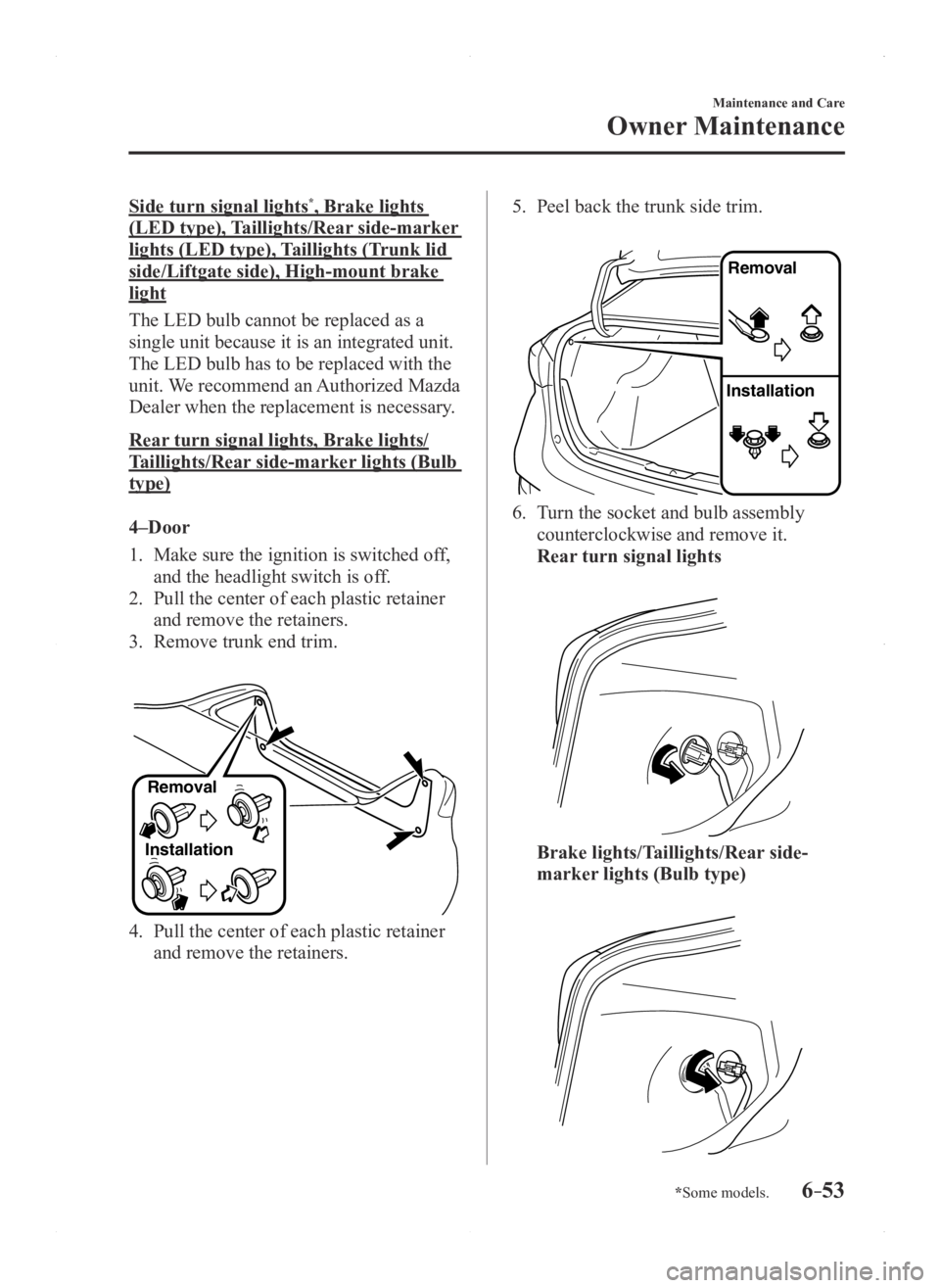
Rear turn signal lights, Brake lights/
Taillights/Rear side-marker lights (Bulb
type)
4–Door
1. Make sure the ignition is switched of f,
and the headlight switch is off.
2. Pull the center of each plastic retainer
and remove the retainers.
3. Remove trunk end trim.
InstallationRemoval
4. Pull the center of each plastic retainer
and remove the retainers.
5. Peel back the trunk side trim.
Remova
l
Installation
6. Turn the socket and bulb assembly
counterclockwise and remove it.
Rear turn signal lights
Brake lights/Taillights/Rear side-
marker lights (Bulb type)
Mazda3_8FA4-EA-15G_Edition1.indb 532015/05/11 14:02:24
Page 462 of 598
6–58
Maintenance and Care
Owner Maintenance
12. Install the cover in the reverse order of
the removal procedure.
13. Insert the cover tabs and install the
cover.
Tabs
NOTE
Verify that the cover is securely installed.
Reverse lights
4–Door
1. Make sure the ignition is switched off,
and the headlight switch is off.
2. Pull the center of each plastic retainer
and remove the retainers.
3. Peel back the trunk lid trim.
Removal
Installation
4. Disconnect the electrical connector
from the bulb by pressing the tab on the
connector with your finger and pulling
the connector.
5. Turn the socket and bulb assembly
counterclockwise and remove it.
6. Disconnect the bulb from the socket.
7. Install the new bulb in the reverse order
of the removal procedure.
Mazda3_8FA4-EA-15G_Edition1.indb 582015/05/11 14:02:27

