Page 238 of 419

BREAKING-IN
You need to break in new tires for
approximately 300 miles (480 kilometers).
During this time, your vehicle may exhibit
some unusual driving characteristics.
Avoid driving too fast during the first 1000
miles (1600 kilometers). Vary your speed
frequently and change up through the gears
early. Do not labor the engine.
Do not tow during the first 1000 miles (1600
kilometers).
REDUCED ENGINE PERFORMANCE
WARNING
Continued operation will increase the
engine temperature and cause the
engine to shut down completely. If the engine coolant temperature gauge
needle moves to the upper limit position, the
engine is overheating. See Gauges (page
99). You must only drive your vehicle for a short
distance if the engine overheats. The
distance you can travel depends on ambient
temperature, vehicle load and terrain. The
engine will continue to operate with limited
power for a short time.
If the engine temperature continues to rise,
the fuel supply to the engine will reduce. The
air conditioning will switch off and the engine
cooling fan will operate continually.
1. Reduce your speed gradually and stop
your vehicle as soon as it is safe to do
so.
2. Switch the engine off immediately to prevent severe engine damage.
3. Wait for the engine to cool down.
4. Check the coolant level.
See Engine
Coolant Check (page 269).
5. Have your vehicle checked by an authorized dealer as soon as possible. ECONOMICAL DRIVING
Fuel economy is affected by several things
such as how you drive, the conditions you
drive under and how you maintain your
vehicle.
There are some things to keep in mind that
may improve your fuel economy:
•
Accelerate and slow down in a smooth,
moderate fashion.
• Drive at steady speeds.
• Anticipate stops; slowing down may
eliminate the need to stop.
• Combine errands and minimize
stop-and-go driving(When running
errands, go to the furthest destination
first and then work your way back home).
• Close the windows for high-speed
driving.
• Drive at reasonable speeds.
• Keep the tires properly inflated and use
only the recommended size.
• Use the recommended engine oil.
• Perform all regularly scheduled
maintenance.
235
Navigator (TB5) Canada/United States of America, enUSA, First Printing Driving Hints
Page 246 of 419

GETTING THE SERVICES YOU
NEED
Warranty repairs to your vehicle must be
performed by an authorized dealer. While
any authorized dealer handling your vehicle
line will provide warranty service, we
recommend you return to your selling
authorized dealer who wants to ensure your
continued satisfaction.
Please note that certain warranty repairs
require special training and equipment, so
not all authorized dealers are authorized to
perform all warranty repairs. This means that,
depending on the warranty repair needed,
you may have to take your vehicle to another
authorized dealer.
A reasonable time must be allowed to
perform a repair after taking your vehicle to
the authorized dealer. Repairs will be made
using Ford or Motorcraft parts, or
remanufactured or other parts that are
authorized by Ford.
Away From Home
If you are away from home when your vehicle
needs service, contact the Ford Customer
Relationship Center or use the online
resources listed below to find the nearest
authorized dealer.
In the United States:
Mailing address
Ford Motor Company
Customer Relationship Center
P.O. Box 6248
Dearborn, MI 48121
Telephone
1-800-521-4140
(TDD for the hearing impaired:
1-800-232-5952)
Online
Additional information and resources are
available online at www.lincolnowner.com
These are some of the items that can be
found online:
•
U.S. dealer locator by Dealer Name,
City/State, or Zip Code
• Owner Manuals
• Maintenance Schedules
• Recalls
• Ford Extended Service Plans
• Ford Genuine Accessories
• Service specials and promotions.
In Canada:
Mailing address
Lincoln Customer Relationship Centre
Ford Motor Company of Canada, Limited
P.O. Box 2000
Oakville, Ontario L6J 5E4
Telephone
1-800-387-9333
Online
www.ford.ca
Twitter English
@LincolnMotorCA
243
Navigator (TB5) Canada/United States of America, enUSA, First Printing Customer Assistance
Page 267 of 419

GENERAL INFORMATION
Have your vehicle serviced regularly to help
maintain its roadworthiness and resale value.
There is a large network of authorized
dealers that are there to help you with their
professional servicing expertise. We believe
that their specially trained technicians are
best qualified to service your vehicle properly
and expertly. They are supported by a wide
range of highly specialized tools developed
specifically for servicing your vehicle.
If your vehicle requires professional service,
an authorized dealer can provide the
necessary parts and service. Check your
warranty information to find out which parts
and services are covered.
Use only recommended fuels, lubricants,
fluids and service parts conforming to
specifications. Motorcraft® parts are
designed and built to provide the best
performance in your vehicle.
Precautions
•
Do not work on a hot engine.
• Make sure that nothing gets caught in
moving parts.
• Do not work on a vehicle with the engine
running in an enclosed space, unless you
are sure you have enough ventilation.
• Keep all open flames and other burning
material (such as cigarettes) away from
the battery and all fuel related parts.
Working with the Engine Off
1. Set the parking brake and shift to park (P).
2. Switch off the engine.
3. Block the wheels.
Working with the Engine On WARNING
To reduce the risk of vehicle damage
and/or personal burn injuries, do not
start your engine with the air cleaner
removed and do not remove it while the
engine is running. 1. Set the parking brake and shift to park
(P).
2. Block the wheels.
OPENING AND CLOSING THE
HOOD
1. Inside the vehicle, pull the hood release handle located under the left-hand side
of the instrument panel.
264
Navigator (TB5) Canada/United States of America, enUSA, First Printing Maintenance
Page 268 of 419
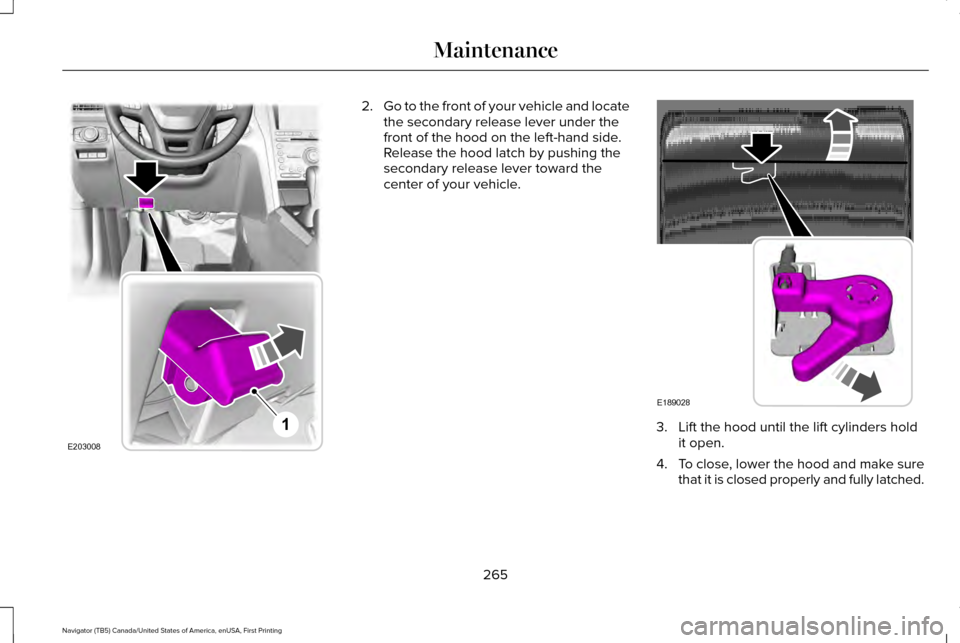
2.
Go to the front of your vehicle and locate
the secondary release lever under the
front of the hood on the left-hand side.
Release the hood latch by pushing the
secondary release lever toward the
center of your vehicle. 3. Lift the hood until the lift cylinders hold
it open.
4. To close, lower the hood and make sure
that it is closed properly and fully latched.
265
Navigator (TB5) Canada/United States of America, enUSA, First Printing MaintenanceE203008
1 E189028
Page 269 of 419
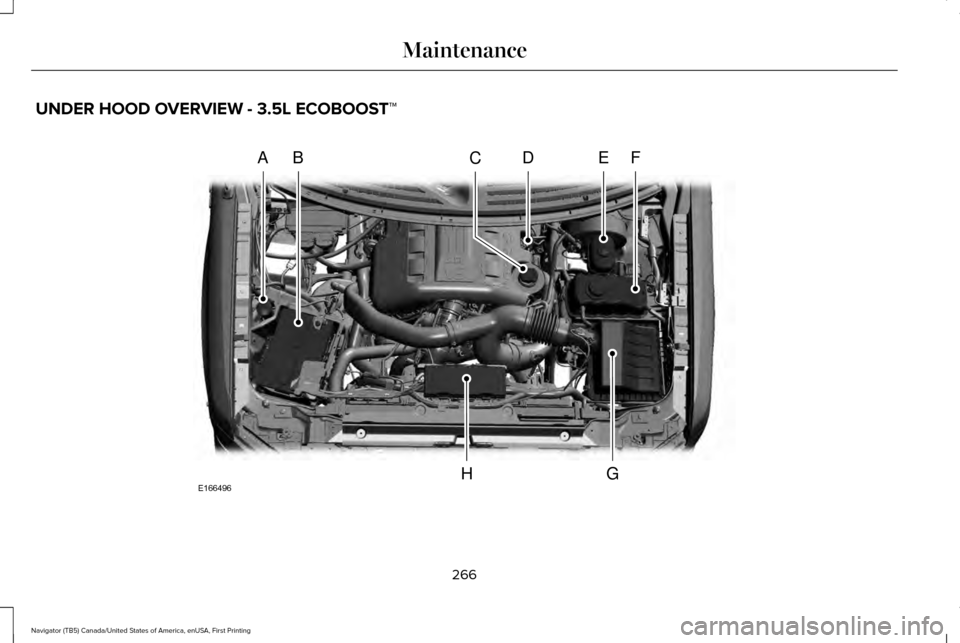
UNDER HOOD OVERVIEW - 3.5L ECOBOOST™
266
Navigator (TB5) Canada/United States of America, enUSA, First Printing MaintenanceA
A
BDEFC
GHE166496
Page 270 of 419
Windshield washer fluid reservoir. See Washer Fluid Check (page 275).
A.
Battery.
See Changing the 12V Battery (page 276).
B.
Engine oil filler cap.
See Engine Oil Check (page 268).
C.
Engine oil dipstick.
See Engine Oil Dipstick (page 268).
D.
Brake fluid reservoir.
See Brake Fluid Check (page 274).
E.
Engine coolant reservoir.
See Engine Coolant Check (page 269).
F.
Air filter assembly.
See Changing the Engine Air Filter (page 284).
G.
Power distribution box.
See Fuses (page 250).
H.
267
Navigator (TB5) Canada/United States of America, enUSA, First Printing Maintenance
Page 271 of 419

ENGINE OIL DIPSTICK
MINA
MAXB
ENGINE OIL CHECK
1. Make sure that your vehicle is on level ground.
2. Switch the engine off and wait 15 minutes
for the oil to drain into the oil pan.
3. Set the parking brake and ensure the gearshift is in park (P). 4. Open the hood. Protect yourself from
engine heat.
5. Locate and carefully remove the engine oil level dipstick. See Under Hood
Overview (page 266).
6. Wipe the dipstick clean. Insert the dipstick fully, then remove it again.
•If the oil level is between the lower
and upper holes, the oil level is
acceptable. DO NOT ADD OIL.
• If the oil level is below the lower hole,
add enough oil to raise the level
within the lower and upper holes.
• Oil levels above the upper hole may
cause engine damage. Some oil must
be removed from the engine by an
authorized dealer.
7. Put the oil level dipstick back into the oil
dipstick tube and ensure it is fully seated.
Adding Engine Oil
Note: Do not remove the filler cap when the
engine is running.
Note: Do not remove the engine oil level
dipstick when the engine is running. Note:
Do not add oil further than the MAX
mark. Oil levels above the MAX mark may
cause engine damage. Only use oils certified for gasoline engines
by the American Petroleum Institute (API).
An oil with this trademark symbol conforms
to the current engine and emission system
protection standards and fuel economy
requirements of the International Lubricants
Specification Advisory Council (ILSAC),
comprised of U.S. and Japanese automobile
manufacturers.
268
Navigator (TB5) Canada/United States of America, enUSA, First Printing MaintenanceE146429 E142732
Page 272 of 419

1. Check the engine oil level.
2. If the engine oil level is not within the
normal range, add engine oil that meets
Ford specifications. See Capacities and
Specifications (page 328).
3. Remove the engine oil filler cap and use
a funnel to pour the engine oil into the
opening.
4. Wipe off any spilled oil.
5. Recheck the engine oil level. Make sure the oil level is not above the normal
operating range on the engine oil level
dipstick.
6. Install the engine oil level dipstick and ensure it is fully seated.
7. Fully install the engine oil filler cap by turning the filler cap clockwise until three
clicks are heard or until the cap is fully
seated.
OIL CHANGE INDICATOR RESET
Use the information display controls on the
steering wheel to reset the oil change
indicator. From the main menu scroll to: Action and description
Message
Press the right arrow button,
then from this menu scroll to
the following message.
Settings
Press the right arrow button,
then from this menu scroll to
the following message.
Vehicle
Press the right arrow button,
then from this menu scroll to
the following message.
Oil Life
Press and hold the OK button
until the instrument cluster
displays the following
message.
Hold OK to
Reset
Reset Successful
When the oil change indicator
resets the instrument cluster
displays 100%.
Remaining Life
{00}% Action and description
Message
If the instrument cluster
displays one of the following
messages, repeat the
process.
Not Reset
Reset Cancelled
ENGINE COOLANT CHECK WARNINGS
Do not add engine coolant when the
engine is hot. Steam and scalding
liquids released from a hot cooling system
can burn you badly. Also, spilling coolant on
hot engine parts can burn you. Do not put engine coolant in the
windshield washer fluid container. If
sprayed on the windshield, engine coolant
could make it difficult to see through the
windshield.
269
Navigator (TB5) Canada/United States of America, enUSA, First Printing Maintenance