2016 LINCOLN NAVIGATOR check oil
[x] Cancel search: check oilPage 272 of 419

1. Check the engine oil level.
2. If the engine oil level is not within the
normal range, add engine oil that meets
Ford specifications. See Capacities and
Specifications (page 328).
3. Remove the engine oil filler cap and use
a funnel to pour the engine oil into the
opening.
4. Wipe off any spilled oil.
5. Recheck the engine oil level. Make sure the oil level is not above the normal
operating range on the engine oil level
dipstick.
6. Install the engine oil level dipstick and ensure it is fully seated.
7. Fully install the engine oil filler cap by turning the filler cap clockwise until three
clicks are heard or until the cap is fully
seated.
OIL CHANGE INDICATOR RESET
Use the information display controls on the
steering wheel to reset the oil change
indicator. From the main menu scroll to: Action and description
Message
Press the right arrow button,
then from this menu scroll to
the following message.
Settings
Press the right arrow button,
then from this menu scroll to
the following message.
Vehicle
Press the right arrow button,
then from this menu scroll to
the following message.
Oil Life
Press and hold the OK button
until the instrument cluster
displays the following
message.
Hold OK to
Reset
Reset Successful
When the oil change indicator
resets the instrument cluster
displays 100%.
Remaining Life
{00}% Action and description
Message
If the instrument cluster
displays one of the following
messages, repeat the
process.
Not Reset
Reset Cancelled
ENGINE COOLANT CHECK WARNINGS
Do not add engine coolant when the
engine is hot. Steam and scalding
liquids released from a hot cooling system
can burn you badly. Also, spilling coolant on
hot engine parts can burn you. Do not put engine coolant in the
windshield washer fluid container. If
sprayed on the windshield, engine coolant
could make it difficult to see through the
windshield.
269
Navigator (TB5) Canada/United States of America, enUSA, First Printing Maintenance
Page 297 of 419

Cooling system
•
Protect against freezing temperatures.
• When removing your vehicle from
storage, check coolant fluid level.
Confirm that there are no cooling system
leaks and that fluid is at the
recommended level.
Battery
• Check and recharge as necessary. Keep
connections clean.
• If storing your vehicle for more than 30
days without recharging the battery, we
recommend that you disconnect the
battery cables to maintain battery charge
for quick starting.
Note: It is necessary to reset memory
features if battery cables are disconnected.
Brakes
• Make sure the brakes and parking brake
release fully.
Tires
• Maintain recommended air pressure. Miscellaneous
•
Make sure all linkages, cables, levers and
pins under your vehicle are covered with
grease to prevent rust.
• Move vehicles at least 25 ft (7.5 m) every
15 days to lubricate working parts and
prevent corrosion.
Removing Vehicle From Storage
When your vehicle is ready to come out of
storage, do the following:
• Wash your vehicle to remove any dirt or
grease film build-up on window surfaces.
• Check windshield wipers for any
deterioration.
• Check under the hood for any foreign
material that may have collected during
storage such as mice or squirrel nests.
• Check the exhaust for any foreign
material that may have collected during
storage.
• Check tire pressures and set tire inflation
per the Tire Label. •
Check brake pedal operation. Drive your
vehicle 15 ft (4.5 m) back and forth to
remove rust build-up.
• Check fluid levels (including coolant, oil
and gas) to make sure there are no leaks,
and fluids are at recommended levels.
• If you remove the battery, clean the
battery cable ends and check for
damage.
Contact an authorized dealer if you have any
concerns or issues.
294
Navigator (TB5) Canada/United States of America, enUSA, First Printing Vehicle Care
Page 336 of 419
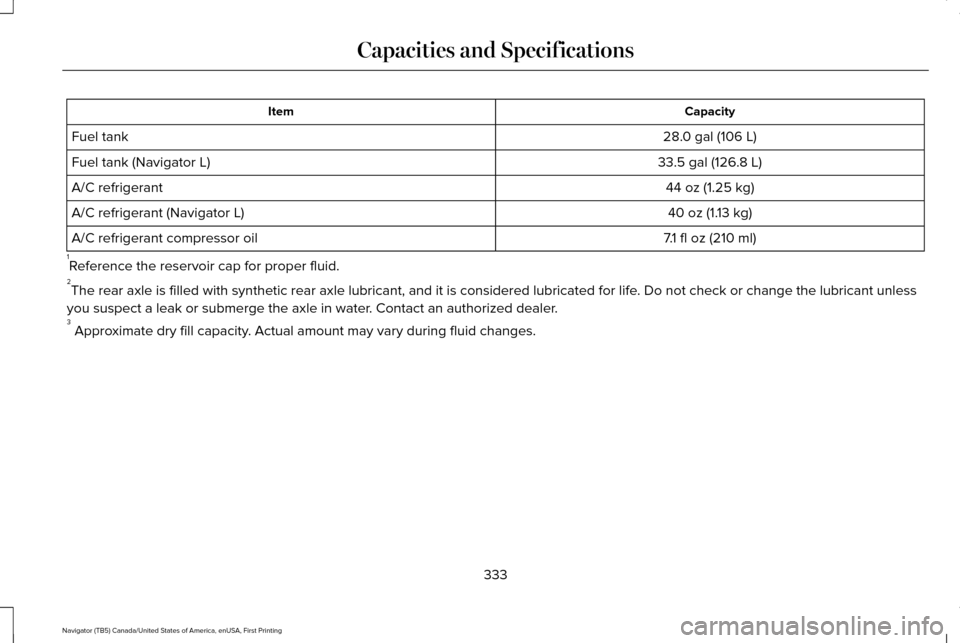
Capacity
Item
28.0 gal (106 L)
Fuel tank
33.5 gal (126.8 L)
Fuel tank (Navigator L)
44 oz (1.25 kg)
A/C refrigerant
40 oz (1.13 kg)
A/C refrigerant (Navigator L)
7.1 fl oz (210 ml)
A/C refrigerant compressor oil
1 Reference the reservoir cap for proper fluid.
2 The rear axle is filled with synthetic rear axle lubricant, and it is co\
nsidered lubricated for life. Do not check or change the lubricant unless
you suspect a leak or submerge the axle in water. Contact an authorized dealer.
3 Approximate dry fill capacity. Actual amount may vary during fluid changes.
333
Navigator (TB5) Canada/United States of America, enUSA, First Printing Capacities and Specifications
Page 358 of 419

Make sure to change your vehicle
’s oils and
fluids at the specified intervals or in
conjunction with a repair. Flushing is a viable
way to change fluid for many vehicle
sub-systems during scheduled maintenance. It is critical that systems are flushed only with
new fluid that is the same as that required
to fill and operate the system or using a
Ford-approved flushing chemical.
Owner Checks and Services
Make sure you perform the following basic
maintenance checks and inspections every
month or at six-month intervals. Check every month
Engine oil level.
Function of all interior and exterior lights.
Tires (including spare) for wear and proper pressure. Windshield washer fluid level. Check every six months
Battery connections. Clean if necessary.
Body and door drain holes for obstructions. Clean if necessary. Cooling system fluid level and coolant strength.
Door weatherstrips for wear. Lubricate if necessary.
Hinges, latches and outside locks for proper operation. Lubricate if necessary. Parking brake for proper operation.
355
Navigator (TB5) Canada/United States of America, enUSA, First Printing Scheduled Maintenance
Page 360 of 419

Multi-Point inspection
Steering and linkage
Exterior lamps operation
Tires (including spare) for wear and proper pressure**
Fluid levels *
; fill if necessary
Windshield for cracks, chips or pits
For oil and fluid leaks
Washer spray and wiper operation
Half-shaft dust boots
* Brake, coolant recovery reservoir, automatic transmission and window washer
** If your vehicle is equipped with a temporary mobility kit, check the tir\
e sealant expiration Use By date on the canister. Replace as needed.
Be sure to ask your dealership service
advisor or technician about the multi-point
vehicle inspection. It is a comprehensive way
to perform a thorough inspection of your
vehicle. Your checklist gives you immediate
feedback on the overall condition of your
vehicle. NORMAL SCHEDULED
MAINTENANCE
Intelligent Oil-Life Monitor
Your vehicle is equipped with an Intelligent
Oil-Life Monitor that determines when you
should change the engine oil based on how
your vehicle is used. By using several
important factors in its calculations, the
monitor helps reduce the cost of owning your
vehicle and reduces environmental waste at
the same time.This means you do not have to remember to
change the oil on a mileage-based schedule.
Your vehicle lets you know when an oil
change is due by displaying a message in
the information display.
The following table provides examples of
vehicle use and its impact on oil change
intervals. It is a guideline only. Actual oil
change intervals depend on several factors
and generally decrease with severity of use.
357
Navigator (TB5) Canada/United States of America, enUSA, First Printing Scheduled Maintenance
Page 366 of 419

Off-road operation
Inspect steering linkage, ball joints and U-joints. Lubricate if equipped with grease fittings.
Inspect frequently, service
as required
Replace engine air filter.
Change engine oil and filter.*
Every 5,000 mi (8,000 km)
or six months
Inspect the wheels and related components for abnormal noise, wear, looseness or drag.
Rotate tires, inspect tires for wear and measure tread depth.
Replace front wheel bearing grease and grease seals if non-sealed bearing\
s are used (Two-wheel drive
vehicles).
Every
30,000 mi
(48,000 km)
Change transfer case fluid (Four-wheel drive vehicles).
Every
60,000 mi
(96,000 km)
* Reset your Intelligent Oil-Life Monitor after each engine oil and filter \
change.
Exceptions
There are several exceptions to the Normal
Schedule. Normal Vehicle Axle Maintenance
Rear axles and power take-off units with
synthetic fluid and light-duty trucks equipped
with Ford-design axles are lubricated for life;
do not check or change fluid unless a leak
is suspected, service is required or the
assembly has been submerged in water.
During long periods of trailer towing with
363
Navigator (TB5) Canada/United States of America, enUSA, First Printing Scheduled Maintenance
Page 410 of 419

Cross Traffic Alert.........................................204
False Alerts..........................................................208
Switching the System Off and On..................208
System Errors......................................................208
System Lights, Messages and Audible
Alerts.................................................................207
System Limitations.............................................207
Using the System...............................................204
Cruise Control.................................................82 Principle of Operation.......................................200
Cruise control See: Using Cruise Control...............................200
Customer Assistance
..................................243
D
Data Recording
..................................................9
Event Data Recording...........................................10
Service Data Recording.........................................9
Daytime Running Lamps...............................89 Type 1 - Conventional
(Non-Configurable)..........................................90
Type 2 - Configurable..........................................90
Direction Indicators.........................................91 Lane Change...........................................................91
Drive Control.................................................209 LINCOLN DRIVE CONTROL............................209 Driver and Passenger Airbags....................43
Children and Airbags...........................................44
Proper Driver and Front Passenger Seating
Adjustment.........................................................43
Driving Aids
...................................................202
Driving Hints..................................................235
Driving Through Water...............................236
DRL See: Daytime Running Lamps...........................89
E
Economical Driving
......................................235
Emission Control System............................168
On-Board Diagnostics (OBD-II)........................169
Readiness for Inspection/Maintenance (I/M)
Testing...............................................................170
End User License Agreement...................385 VEHICLE SOFTWARE END USER LICENSE
AGREEMENT (EULA) ....................................385
Engine Block Heater....................................160 Using the Engine Block Heater........................161 Engine Coolant Check
................................269
Adding Engine Coolant.....................................270
Checking the Engine Coolant.........................270
Recycled Engine Coolant..................................271
Severe Climates...................................................271
What You Should Know About Fail-Safe
Cooling.............................................................272
Engine Immobilizer See: Passive Anti-Theft System
.........................73
Engine Oil Check.........................................268 Adding Engine Oil..............................................268
Engine Oil Dipstick......................................268
Engine Specifications..................................328 Drivebelt Routing................................................328
Environment......................................................15
Essential Towing Checks...........................226 Before Towing a Trailer......................................
231
Hitches..................................................................227
Launching or Retrieving a Boat or Personal Watercraft (PWC)............................................232
Safety Chains......................................................230
Trailer Brakes......................................................230
Trailer Hitch Cover.............................................226
Trailer Lamps.......................................................230
Trailer Towing Connector (Vehicles with a Trailer Towing Package and 7–Pin
Connector).......................................................226
When Towing a Trailer........................................231
407
Navigator (TB5) Canada/United States of America, enUSA, First Printing Index
Page 413 of 419
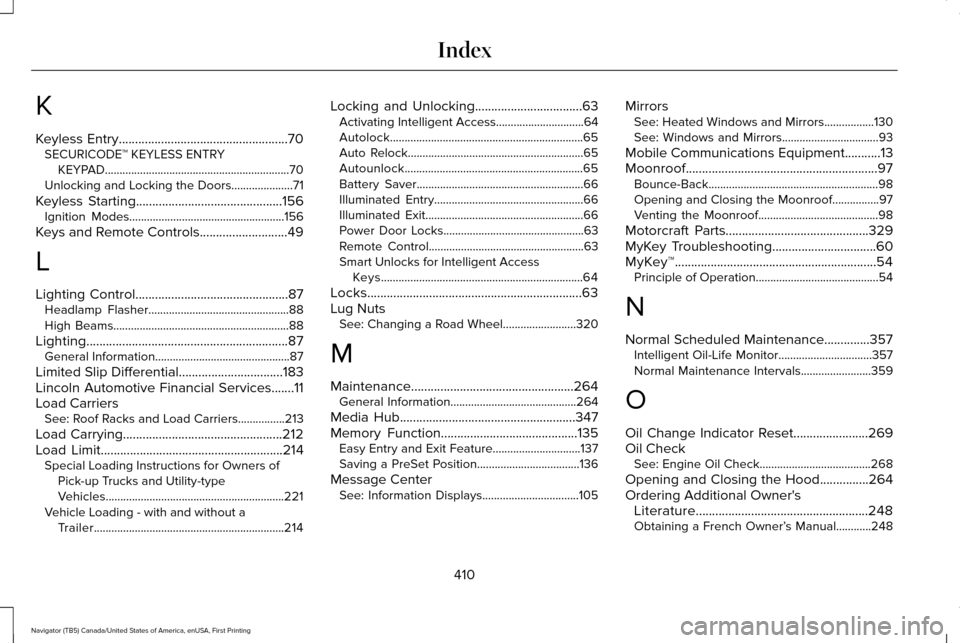
K
Keyless Entry....................................................70
SECURICODE™ KEYLESS ENTRY
KEYPAD...............................................................70
Unlocking and Locking the Doors.....................71
Keyless Starting.............................................156 Ignition Modes.....................................................156
Keys and Remote Controls...........................49
L
Lighting Control
...............................................87
Headlamp Flasher................................................88
High Beams............................................................88
Lighting
..............................................................87
General Information..............................................87
Limited Slip Differential
................................183
Lincoln Automotive Financial Services.......11
Load Carriers See: Roof Racks and Load Carriers................213
Load Carrying.................................................212
Load Limit
........................................................214
Special Loading Instructions for Owners of
Pick-up Trucks and Utility-type
Vehicles.............................................................221
Vehicle Loading - with and without a Trailer.................................................................214 Locking and Unlocking
.................................63
Activating Intelligent Access..............................64
Autolock..................................................................65
Auto Relock............................................................65
Autounlock.............................................................65
Battery Saver.........................................................66
Illuminated Entry...................................................66
Illuminated Exit......................................................66
Power Door Locks................................................63
Remote Control.....................................................63
Smart Unlocks for Intelligent Access
Keys.....................................................................64
Locks..................................................................63
Lug Nuts See: Changing a Road Wheel.........................320
M
Maintenance..................................................264 General Information...........................................264
Media Hub
......................................................347
Memory Function..........................................135
Easy Entry and Exit Feature..............................137
Saving a PreSet Position...................................136
Message Center See: Information Displays.................................105 Mirrors
See: Heated Windows and Mirrors.................130
See: Windows and Mirrors.................................93
Mobile Communications Equipment...........13
Moonroof...........................................................97 Bounce-Back..........................................................98
Opening and Closing the Moonroof................97
Venting the Moonroof.........................................98
Motorcraft Parts
............................................329
MyKey Troubleshooting................................60
MyKey™..............................................................54 Principle of Operation..........................................54
N
Normal Scheduled Maintenance..............357 Intelligent Oil-Life Monitor................................
357
Normal Maintenance Intervals........................359
O
Oil Change Indicator Reset.......................269
Oil Check See: Engine Oil Check......................................268
Opening and Closing the Hood
...............264
Ordering Additional Owner's Literature
.....................................................248
Obtaining a French Owner’ s Manual............248
410
Navigator (TB5) Canada/United States of America, enUSA, First Printing Index