2016 LINCOLN MKZ parking brake
[x] Cancel search: parking brakePage 191 of 544

The anti-lock braking system will not
eliminate the risks when:
• You drive too closely to the vehicle infront of you.
• Your vehicle is hydroplaning.
• You take corners too fast.
• The road surface is poor.
ELECTRIC PARKING BRAKE
The electric parking brake replaces the
conventional handbrake. The operating
switch is located on the instrument panel to
the left of the steering wheel.
WARNING
Always set the parking brake and leave
your vehicle with the transmission in
park (P).
Note: When you apply the electric parking
brake in certain conditions, for example on
a steep hill, the electric parking brake may
reapply the brakes within three to ten
minutes. As a result, you may notice various
noises when you apply and release the
electric parking brake. This is normal and no
cause for concern.
Applying the electric parking brake
WARNING
If the brake system warning lamp does
not illuminate or flashes, there could
be a problem with your electric parking
brake. Have the system checked by an
authorized dealer as soon as possible.
Note: The brake system warning lamp will
illuminate for ten seconds if you switch the
ignition off after you apply the electric
parking brake, or you apply the electric
parking brake after you switch the ignition
off. Note:
The electric parking brake will not
automatically apply. You must apply the
electric parking brake using the electric
parking brake switch.
E169085
Pull the switch to apply the electric parking
brake.
The brake system warning lamp will flash for
approximately 2 seconds and then illuminate
to confirm that the electric parking brake has
been applied. See Information Displays
(page 109).
188
Brakes
Page 192 of 544
Applying the electric parking brake
when the vehicle is moving
WARNINGS
Applying the electric parking brake
while moving will result in use of the
anti-lock braking system. Do not use the
electric parking brake system when the
vehicle is moving unless the normal brake
system is unable to stop the vehicle.
With the exception of emergency
conditions (for example, the brake
pedal does not work or is blocked), do not
apply the electric parking brake while the
vehicle is moving. On bends, or poor road
surfaces or weather conditions, emergency
braking can cause the vehicle to skid out of
control or off the road.
The brake system warning lamp will
flash during an electric parking brake
apply. If the brake system warning lamp
continues to flash there could be a problem
with your electric parking brake. Have the
system checked by an authorized dealer as
soon as possible.
If you apply the electric parking brake when
your vehicle is moving, the brake system
warning lamp will illuminate and a warning
tone will sound. See Information Displays
(page 109).
If your vehicle speed is above 4 mph
(6 km/h), the braking force is applied as long
as the switch is applied. Release or press the
switch, or press the accelerator pedal to stop
the braking force.
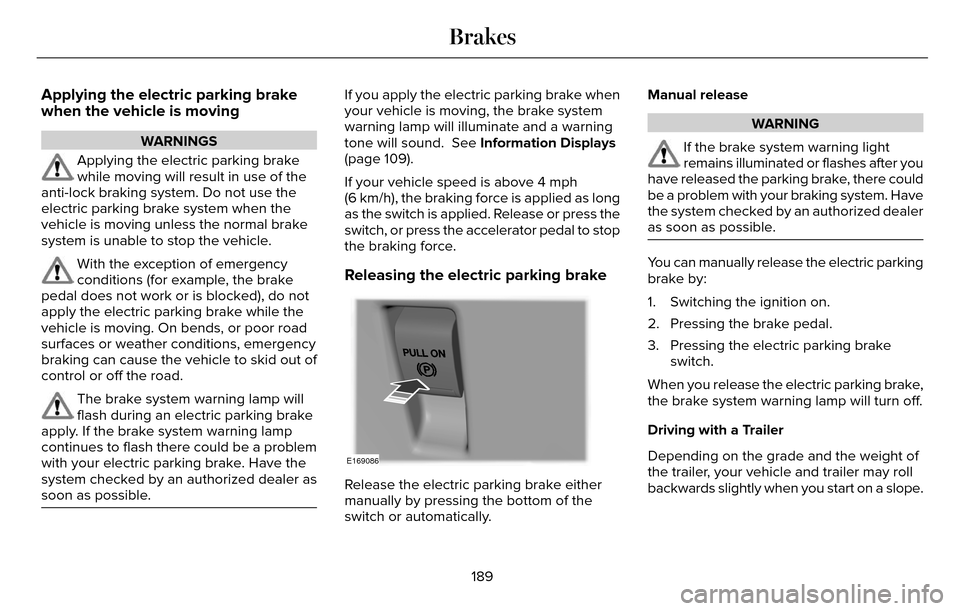
Releasing the electric parking brake
E169086
Release the electric parking brake either
manually by pressing the bottom of the
switch or automatically. Manual release
WARNING
If the brake system warning light
remains illuminated or flashes after you
have released the parking brake, there could
be a problem with your braking system. Have
the system checked by an authorized dealer
as soon as possible.
You can manually release the electric parking
brake by:
1. Switching the ignition on.
2. Pressing the brake pedal.
3. Pressing the electric parking brake switch.
When you release the electric parking brake,
the brake system warning lamp will turn off.
Driving with a Trailer
Depending on the grade and the weight of
the trailer, your vehicle and trailer may roll
backwards slightly when you start on a slope.
189
Brakes
Page 193 of 544

To prevent this from happening, do the
following:
1. Pull the switch and hold it in this position.
2. Drive your vehicle, then release theswitch when you notice that the engine
has developed sufficient driving force.
Automatic release - drive away release
Your vehicle will automatically release the
parking brake if:
• The driver door is closed.
• The vehicle is accelerated.
• There are no faults detected in the parking brake system.
Note: If the electric parking brake warning
lamp stays illuminated, the electric parking
brake will not automatically release. You
must release the electric parking brake using
the electric parking brake switch.
The brake system warning lamp will go off
to confirm that you have released the electric
parking brake. Note:
The electric parking brake drive away
release makes starting on a hill easier. This
feature will release the parking brake
automatically when the vehicle has sufficient
drive force to move up the hill. To assure
drive away release when starting uphill,
press the accelerator pedal quickly.
Battery With No Charge
WARNING
You will not be able to apply or release
the electric parking brake if the battery
is low or has no charge.
If the battery is low or has no charge, use
jumper cables and a booster battery.
HILL START ASSIST
WARNINGS
The system does not replace the
parking brake. When you leave your
vehicle, always apply the parking brake.
Failure to leave your vehicle securely parked
may lead to a crash or injury. See Electric
Parking Brake (page 188).
You must remain in your vehicle when
the system turns on. At all times, you
are responsible for controlling your vehicle,
supervising the system and intervening, if
required. Failure to take care may result in
the loss of control of your vehicle, serious
personal injury or death.
The system will turn off if a malfunction
is apparent or if you rev the engine
excessively. Failure to take care may result
in the loss of control of your vehicle, serious
personal injury or death.
The system makes it easier to pull away
when your vehicle is on a slope without the
need to use the parking brake.
190
Brakes
Page 194 of 544

When the system is active, your vehicle
remains stationary on the slope for two to
three seconds after you release the brake
pedal. This allows time to move your foot
from the brake to the accelerator pedal. The
system releases the brakes automatically
once the engine has developed sufficient
drive to prevent your vehicle from rolling
down the slope. This is an advantage when
pulling away on a slope, for example from a
car park ramp, traffic lights or when reversing
uphill into a parking space.
Note:The system only functions when you
bring your vehicle to a complete standstill
with the vehicle in an uphill gear (for
example, second (2) when facing uphill or
reverse (R) when facing downhill).
Note: There is no warning light to indicate
the system is either on or off.
Using Hill Start Assist
1. Press the brake pedal to bring your vehicle to a complete standstill. Keep the
brake pedal pressed. 2. If the sensors detect that your vehicle is
on a slope, the system activates
automatically.
3. When you remove your foot from the brake pedal, your vehicle remains on the
slope without rolling away for about two
to three seconds. This hold time
automatically extends if you are in the
process of driving off.
4. Drive off in the normal manner. The system releases the brakes automatically.
Note: When you remove your foot from the
brake pedal and press the pedal again when
the system is active, you will experience
significantly reduced brake pedal travel. This
is normal.
Switching the System On and Off
Vehicles with Manual Transmission
You can switch this feature on or off in the
information display. The system remembers
the last setting when you start your vehicle. Vehicles with Automatic Transmission
You cannot turn the system on or off. When
you switch the ignition on, the system
automatically turns on.
191
Brakes
Page 199 of 544
PRINCIPLE OF OPERATION
WARNINGS
To help avoid personal injury, please
read and understand the limitations of
the system as contained in this section.
Sensing is only an aid for some (generally
large and fixed) objects when moving on a
flat surface at parking speeds. Certain
objects with surfaces that absorb ultrasonic
waves, surrounding vehicle's parking aid
systems, traffic control systems, fluorescent
lamps, inclement weather, air brakes, and
external motors and fans may also affect the
function of the sensing system; this may
include reduced performance or a false
activation.
To help avoid personal injury, always
use caution when in reverse (R) and
when using the sensing system.
WARNINGS
This system is not designed to prevent
contact with small or moving objects.
The system is designed to provide a warning
to assist the driver in detecting large
stationary objects to avoid damaging your
vehicle. The system may not detect smaller
objects, particularly those close to the
ground.
Certain add-on devices such as large
trailer hitches, bike or surfboard racks
and any device that may block the normal
detection zone of the system, may create
false beeps.
Note: Keep the sensors, located on the
bumper or fascia, free from snow, ice and
large accumulations of dirt. If the sensors
are covered, the system’s accuracy can be
affected. Do not clean the sensors with sharp
objects.
Note: If your vehicle sustains damage to the
bumper or fascia, leaving it misaligned or
bent, the sensing zone may be altered
causing inaccurate measurement of
obstacles or false alarms. Note:
The sensing system cannot be turned
off when a MyKey is present. See Principle
of Operation (page 60).
Note: If you attach certain add-on devices
such as a trailer or bike rack, the rear
sensing system may detect that add-on
device and therefore provide warnings. It is
suggested that you disable the rear sensing
system when you attach an add-on device
to your vehicle to prevent these warnings.
The sensing system warns the driver of
obstacles within a certain range of your
vehicle. The system turns on automatically
whenever you switch the ignition on.
The system can be switched off through the
information display menu or from the pop-up
message that appears once you shift the
transmission into reverse (R). See General
Information (page 109).
Note: On vehicles with front parking aid you
can use the parking aid switch to switch the
system off.
If a fault is present in the system, a warning
message appears in the information display.
See Information Messages (page 115).
196
Parking Aids (If Equipped)
Page 201 of 544

If the transmission is in reverse (R), the front
sensing system provides audio warnings
when your vehicle is moving and the
detected obstacle is stationary or moving
towards your vehicle.
If the transmission is in drive (D) or any other
forward gear (for example, low (L), sport (S)
or any forward gear in a manual
transmission), the front sensing system
provides audio warnings when your vehicle
is moving below a speed of 7 mph (12 km/h)
and an obstacle is located inside the
detection area.
ACTIVE PARK ASSIST (If Equipped)
WARNING
Designed to be a supplementary park
aid, this system may not work in all
conditions. This system cannot replace the
driver’s attention and judgment. The driver
is responsible for avoiding hazards and
maintaining a safe distance and speed, even
when the system is in use.
Note: The driver is always responsible for
controlling the vehicle, supervising the
system and intervening if required.
The system detects an available parallel
parking space and automatically steers your
vehicle into the space (hands-free) while you
control the accelerator, gearshift and brakes.
The system visually and audibly instructs you
to park your vehicle.
The system may not function correctly if
something passes between the front bumper
and the parking space (a pedestrian or
cyclist) or if the edge of the neighboring
parked vehicle is high off the ground (for
example, a bus, tow truck or flatbed truck).
Note: The blindspot information system does
not detect traffic alongside or behind your
vehicle during a park assist maneuver.
Note: The sensors may not detect objects
in heavy rain or other conditions that cause
disruptive reflections.
Note: The sensors may not detect objects
with surfaces that absorb ultrasonic waves
or cause ultrasonic interference (motorcycle
exhaust, truck air brakes or horns). Do not use the system if:
• You have attached a foreign object (bike
rack or trailer) to the front or rear of your
vehicle or attached close to the sensors.
• You have attached an overhanging object (surfboard) to the roof.
• The front bumper or side sensors are damaged or obstructed by a foreign
object (front bumper cover).
• A mini-spare tire is in use.
Using Active Park Assist
E146186
Press the button located on the
center console near the gearshift
lever or the right side of the center
stack.
The touchscreen displays a message and a
corresponding graphic to indicate it is
searching for a parking space. Use the
direction indicator to indicate which side of
your vehicle you want the system to search.
Note: If the direction indicator is not on, the
system automatically searches on your
vehicle's passenger side.
198
Parking Aids (If Equipped)
Page 203 of 544

E130108
When you think your vehicle has enough
space in front and behind it, or you hear a
solid tone from the parking aid (accompanied
by a touchscreen display message and a
chime), bring your vehicle to a complete stop.
When automatic steering is finished, the
touch screen displays a message and a tone
sounds, indicating that the active park assist
process is done. The driver is responsible
for checking the parking job and making any
necessary corrections before putting the
transmission in park (P).Deactivating the Park Assist Feature
Manually deactivate the system by:
• Pressing the active park assist button.
• Grabbing the steering wheel.
• Driving above approximately 50 mph(80 km/h) for 10 seconds during an active
park search.
• Driving above 6 mph (9 km/h) during automatic steering.
• Turning off the traction control system. Certain vehicle conditions can also
deactivate the system, such as:
• Traction control has activated on a
slippery or loose surface.
• There is an anti-lock brake system activation or failure.
• Something touches the steering wheel.
If a problem occurs with the system, a
warning message is displayed, followed by
a tone. Occasional system messages may
occur in normal operation. For recurring or
frequent system faults, contact an authorized
dealer to have your vehicle serviced.
200
Parking Aids (If Equipped)
Page 206 of 544

WARNINGS
Use caution when turning camera
features on or off while in reverse (R).
Make sure your vehicle is not moving.
The rear view camera system provides a
video image of the area behind your vehicle.
The image will display in either the rear view
mirror or the display in the center of the
instrument panel.
During operation, lines will appear in the
display that represent your vehicle’s path
and proximity to objects behind your vehicle.
E152548
The camera is located on the trunk near the
high-mount brake lamp.
Using the Rear View Camera System
The rear view camera system displays what
is behind your vehicle when you place the
transmission in reverse (R).
The system uses three types of guides to
help you see what is behind your vehicle:
• Active guidelines: Show the intended path of your vehicle when reversing.
• Fixed guidelines: Show the actual path your vehicle is moving in while reversing
in a straight line. This can be helpful
when backing into a parking space or
aligning your vehicle with another object
behind you.
• Centerline (if applicable): Helps align the center of your vehicle with an object
(trailer).
Note: If the transmission is in reverse (R) and
the luggage compartment is ajar, no rear
view camera features will display.
Note: If the image comes on while the
transmission is not in reverse (R), have the
system inspected by an authorized dealer. Note:
When towing, the camera only sees
what you are towing behind your vehicle.
This might not provide adequate coverage
and you might not see some objects. In some
vehicles, the guidelines may disappear once
you connect the trailer tow connector.
The camera may not operate correctly under
the following conditions:
• Nighttime or dark areas if the reverse lamps are not operating.
• Mud, water or debris obstructs the camera's view. Clean the lens with a soft,
lint-free cloth and non-abrasive cleaner.
• The camera is misaligned due to damage to the rear of your vehicle.
To access any of the rear view camera
system settings, make the following
selections in the touch screen when the
transmission is not in reverse (R):
• Menu > Vehicle > Camera Settings
After changing a system setting, the touch
screen shows a preview of the selected
features.
203
Parking Aids (If Equipped)