2016 LINCOLN MKZ power mirror
[x] Cancel search: power mirrorPage 149 of 544
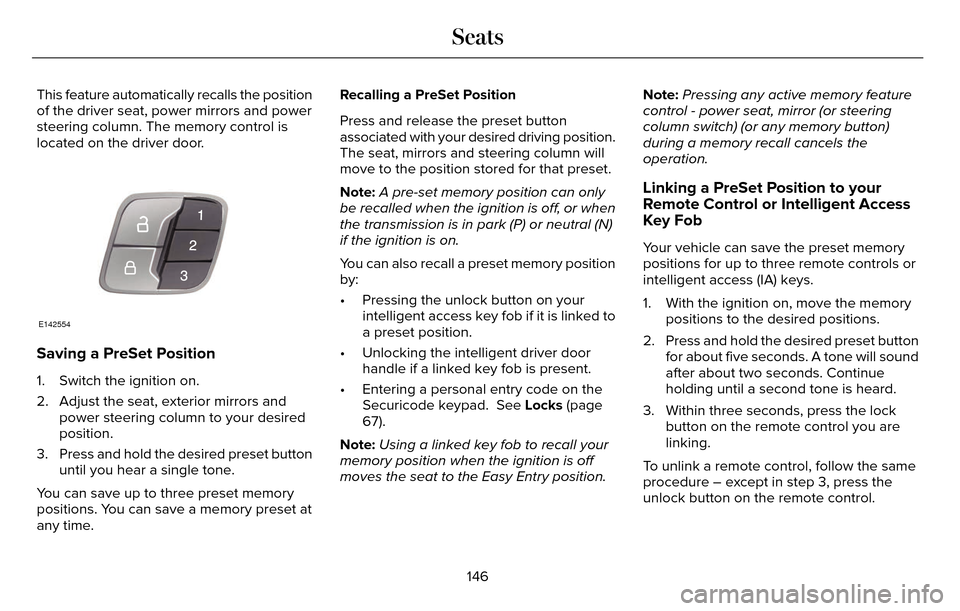
This feature automatically recalls the position
of the driver seat, power mirrors and power
steering column. The memory control is
located on the driver door.
E142554
Saving a PreSet Position
1. Switch the ignition on.
2. Adjust the seat, exterior mirrors andpower steering column to your desired
position.
3. Press and hold the desired preset button until you hear a single tone.
You can save up to three preset memory
positions. You can save a memory preset at
any time. Recalling a PreSet Position
Press and release the preset button
associated with your desired driving position.
The seat, mirrors and steering column will
move to the position stored for that preset.
Note:
A pre-set memory position can only
be recalled when the ignition is off, or when
the transmission is in park (P) or neutral (N)
if the ignition is on.
You can also recall a preset memory position
by:
• Pressing the unlock button on your intelligent access key fob if it is linked to
a preset position.
• Unlocking the intelligent driver door handle if a linked key fob is present.
• Entering a personal entry code on the Securicode keypad. See Locks (page
67).
Note: Using a linked key fob to recall your
memory position when the ignition is off
moves the seat to the Easy Entry position. Note:
Pressing any active memory feature
control - power seat, mirror (or steering
column switch) (or any memory button)
during a memory recall cancels the
operation.
Linking a PreSet Position to your
Remote Control or Intelligent Access
Key Fob
Your vehicle can save the preset memory
positions for up to three remote controls or
intelligent access (IA) keys.
1. With the ignition on, move the memory positions to the desired positions.
2. Press and hold the desired preset button for about five seconds. A tone will sound
after about two seconds. Continue
holding until a second tone is heard.
3. Within three seconds, press the lock button on the remote control you are
linking.
To unlink a remote control, follow the same
procedure – except in step 3, press the
unlock button on the remote control.
146
Seats
Page 228 of 544

There may be certain instances when either
the BLIS or cross traffic alert systems
illuminate the alert indicator with no vehicle
in the coverage zone; this is known as a false
alert. Some amount of false alerts are normal;
they are temporary and self-correct.
System Errors
If either system senses a problem with the
left or right sensor, the BLIS telltale will
illuminate and a message will appear in the
information display.
All other system faults will only be displayed
by a message in the information display.
Switching the Systems Off and On
One or both systems can be switched off
temporarily by using the information display
control. See (page 109). When the BLIS is
switched off, you will not receive alerts and
a telltale illuminates in the information
display. The yellow alert indicator in the
outside mirror will also flash twice.Note:
The CTA system always switches on
whenever the ignition is switched on.
However, the BLIS system will remember the
last selected on or off setting.
One or both systems cannot be switched off
when MyKey is used. See Principle of
Operation (page 60).
One or both systems can also be switched
off permanently at your authorized dealer.
Once switched off, switching it back on must
also be done at your authorized dealer.STEERING
Electric Power Steering
WARNING
The electric power steering system has
diagnostic checks that continuously
monitor the system. If a fault is detected, a
message displays in the information display.
Stop your vehicle as soon as it is safe to do
so. Switch the ignition off. After at least 10
seconds, switch the ignition on and watch
the information display for a steering system
warning message. If a steering system
warning message returns, have the system
checked by an authorized dealer.
Your vehicle has an electric power steering
system. There is no fluid reservoir. No
maintenance is required.
If your vehicle loses electrical power while
you are driving, electric power steering
assistance is lost. The steering system still
operates and you can steer your vehicle
manually. Manually steering your vehicle
requires more effort.
225
Driving Aids
Page 279 of 544

Protected components
Fuse amp rating
Fuse or relay number
Lighting (ambient, glove box, vanity, dome, trunk).
10A11
Memory seats, Lumbar, Power mirror.
7.5A
12
Driver door unlock.
20A
13
Not used (spare).
5A
14
Subwoofer amplifier.
20A
15
Heated seat relay coil.
10A
26
Not used (spare).
10A
27
Not used (spare).
10A
28
Not used (spare).
10A
29
Power trunk logic.
5A
210
Keypad.
Cellphone passport module.
276
Fuses
Page 281 of 544

Protected components
Fuse amp rating
Fuse or relay number
Humidity and in-car temperature sensor.
5A221
Occupant classification sensor.
5A
222
Delayed accessory (power inverter, smart window, driver-
window switch).
10A
123
Central lock-unlock.
20A
124
Driver door (window, mirror).
30A
125
Front passenger door (window, mirror).
30A
126
Moonroof.
30A
127
Amplifier.
20A
128
Rear driver side door (window).
30A
129
Rear passenger side door (window).
30A
130
Not used (spare).
15A
131
278
Fuses
Page 301 of 544

If you see any corrosion on the battery or
terminals, remove the cables from the
terminals and clean with a wire brush. You
can neutralize the acid with a solution of
baking soda and water.
When a battery replacement is required, the
battery should only be replaced with a Ford
recommended replacement battery that
matches the electrical requirements of the
vehicle.
Because your vehicle’s engine is
electronically-controlled by a computer,
some engine control settings are maintained
by power from the low voltage battery. Some
engine computer settings, like the idle trim
and fuel trim strategy, optimize the
driveability and performance of the engine.
Some other computer settings, like the clock
and radio station presets, are also maintained
in memory by power from the low voltage
battery. When a technician disconnects and
connects the low voltage battery, these
settings are erased.Note:
Until you switch the ignition to the on
position, you will receive a message in your
information display stating that your vehicle
is not in park.
Complete the following procedure in order
to restore the settings:
1. With the vehicle at a complete stop, set the parking brake.
2. Shift the transmission into P.
3. Turn off all accessories.
4. Step on the brake pedal and start the vehicle.
5. Run the engine until it reaches normal operating temperature. While the engine
is warming up, complete the following:
Reset the clock. See Windows and
Mirrors (page 95). Reset the power
windows bounce-back feature. See
Windows and Mirrors (page 95). Reset
the radio station presets. See Windows
and Mirrors (page 95).
6. Allow the engine to idle for at least one minute. If the engine turns off, step on
the accelerator to start the engine. 7. While the engine is running, step on the
brake pedal and shift the transmission to
N.
8. Allow the engine to run for at least one minute by pressing on the accelerator
pedal.
9. Drive your vehicle at least 10 miles (16 kilometers) to completely relearn the idle
and fuel trim strategy.
Note: Certain features may not operate if
the Battery Monitor System is not reset with
a scan tool following a jump start or battery
replacement. Normal electrical accessory
operation should resume after your vehicle
is left undisturbed for 8 hours.
Note: If you do not allow the engine to
relearn the idle and fuel trim strategy, the
idle quality of your vehicle may be adversely
affected until the engine computer
eventually relearns the idle trim and fuel trim
strategy.
298
Maintenance
Page 537 of 544

Essential Towing Checks............................243Before Towing a Trailer.....................................244
Hitches..................................................................243
Launching or Retrieving a Boat or PersonalWatercraft (PWC)............................................244
Safety Chains.......................................................243
Trailer Brakes.......................................................243
Trailer Lamps.......................................................243
When Towing a Trailer.......................................244
Event Data RecordingSee: Data Recording..............................................9
Export Unique Options...................................14
Extended Service Plan (ESP).....................477
SERVICE PLANS (CANADA ONLY).................478
SERVICE PLANS (U.S. Only).............................477
Exterior Mirrors................................................96Auto-Dimming Feature........................................97
Blind Spot Monitor................................................98
Fold-Away Exterior Mirrors.................................97
Heated Exterior Mirrors.......................................97
Integrated Blind Spot Mirrors............................98
Lincoln Welcome Mat..........................................98
Memory Mirrors.....................................................97
Power Exterior Mirrors.........................................96
Power-Folding Mirrors.........................................97
Signal Indicator Mirrors.......................................97
F
Fastening the Safety Belts...........................34Rear Inflatable Safety Belt..................................36
Safety Belt Extension Assembly........................37
Safety Belt Locking Modes................................35
Using Safety Belts During Pregnancy.............34
Flat Tire InflationSee: Temporary Mobility Kit..............................314
Floor Mats......................................................249
Front Parking Aid...........................................197
Front Passenger Sensing System..............46
Fuel and Refueling........................................166
Fuel Consumption..........................................171
Calculating Fuel Economy................................172
Filling the Tank.....................................................172
Fuel Filter.......................................................296
Fuel Quality.....................................................167
Choosing the Right Fuel....................................167
Fuel Shutoff...................................................252
Fuses...............................................................263
Fuse Specification Chart............................263
Passenger Compartment Fuse Panel............274
Power Distribution Box.....................................263
G
Garage Door OpenerSee: Universal Garage Door Opener.............152
Gauges............................................................102Engine Coolant Temperature Gauge.............104
Fuel Gauge...........................................................103\
Information Display.............................................103
General Information on Radio Frequencies...................................................54
Intelligent Access..................................................54
General Maintenance Information...........480Multi-Point Inspection........................................483
Owner Checks and Services...........................482
Protecting Your Investment.............................480
Why Maintain Your Vehicle?............................480
Why Maintain Your Vehicle at Your
Dealership?......................................................480
Getting Assistance Outside the U.S. andCanada.........................................................259
Getting the Services You Need................256
Away From Home..............................................256
Global Opening and Closing.......................96Closing the Windows...........................................96
Opening the Windows.........................................96
534
Index
Page 539 of 544

Information Messages..................................115Active Park.............................................................115
Adaptive Cruise Control.....................................116
Adaptive Headlamps...........................................117
AdvanceTrac™.........................................................117
Airbag......................................................................117
Alarm.......................................................................1\
18
Automatic Engine Shutdown.............................118
AWD........................................................................\
.119
Battery and Charging System..........................120
Blind Spot Information and Cross Traffic AlertSystem................................................................121
Doors and Locks...................................................121
Driver Alert............................................................\
122
Fuel........................................................................\
.122
Hill Start Assist.....................................................123
Keys and Intelligent Access..............................123
Lane Keeping System........................................124
Maintenance.........................................................125
MyKey.....................................................................126
Park Aid.................................................................\
.127
Park Brake.............................................................12\
7
Power Steering....................................................129
Pre-Collision Assist.............................................129
Remote Start.........................................................130
Seats.......................................................................1\
30
Starting System ...................................................130
Tire Pressure Monitoring System.....................131 Traction Control................................................131
Transmission.........................................................132
Installing Child Seats......................................18Child Seats.............................................................\
..18
Using Lap and Shoulder Belts............................18
Using Lower Anchors and Tethers for CHildren (LATCH).............................................24
Using Tether Straps..............................................25
Instrument Cluster........................................102
Instrument Lighting Dimmer........................88
Interior Lamps..................................................93
Front Interior Lamp...............................................93
Rear Interior Lamp................................................94
Rear Interior Lamp (If Equipped).......................94
Interior Luggage Compartment Release...........................................................75
Interior Mirror...................................................98
Auto-Dimming Mirror...........................................99
Introduction.........................................................7
J
Jump Starting the Vehicle..........................253Connecting the Jumper Cables......................254
Jump Starting......................................................254
Preparing Your Vehicle.....................................253
Removing the Jumper Cables........................255
K
Keyless Entry....................................................72SECURICODE™ KEYLESS ENTRY
KEYPAD...............................................................72
Keyless Starting..............................................161Ignition Modes......................................................161
Keys and Remote Controls...........................54
L
Lane Keeping System..................................215Switching the System On and Off...................216
Lighting Control...............................................87Headlamp Flasher.................................................87
High Beams............................................................87\
Lighting..............................................................87
Lincoln Automotive Financial Services......12
Load Carrying.................................................231
Load Limit........................................................231
Vehicle Loading - with and without aTrailer.................................................................231
536
Index
Page 540 of 544

Locking and Unlocking..................................67Activating Intelligent Access.............................68
Autolock ...............................................................\
..69
Auto Relock............................................................69
Battery Saver..........................................................7\
0
Illuminated Entry...................................................70
Illuminated Exit......................................................70\
Luggage Compartment.......................................70
Power Decklid.........................................................71
Power Door Locks................................................67
Remote Control.....................................................67
Smart Unlocks for Intelligent AccessKeys.....................................................................69
Locks..................................................................67
Lug Nuts
See: Changing a Road Wheel.........................346
M
Maintenance...................................................281General Information............................................281
Media Hub......................................................372
Memory Function..........................................145
Easy Entry and Exit Feature..............................147
Linking a PreSet Position to your RemoteControl or Intelligent Access Key Fob.......146
Saving a PreSet Position...................................146
Message CenterSee: Information Displays.................................109
MirrorsSee: Heated Windows and Mirrors.................138
See: Windows and Mirrors.................................95
Mobile Communications Equipment...........14
Moonroof.........................................................100
Bounce-Back.........................................................101
Opening and Closing the Moonroof..............100
Motorcraft Parts............................................354
MyKey Troubleshooting................................65
MyKey™..............................................................60
Principle of Operation.........................................60
MyLincoln Touch™.........................................373General Information...........................................373
MyLincoln Touch™ Troubleshooting.........467
N
Navigation ......................................................454cityseekr................................................................457
Destination Mode...............................................454
Map Mode............................................................462
Navigation Map Updates.................................466
Navigation Voice Commands.........................466
Point of Interest (POI) Categories..................456
Quick-touch Buttons..........................................465
Setting Your Navigation Preferences............458
Normal Scheduled Maintenance..............484Intelligent Oil-Life Monitor™..............................484
Maintenance Intervals.......................................486
O
Oil Change Indicator Reset.......................288
Oil Check
See: Engine Oil Check......................................287
Opening and Closing the Hood................281
Ordering Additional Owner's
Literature......................................................261
Obtaining a French Owner’s Manual.............261
Overhead Console.......................................160
P
Parking Aids....................................................196Principle of Operation........................................196
Passive Anti-Theft System............................77SecuriLock...............................................................77
PA T SSee: Passive Anti-Theft System.........................77
Perchlorate........................................................ 12
Personal Safety System™..............................43
How Does the Personal Safety System
Work?...................................................................43
537
Index