2016 LINCOLN MKZ Parking aids
[x] Cancel search: Parking aidsPage 206 of 544

WARNINGS
Use caution when turning camera
features on or off while in reverse (R).
Make sure your vehicle is not moving.
The rear view camera system provides a
video image of the area behind your vehicle.
The image will display in either the rear view
mirror or the display in the center of the
instrument panel.
During operation, lines will appear in the
display that represent your vehicle’s path
and proximity to objects behind your vehicle.
E152548
The camera is located on the trunk near the
high-mount brake lamp.
Using the Rear View Camera System
The rear view camera system displays what
is behind your vehicle when you place the
transmission in reverse (R).
The system uses three types of guides to
help you see what is behind your vehicle:
• Active guidelines: Show the intended path of your vehicle when reversing.
• Fixed guidelines: Show the actual path your vehicle is moving in while reversing
in a straight line. This can be helpful
when backing into a parking space or
aligning your vehicle with another object
behind you.
• Centerline (if applicable): Helps align the center of your vehicle with an object
(trailer).
Note: If the transmission is in reverse (R) and
the luggage compartment is ajar, no rear
view camera features will display.
Note: If the image comes on while the
transmission is not in reverse (R), have the
system inspected by an authorized dealer. Note:
When towing, the camera only sees
what you are towing behind your vehicle.
This might not provide adequate coverage
and you might not see some objects. In some
vehicles, the guidelines may disappear once
you connect the trailer tow connector.
The camera may not operate correctly under
the following conditions:
• Nighttime or dark areas if the reverse lamps are not operating.
• Mud, water or debris obstructs the camera's view. Clean the lens with a soft,
lint-free cloth and non-abrasive cleaner.
• The camera is misaligned due to damage to the rear of your vehicle.
To access any of the rear view camera
system settings, make the following
selections in the touch screen when the
transmission is not in reverse (R):
• Menu > Vehicle > Camera Settings
After changing a system setting, the touch
screen shows a preview of the selected
features.
203
Parking Aids (If Equipped)
Page 207 of 544

Guidelines and the Centerline
Note:Active guidelines and fixed guidelines
are only available when the transmission is
in reverse (R).
Note: The centerline is only available if
Active or Fixed guidelines are on.
ABCD
F
E
E142436
Active guidelines
A
Centerline
B
Fixed guideline: Green zone
C Fixed guideline: Yellow zone
D
Fixed guideline: Red zone
E
Rear bumper
F
Active guidelines are only shown with fixed
guidelines. To use active guidelines, turn the
steering wheel to point the guidelines toward
an intended path. If you change the steering
wheel position while reversing, your vehicle
might deviate from the original intended
path.
The fixed and active guidelines fade in and
out depending on your steering wheel
position. When your steering wheel position
is straight, the active guidelines are not
visible.
Always use caution while reversing. Objects
in the red zone are closest to your vehicle
and objects in the green zone are farther
away. Objects are getting closer to your
vehicle as they move from the green zone
to the yellow or red zones. Use the side view
mirrors and rear view mirror to get better
coverage on both sides and rear of your
vehicle.
204
Parking Aids (If Equipped)
Page 208 of 544

Enhanced Park Aids
Note:Enhanced park aids are only available
when the transmission is in reverse (R).
Note: The reverse sensing system is not
effective at speeds above 3 mph (5 km/h)
and may not detect certain angular or
moving objects.
The system uses red, yellow and green
highlights that appear on top of the video
image when the reverse sensing system
detects an object. The alert highlights the
closest object detected. You can disable the
reverse sensing alert if you have enhanced
park aids enabled, you will still see the
displayed highlighted areas.
Selectable settings for this feature are ON
and OFF.
Manual Zoom
WARNING
When manual zoom is on, the full area
behind your vehicle is not shown. Be
aware of your surroundings when using the
manual zoom feature.
Note: Manual zoom is only available when
the transmission is in reverse (R).
Note: Only the centerline shows when you
enable manual zoom.
This allows you to get a closer view of an
object behind your vehicle. The zoomed
image keeps the bumper in the image to
provide a reference. The zoom is only active
while the transmission is in reverse (R). When
you shift the transmission out of reverse (R),
the feature automatically turns off and you
must enable it to use it again.
Selectable settings for this feature are ON
and OFF.
Rear Camera Delay
When shifting the transmission out of reverse
(R) and into any gear other than park (P), the
camera image remains in the display until
your vehicle speed reaches 5 mph (8 km/h)
or until you select a radio button.
Selectable settings for this feature are ON
and OFF. The default setting for the rear
camera delay is OFF.
205
Parking Aids (If Equipped)
Page 224 of 544
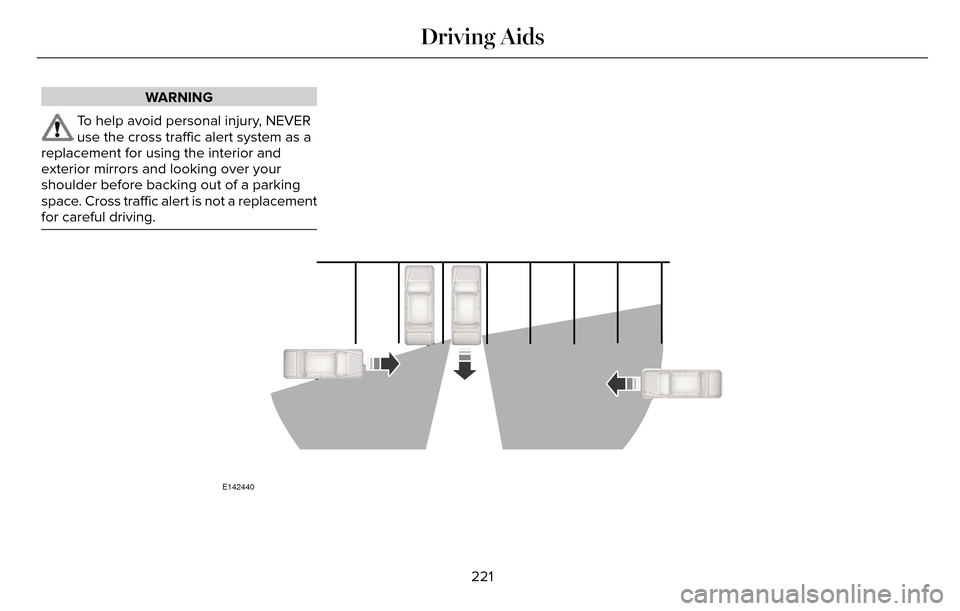
WARNING
To help avoid personal injury, NEVER
use the cross traffic alert system as a
replacement for using the interior and
exterior mirrors and looking over your
shoulder before backing out of a parking
space. Cross traffic alert is not a replacement
for careful driving.
E142440
221
Driving Aids
Page 225 of 544

In this first example, the left sensor is only
partially obstructed; zone coverage is nearlymaximized.
E142441
Zone coverage also decreases when parking
at shallow angles. Here, the left sensor is
mostly obstructed; zone coverage on that
side is severely limited.
222
Driving Aids
Page 227 of 544

When the blockage is removed, the system
can be reset in two ways:
• when at least two objects are detectedwhile driving, or
• turn the ignition from on to off, then back on.
If the blockage is still present after the key
cycle, the system senses again that it is
blocked after driving in traffic.
Reasons for messages being displayed
Clean the fascia area in front of the radar or remove the obstruction.
The radar
surface is dirty or
obstructed
Drive normally in traffic for afew minutes to allow theradar to detect passing
vehicles so it can clear the blocked state.
The radar
surface is
not dirty or obstructed
No action required. The
system automatically resets to an unblocked state once the rainfall or snowfall rate
decreases or stops. Do not
use BLIS or cross traffic alert in these conditions.
Heavy rain-
fall/snowfall interfereswith the radar
signals
System Limitations
The BLIS and cross traffic alert systems do
have their limitations; situations such as
severe weather conditions or debris build-up
on the sensor area may limit vehicle
detection. The following are other situations that may
limit the BLIS:
• Certain maneuvering of vehicles entering
and exiting the blind zone.
• Vehicles passing through the blind zone at very fast rates.
• When several vehicles forming a convoy pass through the blind zone.
The following are other situations that may
limit the cross traffic alert system:
• Adjacently parked vehicles or objects obstructing the sensors.
• Approaching vehicles passing at speeds greater than 15 mph (24 km/h).
• Driving in reverse faster than 5 mph (8 km/h).
• Backing out of an angled parking spot.
False Alerts
Note: If a trailer is connected to the vehicle
the BLIS system may detect the trailer
causing a false alert. You may want to turn
the BLIS off manually.
224
Driving Aids
Page 393 of 544

Action and Description
Menu Item
Mileage Interval (Miles)
To run the vehicle health report immediately.
Run Vehicle Health Report Now
You can find more information on Vehicle Health Report in this chapter.
Camera Settings
This menu allows you to access settings for
your rear view camera. See Parking Aids
(page 196).
E142607
To make adjustments using the touchscreen, select:
Action and Description
Menu Item
Press the settings icon.
Settings
Vehicle
Camera Settings
Then select from the following:
Enhanced Park Aids
Rear Camera Delay
You can find more information on the rear view camera system in another c\
hapter.
390
MyLincoln Touch™
Page 536 of 544

Cruise Control.................................................82Principle of Operation.......................................206
Type 1...................................................................\
....82
Type 2...................................................................\
...82
Cruise controlSee: Using Cruise Control...............................206
Customer Assistance..................................256
D
Data Recording..................................................9Event Data Recording...........................................10
Service Data Recording.........................................9
Daytime Running Lamps...............................89Type 1 - Conventional(Non-Configurable)..........................................89
Type 2 - Configurable..........................................90
Direction Indicators........................................92
Drive Control.................................................229
LINCOLN DRIVE CONTROL............................229
Driver Alert......................................................214Using Driver Alert................................................214
Driver and Passenger Airbags....................45Children and Airbags...........................................46
Proper Driver and Front Passenger Seating Adjustment.........................................................46
Driver and Passenger Knee Airbags.........50
Driving Aids.....................................................214 Driving Hints..................................................248
Driving Through Water...............................248
DRL
See: Daytime Running Lamps...........................89
E
Economical Driving......................................248
Electric Parking Brake..................................188
Applying the electric parking brake...............188
Applying the electric parking brake when the
vehicle is moving............................................189
Battery With No Charge....................................190
Releasing the electric parking brake.............189
Emission Control System.............................172On-Board Diagnostics (OBD-II)........................173
Readiness for Inspection/Maintenance (I/M) Testing................................................................174
End User License Agreement...................503SYNC End User License Agreement(EULA)...............................................................503
Engine Block Heater....................................165Using the Engine Block Heater.......................165
Engine Coolant Check................................289Adding Engine Coolant....................................289
Checking the Engine Coolant.........................289
Recycled Engine Coolant.................................290
Severe Climates.................................................290
What You Should Know About Fail-SafeCooling..............................................................291
Engine ImmobilizerSee: Passive Anti-Theft System.........................77
Engine Oil Check..........................................287Adding Engine Oil..............................................287
Engine Oil Dipstick - 2.0LEcoBoost™....................................................287
Engine Oil Dipstick - 3.7L............................287
Engine Specifications..................................353
Drivebelt Routing................................................353
Entertainment................................................403AM/FM Radio.......................................................404
Bluetooth Audio..................................................425
CD......................................................................\
......419
SD Card Slot and USB Port...............................421
SIRIUS® Satellite Radio (If Activated)..............412
Supported Media Players, Formats and
Metadata Information...................................425
Environment......................................................15
EPB
See: Electric Parking Brake..............................188
533
Index