2016 LINCOLN MKX Exterior mirrors
[x] Cancel search: Exterior mirrorsPage 5 of 563

Security
Passive Anti-Theft System............................80
Anti-Theft Alarm...............................................81
Steering Wheel
Adjusting the Steering Wheel -
Vehicles
With: Manual Adjustable Steering
Column..........................................................83
Adjusting the Steering Wheel -
Vehicles
With: Power Adjustable Steering
Column..........................................................83
Audio Control
...................................................84
Voice Control
...................................................85
Cruise Control
.................................................85
Information Display Control
.........................85
Heated Steering Wheel................................86
Wipers and Washers
Windshield Wipers..........................................87
Autowipers.......................................................88
Windshield Washers
......................................89
Rear Window Wiper and Washers..............89 Lighting
General Information........................................91
Lighting Control
................................................91
Autolamps........................................................92
Instrument Lighting Dimmer........................93
Headlamp Exit Delay.....................................94
Daytime Running Lamps
...............................94
Automatic High Beam Control....................95
Adaptive Headlamps
.....................................96
Direction Indicators
........................................97
Welcome Lighting
...........................................97
Interior Lamps..................................................97
Ambient Lighting............................................99
Windows and Mirrors
Power Windows.............................................100
Global Opening and Closing
.......................101
Exterior Mirrors
...............................................101
Interior Mirror
.................................................104
Sun Visors.......................................................105
Moonroof.........................................................105 Instrument Cluster
Gauges.............................................................107
Warning Lamps and Indicators..................109
Audible Warnings and Indicators...............113
Information Displays
General Information
.......................................114
Information Messages..................................121
Climate Control
Automatic Climate Control.........................140
Hints on Controlling the Interior Climate.........................................................142
Heated Windows and Mirrors....................143
Cabin Air Filter
...............................................143
Remote Start...................................................144
Seats
Sitting in the Correct Position....................145
Head Restraints
.............................................145
Power Seats....................................................148
Memory Function
...........................................151
Rear Seats
.......................................................153
2
MKX (CD9) Canada/United States of America, enUSA, ASO/OGC Review Table of Contents
Page 100 of 563

Note:
There may be a delay of up to five
seconds before the system will operate when
the vehicle is first driven.
Note: The system is only active at speeds
above 3 mph (5 km/h).
When the vehicle is started, the lamps track
to a predetermined position, then back to
center to alert the driver that the system is
working properly. DIRECTION INDICATORS
Push the lever up or down to use the
direction indicators.
Note:
Tap the lever up or down to make the
direction indicators flash three times to
indicate a lane change.
WELCOME LIGHTING
The Lincoln welcome mat projection lights
are on the bottom of the exterior mirror
housings. They will project an image onto
the ground a short distance from your vehicle
when welcome lighting or lighted entry turns
on. For auto-fold mirrors, the Lincoln welcome
mat will turn on when welcome lighting or
lighted entry turns on and the mirrors have
been automatically folded in upon locking
or using the switch on the door.
Note:
Moisture, frost and ice build-up or
other types of contamination on the surface
of the light lens can cause non-permanent
distortion or reduced brightness of the
image. Do not use abrasive materials to
clean the lens.
Note: If you enable auto-fold and then you
fold the mirrors in manually to the door
window glass, then the welcome mats will
not turn on.
INTERIOR LAMPS
The lamps will turn on when you have met
one of the following conditions:
• You open any door.
• You press a remote control button.
• You press the all lamps on button on the
front interior lamp.
97
MKX (CD9) Canada/United States of America, enUSA, ASO/OGC Review LightingE142451 E169255
Page 104 of 563

Window Lock
Press the control to lock or unlock the rear
window controls. It will illuminate when you
lock the rear window controls.
Accessory Delay
You can use the window switches for several
minutes after you switch the ignition off or
until you open either front door.
GLOBAL OPENING AND CLOSING
You can use the remote control to operate
the windows with the ignition off. Note:
You can enable or disable this feature
in the information display or see an
authorized dealer. See General Information
(page 114).
Note: To operate this feature, accessory
delay must not be active.
Opening the Windows
You can only open the windows for a short
time after you unlock your vehicle with the
remote control. After you unlock your vehicle,
press and hold the remote control unlock
button to open the windows. Release the
button once movement starts. Press the lock
or unlock button to stop movement.
Closing the Windows WARNING
When closing the power windows, you
should verify they are free of
obstructions and make sure that children and
pets are not in the proximity of the window
openings. To close the windows, press and hold the
remote control lock button. Release the
button once movement starts. Press the lock
or unlock button to stop movement.
EXTERIOR MIRRORS
Power Exterior Mirrors
WARNING
Do not adjust the mirrors when your
vehicle is moving.
101
MKX (CD9) Canada/United States of America, enUSA, ASO/OGC Review Windows and MirrorsE144072
Page 105 of 563

Left-hand mirror.
A
Adjustment control.
B
Right-hand mirror.
C
To adjust your mirrors, switch your vehicle
on (with the ignition in accessory mode or
the engine running) and then:
1. Select the mirror you want to adjust. The
control lights.
2. Use the adjustment control to adjust the
position of the mirror.
3. Press the mirror control again. The control light turns off. Fold-Away Exterior Mirrors
Push the mirror toward the door window
glass. Make sure that you fully engage the
mirror in its support when returning it to its
original position.
Auto-Folding Mirrors
The exterior mirrors fold in toward the glass
automatically when you place the
transmission into park (P), open a front door
and then lock your vehicle by using either
the lock button on the door or with the lock
button on your remote transmitter.
Auto-folding mirrors unfold and return to their
original position automatically after you
unlock your vehicle, and then open and close
the driver's door.
You can switch this feature on and off
through the information display. See General
Information (page 114).
You can fold the mirrors on demand by
pressing the door lock control located on the
door. The control will light and the mirrors
will fold in toward the glass. Press the control
again to unfold the mirrors. The control light
will turn off.
Note:
If you use the control to fold the
mirrors on demand and the auto fold feature
is switched on, you must use the control
again to unfold them.
102
MKX (CD9) Canada/United States of America, enUSA, ASO/OGC Review Windows and MirrorsE144073 E170431
Page 106 of 563

Loose Mirror
You can manually fold an auto-folding mirror
by pulling it toward the door window glass.
This may cause the mirror to appear loose
and it will need to be re-synchronized. Press
the control to fold the mirrors in until the
movement stops. You will hear a click that
indicates re-synchronization. If you do not
hear a click, use the control again to fold the
mirrors all the way out, and then in again.
Once you hear the click, the mirrors will
operate normally until you fold them
manually again.
Heated Exterior Mirrors
See Heated Windows and Mirrors (page
143).
Memory Mirrors
You can save and recall the mirror positions
through the memory function. See Memory
Function
(page 151). Auto-dimming Feature
(If Equipped)
The driver exterior mirror automatically dims
when the interior auto-dimming mirror turns
on.
Signal Indicator Mirrors
The outer portion of the appropriate mirror
housing blinks when you activate the turn
signal.
Lincoln Welcome Mat
Projection lights, on the bottom of the mirror
housings, project an image onto the ground
a short distance from the vehicle.
See
Lighting (page 91).
Integrated Blind Spot Mirror WARNING
Objects in the blind spot mirror are
closer than they appear. Blind spot mirrors have an integrated convex
mirror built into the upper outboard corner
of the exterior mirrors. They can assist you
by increasing visibility along the side of your
vehicle.
Check the main mirror first before a lane
change, then check the blind spot mirror. If
no vehicles are present in the blind spot
mirror and the traffic in the adjacent lane is
at a safe distance, signal that you are going
to change lanes. Glance over your shoulder
to verify traffic is clear, and carefully change
lanes.
103
MKX (CD9) Canada/United States of America, enUSA, ASO/OGC Review Windows and Mirrors
Page 122 of 563
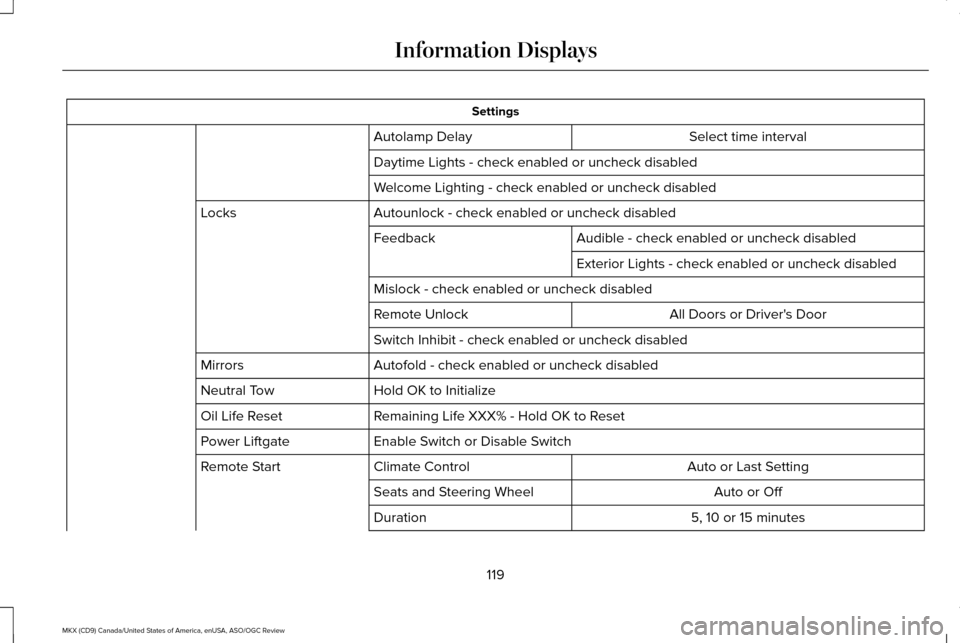
Settings
Select time interval
Autolamp Delay
Daytime Lights - check enabled or uncheck disabled
Welcome Lighting - check enabled or uncheck disabled
Autounlock - check enabled or uncheck disabled
Locks
Audible - check enabled or uncheck disabled
Feedback
Exterior Lights - check enabled or uncheck disabled
Mislock - check enabled or uncheck disabled All Doors or Driver's Door
Remote Unlock
Switch Inhibit - check enabled or uncheck disabled
Autofold - check enabled or uncheck disabled
Mirrors
Hold OK to Initialize
Neutral Tow
Remaining Life XXX% - Hold OK to Reset
Oil Life Reset
Enable Switch or Disable Switch
Power Liftgate
Auto or Last Setting
Climate Control
Remote Start
Auto or Off
Seats and Steering Wheel
5, 10 or 15 minutes
Duration
119
MKX (CD9) Canada/United States of America, enUSA, ASO/OGC Review Information Displays
Page 146 of 563

Cooling the Interior Quickly
1. Select the MAX A/C function.
Recommended Settings for Cooling
1. Select the
AUTO function.
2. Adjust the temperature function to the desired setting. Use 72°F (22°C) as a
starting point, then adjust the setting as
necessary.
Side Window Defogging in Cold
Weather
1. Press the defrost button.
2. Adjust the temperature control to the desired setting. Use 72°F (22°C) as a
starting point, then adjust the setting as
necessary. HEATED WINDOWS AND MIRRORS
(If Equipped)
Heated Rear Window
Note:
Make sure the engine is running
before operating the heated windows. Press the button to clear the
heated rear window of thin ice and
fog. The heated rear window will
automatically turn off after a short period of
time. Start the engine before you switch the
heated rear window on.
Note: Do not use razor blades or other sharp
objects to clean or remove decals from the
inside of the heated rear window. The
vehicle warranty does not cover damage
caused to the heated rear window grid lines.
Heated Exterior Mirror
When you switch the heated rear window
on, the heated exterior mirrors will
automatically turn on. Note:
Do not remove ice from the mirrors
with a scraper or adjust the mirror glass
when it is frozen in place.
Note: Do not clean the mirror housing or
glass with harsh abrasives, fuel or other
petroleum-based cleaning products.
CABIN AIR FILTER
Your vehicle is equipped with a cabin air
filter, which gives you and your passengers
the following benefits:
• It improves your driving comfort by
reducing particle concentration.
• It improves the interior compartment
cleanliness.
• It protects the climate control
components from particle deposits.
You can locate the cabin air filter behind the
glove box.
143
MKX (CD9) Canada/United States of America, enUSA, ASO/OGC Review Climate ControlE184884
Page 220 of 563

The system does not position the vehicle where I want in the space
A parked vehicle has a high attachment (salt sprayer, snowplow or moving truck bed).
The parking space length or position of parked objects changed after your vehicle passed.
The temperature around your vehicle changes quickly (driving from a hea\
ted garage into the cold, or after leaving a car wash).
REAR VIEW CAMERA WARNINGS
The rear view camera system is a
reverse aid supplement device that still
requires the driver to use it in conjunction
with the interior and exterior mirrors for
maximum coverage. Objects that are close to either corner
of the bumper or under the bumper,
might not be seen on the screen due to the
limited coverage of the camera system. Back up as slow as possible since
higher speeds might limit your reaction
time to stop your vehicle. WARNINGS
Use caution when using the rear video
camera and the luggage compartment
door is ajar. If the luggage compartment door
is ajar, the camera will be out of position and
the video image may be incorrect. All
guidelines disappear when the luggage
compartment door is ajar. Use caution when turning camera
features on or off. Make sure your
vehicle is not moving. The rear view camera system provides a
video image of the area behind your vehicle.
During operation, lines appear in the display
which represent your vehicle
’s path and
proximity to objects behind your vehicle. The camera is located on the luggage
compartment door.
Using the Rear View Camera System
The rear view camera system displays what
is behind your vehicle when you place the
transmission in reverse (R).
217
MKX (CD9) Canada/United States of America, enUSA, ASO/OGC Review Parking AidsE142435