Page 129 of 563
Blind Spot Information and Cross Traffic Alert System
Action
Message
Displayed when a fault with the system has occurred. Contact an authoriz\
ed dealer as soon as possible.
Blindspot System Fault
Displayed when the system sensors are blocked. Contact an authorized dealer as soon aspossible. See Blind Spot Information System (page 237).
Blindspot Not Available Sensor Blocked
See Manual
Displayed when the system detects a vehicle. See Blind Spot Information System (page 237).
Cross Traffic Vehicle Coming From X
Displayed when the blind spot information system and cross traffic alert\
system sensors areblocked.
See Blind Spot Information System (page 237).
Cross Traffic Not Available Sensor Blocked
See Manual
Displays when a fault with the system has occurred. Contact an authorize\
d dealer as soon as possible.
Cross Traffic System Fault
126
MKX (CD9) Canada/United States of America, enUSA, ASO/OGC Review Information Displays
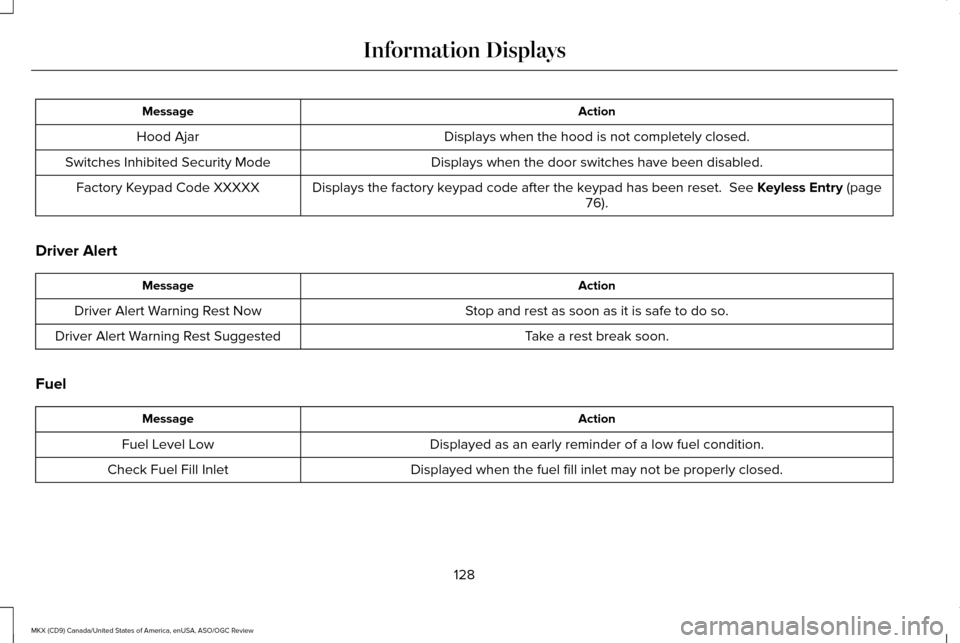
Page 131 of 563
Action
Message
Displays when the hood is not completely closed.
Hood Ajar
Displays when the door switches have been disabled.
Switches Inhibited Security Mode
Displays the factory keypad code after the keypad has been reset. See Keyless Entry (page
76).
Factory Keypad Code XXXXX
Driver Alert Action
Message
Stop and rest as soon as it is safe to do so.
Driver Alert Warning Rest Now
Take a rest break soon.
Driver Alert Warning Rest Suggested
Fuel Action
Message
Displayed as an early reminder of a low fuel condition.
Fuel Level Low
Displayed when the fuel fill inlet may not be properly closed.
Check Fuel Fill Inlet
128
MKX (CD9) Canada/United States of America, enUSA, ASO/OGC Review Information Displays
Page 132 of 563

Hill Start Assist
Action
Message
Displays when hill start assist is not available. Contact an authorized dealer.
Hill Start Assist Not Available
Keys and Intelligent Access Action
Message
Displayed as a reminder to press the brake while starting the vehicle.
Press Brake to START
Displayed if the key is not detected by the system. See Keyless Starting (page 167).
No Key Detected
Displayed when the start/stop button is pressed to shut off the engine a\
nd an Intelligent Accesskey is not detected inside the vehicle.
Restart Now or Key is Needed
Displayed when the vehicle is in the run ignition state.
Run Power Active
This message is displayed when there is a problem with your vehicle ’s starting system. See an
authorized dealer for service.
Starting System Fault
Displayed during spare key programming, when an intelligent access key is programmed to the system.
Key Program Successful
Displayed during spare key programming, when an intelligent access key has failed to be programmed.
Key Program Failure
129
MKX (CD9) Canada/United States of America, enUSA, ASO/OGC Review Information Displays
Page 134 of 563

Maintenance
Action
Message
Stop the vehicle as soon as safely possible, turn off the engine. Check the oil level. If the warningstays on or continues to come on with your engine running, contact an au\
thorized dealer as soon as possible.
LOW Engine Oil Pressure
Displayed when the engine oil life remaining is 10% or less. See Engine Oil Check (page 308).
Change Engine Oil Soon
Displayed when the oil life left reaches 0%.
See Engine Oil Check (page 308).
Oil Change Required
Indicates the brake fluid level is low and the brake system should be inspected immediately.See
Brake Fluid Check (page 315).
Brake Fluid Level LOW
Displays when the brake system needs servicing. Stop the vehicle in a safe place. Contact an authorized dealer.
Check Brake System
Displays when the engine coolant temperature is excessively high.
Engine Coolant Overtemperature
Displays when the washer fluid is low and needs to be refilled.
Washer Fluid Level Low
Displays when the engine has reduced power in order to help reduce high \
coolant temperatures.
Power Reduced to Lower Engine Temp
Displays to indicate that the vehicle is still in Transport or Factory mode. This may not allow somefeatures to operate properly. See an authorized dealer.
Transport / Factory Mode
Informs the driver that the powertrain needs service due to a powertrain\
malfunction.
See Manual
131
MKX (CD9) Canada/United States of America, enUSA, ASO/OGC Review Information Displays
Page 136 of 563

Park Aid
Action
Message
Displays when the system has detected a condition that requires service. Contact an authorizeddealer. See Front Parking Aid (page 206).
Check Front Park Aid
Displays when the system has detected a condition that requires service. Contact an authorizeddealer.
See Rear Parking Aid (page 206).
Check Rear Park Aid
Displays the park aid status.
Front Park Aid On Off
Displays the park aid status.
Rear Park Aid On Off
Park Brake Action
Message
Displays when the parking brake is set, the engine is running and the vehicle is driven more than
3 mph (5 km/h). If the warning stays on after the parking brake is released, contact an authorized dealer.
Park Brake Engaged
The electric parking brake system has detected a condition that requires service. See anauthorized dealer.
Park Brake Malfunction Service Now
Displays when the electric parking brake is not set.
Park Brake Not Applied
Displays when the electric parking brake is running a diagnostic check.
Park Brake Maintenance Mode
133
MKX (CD9) Canada/United States of America, enUSA, ASO/OGC Review Information Displays
Page 139 of 563

Tire Pressure Monitoring System
Action
Message
Displays when one or more tires on your vehicle have low tire pressure. See Tire Pressure
Monitoring System (page 359).
LOW Tire Pressure
Displays when the tire pressure monitoring system is malfunctioning. If \
the warning stays on or
continues to come on, contact an authorized dealer. See Tire Pressure Monitoring System (page 359
).
Tire Pressure Monitor Fault
Displayed when a tire pressure sensor is malfunctioning, or your spare t\
ire is in use. For more
information on how the system operates under these conditions, See Tire Pressure Monitoring
System (page 359). If the warning stays on or continues to come on, contact\
an authorized dealer as soon as possible.
Tire Pressure Sensor Fault
Traction Control Action
Message
Displays when the traction control system has been switched off or on.
See Using Traction
Control (page 200).
Traction Control Off / Traction Control On
Displays when a spinout has occurred and your vehicle has activated the \
hazard warning flashers.
Spinout Detected Hazards Activated
136
MKX (CD9) Canada/United States of America, enUSA, ASO/OGC Review Information Displays
Page 140 of 563

Transmission
Action
Message
See an authorized dealer.
Transmission Malfunction Service Now
The transmission is overheating and needs to cool. Stop in a safe place as soon as it’ s possible.
Transmission Overheating Stop Safely
The transmission has overheated and needs to cool. Stop in a safe place as soon as it’ s possible.
Transmission Overtemperature Stop Safely
See an authorized dealer.
Transmission Service Required
Transmission is getting hot. Stop to let it cool.
Transmission Too Hot Press Brake
Displays when the transmission has overheated and has limited functional\
ity. See Automatic
Transmission (page 182).
Transmission Limited Function See Manual
Transmission is too cold. Wait for it to warm up before you drive.
Transmission Warming Up Please Wait
A reminder to shift into park. In addition, this message is typical afte\
r reconnecting or rechargingthe battery until you cycle the ignition to the on mode.
See Changing the 12V Battery (page
316).
Transmission Not in Park
Displays when the transmission has adjusted the shift strategy.
Transmission Adjusted
Displays when the transmission is adjusting the shift strategy.
Transmission Adapt Mode
Displays when the transmission shift lever is locked and unable to select gears.
Transmission Indicate Mode Lockup On
Displays when the transmission shift lever is unlocked and free to select gears.
Transmission Indicate Mode Lockup Off
Displays when an invalid gear has been selected.
Invalid Gear Selection
137
MKX (CD9) Canada/United States of America, enUSA, ASO/OGC Review Information Displays
Page 141 of 563

Action
Message
Displays when the brake pedal needs to be depressed.
Press Brake Pedal
Displays when the brake pedal needs to be depressed to enable the transmission to shift from park.
Depress Brake to Shift from Park
Displays when the neutral button N needs to be pressed again to enter ne\
utral hold. See Auto-matic Transmission (page 182).
Press N again to Enter Stay in Neutral
Mode
Displays when neutral hold is active.
See Automatic Transmission (page 182).
Stay in Neutral Mode Engaged
Displays when neutral hold is active.
See General Information (page 114).
Stay in Neutral Tow Engaged See Manual
to Disable
Displays when there is a system fault and the park brake needs to be depressed before exiting the vehicle. See an authorized dealer.
SHIFT SYS FAULT Confirm Park Brake
Apply Before Exiting the Vehicle
Displays when there is a system fault and the park brake needs to be depressed before exitingthe vehicle. See an authorized dealer.
SHIFT SYS FAULT Cannot Shift Trans Use
Park Brake to Secure Vehicle
See an authorized dealer.
SHIFT SYS FAULT Service Required
Displays when there is a system fault while the vehicle is shifting to p\
ark. See an authorized dealer.
SHIFT SYS FAULT Vehicle is Shifting to
Park
Displays when there is a system fault while the vehicle is shifting to r\
everse. See an authorized dealer.
SHIFT SYS FAULT Reverse Unavailable
Service Required
See an authorized dealer.
SHIFT SYS FAULT Drive Unavailable Select
S for Drive Service Required
138
MKX (CD9) Canada/United States of America, enUSA, ASO/OGC Review Information Displays