2016 LINCOLN MKX flash drive
[x] Cancel search: flash drivePage 247 of 563

WARNINGS
System performance may reduce in
situations where the camera's
detection capability is limited. These
situations include but are not limited to direct
or low sunlight, vehicles at night without tail
lights, unconventional vehicle types,
pedestrians with complex backgrounds,
running pedestrians, partly obscured
pedestrians, or pedestrians which cannot be
distinguished from a group. Failure to take
care may result in the loss of control of your
vehicle, serious personal injury or death. The system cannot help prevent all
collisions. Do not rely on this system
to replace driver judgment and the need to
maintain distance and speed. The pre-collision assist system's brake
support can only help reduce the
speed at which a collision occurs if the driver
applies the vehicle's brakes. The brake pedal
must be pressed just like any typical braking
situation. Using the Pre-Collision Assist System
The Pre-Collision Assist system is active at
speeds above approximately 3 mph (5 km/h)
and pedestrian detection is active at speeds
up to 50 mph (80 km/h).
If your vehicle is rapidly approaching another
stationary vehicle, a vehicle traveling in the
same direction as yours, or a pedestrian
within your driving path, the system is design
to provide three levels of functionality:
1. Alert
2. Brake Support
3. Active Braking Alert
: When activated, a red warning light
flashes, an audible warning chime sounds
and a warning message shows in the
information display.
Brake Support
: The brake support system
assists the driver in reducing the collision
speed by lightly applying the brakes. If the
risk of collision further increases after the
warning light illuminates, the brake support
prepares the brake system for rapid braking.
This may be apparent to the driver. The
system does not automatically activate the
brakes, but if you press the brake pedal, the
system may apply full force, even if the brake
pedal is lightly pressed.
Active Braking
: Active braking may activate
if the system determines that a collision is
imminent. The system may help the driver
reduce impact damage or avoid the crash
completely.
244
MKX (CD9) Canada/United States of America, enUSA, ASO/OGC Review Driving AidsE156130 E156131
Page 265 of 563

RV & Trailer Towing Guide Online
http://www.fleet.ford.com/towing-guides/
Website
TRAILER SWAY CONTROL (If Equipped) WARNING
Turning off trailer sway control
increases the risk of loss of vehicle
control, serious injury or death. Ford does
not recommend disabling this feature except
in situations where speed reduction may be
detrimental (such as hill climbing), the driver
has significant trailer towing experience, and
can control trailer sway and maintain safe
operation. Note:
This feature does not prevent trailer
sway, but reduces it once it begins.
Note: This feature cannot stop all trailers
from swaying. Note:
In some cases, if vehicle speed is too
high, the system may activate multiple times,
gradually reducing vehicle speed.
This feature applies your vehicle brakes at
individual wheels and, if necessary, reduces
engine power. If the trailer begins to sway,
the stability control light flashes and the
message TRAILER SWAY REDUCE SPEED
appears in the information display. The first
thing to do is slow your vehicle down, then
pull safely to the side of the road and check
for proper tongue load and trailer load
distribution.
See Load Carrying (page 249).
RECOMMENDED TOWING
WEIGHTS
Note: Do not exceed the trailer weight
for your vehicle configuration listed in
the chart below. Note:
Make sure to take into
consideration trailer frontal area. Do not
exceed 20 ft² (1.86 m²) for vehicles
without towing package, or 30 ft² (2.79
m²) for vehicles with towing package.
Note: For high altitude operation,
reduce the gross combined weight by
2% per
1,000 ft (305 m) starting at the
1,000 ft (305 m) elevation point.
Note: Certain states require electric
trailer brakes for trailers over a specified
weight. Be sure to check state
regulations for this specified weight. The
maximum trailer weights listed may be
limited to this specified weight, as the
vehicle ’s electrical system may not
include the wiring connector needed to
activate electric trailer brakes.
262
MKX (CD9) Canada/United States of America, enUSA, ASO/OGC Review Towing
Page 359 of 563

Important: Remember to replace the
wheel valve stems when the road tires
are replaced on your vehicle.
The two front tires or two rear tires
should generally be replaced as a pair.
The tire pressure sensors mounted in
the wheels (originally installed on your
vehicle) are not designed to be used in
aftermarket wheels.
The use of wheels or tires not
recommended by Ford Motor Company
may affect the operation of your tire
pressure monitoring system.
If the tire pressure monitoring system
indicator is flashing, the system is
malfunctioning. Your replacement tire
might be incompatible with your tire
pressure monitoring system, or some
component of the system may be
damaged. Safety Practices WARNINGS
If your vehicle is stuck in snow,
mud or sand, do not rapidly spin
the tires. Spinning the tires can tear the
tire and cause an explosion. A tire can
explode in as little as three to five
seconds. Do not spin the wheels at over 35
mph (56 km/h). The tires may fail
and injure a passenger or bystander. Driving habits have a great deal to do
with your tire mileage and safety.
*Observe posted speed limits
*Avoid fast starts, stops and turns
*Avoid potholes and objects on the road
*Do not run over curbs or hit the tire
against a curb when parkingHighway Hazards
No matter how carefully you drive
there
’s always the possibility that you
may eventually have a flat tire on the
highway. Drive slowly to the closest safe
area out of traffic. This may further
damage the flat tire, but your safety is
more important.
If you feel a sudden vibration or ride
disturbance while driving, or you suspect
your tire or vehicle has been damaged,
immediately reduce your speed. Drive
with caution until you can safely pull off
the road. Stop and inspect the tires for
damage. If you cannot detect a cause,
have the vehicle towed to the nearest
repair facility or tire dealer to have the
vehicle inspected.
356
MKX (CD9) Canada/United States of America, enUSA, ASO/OGC Review Wheels and Tires
Page 363 of 563

As an added safety feature, your vehicle has
been equipped with a Tire Pressure
Monitoring System (TPMS) that illuminates a
low tire pressure telltale when one or more
of your tires is significantly under-inflated.
Accordingly, when the low tire pressure
telltale illuminates, you should stop and
check your tires as soon as possible, and
inflate them to the proper pressure. Driving
on a significantly under-inflated tire causes
the tire to overheat and can lead to tire
failure. Under-inflation also reduces fuel
efficiency and tire tread life, and may affect
the vehicle
’s handling and stopping ability.
Please note that the TPMS is not a substitute
for proper tire maintenance, and it is the
driver’ s responsibility to maintain correct tire
pressure, even if under-inflation has not
reached the level to trigger illumination of
the TPMS low tire pressure telltale. Your vehicle has also been equipped with a
TPMS malfunction indicator to indicate when
the system is not operating properly. The
TPMS malfunction indicator is combined with
the low tire pressure telltale. When the
system detects a malfunction, the telltale will
flash for approximately one minute and then
remain continuously illuminated. This
sequence will continue upon subsequent
vehicle start-ups as long as the malfunction
exists.
When the malfunction indicator is illuminated,
the system may not be able to detect or
signal low tire pressure as intended. TPMS
malfunctions may occur for a variety of
reasons, including the installation of
replacement or alternate tires or wheels on
the vehicle that prevent the TPMS from
functioning properly. Always check the TPMS
malfunction telltale after replacing one or
more tires or wheels on your vehicle to
ensure that the replacement or alternate tires
and wheels allow the TPMS to continue to
function properly.The tire pressure monitoring system
complies with part 15 of the FCC rules and
with RSS-210 of Industry Canada. Operation
is subject to the following two conditions: (1)
This device may not cause harmful
interference, and (2) This device must accept
any interference received, including
interference that may cause undesired
operation.
Changing Tires With a Tire Pressure
Monitoring System
360
MKX (CD9) Canada/United States of America, enUSA, ASO/OGC Review Wheels and TiresE142549
Page 365 of 563
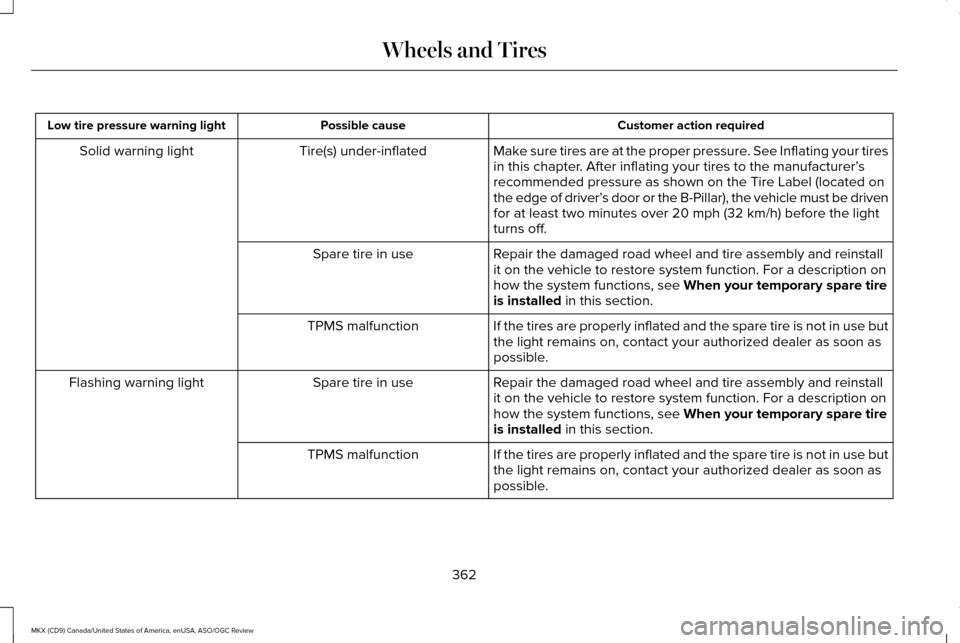
Customer action required
Possible cause
Low tire pressure warning light
Make sure tires are at the proper pressure. See Inflating your tires
in this chapter. After inflating your tires to the manufacturer’s
recommended pressure as shown on the Tire Label (located on
the edge of driver’ s door or the B-Pillar), the vehicle must be driven
for at least two minutes over 20 mph (32 km/h) before the light
turns off.
Tire(s) under-inflated
Solid warning light
Repair the damaged road wheel and tire assembly and reinstall
it on the vehicle to restore system function. For a description on
how the system functions, see When your temporary spare tire
is installed in this section.
Spare tire in use
If the tires are properly inflated and the spare tire is not in use but
the light remains on, contact your authorized dealer as soon as
possible.
TPMS malfunction
Repair the damaged road wheel and tire assembly and reinstall
it on the vehicle to restore system function. For a description on
how the system functions, see
When your temporary spare tire
is installed in this section.
Spare tire in use
Flashing warning light
If the tires are properly inflated and the spare tire is not in use but
the light remains on, contact your authorized dealer as soon as
possible.
TPMS malfunction
362
MKX (CD9) Canada/United States of America, enUSA, ASO/OGC Review Wheels and Tires
Page 368 of 563

•
Wet weather driving capability.
• All-wheel driving capability.
When driving with the full-size dissimilar
spare wheel and tire assembly additional
caution should be given to:
• Towing a trailer.
• Driving vehicles equipped with a camper
body.
• Driving vehicles with a load on the cargo
rack.
Drive cautiously when using a full-size
dissimilar spare wheel and tire assembly and
seek service as soon as possible.
Tire Change Procedure (If Equipped) WARNINGS
When one of the front wheels is off the
ground, the transmission alone will not
prevent the vehicle from moving or slipping
off the jack, even if the transmission is in park
(P). WARNINGS
To help prevent your vehicle from
moving when you change a tire, be
sure to place the transmission in park (P), set
the parking brake and block (in both
directions) the wheel that is diagonally
opposite (other side and end of the vehicle)
to the tire being changed. Never get underneath a vehicle that is
supported only by a jack. If your vehicle
slips off the jack, you or someone else could
be seriously injured. Do not attempt to change a tire on the
side of the vehicle close to moving
traffic. Pull far enough off the road to avoid
the danger of being hit when operating the
jack or changing the wheel. Always use the jack provided as
original equipment with your vehicle.
If using a jack other than the one provided
as original equipment with your vehicle,
make sure the jack capacity is adequate for
the vehicle weight, including any vehicle
cargo or modifications. Note:
Passengers should not remain in your
vehicle when the vehicle is being jacked.
1. Park on a level surface, set the parking brake and activate the hazard flashers.
2. Place the transmission in park (P) and turn the engine off. 3.
Block both the front and rear of the wheel
diagonally opposite the flat tire. For
example, if the left front tire is flat, block
the right rear wheel.
4. Lift the carpeted load floor panel and secure in the up position with the hanger
clip.
365
MKX (CD9) Canada/United States of America, enUSA, ASO/OGC Review Wheels and TiresE175447
Page 444 of 563

This feature allows you to plug in media
playing devices, memory sticks, flash drives
or thumb drives, and charge devices if they
support this feature.
Playing Music from Your Device
Note:
The system is capable of indexing up
to 30,000 songs. Insert your device and select:
Action and Description
Menu Item
Once the system recognizes your USB or SD card you can then select from \
the following options:
USB
SD Card
This feature replays the currently playing song or album.
Repeat
Touch this button to play music on the selected album or folder in random\
order.
Shuffle
This feature allows you to choose music similar to what is currently pla\
ying.
Similar Music
Touch this button to see disc information, for example current track, art\
ist name, album and genre.
More Info
Touch this button to view and adjust various media settings.
Options
441
MKX (CD9) Canada/United States of America, enUSA, ASO/OGC Review MyLincoln Touch™E142611
Page 557 of 563

Information Messages..................................121
Active Park.............................................................121
Adaptive Cruise Control....................................122
AdvanceTrac ™.......................................................123
Airbag.....................................................................123
Alarm......................................................................123
Automatic Engine Shutdown............................124
AWD........................................................................\
124
Battery and Charging System..........................125
Blind Spot Information and Cross Traffic Alert System...............................................................126
Collision Warning System..................................127
Doors and Locks..................................................127
Driver Alert............................................................128
Fuel........................................................................\
.128
Hill Start Assist.....................................................129
Keys and Intelligent Access.............................129
Lane Keeping System........................................130
Maintenance..........................................................131
MyKey.....................................................................132
Park Aid..................................................................133
Park Brake.............................................................133
Power Steering.....................................................134
Remote Start.........................................................135
Seats.......................................................................135
Starting System ...................................................135
Tire Pressure Monitoring System....................136
Traction Control...................................................136 Transmission.....................................................137
Installing Child Seats......................................18 Child Seats...............................................................18
Using Lap and Shoulder Belts............................18
Using Lower Anchors and Tethers for
CHildren (LATCH).............................................24
Using Tether Straps..............................................25
Instrument Cluster.........................................107
Instrument Lighting Dimmer........................93
Interior Lamps..................................................97 Front Interior Lamp...............................................98
Rear Interior Lamp................................................99
Interior Mirror
.................................................104
Auto-Dimming Mirror..........................................104
Introduction
.........................................................7
J
Jump Starting the Vehicle..........................274 Connecting the Jumper Cables......................275
Jump Starting......................................................275
Preparing Your Vehicle......................................274
Removing the Jumper Cables.........................276
K
Keyless Entry
....................................................76
SECURICODE™ Keyless Entry Keypad.............76 Keyless Starting.............................................167
Ignition Modes......................................................167
Keys and Remote Controls..........................55
L
Lane Keeping System
.................................232
Switching the System On and Off..................233
Lighting Control
................................................91
Headlamp Flasher................................................92
High Beams............................................................92
Lighting...............................................................91 General Information..............................................91
Lincoln Automotive Financial Services......12
Load Carriers See: Roof Racks and Load Carriers................251
Load Carrying
................................................249
Load Limit........................................................251 Special Loading Instructions for Owners of
Pick-up Trucks and Utility-type
Vehicles............................................................260
Vehicle Loading - with and without a Trailer
.................................................................251
554
MKX (CD9) Canada/United States of America, enUSA, ASO/OGC Review Index